> ## Documentation Index
> Fetch the complete documentation index at: https://manual.voiceping.net/llms.txt
> Use this file to discover all available pages before exploring further.
# Coin & Recognition System
> Recognize colleagues with VoicePing coins — send recognition from the virtual office, track received coins on the dashboard, customize coin types, and review engagement analytics.
export const ContactEn = () => <>
If you have any questions, please contact us via this form.
## Official Links
Visit our official website
Follow us on X
Like us on Facebook
Connect on LinkedIn
;
 The **Coin System** lets workspace members recognize each other's contributions by sending coins — a lightweight way to build appreciation and engagement across distributed, multilingual teams. Each member has a daily coin allowance to spend, and every coin carries a recognition type (such as Great Work or Kindness) and a comment.
## Where To Find It
Open **Coin System** from the left workspace navigation. It has three tabs:
| Tab | Who can see it | What it shows |
| ------------- | ----------------- | ------------------------------------------------------------------------------------------- |
| **Dashboard** | All members | Your remaining coins, coins sent, recognition received, and the workspace recognition feed. |
| **Settings** | Managers / admins | Daily allowance, comment requirement, and coin-type configuration. |
| **Analysis** | Managers / admins | Recognition trends, top senders and receivers, and CSV/PDF export. |
You can also send a coin directly from the **Virtual Office**.
## Send A Coin
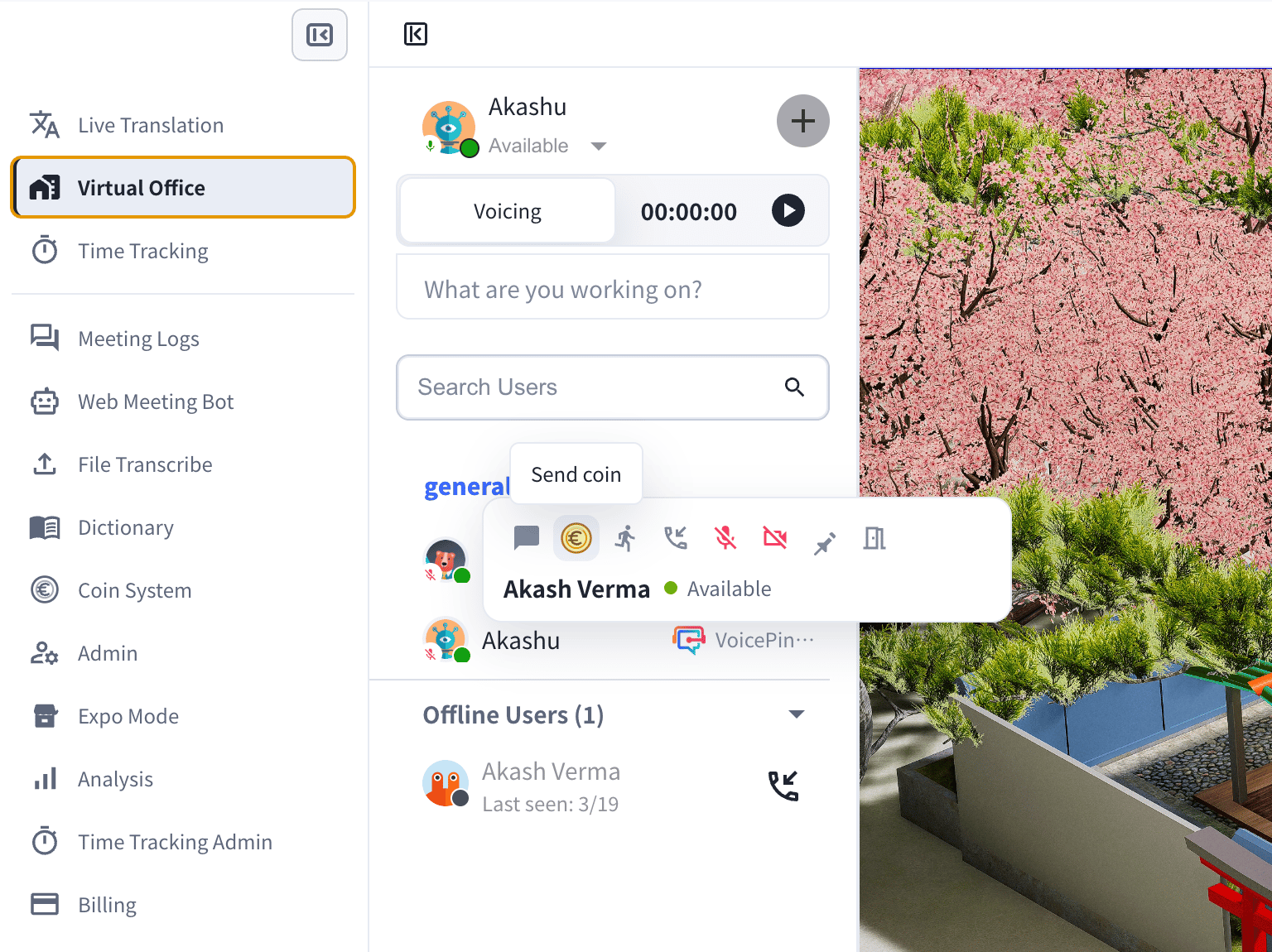
From the **Virtual Office**, hover over a member and click the **Send coin** icon in their action toolbar.
The **Coin System** lets workspace members recognize each other's contributions by sending coins — a lightweight way to build appreciation and engagement across distributed, multilingual teams. Each member has a daily coin allowance to spend, and every coin carries a recognition type (such as Great Work or Kindness) and a comment.
## Where To Find It
Open **Coin System** from the left workspace navigation. It has three tabs:
| Tab | Who can see it | What it shows |
| ------------- | ----------------- | ------------------------------------------------------------------------------------------- |
| **Dashboard** | All members | Your remaining coins, coins sent, recognition received, and the workspace recognition feed. |
| **Settings** | Managers / admins | Daily allowance, comment requirement, and coin-type configuration. |
| **Analysis** | Managers / admins | Recognition trends, top senders and receivers, and CSV/PDF export. |
You can also send a coin directly from the **Virtual Office**.
## Send A Coin
From the **Virtual Office**, hover over a member and click the **Send coin** icon in their action toolbar.
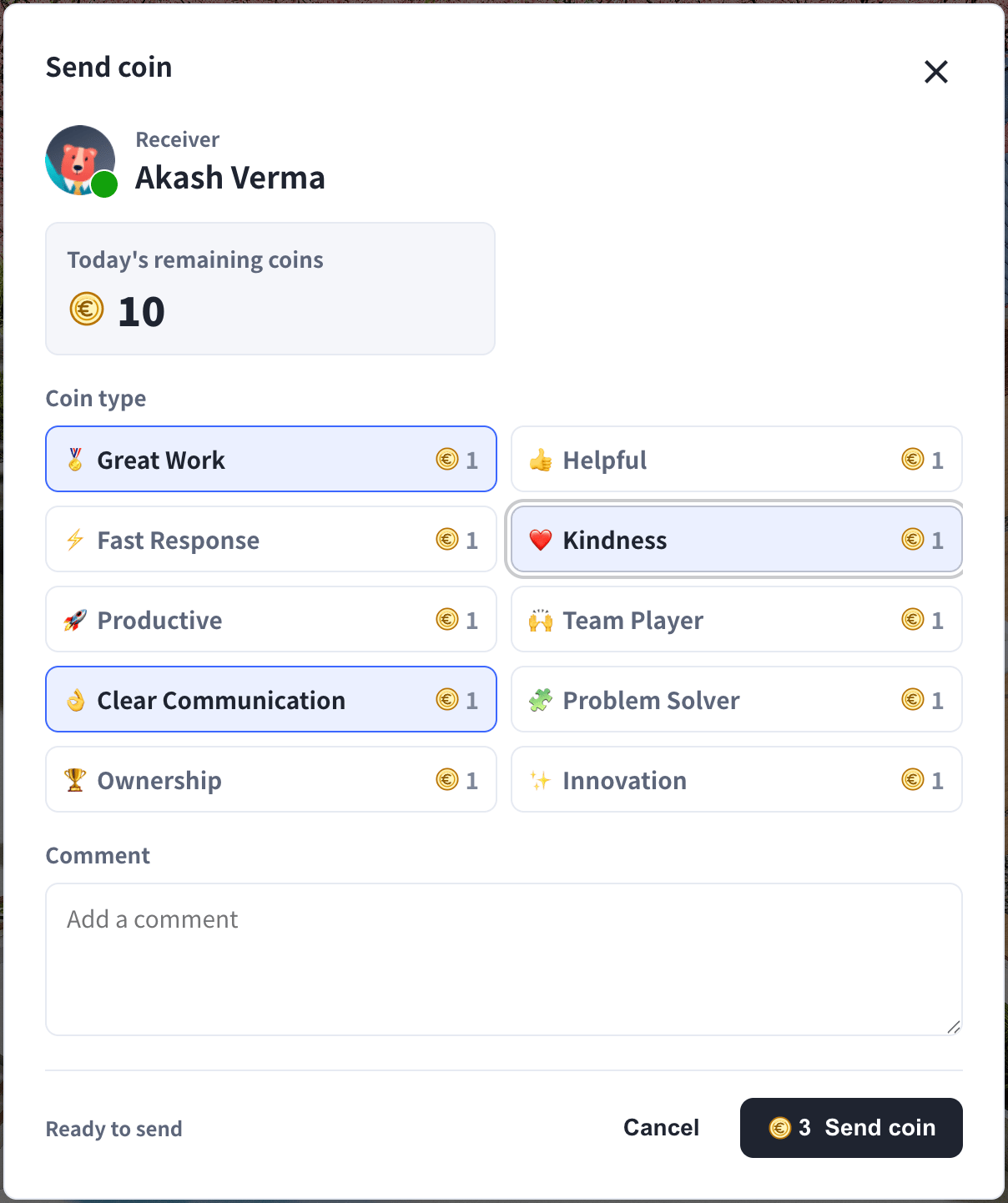
 In the **Send coin** dialog:
1. Confirm the **receiver**.
2. Choose a **coin type** — for example Great Work, Helpful, Fast Response, Kindness, Productive, Team Player, or Clear Communication. Each type has a coin cost.
3. Add a **comment** describing what you are recognizing. A comment is required when the workspace turns on that setting.
4. Click **Send coin**. Your remaining daily coins update automatically.
In the **Send coin** dialog:
1. Confirm the **receiver**.
2. Choose a **coin type** — for example Great Work, Helpful, Fast Response, Kindness, Productive, Team Player, or Clear Communication. Each type has a coin cost.
3. Add a **comment** describing what you are recognizing. A comment is required when the workspace turns on that setting.
4. Click **Send coin**. Your remaining daily coins update automatically.
 You can send up to your **daily allowance**, which resets each day.
## Coin Types
| Emoji | Type | Recognizes |
| ----- | ------------------- | -------------------------------------- |
| 🏅 | Great Work | High-quality work or a strong result |
| 👍 | Helpful | Helping out a teammate |
| ⚡ | Fast Response | Quick replies and turnaround |
| ❤️ | Kindness | Thoughtful, considerate behavior |
| 🚀 | Productive | Strong momentum and output |
| 🙌 | Team Player | Collaboration and support |
| 👌 | Clear Communication | Clear, easy-to-follow communication |
| 🧩 | Problem Solver | Solving a hard problem |
| 🏆 | Ownership | Taking ownership and following through |
| ✨ | Innovation | New ideas and creative solutions |
Managers can rename, reorder, add, deactivate, or change the cost of any coin type in **Settings**.
## Recognition Dashboard
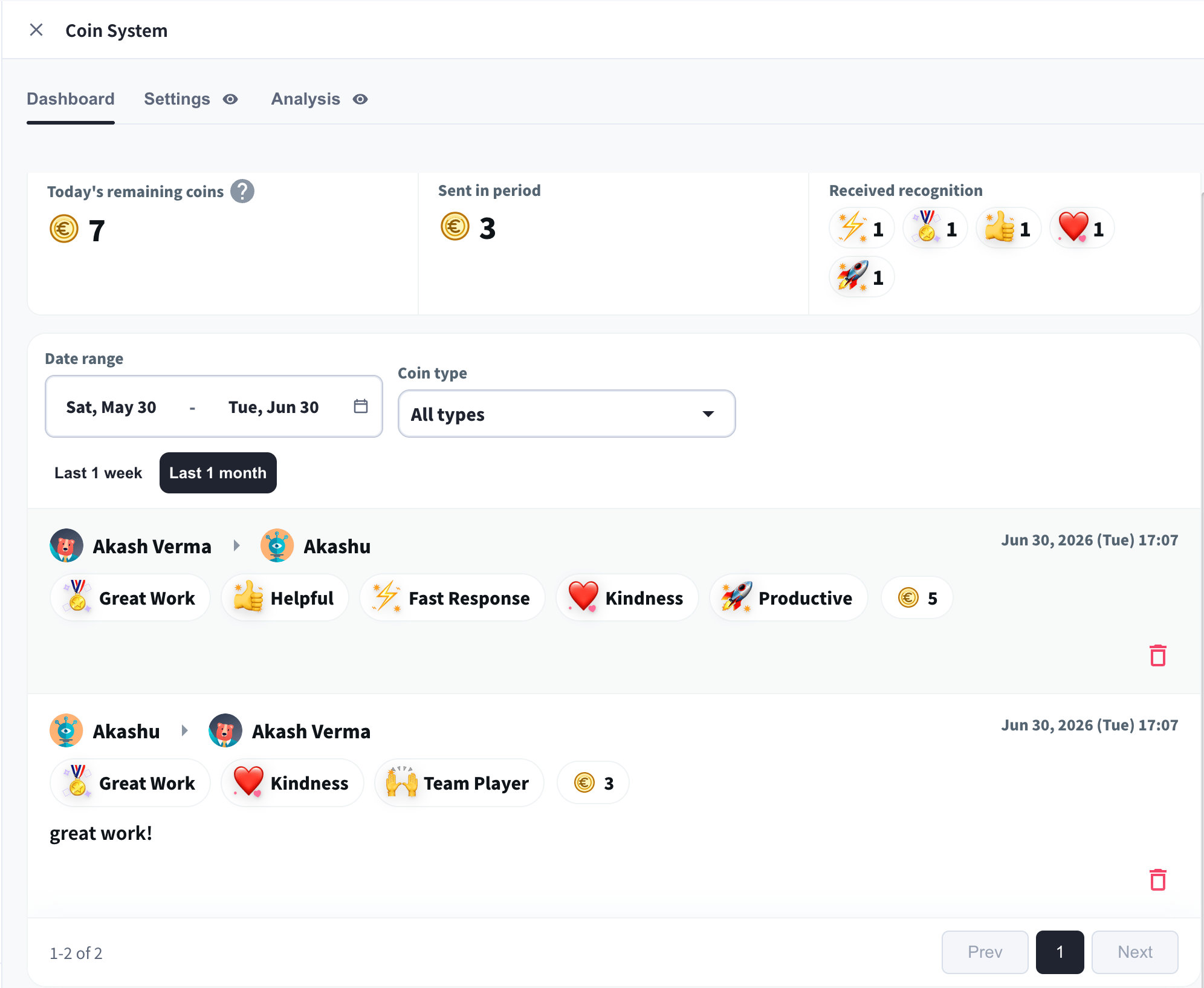
The **Dashboard** is each member's recognition home. It shows:
* **Today's remaining coins** — how many coins you can still send today.
* **Sent in period** — coins you sent in the selected date range.
* **Received recognition** — a breakdown of the coins you received, by type.
* **Recognition feed** — every recognition in the workspace (sender → receiver, coin types, total coins, and comment), filterable by date range and coin type.
You can send up to your **daily allowance**, which resets each day.
## Coin Types
| Emoji | Type | Recognizes |
| ----- | ------------------- | -------------------------------------- |
| 🏅 | Great Work | High-quality work or a strong result |
| 👍 | Helpful | Helping out a teammate |
| ⚡ | Fast Response | Quick replies and turnaround |
| ❤️ | Kindness | Thoughtful, considerate behavior |
| 🚀 | Productive | Strong momentum and output |
| 🙌 | Team Player | Collaboration and support |
| 👌 | Clear Communication | Clear, easy-to-follow communication |
| 🧩 | Problem Solver | Solving a hard problem |
| 🏆 | Ownership | Taking ownership and following through |
| ✨ | Innovation | New ideas and creative solutions |
Managers can rename, reorder, add, deactivate, or change the cost of any coin type in **Settings**.
## Recognition Dashboard
The **Dashboard** is each member's recognition home. It shows:
* **Today's remaining coins** — how many coins you can still send today.
* **Sent in period** — coins you sent in the selected date range.
* **Received recognition** — a breakdown of the coins you received, by type.
* **Recognition feed** — every recognition in the workspace (sender → receiver, coin types, total coins, and comment), filterable by date range and coin type.
 ## Settings (Managers)
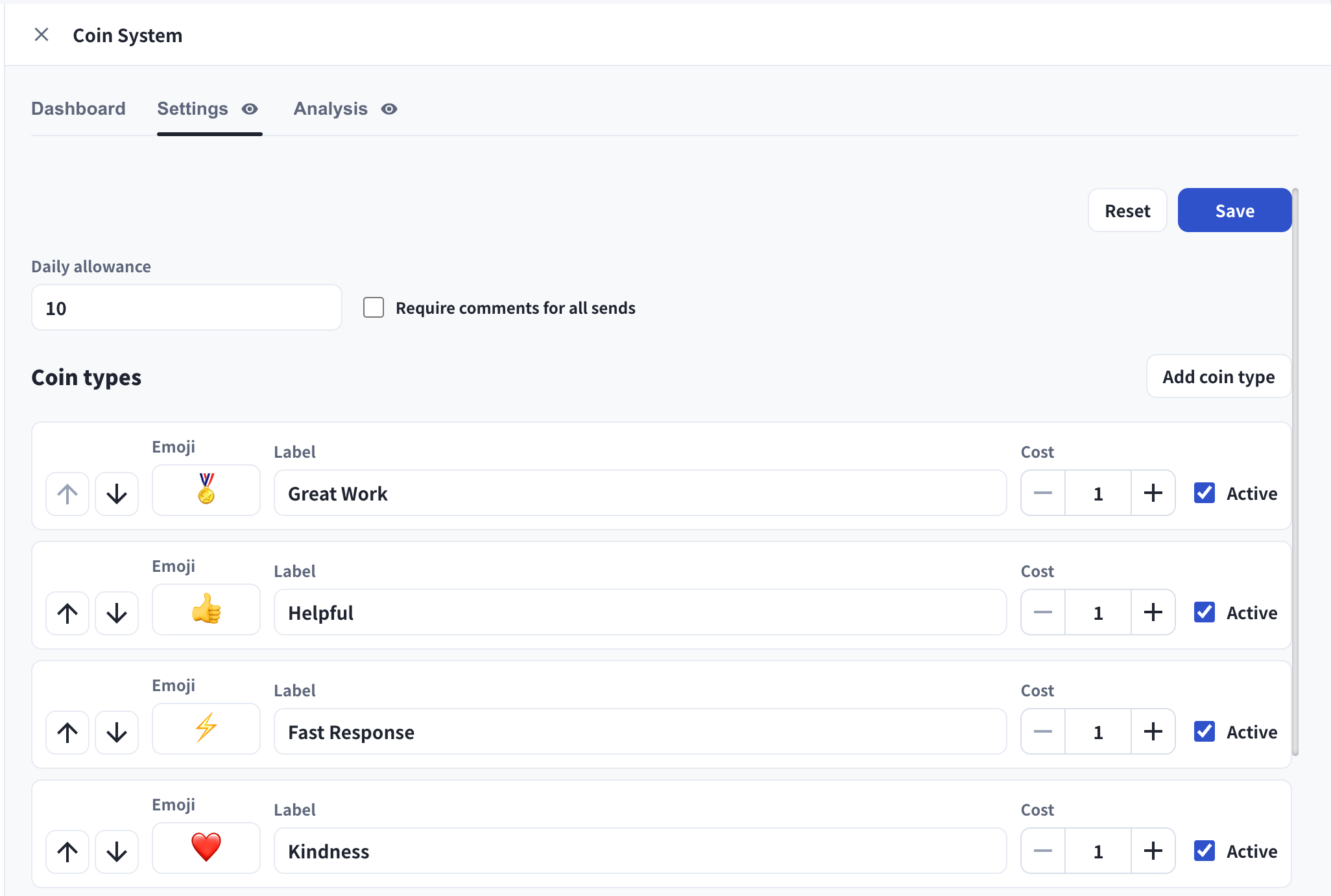
In **Settings**, managers control how the Coin System works:
* **Daily allowance** — how many coins each member can send per day.
* **Require comments for all sends** — force a comment on every coin.
* **Coin types** — add, rename, reorder, set the cost, and activate or deactivate each type. Use **Add coin type** to create a custom recognition with its own emoji and label.
Click **Save** to apply changes, or **Reset** to revert.
## Settings (Managers)
In **Settings**, managers control how the Coin System works:
* **Daily allowance** — how many coins each member can send per day.
* **Require comments for all sends** — force a comment on every coin.
* **Coin types** — add, rename, reorder, set the cost, and activate or deactivate each type. Use **Add coin type** to create a custom recognition with its own emoji and label.
Click **Save** to apply changes, or **Reset** to revert.
 ## Analysis And Reporting (Managers)
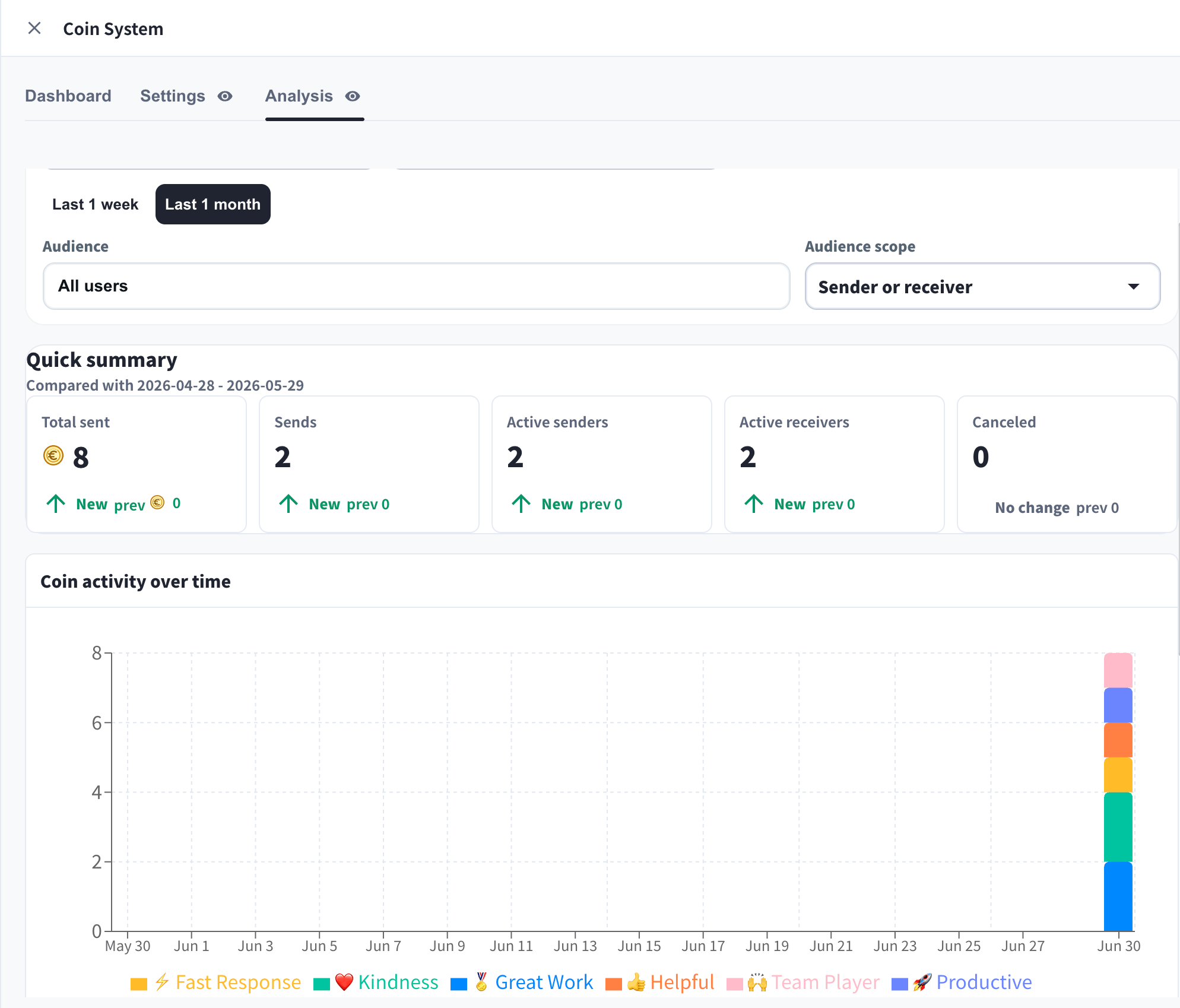
The **Analysis** tab turns recognition into engagement insight:
* **Quick summary** — Total sent, Sends, Active senders, Active receivers, and Canceled, compared with the previous period.
* **Coin activity over time** — recognition volume by coin type across the date range.
* **Top senders / Top receivers** — leaderboards of recognition activity.
* Filter by **date range**, **coin type**, and **audience** (sender or receiver), then **Export to CSV** or **Export PDF**.
## Analysis And Reporting (Managers)
The **Analysis** tab turns recognition into engagement insight:
* **Quick summary** — Total sent, Sends, Active senders, Active receivers, and Canceled, compared with the previous period.
* **Coin activity over time** — recognition volume by coin type across the date range.
* **Top senders / Top receivers** — leaderboards of recognition activity.
* Filter by **date range**, **coin type**, and **audience** (sender or receiver), then **Export to CSV** or **Export PDF**.
 ## Related
* [Virtual Office](/en/virtual-office)
* [Analysis Dashboard](/en/analytics)
* [Member Permissions](/en/member-roles)
## Related
* [Virtual Office](/en/virtual-office)
* [Analysis Dashboard](/en/analytics)
* [Member Permissions](/en/member-roles)