> ## Documentation Index
> Fetch the complete documentation index at: https://manual.voiceping.net/llms.txt
> Use this file to discover all available pages before exploring further.

# ワークフロー — 商談に埋もれたボトルネックを発見

> パイプライン全体に散在する再発する阻害要因、オーナー不在、セキュリティ遅延を可視化し、優先度付きアクションプランにまとめます。VoicePing MCP Accessを利用します。

export const FeedbackJa = () => <>
    <Tip>
      このフィーチャーへのご意見やご要望は、<a href="/ja/product-feedback">Product Feedback</a> からチームへお送りください。
    </Tip>

    <h2>公式リンク</h2>

    <CardGroup cols={2}>
      <Card title="公式サイト" icon="globe" href="https://voiceping.net/">
        公式ウェブサイトはこちら
      </Card>
      <Card title="X (Twitter)" icon="x-twitter" href="https://x.com/VoicePingMedia">
        Xでフォロー
      </Card>
      <Card title="Facebook" icon="facebook" href="https://www.facebook.com/voiceping.inc">
        Facebookでいいね
      </Card>
      <Card title="LinkedIn" icon="linkedin" href="https://www.linkedin.com/company/28684130/">
        LinkedInでつながる
      </Card>
    </CardGroup>
  </>;

## 商談に埋もれたボトルネックを発見

**状況設定。** 商談が失速しています。原因は1つではないので、明確にはわかりません。セキュリティの質問、不明確な顧客側オーナー、パイロットの停滞、提案の手戻りなどが混在しています。個別の事案ではなく、パターンを見る必要があります。

このワークフローは、[MCP Access](/ja/external-access/mcp) を有効化し、AIクライアントに接続済みであることを前提としています。

<Steps>
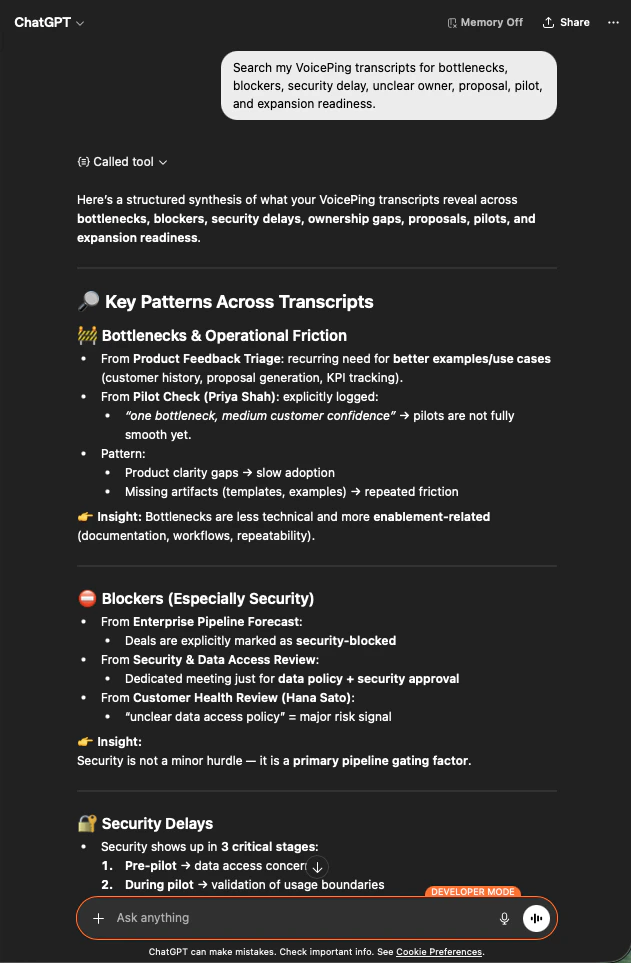
  <Step title="すべてのボトルネックシグナルを洗い出す">
    ```text theme={null}
    Search my VoicePing transcripts for bottlenecks, blockers, security delay,
    unclear owner, proposal, pilot, and expansion readiness.
    ```

    議事録を横断した統合結果が返されます ― 運用上の摩擦、セキュリティ阻害、遅延、オーナー不在などのパターンが、それぞれの根拠となる会議名付きで提示されます。

    <div style={{maxWidth: "600px", margin: "0 auto"}}>
      <Frame>
        <img src="https://mintcdn.com/test-cf63e467/z13MfE0CikV5b-4X/en/images/external_access/Founding%20bottlenecks%201.png?fit=max&auto=format&n=z13MfE0CikV5b-4X&q=85&s=74fbefec3529689b40ecac2ebf547757" alt="ChatGPT surfacing bottleneck patterns across VoicePing transcripts — operational friction, security blockers, ownership gaps" width="631" height="963" data-path="en/images/external_access/Founding bottlenecks 1.png" />
      </Frame>
    </div>
  </Step>

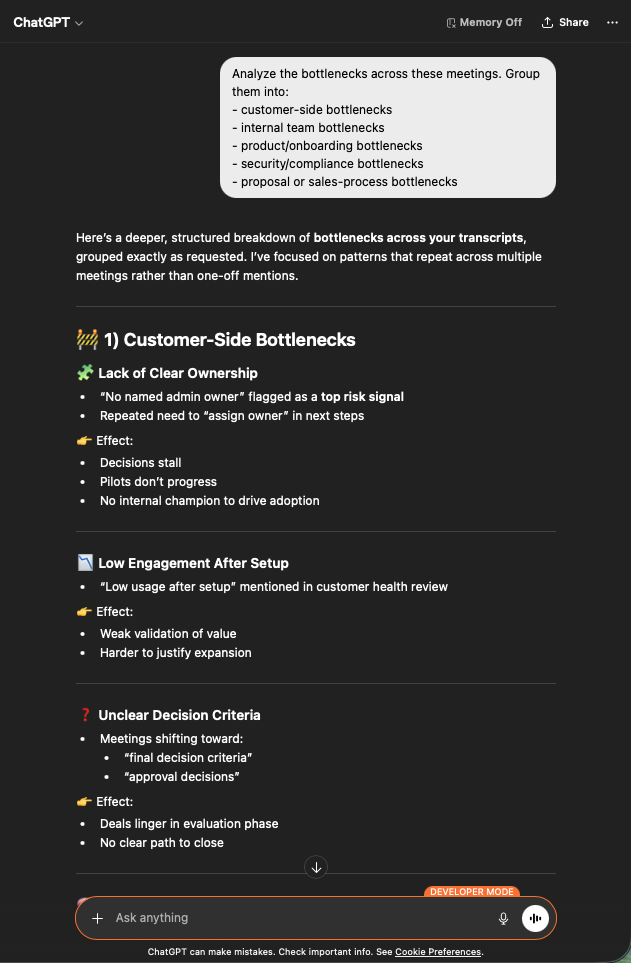
  <Step title="アクション可能な粒度にグルーピング">
    ```text theme={null}
    Analyze the bottlenecks across these meetings. Group them into:
    - customer-side bottlenecks
    - internal team bottlenecks
    - product / onboarding bottlenecks
    - security / compliance bottlenecks
    - proposal or sales-process bottlenecks
    ```

    明確なカテゴリに分かれます。顧客側（オーナー不明、エンゲージメント低下、意思決定基準の不明確さ）、社内、プロダクト、セキュリティ、セールスプロセス ― それぞれ複数会議にまたがる再現的な根拠付きで整理されます。

    <div style={{maxWidth: "600px", margin: "0 auto"}}>
      <Frame>
        <img src="https://mintcdn.com/test-cf63e467/z13MfE0CikV5b-4X/en/images/external_access/Founding%20bottlenecks%202.png?fit=max&auto=format&n=z13MfE0CikV5b-4X&q=85&s=bf47786ffd6d4d4d58b9e8238489e5aa" alt="ChatGPT grouping bottlenecks across customer-side, internal, product, security, and sales-process categories" width="631" height="963" data-path="en/images/external_access/Founding bottlenecks 2.png" />
      </Frame>
    </div>
  </Step>

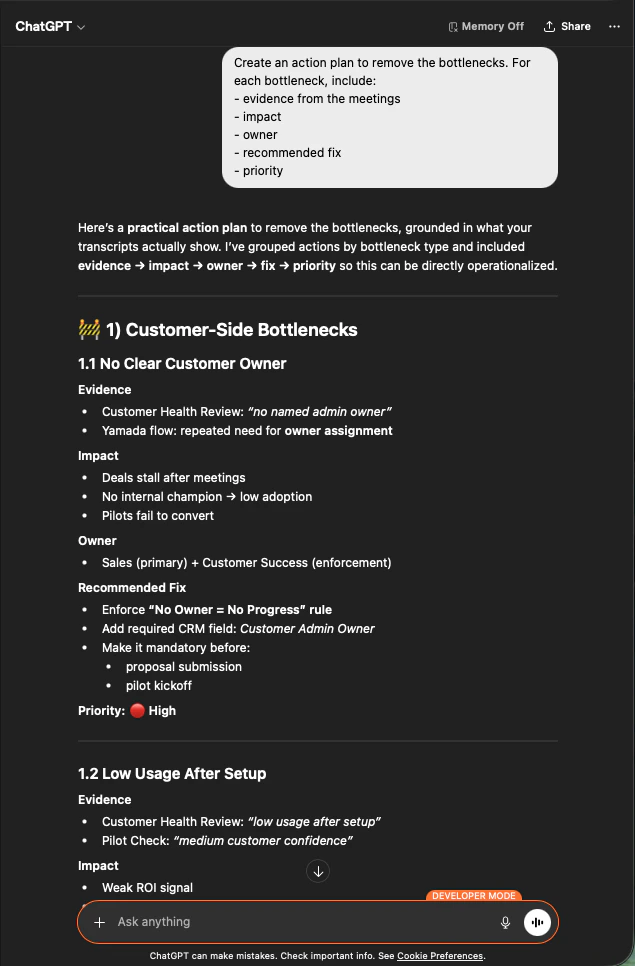
  <Step title="ボトルネック別のアクションプランを作成">
    ```text theme={null}
    Create an action plan to remove the bottlenecks. For each bottleneck, include:
    - evidence from the meetings
    - impact
    - owner
    - recommended fix
    - priority
    ```

    各項目が、根拠、インパクト、オーナー、推奨対応、優先度とともに整理されます。これが経営会議にそのまま持ち込めるドキュメントになります。

    <div style={{maxWidth: "600px", margin: "0 auto"}}>
      <Frame>
        <img src="https://mintcdn.com/test-cf63e467/z13MfE0CikV5b-4X/en/images/external_access/Founding%20bottlenecks%203.png?fit=max&auto=format&n=z13MfE0CikV5b-4X&q=85&s=0d75e976e991f2c158cd8057aafef71a" alt="ChatGPT producing a prioritized action plan per bottleneck with evidence, impact, owner, recommended fix, and priority" width="635" height="966" data-path="en/images/external_access/Founding bottlenecks 3.png" />
      </Frame>
    </div>
  </Step>
</Steps>

**これが創業者レベルのレバレッジになる理由。** どの商談が止まっているかを議論するのをやめ、*すべての* 商談を止めているパターンを修正する側に回れます。

***

## 次のステップ

<CardGroup cols={2}>
  <Card title="外部アクセスの概要" icon="arrow-left" href="/ja/external-access">
    スコープ、ライフサイクル制御、イベントログのハブに戻る。
  </Card>

  <Card title="MCP Accessの有効化手順" icon="plug" href="/ja/external-access/mcp">
    Claude、ChatGPT、Codex、Claude Code、Gemini CLI のセットアップガイド。
  </Card>
</CardGroup>

<FeedbackJa />