> ## Documentation Index
> Fetch the complete documentation index at: https://manual.voiceping.net/llms.txt
> Use this file to discover all available pages before exploring further.

# ワークフロー — 30秒でフォローアップメールを送信

> 直後の会議議事録から、プロフェッショナルなフォローアップメール（要約、合意事項、担当者付きアクションアイテム、次のステップ）を生成。VoicePing MCP Accessを利用します。

export const FeedbackJa = () => <>
    <Tip>
      このフィーチャーへのご意見やご要望は、<a href="/ja/product-feedback">Product Feedback</a> からチームへお送りください。
    </Tip>

    <h2>公式リンク</h2>

    <CardGroup cols={2}>
      <Card title="公式サイト" icon="globe" href="https://voiceping.net/">
        公式ウェブサイトはこちら
      </Card>
      <Card title="X (Twitter)" icon="x-twitter" href="https://x.com/VoicePingMedia">
        Xでフォロー
      </Card>
      <Card title="Facebook" icon="facebook" href="https://www.facebook.com/voiceping.inc">
        Facebookでいいね
      </Card>
      <Card title="LinkedIn" icon="linkedin" href="https://www.linkedin.com/company/28684130/">
        LinkedInでつながる
      </Card>
    </CardGroup>
  </>;

## 30秒でフォローアップメールを送信

**状況設定。** 会議が終わった直後。参加者全員が決まった内容の40%ほどしか覚えていません。最初にリキャップを送った人が記録を定義し、アクションアイテムを確定させます。これは、あらゆる営業・プロジェクトチームで最もレバレッジの高い習慣です。

このワークフローは、[MCP Access](/ja/external-access/mcp) を有効化し、AIクライアントに接続済みであることを前提としています。

<Steps>
  <Step title="会議のコンテキストを取得する">
    ```text theme={null}
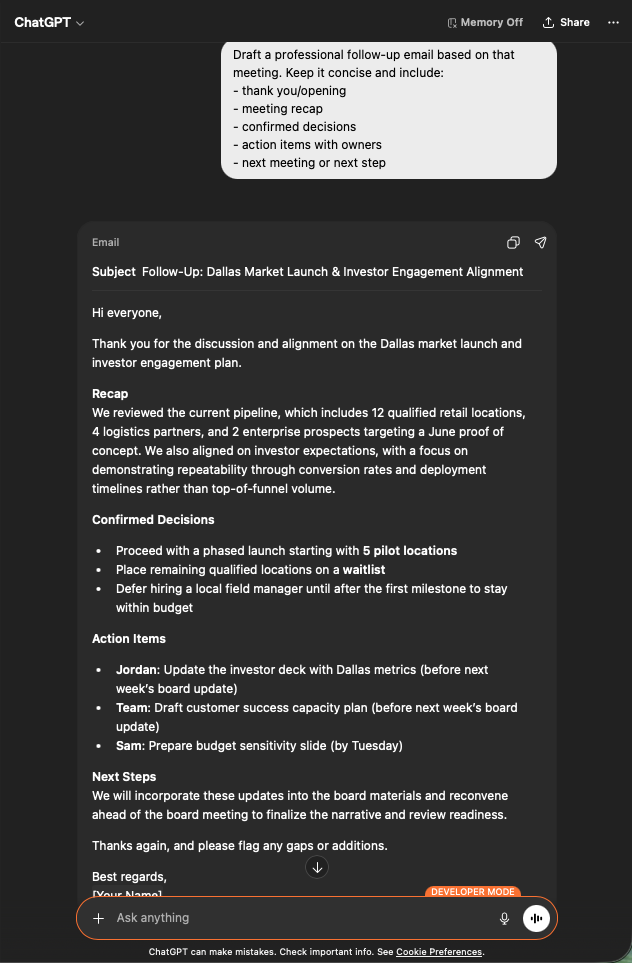
    Search my VoicePing transcripts for Dallas market investor engagement.
    ```

    構造化されたリキャップが得られます ― コアサマリ、投資家の期待、主要な意思決定、戦略的インサイト、担当者付きアクションアイテム。フォローアップメールに必要な素材がすべて揃います。

    <div style={{maxWidth: "600px", margin: "0 auto"}}>
      <Frame>
        <img src="https://mintcdn.com/test-cf63e467/z13MfE0CikV5b-4X/en/images/external_access/Follow-up%20email%20creation%201.png?fit=max&auto=format&n=z13MfE0CikV5b-4X&q=85&s=6da6641338869dad182dbb481af32b15" alt="ChatGPT surfacing a Dallas Market Launch transcript with core summary, investor expectations, key decisions, and action items" width="634" height="963" data-path="en/images/external_access/Follow-up email creation 1.png" />
      </Frame>
    </div>
  </Step>

  <Step title="メールドラフトを依頼する">
    ```text theme={null}
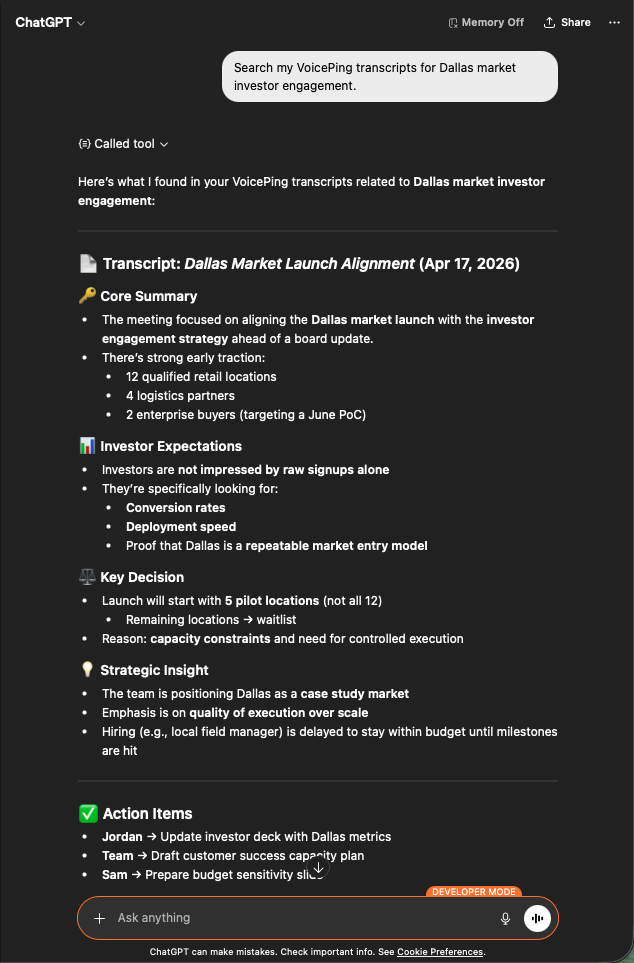
    Draft a professional follow-up email based on that meeting.
    Keep it concise and include:
    - thank you / opening
    - meeting recap
    - confirmed decisions
    - action items with owners
    - next meeting or next step
    ```

    そのまま送信可能なメールが得られます ― 件名、簡潔なリキャップ、箇条書きの意思決定、適切な担当者と期限が付されたアクションアイテム。Gmailに貼り付け、確認して送信するだけです。

    <div style={{maxWidth: "600px", margin: "0 auto"}}>
      <Frame>
        <img src="https://mintcdn.com/test-cf63e467/z13MfE0CikV5b-4X/en/images/external_access/Follow-up%20email%20creation%202.png?fit=max&auto=format&n=z13MfE0CikV5b-4X&q=85&s=7440cfa879ba68ec0a1ade3cd9c2f0d5" alt="ChatGPT generating a professional follow-up email draft with subject, recap, decisions, and assigned action items" width="632" height="963" data-path="en/images/external_access/Follow-up email creation 2.png" />
      </Frame>
    </div>
  </Step>
</Steps>

**これが重要な理由。** フォローアップの質は、商談のスピードを示す先行指標です。30秒で完了するタスクにすれば、メンバーがそれをスキップする理由はなくなります。

***

## 次のステップ

<CardGroup cols={2}>
  <Card title="外部アクセスの概要" icon="arrow-left" href="/ja/external-access">
    スコープ、ライフサイクル制御、イベントログのハブに戻る。
  </Card>

  <Card title="MCP Accessの有効化手順" icon="plug" href="/ja/external-access/mcp">
    Claude、ChatGPT、Codex、Claude Code、Gemini CLI のセットアップガイド。
  </Card>
</CardGroup>

<FeedbackJa />