> ## Documentation Index
> Fetch the complete documentation index at: https://manual.voiceping.net/llms.txt
> Use this file to discover all available pages before exploring further.

# ワークフロー — 過去の会議から顧客向けアジェンダを作成

> 顧客との直近3〜4件の議事録から、カレンダー招待にそのまま貼り付け可能な、時間配分付きの実践的アジェンダを生成。VoicePing MCP Accessと任意の対応AIクライアントで動作します。

export const FeedbackJa = () => <>
    <Tip>
      このフィーチャーへのご意見やご要望は、<a href="/ja/product-feedback">Product Feedback</a> からチームへお送りください。
    </Tip>

    <h2>公式リンク</h2>

    <CardGroup cols={2}>
      <Card title="公式サイト" icon="globe" href="https://voiceping.net/">
        公式ウェブサイトはこちら
      </Card>
      <Card title="X (Twitter)" icon="x-twitter" href="https://x.com/VoicePingMedia">
        Xでフォロー
      </Card>
      <Card title="Facebook" icon="facebook" href="https://www.facebook.com/voiceping.inc">
        Facebookでいいね
      </Card>
      <Card title="LinkedIn" icon="linkedin" href="https://www.linkedin.com/company/28684130/">
        LinkedInでつながる
      </Card>
    </CardGroup>
  </>;

## 過去の会議から顧客向けアジェンダを作成

**状況設定。** 顧客との再訪問が月曜にあるとします。たとえば Northstar Capital 社との面談です。直近2週間で3回 ― ディスカバリー、セキュリティレビュー、ROIの議論 ― を実施しています。すべての議事録を読み直してアジェンダを手で組み立てることもできますし、AIに聞くこともできます。

このワークフローは、[MCP Access](/ja/external-access/mcp) を有効化し、AIクライアントに接続済みであることを前提としています。

<Steps>
  <Step title="AIに関連する過去の会議を探させる">
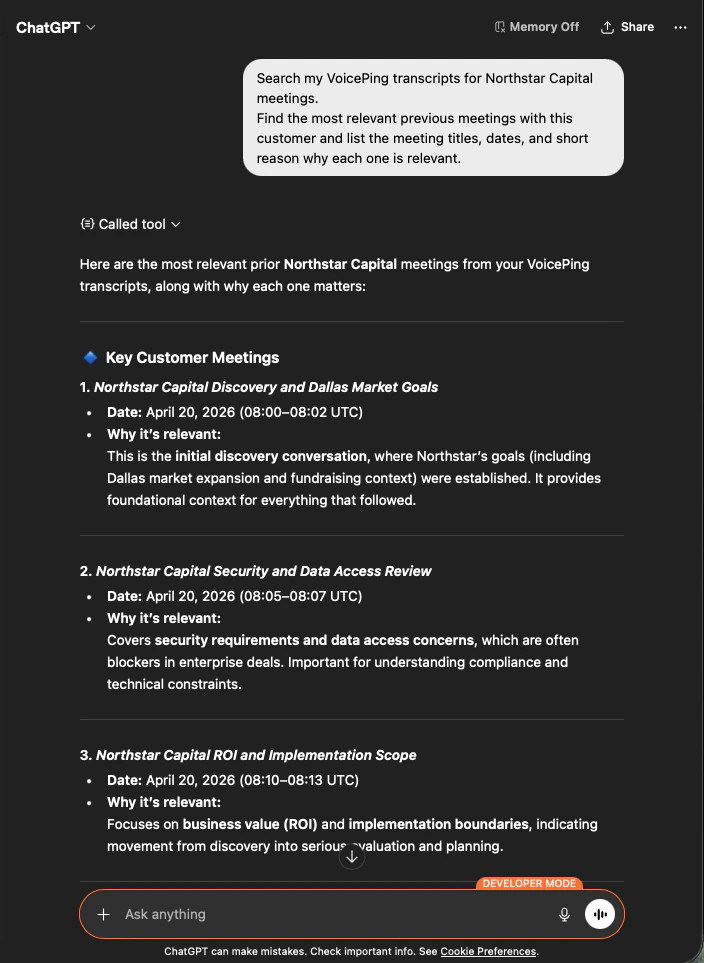
    顧客名を与え、関係する会議をAIに抽出させます。

    ```text theme={null}
    Search my VoicePing transcripts for Northstar Capital meetings.
    Find the most relevant previous meetings with this customer and list the
    meeting titles, dates, and short reason why each one is relevant.
    ```

    AIは過去3件の会議を、日付と一行の「なぜ重要か」とともに返します ― 関係性の流れが一瞬で把握できます。

    <div style={{maxWidth: "600px", margin: "0 auto"}}>
      <Frame>
        <img src="https://mintcdn.com/test-cf63e467/z13MfE0CikV5b-4X/en/images/external_access/meeting%20agenda%20creation%201.png?fit=max&auto=format&n=z13MfE0CikV5b-4X&q=85&s=5926c260849933b5be8031d18da011cd" alt="ChatGPT searching VoicePing transcripts and returning the three most relevant Northstar Capital meetings with dates and relevance notes" width="704" height="963" data-path="en/images/external_access/meeting agenda creation 1.png" />
      </Frame>
    </div>
  </Step>

  <Step title="顧客向けアジェンダを依頼する">
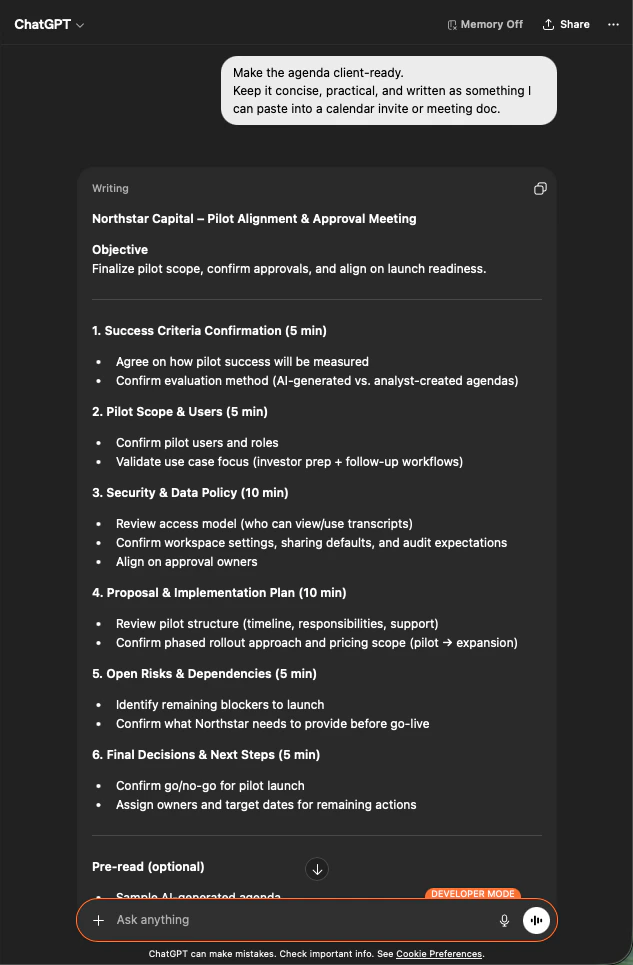
    次に、それらの会議から実際に送付できる形のアジェンダに変換させます。

    ```text theme={null}
    Make the agenda client-ready.
    Keep it concise, practical, and written as something I can paste into
    a calendar invite or meeting doc.
    ```

    実際の議論内容に基づいた、6セクション構成の時間配分付きアジェンダが得られます ― Success Criteria、Pilot Scope、Security & Data Policy、Proposal Plan、Open Risks、Final Decisions。

    <div style={{maxWidth: "600px", margin: "0 auto"}}>
      <Frame>
        <img src="https://mintcdn.com/test-cf63e467/z13MfE0CikV5b-4X/en/images/external_access/meeting%20agenda%20creation%202.png?fit=max&auto=format&n=z13MfE0CikV5b-4X&q=85&s=c05e7906fcfba54cd6a23befe80b5da9" alt="ChatGPT producing a time-boxed, six-section meeting agenda for Northstar Capital based on prior transcripts" width="633" height="965" data-path="en/images/external_access/meeting agenda creation 2.png" />
      </Frame>
    </div>
  </Step>
</Steps>

**この方法の価値。** 20分の準備タスクが60秒で終わります。しかも、汎用テンプレートではなく、顧客固有の文脈を反映したアジェンダになります。

<Tip>
  **共通パターン：** 議事録を検索する → 対象の会議に絞り込む → 必要な出力フォーマットを依頼する。この3プロンプトの型は、本サイトのすべてのワークフローで機能し、自分で考案するワークフローにもそのまま適用できます。
</Tip>

***

## 次のステップ

<CardGroup cols={2}>
  <Card title="外部アクセスの概要" icon="arrow-left" href="/ja/external-access">
    スコープ、ライフサイクル制御、イベントログのハブに戻る。
  </Card>

  <Card title="MCP Accessの有効化手順" icon="plug" href="/ja/external-access/mcp">
    Claude、ChatGPT、Codex、Claude Code、Gemini CLI のセットアップガイド。
  </Card>
</CardGroup>

<FeedbackJa />