> ## Documentation Index
> Fetch the complete documentation index at: https://manual.voiceping.net/llms.txt
> Use this file to discover all available pages before exploring further.

# 1週間無料プレミアムプランのトライアルの始め方

> WEBアプリでトライアルを開始する手順

export const ContactJa = () => <>
    <Tip>
      ご不明な点がございましたら、<a href="https://forms.gle/6AUho7oj3zBr79e96">こちらのフォーム</a>よりお問い合わせください。
    </Tip>

    <h2>公式リンク</h2>

    <CardGroup cols={2}>
      <Card title="公式サイト" icon="globe" href="https://voiceping.net/">
        公式ウェブサイトはこちら
      </Card>
      <Card title="X (Twitter)" icon="x-twitter" href="https://x.com/VoicePingMedia">
        Xでフォロー
      </Card>
      <Card title="Facebook" icon="facebook" href="https://www.facebook.com/voiceping.inc">
        Facebookでいいね
      </Card>
      <Card title="LinkedIn" icon="linkedin" href="https://www.linkedin.com/company/28684130/">
        LinkedInでつながる
      </Card>
    </CardGroup>
  </>;

## 1. 会員登録＆ワークスペース作成

[オーナーアカウント作成はこちら](/ja/owner-signup)

## 2. 無料トライアルの開始

### WEBアプリからの登録手順

1. [こちら](https://app.voiceping.io/user/login/)からログインします。

2. 左サイドバーから **Billing** ページを開きます。**Subscriptions** タブで、**Premium Plan** の下にある **1 Week Free Trial** をクリックします。
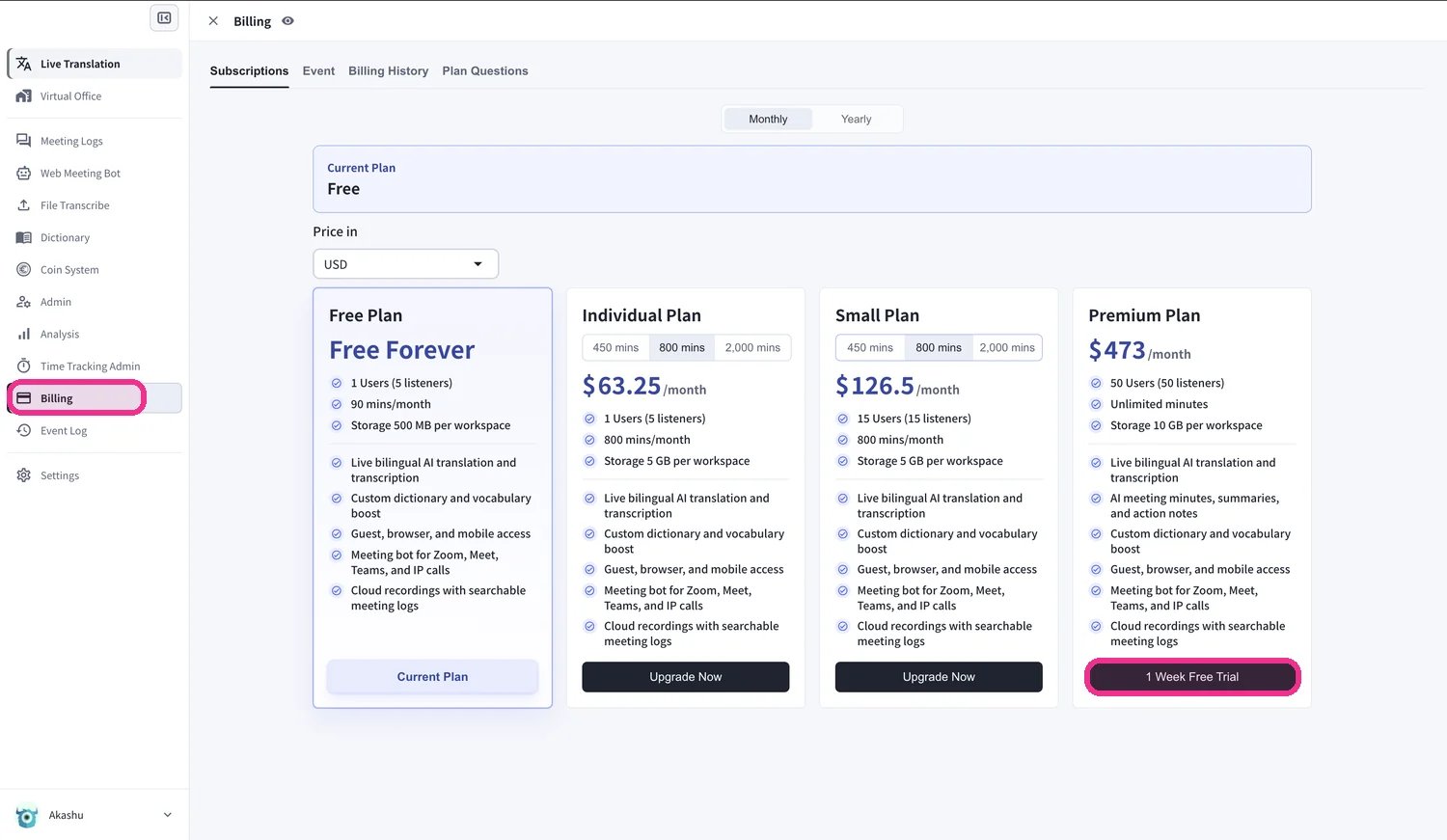
<Frame>
  <img src="https://mintcdn.com/test-cf63e467/52y2Vn0ATlzmgl0q/en/images/free-trial/01-select-trial-plan.webp?fit=max&auto=format&n=52y2Vn0ATlzmgl0q&q=85&s=f658952cbc56a21d68ac14f842587959" alt="Billing ページ — Premium Plan の下にある 1 Week Free Trial をクリック" width="1500" height="871" data-path="en/images/free-trial/01-select-trial-plan.webp" />
</Frame>

3. **Paid Plan Trial policy** ダイアログが表示されます。トライアルの終了日を確認してください。終了後、別途有料プランを購入しない限り、ワークスペースは Free プランに戻ります。

<Frame>
  <img src="https://mintcdn.com/test-cf63e467/52y2Vn0ATlzmgl0q/en/images/free-trial/02-trial-policy.webp?fit=max&auto=format&n=52y2Vn0ATlzmgl0q&q=85&s=1cf8cab53a3c64d49950f2108aa56857" alt="トライアル終了日が表示された Paid Plan Trial policy ダイアログ" width="1500" height="816" data-path="en/images/free-trial/02-trial-policy.webp" />
</Frame>

4. **Do you agree with above?** にチェックを入れ、**Start Trial** をクリックします。

<Frame>
  <img src="https://mintcdn.com/test-cf63e467/52y2Vn0ATlzmgl0q/en/images/free-trial/03-agree-start-trial.webp?fit=max&auto=format&n=52y2Vn0ATlzmgl0q&q=85&s=36f85b726c87b342345eb6562b090852" alt="トライアルポリシーに同意し、Start Trial をクリック" width="1500" height="751" data-path="en/images/free-trial/03-agree-start-trial.webp" />
</Frame>

5. 安全な Stripe のチェックアウト画面で **カード情報** を入力し、**Subscribe** をクリックします。トライアル期間中は無料で、カードへの請求はトライアル終了後にのみ行われます。

<Frame>
  <img src="https://mintcdn.com/test-cf63e467/52y2Vn0ATlzmgl0q/en/images/free-trial/04-payment-details.webp?fit=max&auto=format&n=52y2Vn0ATlzmgl0q&q=85&s=7e28e59b0b372851836ad0b251e5952e" alt="Stripe のチェックアウト画面でカード情報を入力し、Subscribe をクリック" width="1500" height="1170" data-path="en/images/free-trial/04-payment-details.webp" />
</Frame>

6. 支払いが確認されると、**"Your Premium plan is active"** と表示されます。**View subscription** をクリックします。

<Frame>
  <img src="https://mintcdn.com/test-cf63e467/52y2Vn0ATlzmgl0q/en/images/free-trial/05-plan-active.webp?fit=max&auto=format&n=52y2Vn0ATlzmgl0q&q=85&s=cd6a898f5676f374a1fb742f6ef0485b" alt="支払い確認完了 — View subscription をクリック" width="1500" height="997" data-path="en/images/free-trial/05-plan-active.webp" />
</Frame>

7. **Subscriptions** ページに、現在のプランとして **Premium** が次回請求日とともに表示されるようになります。

<Frame>
  <img src="https://mintcdn.com/test-cf63e467/52y2Vn0ATlzmgl0q/en/images/free-trial/06-subscription-active.webp?fit=max&auto=format&n=52y2Vn0ATlzmgl0q&q=85&s=30eb307ce31e5bfdd3739e0a9df7fd1b" alt="現在のプランとして Premium が次回請求日とともに表示された Subscriptions ページ" width="1500" height="764" data-path="en/images/free-trial/06-subscription-active.webp" />
</Frame>

<Tip>
  トライアルが開始されたことを確認するには、**Billing History** タブを開きます。**Succeeded to start Trial** と **Succeeded to add payment method** のエントリが表示されます。
</Tip>

<Frame>
  <img src="https://mintcdn.com/test-cf63e467/52y2Vn0ATlzmgl0q/en/images/free-trial/07-billing-history.webp?fit=max&auto=format&n=52y2Vn0ATlzmgl0q&q=85&s=eb8ecf4cd8176ebb30c7c80de6a16080" alt="Succeeded to start Trial のログエントリが表示された Billing History タブ" width="1500" height="227" data-path="en/images/free-trial/07-billing-history.webp" />
</Frame>

## キャンセル方法

**Free plan** に戻すと、キャンセルは完了です。**Billing** ページの **Subscriptions** タブで、**Free Plan** の下にある **Start Free Plan** をクリックします。

<Frame>
  <img src="https://mintcdn.com/test-cf63e467/52y2Vn0ATlzmgl0q/en/images/free-trial/08-cancel-free-plan.webp?fit=max&auto=format&n=52y2Vn0ATlzmgl0q&q=85&s=cfc9e8b5c81bde3480883b66f9ae92dc" alt="Start Free Plan をクリックして Free プランに戻す" width="760" height="1154" data-path="en/images/free-trial/08-cancel-free-plan.webp" />
</Frame>

<ContactJa />
