> ## Documentation Index
> Fetch the complete documentation index at: https://manual.voiceping.net/llms.txt
> Use this file to discover all available pages before exploring further.
# モバイルのライブ文字起こし設定
> ライブ文字起こしの音声・表示・辞書設定。
export const FeedbackJa = () => <>
このフィーチャーへのご意見やご要望は、Product Feedback からチームへお送りください。
公式リンク
公式ウェブサイトはこちら
Xでフォロー
Facebookでいいね
LinkedInでつながる
;
 セッション中のツールバーとアプリレベル設定のリファレンスです。基本の使い方は [モバイルのライブ文字起こし](/ja/mobile-live-transcription) をご覧ください。
## 各設定の場所
| 設定グループ | 場所 |
| -------------------------------- | ------------------------ |
| 音声の再生・出力・入力 | セッション中 → 🔊 Audio |
| テキストサイズ・色・Face-to-face | セッション中 → TT Text display |
| Custom Phrase・辞書・語彙・既定の議事録テンプレート | アプリレベル → ⚙ Settings |
## Audio
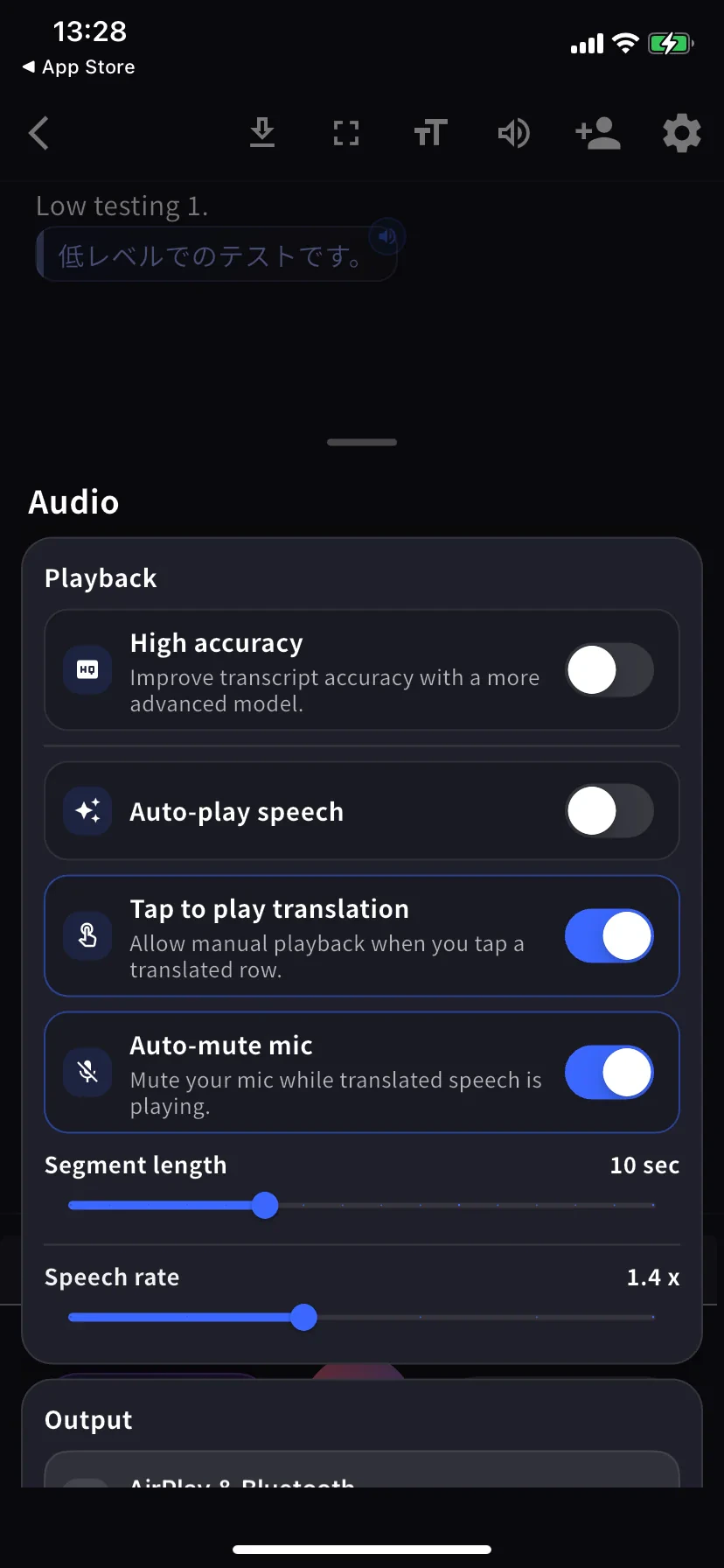
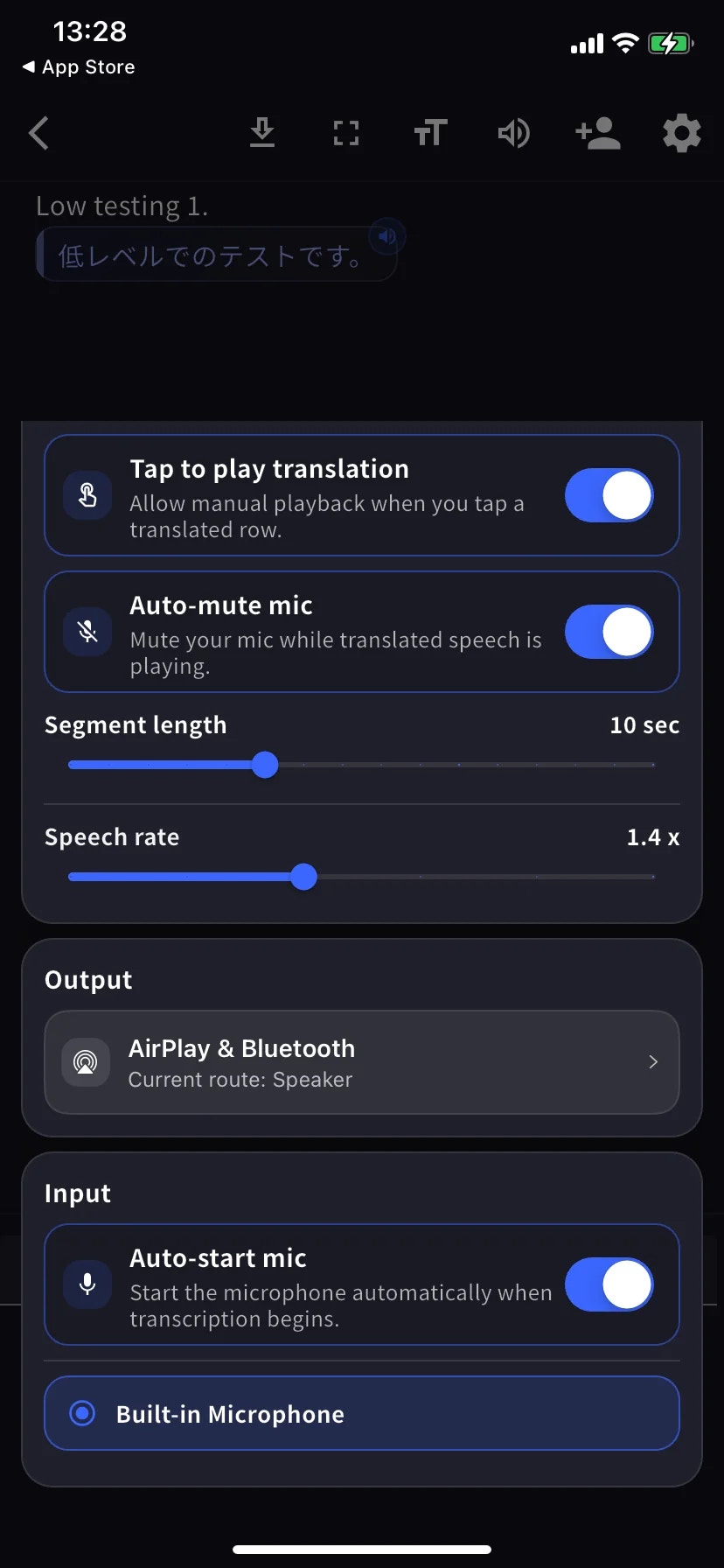
Audio シートは1つの縦スクロールメニューです。下の2枚のスクリーンショットは、同じ画面の上部(Playback)と下部(Output / Input)を示しています。
| 設定 | 内容 |
| --------------------------- | ------------------------------------------- |
| **High accuracy** | より高精度なモデルを使用。遅延とバッテリー消費が増えます。 |
| **Auto-play speech** | 翻訳された各行を自動で読み上げます。 |
| **Tap to play translation** | 行をタップすると翻訳を音声再生します。 |
| **Auto-mute mic** | 再生中にマイクを自動ミュート(自分の声として再認識されるのを防止)。 |
| **Segment length** | 1行が確定するまでの待ち時間。既定10秒。 |
| **Speech rate** | 再生速度。既定1.4倍。 |
| **Output** | 翻訳音声の出力先(AirPlay/Bluetooth/ヘッドフォン/内蔵スピーカー)。 |
| **Auto-start mic** | 文字起こし開始時に自動でマイクをオン。 |
| **Mic source** | 内蔵/有線/Bluetooth — 選択中のマイクは青いリングで示されます。 |
## Text display
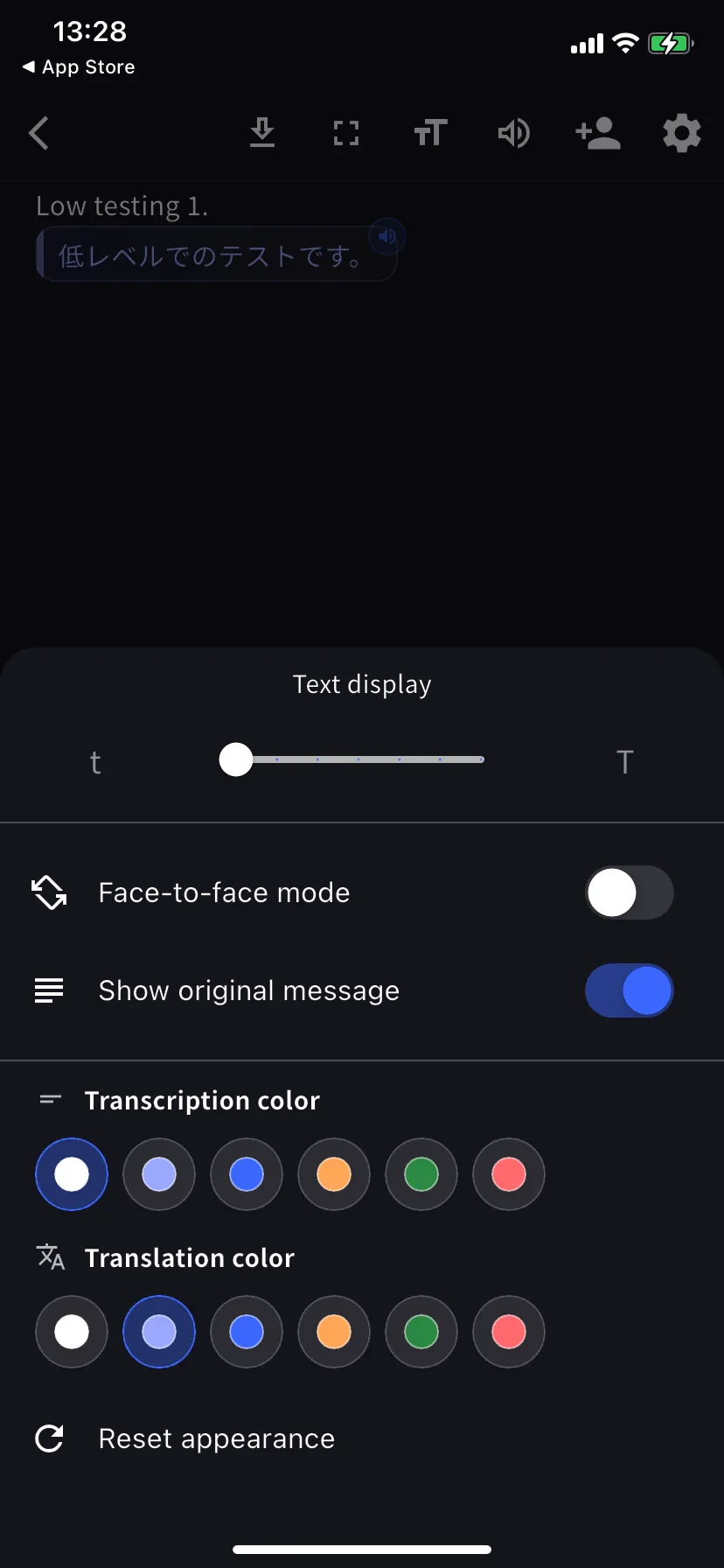
セッション中のツールバーで **TT** をタップ。
| 設定 | 内容 |
| ------------------------------------- | ---------------------------------------------- |
| **Text size** | テーブル越しの手渡しや投影時は大きめに。 |
| **Face-to-face mode** | 翻訳側を180°回転し、対面の相手が正位置で読めるようにします。 |
| **Show original message** | オフで翻訳のみ表示。 |
| **Transcription / Translation color** | 各6色。Face-to-face では原文と翻訳でコントラストをつけると読みやすくなります。 |
## アプリレベル設定
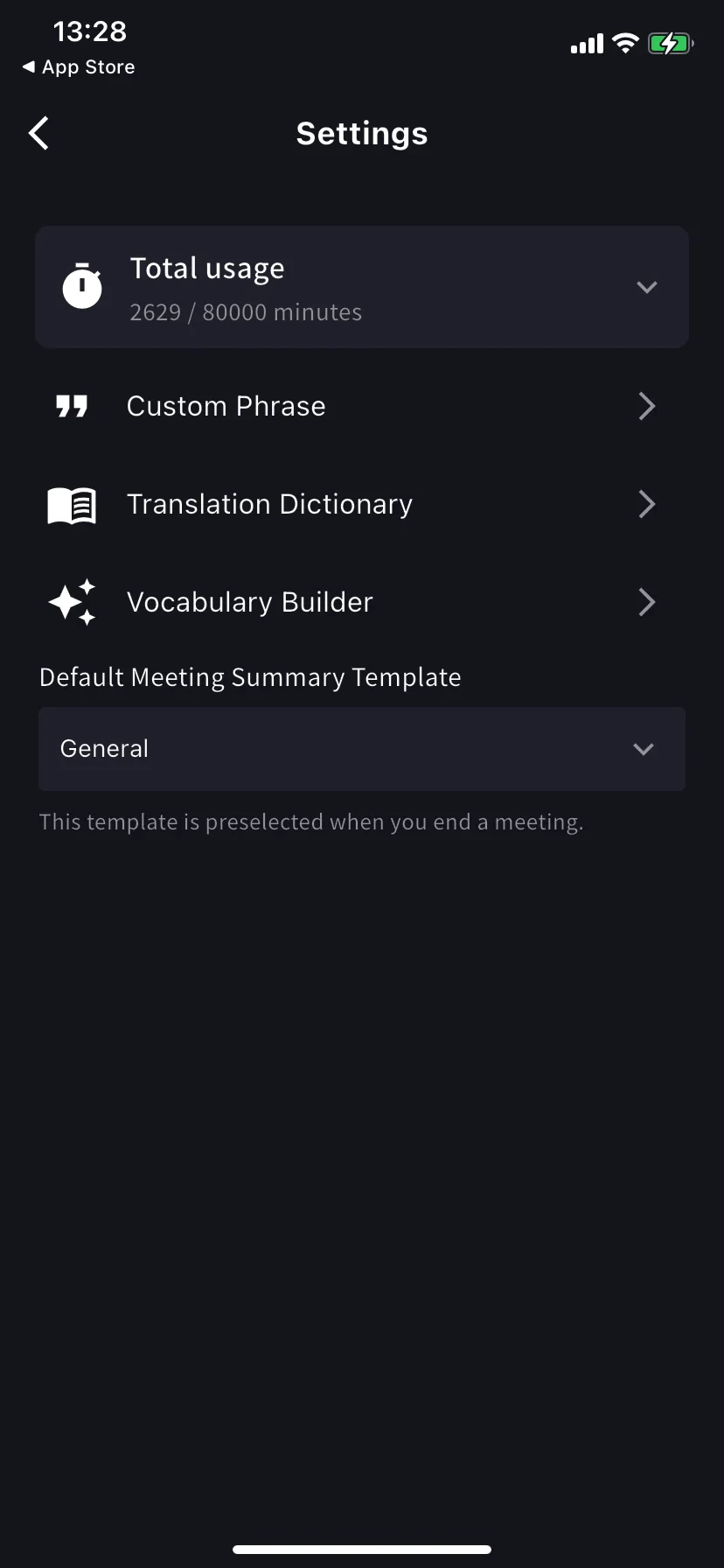
ホーム画面の ⚙ ギアアイコンから。
| 設定 | 内容 |
| ---------------------------- | ----------------------------------------------------------------------- |
| **Total usage** | 今期のプラン利用分数(使用中/上限)。 |
| **Custom Phrase** | 固有名詞・略語を正確に文字起こし。個人・ワークスペース両対応。 |
| **Translation Dictionary** | 用語レベルの翻訳上書き。個人・ワークスペース両対応(デスクトップと同じ)。[辞書](/ja/dictionary) を参照。 |
| **Vocabulary Builder** | 個人・ワークスペースの語彙リストを作成 — [Vocabulary Builder](/ja/vocabulary-builder) を参照。 |
| **話者分離** | 対応するライブ文字起こしで話者を分けて保存します。 |
| **Default summary template** | 会議終了フォームであらかじめ選択されるテンプレート。 |
## おすすめプリセット
High accuracy オン · Auto-play オフ · Tap-to-play オン · Bilingual オン · Face-to-face オン · テキストサイズは大きめ(相手が自分の側から読める大きさ)。
有線またはBluetoothのヘッドセットを接続 · Segment length 12-15秒 · テキストサイズ大きめ。
Auto-play オン · Segment length 5秒 · Speech rate 1.0-1.2倍 · Output はBluetoothスピーカーまたはヘッドフォンに。
フルスクリーン オン · テキストサイズ 最大 · Face-to-face オン · 相手に翻訳だけ見せる場合は Show original オフ。
## 使いこなしのヒント
* 好みのマイクは **Start を押す前に** 接続してください(ルーティングがセッション中保持されます)。
* 設定変更は即時反映されます(再起動不要)。
## 関連ページ
* [モバイルのライブ文字起こし](/ja/mobile-live-transcription) · [リスナーに共有](/ja/mobile-live-transcription-share)
* [辞書](/ja/dictionary) · [Vocabulary Builder](/ja/vocabulary-builder)
セッション中のツールバーとアプリレベル設定のリファレンスです。基本の使い方は [モバイルのライブ文字起こし](/ja/mobile-live-transcription) をご覧ください。
## 各設定の場所
| 設定グループ | 場所 |
| -------------------------------- | ------------------------ |
| 音声の再生・出力・入力 | セッション中 → 🔊 Audio |
| テキストサイズ・色・Face-to-face | セッション中 → TT Text display |
| Custom Phrase・辞書・語彙・既定の議事録テンプレート | アプリレベル → ⚙ Settings |
## Audio
Audio シートは1つの縦スクロールメニューです。下の2枚のスクリーンショットは、同じ画面の上部(Playback)と下部(Output / Input)を示しています。
| 設定 | 内容 |
| --------------------------- | ------------------------------------------- |
| **High accuracy** | より高精度なモデルを使用。遅延とバッテリー消費が増えます。 |
| **Auto-play speech** | 翻訳された各行を自動で読み上げます。 |
| **Tap to play translation** | 行をタップすると翻訳を音声再生します。 |
| **Auto-mute mic** | 再生中にマイクを自動ミュート(自分の声として再認識されるのを防止)。 |
| **Segment length** | 1行が確定するまでの待ち時間。既定10秒。 |
| **Speech rate** | 再生速度。既定1.4倍。 |
| **Output** | 翻訳音声の出力先(AirPlay/Bluetooth/ヘッドフォン/内蔵スピーカー)。 |
| **Auto-start mic** | 文字起こし開始時に自動でマイクをオン。 |
| **Mic source** | 内蔵/有線/Bluetooth — 選択中のマイクは青いリングで示されます。 |
## Text display
セッション中のツールバーで **TT** をタップ。
| 設定 | 内容 |
| ------------------------------------- | ---------------------------------------------- |
| **Text size** | テーブル越しの手渡しや投影時は大きめに。 |
| **Face-to-face mode** | 翻訳側を180°回転し、対面の相手が正位置で読めるようにします。 |
| **Show original message** | オフで翻訳のみ表示。 |
| **Transcription / Translation color** | 各6色。Face-to-face では原文と翻訳でコントラストをつけると読みやすくなります。 |
## アプリレベル設定
ホーム画面の ⚙ ギアアイコンから。
| 設定 | 内容 |
| ---------------------------- | ----------------------------------------------------------------------- |
| **Total usage** | 今期のプラン利用分数(使用中/上限)。 |
| **Custom Phrase** | 固有名詞・略語を正確に文字起こし。個人・ワークスペース両対応。 |
| **Translation Dictionary** | 用語レベルの翻訳上書き。個人・ワークスペース両対応(デスクトップと同じ)。[辞書](/ja/dictionary) を参照。 |
| **Vocabulary Builder** | 個人・ワークスペースの語彙リストを作成 — [Vocabulary Builder](/ja/vocabulary-builder) を参照。 |
| **話者分離** | 対応するライブ文字起こしで話者を分けて保存します。 |
| **Default summary template** | 会議終了フォームであらかじめ選択されるテンプレート。 |
## おすすめプリセット
High accuracy オン · Auto-play オフ · Tap-to-play オン · Bilingual オン · Face-to-face オン · テキストサイズは大きめ(相手が自分の側から読める大きさ)。
有線またはBluetoothのヘッドセットを接続 · Segment length 12-15秒 · テキストサイズ大きめ。
Auto-play オン · Segment length 5秒 · Speech rate 1.0-1.2倍 · Output はBluetoothスピーカーまたはヘッドフォンに。
フルスクリーン オン · テキストサイズ 最大 · Face-to-face オン · 相手に翻訳だけ見せる場合は Show original オフ。
## 使いこなしのヒント
* 好みのマイクは **Start を押す前に** 接続してください(ルーティングがセッション中保持されます)。
* 設定変更は即時反映されます(再起動不要)。
## 関連ページ
* [モバイルのライブ文字起こし](/ja/mobile-live-transcription) · [リスナーに共有](/ja/mobile-live-transcription-share)
* [辞書](/ja/dictionary) · [Vocabulary Builder](/ja/vocabulary-builder)