> ## Documentation Index
> Fetch the complete documentation index at: https://manual.voiceping.net/llms.txt
> Use this file to discover all available pages before exploring further.

# 워크플로우 — 딜에 묻힌 병목 발견

> 파이프라인 전반에 걸친 반복되는 장애 요인, 소유권 공백, 보안 지연을 드러내고 우선순위가 지정된 실행 계획으로 전환합니다. VoicePing MCP Access를 사용합니다.

export const FeedbackKo = () => <>
    <Tip>
      이 기능에 대한 아이디어나 요청은 <a href="/ko/product-feedback">Product Feedback</a>을 통해 팀에 보내주세요.
    </Tip>

    <h2>공식 링크</h2>

    <CardGroup cols={2}>
      <Card title="공식 웹사이트" icon="globe" href="https://voiceping.net/en/">
        공식 웹사이트 방문
      </Card>
      <Card title="X (Twitter)" icon="x-twitter" href="https://x.com/VoicePingMedia">
        X에서 팔로우
      </Card>
      <Card title="Facebook" icon="facebook" href="https://www.facebook.com/voiceping.inc">
        Facebook에서 좋아요
      </Card>
      <Card title="LinkedIn" icon="linkedin" href="https://www.linkedin.com/company/28684130/">
        LinkedIn에서 연결
      </Card>
    </CardGroup>
  </>;

## 딜에 묻힌 병목 발견

**상황.** 딜이 느려지고 있습니다. 정확한 이유는 모릅니다 ― 한 가지 문제가 아닙니다. 보안 질문, 불분명한 고객 측 담당자, 파일럿 정체, 제안서 재작업이 뒤섞여 있습니다. 개별 사건이 아니라 패턴을 봐야 합니다.

이 워크플로우는 [MCP Access](/ko/external-access/mcp) 를 이미 활성화하고 AI 클라이언트에 연결했다고 가정합니다.

<Steps>
  <Step title="모든 병목 신호를 수면 위로">
    ```text theme={null}
    Search my VoicePing transcripts for bottlenecks, blockers, security delay,
    unclear owner, proposal, pilot, and expansion readiness.
    ```

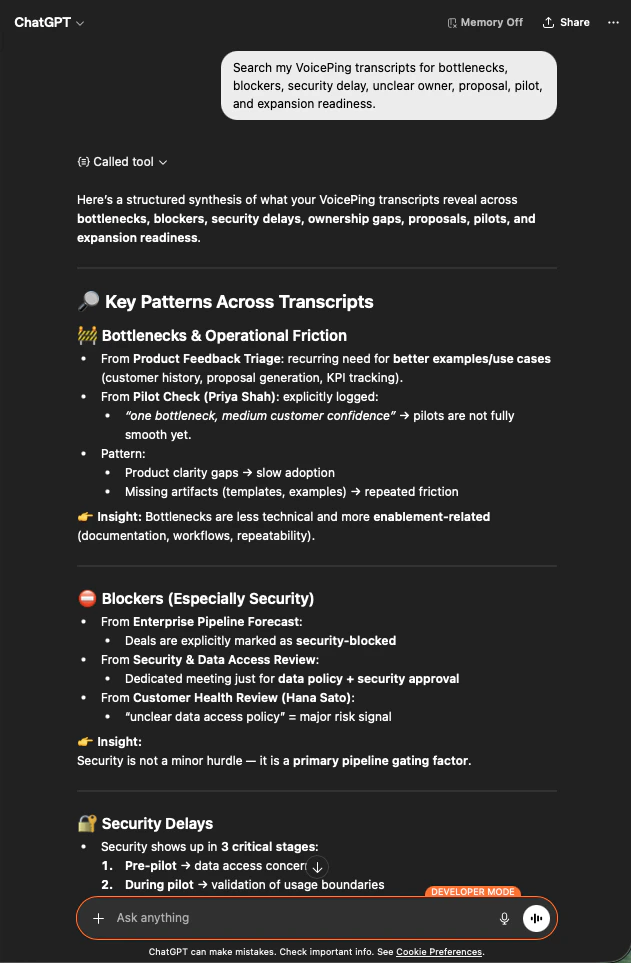
    AI는 회의록을 가로지르는 종합 결과를 반환합니다: 운영 마찰, 보안 장애, 지연, 소유권 공백에 걸친 주요 패턴 ― 각 패턴의 출처 회의가 함께 표시됩니다.

    <div style={{maxWidth: "600px", margin: "0 auto"}}>
      <Frame>
        <img src="https://mintcdn.com/test-cf63e467/z13MfE0CikV5b-4X/en/images/external_access/Founding%20bottlenecks%201.png?fit=max&auto=format&n=z13MfE0CikV5b-4X&q=85&s=74fbefec3529689b40ecac2ebf547757" alt="ChatGPT surfacing bottleneck patterns across VoicePing transcripts — operational friction, security blockers, ownership gaps" width="631" height="963" data-path="en/images/external_access/Founding bottlenecks 1.png" />
      </Frame>
    </div>
  </Step>

  <Step title="실행 가능한 단위로 그룹화">
    ```text theme={null}
    Analyze the bottlenecks across these meetings. Group them into:
    - customer-side bottlenecks
    - internal team bottlenecks
    - product / onboarding bottlenecks
    - security / compliance bottlenecks
    - proposal or sales-process bottlenecks
    ```

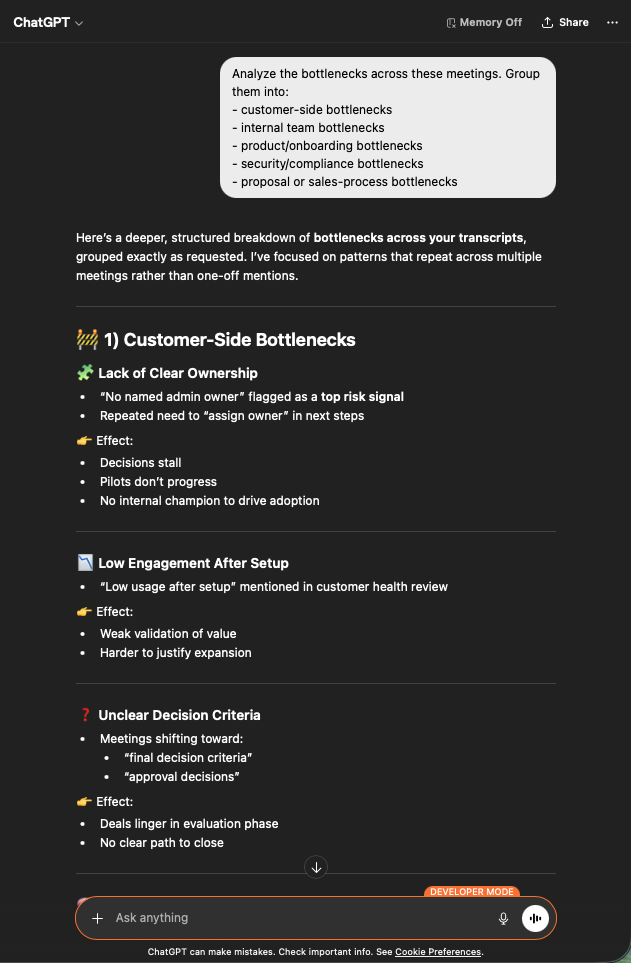
    이제 명확한 버킷이 생겼습니다. 고객 측 이슈(불분명한 소유권, 낮은 참여도, 모호한 의사결정 기준), 내부, 제품, 보안, 영업 프로세스 ― 각각이 여러 회의에 걸친 반복 근거와 함께 정리됩니다.

    <div style={{maxWidth: "600px", margin: "0 auto"}}>
      <Frame>
        <img src="https://mintcdn.com/test-cf63e467/z13MfE0CikV5b-4X/en/images/external_access/Founding%20bottlenecks%202.png?fit=max&auto=format&n=z13MfE0CikV5b-4X&q=85&s=bf47786ffd6d4d4d58b9e8238489e5aa" alt="ChatGPT grouping bottlenecks across customer-side, internal, product, security, and sales-process categories" width="631" height="963" data-path="en/images/external_access/Founding bottlenecks 2.png" />
      </Frame>
    </div>
  </Step>

  <Step title="병목별 실행 계획 얻기">
    ```text theme={null}
    Create an action plan to remove the bottlenecks. For each bottleneck, include:
    - evidence from the meetings
    - impact
    - owner
    - recommended fix
    - priority
    ```

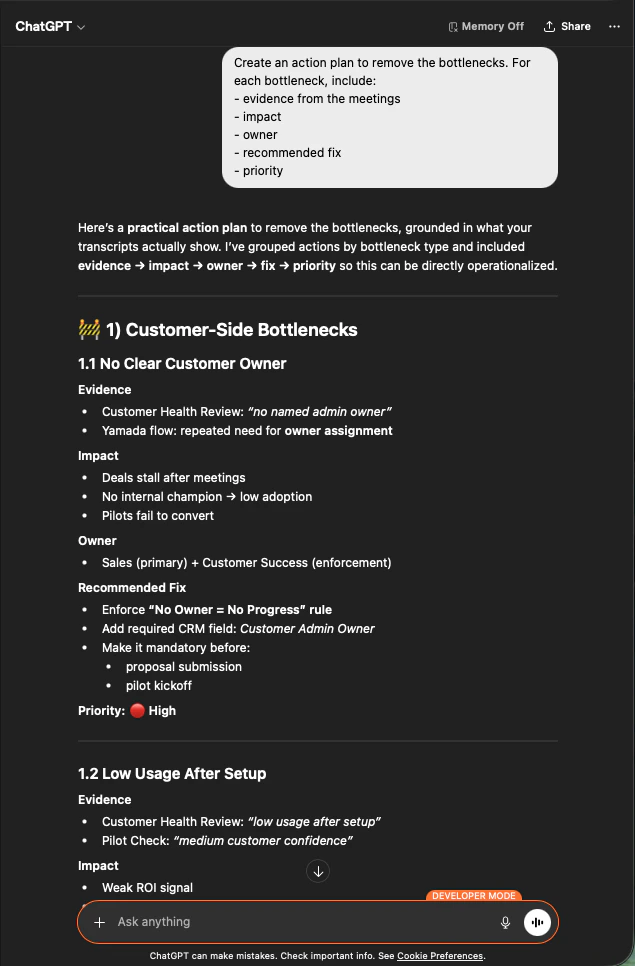
    이제 각 항목에는 근거, 영향, 담당자, 권장 조치, 우선순위가 부여됩니다. 이것이 리더십 회의에 바로 가져갈 수 있는 문서입니다.

    <div style={{maxWidth: "600px", margin: "0 auto"}}>
      <Frame>
        <img src="https://mintcdn.com/test-cf63e467/z13MfE0CikV5b-4X/en/images/external_access/Founding%20bottlenecks%203.png?fit=max&auto=format&n=z13MfE0CikV5b-4X&q=85&s=0d75e976e991f2c158cd8057aafef71a" alt="ChatGPT producing a prioritized action plan per bottleneck with evidence, impact, owner, recommended fix, and priority" width="635" height="966" data-path="en/images/external_access/Founding bottlenecks 3.png" />
      </Frame>
    </div>
  </Step>
</Steps>

**왜 창업자 수준의 레버리지인가.** 어떤 딜이 멈췄는지 토론하는 것을 멈추고, *모든* 딜을 지연시키는 패턴을 고치는 쪽으로 옮겨갈 수 있기 때문입니다.

***

## 다음 단계

<CardGroup cols={2}>
  <Card title="외부 접근 개요" icon="arrow-left" href="/ko/external-access">
    스코프, 라이프사이클 제어, 이벤트 로그 허브로 돌아가기.
  </Card>

  <Card title="MCP Access 활성화 방법" icon="plug" href="/ko/external-access/mcp">
    Claude, ChatGPT, Codex, Claude Code, Gemini CLI용 설정 가이드.
  </Card>
</CardGroup>

<FeedbackKo />