> ## Documentation Index
> Fetch the complete documentation index at: https://manual.voiceping.net/llms.txt
> Use this file to discover all available pages before exploring further.

# 1주일 무료 체험 시작하기

> 프리미엄 플랜 1주일 무료 체험을 시작하는 방법

export const ContactKo = () => <>
    <Tip>
      문의 사항이 있으시면 <a href="https://forms.gle/6AUho7oj3zBr79e96">이 양식</a>을 통해 연락해 주세요.
    </Tip>

    <h2>공식 링크</h2>

    <CardGroup cols={2}>
      <Card title="공식 웹사이트" icon="globe" href="https://voiceping.net/en/">
        공식 웹사이트 방문
      </Card>
      <Card title="X (Twitter)" icon="x-twitter" href="https://x.com/VoicePingMedia">
        X에서 팔로우
      </Card>
      <Card title="Facebook" icon="facebook" href="https://www.facebook.com/voiceping.inc">
        Facebook에서 좋아요
      </Card>
      <Card title="LinkedIn" icon="linkedin" href="https://www.linkedin.com/company/28684130/">
        LinkedIn에서 연결
      </Card>
    </CardGroup>
  </>;

## 1. 회원 가입 및 워크스페이스 생성

[워크스페이스 설정](/ko/owner-signup)

## 2. 무료 체험 시작

### WEB App Registration Steps

1. [여기](https://app.voiceping.io/user/login/)에서 로그인합니다.

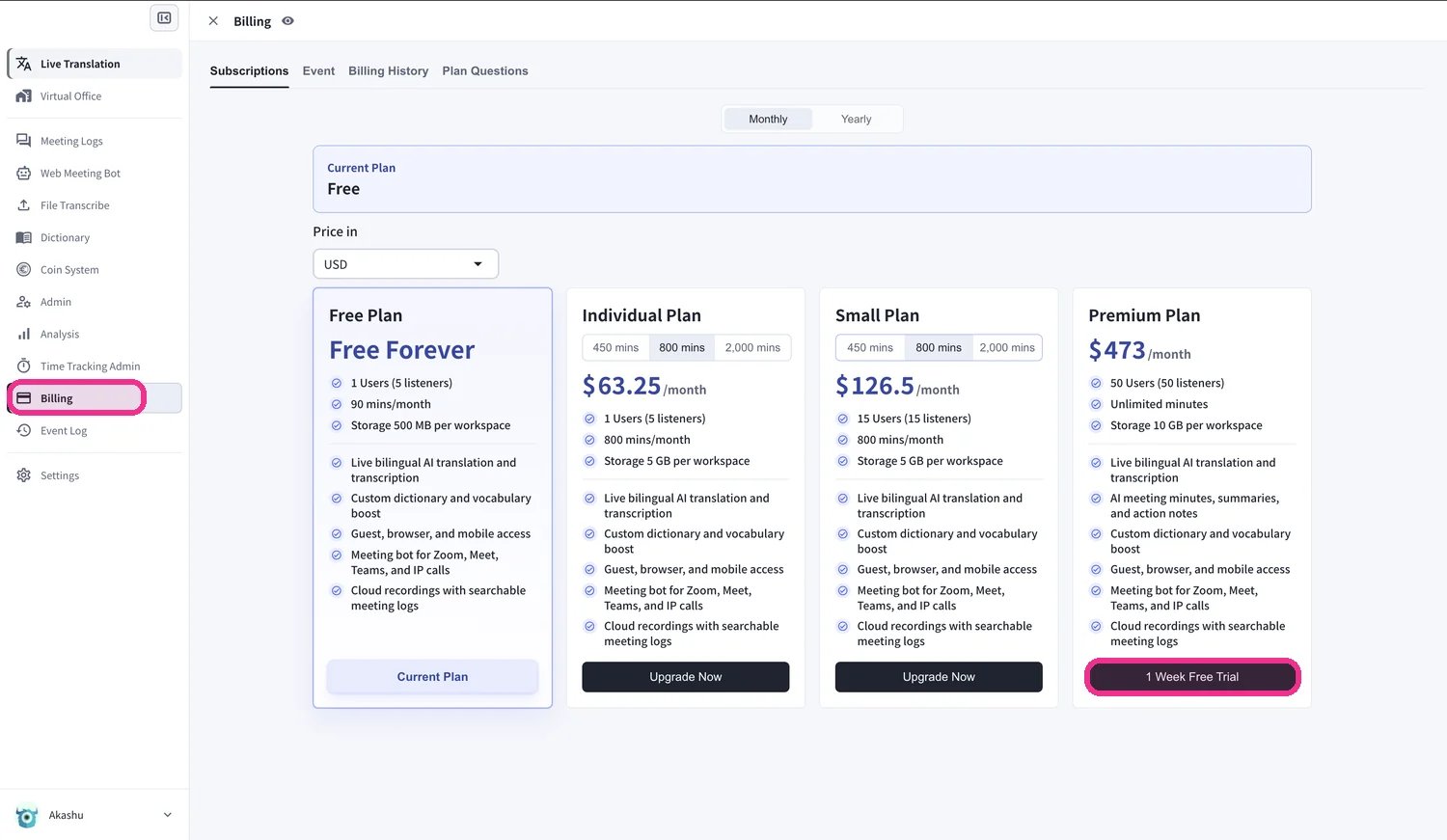
2. 왼쪽 사이드바에서 **Billing** 페이지를 엽니다. **Subscriptions** 탭에서 **Premium Plan** 아래에 있는 **1 Week Free Trial**을 클릭합니다.
<Frame>
  <img src="https://mintcdn.com/test-cf63e467/52y2Vn0ATlzmgl0q/en/images/free-trial/01-select-trial-plan.webp?fit=max&auto=format&n=52y2Vn0ATlzmgl0q&q=85&s=f658952cbc56a21d68ac14f842587959" alt="Billing 페이지 — Premium Plan 아래의 1 Week Free Trial 클릭" width="1500" height="871" data-path="en/images/free-trial/01-select-trial-plan.webp" />
</Frame>

3. **Paid Plan Trial policy** 대화 상자가 나타납니다. 체험 종료 시점을 확인하세요. 체험이 종료되면 별도로 유료 플랜을 구매하지 않는 한 워크스페이스는 무료 플랜으로 돌아갑니다.

<Frame>
  <img src="https://mintcdn.com/test-cf63e467/52y2Vn0ATlzmgl0q/en/images/free-trial/02-trial-policy.webp?fit=max&auto=format&n=52y2Vn0ATlzmgl0q&q=85&s=1cf8cab53a3c64d49950f2108aa56857" alt="체험 종료일을 표시하는 Paid Plan Trial policy 대화 상자" width="1500" height="816" data-path="en/images/free-trial/02-trial-policy.webp" />
</Frame>

4. \*\*Do you agree with above?\*\*에 체크한 다음 **Start Trial**을 클릭합니다.

<Frame>
  <img src="https://mintcdn.com/test-cf63e467/52y2Vn0ATlzmgl0q/en/images/free-trial/03-agree-start-trial.webp?fit=max&auto=format&n=52y2Vn0ATlzmgl0q&q=85&s=36f85b726c87b342345eb6562b090852" alt="체험 정책에 동의한 후 Start Trial 클릭" width="1500" height="751" data-path="en/images/free-trial/03-agree-start-trial.webp" />
</Frame>

5. 보안 Stripe 결제 화면에서 **카드 정보**를 입력한 다음 **Subscribe**를 클릭합니다. 체험 기간은 무료이며, 카드는 체험이 종료된 후에만 청구됩니다.

<Frame>
  <img src="https://mintcdn.com/test-cf63e467/52y2Vn0ATlzmgl0q/en/images/free-trial/04-payment-details.webp?fit=max&auto=format&n=52y2Vn0ATlzmgl0q&q=85&s=7e28e59b0b372851836ad0b251e5952e" alt="Stripe 결제 화면에서 카드 정보를 입력하고 Subscribe 클릭" width="1500" height="1170" data-path="en/images/free-trial/04-payment-details.webp" />
</Frame>

6. 결제가 확인되면 \*\*"Your Premium plan is active"\*\*가 표시됩니다. **View subscription**을 클릭합니다.

<Frame>
  <img src="https://mintcdn.com/test-cf63e467/52y2Vn0ATlzmgl0q/en/images/free-trial/05-plan-active.webp?fit=max&auto=format&n=52y2Vn0ATlzmgl0q&q=85&s=cd6a898f5676f374a1fb742f6ef0485b" alt="결제 확인 완료 — View subscription 클릭" width="1500" height="997" data-path="en/images/free-trial/05-plan-active.webp" />
</Frame>

7. 이제 **Subscriptions** 페이지에 현재 플랜으로 **Premium**과 다음 청구일이 함께 표시됩니다.

<Frame>
  <img src="https://mintcdn.com/test-cf63e467/52y2Vn0ATlzmgl0q/en/images/free-trial/06-subscription-active.webp?fit=max&auto=format&n=52y2Vn0ATlzmgl0q&q=85&s=30eb307ce31e5bfdd3739e0a9df7fd1b" alt="현재 플랜으로 Premium과 다음 청구일을 표시하는 Subscriptions 페이지" width="1500" height="764" data-path="en/images/free-trial/06-subscription-active.webp" />
</Frame>

<Tip>
  체험이 시작되었는지 확인하려면 **Billing History** 탭을 엽니다. **Succeeded to start Trial**과 **Succeeded to add payment method** 항목이 표시됩니다.
</Tip>

<Frame>
  <img src="https://mintcdn.com/test-cf63e467/52y2Vn0ATlzmgl0q/en/images/free-trial/07-billing-history.webp?fit=max&auto=format&n=52y2Vn0ATlzmgl0q&q=85&s=eb8ecf4cd8176ebb30c7c80de6a16080" alt="Succeeded to start Trial 로그 항목을 표시하는 Billing History 탭" width="1500" height="227" data-path="en/images/free-trial/07-billing-history.webp" />
</Frame>

## 취소 방법

취소는 **Free plan**으로 다시 전환하면 완료됩니다. **Billing** 페이지의 **Subscriptions** 탭에서 **Free Plan** 아래에 있는 **Start Free Plan**을 클릭합니다.

<Frame>
  <img src="https://mintcdn.com/test-cf63e467/52y2Vn0ATlzmgl0q/en/images/free-trial/08-cancel-free-plan.webp?fit=max&auto=format&n=52y2Vn0ATlzmgl0q&q=85&s=cfc9e8b5c81bde3480883b66f9ae92dc" alt="Start Free Plan을 클릭하여 Free plan으로 다시 전환" width="760" height="1154" data-path="en/images/free-trial/08-cancel-free-plan.webp" />
</Frame>

<ContactKo />
