> ## Documentation Index
> Fetch the complete documentation index at: https://manual.voiceping.net/llms.txt
> Use this file to discover all available pages before exploring further.
# 청구서, 영수증 및 결제 활동
> PC 또는 모바일 앱에서 청구서 PDF와 영수증을 다운로드하고, 청구 대상 정보를 업데이트하며, 모든 구독 이벤트를 감사하는 방법입니다.
export const ContactKo = () => <>
문의 사항이 있으시면 이 양식을 통해 연락해 주세요.
공식 링크
공식 웹사이트 방문
X에서 팔로우
Facebook에서 좋아요
LinkedIn에서 연결
;
구독 감사에 필요한 모든 것은 PC의 **Billing** 섹션과 모바일의 **Billing** 허브에 모여 있습니다. 청구서 PDF를 다운로드하고, 영수증을 확인하고, 향후 청구서에 표시될 청구 대상 필드를 수정하고, 전체 이벤트 로그를 검토할 수 있습니다.
## PC (Billing 탭)
상단 내비게이션 → **Billing** 을 엽니다. 청구서 관리는 두 탭에서 처리합니다.
| 탭 | 용도 |
| -------------------------------- | ------------------------------------------------------------------------------------------------------- |
| **Invoice Details** | 청구서 PDF에 표시될 청구 대상 이름, 이메일, 전화번호 |
| **Invoice and Receipt Download** | 월별 청구 목록과 청구서 PDF 및 영수증 다운로드 |
| **Billing History** | Full subscription, payment-method, trial, cancellation, restore, renewal, and payment-failure event log |
### Invoice Details
Stripe가 청구서 PDF에 찍는 이름, 이메일, 전화번호를 설정합니다.
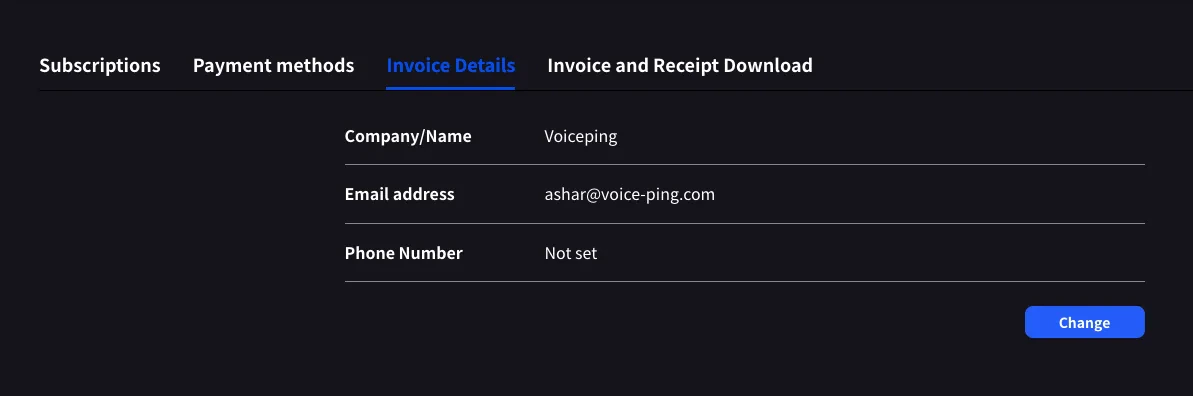 **Change** 를 클릭하여 필드를 수정합니다.
다음 결제일 전에 업데이트하세요. Stripe는 청구서 생성 시점의 필드를 읽으므로 나중에 수정해도 과거 PDF에는 반영되지 않습니다.
### Invoice and Receipt Download
완료된 결제는 월, 플랜명, 상태, 금액, 청구서 PDF와 영수증 다운로드 버튼이 있는 행으로 표시됩니다.
**Change** 를 클릭하여 필드를 수정합니다.
다음 결제일 전에 업데이트하세요. Stripe는 청구서 생성 시점의 필드를 읽으므로 나중에 수정해도 과거 PDF에는 반영되지 않습니다.
### Invoice and Receipt Download
완료된 결제는 월, 플랜명, 상태, 금액, 청구서 PDF와 영수증 다운로드 버튼이 있는 행으로 표시됩니다.
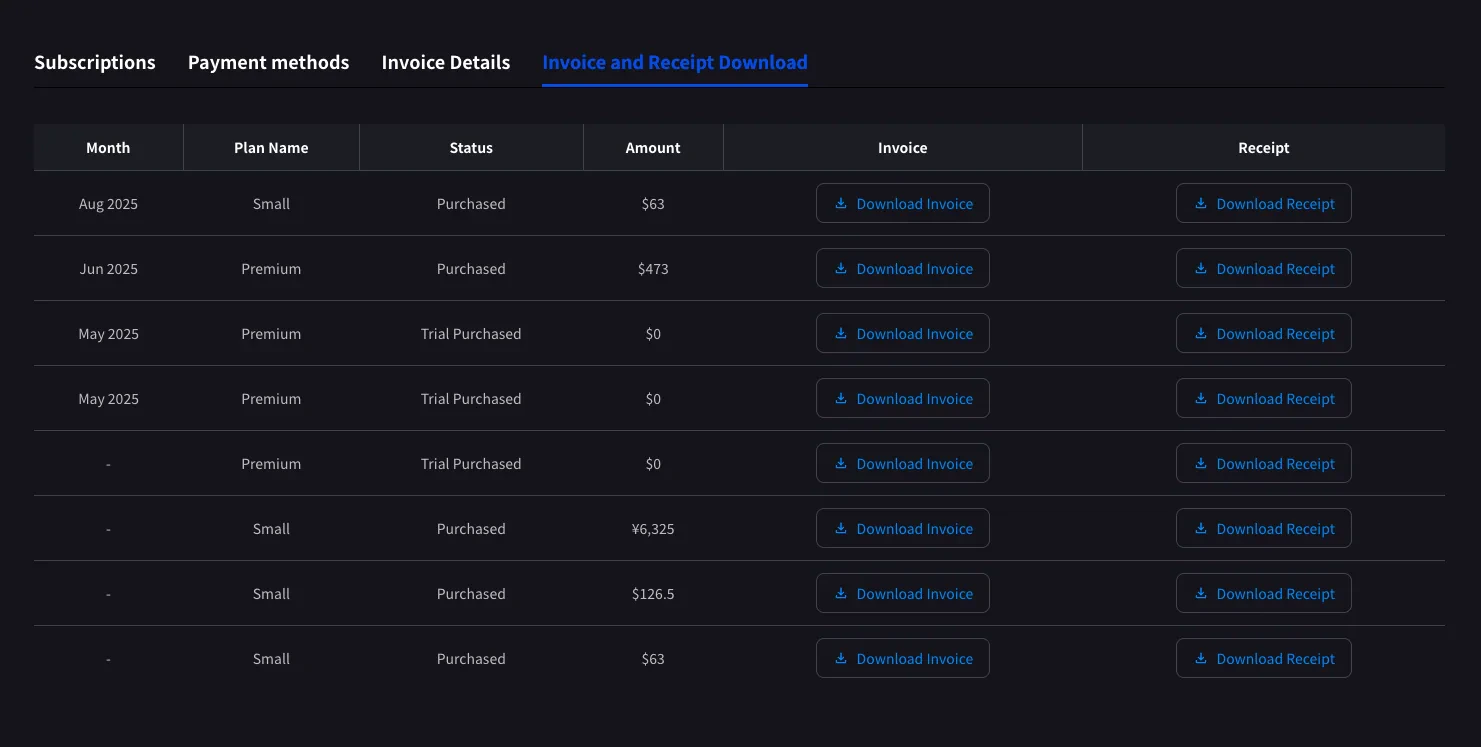 | 버튼 | 열리는 항목 |
| -------------------- | -------------------------------------------------------------------------------------------------- |
| **Download Invoice** | 청구서 PDF. 공유, 저장, 재무팀 전달에 사용합니다 |
| **Download Receipt** | Receipt download or stored receipt link; if unavailable, the hosted receipt/invoice fallback opens |
완료된 결제만 여기에 표시됩니다. 예정된 플랜 변경은 다음 결제일에 Stripe가 청구서를 생성한 뒤 표시됩니다. 상태가 **Trial Purchased** 인 `$0` 행도 기록되므로 체험 시작일을 추적하는 데 유용합니다.
### Billing History
Use **Billing History** when you need the full audit trail, not only completed invoice rows.
| Column | What it shows |
| ------------------------- | -------------------------------------------------------------------------------------------------------------------------------------------------- |
| **Status** | Event result, such as purchase, upgrade, scheduled change, cancellation, restore, payment-method change, trial update, renewal, or payment failure |
| **Event Date (UTC+9)** | When the billing event was recorded |
| **Plan Name** | The plan involved in the event, including tiered Individual / Small minute labels when available |
| **Start Date / End Date** | The subscription period affected by the event |
| **Price** | The billed amount when the event has a displayable charge |
Use **Billing History** for "what changed and when?" Use **Invoice and Receipt Download** when finance needs the actual invoice PDF or receipt.
## Mobile (Billing 허브)
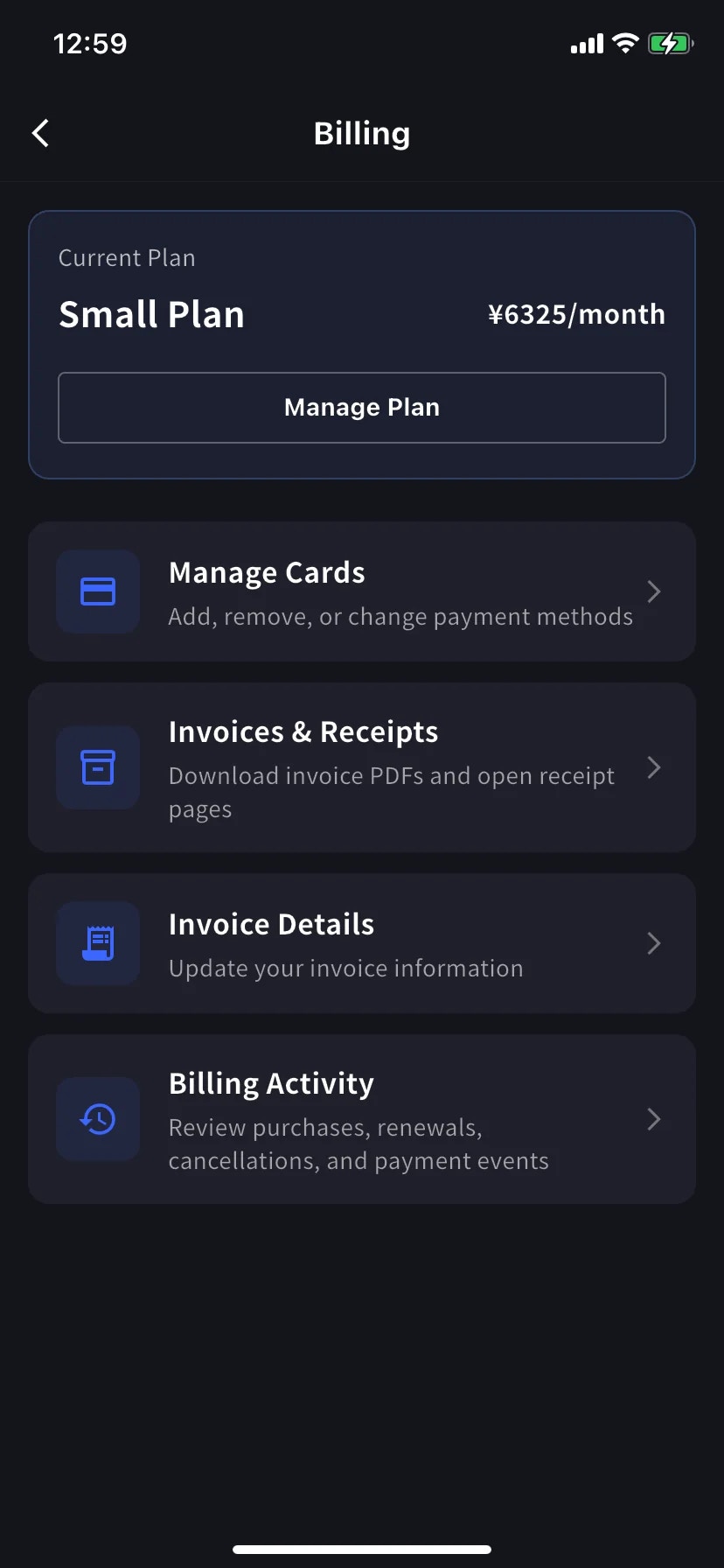
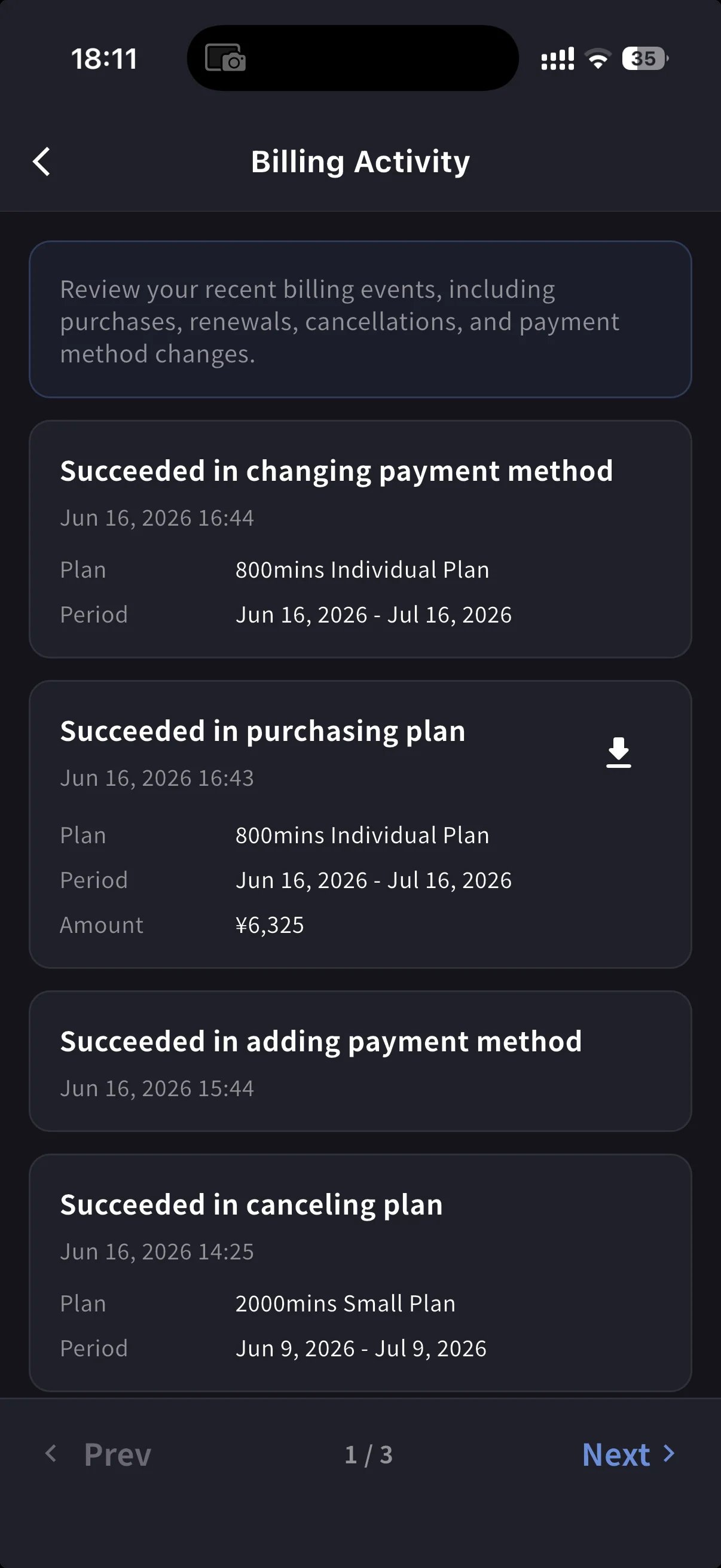
모바일 앱은 같은 기능을 **Billing** 허브에 모으고, 모든 구독 변경을 기록하는 이벤트 로그(Billing Activity)도 제공합니다.
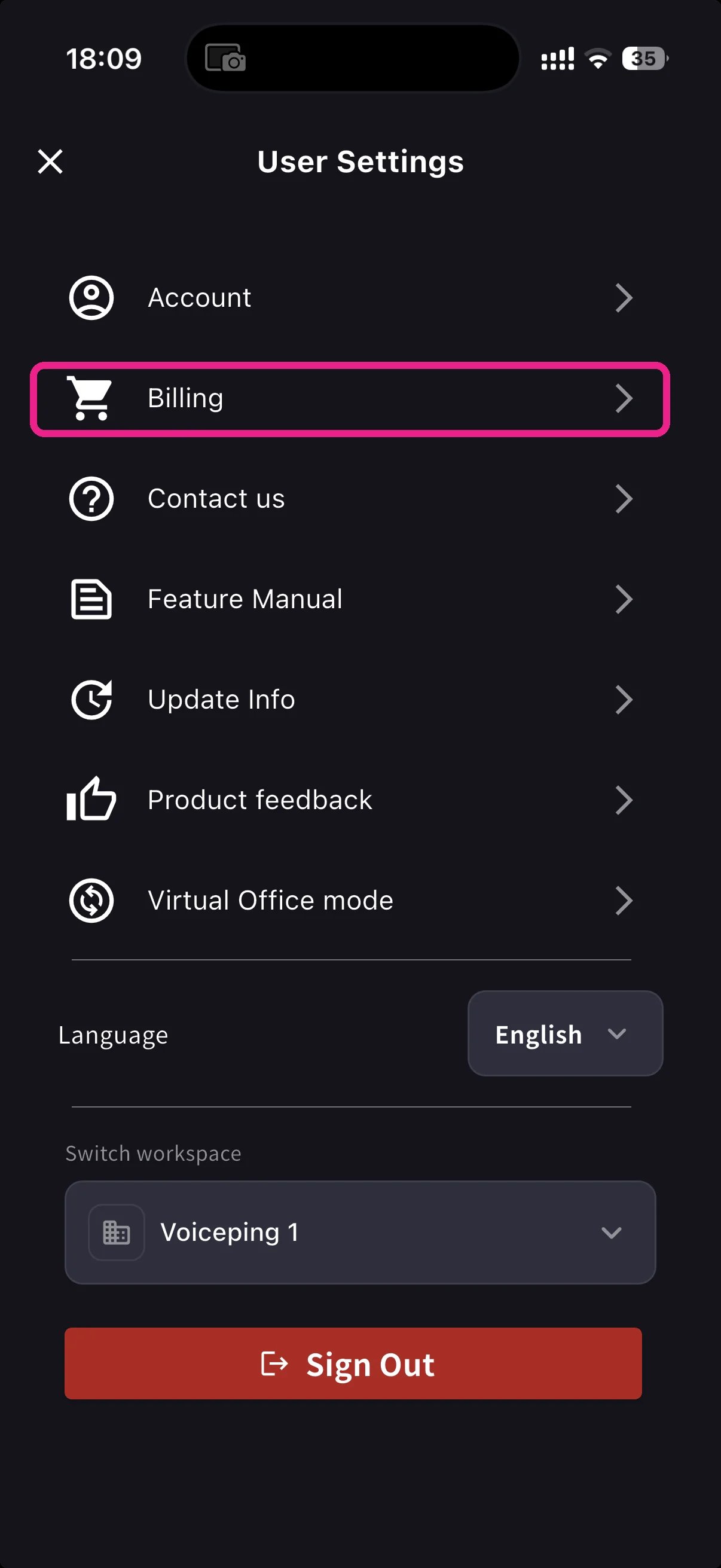
홈 화면에서 사이드 메뉴를 열고 **Billing** (카트 아이콘)을 탭합니다.
Current Plan 카드 아래에 청구 관련 세 가지 바로가기가 있습니다.
| Shortcut | 용도 |
| ----------------------- | ---------------------------------------------------------- |
| **Invoice Details** | 청구 대상 이름, 이메일, 전화번호 |
| **Invoices & Receipts** | Invoice PDFs and receipt downloads or stored receipt links |
| **Billing Activity** | 모든 구독 변경의 이벤트 로그. 타임스탬프와 IP 포함 |
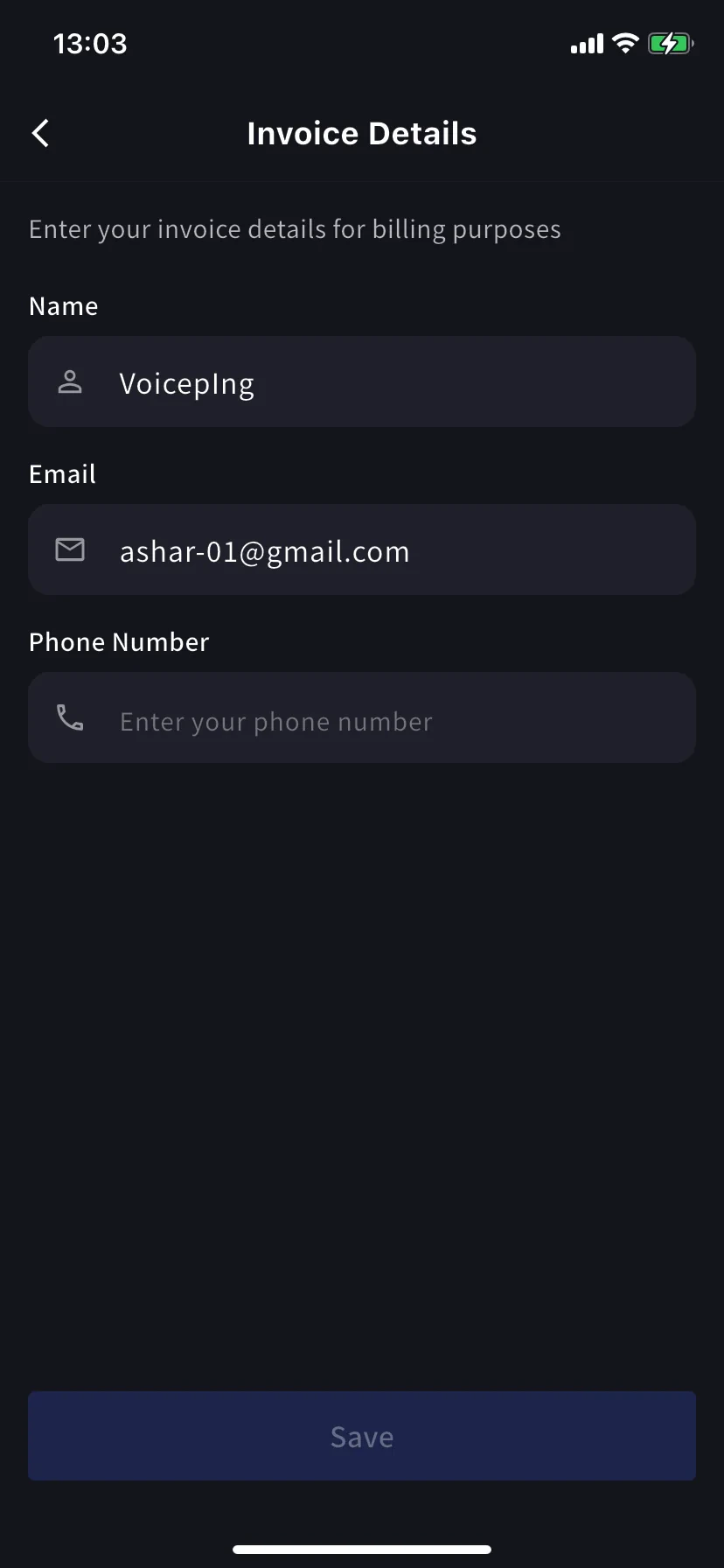
### Invoice Details (mobile)
PC 탭과 같은 필드입니다. 청구서 PDF용 이름, 이메일, 전화번호입니다.
다음 결제일 전에 업데이트하세요. Stripe는 청구서 생성 시점의 필드를 읽으므로 나중에 수정해도 과거 PDF에는 반영되지 않습니다.
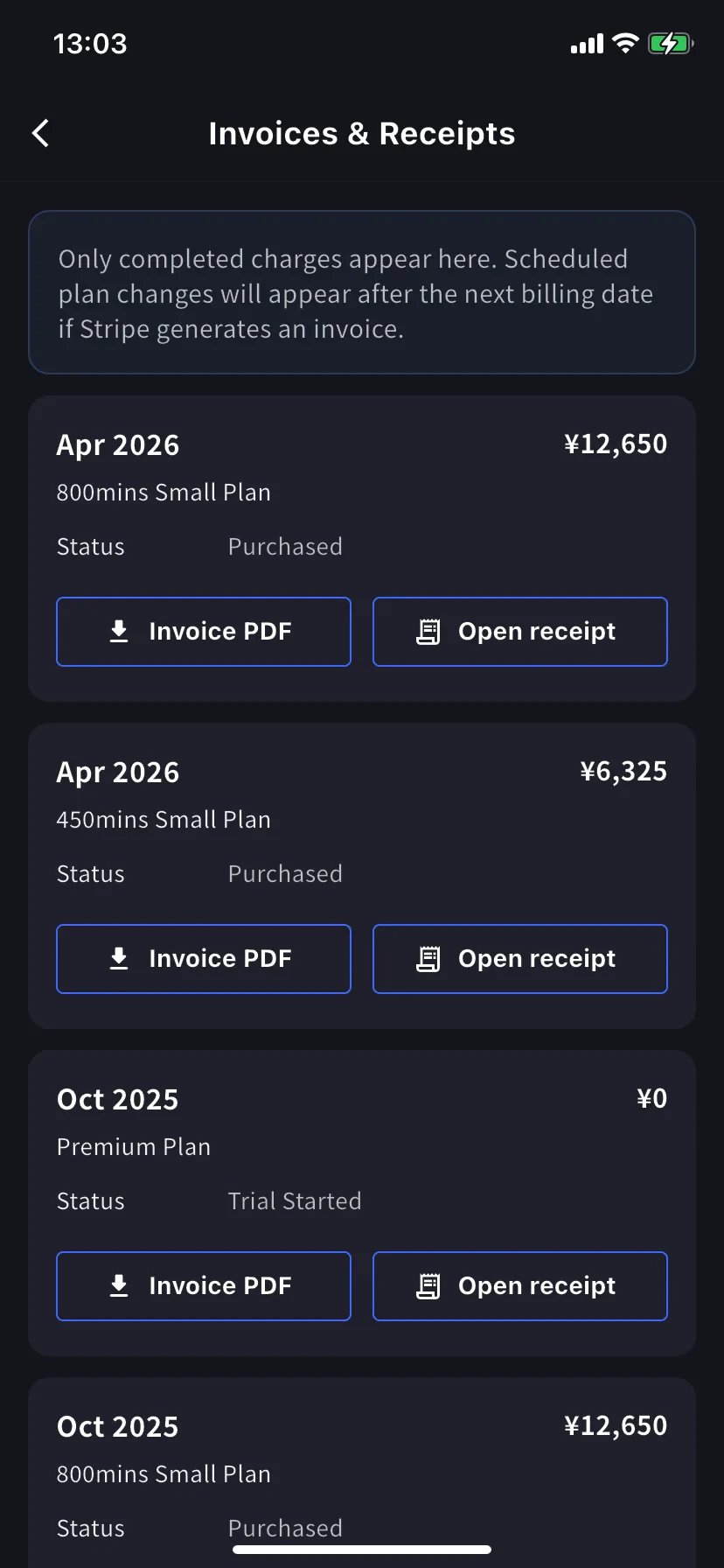
### Invoices & Receipts (mobile)
과거 결제는 월별 카드로 표시됩니다. 각 카드에는 두 가지 동작이 있습니다.
| 버튼 | 열리는 항목 |
| ---------------- | -------------------------------------------------------------------------------------------------- |
| **Invoice PDF** | 다운로드 가능한 청구서 PDF. 공유, 저장, 전달에 사용합니다 |
| **Open receipt** | Receipt download or stored receipt link; if unavailable, the hosted receipt/invoice fallback opens |
### Billing Activity (mobile only)
이벤트 로그입니다. 워크스페이스가 구독에 대해 수행한 모든 일을 한곳에서 확인합니다.
각 행에는 다음 정보가 포함됩니다.
* 이벤트 이름 — 예: *Succeeded in upgrading plan*, *Subscription will be canceled on the next payment date*, *Succeeded in restoring subscription*
* 타임스탬프 (`YYYY/MM/DD HH:MM`)
* 플랜, 결제 주기, 금액(해당하는 경우)
* **IP Address** — 누가 어디서 조작했는지 감사 / 보안 검토에 사용합니다
* 완료된 결제의 다운로드 아이콘 — 해당 이벤트의 청구서 PDF를 가져옵니다
이메일을 뒤지지 않고도 “그 일이 언제 일어났지?”를 확인할 수 있습니다.
On PC, use **Billing History** for the full event log and **Invoice and Receipt Download** for finance documents. On mobile, **Billing Activity** gives a compact activity log with timestamps, IP address, and invoice download actions where available.
## 팁
* **청구 대상 변경은 향후 청구서에만 적용됩니다.** 재발행을 피하려면 다음 결제일 전에 Invoice Details를 업데이트하세요.
* **영수증과 청구서.** 청구서는 Stripe가 결제에 대해 생성하는 문서이고, 영수증은 Stripe 호스팅 결제 확인 페이지입니다. 일반적으로 재무팀은 청구서 PDF를 원합니다.
* **모바일과 PC는 동기화됩니다.** 한쪽에서 수정한 내용은 다른 쪽에 즉시 반영됩니다.
## Related
* [Plan Changes, Cancellation & Trial End](/ko/plan-changes) — 업그레이드, 다운그레이드, 해지
* [Changing Your Payment Credit Card](/ko/credit-card-change) — card management (PC and mobile)
* [Pricing](/ko/pricing) — plan tiers and minute allowances
| 버튼 | 열리는 항목 |
| -------------------- | -------------------------------------------------------------------------------------------------- |
| **Download Invoice** | 청구서 PDF. 공유, 저장, 재무팀 전달에 사용합니다 |
| **Download Receipt** | Receipt download or stored receipt link; if unavailable, the hosted receipt/invoice fallback opens |
완료된 결제만 여기에 표시됩니다. 예정된 플랜 변경은 다음 결제일에 Stripe가 청구서를 생성한 뒤 표시됩니다. 상태가 **Trial Purchased** 인 `$0` 행도 기록되므로 체험 시작일을 추적하는 데 유용합니다.
### Billing History
Use **Billing History** when you need the full audit trail, not only completed invoice rows.
| Column | What it shows |
| ------------------------- | -------------------------------------------------------------------------------------------------------------------------------------------------- |
| **Status** | Event result, such as purchase, upgrade, scheduled change, cancellation, restore, payment-method change, trial update, renewal, or payment failure |
| **Event Date (UTC+9)** | When the billing event was recorded |
| **Plan Name** | The plan involved in the event, including tiered Individual / Small minute labels when available |
| **Start Date / End Date** | The subscription period affected by the event |
| **Price** | The billed amount when the event has a displayable charge |
Use **Billing History** for "what changed and when?" Use **Invoice and Receipt Download** when finance needs the actual invoice PDF or receipt.
## Mobile (Billing 허브)
모바일 앱은 같은 기능을 **Billing** 허브에 모으고, 모든 구독 변경을 기록하는 이벤트 로그(Billing Activity)도 제공합니다.
홈 화면에서 사이드 메뉴를 열고 **Billing** (카트 아이콘)을 탭합니다.
Current Plan 카드 아래에 청구 관련 세 가지 바로가기가 있습니다.
| Shortcut | 용도 |
| ----------------------- | ---------------------------------------------------------- |
| **Invoice Details** | 청구 대상 이름, 이메일, 전화번호 |
| **Invoices & Receipts** | Invoice PDFs and receipt downloads or stored receipt links |
| **Billing Activity** | 모든 구독 변경의 이벤트 로그. 타임스탬프와 IP 포함 |
### Invoice Details (mobile)
PC 탭과 같은 필드입니다. 청구서 PDF용 이름, 이메일, 전화번호입니다.
다음 결제일 전에 업데이트하세요. Stripe는 청구서 생성 시점의 필드를 읽으므로 나중에 수정해도 과거 PDF에는 반영되지 않습니다.
### Invoices & Receipts (mobile)
과거 결제는 월별 카드로 표시됩니다. 각 카드에는 두 가지 동작이 있습니다.
| 버튼 | 열리는 항목 |
| ---------------- | -------------------------------------------------------------------------------------------------- |
| **Invoice PDF** | 다운로드 가능한 청구서 PDF. 공유, 저장, 전달에 사용합니다 |
| **Open receipt** | Receipt download or stored receipt link; if unavailable, the hosted receipt/invoice fallback opens |
### Billing Activity (mobile only)
이벤트 로그입니다. 워크스페이스가 구독에 대해 수행한 모든 일을 한곳에서 확인합니다.
각 행에는 다음 정보가 포함됩니다.
* 이벤트 이름 — 예: *Succeeded in upgrading plan*, *Subscription will be canceled on the next payment date*, *Succeeded in restoring subscription*
* 타임스탬프 (`YYYY/MM/DD HH:MM`)
* 플랜, 결제 주기, 금액(해당하는 경우)
* **IP Address** — 누가 어디서 조작했는지 감사 / 보안 검토에 사용합니다
* 완료된 결제의 다운로드 아이콘 — 해당 이벤트의 청구서 PDF를 가져옵니다
이메일을 뒤지지 않고도 “그 일이 언제 일어났지?”를 확인할 수 있습니다.
On PC, use **Billing History** for the full event log and **Invoice and Receipt Download** for finance documents. On mobile, **Billing Activity** gives a compact activity log with timestamps, IP address, and invoice download actions where available.
## 팁
* **청구 대상 변경은 향후 청구서에만 적용됩니다.** 재발행을 피하려면 다음 결제일 전에 Invoice Details를 업데이트하세요.
* **영수증과 청구서.** 청구서는 Stripe가 결제에 대해 생성하는 문서이고, 영수증은 Stripe 호스팅 결제 확인 페이지입니다. 일반적으로 재무팀은 청구서 PDF를 원합니다.
* **모바일과 PC는 동기화됩니다.** 한쪽에서 수정한 내용은 다른 쪽에 즉시 반영됩니다.
## Related
* [Plan Changes, Cancellation & Trial End](/ko/plan-changes) — 업그레이드, 다운그레이드, 해지
* [Changing Your Payment Credit Card](/ko/credit-card-change) — card management (PC and mobile)
* [Pricing](/ko/pricing) — plan tiers and minute allowances