> ## Documentation Index
> Fetch the complete documentation index at: https://manual.voiceping.net/llms.txt
> Use this file to discover all available pages before exploring further.
# 모바일 실시간 전사 설정
> 실시간 전사의 오디오, 텍스트 표시, 사전 설정.
export const FeedbackKo = () => <>
이 기능에 대한 아이디어나 요청은 Product Feedback을 통해 팀에 보내주세요.
공식 링크
공식 웹사이트 방문
X에서 팔로우
Facebook에서 좋아요
LinkedIn에서 연결
;
 세션 중 툴바와 앱 레벨 설정 레퍼런스입니다. 기본 흐름은 [모바일 실시간 전사](/ko/mobile-live-transcription) 를 참조하세요.
## 각 설정의 위치
| 설정 그룹 | 위치 |
| -------------------------------- | ---------------------- |
| 오디오 재생, 출력, 입력 | 세션 중 → 🔊 Audio |
| 텍스트 크기, 색상, Face-to-face | 세션 중 → TT Text display |
| Custom Phrase, 사전, 어휘, 기본 요약 템플릿 | 앱 레벨 → ⚙ Settings |
## Audio
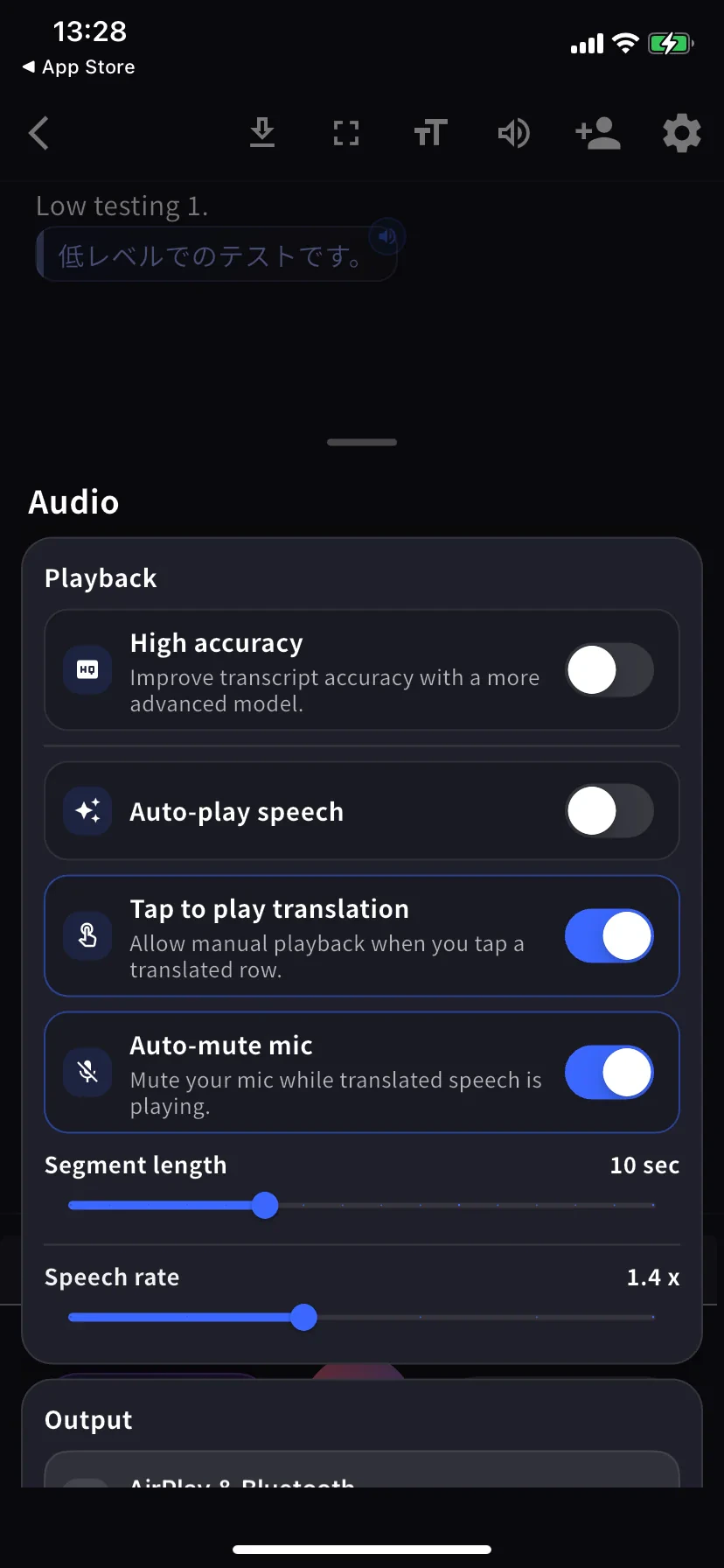
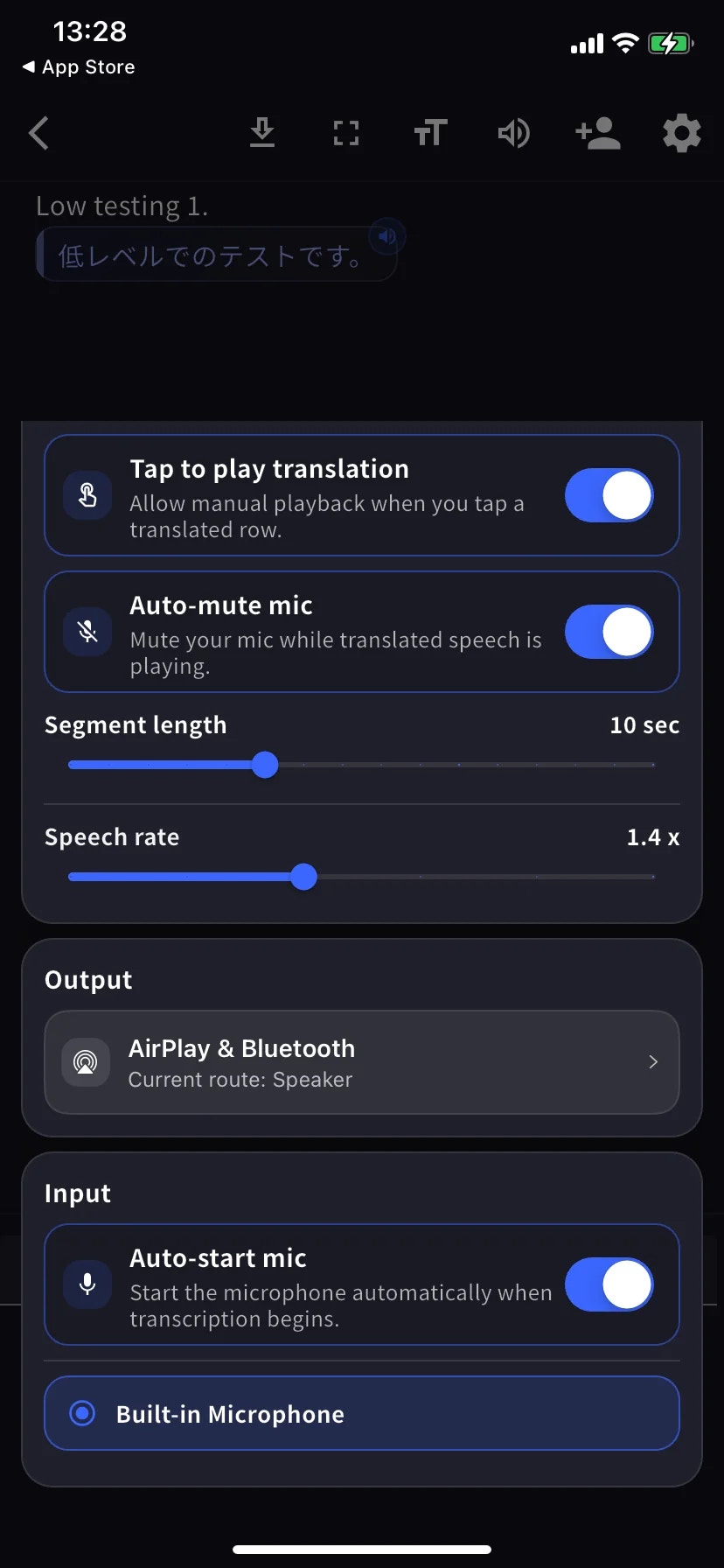
Audio 시트는 하나의 스크롤 메뉴입니다 — 아래 두 스크린샷은 같은 화면의 상단 (Playback) 과 하단 (Output / Input) 입니다.
| 설정 | 내용 |
| --------------------------- | -------------------------------------------- |
| **High accuracy** | 더 정확한 모델 사용. 지연 시간 / 배터리 소모 증가. |
| **Auto-play speech** | 번역된 각 행을 자동으로 읽어줍니다. |
| **Tap to play translation** | 행을 탭하면 번역을 재생합니다. |
| **Auto-mute mic** | 재생 중 마이크 자동 음소거 (재전사 방지). |
| **Segment length** | 행이 확정될 때까지의 대기 시간. 기본 10초. |
| **Speech rate** | 재생 속도. 기본 1.4배. |
| **Output** | 번역 음성 출력 (AirPlay, Bluetooth, 헤드폰, 내장 스피커). |
| **Auto-start mic** | 전사 시작 시 마이크 자동 켜기. |
| **Mic source** | 내장 / 유선 / Bluetooth — 선택된 마이크에 파란색 링이 표시됩니다. |
## Text display
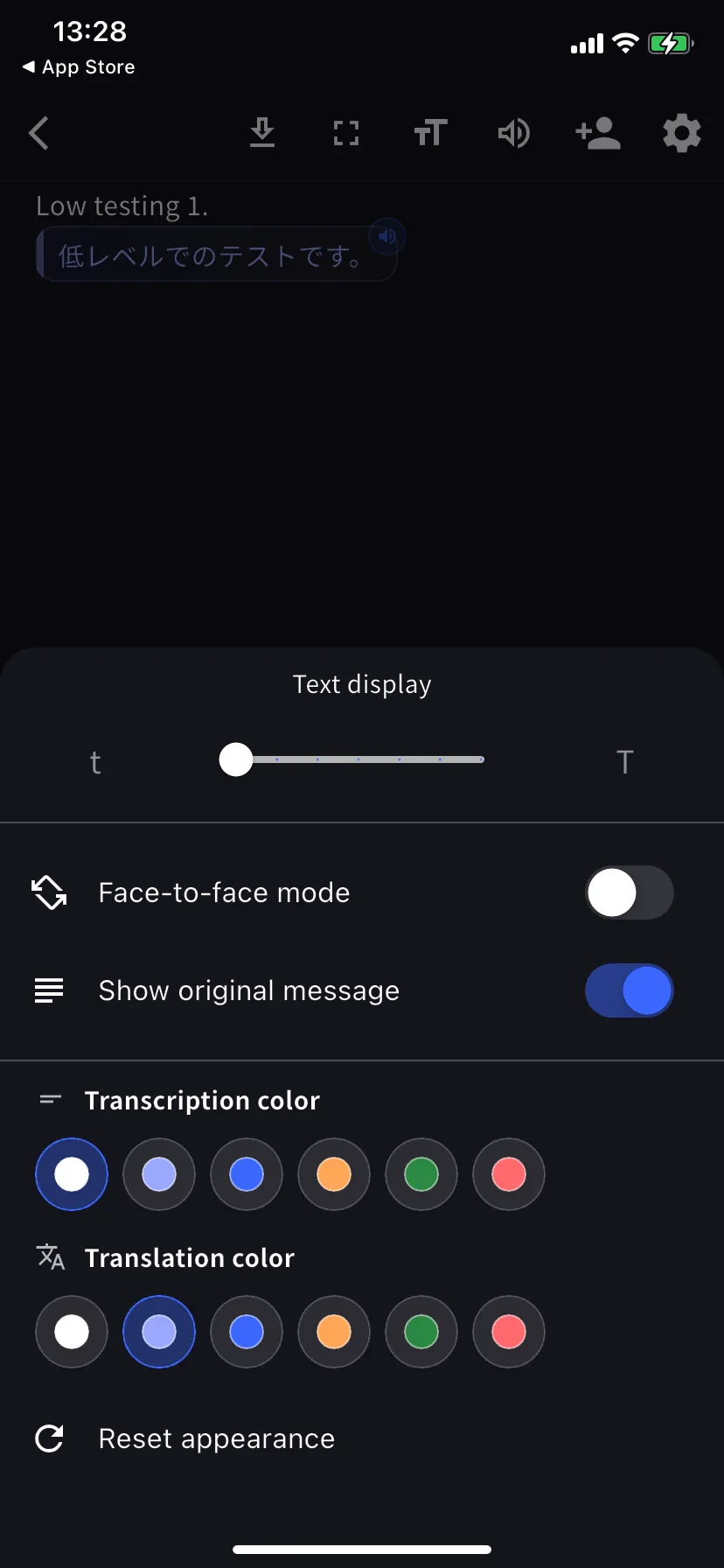
세션 중 툴바에서 **TT** 를 탭하세요.
| 설정 | 내용 |
| ------------------------------------- | ----------------------------------------- |
| **Text size** | 테이블 건너편으로 넘겨줄 때나 투영 시 큰 크기로. |
| **Face-to-face mode** | 번역 부분을 180° 회전해 건너편 상대방이 읽기 쉽게 합니다. |
| **Show original message** | 끄면 번역 전용 보기. |
| **Transcription / Translation color** | 각 6가지 색상. Face-to-face 에서는 대비되는 색을 선택하세요. |
## 앱 레벨 설정
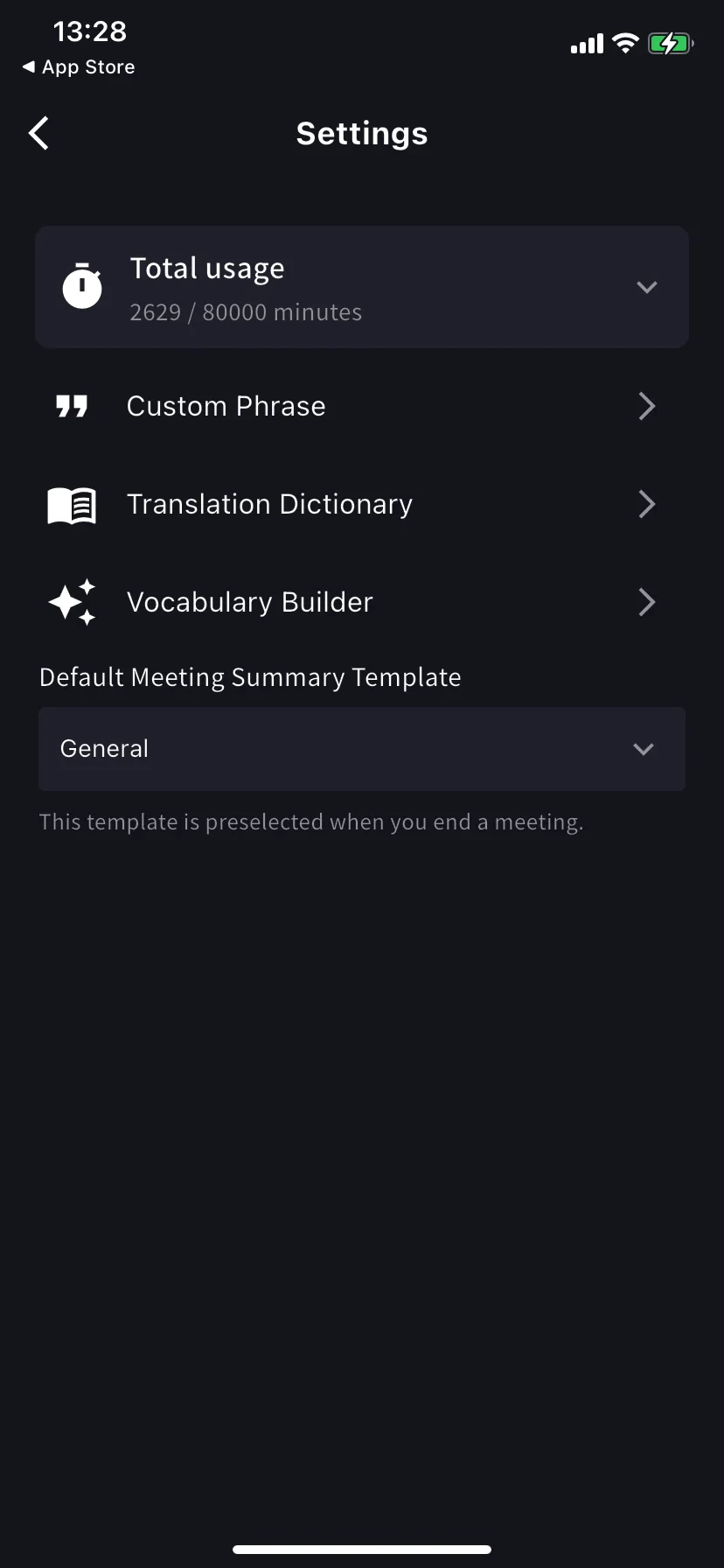
홈 화면 → ⚙ 기어 아이콘.
| 설정 | 내용 |
| ---------------------------- | ---------------------------------------------------------------------------------- |
| **Total usage** | 이번 주기의 플랜 사용 / 한도 분량. |
| **Custom Phrase** | 고유명사 / 약어를 정확히 전사. 개인 및 워크스페이스 목록 지원. |
| **Translation Dictionary** | 용어 수준의 번역 재정의. 개인 및 워크스페이스 목록 지원 — 데스크톱과 동일. [사전](/ko/dictionary) 참조. |
| **Vocabulary Builder** | 개인 또는 워크스페이스 어휘 목록 구축 — [Vocabulary Builder](/ko/vocabulary-builder) 참조. |
| **Speaker diarization** | Separates speakers in supported live transcription sessions before saving the log. |
| **Default summary template** | End-meeting 폼에서 미리 선택되는 템플릿. |
## 추천 프리셋
High accuracy 켜기 · Auto-play 끄기 · Tap-to-play 켜기 · Bilingual 켜기 · Face-to-face 켜기 · 텍스트 크기 크게 (상대방이 자기 쪽에서 읽을 수 있는 크기).
유선 또는 Bluetooth 헤드셋 연결 · Segment length 12-15초 · 텍스트 크기 크게.
Auto-play 켜기 · Segment length 5초 · Speech rate 1.0-1.2배 · Bluetooth 스피커 또는 헤드폰으로 출력.
Fullscreen 켜기 · 텍스트 크기 최대 · Face-to-face 켜기 · 번역만 보여줄 경우 Show original 끄기.
## 팁
* 선호하는 마이크는 Start 를 누르기 *전에* 연결하세요 — 라우팅이 세션 중 유지됩니다.
* 설정 변경은 즉시 반영됩니다 (재시작 불필요).
## 관련 페이지
* [모바일 실시간 전사](/ko/mobile-live-transcription) · [리스너에게 공유](/ko/mobile-live-transcription-share)
* [사전](/ko/dictionary) · [Vocabulary Builder](/ko/vocabulary-builder)
세션 중 툴바와 앱 레벨 설정 레퍼런스입니다. 기본 흐름은 [모바일 실시간 전사](/ko/mobile-live-transcription) 를 참조하세요.
## 각 설정의 위치
| 설정 그룹 | 위치 |
| -------------------------------- | ---------------------- |
| 오디오 재생, 출력, 입력 | 세션 중 → 🔊 Audio |
| 텍스트 크기, 색상, Face-to-face | 세션 중 → TT Text display |
| Custom Phrase, 사전, 어휘, 기본 요약 템플릿 | 앱 레벨 → ⚙ Settings |
## Audio
Audio 시트는 하나의 스크롤 메뉴입니다 — 아래 두 스크린샷은 같은 화면의 상단 (Playback) 과 하단 (Output / Input) 입니다.
| 설정 | 내용 |
| --------------------------- | -------------------------------------------- |
| **High accuracy** | 더 정확한 모델 사용. 지연 시간 / 배터리 소모 증가. |
| **Auto-play speech** | 번역된 각 행을 자동으로 읽어줍니다. |
| **Tap to play translation** | 행을 탭하면 번역을 재생합니다. |
| **Auto-mute mic** | 재생 중 마이크 자동 음소거 (재전사 방지). |
| **Segment length** | 행이 확정될 때까지의 대기 시간. 기본 10초. |
| **Speech rate** | 재생 속도. 기본 1.4배. |
| **Output** | 번역 음성 출력 (AirPlay, Bluetooth, 헤드폰, 내장 스피커). |
| **Auto-start mic** | 전사 시작 시 마이크 자동 켜기. |
| **Mic source** | 내장 / 유선 / Bluetooth — 선택된 마이크에 파란색 링이 표시됩니다. |
## Text display
세션 중 툴바에서 **TT** 를 탭하세요.
| 설정 | 내용 |
| ------------------------------------- | ----------------------------------------- |
| **Text size** | 테이블 건너편으로 넘겨줄 때나 투영 시 큰 크기로. |
| **Face-to-face mode** | 번역 부분을 180° 회전해 건너편 상대방이 읽기 쉽게 합니다. |
| **Show original message** | 끄면 번역 전용 보기. |
| **Transcription / Translation color** | 각 6가지 색상. Face-to-face 에서는 대비되는 색을 선택하세요. |
## 앱 레벨 설정
홈 화면 → ⚙ 기어 아이콘.
| 설정 | 내용 |
| ---------------------------- | ---------------------------------------------------------------------------------- |
| **Total usage** | 이번 주기의 플랜 사용 / 한도 분량. |
| **Custom Phrase** | 고유명사 / 약어를 정확히 전사. 개인 및 워크스페이스 목록 지원. |
| **Translation Dictionary** | 용어 수준의 번역 재정의. 개인 및 워크스페이스 목록 지원 — 데스크톱과 동일. [사전](/ko/dictionary) 참조. |
| **Vocabulary Builder** | 개인 또는 워크스페이스 어휘 목록 구축 — [Vocabulary Builder](/ko/vocabulary-builder) 참조. |
| **Speaker diarization** | Separates speakers in supported live transcription sessions before saving the log. |
| **Default summary template** | End-meeting 폼에서 미리 선택되는 템플릿. |
## 추천 프리셋
High accuracy 켜기 · Auto-play 끄기 · Tap-to-play 켜기 · Bilingual 켜기 · Face-to-face 켜기 · 텍스트 크기 크게 (상대방이 자기 쪽에서 읽을 수 있는 크기).
유선 또는 Bluetooth 헤드셋 연결 · Segment length 12-15초 · 텍스트 크기 크게.
Auto-play 켜기 · Segment length 5초 · Speech rate 1.0-1.2배 · Bluetooth 스피커 또는 헤드폰으로 출력.
Fullscreen 켜기 · 텍스트 크기 최대 · Face-to-face 켜기 · 번역만 보여줄 경우 Show original 끄기.
## 팁
* 선호하는 마이크는 Start 를 누르기 *전에* 연결하세요 — 라우팅이 세션 중 유지됩니다.
* 설정 변경은 즉시 반영됩니다 (재시작 불필요).
## 관련 페이지
* [모바일 실시간 전사](/ko/mobile-live-transcription) · [리스너에게 공유](/ko/mobile-live-transcription-share)
* [사전](/ko/dictionary) · [Vocabulary Builder](/ko/vocabulary-builder)