> ## Documentation Index
> Fetch the complete documentation index at: https://manual.voiceping.net/llms.txt
> Use this file to discover all available pages before exploring further.
# 모바일에서 업그레이드, 다운그레이드 & 취소
> VoicePing 플랜 변경, 취소, 자동 갱신 복원을 모바일 앱에서 바로 수행하세요.
export const ContactKo = () => <>
문의 사항이 있으시면 이 양식을 통해 연락해 주세요.
공식 링크
공식 웹사이트 방문
X에서 팔로우
Facebook에서 좋아요
LinkedIn에서 연결
;
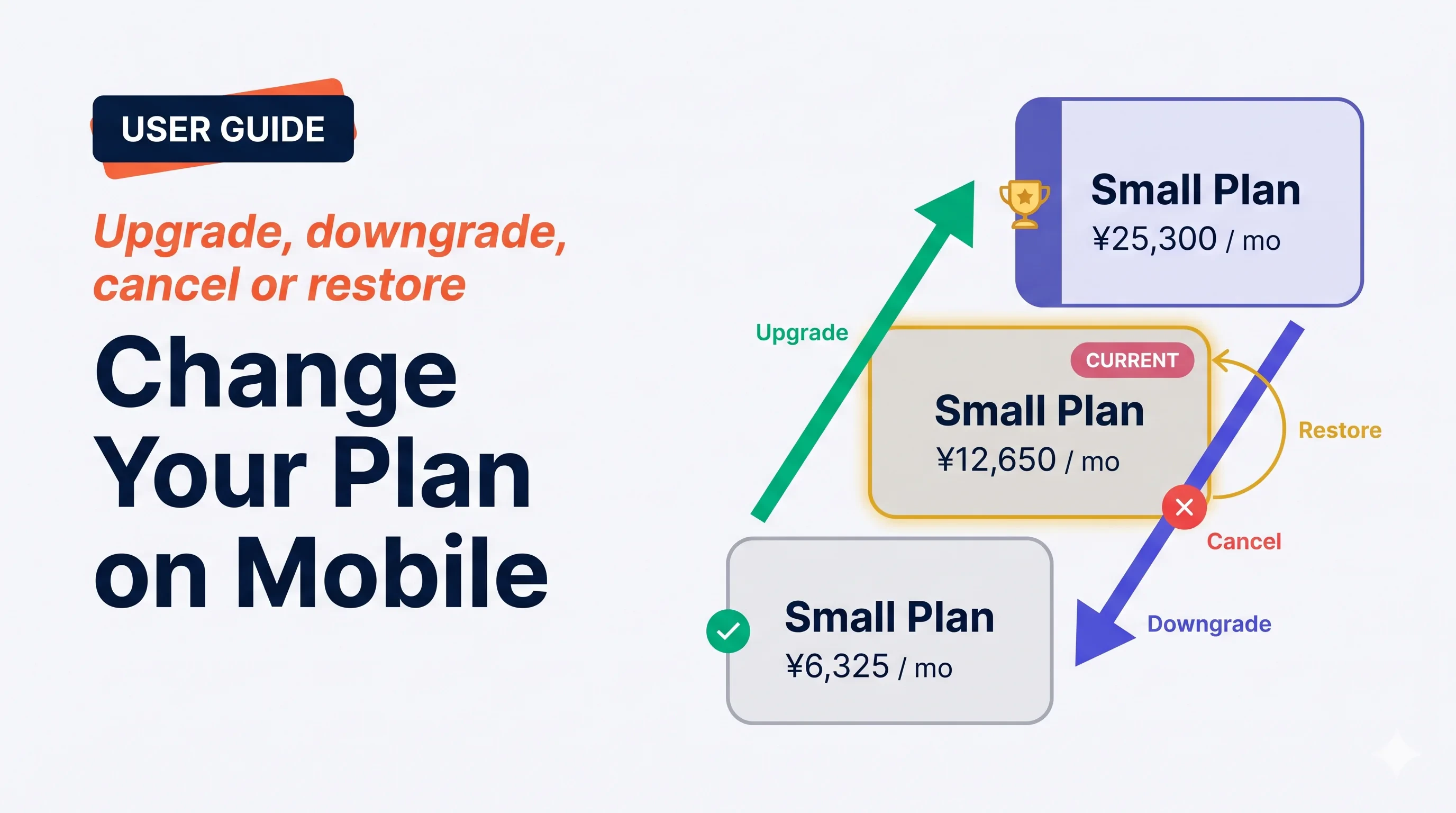 **Manage Plan** 화면은 모든 구독 작업을 처리합니다 — 즉시 업그레이드, 다음 갱신 시 다운그레이드, 취소, 예약된 취소 복원. VoicePing은 확인 전에 *언제*, *가격*, *사용량 재설정*을 분명히 보여주도록 세심하게 설계되었습니다.
## 네 가지 작업
**Manage Plan** 화면은 모든 구독 작업을 처리합니다 — 즉시 업그레이드, 다음 갱신 시 다운그레이드, 취소, 예약된 취소 복원. VoicePing은 확인 전에 *언제*, *가격*, *사용량 재설정*을 분명히 보여주도록 세심하게 설계되었습니다.
## 네 가지 작업
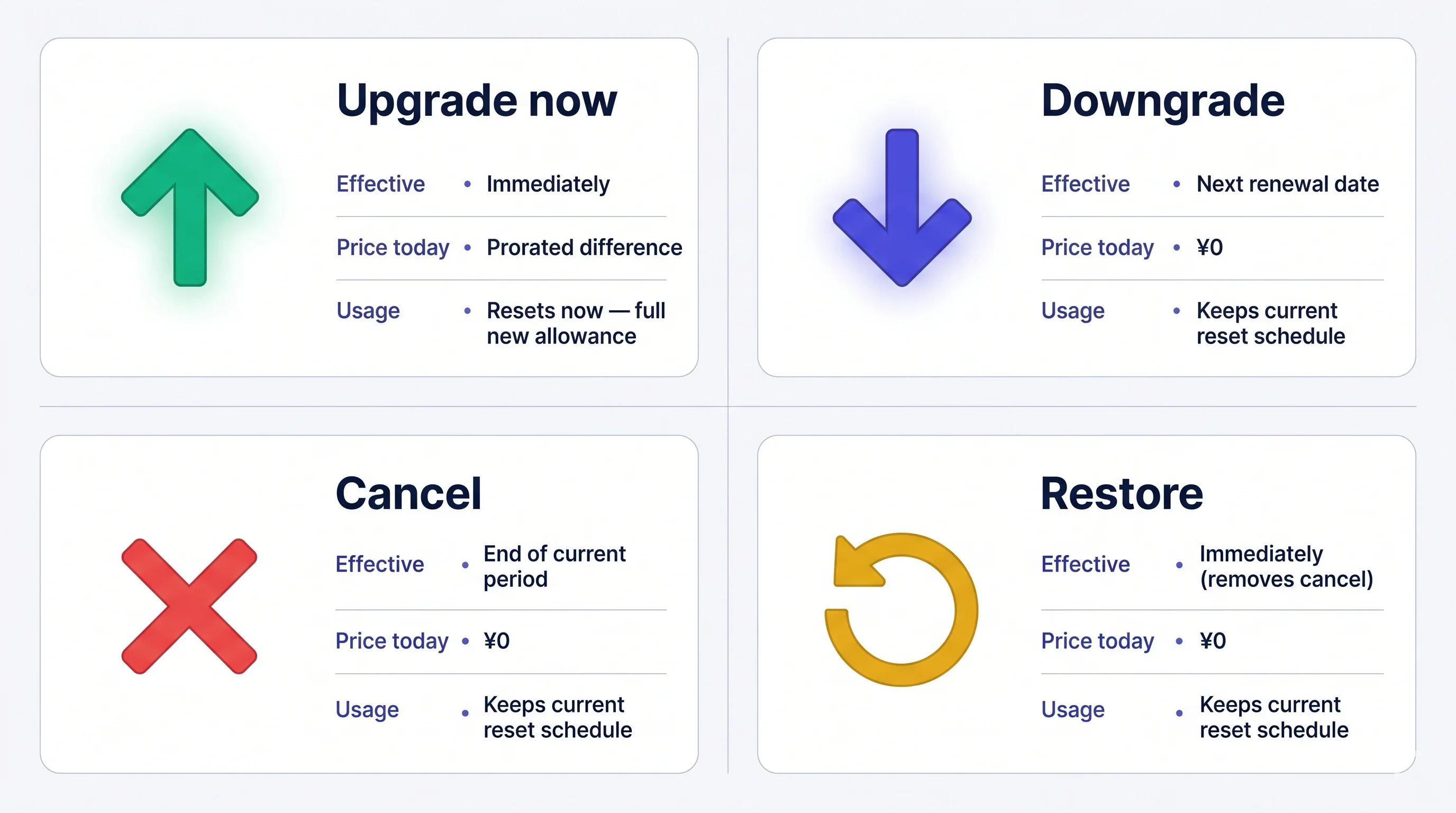 요금은 청구 후에는 **환불되지 않습니다**. 취소해도 현재 플랜은 기간 종료까지 활성 — 기간 내에는 언제든 무료로 복원할 수 있습니다.
## Manage Plan 열기
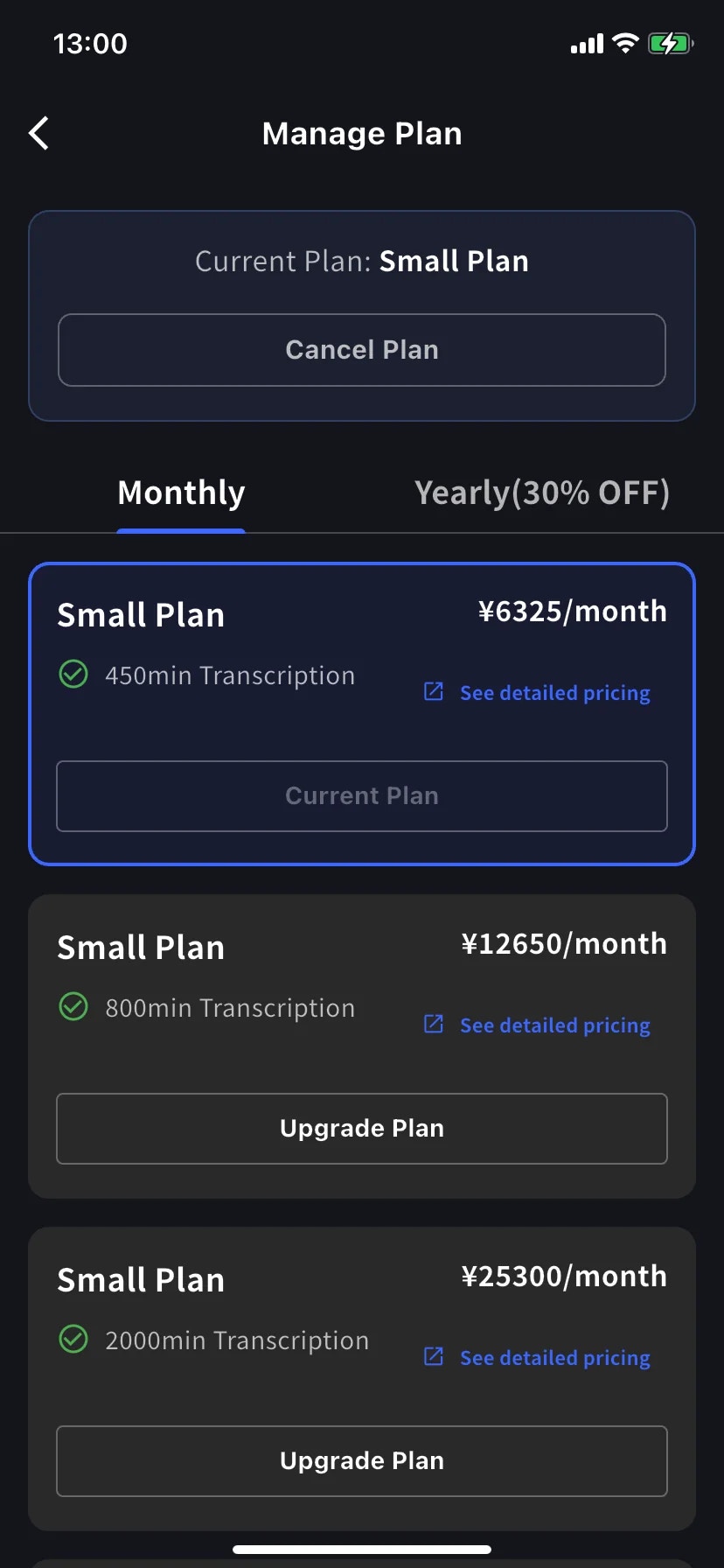
사이드 메뉴 → **User Settings** → **Billing** → **Manage Plan**, 또는 Current Plan 카드에서 바로 **Manage Plan** 탭.
* **Monthly** / **Yearly** 탭으로 사다리 전환 — 가격은 월 단위로 표시, 연간은 한 번에 청구.
* 현재 티어는 파란 테두리로 강조되고 버튼에 **Current Plan** 도장.
* 상위 티어에는 **Upgrade Plan**, 하위 티어에는 **Change Plan** 표시.
* **Cancel Plan** 은 화면 상단, 현재 플랜 배지 옆에 있습니다.
## 지금 업그레이드
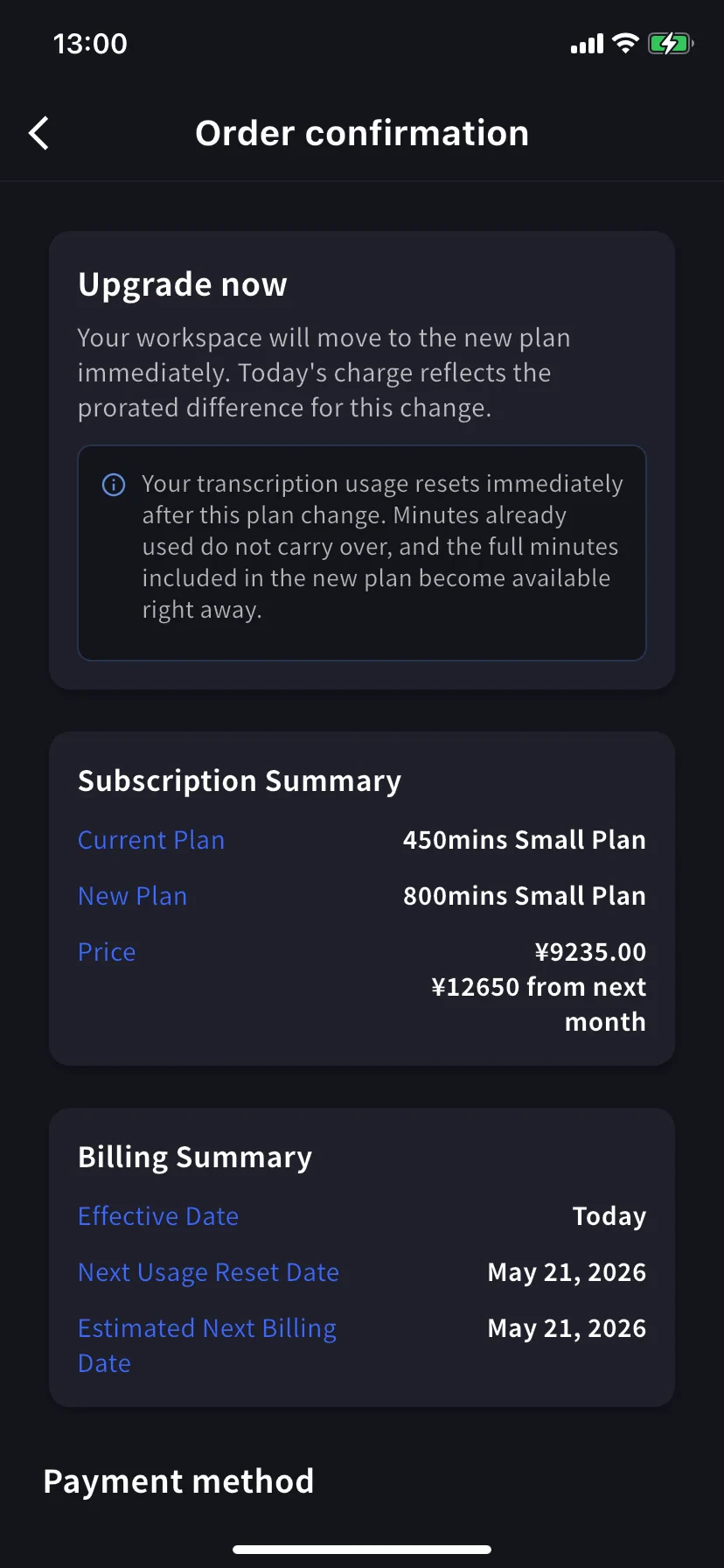
**Order confirmation** 으로 이동. 배너는 *Upgrade now — your workspace will move to the new plan immediately. Today's charge reflects the prorated difference for this change.*
**전사 사용량이 즉시 재설정됩니다.** 이미 사용한 분은 이월되지 않고, 새 플랜의 전체 분이 즉시 사용 가능해집니다.
Subscription Summary에 현재 플랜, 새 플랜, 두 가격 — 오늘 비례 금액과 다음 달부터의 정규 금액이 표시됩니다. Billing Summary가 **Effective Date: Today** 와 다음 재설정 / 결제 날짜를 확인합니다.
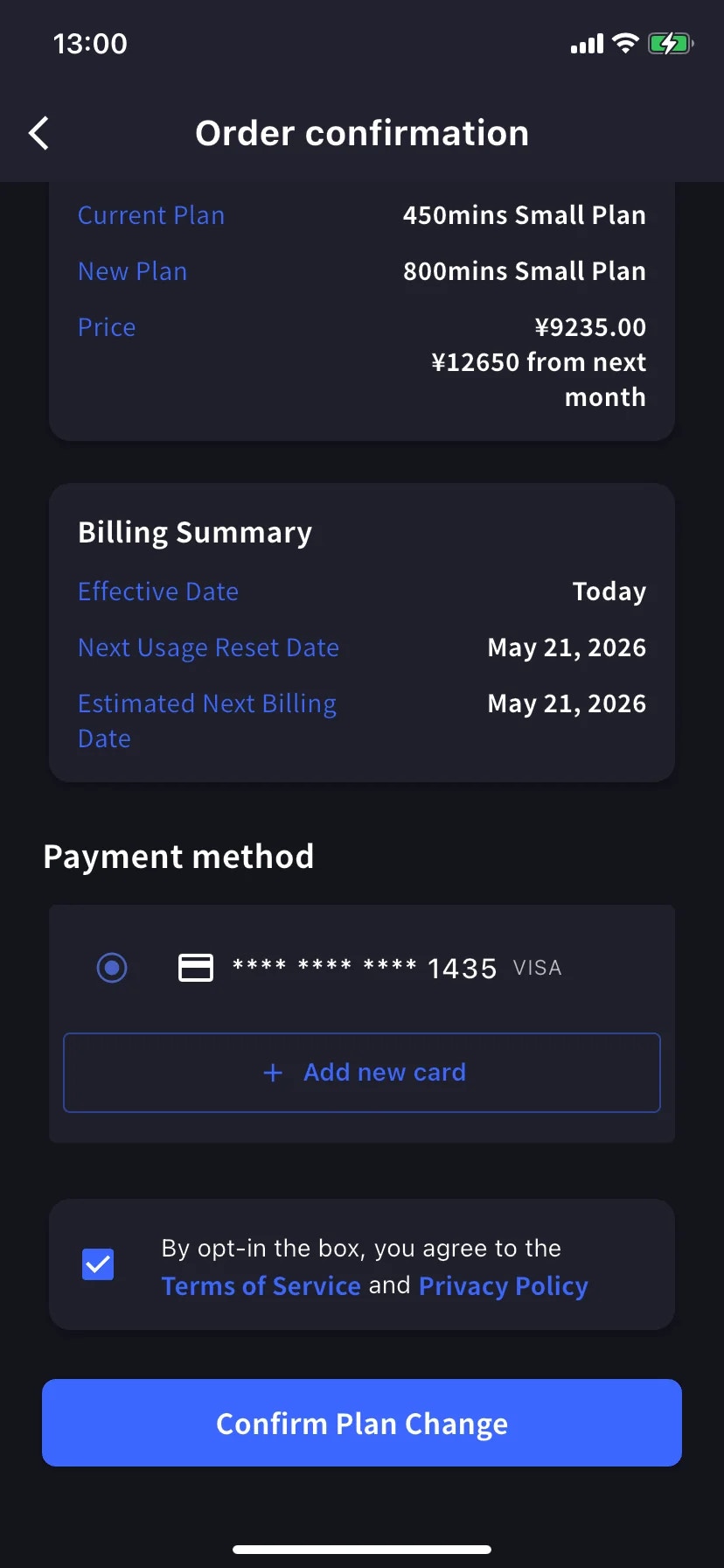
**Payment method** 로 스크롤, 기존 카드를 선택하거나 **+ Add new card** 탭해 Stripe 시트 열기 (Link 또는 수동 입력 — [모바일 결제](/ko/mobile-billing#manage-cards) 참조). 약관 / 개인정보 체크박스 체크.
파란색 **Confirm Plan Change** 버튼 탭. 청구가 처리되는 동안 버튼이 잠시 어둡게 됩니다.
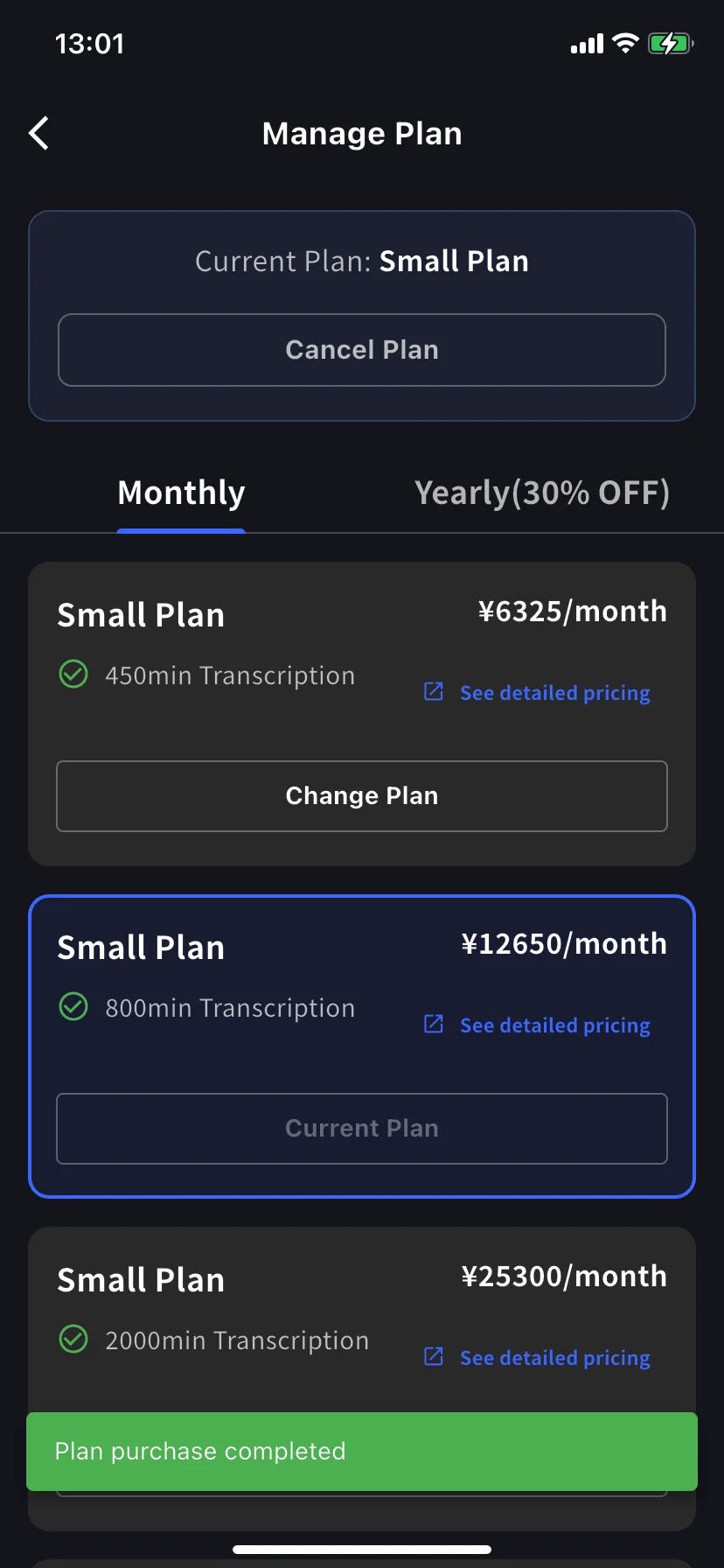
성공하면 Manage Plan으로 돌아가고 녹색 **Plan purchase completed** 토스트와 함께 새 티어가 현재 플랜으로 테두리 표시됩니다.
비례 청구는 이전 플랜에서 이미 사용한 시간을 제외하므로 결제 기간 늦게 업그레이드하면 새 플랜 정가에 가까워집니다. 가장 저렴한 업그레이드를 원하면 갱신일 근처로 — 또는 신경 쓰지 말고 필요할 때 업그레이드하세요.
## 다운그레이드 — 다음 갱신 시 적용
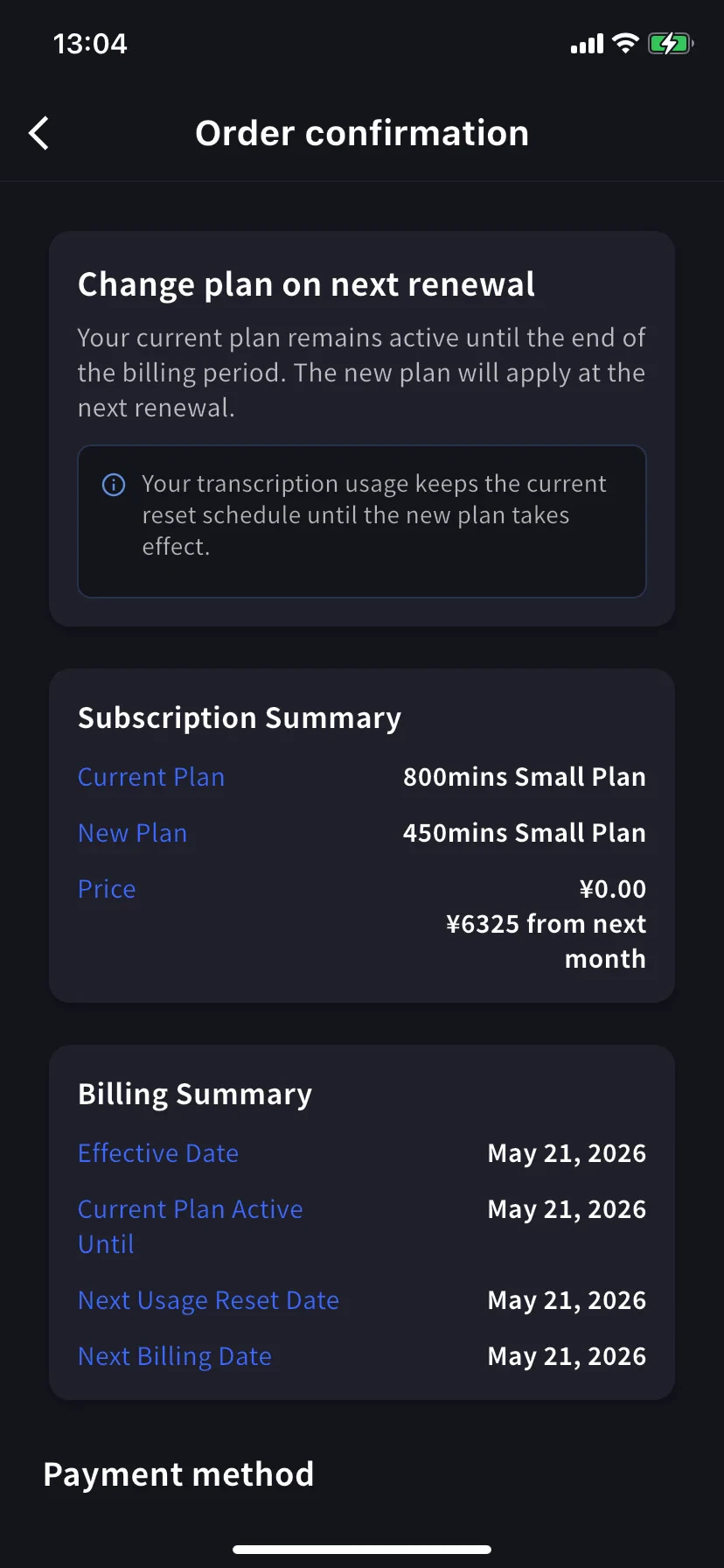
하위 티어의 **Change Plan** 탭. 확인 배너가 바뀝니다 — *Change plan on next renewal — your current plan remains active until the end of the billing period. The new plan will apply at the next renewal.*
오늘 가격은 **¥0.00** — 다음 달부터 낮은 가격을 지불합니다. Billing Summary는 **Effective Date** 와 **Current Plan Active Until** 을 갱신일로 표시합니다.
**사용량은 일정을 유지합니다.** 갱신까지 현재 플랜의 분을 유지하고, 새 낮은 할당량은 이후에 시작됩니다.
확인 방법은 업그레이드와 동일합니다.
## 구독 취소
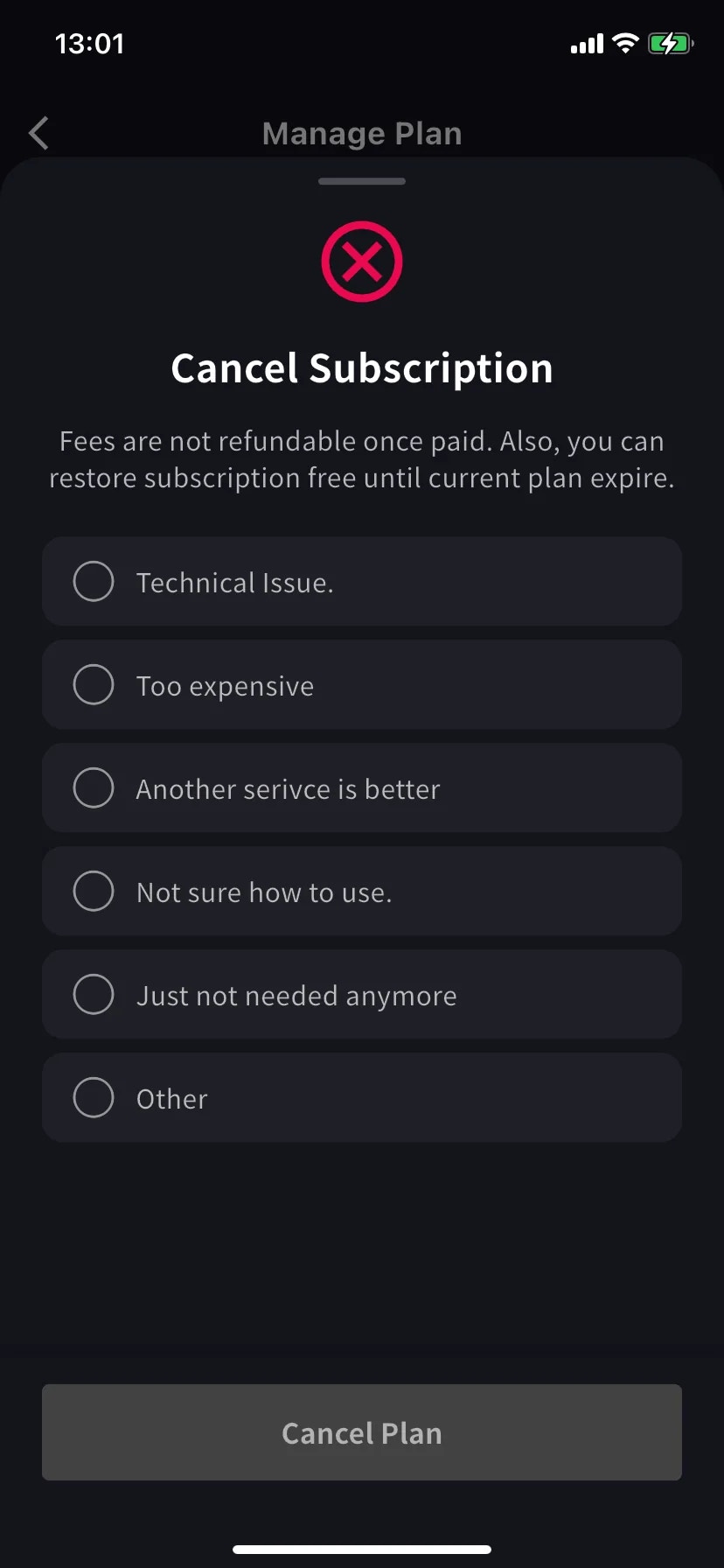
빨간 ⊗ 아이콘과 필수 이유 목록이 있는 시트가 슬라이드 업합니다.
이유 하나 선택 — 이유를 선택할 때까지 Cancel Plan 버튼은 회색.
결제된 요금은 환불되지 않습니다. 현재 플랜은 기간 종료까지 사용 가능 — 기간 내에 무료로 복원 가능.
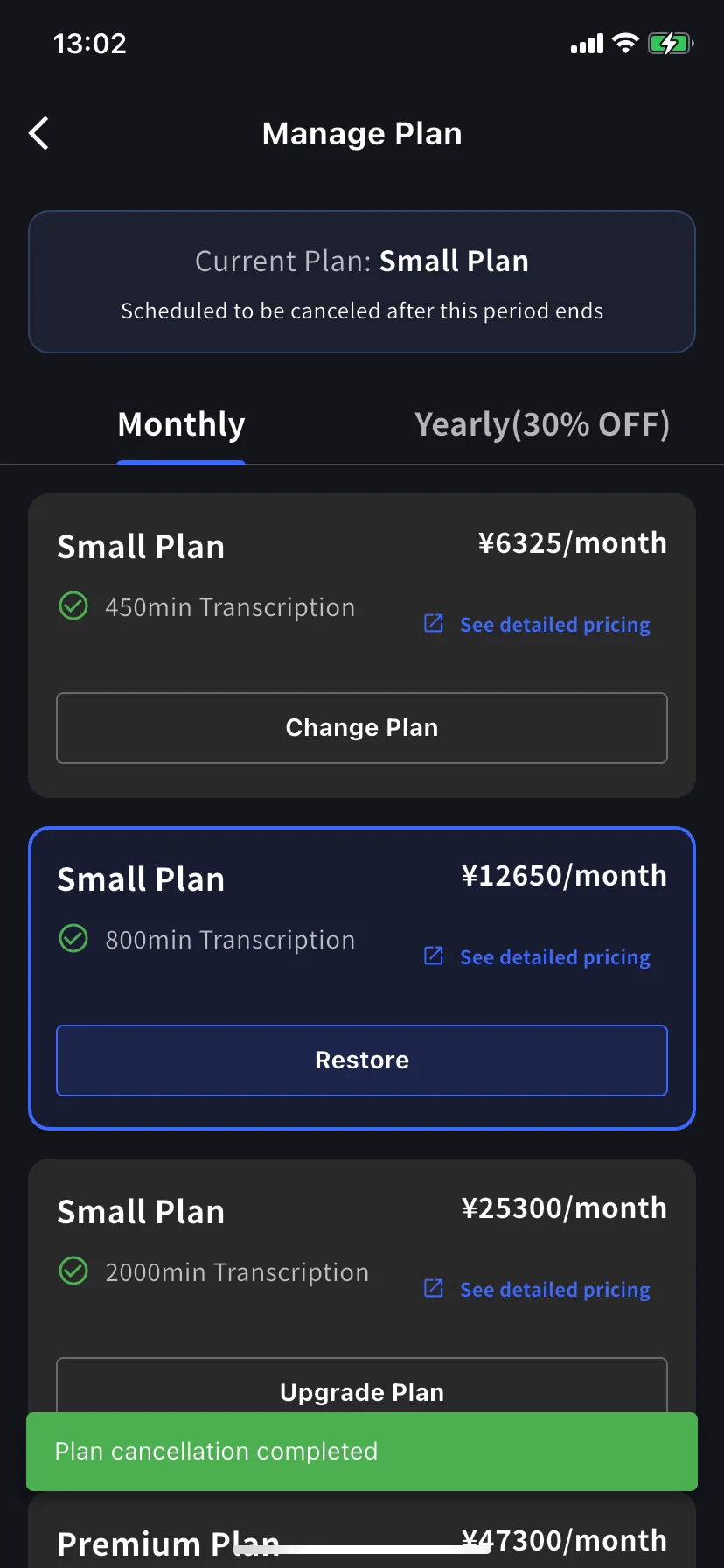
현재 플랜 배너가 **Scheduled to be canceled after this period ends** 로 바뀌고, 아래 티어에 **Restore** 버튼이 나타납니다.
녹색 **Plan cancellation completed** 토스트가 일정을 확인합니다. 갱신일까지 플랜과 모든 분을 유지합니다.
## 자동 갱신 복원
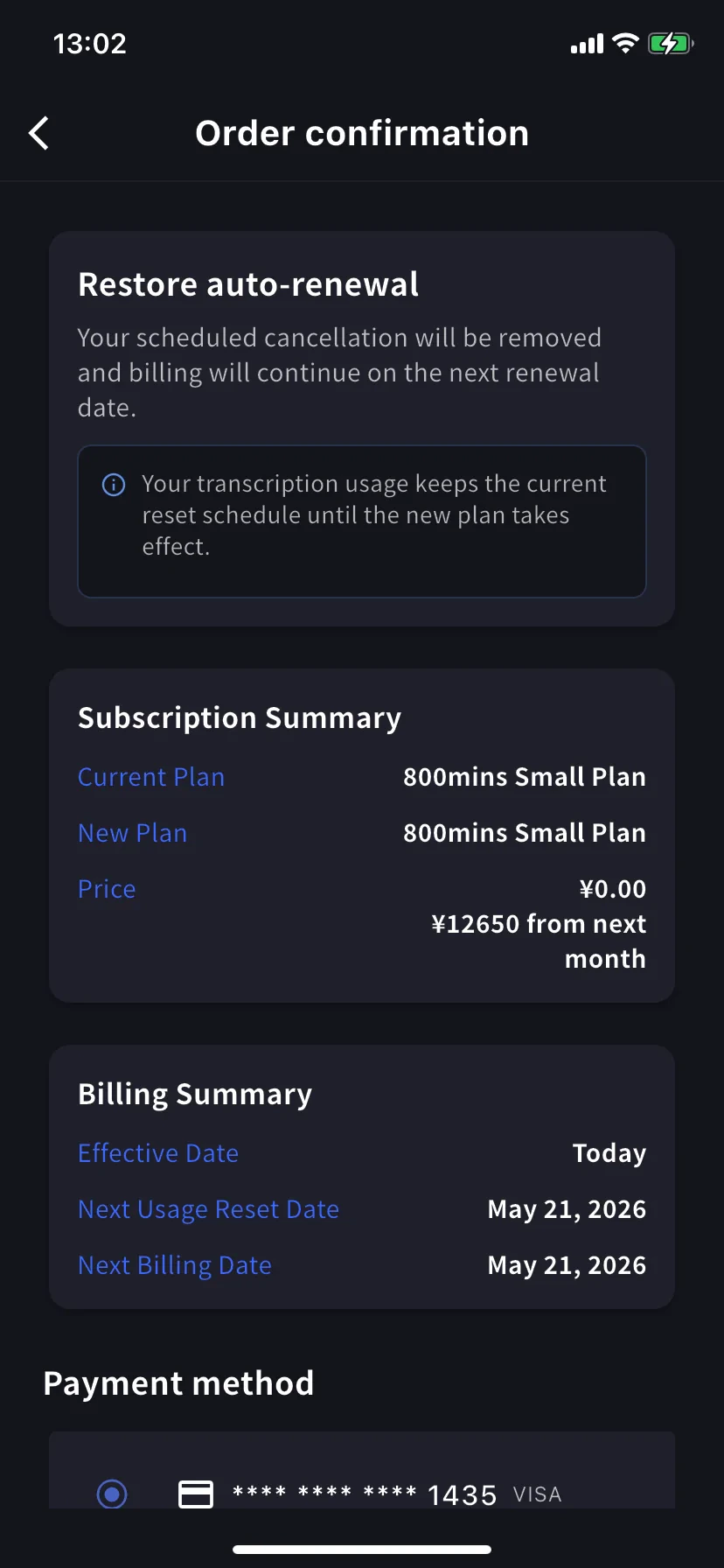
마음이 바뀌었나요? 현재 티어의 **Restore** 탭.
Order confirmation에 *Restore auto-renewal — your scheduled cancellation will be removed and billing will continue on the next renewal date.* 오늘 가격 ¥0. **Confirm Plan Change** 를 탭하면 정상 갱신 구독으로 돌아갑니다.
사용량은 현재 재설정 일정을 유지 — 복원해도 분이 재설정되지 않습니다.
## 내가 보고 있는 확인 화면은?
세 화면은 같은 레이아웃(Subscription Summary / Billing Summary / Payment method / Confirm)을 공유합니다. **배너 헤드라인** 을 읽어 확인하세요:
| 배너 | 방향 | 유효 |
| ------------------------------- | ----- | ----- |
| **Upgrade now** | 상위 티어 | 오늘 |
| **Change plan on next renewal** | 하위 티어 | 다음 갱신 |
| **Restore auto-renewal** | 취소 취소 | 오늘 |
## 팁
* **연간 탭은 30% 할인.** 오래 사용할 예정이면 같은 티어에서 Monthly → Yearly 전환은 즉시 할인이 적용된 업그레이드.
* **이후 Billing Activity를 확인.** 이 작업들은 타임스탬프와 IP로 기록됩니다 — 팀의 다른 사람도 앱을 설치한 경우 유용.
* **다운그레이드 ≠ 취소.** 다운그레이드는 (작은) 유료 플랜을 유지, 취소는 기간 종료 후 Free로 떨어뜨림. 원하는 것에 맞는 것을 선택.
* **카드를 먼저 추가.** 업그레이드할 것을 안다면 먼저 [Manage Cards](/ko/mobile-billing#manage-cards)에서 카드를 추가 — 업그레이드 흐름이 재사용합니다.
## 관련 페이지
* [모바일에서 결제 관리](/ko/mobile-billing) — 카드, 인보이스, 영수증, 활동 로그
* [플랜 변경, 취소 & 체험 종료](/ko/plan-changes) — PC 관리자 대시보드 동등 기능
* [요금](/ko/pricing) — 플랜 티어와 분수 할당량
* [무료 플랜](/ko/free-plan) / [무료 체험](/ko/free-trial)
요금은 청구 후에는 **환불되지 않습니다**. 취소해도 현재 플랜은 기간 종료까지 활성 — 기간 내에는 언제든 무료로 복원할 수 있습니다.
## Manage Plan 열기
사이드 메뉴 → **User Settings** → **Billing** → **Manage Plan**, 또는 Current Plan 카드에서 바로 **Manage Plan** 탭.
* **Monthly** / **Yearly** 탭으로 사다리 전환 — 가격은 월 단위로 표시, 연간은 한 번에 청구.
* 현재 티어는 파란 테두리로 강조되고 버튼에 **Current Plan** 도장.
* 상위 티어에는 **Upgrade Plan**, 하위 티어에는 **Change Plan** 표시.
* **Cancel Plan** 은 화면 상단, 현재 플랜 배지 옆에 있습니다.
## 지금 업그레이드
**Order confirmation** 으로 이동. 배너는 *Upgrade now — your workspace will move to the new plan immediately. Today's charge reflects the prorated difference for this change.*
**전사 사용량이 즉시 재설정됩니다.** 이미 사용한 분은 이월되지 않고, 새 플랜의 전체 분이 즉시 사용 가능해집니다.
Subscription Summary에 현재 플랜, 새 플랜, 두 가격 — 오늘 비례 금액과 다음 달부터의 정규 금액이 표시됩니다. Billing Summary가 **Effective Date: Today** 와 다음 재설정 / 결제 날짜를 확인합니다.
**Payment method** 로 스크롤, 기존 카드를 선택하거나 **+ Add new card** 탭해 Stripe 시트 열기 (Link 또는 수동 입력 — [모바일 결제](/ko/mobile-billing#manage-cards) 참조). 약관 / 개인정보 체크박스 체크.
파란색 **Confirm Plan Change** 버튼 탭. 청구가 처리되는 동안 버튼이 잠시 어둡게 됩니다.
성공하면 Manage Plan으로 돌아가고 녹색 **Plan purchase completed** 토스트와 함께 새 티어가 현재 플랜으로 테두리 표시됩니다.
비례 청구는 이전 플랜에서 이미 사용한 시간을 제외하므로 결제 기간 늦게 업그레이드하면 새 플랜 정가에 가까워집니다. 가장 저렴한 업그레이드를 원하면 갱신일 근처로 — 또는 신경 쓰지 말고 필요할 때 업그레이드하세요.
## 다운그레이드 — 다음 갱신 시 적용
하위 티어의 **Change Plan** 탭. 확인 배너가 바뀝니다 — *Change plan on next renewal — your current plan remains active until the end of the billing period. The new plan will apply at the next renewal.*
오늘 가격은 **¥0.00** — 다음 달부터 낮은 가격을 지불합니다. Billing Summary는 **Effective Date** 와 **Current Plan Active Until** 을 갱신일로 표시합니다.
**사용량은 일정을 유지합니다.** 갱신까지 현재 플랜의 분을 유지하고, 새 낮은 할당량은 이후에 시작됩니다.
확인 방법은 업그레이드와 동일합니다.
## 구독 취소
빨간 ⊗ 아이콘과 필수 이유 목록이 있는 시트가 슬라이드 업합니다.
이유 하나 선택 — 이유를 선택할 때까지 Cancel Plan 버튼은 회색.
결제된 요금은 환불되지 않습니다. 현재 플랜은 기간 종료까지 사용 가능 — 기간 내에 무료로 복원 가능.
현재 플랜 배너가 **Scheduled to be canceled after this period ends** 로 바뀌고, 아래 티어에 **Restore** 버튼이 나타납니다.
녹색 **Plan cancellation completed** 토스트가 일정을 확인합니다. 갱신일까지 플랜과 모든 분을 유지합니다.
## 자동 갱신 복원
마음이 바뀌었나요? 현재 티어의 **Restore** 탭.
Order confirmation에 *Restore auto-renewal — your scheduled cancellation will be removed and billing will continue on the next renewal date.* 오늘 가격 ¥0. **Confirm Plan Change** 를 탭하면 정상 갱신 구독으로 돌아갑니다.
사용량은 현재 재설정 일정을 유지 — 복원해도 분이 재설정되지 않습니다.
## 내가 보고 있는 확인 화면은?
세 화면은 같은 레이아웃(Subscription Summary / Billing Summary / Payment method / Confirm)을 공유합니다. **배너 헤드라인** 을 읽어 확인하세요:
| 배너 | 방향 | 유효 |
| ------------------------------- | ----- | ----- |
| **Upgrade now** | 상위 티어 | 오늘 |
| **Change plan on next renewal** | 하위 티어 | 다음 갱신 |
| **Restore auto-renewal** | 취소 취소 | 오늘 |
## 팁
* **연간 탭은 30% 할인.** 오래 사용할 예정이면 같은 티어에서 Monthly → Yearly 전환은 즉시 할인이 적용된 업그레이드.
* **이후 Billing Activity를 확인.** 이 작업들은 타임스탬프와 IP로 기록됩니다 — 팀의 다른 사람도 앱을 설치한 경우 유용.
* **다운그레이드 ≠ 취소.** 다운그레이드는 (작은) 유료 플랜을 유지, 취소는 기간 종료 후 Free로 떨어뜨림. 원하는 것에 맞는 것을 선택.
* **카드를 먼저 추가.** 업그레이드할 것을 안다면 먼저 [Manage Cards](/ko/mobile-billing#manage-cards)에서 카드를 추가 — 업그레이드 흐름이 재사용합니다.
## 관련 페이지
* [모바일에서 결제 관리](/ko/mobile-billing) — 카드, 인보이스, 영수증, 활동 로그
* [플랜 변경, 취소 & 체험 종료](/ko/plan-changes) — PC 관리자 대시보드 동등 기능
* [요금](/ko/pricing) — 플랜 티어와 분수 할당량
* [무료 플랜](/ko/free-plan) / [무료 체험](/ko/free-trial)