> ## Documentation Index
> Fetch the complete documentation index at: https://manual.voiceping.net/llms.txt
> Use this file to discover all available pages before exploring further.
# Product Feedback
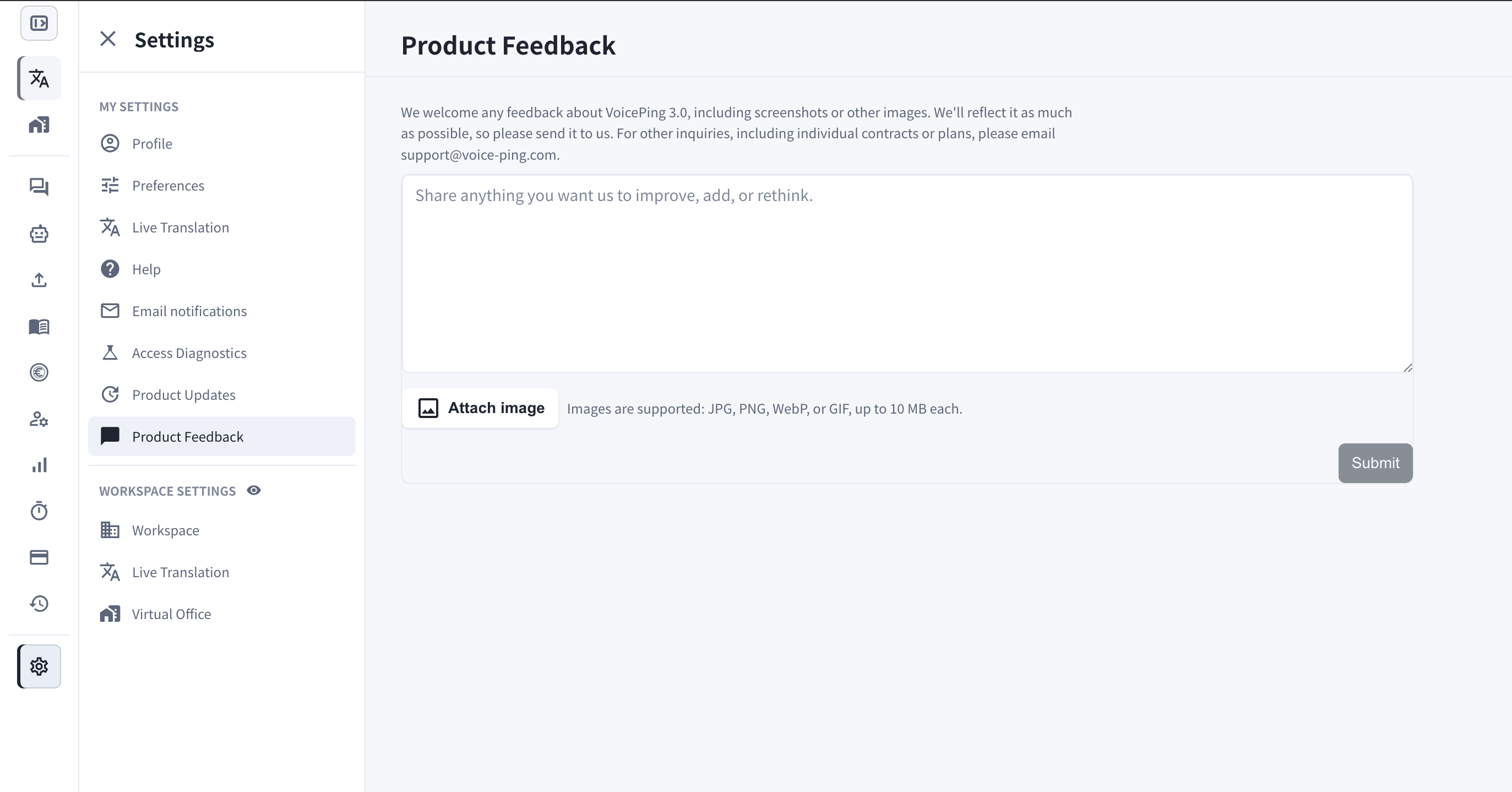
> Settings > Product Feedback에서 개선 아이디어와 요청, 스크린샷을 VoicePing 팀에 보냅니다.
export const ContactKo = () => <>
문의 사항이 있으시면 이 양식을 통해 연락해 주세요.
## 공식 링크
공식 웹사이트 방문
X에서 팔로우
Facebook에서 좋아요
LinkedIn에서 연결
;
 Product Feedback을 사용하면 VoicePing 3.0에 대한 의견을 앱 안에서 팀에 직접 보낼 수 있습니다.
## 무엇을 위한 기능인가요?
* **개선, 추가, 재검토**가 필요하다고 생각하는 것은 무엇이든 공유하세요 — 기능 요청, 사용성 문제, 불편한 부분 등.
* **스크린샷이나 이미지**를 첨부해 상황을 정확하게 전달할 수 있습니다.
* 제출된 내용은 VoicePing 팀에 바로 전달되며, 가능한 한 제품에 반영합니다.
개별 계약이나 플랜 등 기타 문의는 [support@voice-ping.com](mailto:support@voice-ping.com)으로 이메일을 보내주세요.
## 여는 방법
1. **Settings**를 엽니다.
2. **My Settings**에서 **Product Feedback**을 선택합니다.
3. 텍스트 상자에 메시지를 입력합니다.
4. 필요하면 **Attach image**를 클릭합니다 — JPG, PNG, WebP, GIF를 지원하며 각 파일 최대 10 MB입니다.
5. **Submit**을 클릭합니다.
Product Feedback을 사용하면 VoicePing 3.0에 대한 의견을 앱 안에서 팀에 직접 보낼 수 있습니다.
## 무엇을 위한 기능인가요?
* **개선, 추가, 재검토**가 필요하다고 생각하는 것은 무엇이든 공유하세요 — 기능 요청, 사용성 문제, 불편한 부분 등.
* **스크린샷이나 이미지**를 첨부해 상황을 정확하게 전달할 수 있습니다.
* 제출된 내용은 VoicePing 팀에 바로 전달되며, 가능한 한 제품에 반영합니다.
개별 계약이나 플랜 등 기타 문의는 [support@voice-ping.com](mailto:support@voice-ping.com)으로 이메일을 보내주세요.
## 여는 방법
1. **Settings**를 엽니다.
2. **My Settings**에서 **Product Feedback**을 선택합니다.
3. 텍스트 상자에 메시지를 입력합니다.
4. 필요하면 **Attach image**를 클릭합니다 — JPG, PNG, WebP, GIF를 지원하며 각 파일 최대 10 MB입니다.
5. **Submit**을 클릭합니다.