> ## Documentation Index
> Fetch the complete documentation index at: https://manual.voiceping.net/llms.txt
> Use this file to discover all available pages before exploring further.

# เวิร์กโฟลว์ — ส่งอีเมลติดตามผลใน 30 วินาที

> เปลี่ยนบันทึกการประชุมที่เพิ่งจบให้เป็นอีเมลติดตามผลอย่างมืออาชีพ — สรุป การตัดสินใจที่ยืนยันแล้ว รายการงานพร้อมผู้รับผิดชอบ ขั้นตอนถัดไป ใช้ VoicePing MCP Access

export const FeedbackTh = () => <>
    <Tip>
      มีไอเดียหรือคำขอเกี่ยวกับฟีเจอร์นี้ไหม? ส่งถึงทีมผ่าน <a href="/th/product-feedback">Product Feedback</a>
    </Tip>

    <h2>ลิงก์อย่างเป็นทางการ</h2>

    <CardGroup cols={2}>
      <Card title="เว็บไซต์อย่างเป็นทางการ" icon="globe" href="https://voiceping.net/en/">
        เยี่ยมชมเว็บไซต์อย่างเป็นทางการของเรา
      </Card>
      <Card title="X (Twitter)" icon="x-twitter" href="https://x.com/VoicePingMedia">
        ติดตามเราบน X
      </Card>
      <Card title="Facebook" icon="facebook" href="https://www.facebook.com/voiceping.inc">
        ติดตามเราบน Facebook
      </Card>
      <Card title="LinkedIn" icon="linkedin" href="https://www.linkedin.com/company/28684130/">
        เชื่อมต่อบน LinkedIn
      </Card>
    </CardGroup>
  </>;

## ส่งอีเมลติดตามผลใน 30 วินาที

**สถานการณ์.** การประชุมเพิ่งจบ ทุกคนจำสิ่งที่ถูกตัดสินใจได้ประมาณ 40% ใครก็ตามที่ส่งสรุปแรกคือคนที่บันทึกข้อมูล — และล็อกรายการงาน นี่คือนิสัยที่ให้เลเวอเรจสูงสุดในทีมขายหรือโครงการใดๆ

เวิร์กโฟลว์นี้สมมติว่าคุณได้เปิดใช้งาน [MCP Access](/th/external-access/mcp) และเชื่อมต่อไคลเอนต์ AI ของคุณแล้ว

<Steps>
  <Step title="ดึงบริบทของการประชุม">
    ```text theme={null}
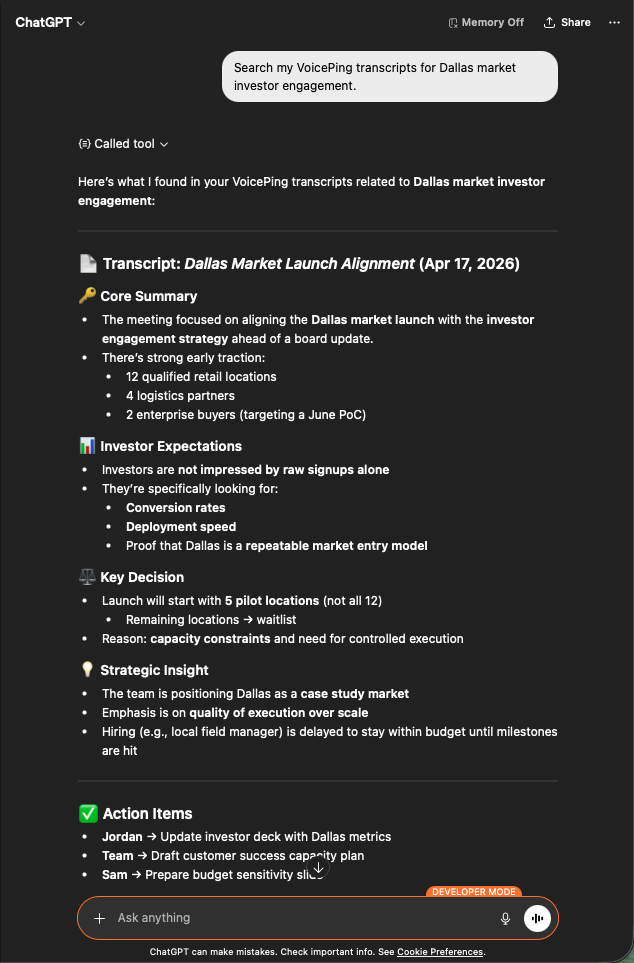
    Search my VoicePing transcripts for Dallas market investor engagement.
    ```

    คุณจะได้สรุปที่มีโครงสร้าง: บทสรุปหลัก ความคาดหวังของนักลงทุน การตัดสินใจสำคัญ ข้อมูลเชิงยุทธศาสตร์ และรายการงานพร้อมผู้รับผิดชอบ วัสดุที่อีเมลติดตามผลต้องการพอดี

    <div style={{maxWidth: "600px", margin: "0 auto"}}>
      <Frame>
        <img src="https://mintcdn.com/test-cf63e467/z13MfE0CikV5b-4X/en/images/external_access/Follow-up%20email%20creation%201.png?fit=max&auto=format&n=z13MfE0CikV5b-4X&q=85&s=6da6641338869dad182dbb481af32b15" alt="ChatGPT surfacing a Dallas Market Launch transcript with core summary, investor expectations, key decisions, and action items" width="634" height="963" data-path="en/images/external_access/Follow-up email creation 1.png" />
      </Frame>
    </div>
  </Step>

  <Step title="ขอฉบับร่างอีเมล">
    ```text theme={null}
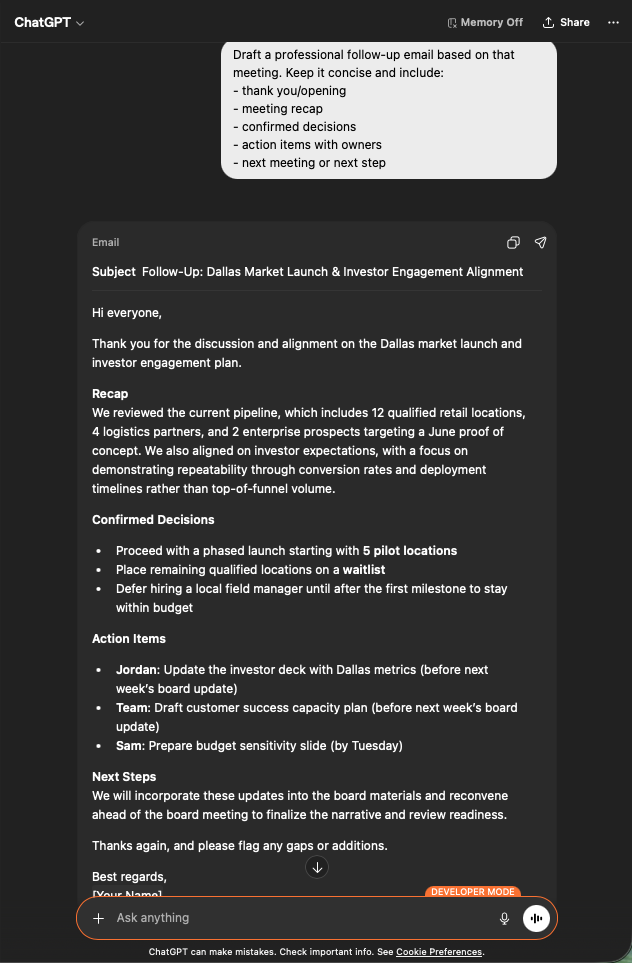
    Draft a professional follow-up email based on that meeting.
    Keep it concise and include:
    - thank you / opening
    - meeting recap
    - confirmed decisions
    - action items with owners
    - next meeting or next step
    ```

    คุณจะได้อีเมลที่พร้อมส่ง: หัวข้อ สรุปสั้นกระชับ การตัดสินใจแบบ bullet รายการงานที่แท็กผู้รับผิดชอบที่ถูกต้องและกำหนดเวลา วางลงใน Gmail ตรวจสอบ แล้วส่ง

    <div style={{maxWidth: "600px", margin: "0 auto"}}>
      <Frame>
        <img src="https://mintcdn.com/test-cf63e467/z13MfE0CikV5b-4X/en/images/external_access/Follow-up%20email%20creation%202.png?fit=max&auto=format&n=z13MfE0CikV5b-4X&q=85&s=7440cfa879ba68ec0a1ade3cd9c2f0d5" alt="ChatGPT generating a professional follow-up email draft with subject, recap, decisions, and assigned action items" width="632" height="963" data-path="en/images/external_access/Follow-up email creation 2.png" />
      </Frame>
    </div>
  </Step>
</Steps>

**ทำไมสิ่งนี้จึงสำคัญ.** คุณภาพของอีเมลติดตามผลเป็นตัวชี้วัดล่วงหน้าของความเร็วในการปิดดีล การทำให้มันเป็นงาน 30 วินาทีจะขจัดเหตุผลที่คนมักข้ามมันไป

***

## ขั้นตอนถัดไป

<CardGroup cols={2}>
  <Card title="ภาพรวม External Access" icon="arrow-left" href="/th/external-access">
    กลับสู่ศูนย์กลางเพื่อดูขอบเขต การควบคุมวงจรชีวิต และบันทึกเหตุการณ์
  </Card>

  <Card title="วิธีเปิด MCP Access" icon="plug" href="/th/external-access/mcp">
    คู่มือตั้งค่าสำหรับ Claude, ChatGPT, Codex, Claude Code และ Gemini CLI
  </Card>
</CardGroup>

<FeedbackTh />