> ## Documentation Index
> Fetch the complete documentation index at: https://manual.voiceping.net/llms.txt
> Use this file to discover all available pages before exploring further.

# เวิร์กโฟลว์ — ร่างข้อเสนอให้ลูกค้าจากการประชุมเดียว

> เปลี่ยนบันทึกการประชุมทบทวนข้อเสนอให้เป็นข้อเสนอฉบับร่างพร้อมเสนอผู้บริหาร — สรุปผู้บริหาร สถานการณ์ลูกค้า โซลูชันที่เสนอ ไทม์ไลน์ ขั้นตอนถัดไป ใช้ VoicePing MCP Access

export const FeedbackTh = () => <>
    <Tip>
      มีไอเดียหรือคำขอเกี่ยวกับฟีเจอร์นี้ไหม? ส่งถึงทีมผ่าน <a href="/th/product-feedback">Product Feedback</a>
    </Tip>

    <h2>ลิงก์อย่างเป็นทางการ</h2>

    <CardGroup cols={2}>
      <Card title="เว็บไซต์อย่างเป็นทางการ" icon="globe" href="https://voiceping.net/en/">
        เยี่ยมชมเว็บไซต์อย่างเป็นทางการของเรา
      </Card>
      <Card title="X (Twitter)" icon="x-twitter" href="https://x.com/VoicePingMedia">
        ติดตามเราบน X
      </Card>
      <Card title="Facebook" icon="facebook" href="https://www.facebook.com/voiceping.inc">
        ติดตามเราบน Facebook
      </Card>
      <Card title="LinkedIn" icon="linkedin" href="https://www.linkedin.com/company/28684130/">
        เชื่อมต่อบน LinkedIn
      </Card>
    </CardGroup>
  </>;

## ร่างข้อเสนอให้ลูกค้าจากการประชุมเดียว

**สถานการณ์.** การประชุมทบทวนข้อเสนอเพิ่งจะจบลง ลูกค้าแจ้งเป้าหมาย ยกประเด็นเรื่องความปลอดภัย 2 เรื่อง และขอไทม์ไลน์แบบแบ่งเฟส ตอนนี้คุณต้องเปลี่ยนการสนทนานั้นให้เป็นข้อเสนออย่างเป็นทางการ ความยากไม่ใช่การเขียน — แต่คือการไม่พลาดสัญญาณใดๆ

เวิร์กโฟลว์นี้สมมติว่าคุณได้เปิดใช้งาน [MCP Access](/th/external-access/mcp) และเชื่อมต่อไคลเอนต์ AI ของคุณแล้ว

<Steps>
  <Step title="ค้นหาการประชุมที่เจาะจง">
    ```text theme={null}
    Search my VoicePing transcripts for the Northstar Capital proposal review meeting.
    Find the most relevant transcript and show me the title, date, participants
    if available, and why it matches.
    ```

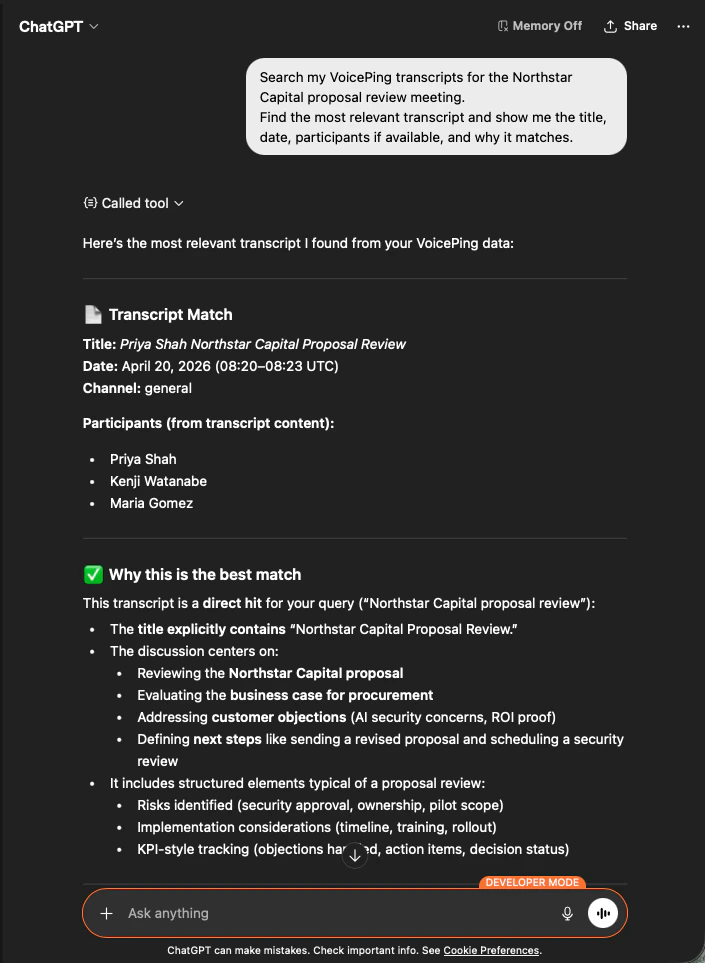
    AI ระบุบันทึกที่ตรงกันพอดี แสดงรายชื่อผู้เข้าร่วม และอธิบายว่าทำไมถึงเป็นผลลัพธ์ที่ถูกต้อง — เพื่อให้คุณรู้ว่าข้อเสนอสร้างขึ้นจากการโทรที่ถูกต้อง

    <div style={{maxWidth: "600px", margin: "0 auto"}}>
      <Frame>
        <img src="https://mintcdn.com/test-cf63e467/z13MfE0CikV5b-4X/en/images/external_access/proposal%20creation%201.png?fit=max&auto=format&n=z13MfE0CikV5b-4X&q=85&s=541234a4b6549b663c1410f3344d4edb" alt="ChatGPT identifying the Northstar Capital proposal review transcript with participants and match reasoning" width="705" height="963" data-path="en/images/external_access/proposal creation 1.png" />
      </Frame>
    </div>
  </Step>

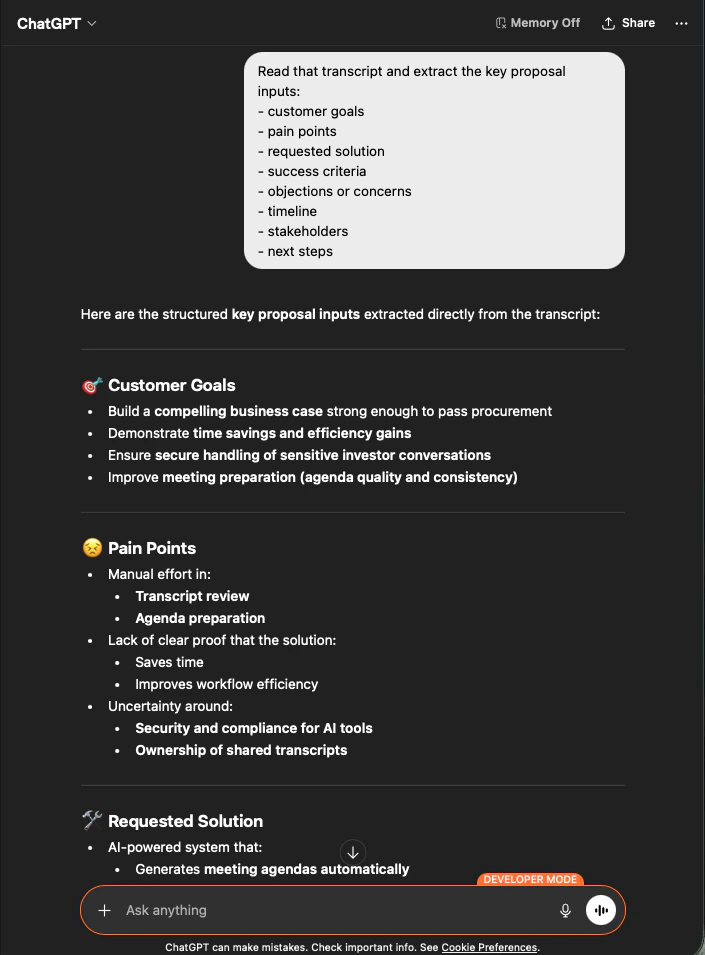
  <Step title="สกัดอินพุตข้อเสนอแบบมีโครงสร้าง">
    ```text theme={null}
    Read that transcript and extract the key proposal inputs:
    - customer goals
    - pain points
    - requested solution
    - success criteria
    - objections or concerns
    - timeline
    - stakeholders
    - next steps
    ```

    AI ดึงอินพุตทุกอย่างออกมา จัดกลุ่มตามที่คุณขอเป๊ะ นี่คือโครงของข้อเสนอของคุณ — ไม่มีอะไรถูกคิดขึ้นใหม่ ทุกอย่างสืบย้อนกลับไปยังบันทึกได้

    <div style={{maxWidth: "600px", margin: "0 auto"}}>
      <Frame>
        <img src="https://mintcdn.com/test-cf63e467/z13MfE0CikV5b-4X/en/images/external_access/proposal%20creation%202.png?fit=max&auto=format&n=z13MfE0CikV5b-4X&q=85&s=65915e908ac022464f1668c6b920706e" alt="ChatGPT extracting structured proposal inputs — customer goals, pain points, requested solution — from a Northstar Capital transcript" width="705" height="955" data-path="en/images/external_access/proposal creation 2.png" />
      </Frame>
    </div>
  </Step>

  <Step title="สร้างข้อเสนอฉบับร่าง">
    ```text theme={null}
    Create a customer proposal draft based only on this meeting.
    Structure it with:
    - executive summary
    - customer situation
    - proposed solution
    - implementation scope
    - expected value
    - security or operational considerations
    - timeline
    - next steps
    ```

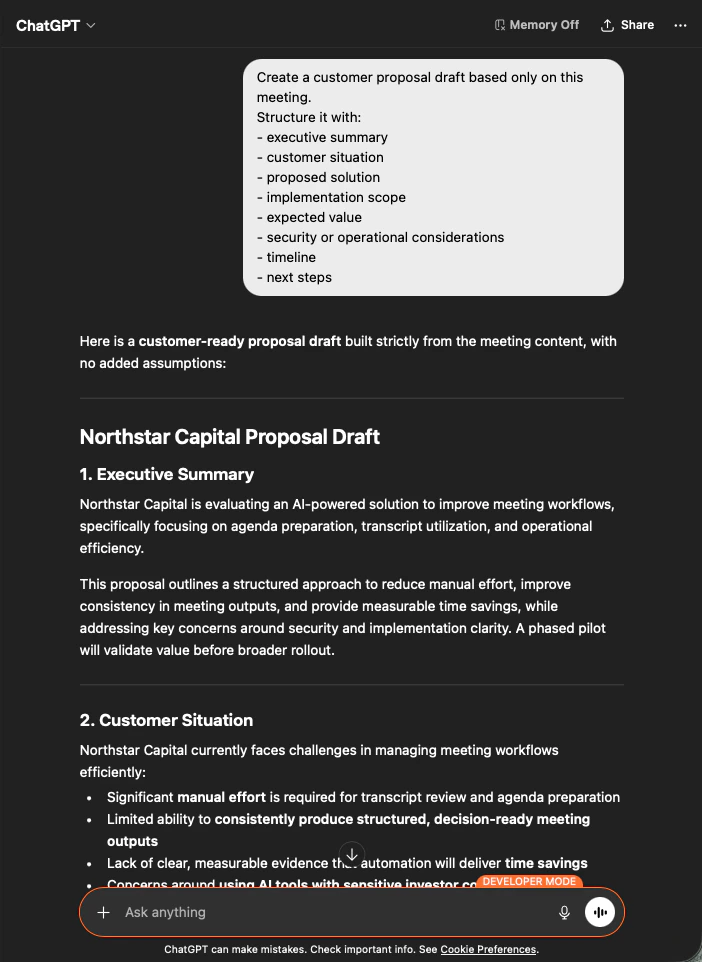
    ผลลัพธ์คือข้อเสนอฉบับร่างเต็มรูปแบบ — สรุปผู้บริหารอยู่ด้านบน จากนั้นแต่ละส่วนถูกเติมเต็มโดยเคร่งครัดจากเนื้อหาการประชุม คุณแก้ไขน้ำเสียงและส่ง

    <div style={{maxWidth: "600px", margin: "0 auto"}}>
      <Frame>
        <img src="https://mintcdn.com/test-cf63e467/z13MfE0CikV5b-4X/en/images/external_access/proposal%20creation%203.png?fit=max&auto=format&n=z13MfE0CikV5b-4X&q=85&s=9ef5ea2d403eadf232efd486e8c1a7c8" alt="ChatGPT producing a customer-ready Northstar Capital proposal draft built strictly from meeting content" width="702" height="962" data-path="en/images/external_access/proposal creation 3.png" />
      </Frame>
    </div>
  </Step>
</Steps>

<Note>
  การบอก AI ให้สร้าง **"based only on this meeting"** และ **"with no added assumptions"** คือความแตกต่างระหว่างข้อเสนอที่คุณส่งได้จริง กับข้อเสนอที่คุณต้องตรวจสอบความถูกต้องทีละบรรทัด
</Note>

***

## ขั้นตอนถัดไป

<CardGroup cols={2}>
  <Card title="ภาพรวม External Access" icon="arrow-left" href="/th/external-access">
    กลับสู่ศูนย์กลางเพื่อดูขอบเขต การควบคุมวงจรชีวิต และบันทึกเหตุการณ์
  </Card>

  <Card title="วิธีเปิด MCP Access" icon="plug" href="/th/external-access/mcp">
    คู่มือตั้งค่าสำหรับ Claude, ChatGPT, Codex, Claude Code และ Gemini CLI
  </Card>
</CardGroup>

<FeedbackTh />