> ## Documentation Index
> Fetch the complete documentation index at: https://manual.voiceping.net/llms.txt
> Use this file to discover all available pages before exploring further.
# วิธีเริ่มต้นทดลองใช้ฟรี 1 สัปดาห์
> วิธีเริ่มต้นทดลองใช้ฟรี 1 สัปดาห์ของแผนพรีเมียม
export const ContactTh = () => <>
หากคุณมีคำถามใดๆ กรุณาติดต่อเราผ่าน แบบฟอร์มนี้
ลิงก์อย่างเป็นทางการ
เยี่ยมชมเว็บไซต์อย่างเป็นทางการของเรา
ติดตามเราบน X
ติดตามเราบน Facebook
เชื่อมต่อบน LinkedIn
;
## 1. สมัครสมาชิก & สร้าง Workspace
[ตั้งค่า Workspace](/th/owner-signup)
## 2. เริ่มต้นทดลองใช้ฟรี
### WEB App Registration Steps
1. เข้าสู่ระบบได้[ที่นี่](https://app.voiceping.io/user/login/)
2. เปิดหน้า **Billing** จากแถบด้านซ้าย ที่แท็บ **Subscriptions** คลิก **1 Week Free Trial** ใต้ **Premium Plan**
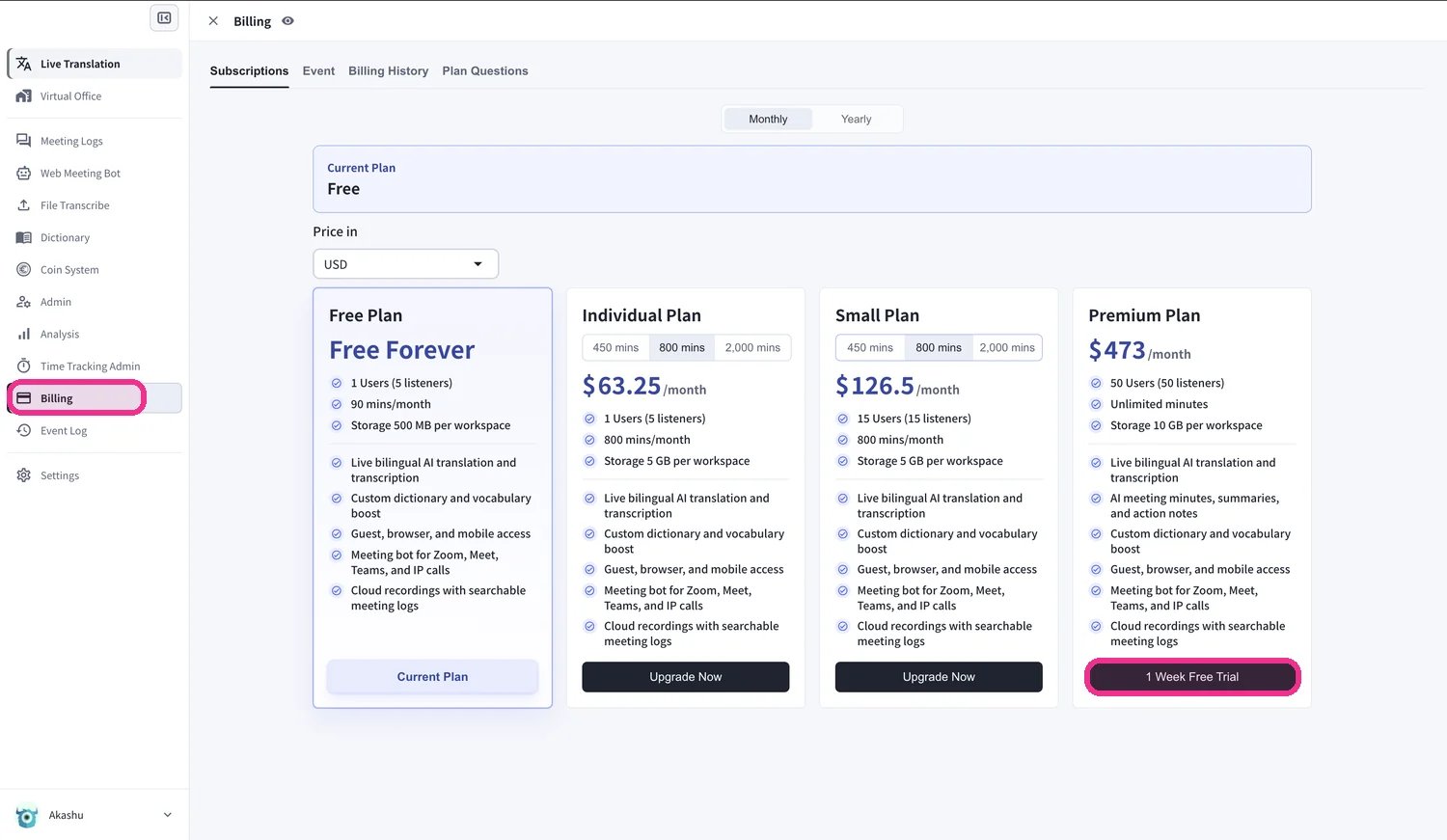 3. กล่องโต้ตอบ **Paid Plan Trial policy** จะปรากฏขึ้น ตรวจสอบว่าช่วงทดลองใช้จะสิ้นสุดเมื่อใด — หลังจากสิ้นสุดแล้ว Workspace ของคุณจะกลับไปใช้แผน Free เว้นแต่คุณจะซื้อแผนแบบชำระเงินแยกต่างหาก
 4. ทำเครื่องหมายที่ **Do you agree with above?** จากนั้นคลิก **Start Trial**
 5. กรอก **รายละเอียดบัตร** ของคุณในหน้าชำระเงินที่ปลอดภัยของ Stripe จากนั้นคลิก **Subscribe** ช่วงทดลองใช้นั้นฟรี — บัตรของคุณจะถูกเรียกเก็บเงินหลังจากช่วงทดลองใช้สิ้นสุดลงเท่านั้น
 6. เมื่อยืนยันการชำระเงินแล้ว คุณจะเห็น **"Your Premium plan is active"** คลิก **View subscription**
 7. หน้า **Subscriptions** ของคุณจะแสดง **Premium** เป็นแผนปัจจุบัน พร้อมกับวันที่เรียกเก็บเงินครั้งถัดไป
 เพื่อยืนยันว่าการทดลองใช้เริ่มต้นแล้ว ให้เปิดแท็บ **Billing History** คุณจะเห็นรายการ **Succeeded to start Trial** และ **Succeeded to add payment method**
 ## วิธียกเลิก
การยกเลิกจะเสร็จสมบูรณ์เมื่อคุณสลับกลับไปใช้ **Free plan** ที่แท็บ **Subscriptions** ของหน้า **Billing** คลิก **Start Free Plan** ใต้ **Free Plan**
## วิธียกเลิก
การยกเลิกจะเสร็จสมบูรณ์เมื่อคุณสลับกลับไปใช้ **Free plan** ที่แท็บ **Subscriptions** ของหน้า **Billing** คลิก **Start Free Plan** ใต้ **Free Plan**
