> ## Documentation Index
> Fetch the complete documentation index at: https://manual.voiceping.net/llms.txt
> Use this file to discover all available pages before exploring further.
# ใบแจ้งหนี้ ใบเสร็จ และกิจกรรมการเรียกเก็บเงิน
> ดาวน์โหลด PDF ใบแจ้งหนี้และใบเสร็จ อัปเดตข้อมูลผู้รับบิล และตรวจสอบเหตุการณ์แพลน
export const ContactTh = () => <>
หากคุณมีคำถามใดๆ กรุณาติดต่อเราผ่าน แบบฟอร์มนี้
ลิงก์อย่างเป็นทางการ
เยี่ยมชมเว็บไซต์อย่างเป็นทางการของเรา
ติดตามเราบน X
ติดตามเราบน Facebook
เชื่อมต่อบน LinkedIn
;
ทุกสิ่งที่คุณต้องการในการตรวจสอบการสมัครของคุณรวมอยู่ในที่เดียว: ส่วน **Billing** บน PC และฮับ **Billing** บนมือถือ ดาวน์โหลดไฟล์ PDF ใบแจ้งหนี้ รับใบเสร็จรับเงิน แก้ไขฟิลด์การเรียกเก็บเงินที่ปรากฏในใบแจ้งหนี้ในอนาคต และตรวจสอบบันทึกเหตุการณ์ทั้งหมด
## บน PC (แท็บ Billing)
เปิดการนำทางด้านบน → **Billing** สองแท็บครอบคลุมการจัดการใบแจ้งหนี้:
| แท็บ | มันมีไว้เพื่ออะไร |
| -------------------------------- | ------------------------------------------------------------------------------------------------------- |
| **Invoice Details** | ชื่อผู้เรียกเก็บเงิน อีเมล และหมายเลขโทรศัพท์ที่ปรากฏในใบแจ้งหนี้ PDF ของคุณ |
| **Invoice and Receipt Download** | Monthly รายการค่าใช้จ่ายพร้อมใบแจ้งหนี้ PDF และใบเสร็จรับเงินที่ดาวน์โหลดได้ |
| **Billing History** | Full subscription, payment-method, trial, cancellation, restore, renewal, and payment-failure event log |
### Invoice Details
ตั้งชื่อ อีเมล และโทรศัพท์ที่ Stripe ประทับลงในไฟล์ PDF ใบแจ้งหนี้ของคุณ
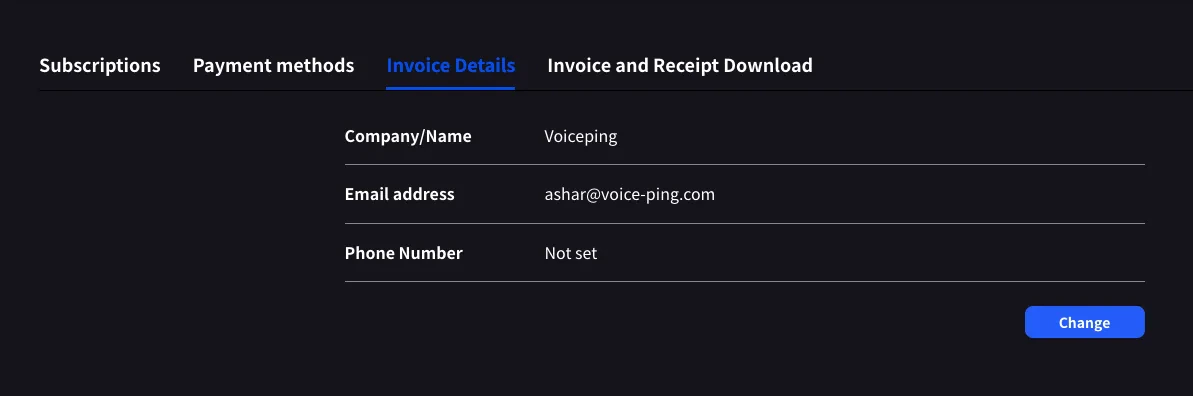 คลิก **Change** เพื่อแก้ไขฟิลด์ใดๆ
อัปเดต **before** วันที่เรียกเก็บเงินครั้งถัดไปของคุณ Stripe อ่านฟิลด์เหล่านี้ในขณะที่สร้างใบแจ้งหนี้ การแก้ไขในภายหลังจะไม่รีสแตมป์ PDF ที่ผ่านมา
### Invoice and Receipt Download
การเรียกเก็บเงินที่เสร็จสมบูรณ์ทุกรายการจะปรากฏเป็นแถวพร้อมเดือน ชื่อแผน สถานะ จำนวนเงิน และปุ่มดาวน์โหลดสำหรับทั้งใบแจ้งหนี้ PDF และใบเสร็จ Stripe
คลิก **Change** เพื่อแก้ไขฟิลด์ใดๆ
อัปเดต **before** วันที่เรียกเก็บเงินครั้งถัดไปของคุณ Stripe อ่านฟิลด์เหล่านี้ในขณะที่สร้างใบแจ้งหนี้ การแก้ไขในภายหลังจะไม่รีสแตมป์ PDF ที่ผ่านมา
### Invoice and Receipt Download
การเรียกเก็บเงินที่เสร็จสมบูรณ์ทุกรายการจะปรากฏเป็นแถวพร้อมเดือน ชื่อแผน สถานะ จำนวนเงิน และปุ่มดาวน์โหลดสำหรับทั้งใบแจ้งหนี้ PDF และใบเสร็จ Stripe
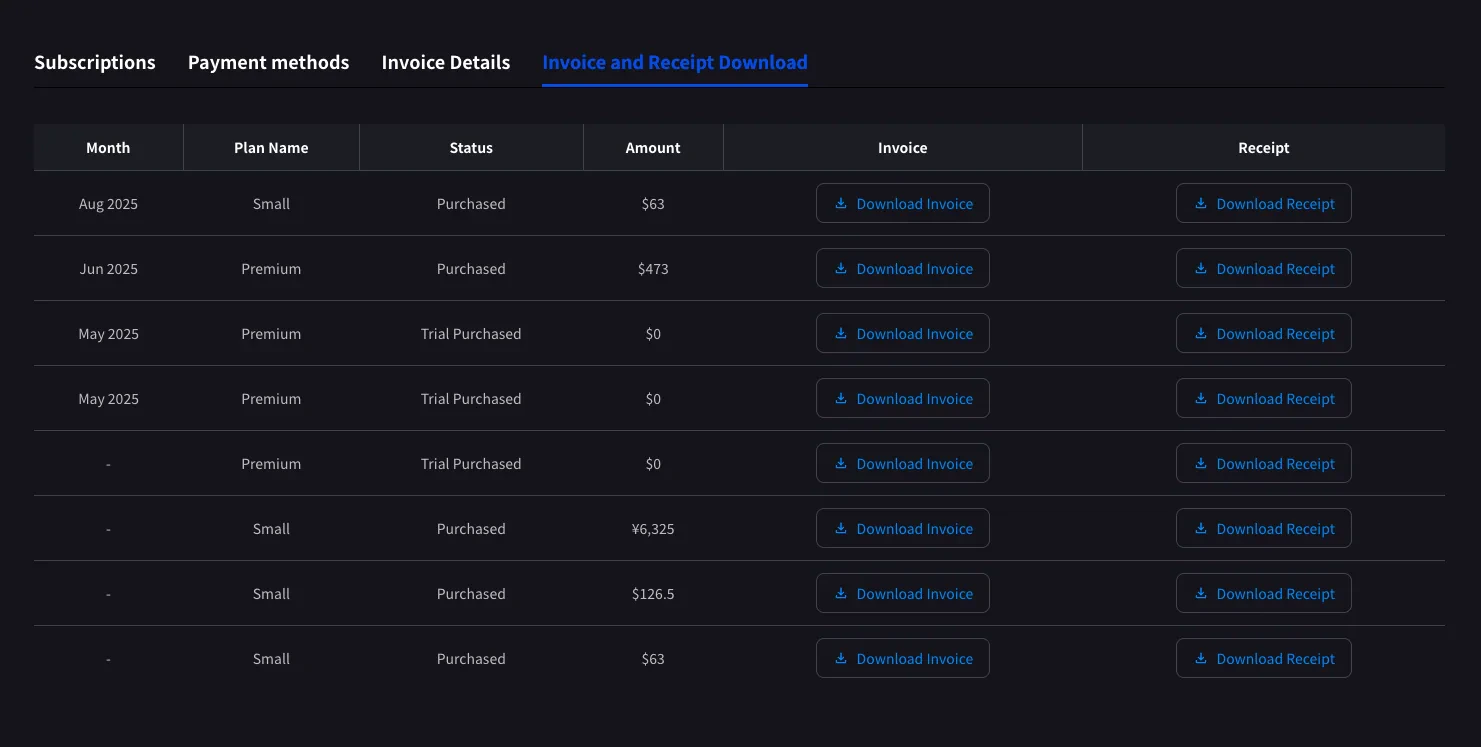 | ปุ่ม | เปิด |
| -------------------- | -------------------------------------------------------------------------------------------------- |
| **Download Invoice** | ใบแจ้งหนี้ PDF สำหรับการแชร์ บันทึก หรือส่งต่อไปยังการเงิน |
| **Download Receipt** | Receipt download or stored receipt link; if unavailable, the hosted receipt/invoice fallback opens |
เฉพาะการเรียกเก็บเงินที่เสร็จสมบูรณ์แล้วเท่านั้นที่ปรากฏที่นี่ การเปลี่ยนแปลงแผนที่กำหนดเวลาไว้จะปรากฏขึ้นหลังจากวันที่เรียกเก็บเงินครั้งถัดไป เมื่อ Stripe สร้างใบแจ้งหนี้ `$0` แถวที่มีสถานะ **Trial Purchased** จะถูกบันทึกด้วยเช่นกัน ซึ่งช่วยติดตามเมื่อการทดลองเริ่มขึ้น
### Billing History
Use **Billing History** when you need the full audit trail, not only completed invoice rows.
| Column | What it shows |
| ------------------------- | -------------------------------------------------------------------------------------------------------------------------------------------------- |
| **Status** | Event result, such as purchase, upgrade, scheduled change, cancellation, restore, payment-method change, trial update, renewal, or payment failure |
| **Event Date (UTC+9)** | When the billing event was recorded |
| **Plan Name** | The plan involved in the event, including tiered Individual / Small minute labels when available |
| **Start Date / End Date** | The subscription period affected by the event |
| **Price** | The billed amount when the event has a displayable charge |
Use **Billing History** for "what changed and when?" Use **Invoice and Receipt Download** when finance needs the actual invoice PDF or receipt.
## บน Mobile (ฮับ Billing)
แอพมือถือยุบฟีเจอร์เดียวกันลงในฮับ **Billing** รวมถึงบันทึกเหตุการณ์ (Billing Activity) ที่บันทึกทุกการย้ายการสมัคร
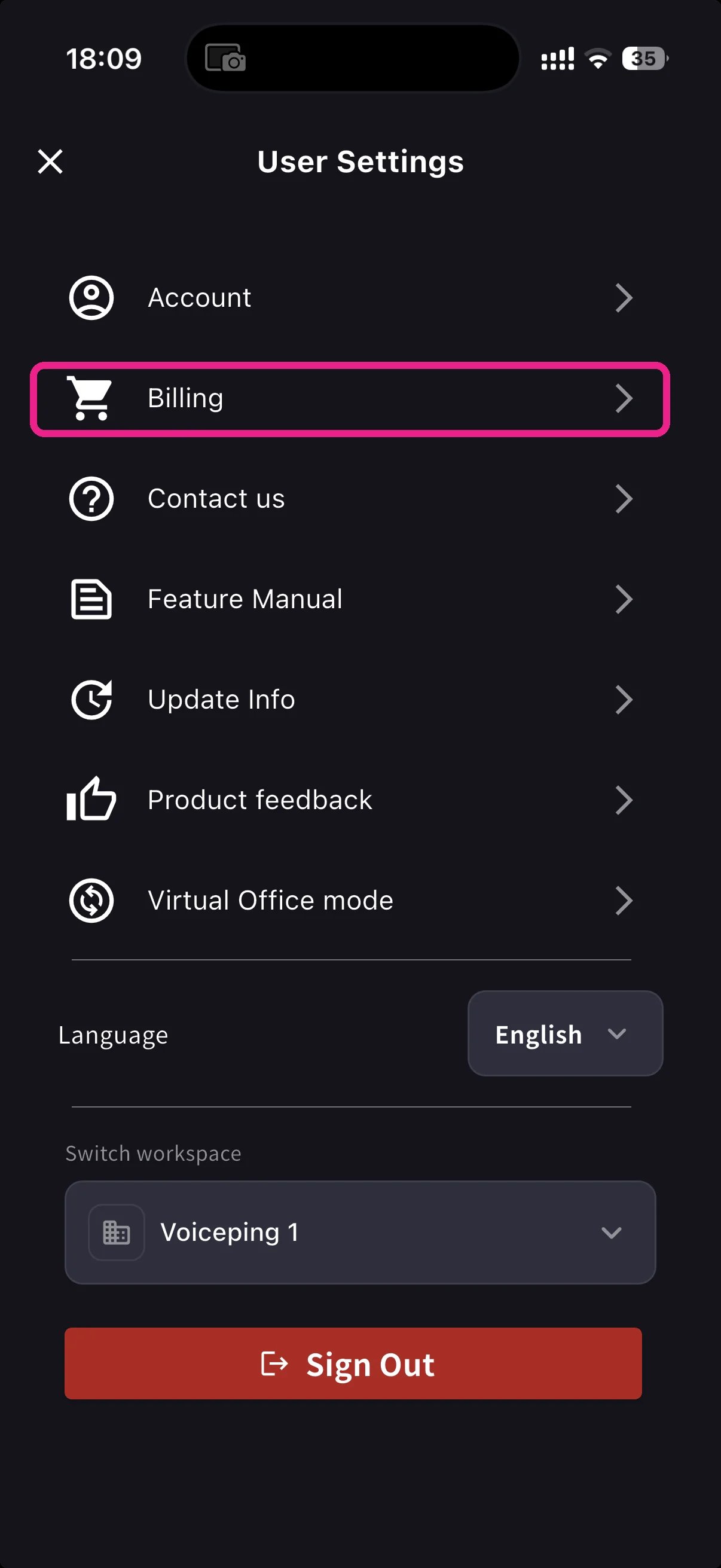
เปิดเมนูด้านข้างจากหน้าจอหลัก แตะ **Billing** (ไอคอนรถเข็น)
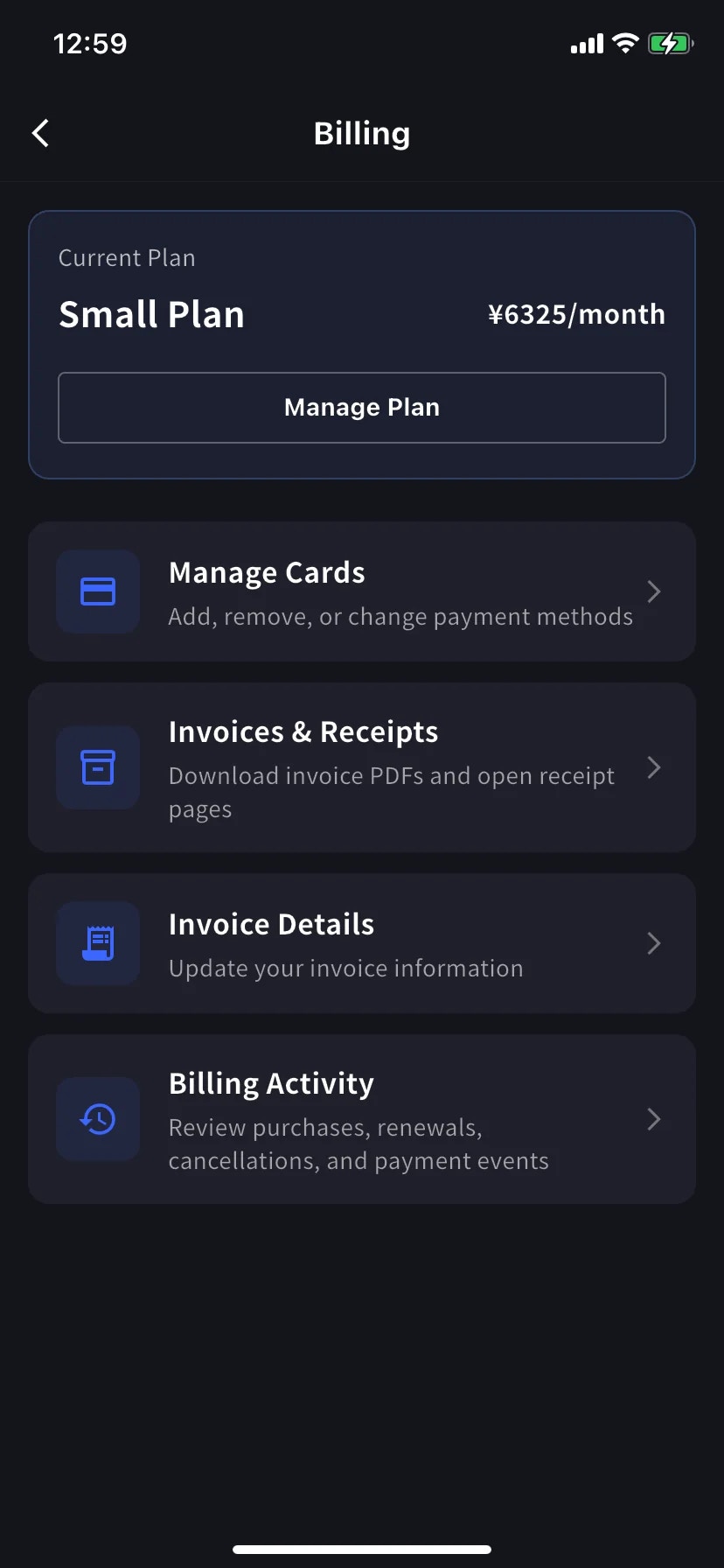
ใต้การ์ด Current Plan มีทางลัด 3 รายการที่ครอบคลุมการออกใบแจ้งหนี้:
| Shortcut | มันมีไว้เพื่ออะไร |
| ----------------------- | ------------------------------------------------------------------------ |
| **Invoice Details** | ชื่อผู้เรียกเก็บเงิน อีเมล โทรศัพท์ |
| **Invoices & Receipts** | Invoice PDFs and receipt downloads or stored receipt links |
| **Billing Activity** | บันทึกเหตุการณ์ของการย้ายการสมัครสมาชิกทุกครั้ง พร้อมการประทับเวลาและ IP |
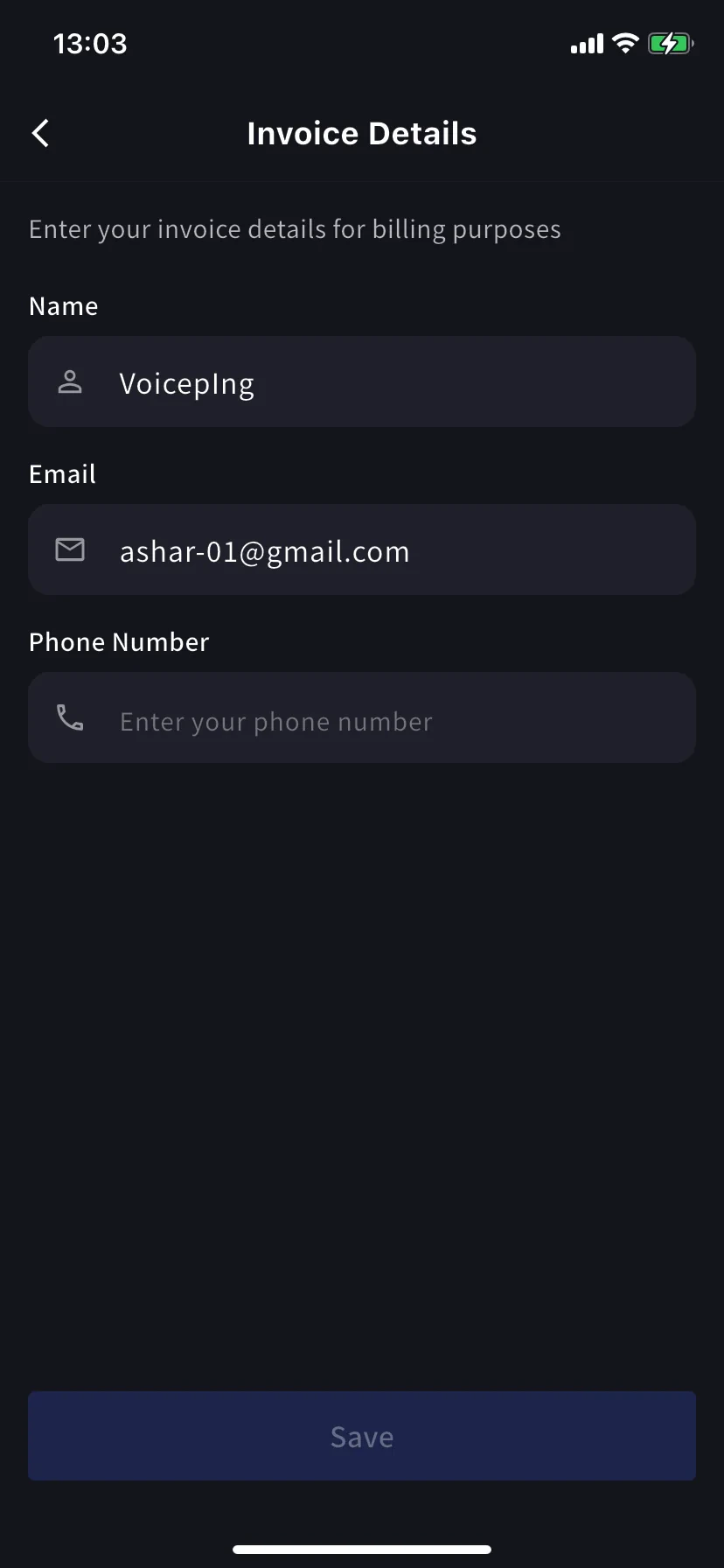
### Invoice Details (mobile)
ช่องเดียวกับแท็บ PC: ชื่อ อีเมล โทรศัพท์ สำหรับใบแจ้งหนี้ PDF ของคุณ
อัปเดต **before** วันที่เรียกเก็บเงินครั้งถัดไปของคุณ Stripe อ่านฟิลด์เหล่านี้ในขณะที่สร้างใบแจ้งหนี้ การแก้ไขในภายหลังจะไม่รีสแตมป์ PDF ที่ผ่านมา
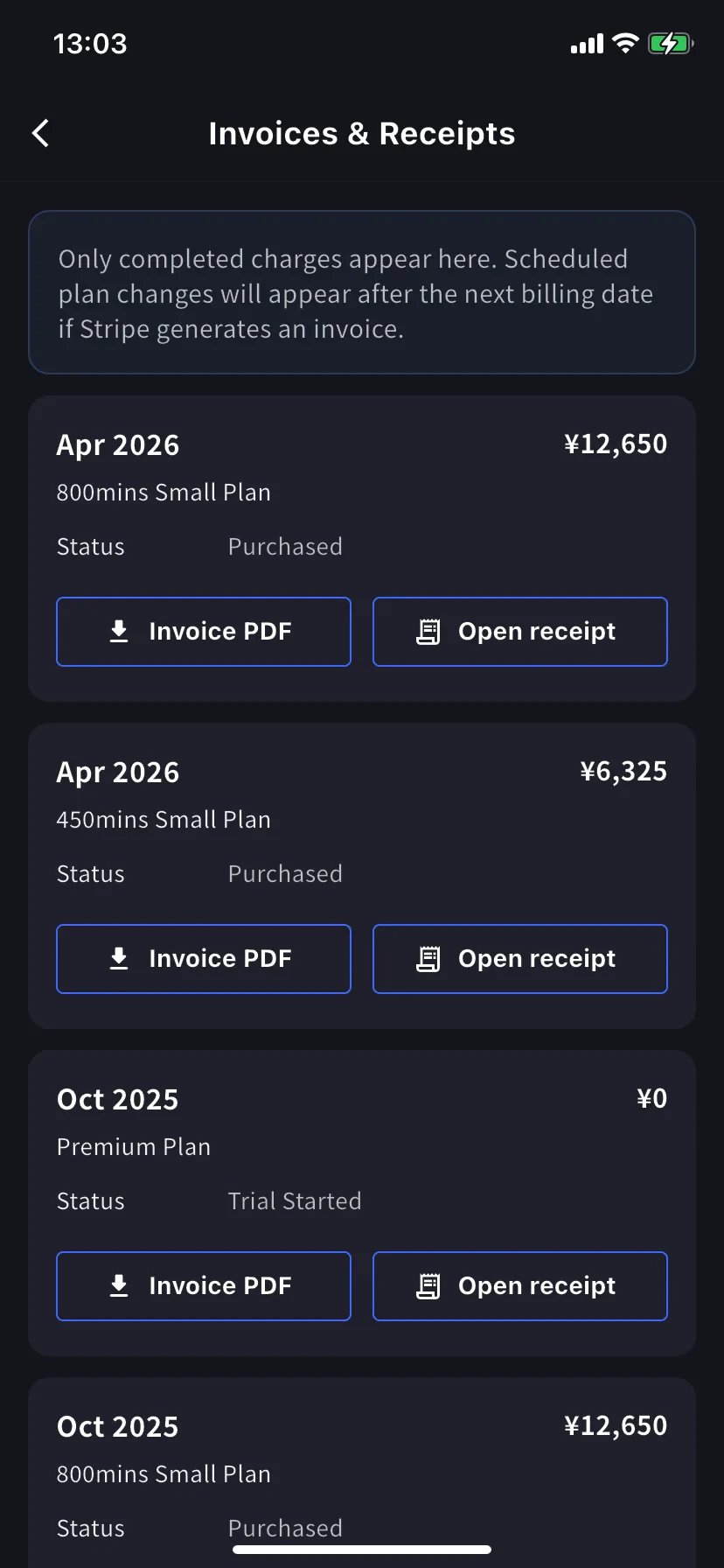
### Invoices & Receipts (mobile)
การเรียกเก็บเงินที่ผ่านมาจะปรากฏเป็นบัตรรายเดือน การ์ดแต่ละใบมีสองการกระทำ
| ปุ่ม | เปิด |
| ---------------- | -------------------------------------------------------------------------------------------------- |
| **Invoice PDF** | ใบแจ้งหนี้ PDF ที่ดาวน์โหลดได้สำหรับการแชร์ บันทึก หรือส่งต่อ |
| **Open receipt** | Receipt download or stored receipt link; if unavailable, the hosted receipt/invoice fallback opens |
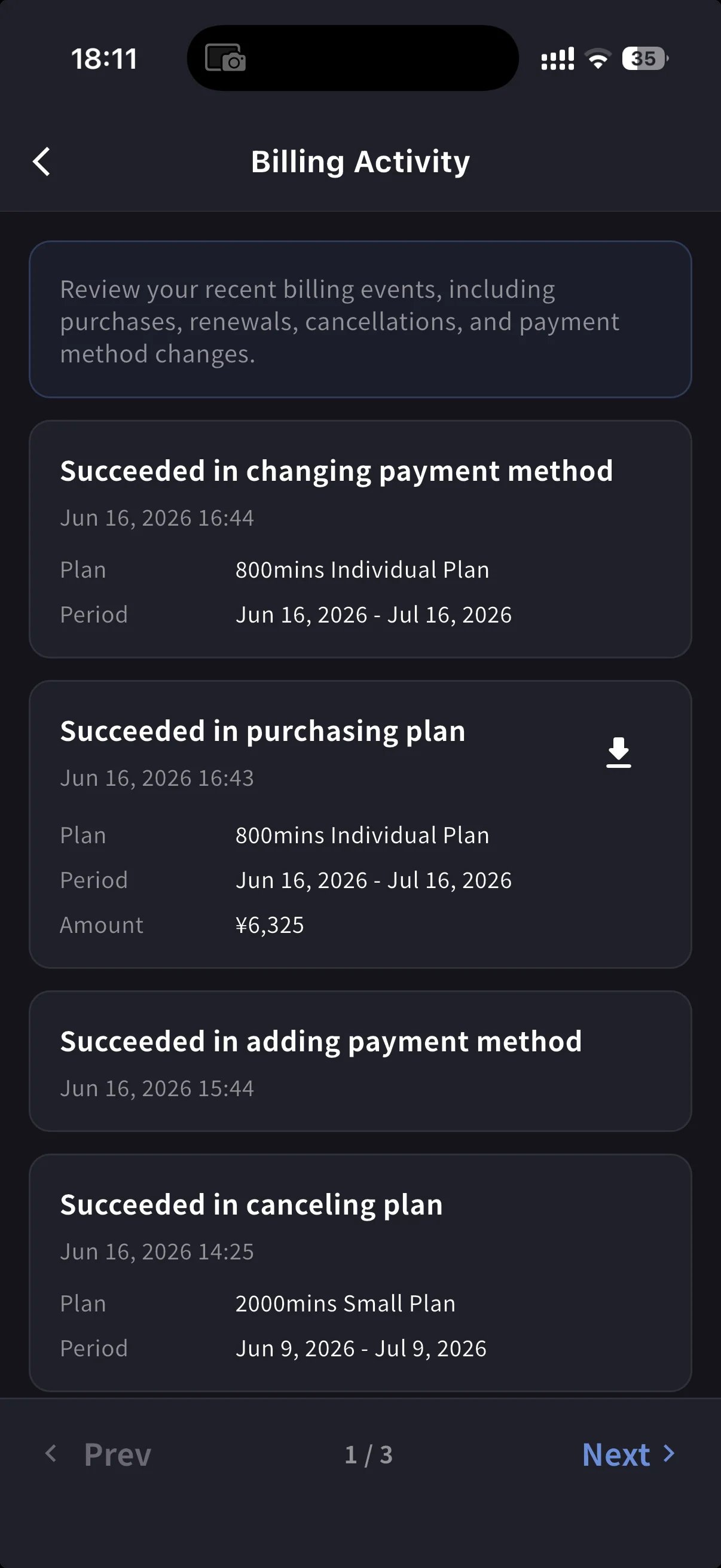
### Billing Activity (mobile only)
บันทึกเหตุการณ์: ทุกอย่างที่พื้นที่ทำงานของคุณทำกับการสมัครรับข้อมูลรวมอยู่ในที่เดียว
แต่ละแถวประกอบด้วย:
* ชื่อเหตุการณ์ เช่น *Succeeded in upgrading plan*, *Subscription will be canceled on the next payment date*, *Succeeded in restoring subscription*
* การประทับเวลา (`YYYY/MM/DD HH:MM`)
* แผน ระยะเวลาการเรียกเก็บเงิน และจำนวนเงิน หากมี
* **IP Address** — ใครดำเนินการจากที่ไหน สำหรับการตรวจสอบและการตรวจสอบความปลอดภัย
* ไอคอนดาวน์โหลดสำหรับการเรียกเก็บเงินที่เสร็จสมบูรณ์ — ดึงใบแจ้งหนี้ PDF สำหรับกิจกรรมนั้น
ใช้มันเพื่อตอบเมื่อสิ่งนั้นเกิดขึ้นโดยไม่ต้องค้นหาอีเมล
On PC, use **Billing History** for the full event log and **Invoice and Receipt Download** for finance documents. On mobile, **Billing Activity** gives a compact activity log with timestamps, IP address, and invoice download actions where available.
## เคล็ดลับ
* **Bill-to changes apply to future invoices only.** อัปเดต Invoice Details ก่อนวันที่เรียกเก็บเงินครั้งถัดไปเพื่อหลีกเลี่ยงไม่ให้ต้องออกใหม่
* **Receipts vs invoices.** The invoice is the charge document. The receipt action opens the stored receipt/download when available; otherwise it opens the hosted Stripe fallback.
* **Mobile and PC stay in sync.** การแก้ไขบนพื้นผิวหนึ่งจะปรากฏอีกด้านหนึ่งทันที
## Related
* [Plan Changes, Cancellation & Trial End](/th/plan-changes) — อัปเกรด ดาวน์เกรด ยกเลิก
* [Changing Your Payment Credit Card](/th/credit-card-change) — การจัดการการ์ดบน PC และมือถือ
* [Pricing](/th/pricing) — วางแผนระดับและเบี้ยเลี้ยงนาที
| ปุ่ม | เปิด |
| -------------------- | -------------------------------------------------------------------------------------------------- |
| **Download Invoice** | ใบแจ้งหนี้ PDF สำหรับการแชร์ บันทึก หรือส่งต่อไปยังการเงิน |
| **Download Receipt** | Receipt download or stored receipt link; if unavailable, the hosted receipt/invoice fallback opens |
เฉพาะการเรียกเก็บเงินที่เสร็จสมบูรณ์แล้วเท่านั้นที่ปรากฏที่นี่ การเปลี่ยนแปลงแผนที่กำหนดเวลาไว้จะปรากฏขึ้นหลังจากวันที่เรียกเก็บเงินครั้งถัดไป เมื่อ Stripe สร้างใบแจ้งหนี้ `$0` แถวที่มีสถานะ **Trial Purchased** จะถูกบันทึกด้วยเช่นกัน ซึ่งช่วยติดตามเมื่อการทดลองเริ่มขึ้น
### Billing History
Use **Billing History** when you need the full audit trail, not only completed invoice rows.
| Column | What it shows |
| ------------------------- | -------------------------------------------------------------------------------------------------------------------------------------------------- |
| **Status** | Event result, such as purchase, upgrade, scheduled change, cancellation, restore, payment-method change, trial update, renewal, or payment failure |
| **Event Date (UTC+9)** | When the billing event was recorded |
| **Plan Name** | The plan involved in the event, including tiered Individual / Small minute labels when available |
| **Start Date / End Date** | The subscription period affected by the event |
| **Price** | The billed amount when the event has a displayable charge |
Use **Billing History** for "what changed and when?" Use **Invoice and Receipt Download** when finance needs the actual invoice PDF or receipt.
## บน Mobile (ฮับ Billing)
แอพมือถือยุบฟีเจอร์เดียวกันลงในฮับ **Billing** รวมถึงบันทึกเหตุการณ์ (Billing Activity) ที่บันทึกทุกการย้ายการสมัคร
เปิดเมนูด้านข้างจากหน้าจอหลัก แตะ **Billing** (ไอคอนรถเข็น)
ใต้การ์ด Current Plan มีทางลัด 3 รายการที่ครอบคลุมการออกใบแจ้งหนี้:
| Shortcut | มันมีไว้เพื่ออะไร |
| ----------------------- | ------------------------------------------------------------------------ |
| **Invoice Details** | ชื่อผู้เรียกเก็บเงิน อีเมล โทรศัพท์ |
| **Invoices & Receipts** | Invoice PDFs and receipt downloads or stored receipt links |
| **Billing Activity** | บันทึกเหตุการณ์ของการย้ายการสมัครสมาชิกทุกครั้ง พร้อมการประทับเวลาและ IP |
### Invoice Details (mobile)
ช่องเดียวกับแท็บ PC: ชื่อ อีเมล โทรศัพท์ สำหรับใบแจ้งหนี้ PDF ของคุณ
อัปเดต **before** วันที่เรียกเก็บเงินครั้งถัดไปของคุณ Stripe อ่านฟิลด์เหล่านี้ในขณะที่สร้างใบแจ้งหนี้ การแก้ไขในภายหลังจะไม่รีสแตมป์ PDF ที่ผ่านมา
### Invoices & Receipts (mobile)
การเรียกเก็บเงินที่ผ่านมาจะปรากฏเป็นบัตรรายเดือน การ์ดแต่ละใบมีสองการกระทำ
| ปุ่ม | เปิด |
| ---------------- | -------------------------------------------------------------------------------------------------- |
| **Invoice PDF** | ใบแจ้งหนี้ PDF ที่ดาวน์โหลดได้สำหรับการแชร์ บันทึก หรือส่งต่อ |
| **Open receipt** | Receipt download or stored receipt link; if unavailable, the hosted receipt/invoice fallback opens |
### Billing Activity (mobile only)
บันทึกเหตุการณ์: ทุกอย่างที่พื้นที่ทำงานของคุณทำกับการสมัครรับข้อมูลรวมอยู่ในที่เดียว
แต่ละแถวประกอบด้วย:
* ชื่อเหตุการณ์ เช่น *Succeeded in upgrading plan*, *Subscription will be canceled on the next payment date*, *Succeeded in restoring subscription*
* การประทับเวลา (`YYYY/MM/DD HH:MM`)
* แผน ระยะเวลาการเรียกเก็บเงิน และจำนวนเงิน หากมี
* **IP Address** — ใครดำเนินการจากที่ไหน สำหรับการตรวจสอบและการตรวจสอบความปลอดภัย
* ไอคอนดาวน์โหลดสำหรับการเรียกเก็บเงินที่เสร็จสมบูรณ์ — ดึงใบแจ้งหนี้ PDF สำหรับกิจกรรมนั้น
ใช้มันเพื่อตอบเมื่อสิ่งนั้นเกิดขึ้นโดยไม่ต้องค้นหาอีเมล
On PC, use **Billing History** for the full event log and **Invoice and Receipt Download** for finance documents. On mobile, **Billing Activity** gives a compact activity log with timestamps, IP address, and invoice download actions where available.
## เคล็ดลับ
* **Bill-to changes apply to future invoices only.** อัปเดต Invoice Details ก่อนวันที่เรียกเก็บเงินครั้งถัดไปเพื่อหลีกเลี่ยงไม่ให้ต้องออกใหม่
* **Receipts vs invoices.** The invoice is the charge document. The receipt action opens the stored receipt/download when available; otherwise it opens the hosted Stripe fallback.
* **Mobile and PC stay in sync.** การแก้ไขบนพื้นผิวหนึ่งจะปรากฏอีกด้านหนึ่งทันที
## Related
* [Plan Changes, Cancellation & Trial End](/th/plan-changes) — อัปเกรด ดาวน์เกรด ยกเลิก
* [Changing Your Payment Credit Card](/th/credit-card-change) — การจัดการการ์ดบน PC และมือถือ
* [Pricing](/th/pricing) — วางแผนระดับและเบี้ยเลี้ยงนาที