> ## Documentation Index
> Fetch the complete documentation index at: https://manual.voiceping.net/llms.txt
> Use this file to discover all available pages before exploring further.
# แชร์คำบรรยายแบบสดให้ผู้ฟัง (QR)
> ให้ผู้ฟังอ่านคำบรรยายแบบสดและคำแปลบนมือถือของตัวเอง — ไม่ต้องติดตั้ง ไม่ต้องมีบัญชี
export const FeedbackTh = () => <>
มีไอเดียหรือคำขอเกี่ยวกับฟีเจอร์นี้ไหม? ส่งถึงทีมผ่าน Product Feedback
ลิงก์อย่างเป็นทางการ
เยี่ยมชมเว็บไซต์อย่างเป็นทางการของเรา
ติดตามเราบน X
ติดตามเราบน Facebook
เชื่อมต่อบน LinkedIn
;
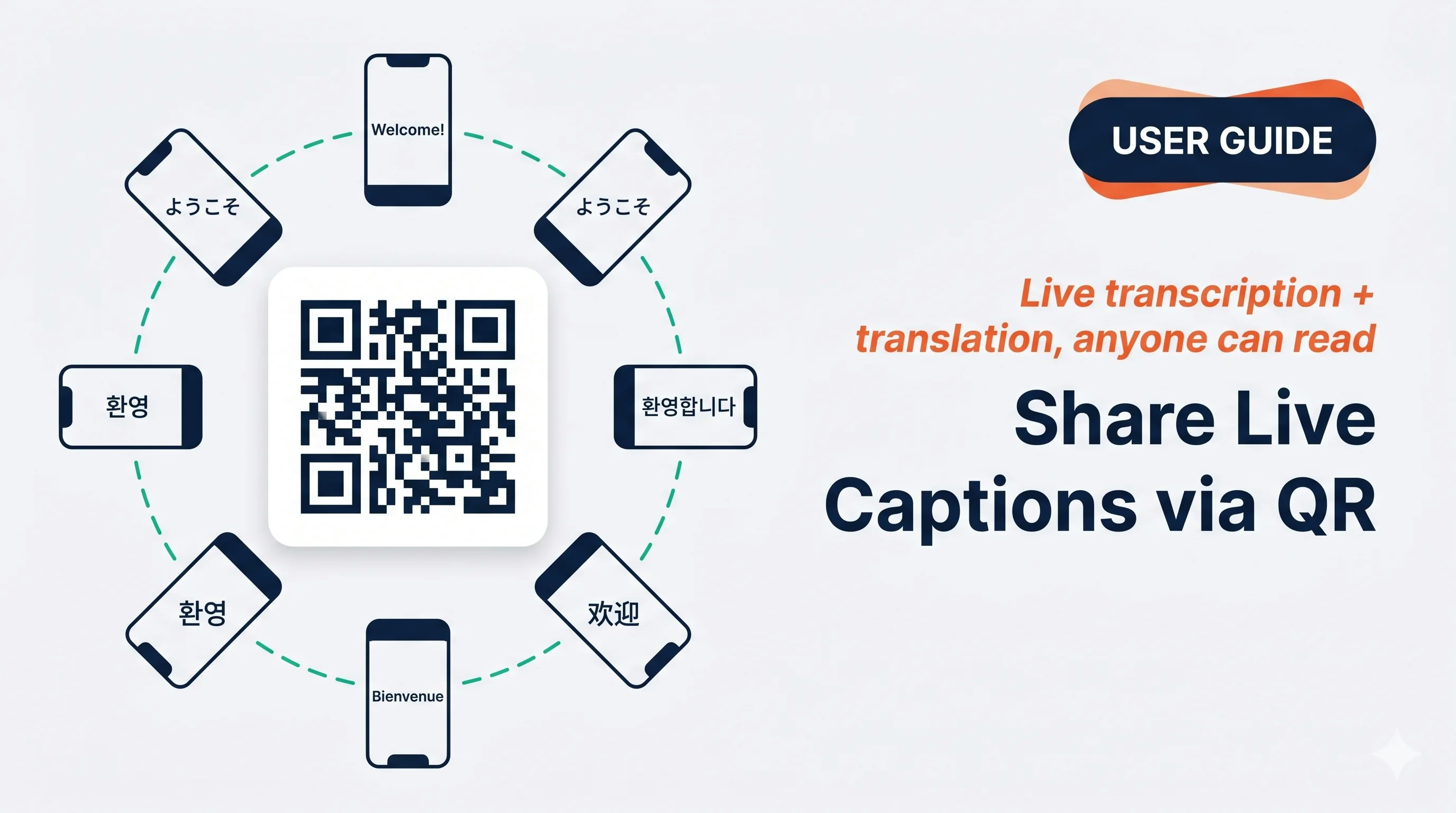 แสดง QR คู่สนทนาสแกนด้วยกล้องมือถือ และอ่านคำบรรยายแบบสดในภาษาของตัวเองบนอุปกรณ์ของตัวเอง — ไม่ต้องติดตั้ง ไม่ต้องมีบัญชี
## ใช้เมื่อ…
ทุกคนที่โต๊ะสแกน QR ของคุณและอ่านในภาษาของตัวเองแทนที่จะเบียดกันดูจอเดียว
คุณพูดกับกลุ่ม บางคนติดตามในมือถือของตัวเองขณะเดิน
นักเรียนสแกนครั้งเดียวและแต่ละคนเลือกภาษาที่ต้องการ เปิดไมค์เพื่อให้พวกเขาถามตอบได้
แตะแชร์เพื่อส่งลิงก์ผ่าน Slack / LINE / อีเมล — พวกเขาอ่านแบบสดจากที่ไหนก็ได้
## เปิดแผ่นแชร์ผู้ฟัง
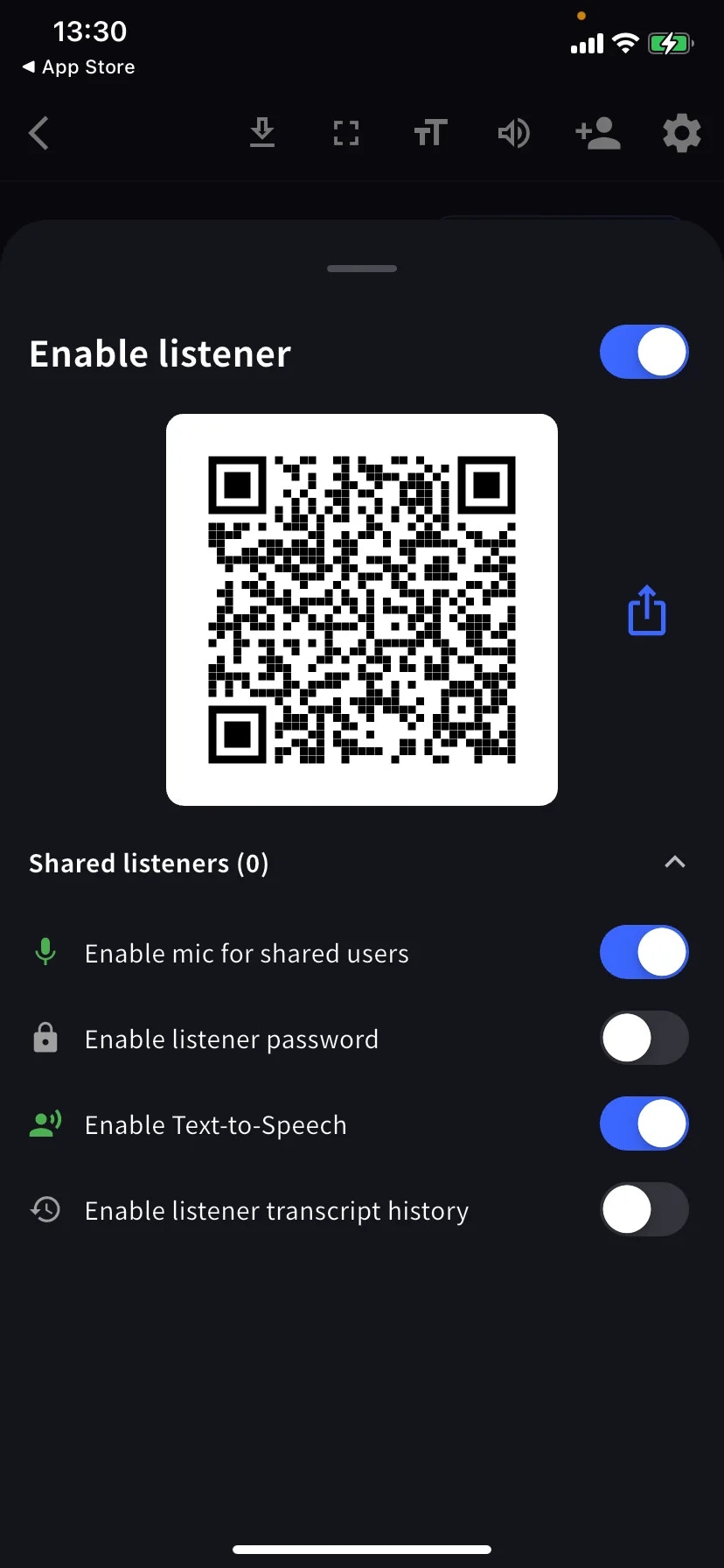
ในเซสชันแบบสด แตะ **+👤** บนแถบเครื่องมือ จากนั้นเปิด **Enable listener**
แสดง QR ให้สแกน หรือแตะไอคอนแชร์เพื่อส่งลิงก์ผ่าน Slack / อีเมล / Teams ผู้ฟังเลือกภาษาแปลในหน้าเข้าร่วมและเห็นคำบรรยายทันที
## การควบคุมผู้ฟัง
| สวิตช์ | หน้าที่ |
| -------------------------------------- | ------------------------------------------------- |
| **Enable mic for shared users** | ผู้ฟังพูดตอบได้ คำพูดของพวกเขาเข้าไปในการถอดเสียง |
| **Enable listener password** | ประตูรหัสผ่านก่อนผู้ฟังดูได้ |
| **Enable Text-to-Speech** | ผู้ฟังให้เบราว์เซอร์อ่านคำแปลออกเสียงได้ |
| **Enable listener transcript history** | ผู้ฟังแต่ละคนเก็บสำเนาในเครื่องของตัวเอง |
แถว **Shared listeners (N)** ขยายรายการปัจจุบัน
## ค่าตั้งล่วงหน้าที่แนะนำ
Mic ปิด · Password ปิด · TTS ปิด แต่ละคนอ่านในภาษาของตัวเองบนมือถือของตัวเอง
Password เปิด (แชร์รหัสในข้อความแยก) · Mic ปิด · History ปิด
Mic เปิดเพื่อให้นักเรียนถามได้ · History เปิดเพื่อให้พวกเขาเก็บการถอดเสียงไว้
ส่งลิงก์โดยตรงผ่าน Slack / LINE / อีเมลแทนการแสดง QR
## เคล็ดลับ
* ทดสอบ QR กับอุปกรณ์ที่สองก่อนงาน
* QR ใช้ได้จนกว่าคุณจะจบการประชุม
* รหัสผ่านเป็นประตูทางเข้า ไม่ใช่ความเป็นส่วนตัวแบบ end-to-end — รวมกับ Share Scope ที่จำกัดสำหรับเนื้อหาที่ละเอียดอ่อน
## ที่เกี่ยวข้อง
* [การถอดเสียงแบบสดบนมือถือ](/th/mobile-live-transcription) · [การตั้งค่า](/th/mobile-live-transcription-settings)
* [คำบรรยายแบบสด (PC)](/th/live-subtitles)
แสดง QR คู่สนทนาสแกนด้วยกล้องมือถือ และอ่านคำบรรยายแบบสดในภาษาของตัวเองบนอุปกรณ์ของตัวเอง — ไม่ต้องติดตั้ง ไม่ต้องมีบัญชี
## ใช้เมื่อ…
ทุกคนที่โต๊ะสแกน QR ของคุณและอ่านในภาษาของตัวเองแทนที่จะเบียดกันดูจอเดียว
คุณพูดกับกลุ่ม บางคนติดตามในมือถือของตัวเองขณะเดิน
นักเรียนสแกนครั้งเดียวและแต่ละคนเลือกภาษาที่ต้องการ เปิดไมค์เพื่อให้พวกเขาถามตอบได้
แตะแชร์เพื่อส่งลิงก์ผ่าน Slack / LINE / อีเมล — พวกเขาอ่านแบบสดจากที่ไหนก็ได้
## เปิดแผ่นแชร์ผู้ฟัง
ในเซสชันแบบสด แตะ **+👤** บนแถบเครื่องมือ จากนั้นเปิด **Enable listener**
แสดง QR ให้สแกน หรือแตะไอคอนแชร์เพื่อส่งลิงก์ผ่าน Slack / อีเมล / Teams ผู้ฟังเลือกภาษาแปลในหน้าเข้าร่วมและเห็นคำบรรยายทันที
## การควบคุมผู้ฟัง
| สวิตช์ | หน้าที่ |
| -------------------------------------- | ------------------------------------------------- |
| **Enable mic for shared users** | ผู้ฟังพูดตอบได้ คำพูดของพวกเขาเข้าไปในการถอดเสียง |
| **Enable listener password** | ประตูรหัสผ่านก่อนผู้ฟังดูได้ |
| **Enable Text-to-Speech** | ผู้ฟังให้เบราว์เซอร์อ่านคำแปลออกเสียงได้ |
| **Enable listener transcript history** | ผู้ฟังแต่ละคนเก็บสำเนาในเครื่องของตัวเอง |
แถว **Shared listeners (N)** ขยายรายการปัจจุบัน
## ค่าตั้งล่วงหน้าที่แนะนำ
Mic ปิด · Password ปิด · TTS ปิด แต่ละคนอ่านในภาษาของตัวเองบนมือถือของตัวเอง
Password เปิด (แชร์รหัสในข้อความแยก) · Mic ปิด · History ปิด
Mic เปิดเพื่อให้นักเรียนถามได้ · History เปิดเพื่อให้พวกเขาเก็บการถอดเสียงไว้
ส่งลิงก์โดยตรงผ่าน Slack / LINE / อีเมลแทนการแสดง QR
## เคล็ดลับ
* ทดสอบ QR กับอุปกรณ์ที่สองก่อนงาน
* QR ใช้ได้จนกว่าคุณจะจบการประชุม
* รหัสผ่านเป็นประตูทางเข้า ไม่ใช่ความเป็นส่วนตัวแบบ end-to-end — รวมกับ Share Scope ที่จำกัดสำหรับเนื้อหาที่ละเอียดอ่อน
## ที่เกี่ยวข้อง
* [การถอดเสียงแบบสดบนมือถือ](/th/mobile-live-transcription) · [การตั้งค่า](/th/mobile-live-transcription-settings)
* [คำบรรยายแบบสด (PC)](/th/live-subtitles)