> ## Documentation Index
> Fetch the complete documentation index at: https://manual.voiceping.net/llms.txt
> Use this file to discover all available pages before exploring further.
# อัปเกรด ดาวน์เกรด และยกเลิกบนมือถือ
> เปลี่ยนแพลน VoicePing ยกเลิก หรือคืนสภาพการต่ออายุอัตโนมัติตรงจากแอปมือถือ
export const ContactTh = () => <>
หากคุณมีคำถามใดๆ กรุณาติดต่อเราผ่าน แบบฟอร์มนี้
ลิงก์อย่างเป็นทางการ
เยี่ยมชมเว็บไซต์อย่างเป็นทางการของเรา
ติดตามเราบน X
ติดตามเราบน Facebook
เชื่อมต่อบน LinkedIn
;
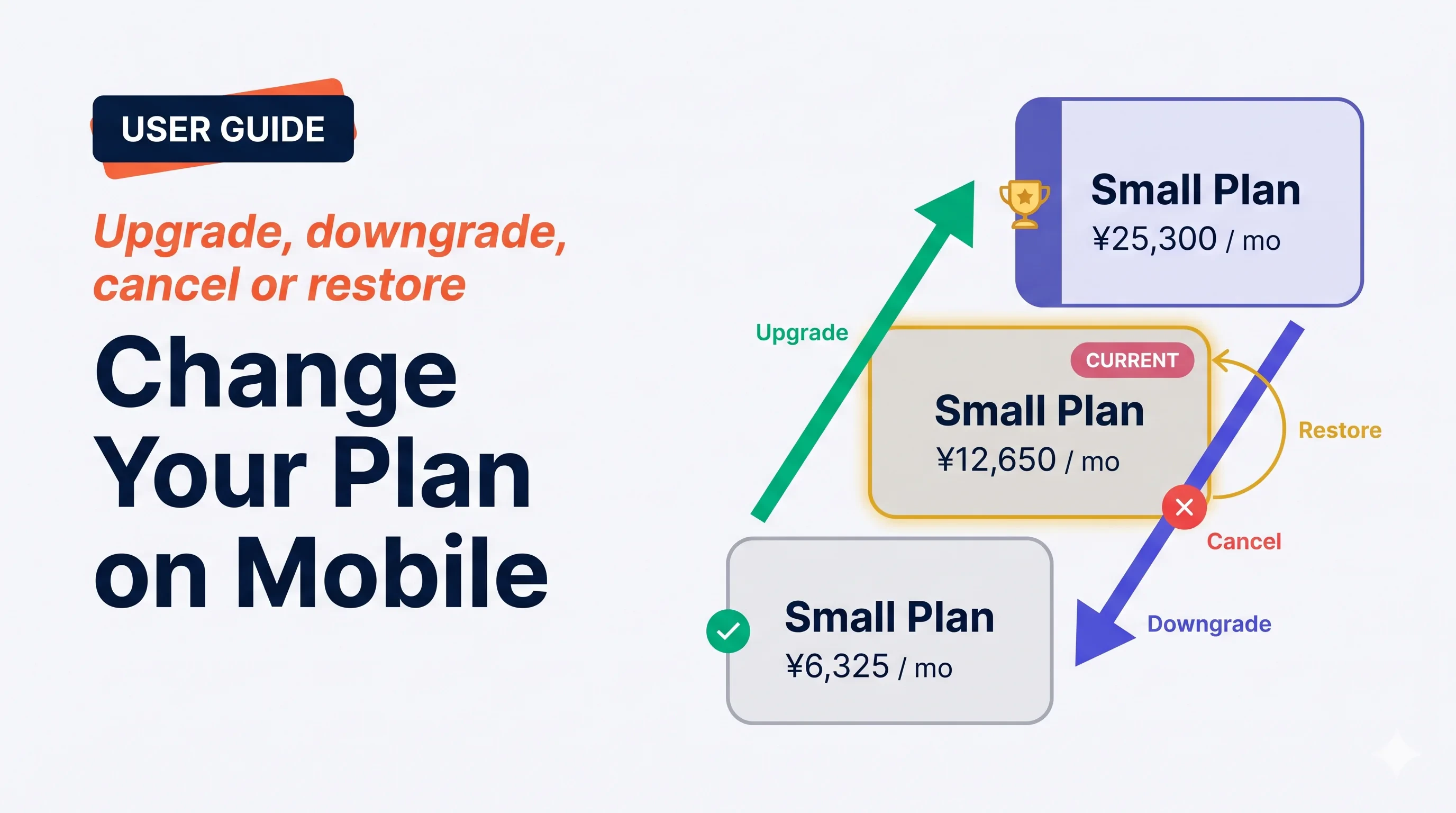 หน้าจอ **Manage Plan** จัดการทุกการเคลื่อนไหวของการสมัครสมาชิก — อัปเกรดทันที ดาวน์เกรดในการต่ออายุครั้งถัดไป ยกเลิก หรือคืนสภาพการยกเลิกที่กำหนด VoicePing ระวังที่จะทำให้ *เมื่อไหร่* *ราคา* และ *การรีเซ็ตการใช้งาน* ชัดเจนก่อนคุณยืนยัน
## สี่การเคลื่อนไหว
หน้าจอ **Manage Plan** จัดการทุกการเคลื่อนไหวของการสมัครสมาชิก — อัปเกรดทันที ดาวน์เกรดในการต่ออายุครั้งถัดไป ยกเลิก หรือคืนสภาพการยกเลิกที่กำหนด VoicePing ระวังที่จะทำให้ *เมื่อไหร่* *ราคา* และ *การรีเซ็ตการใช้งาน* ชัดเจนก่อนคุณยืนยัน
## สี่การเคลื่อนไหว
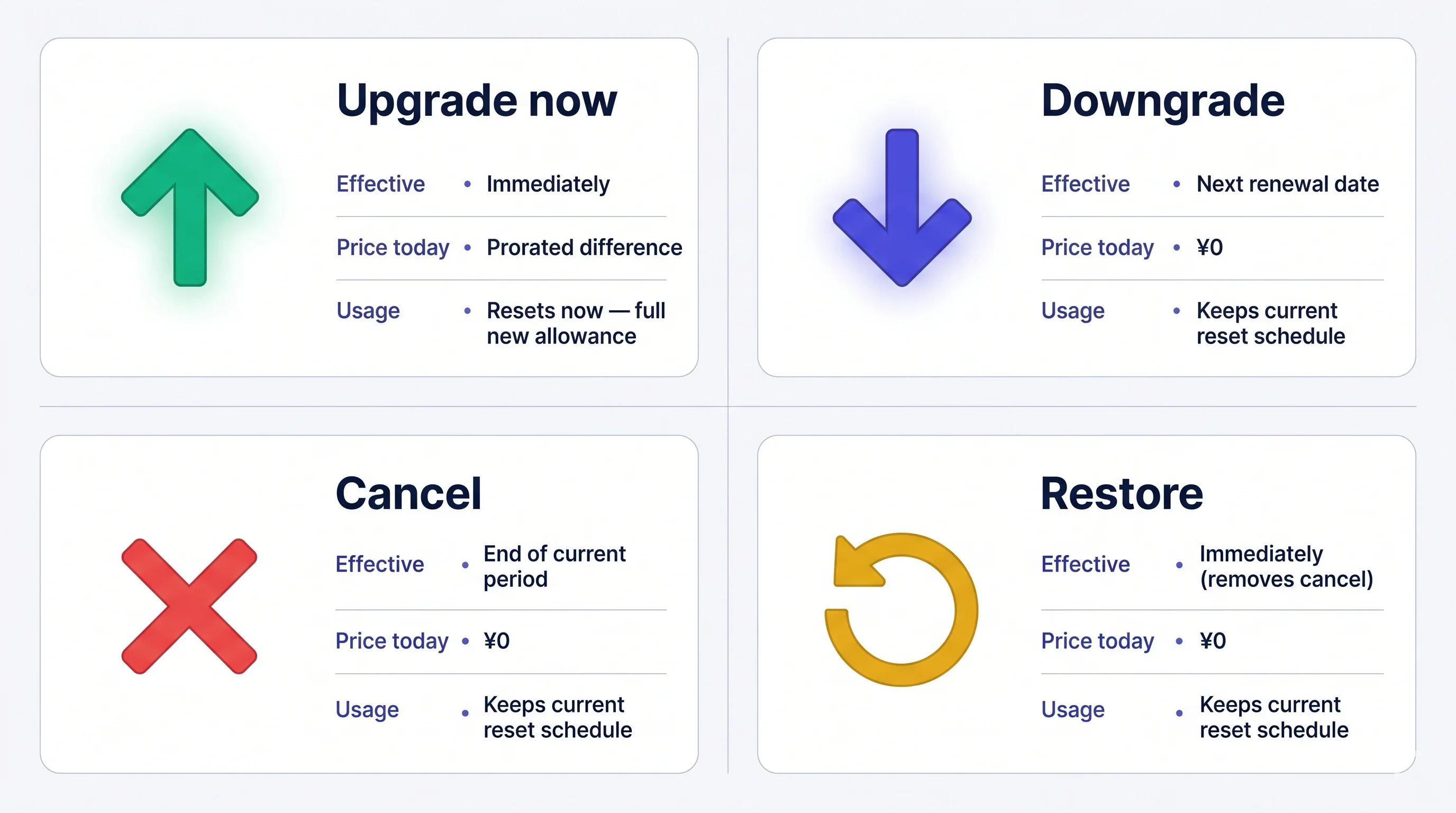 ค่าธรรมเนียม **ไม่สามารถคืนเงินได้** เมื่อเรียกเก็บแล้ว ถ้าคุณยกเลิก แพลนปัจจุบันยังคงใช้งานจนถึงสิ้นสุดระยะเวลา — คุณสามารถคืนสภาพได้ฟรีก่อนนั้น
## เปิด Manage Plan
เมนูด้านข้าง → **User Settings** → **Billing** → **Manage Plan** หรือแตะ **Manage Plan** ตรงบนการ์ด Current Plan
ค่าธรรมเนียม **ไม่สามารถคืนเงินได้** เมื่อเรียกเก็บแล้ว ถ้าคุณยกเลิก แพลนปัจจุบันยังคงใช้งานจนถึงสิ้นสุดระยะเวลา — คุณสามารถคืนสภาพได้ฟรีก่อนนั้น
## เปิด Manage Plan
เมนูด้านข้าง → **User Settings** → **Billing** → **Manage Plan** หรือแตะ **Manage Plan** ตรงบนการ์ด Current Plan
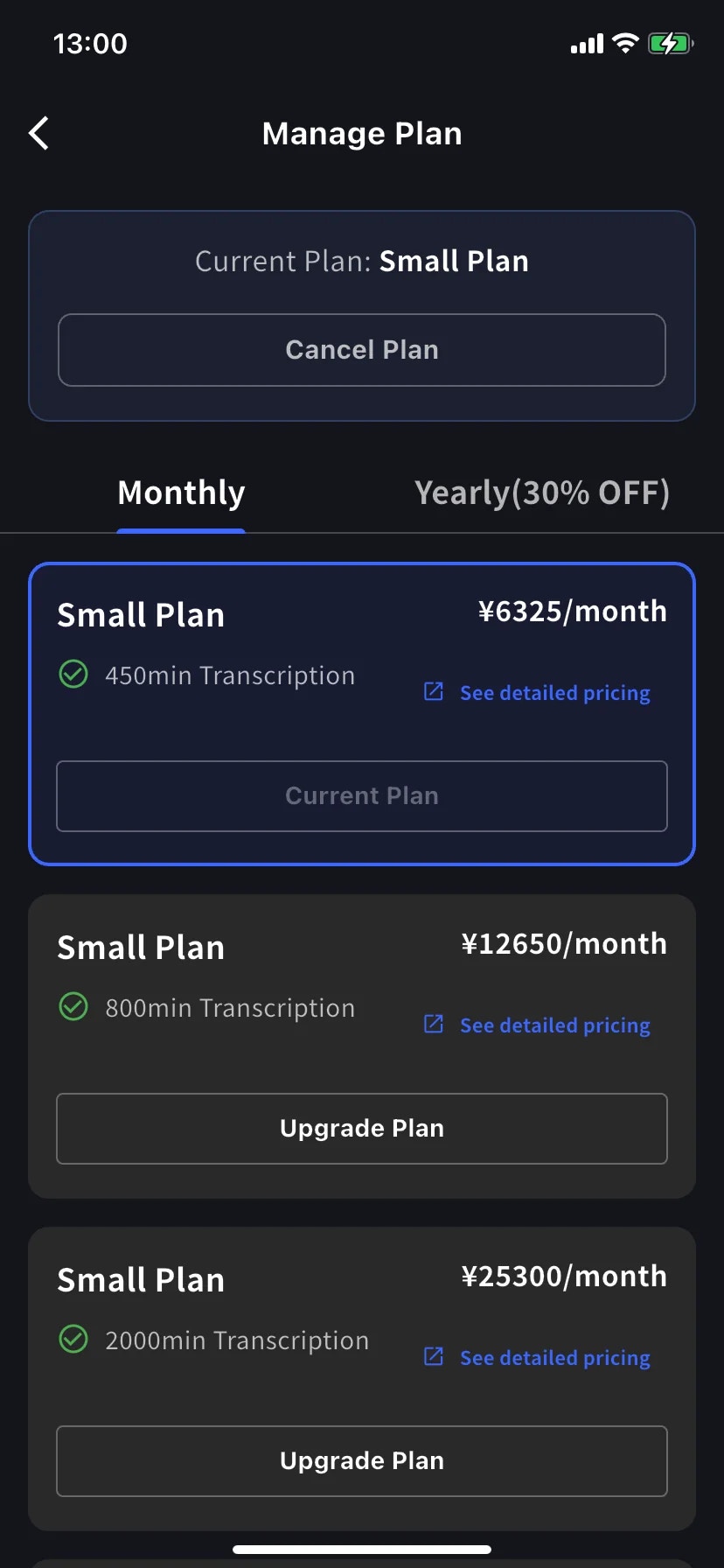
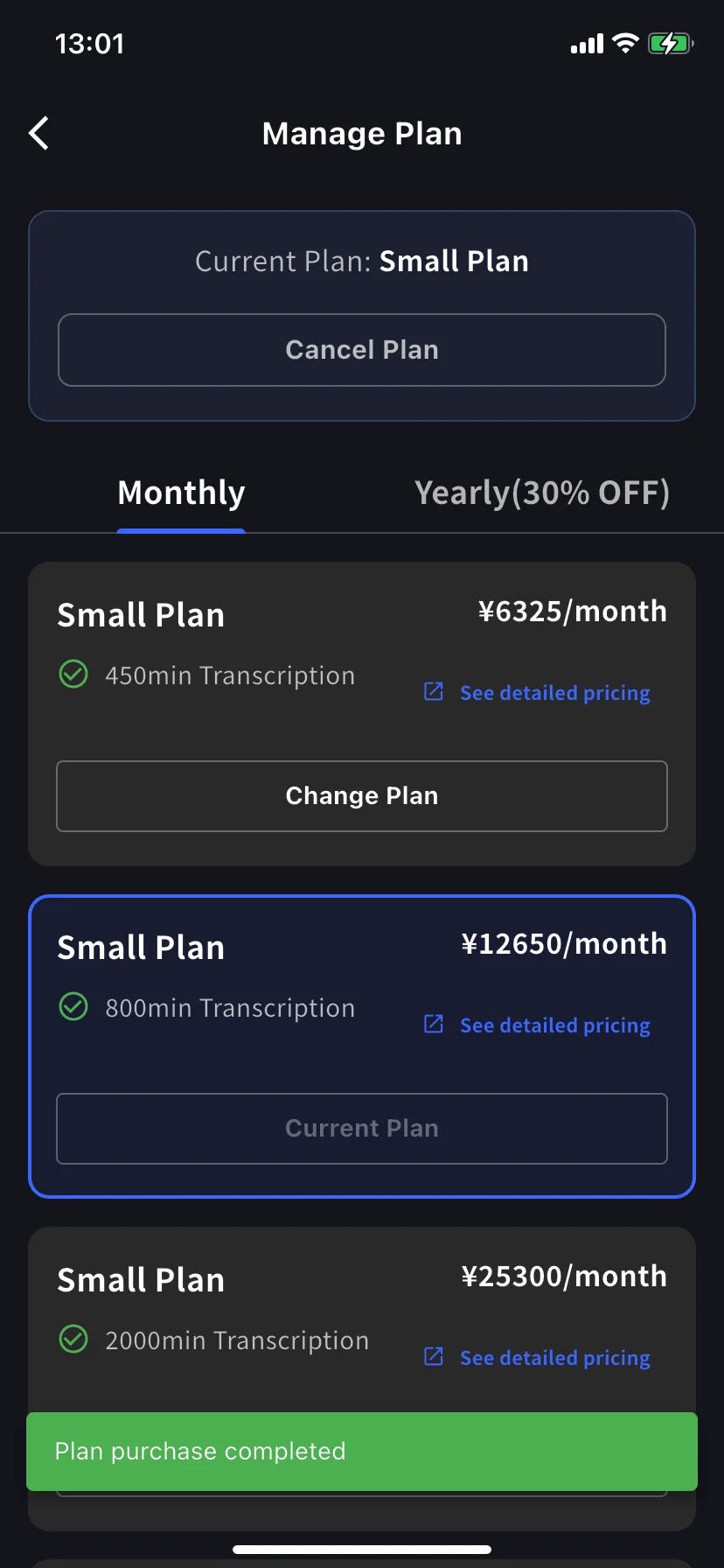
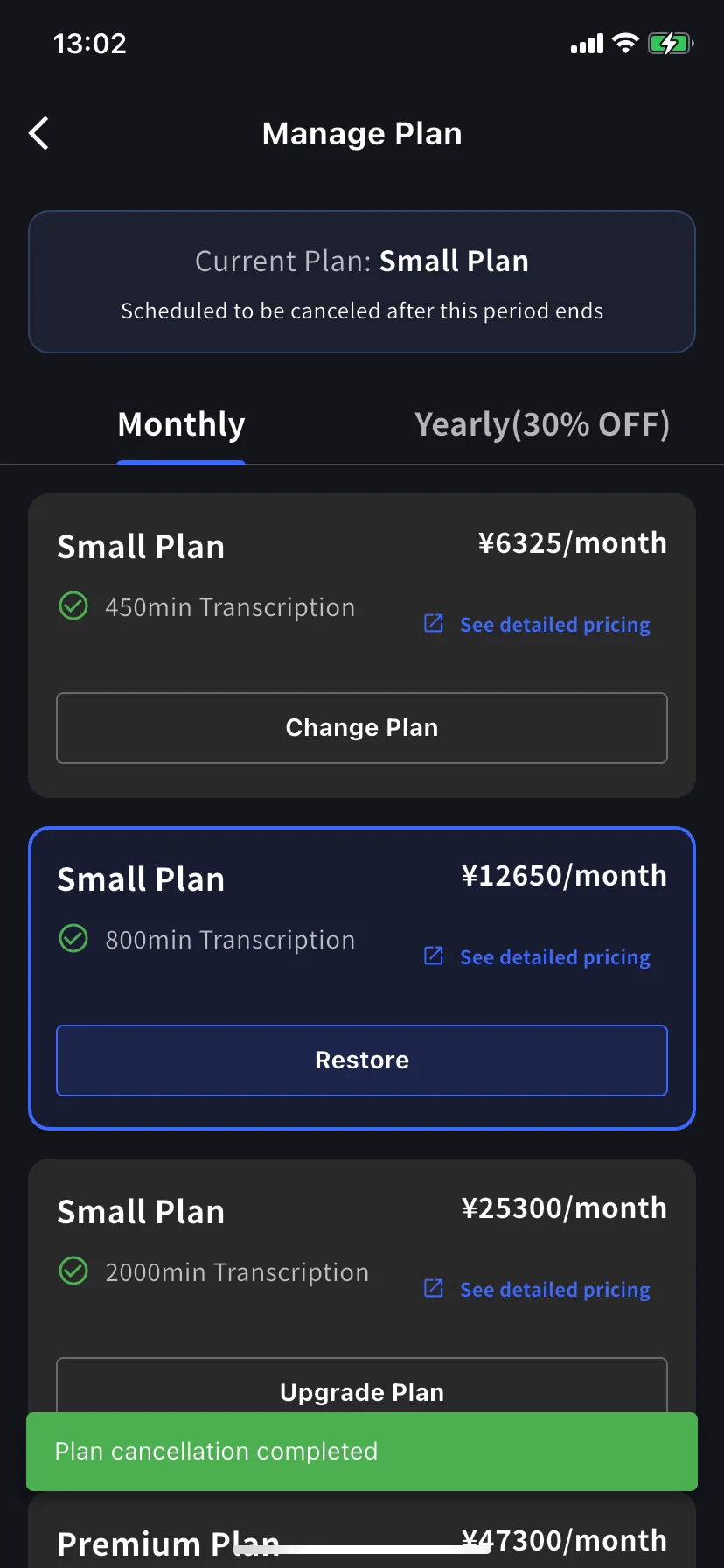
* แท็บ **Monthly** / **Yearly** สลับบันได — ราคาแสดงต่อเดือนทั้งคู่ รายปีเรียกเก็บครั้งเดียว
* ระดับปัจจุบันของคุณมีกรอบสีฟ้าพร้อมประทับ **Current Plan** บนปุ่ม
* ระดับสูงกว่าแสดง **Upgrade Plan** ระดับต่ำกว่าแสดง **Change Plan**
* **Cancel Plan** อยู่ด้านบนของหน้าจอข้างเครื่องหมายแพลนปัจจุบัน
## อัปเกรดตอนนี้
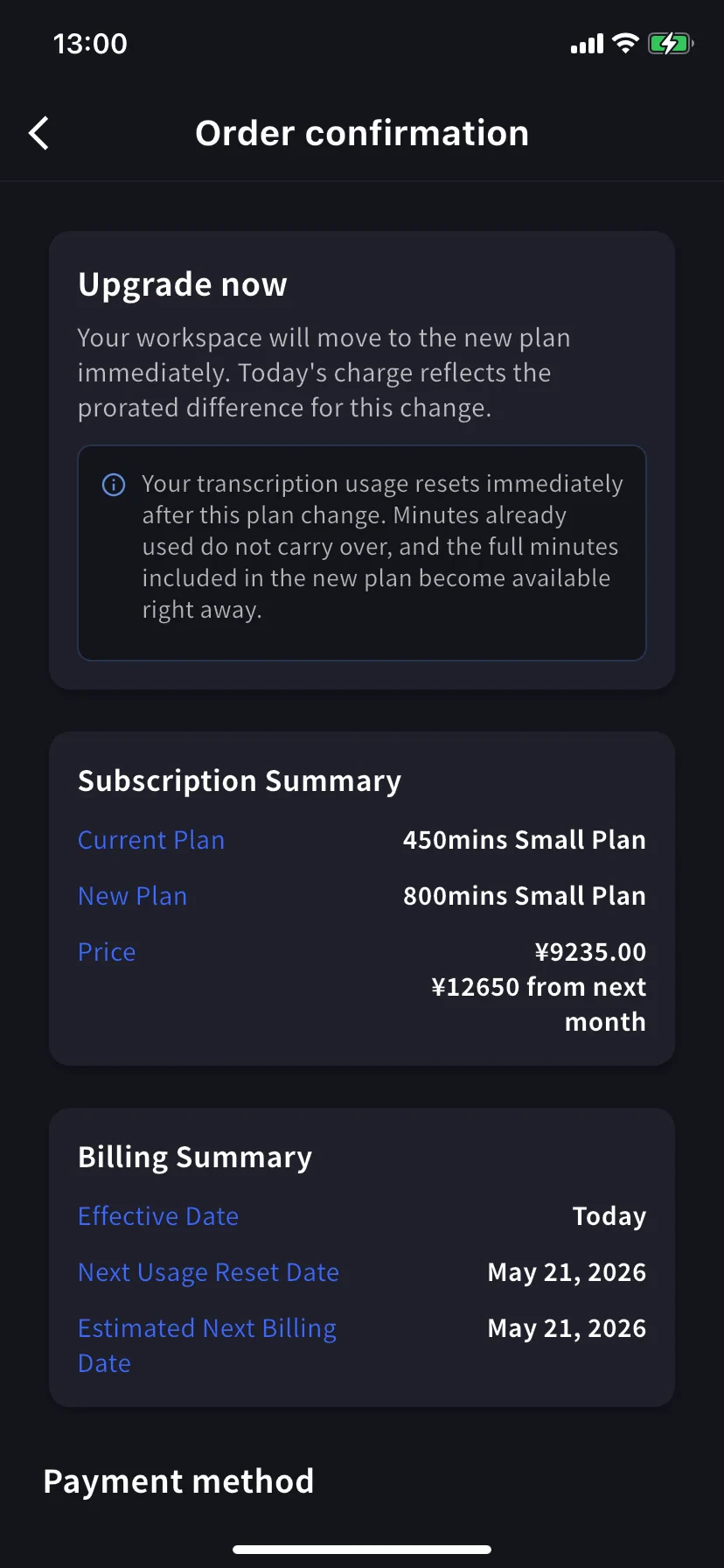
คุณไปที่ **Order confirmation** แบนเนอร์อ่าน *Upgrade now — your workspace will move to the new plan immediately. Today's charge reflects the prorated difference for this change.*
**การใช้งานการถอดเสียงรีเซ็ตทันที** นาทีที่ใช้แล้วจะไม่ถูกยกไป และนาทีเต็มของแพลนใหม่พร้อมใช้งานทันที
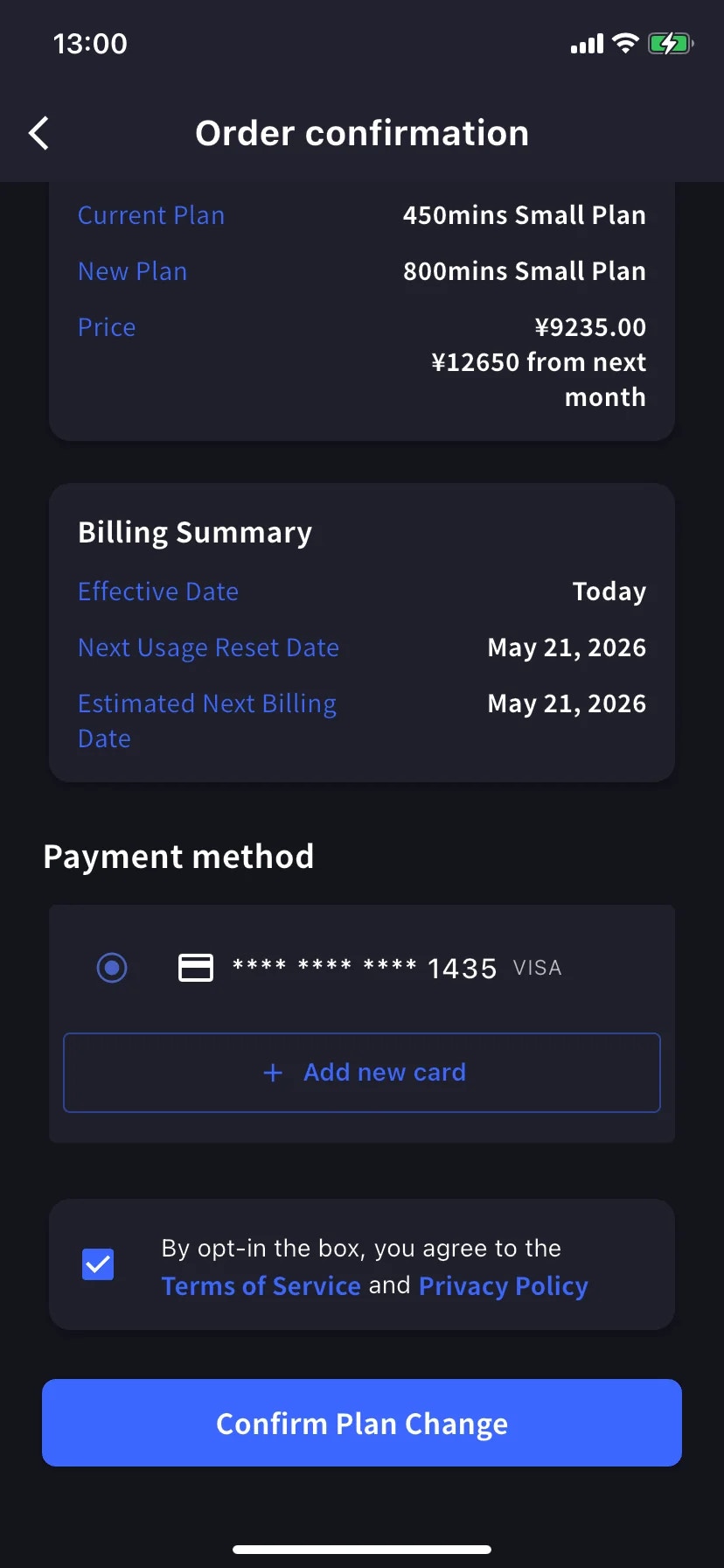
Subscription Summary แสดงแพลนปัจจุบัน แพลนใหม่ และสองราคา — จำนวนเงินตามสัดส่วนวันนี้และราคาเต็มจากเดือนหน้า Billing Summary ยืนยัน **Effective Date: Today** และวันรีเซ็ต / เรียกเก็บถัดไป
เลื่อนไป **Payment method** เลือกบัตรที่มีหรือแตะ **+ Add new card** สำหรับแผ่นงาน Stripe (Link หรือกรอกด้วยตนเอง — ดู [การเรียกเก็บเงินบนมือถือ](/th/mobile-billing#manage-cards)) ทำเครื่องหมายช่อง Terms / Privacy
แตะปุ่มสีฟ้า **Confirm Plan Change** ปุ่มจะหรี่ลงชั่วขณะขณะประมวลผลการเรียกเก็บ
เมื่อสำเร็จคุณจะกลับไปยัง Manage Plan พร้อม toast สีเขียว **Plan purchase completed** และระดับใหม่ถูกกรอบเป็นปัจจุบัน
เนื่องจากการเรียกเก็บตามสัดส่วนไม่รวมเวลาที่ใช้บนแพลนเก่า อัปเกรดช้าในรอบบิลมีค่าใกล้ราคาใหม่เต็ม สำหรับอัปเกรดถูกที่สุด จัดเวลาใกล้วันต่ออายุ — หรือไม่ต้องกังวลและอัปเกรดเมื่อจำเป็น
## ดาวน์เกรด — มีผลในการต่ออายุถัดไป
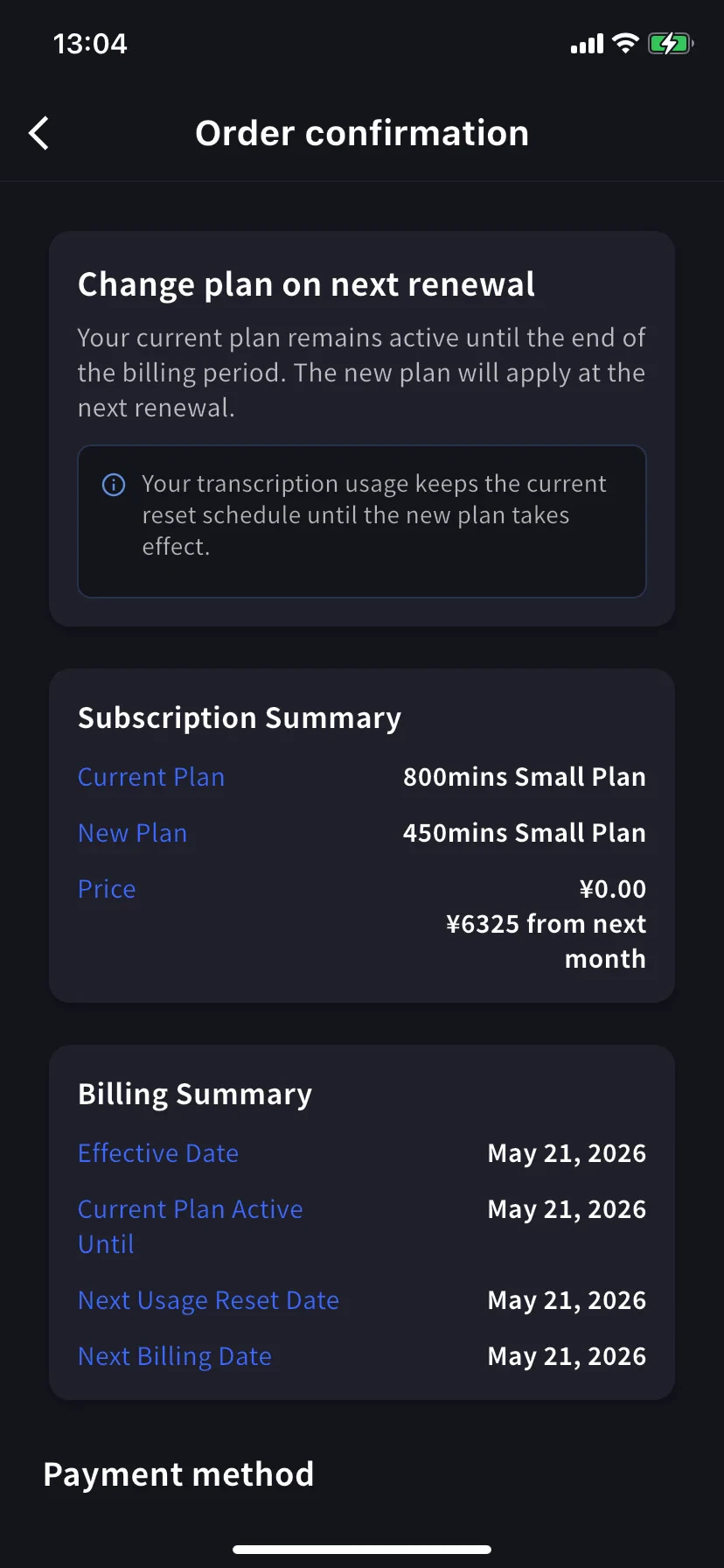
แตะ **Change Plan** บนระดับต่ำกว่า แบนเนอร์ยืนยันเปลี่ยน — ตอนนี้เป็น *Change plan on next renewal — your current plan remains active until the end of the billing period. The new plan will apply at the next renewal.*
ราคาวันนี้ **¥0.00** — คุณจะจ่ายราคาต่ำกว่าเริ่มเดือนหน้า Billing Summary แสดง **Effective Date** และ **Current Plan Active Until** เป็นวันต่ออายุ
**การใช้งานรักษาตารางเวลา** คุณเก็บนาทีของแพลนปัจจุบันจนถึงการต่ออายุ จำนวนใหม่ที่ต่ำกว่าเริ่มหลังจากนั้น
ยืนยันเช่นเดียวกับอัปเกรด
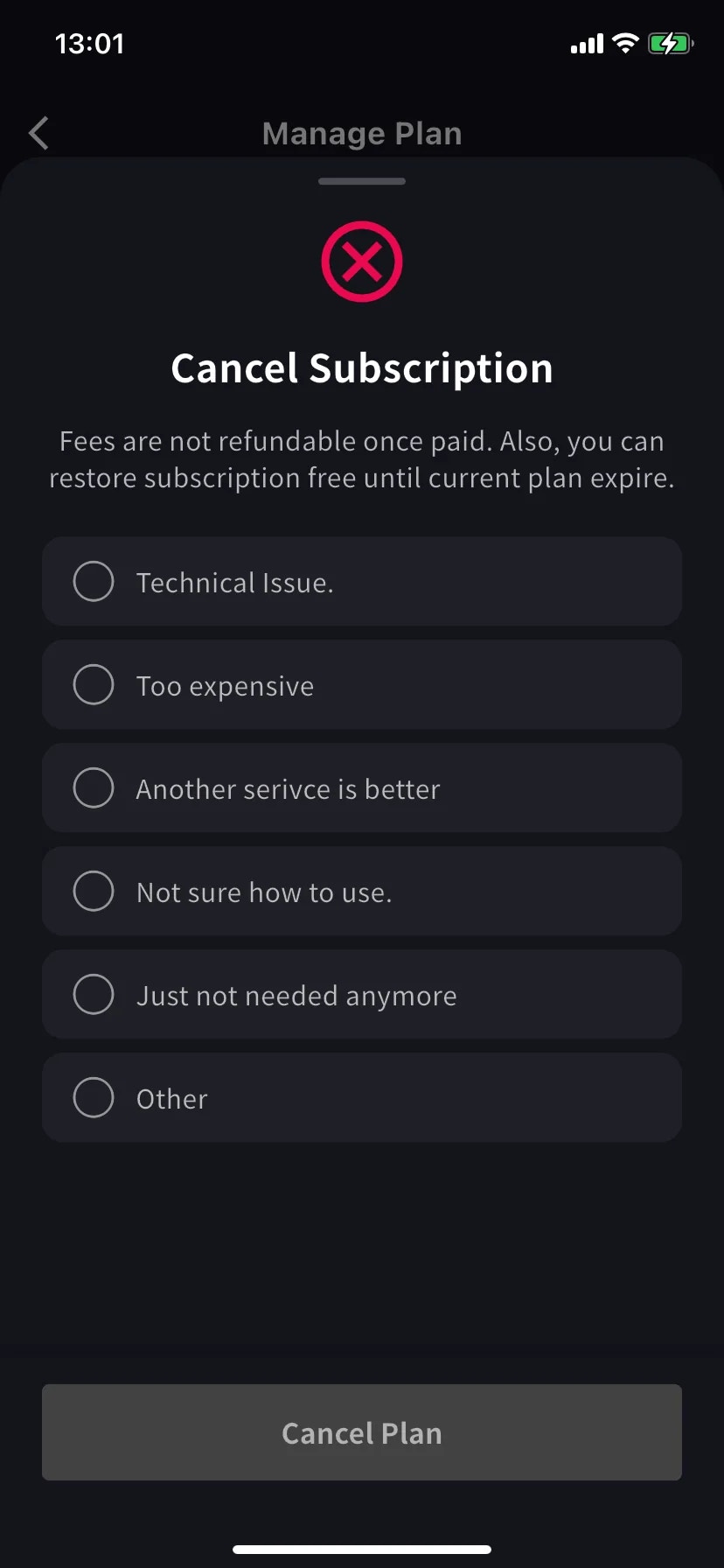
## ยกเลิกการสมัครสมาชิก
แผ่นงานเลื่อนขึ้นพร้อมไอคอน ⊗ สีแดงและรายการเหตุผลที่ต้องการ
เลือกเหตุผลหนึ่ง — ปุ่ม Cancel Plan จะเป็นสีเทาจนกว่าจะเลือก
ค่าธรรมเนียมไม่คืนเงินเมื่อจ่ายแล้ว แพลนปัจจุบันยังใช้งานได้จนถึงสิ้นสุดระยะเวลา — คุณสามารถคืนสภาพได้ฟรีก่อนนั้น
แบนเนอร์แพลนปัจจุบันเปลี่ยนเป็น **Scheduled to be canceled after this period ends** และระดับด้านล่างแสดงปุ่ม **Restore**
Toast สีเขียว **Plan cancellation completed** ยืนยันกำหนดการ คุณเก็บแพลนและนาทีทั้งหมดจนถึงวันต่ออายุ
## คืนสภาพการต่ออายุอัตโนมัติ
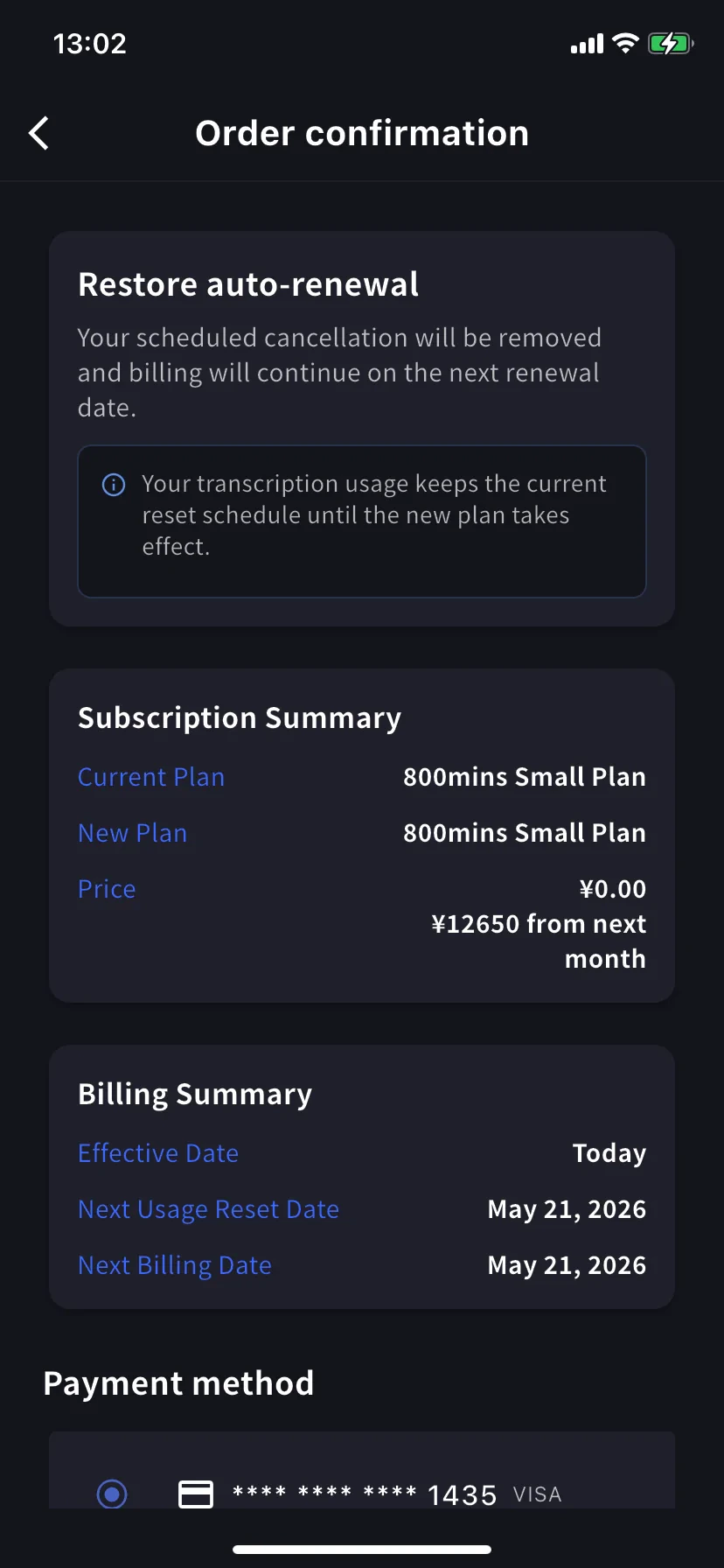
เปลี่ยนใจ? แตะ **Restore** บนระดับปัจจุบัน
Order confirmation อ่าน *Restore auto-renewal — your scheduled cancellation will be removed and billing will continue on the next renewal date.* ราคาวันนี้ ¥0 แตะ **Confirm Plan Change** และคุณกลับไปที่การสมัครที่ต่ออายุปกติ
การใช้งานรักษาตารางรีเซ็ตปัจจุบัน — การคืนสภาพไม่รีเซ็ตนาที
## ฉันดูหน้าจอยืนยันไหน?
ทั้งสามหน้าจอมี layout เดียวกัน (Subscription Summary / Billing Summary / Payment method / Confirm) อ่าน **หัวข้อแบนเนอร์** เพื่อให้แน่ใจ:
| แบนเนอร์ | ทิศทาง | มีผล |
| ------------------------------- | ------------ | --------------- |
| **Upgrade now** | ระดับสูงกว่า | วันนี้ |
| **Change plan on next renewal** | ระดับต่ำกว่า | การต่ออายุถัดไป |
| **Restore auto-renewal** | เลิกยกเลิก | วันนี้ |
## เคล็ดลับ
* **แท็บรายปีลด 30%** ถ้าคุณตกลงระยะยาว สลับ Monthly → Yearly บนระดับเดียวกันเป็นอัปเกรดพร้อมส่วนลดทันที
* **ตรวจ Billing Activity หลังจากนั้น** ทุกการเคลื่อนไหวเหล่านี้บันทึกด้วย timestamp และ IP — มีประโยชน์ถ้าคนอื่นในทีมมีแอปด้วย
* **ดาวน์เกรด ≠ ยกเลิก** ดาวน์เกรดให้คุณอยู่ในแพลนแบบชำระเงิน (เล็กกว่า) ยกเลิกทำให้ตกถึง Free หลังสิ้นสุดระยะเวลา เลือกที่ตรงกับสิ่งที่คุณต้องการจริง
* **เพิ่มบัตรก่อน** ถ้าคุณรู้ว่าจะอัปเกรด เพิ่มบัตรใน [Manage Cards](/th/mobile-billing#manage-cards) ก่อน — ขั้นตอนอัปเกรดใช้ซ้ำ
## ที่เกี่ยวข้อง
* [การเรียกเก็บเงินบนมือถือ](/th/mobile-billing) — บัตร ใบแจ้งหนี้ ใบเสร็จ บันทึกกิจกรรม
* [การเปลี่ยนแพลน การยกเลิก และสิ้นสุด Trial](/th/plan-changes) — เทียบเท่าแดชบอร์ดผู้ดูแล PC
* [ราคา](/th/pricing) — ระดับแพลนและนาที
* [แพลนฟรี](/th/free-plan) / [ทดลองฟรี](/th/free-trial)