> ## Documentation Index
> Fetch the complete documentation index at: https://manual.voiceping.net/llms.txt
> Use this file to discover all available pages before exploring further.
# เปลี่ยนแพลน ยกเลิก และสิ้นสุดทดลองใช้
> อัปเกรด ดาวน์เกรด ยกเลิกแพลน VoicePing หรือขอชำระเงินแบบสัญญา
export const ContactTh = () => <>
หากคุณมีคำถามใดๆ กรุณาติดต่อเราผ่าน แบบฟอร์มนี้
ลิงก์อย่างเป็นทางการ
เยี่ยมชมเว็บไซต์อย่างเป็นทางการของเรา
ติดตามเราบน X
ติดตามเราบน Facebook
เชื่อมต่อบน LinkedIn
;
อัปเกรด ดาวน์เกรด หรือยกเลิกจากแท็บ Billing → Subscriptions
Manage Plan ในฮับ Billing: อัปเกรด ดาวน์เกรด ยกเลิก กู้คืน
การเปลี่ยนแปลงแผนหรือการยกเลิกที่ประสบความสำเร็จทุกครั้งจะทำให้เกิดอีเมลยืนยันจาก `account@voice-ping.com`
## การเคลื่อนไหวทั้งสี่
การเปลี่ยนแปลงการสมัครรับข้อมูลทุกครั้งบน PC หรือบนมือถือ เป็นหนึ่งในสี่การเคลื่อนไหว วันที่มีผลบังคับใช้ ราคาวันนี้ และพฤติกรรมการรีเซ็ตการใช้งานจะเหมือนกันบนทั้งสองพื้นผิว
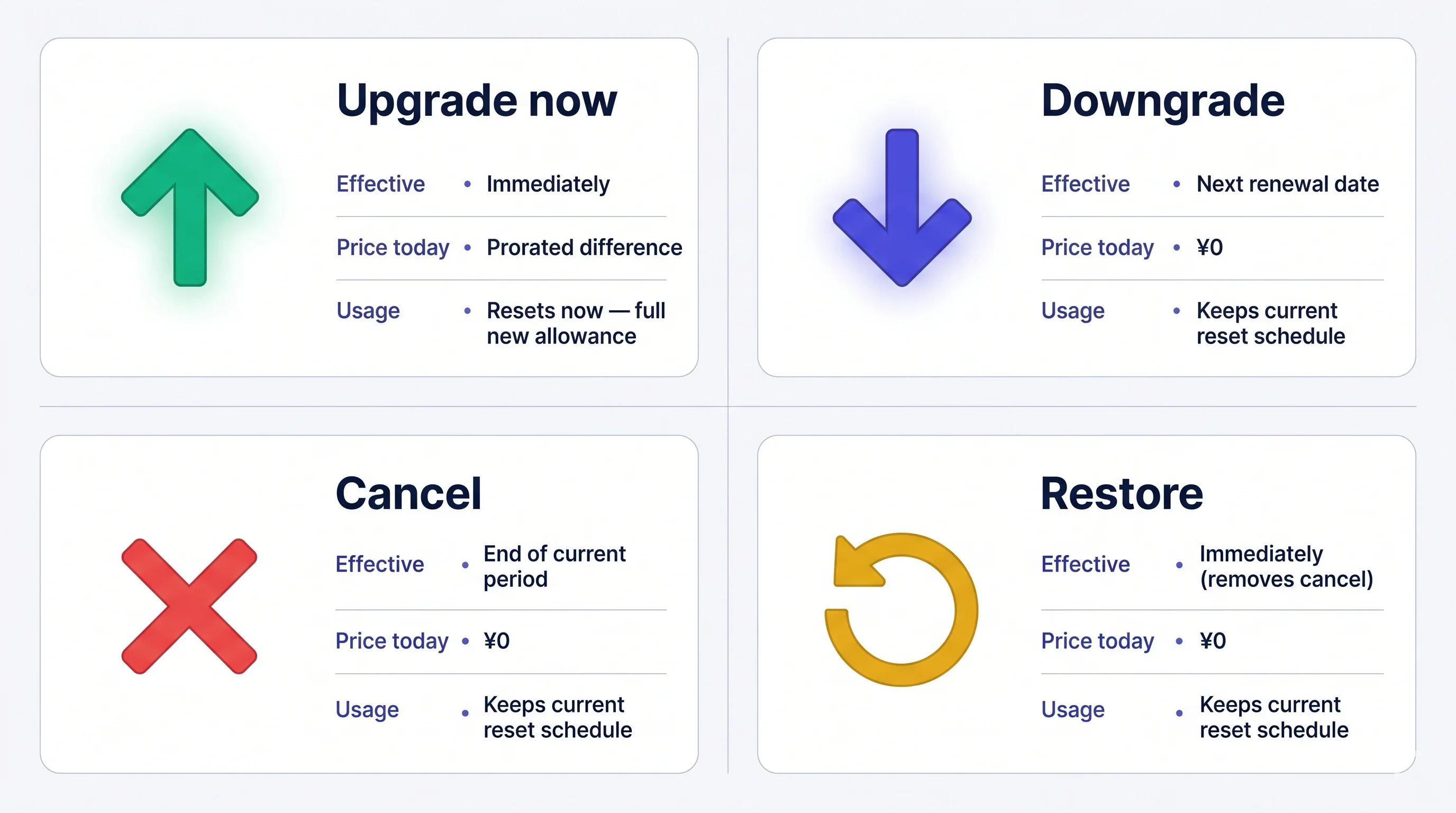 ค่าธรรมเนียมคือ **non-refundable** เมื่อเรียกเก็บแล้ว หากคุณยกเลิก แผนปัจจุบันของคุณจะยังคงใช้งานได้จนกว่าระยะเวลาจะสิ้นสุดลง และคุณสามารถกู้คืนได้ฟรีเมื่อใดก็ได้ก่อนหน้านั้น
## วิธีการ Change Plans
### 1. PC
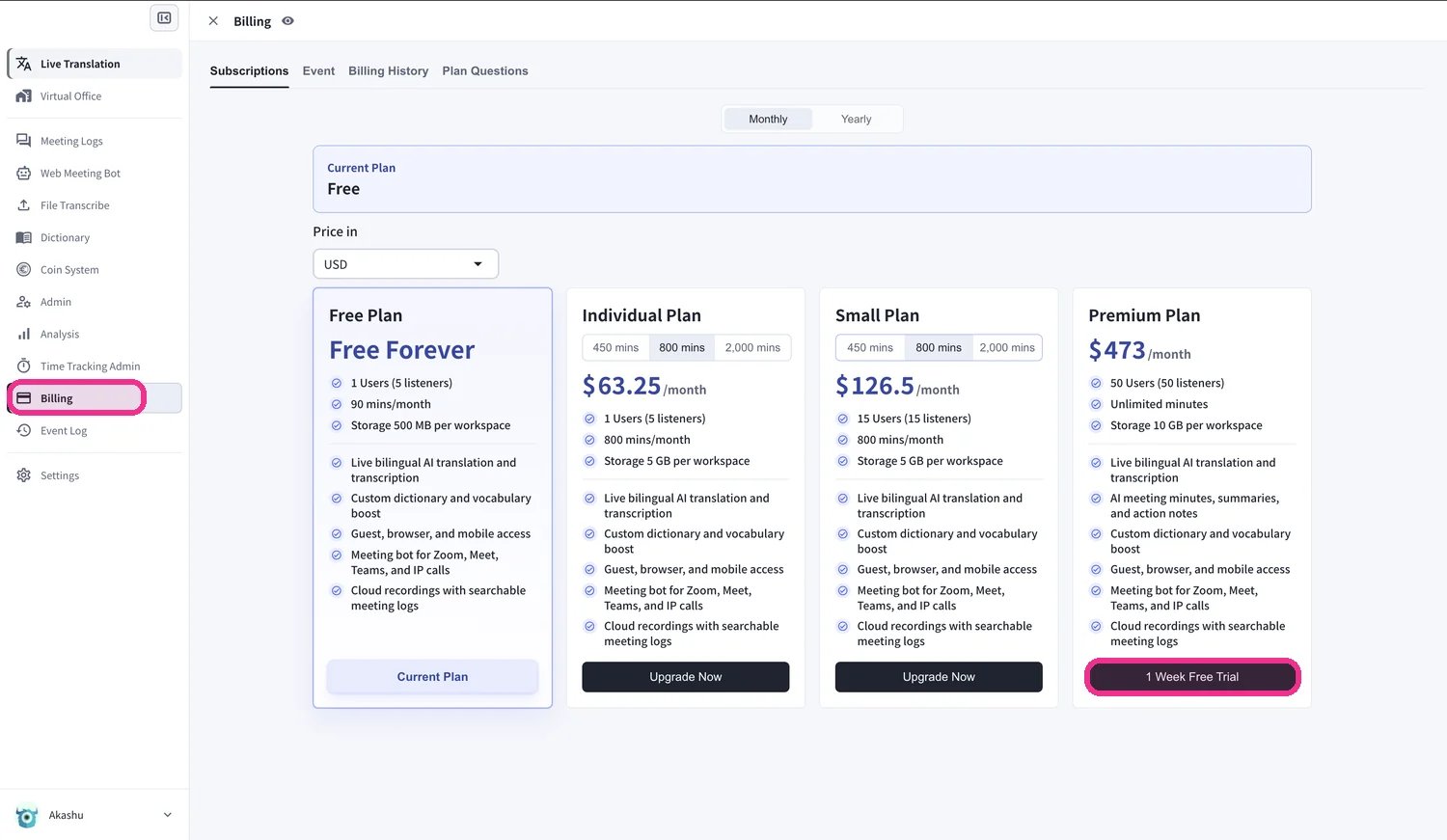
**เปิดแท็บ Subscriptions:** การนำทางด้านบน → **Billing** → **Subscriptions**
* **ตั้งแต่ Free Plan** — คลิก **Upgrade Free Plan** CTA
* **จากแผนการชำระเงิน** — คลิก **Change Plan** ถัดจากแผนปัจจุบันของคุณ
**เลือกแผนเป้าหมาย:**
* **Small / Premium / Enterprise** — คลิก **Upgrade Plan** → **Purchase** → ใส่การ์ด แผนรายบุคคลเป็น **แผนสำหรับผู้ใช้คนเดียวและรายเดือนเท่านั้น**
* **Premium from Free** — คลิก **1-Week Free Trial** → **Start Trial** → ใส่การ์ด ช่วงทดลองใช้งาน 1 สัปดาห์ จากนั้นจะเรียกเก็บเงินอัตโนมัติ
* **Lower tier (downgrade)** — เลือกระดับและยืนยัน แผนปัจจุบันยังคงใช้งานได้จนถึงวันที่ต่ออายุ แผนใหม่จะใช้ตั้งแต่รอบถัดไป
**แผนรายบุคคลเป็นแผนสำหรับผู้ใช้คนเดียว** พื้นที่ทำงานสามารถเปลี่ยนมาใช้แผนรายบุคคลได้เมื่อมีสมาชิกที่ใช้งานอยู่ **เพียงคนเดียว** เท่านั้น หากคุณมีมากกว่านั้น ให้ลบสมาชิกส่วนเกินออกก่อน — VoicePing จะบล็อกการเปลี่ยนแผนและแสดงจำนวนผู้ใช้ที่ต้องลบออกจนกว่าพื้นที่ทำงานจะเหลือเพียงคนเดียว
ค่าธรรมเนียมคือ **non-refundable** เมื่อเรียกเก็บแล้ว หากคุณยกเลิก แผนปัจจุบันของคุณจะยังคงใช้งานได้จนกว่าระยะเวลาจะสิ้นสุดลง และคุณสามารถกู้คืนได้ฟรีเมื่อใดก็ได้ก่อนหน้านั้น
## วิธีการ Change Plans
### 1. PC
**เปิดแท็บ Subscriptions:** การนำทางด้านบน → **Billing** → **Subscriptions**
* **ตั้งแต่ Free Plan** — คลิก **Upgrade Free Plan** CTA
* **จากแผนการชำระเงิน** — คลิก **Change Plan** ถัดจากแผนปัจจุบันของคุณ
**เลือกแผนเป้าหมาย:**
* **Small / Premium / Enterprise** — คลิก **Upgrade Plan** → **Purchase** → ใส่การ์ด แผนรายบุคคลเป็น **แผนสำหรับผู้ใช้คนเดียวและรายเดือนเท่านั้น**
* **Premium from Free** — คลิก **1-Week Free Trial** → **Start Trial** → ใส่การ์ด ช่วงทดลองใช้งาน 1 สัปดาห์ จากนั้นจะเรียกเก็บเงินอัตโนมัติ
* **Lower tier (downgrade)** — เลือกระดับและยืนยัน แผนปัจจุบันยังคงใช้งานได้จนถึงวันที่ต่ออายุ แผนใหม่จะใช้ตั้งแต่รอบถัดไป
**แผนรายบุคคลเป็นแผนสำหรับผู้ใช้คนเดียว** พื้นที่ทำงานสามารถเปลี่ยนมาใช้แผนรายบุคคลได้เมื่อมีสมาชิกที่ใช้งานอยู่ **เพียงคนเดียว** เท่านั้น หากคุณมีมากกว่านั้น ให้ลบสมาชิกส่วนเกินออกก่อน — VoicePing จะบล็อกการเปลี่ยนแผนและแสดงจำนวนผู้ใช้ที่ต้องลบออกจนกว่าพื้นที่ทำงานจะเหลือเพียงคนเดียว
 **Prorated billing on upgrades.** รอบการเรียกเก็บเงินใหม่เริ่มต้นในวันที่อัปเกรด ส่วนที่ไม่ได้ใช้ของแผนเก่าจะถูกนับรวมกับราคาใหม่ และการใช้งานจะถูกรีเซ็ต ยิ่งคุณอัปเกรดช่วงหลัง เครดิตก็จะยิ่งน้อยลงเท่านั้น การอัพเกรดในวันที่ต่ออายุจะถูกที่สุด **Downgrades** สมัครในการต่ออายุครั้งถัดไป วันที่ต่ออายุจะไม่เปลี่ยนแปลง
### 2. Mobile
นโยบาย App Store: ปุ่มอัปเกรดและยกเลิกจะปรากฏขึ้นหลังจากใช้งานฟรีครบ 60 นาทีแล้วเท่านั้น ใช้เวลา 60 นาทีหรือเปลี่ยนแผนจาก PC
การเปลี่ยนแปลงแผนทุกครั้งบนมือถือจะดำเนินการผ่าน **Manage Plan** ในฮับ Billing
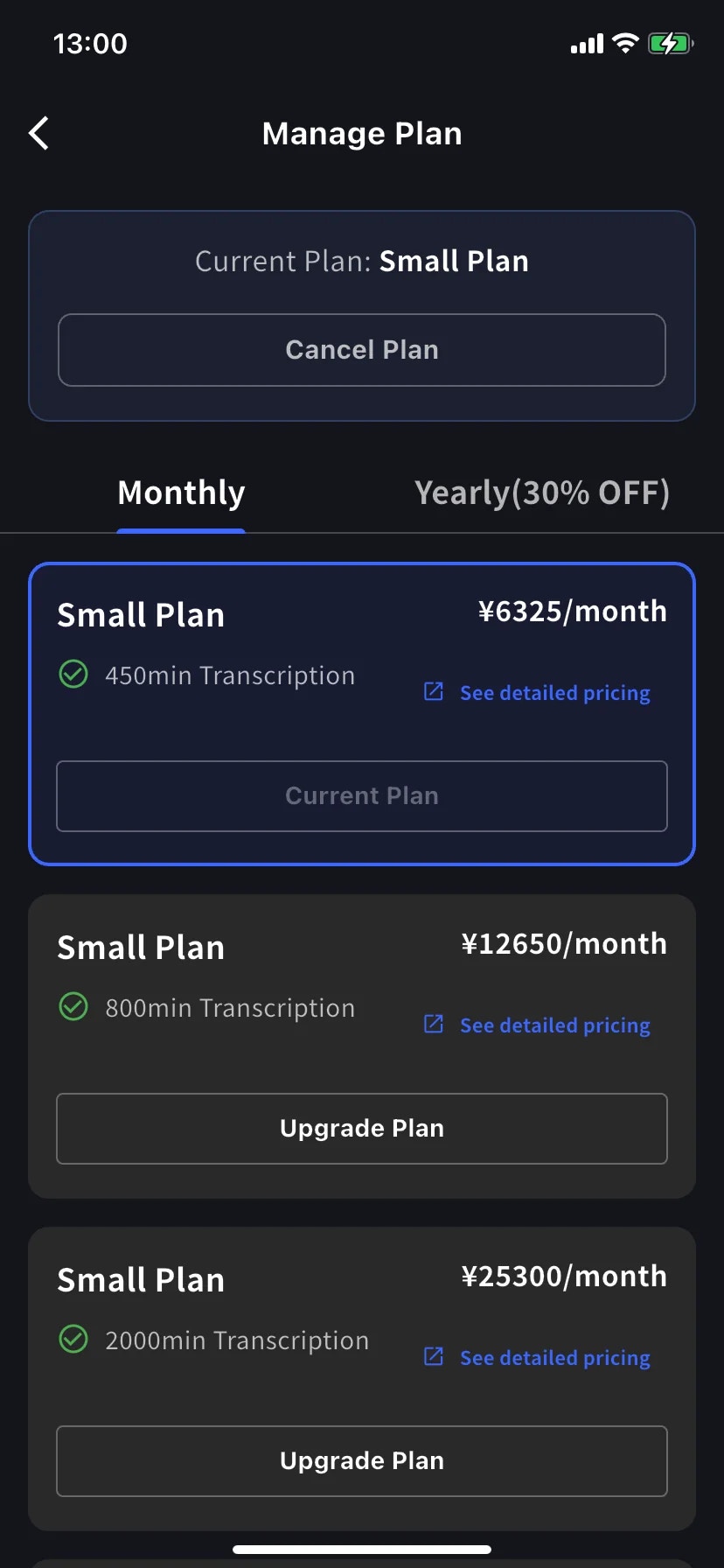
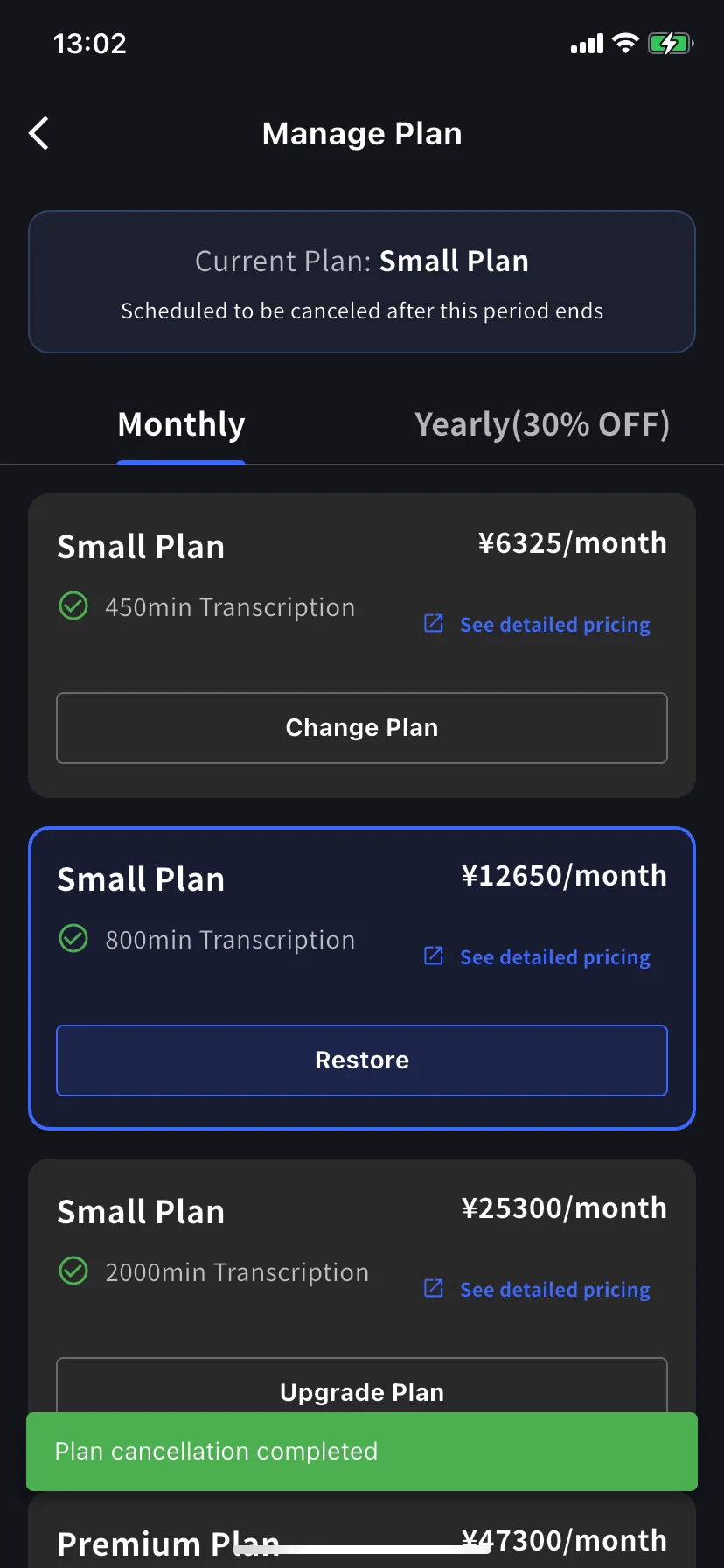
เมนูด้านข้าง → **User Settings** → **Billing** → **Manage Plan** คุณยังสามารถแตะ **Manage Plan** บนการ์ด Current Plan ได้อีกด้วย สลับ **Monthly** / **Yearly** ที่ด้านบน ระดับเหนือรายการปัจจุบัน **Upgrade Plan**; ชั้นด้านล่างแสดง **Change Plan**
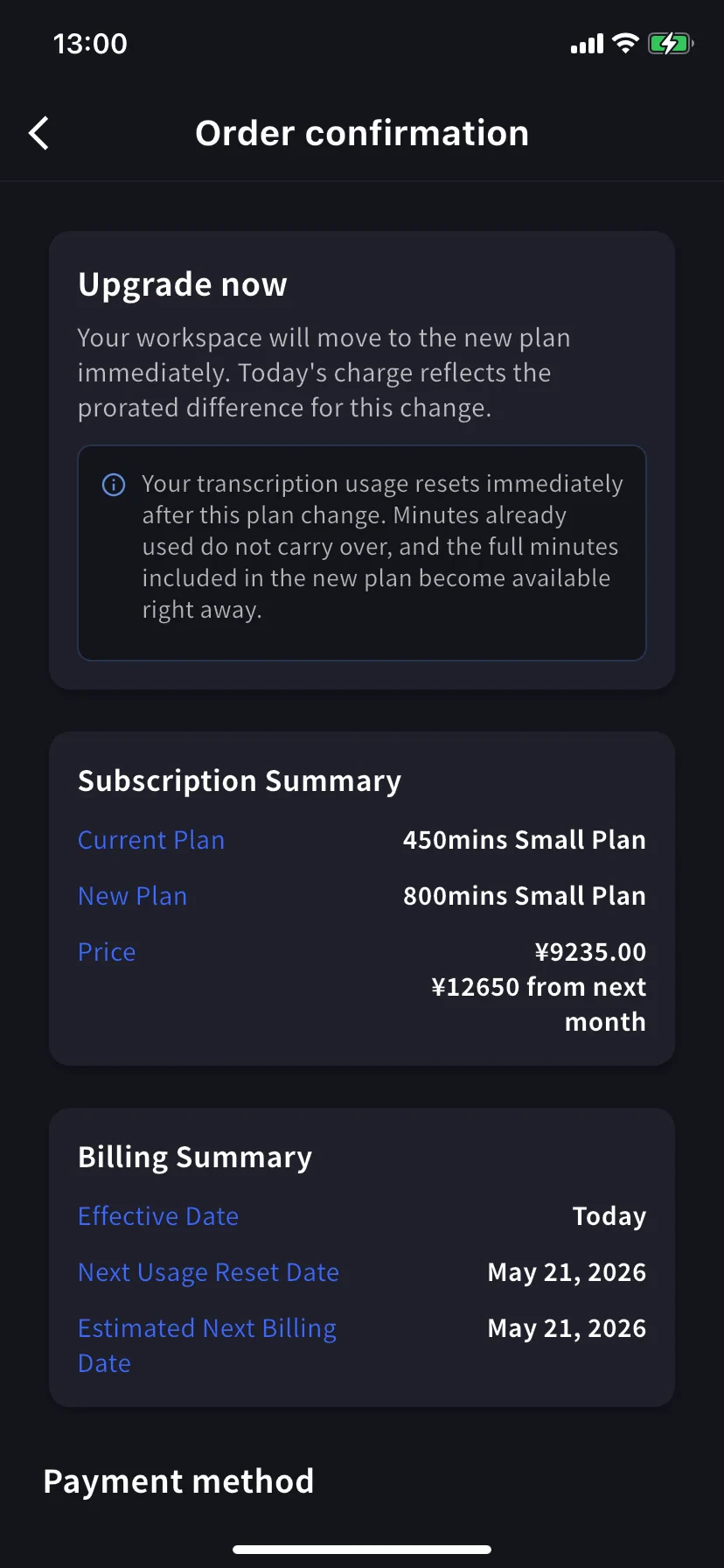
แตะ **Upgrade Plan** บนระดับที่สูงกว่า แบนเนอร์ระบุว่าพื้นที่ทำงานของคุณย้ายไปยังแผนใหม่ทันที และค่าบริการของวันนี้สะท้อนถึงส่วนต่างตามสัดส่วน เลือกการ์ดที่มีอยู่หรือแตะ **+ Add new card** ทำเครื่องหมาย Terms / Privacy จากนั้นแตะ **Confirm Plan Change**
**Premium from Free Plan** เริ่มต้นด้วยการทดลองใช้ 1 สัปดาห์ ไม่มีค่าใช้จ่ายจนกว่าจะสิ้นสุด
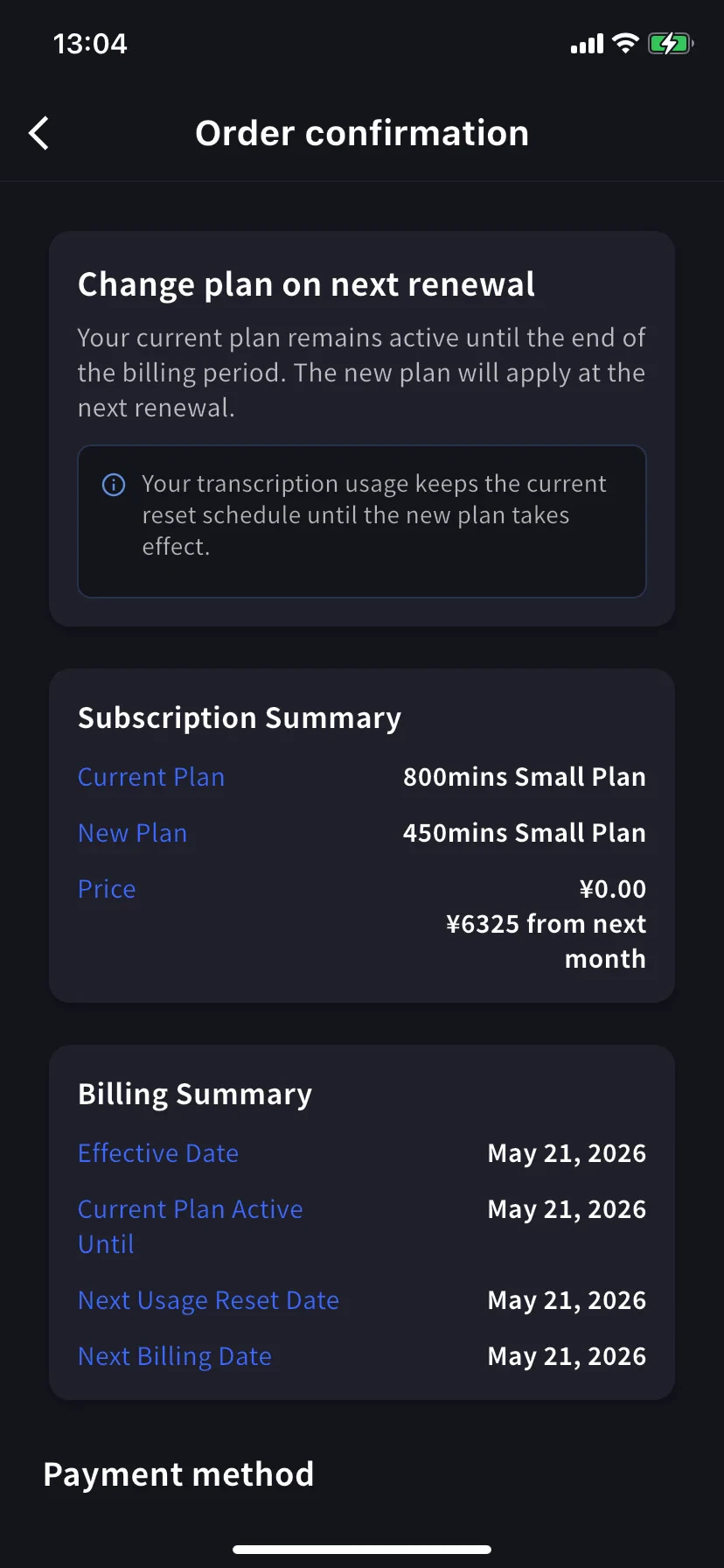
แตะ **Change Plan** ที่ระดับล่าง แบนเนอร์แจ้งว่าแผนปัจจุบันของคุณยังคงใช้งานได้จนกว่าจะสิ้นสุดช่วงเวลาที่เรียกเก็บเงิน ราคาวันนี้คือ **¥0 / \$0** ยืนยันในลักษณะเดียวกับการอัพเกรด
### 3. Enterprise / ลูกค้าที่ทำสัญญาแบบเขียน / อิเล็กทรอนิกส์
ดู [Contract Procedures](/en/contract-procedures) และสมัครผ่าน [this form](https://forms.gle/6AUho7oj3zBr79e96) ด้วย:
1. ชื่อบริษัท 2. ที่อยู่บริษัท 3. โทรศัพท์บริษัท 4. ผู้ติดต่อ 5. วันที่สัญญา 6. แผนปัจจุบันและแผนที่ต้องการ
## การยกเลิก / สิ้นสุดการทดลองใช้
### 1. PC
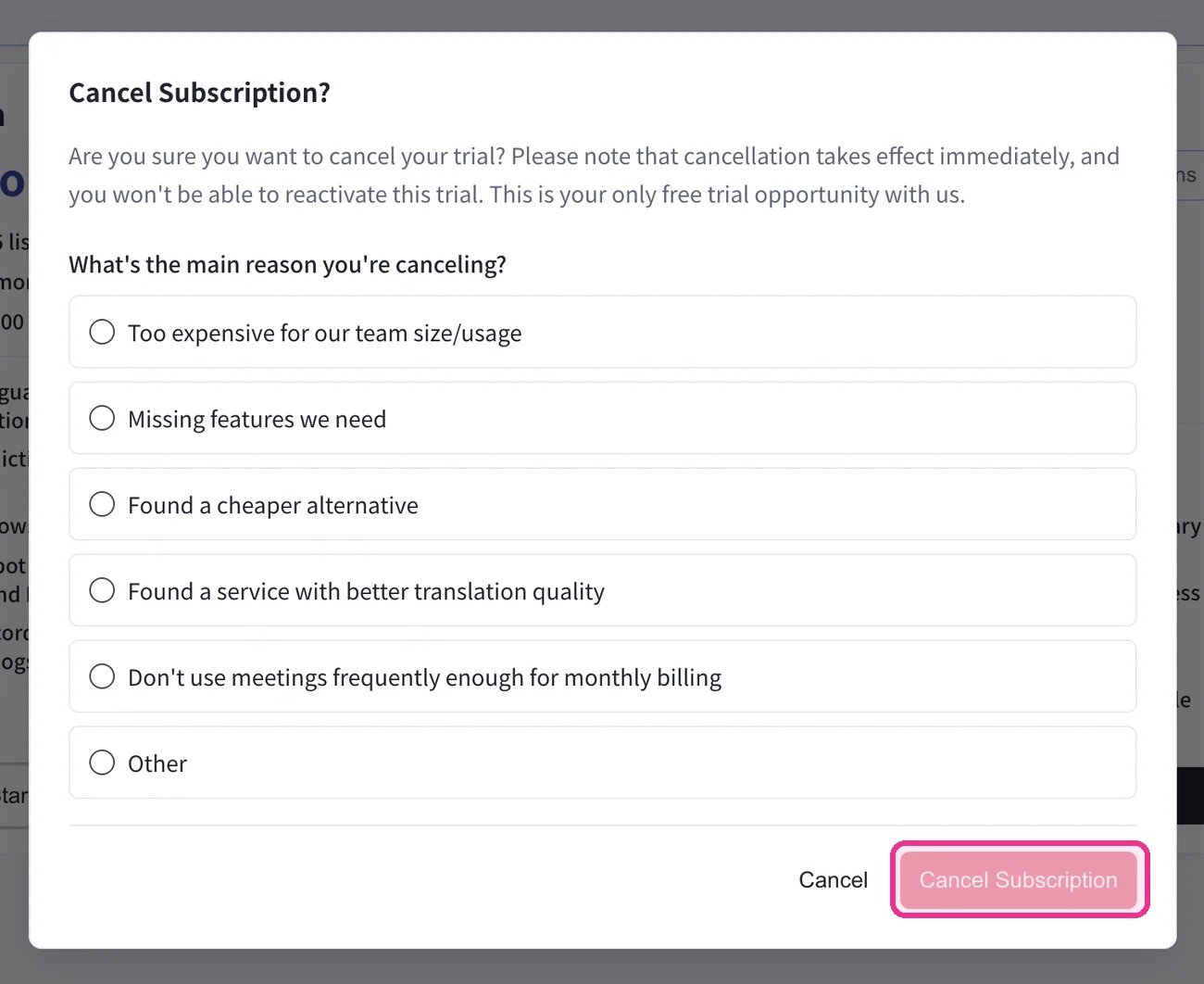
การนำทางด้านบน → **Billing** → **Subscriptions** → ภายใต้ **Free Plan** คลิก **Start Free Plan** ในกล่องโต้ตอบ **Cancel Subscription?** ให้เลือกเหตุผล จากนั้นคลิก **Cancel Subscription**
**Prorated billing on upgrades.** รอบการเรียกเก็บเงินใหม่เริ่มต้นในวันที่อัปเกรด ส่วนที่ไม่ได้ใช้ของแผนเก่าจะถูกนับรวมกับราคาใหม่ และการใช้งานจะถูกรีเซ็ต ยิ่งคุณอัปเกรดช่วงหลัง เครดิตก็จะยิ่งน้อยลงเท่านั้น การอัพเกรดในวันที่ต่ออายุจะถูกที่สุด **Downgrades** สมัครในการต่ออายุครั้งถัดไป วันที่ต่ออายุจะไม่เปลี่ยนแปลง
### 2. Mobile
นโยบาย App Store: ปุ่มอัปเกรดและยกเลิกจะปรากฏขึ้นหลังจากใช้งานฟรีครบ 60 นาทีแล้วเท่านั้น ใช้เวลา 60 นาทีหรือเปลี่ยนแผนจาก PC
การเปลี่ยนแปลงแผนทุกครั้งบนมือถือจะดำเนินการผ่าน **Manage Plan** ในฮับ Billing
เมนูด้านข้าง → **User Settings** → **Billing** → **Manage Plan** คุณยังสามารถแตะ **Manage Plan** บนการ์ด Current Plan ได้อีกด้วย สลับ **Monthly** / **Yearly** ที่ด้านบน ระดับเหนือรายการปัจจุบัน **Upgrade Plan**; ชั้นด้านล่างแสดง **Change Plan**
แตะ **Upgrade Plan** บนระดับที่สูงกว่า แบนเนอร์ระบุว่าพื้นที่ทำงานของคุณย้ายไปยังแผนใหม่ทันที และค่าบริการของวันนี้สะท้อนถึงส่วนต่างตามสัดส่วน เลือกการ์ดที่มีอยู่หรือแตะ **+ Add new card** ทำเครื่องหมาย Terms / Privacy จากนั้นแตะ **Confirm Plan Change**
**Premium from Free Plan** เริ่มต้นด้วยการทดลองใช้ 1 สัปดาห์ ไม่มีค่าใช้จ่ายจนกว่าจะสิ้นสุด
แตะ **Change Plan** ที่ระดับล่าง แบนเนอร์แจ้งว่าแผนปัจจุบันของคุณยังคงใช้งานได้จนกว่าจะสิ้นสุดช่วงเวลาที่เรียกเก็บเงิน ราคาวันนี้คือ **¥0 / \$0** ยืนยันในลักษณะเดียวกับการอัพเกรด
### 3. Enterprise / ลูกค้าที่ทำสัญญาแบบเขียน / อิเล็กทรอนิกส์
ดู [Contract Procedures](/en/contract-procedures) และสมัครผ่าน [this form](https://forms.gle/6AUho7oj3zBr79e96) ด้วย:
1. ชื่อบริษัท 2. ที่อยู่บริษัท 3. โทรศัพท์บริษัท 4. ผู้ติดต่อ 5. วันที่สัญญา 6. แผนปัจจุบันและแผนที่ต้องการ
## การยกเลิก / สิ้นสุดการทดลองใช้
### 1. PC
การนำทางด้านบน → **Billing** → **Subscriptions** → ภายใต้ **Free Plan** คลิก **Start Free Plan** ในกล่องโต้ตอบ **Cancel Subscription?** ให้เลือกเหตุผล จากนั้นคลิก **Cancel Subscription**
 ยืนยันการยกเลิกในแท็บ **Billing History** — รายการ **Succeeded to cancel Trial** (หรือรายการยกเลิกแผนที่เทียบเท่า) จะปรากฏขึ้น
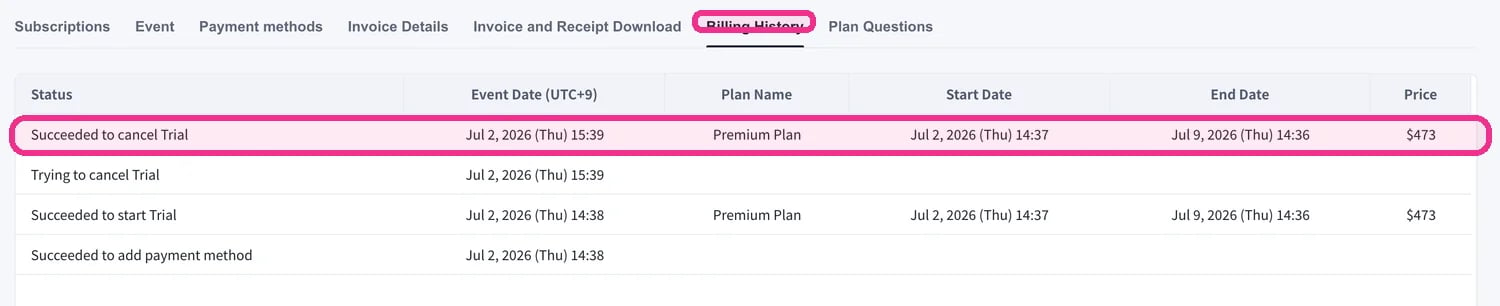 ยืนยันเสมอว่าการยกเลิกปรากฏใน **Billing History** หากคุณข้ามขั้นตอนนี้ การยกเลิกจะถือว่าไม่สมบูรณ์และไม่สามารถคืนเงินได้
### 2. Mobile
ยกเลิกจาก **Manage Plan** ในฮับ Billing Restore เมื่อใดก็ได้ก่อนสิ้นสุดระยะเวลา
##### ยกเลิก
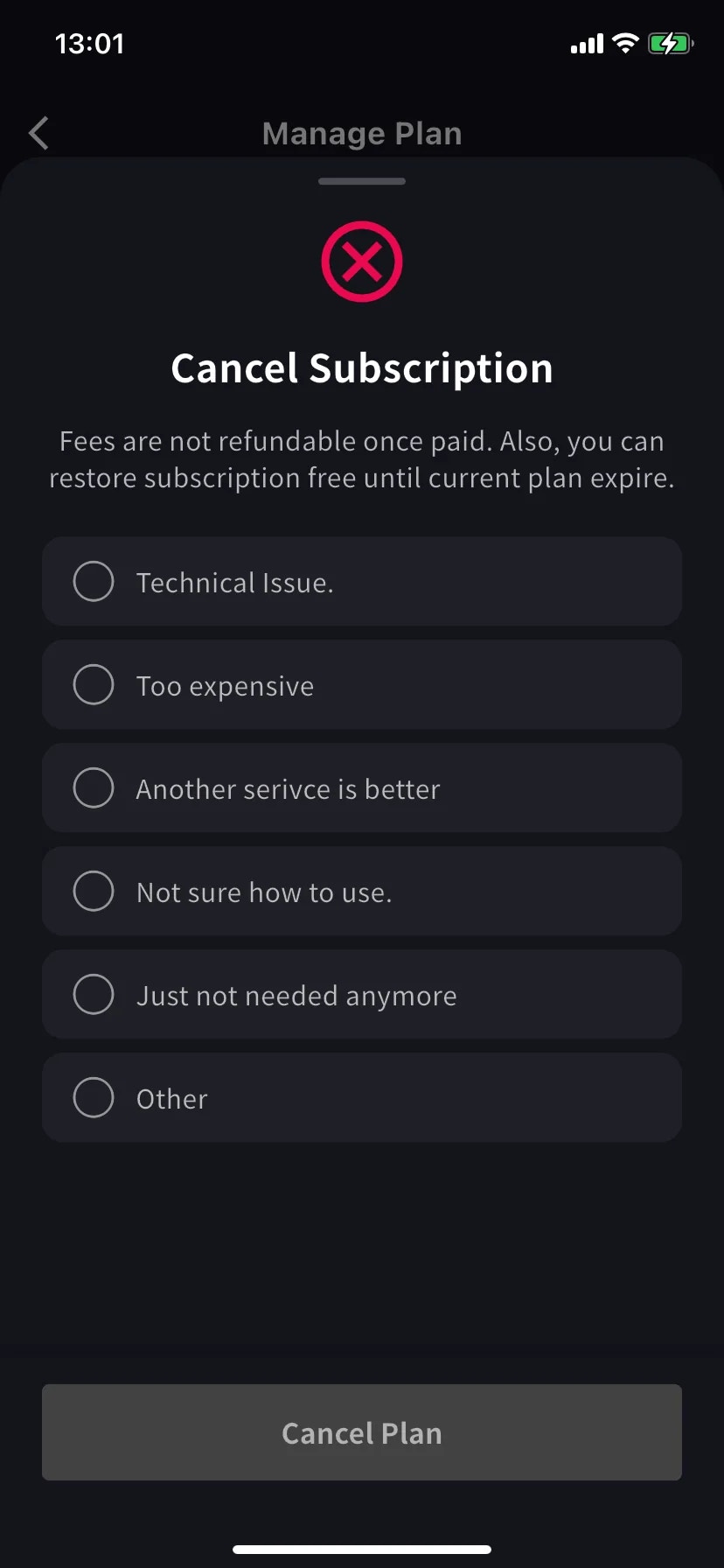
แผ่นงานที่มีรายการเหตุผลที่ต้องเลื่อนขึ้น เลือกอันหนึ่ง; ปุ่ม Cancel Plan ยังคงเป็นสีเทาจนกว่าจะเลือกเหตุผล
การเลือก **Other** ต้องมีอักขระอย่างน้อย 15 ตัว
แบนเนอร์แผนปัจจุบันเปลี่ยนเป็น **Scheduled to be canceled after this period ends**; ชั้นล่างแสดงปุ่ม **Restore** คุณคงแผนและนาทีไว้จนถึงวันที่ต่ออายุ
##### Restore ต่ออายุอัตโนมัติ
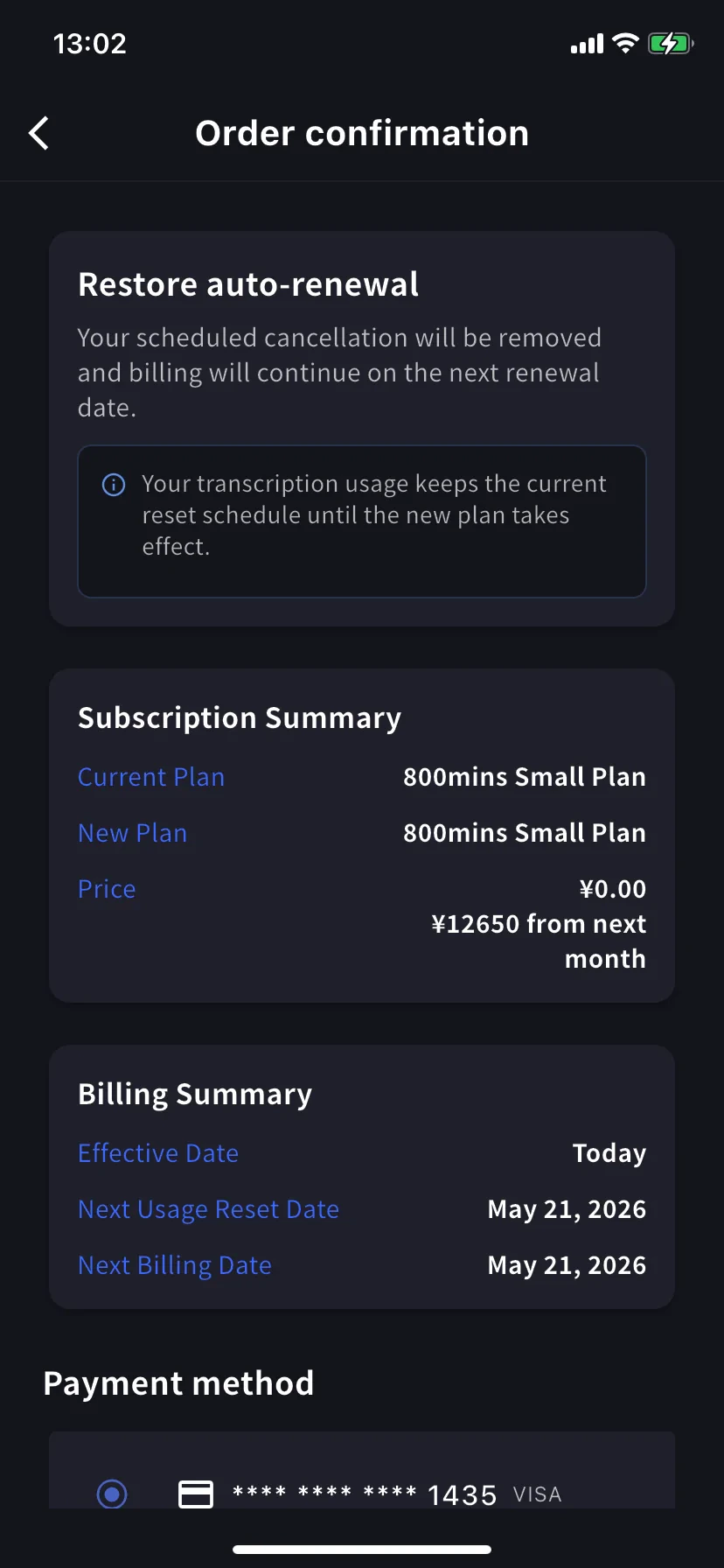
แตะ **Restore** บนระดับปัจจุบัน การยืนยันคำสั่งซื้อแจ้งว่าการยกเลิกตามกำหนดการจะถูกลบออก และการเรียกเก็บเงินจะดำเนินต่อไปในวันที่ต่ออายุครั้งถัดไป ราคาวันนี้ \$0. แตะ **Confirm Plan Change** แล้วคุณจะกลับมาสมัครสมาชิกต่ออายุตามปกติ การใช้งานจะเก็บกำหนดการรีเซ็ตไว้
### 3. Enterprise / ลูกค้าที่ทำสัญญาแบบเขียน / อิเล็กทรอนิกส์
แท็บ Subscriptions ไม่พร้อมใช้งานสำหรับลูกค้าตามสัญญา สมัครผ่าน [this form](https://forms.gle/6AUho7oj3zBr79e96) ด้วย:
1. ชื่อบริษัท 2. ที่อยู่บริษัท 3. โทรศัพท์บริษัท 4. ผู้ติดต่อ 5. วันที่ทำสัญญา 6. ประเภทแผนสัญญา 7. เหตุผลในการยกเลิก
ยืนยันเสมอว่าการยกเลิกปรากฏใน **Billing History** หากคุณข้ามขั้นตอนนี้ การยกเลิกจะถือว่าไม่สมบูรณ์และไม่สามารถคืนเงินได้
### 2. Mobile
ยกเลิกจาก **Manage Plan** ในฮับ Billing Restore เมื่อใดก็ได้ก่อนสิ้นสุดระยะเวลา
##### ยกเลิก
แผ่นงานที่มีรายการเหตุผลที่ต้องเลื่อนขึ้น เลือกอันหนึ่ง; ปุ่ม Cancel Plan ยังคงเป็นสีเทาจนกว่าจะเลือกเหตุผล
การเลือก **Other** ต้องมีอักขระอย่างน้อย 15 ตัว
แบนเนอร์แผนปัจจุบันเปลี่ยนเป็น **Scheduled to be canceled after this period ends**; ชั้นล่างแสดงปุ่ม **Restore** คุณคงแผนและนาทีไว้จนถึงวันที่ต่ออายุ
##### Restore ต่ออายุอัตโนมัติ
แตะ **Restore** บนระดับปัจจุบัน การยืนยันคำสั่งซื้อแจ้งว่าการยกเลิกตามกำหนดการจะถูกลบออก และการเรียกเก็บเงินจะดำเนินต่อไปในวันที่ต่ออายุครั้งถัดไป ราคาวันนี้ \$0. แตะ **Confirm Plan Change** แล้วคุณจะกลับมาสมัครสมาชิกต่ออายุตามปกติ การใช้งานจะเก็บกำหนดการรีเซ็ตไว้
### 3. Enterprise / ลูกค้าที่ทำสัญญาแบบเขียน / อิเล็กทรอนิกส์
แท็บ Subscriptions ไม่พร้อมใช้งานสำหรับลูกค้าตามสัญญา สมัครผ่าน [this form](https://forms.gle/6AUho7oj3zBr79e96) ด้วย:
1. ชื่อบริษัท 2. ที่อยู่บริษัท 3. โทรศัพท์บริษัท 4. ผู้ติดต่อ 5. วันที่ทำสัญญา 6. ประเภทแผนสัญญา 7. เหตุผลในการยกเลิก