> ## Documentation Index
> Fetch the complete documentation index at: https://manual.voiceping.net/llms.txt
> Use this file to discover all available pages before exploring further.

# Cách Xóa Tài Khoản Của Bạn

> Các bước để xóa tài khoản VoicePing của bạn

export const ContactVi = () => <>
    <Tip>
      Nếu bạn có bất kỳ câu hỏi nào, vui lòng liên hệ với chúng tôi qua <a href="https://forms.gle/6AUho7oj3zBr79e96">biểu mẫu này</a>.
    </Tip>

    <h2>Liên kết chính thức</h2>

    <CardGroup cols={2}>
      <Card title="Website chính thức" icon="globe" href="https://voiceping.net/en/">
        Truy cập website chính thức
      </Card>
      <Card title="X (Twitter)" icon="x-twitter" href="https://x.com/VoicePingMedia">
        Theo dõi trên X
      </Card>
      <Card title="Facebook" icon="facebook" href="https://www.facebook.com/voiceping.inc">
        Thích trên Facebook
      </Card>
      <Card title="LinkedIn" icon="linkedin" href="https://www.linkedin.com/company/28684130/">
        Kết nối trên LinkedIn
      </Card>
    </CardGroup>
  </>;

# Cách Xóa Tài Khoản Của Bạn

1. Nhấp vào biểu tượng bánh răng ở góc trên bên phải của ứng dụng

<Frame>
  <img src="https://mintcdn.com/test-cf63e467/4vHpBWNcRcAS0vJ1/ja/images/account-deletion/01-settings-icon.png?fit=max&auto=format&n=4vHpBWNcRcAS0vJ1&q=85&s=85a2b2a6107604bc5bd8e1e857170b2a" alt="Biểu Tượng Cài Đặt" width="1802" height="1376" data-path="ja/images/account-deletion/01-settings-icon.png" />
</Frame>

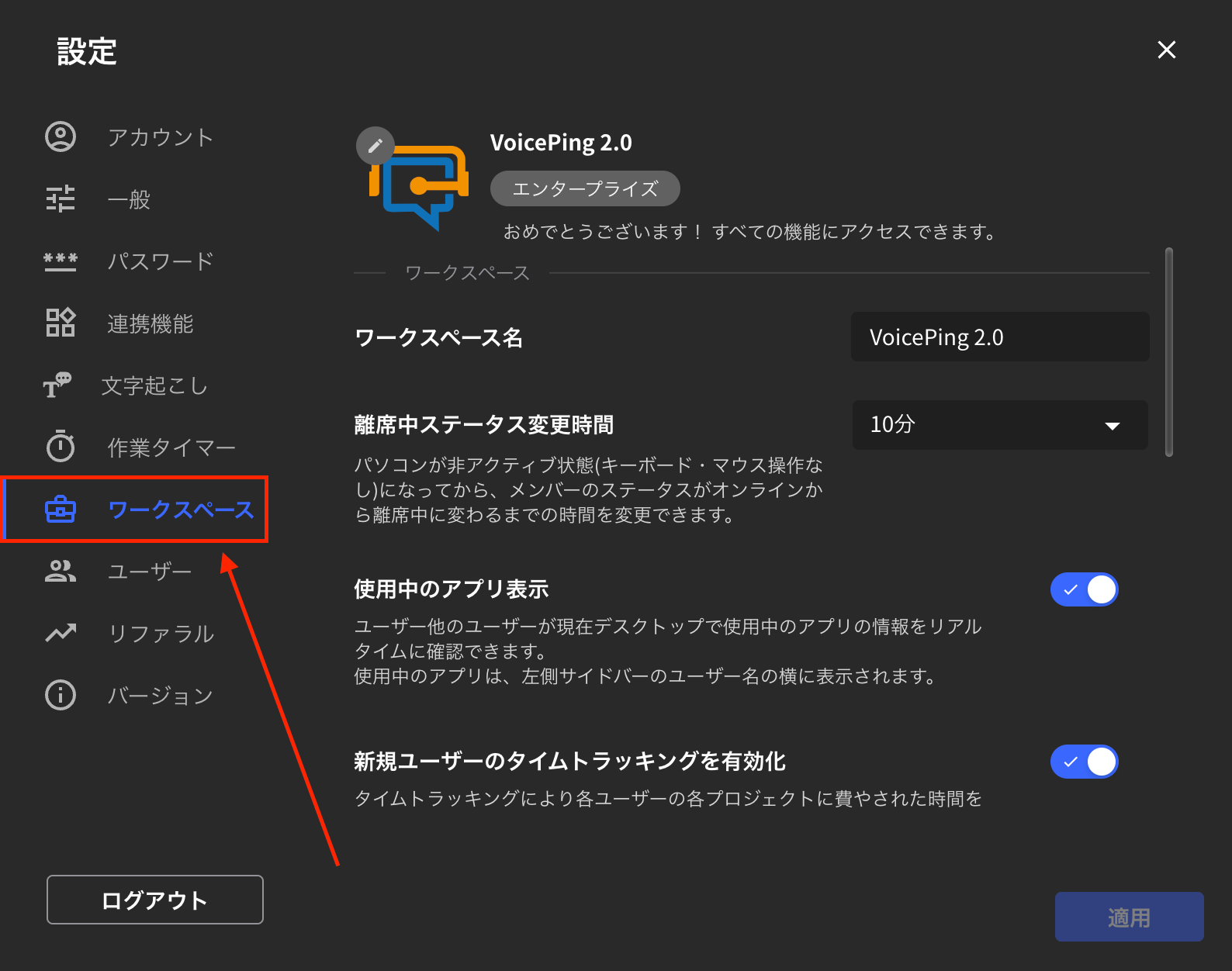
2. Nhấp vào tab "Không Gian Làm Việc"

<Frame>
  <img src="https://mintcdn.com/test-cf63e467/4vHpBWNcRcAS0vJ1/ja/images/account-deletion/02-workspace-tab.png?fit=max&auto=format&n=4vHpBWNcRcAS0vJ1&q=85&s=b1d78d4fbabc1bb171f7de9ccc5d2a91" alt="Tab Không Gian Làm Việc" width="1588" height="1252" data-path="ja/images/account-deletion/02-workspace-tab.png" />
</Frame>

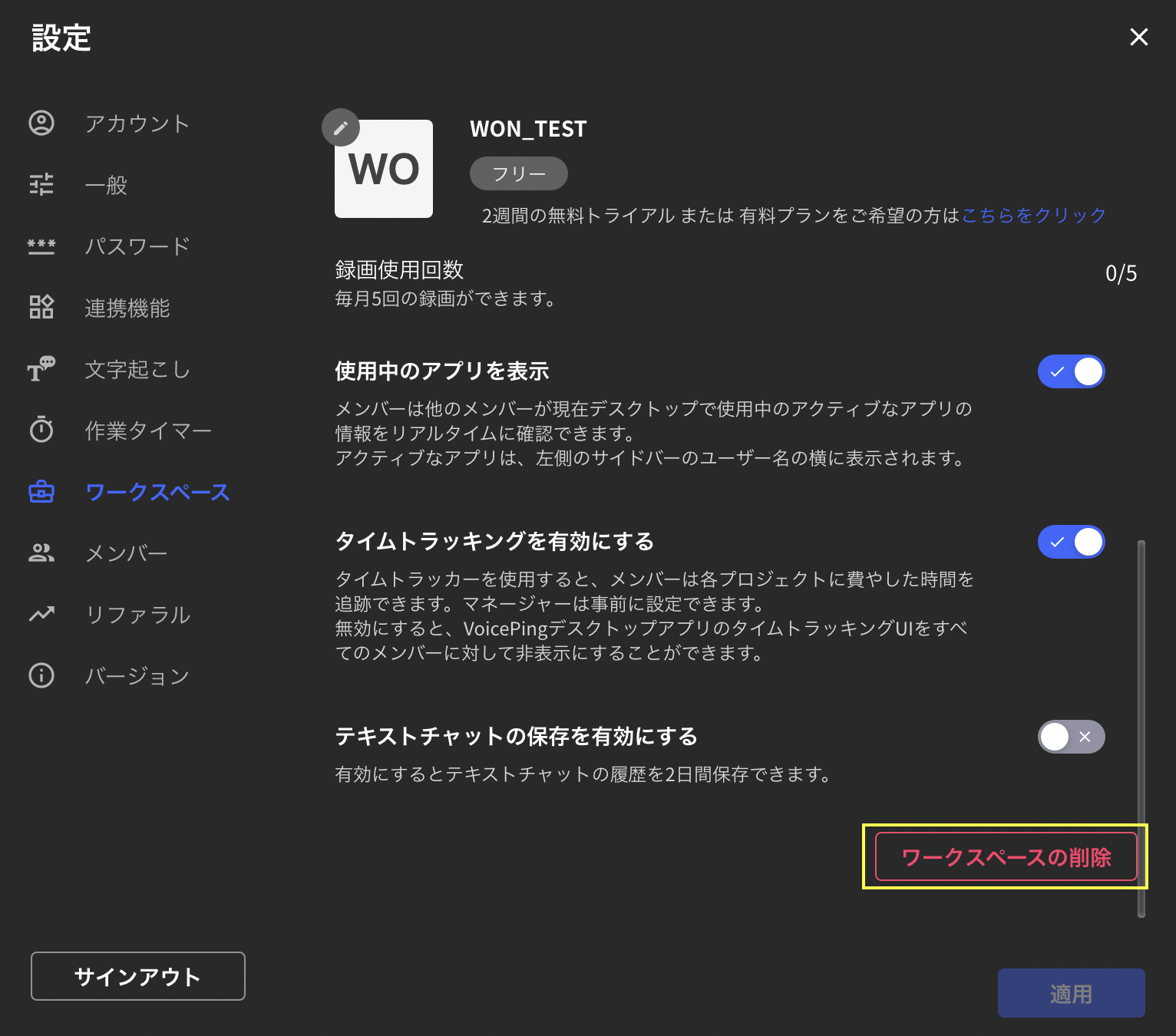
3. Cuộn xuống và nhấp "Xóa Không Gian Làm Việc" ở góc dưới bên phải
<Frame>
  <img src="https://mintcdn.com/test-cf63e467/4vHpBWNcRcAS0vJ1/ja/images/account-deletion/03-workspace-delete-button.png?fit=max&auto=format&n=4vHpBWNcRcAS0vJ1&q=85&s=45d2017febea238bd8482c95e4be33f8" alt="Nút Xóa Không Gian Làm Việc" width="1532" height="1350" data-path="ja/images/account-deletion/03-workspace-delete-button.png" />
</Frame>

4. Nhập tên không gian làm việc bạn muốn xóa và nhấp "Xóa" ở góc dưới bên phải

<Frame>
  <img src="https://mintcdn.com/test-cf63e467/4vHpBWNcRcAS0vJ1/ja/images/account-deletion/04-workspace-name-input.png?fit=max&auto=format&n=4vHpBWNcRcAS0vJ1&q=85&s=b7712f50b18ca37b1c1065a748c768e5" alt="Nhập Tên Không Gian Làm Việc" width="1606" height="1400" data-path="ja/images/account-deletion/04-workspace-name-input.png" />
</Frame>

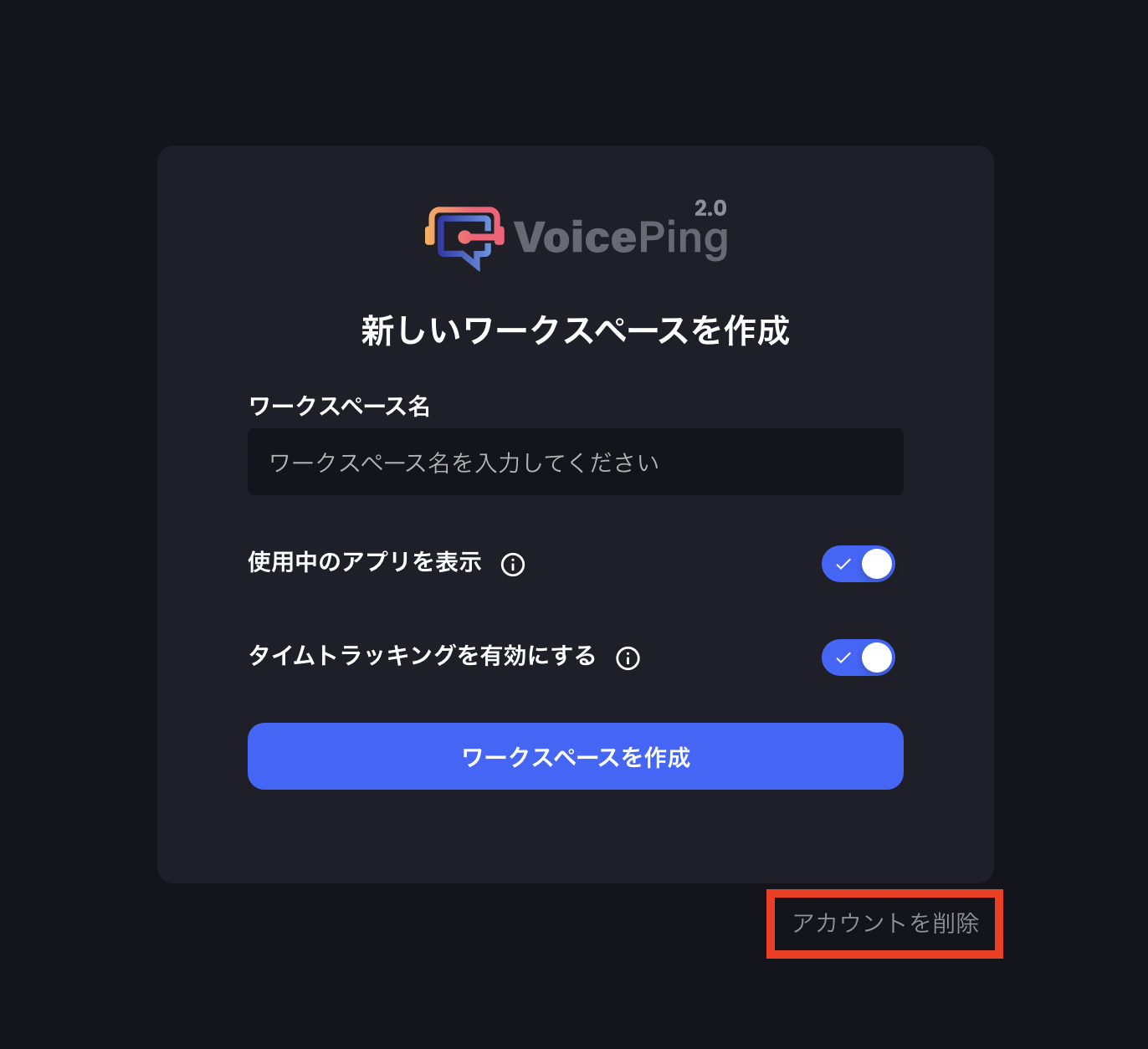
5. Nhấp "Xóa Tài Khoản" ở góc dưới bên phải của màn hình xuất hiện
<Frame>
  <img src="https://mintcdn.com/test-cf63e467/4vHpBWNcRcAS0vJ1/ja/images/account-deletion/05-account-delete-button.png?fit=max&auto=format&n=4vHpBWNcRcAS0vJ1&q=85&s=897be1d52868f316bab32fb27ba1f315" alt="Nút Xóa Tài Khoản" width="1372" height="1254" data-path="ja/images/account-deletion/05-account-delete-button.png" />
</Frame>

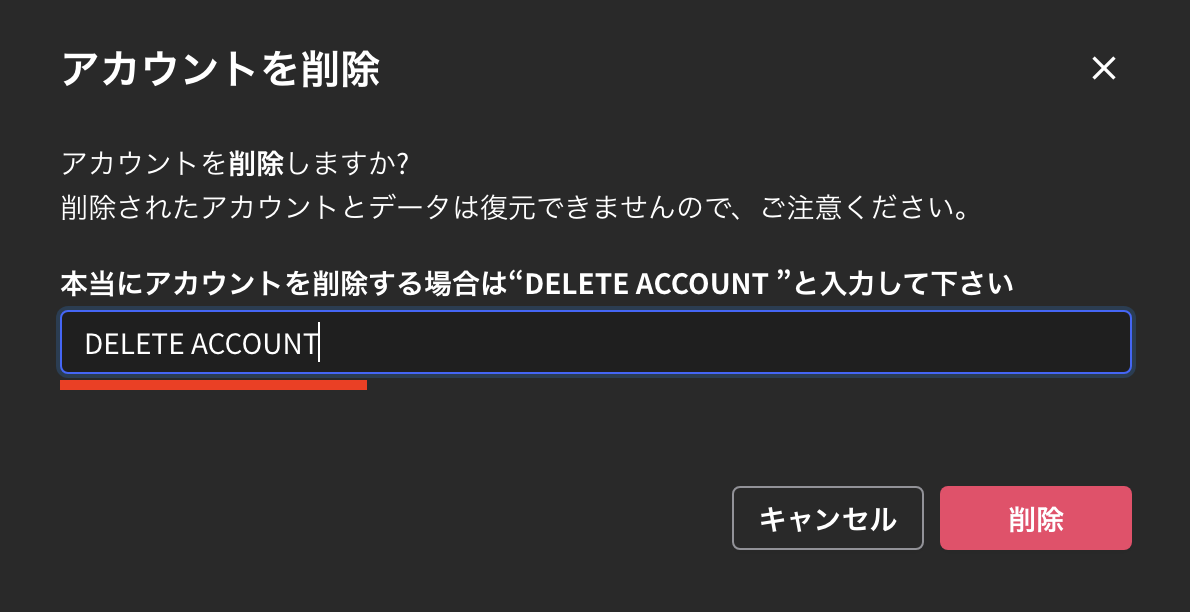
6. Nhập "DELETE ACCOUNT" và nhấp "Xóa" ở góc dưới bên phải để hoàn tất việc xóa tài khoản
<Frame>
  <img src="https://mintcdn.com/test-cf63e467/4vHpBWNcRcAS0vJ1/ja/images/account-deletion/06-delete-account-confirm.png?fit=max&auto=format&n=4vHpBWNcRcAS0vJ1&q=85&s=170e58431ef99fadbe6a85bc316016b8" alt="Xác Nhận DELETE ACCOUNT" width="1190" height="612" data-path="ja/images/account-deletion/06-delete-account-confirm.png" />
</Frame>

<ContactVi />