> ## Documentation Index
> Fetch the complete documentation index at: https://manual.voiceping.net/llms.txt
> Use this file to discover all available pages before exploring further.
# API Access
> Truy vấn bản ghi cuộc họp VoicePing từ backend của riêng bạn với API key có giới hạn phạm vi. Ví dụ mã nguồn bằng TypeScript, Python, Java và Go.
export const FeedbackVi = () => <>
Có ý tưởng hoặc yêu cầu về tính năng này? Gửi cho nhóm qua Product Feedback.
Liên kết chính thức
Truy cập website chính thức
Theo dõi trên X
Thích trên Facebook
Kết nối trên LinkedIn
;
 ## Truy vấn bản ghi VoicePing từ backend của bạn
API Access dành cho các quy trình server-to-server — xuất định kỳ, đồng bộ CRM, bảng điều khiển, lưu trữ tuân thủ. Bạn tạo API key trong workspace, cấp cho nó một tập phạm vi, và backend của bạn gọi VoicePing API với bearer token tiêu chuẩn.
Nếu một **con người** đang đặt câu hỏi thông qua ứng dụng AI, hãy dùng [MCP Access](/vi/external-access/mcp) thay thế.
```text theme={null}
If a person is asking questions, use MCP Access.
If a server is fetching data, use API Access.
```
***
## Khi nào dùng API Access
| Trường hợp | Ví dụ |
| --------------------- | --------------------------------------------------------- |
| Xuất định kỳ | Xuất bản ghi tuần này mỗi thứ Sáu |
| Báo cáo nội bộ | Tạo báo cáo tóm tắt cuộc họp hàng tuần |
| Quy trình CRM hoặc PM | Đẩy tóm tắt bản ghi vào Salesforce hoặc Asana |
| Lưu trữ tuân thủ | Lưu trữ hồ sơ cuộc họp trong bộ lưu trữ đã được phê duyệt |
| Bảng điều khiển | Đưa metadata bản ghi vào hệ thống phân tích |
***
## Tạo API key
1. Mở **workspace settings → External Access → API Access**.
2. Bật **API Access Mode** nếu chưa bật.
3. Nhấp **Create API key**.
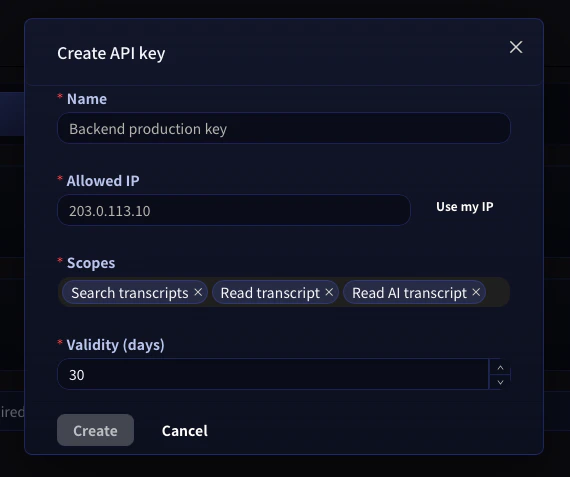
4. Chọn tên, **địa chỉ IP được phép** (khuyến nghị), **phạm vi** mà key cần, và thời hạn hiệu lực.
5. Sao chép key được tạo ngay lập tức và lưu vào trình quản lý bí mật. Key đầy đủ chỉ hiển thị một lần.
## Truy vấn bản ghi VoicePing từ backend của bạn
API Access dành cho các quy trình server-to-server — xuất định kỳ, đồng bộ CRM, bảng điều khiển, lưu trữ tuân thủ. Bạn tạo API key trong workspace, cấp cho nó một tập phạm vi, và backend của bạn gọi VoicePing API với bearer token tiêu chuẩn.
Nếu một **con người** đang đặt câu hỏi thông qua ứng dụng AI, hãy dùng [MCP Access](/vi/external-access/mcp) thay thế.
```text theme={null}
If a person is asking questions, use MCP Access.
If a server is fetching data, use API Access.
```
***
## Khi nào dùng API Access
| Trường hợp | Ví dụ |
| --------------------- | --------------------------------------------------------- |
| Xuất định kỳ | Xuất bản ghi tuần này mỗi thứ Sáu |
| Báo cáo nội bộ | Tạo báo cáo tóm tắt cuộc họp hàng tuần |
| Quy trình CRM hoặc PM | Đẩy tóm tắt bản ghi vào Salesforce hoặc Asana |
| Lưu trữ tuân thủ | Lưu trữ hồ sơ cuộc họp trong bộ lưu trữ đã được phê duyệt |
| Bảng điều khiển | Đưa metadata bản ghi vào hệ thống phân tích |
***
## Tạo API key
1. Mở **workspace settings → External Access → API Access**.
2. Bật **API Access Mode** nếu chưa bật.
3. Nhấp **Create API key**.
4. Chọn tên, **địa chỉ IP được phép** (khuyến nghị), **phạm vi** mà key cần, và thời hạn hiệu lực.
5. Sao chép key được tạo ngay lập tức và lưu vào trình quản lý bí mật. Key đầy đủ chỉ hiển thị một lần.
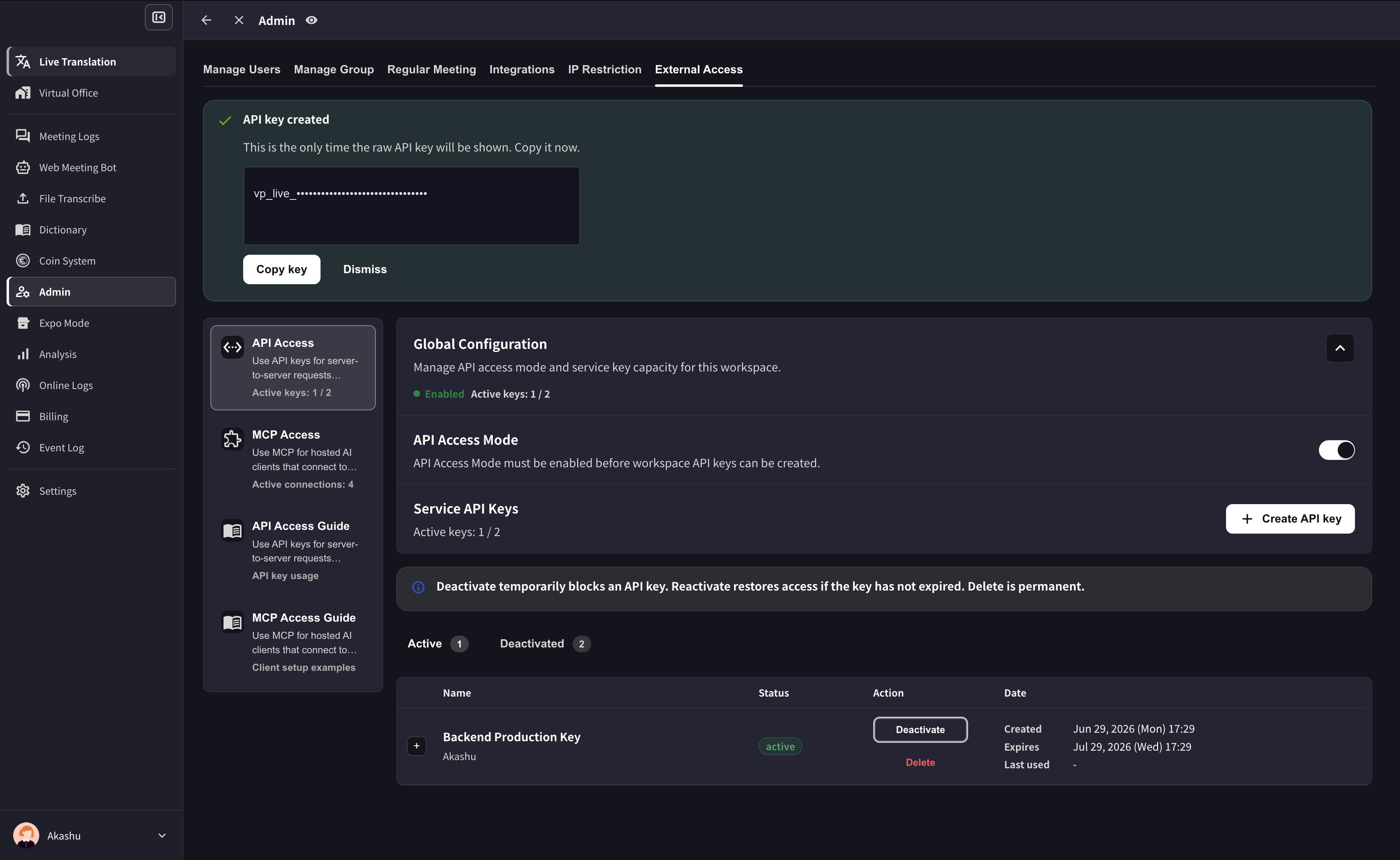
 After the key is created, VoicePing shows the raw key only once. Copy it before dismissing the success panel.
 **Không bao giờ commit API key.** Giữ chúng trong biến môi trường hoặc trình quản lý bí mật. Để an toàn hơn, khóa mỗi key vào một **địa chỉ IP được phép** cụ thể trong modal tạo key — bất kỳ request nào từ IP khác sẽ bị từ chối ngay cả khi key bị rò rỉ.
***
## Xác thực request
Mọi request xác thực bằng bearer token đến `https://api.voiceping.io`:
```http theme={null}
GET /api/v1/transcripts/search?q=pricing&limit=10 HTTP/1.1
Host: api.voiceping.io
Authorization: Bearer
```
Đặt key một lần làm biến môi trường `VOICEPING_API_KEY`, và các mẫu bên dưới sẽ tự động sử dụng.
***
## Quickstart — gọi API bằng ngôn ngữ của bạn
Cùng luồng hai bước — **tìm bản ghi, sau đó lấy một bản** — trong bốn ngôn ngữ. TypeScript được hiển thị đầu tiên; chuyển tab sang stack của bạn.
```typescript TypeScript theme={null}
// Requires Node.js 18+ (for built-in fetch)
const apiKey = process.env.VOICEPING_API_KEY!;
const base = "https://api.voiceping.io/api/v1";
const headers = { Authorization: `Bearer ${apiKey}` };
// 1. Search transcripts
const searchRes = await fetch(
`${base}/transcripts/search?q=pricing&limit=10`,
{ headers },
);
const { transcripts } = await searchRes.json();
// 2. Read the first result in full
const detailRes = await fetch(
`${base}/transcripts/${transcripts[0].id}`,
{ headers },
);
const transcript = await detailRes.json();
console.log(transcript.title, transcript.content);
```
```python Python theme={null}
# pip install requests
import os
import requests
api_key = os.environ["VOICEPING_API_KEY"]
base = "https://api.voiceping.io/api/v1"
headers = {"Authorization": f"Bearer {api_key}"}
# 1. Search transcripts
search = requests.get(
f"{base}/transcripts/search",
headers=headers,
params={"q": "pricing", "limit": 10},
).json()
# 2. Read the first result in full
first_id = search["transcripts"][0]["id"]
detail = requests.get(
f"{base}/transcripts/{first_id}",
headers=headers,
).json()
print(detail["title"], detail["content"])
```
```java Java theme={null}
// Java 11+ (uses built-in java.net.http)
import java.net.URI;
import java.net.http.HttpClient;
import java.net.http.HttpRequest;
import java.net.http.HttpResponse;
public class VoicePingQuickstart {
public static void main(String[] args) throws Exception {
String apiKey = System.getenv("VOICEPING_API_KEY");
String base = "https://api.voiceping.io/api/v1";
HttpClient client = HttpClient.newHttpClient();
// 1. Search transcripts
HttpRequest search = HttpRequest.newBuilder()
.uri(URI.create(base + "/transcripts/search?q=pricing&limit=10"))
.header("Authorization", "Bearer " + apiKey)
.GET()
.build();
HttpResponse searchRes =
client.send(search, HttpResponse.BodyHandlers.ofString());
System.out.println(searchRes.body());
// 2. Read a transcript (parse the id from searchRes.body() first;
// shown here with a placeholder)
HttpRequest detail = HttpRequest.newBuilder()
.uri(URI.create(base + "/transcripts/TRANSCRIPT_ID"))
.header("Authorization", "Bearer " + apiKey)
.GET()
.build();
HttpResponse detailRes =
client.send(detail, HttpResponse.BodyHandlers.ofString());
System.out.println(detailRes.body());
}
}
```
```go Go theme={null}
// go run main.go
package main
import (
"fmt"
"io"
"net/http"
"os"
)
func main() {
apiKey := os.Getenv("VOICEPING_API_KEY")
base := "https://api.voiceping.io/api/v1"
// 1. Search transcripts
req, _ := http.NewRequest("GET",
base+"/transcripts/search?q=pricing&limit=10", nil)
req.Header.Set("Authorization", "Bearer "+apiKey)
res, err := http.DefaultClient.Do(req)
if err != nil {
panic(err)
}
defer res.Body.Close()
body, _ := io.ReadAll(res.Body)
fmt.Println(string(body))
// 2. Read a transcript by id (parse id from body first)
detailReq, _ := http.NewRequest("GET",
base+"/transcripts/TRANSCRIPT_ID", nil)
detailReq.Header.Set("Authorization", "Bearer "+apiKey)
detailRes, _ := http.DefaultClient.Do(detailReq)
defer detailRes.Body.Close()
detailBody, _ := io.ReadAll(detailRes.Body)
fmt.Println(string(detailBody))
}
```
***
## Bước tiếp theo
Quay lại phạm vi, kiểm soát vòng đời và nhật ký sự kiện áp dụng cho cả MCP và API.
Nếu một người đặt câu hỏi qua Claude, ChatGPT, Codex, Claude Code hoặc Gemini CLI, hãy dùng MCP Access.
**Không bao giờ commit API key.** Giữ chúng trong biến môi trường hoặc trình quản lý bí mật. Để an toàn hơn, khóa mỗi key vào một **địa chỉ IP được phép** cụ thể trong modal tạo key — bất kỳ request nào từ IP khác sẽ bị từ chối ngay cả khi key bị rò rỉ.
***
## Xác thực request
Mọi request xác thực bằng bearer token đến `https://api.voiceping.io`:
```http theme={null}
GET /api/v1/transcripts/search?q=pricing&limit=10 HTTP/1.1
Host: api.voiceping.io
Authorization: Bearer
```
Đặt key một lần làm biến môi trường `VOICEPING_API_KEY`, và các mẫu bên dưới sẽ tự động sử dụng.
***
## Quickstart — gọi API bằng ngôn ngữ của bạn
Cùng luồng hai bước — **tìm bản ghi, sau đó lấy một bản** — trong bốn ngôn ngữ. TypeScript được hiển thị đầu tiên; chuyển tab sang stack của bạn.
```typescript TypeScript theme={null}
// Requires Node.js 18+ (for built-in fetch)
const apiKey = process.env.VOICEPING_API_KEY!;
const base = "https://api.voiceping.io/api/v1";
const headers = { Authorization: `Bearer ${apiKey}` };
// 1. Search transcripts
const searchRes = await fetch(
`${base}/transcripts/search?q=pricing&limit=10`,
{ headers },
);
const { transcripts } = await searchRes.json();
// 2. Read the first result in full
const detailRes = await fetch(
`${base}/transcripts/${transcripts[0].id}`,
{ headers },
);
const transcript = await detailRes.json();
console.log(transcript.title, transcript.content);
```
```python Python theme={null}
# pip install requests
import os
import requests
api_key = os.environ["VOICEPING_API_KEY"]
base = "https://api.voiceping.io/api/v1"
headers = {"Authorization": f"Bearer {api_key}"}
# 1. Search transcripts
search = requests.get(
f"{base}/transcripts/search",
headers=headers,
params={"q": "pricing", "limit": 10},
).json()
# 2. Read the first result in full
first_id = search["transcripts"][0]["id"]
detail = requests.get(
f"{base}/transcripts/{first_id}",
headers=headers,
).json()
print(detail["title"], detail["content"])
```
```java Java theme={null}
// Java 11+ (uses built-in java.net.http)
import java.net.URI;
import java.net.http.HttpClient;
import java.net.http.HttpRequest;
import java.net.http.HttpResponse;
public class VoicePingQuickstart {
public static void main(String[] args) throws Exception {
String apiKey = System.getenv("VOICEPING_API_KEY");
String base = "https://api.voiceping.io/api/v1";
HttpClient client = HttpClient.newHttpClient();
// 1. Search transcripts
HttpRequest search = HttpRequest.newBuilder()
.uri(URI.create(base + "/transcripts/search?q=pricing&limit=10"))
.header("Authorization", "Bearer " + apiKey)
.GET()
.build();
HttpResponse searchRes =
client.send(search, HttpResponse.BodyHandlers.ofString());
System.out.println(searchRes.body());
// 2. Read a transcript (parse the id from searchRes.body() first;
// shown here with a placeholder)
HttpRequest detail = HttpRequest.newBuilder()
.uri(URI.create(base + "/transcripts/TRANSCRIPT_ID"))
.header("Authorization", "Bearer " + apiKey)
.GET()
.build();
HttpResponse detailRes =
client.send(detail, HttpResponse.BodyHandlers.ofString());
System.out.println(detailRes.body());
}
}
```
```go Go theme={null}
// go run main.go
package main
import (
"fmt"
"io"
"net/http"
"os"
)
func main() {
apiKey := os.Getenv("VOICEPING_API_KEY")
base := "https://api.voiceping.io/api/v1"
// 1. Search transcripts
req, _ := http.NewRequest("GET",
base+"/transcripts/search?q=pricing&limit=10", nil)
req.Header.Set("Authorization", "Bearer "+apiKey)
res, err := http.DefaultClient.Do(req)
if err != nil {
panic(err)
}
defer res.Body.Close()
body, _ := io.ReadAll(res.Body)
fmt.Println(string(body))
// 2. Read a transcript by id (parse id from body first)
detailReq, _ := http.NewRequest("GET",
base+"/transcripts/TRANSCRIPT_ID", nil)
detailReq.Header.Set("Authorization", "Bearer "+apiKey)
detailRes, _ := http.DefaultClient.Do(detailReq)
defer detailRes.Body.Close()
detailBody, _ := io.ReadAll(detailRes.Body)
fmt.Println(string(detailBody))
}
```
***
## Bước tiếp theo
Quay lại phạm vi, kiểm soát vòng đời và nhật ký sự kiện áp dụng cho cả MCP và API.
Nếu một người đặt câu hỏi qua Claude, ChatGPT, Codex, Claude Code hoặc Gemini CLI, hãy dùng MCP Access.