> ## Documentation Index
> Fetch the complete documentation index at: https://manual.voiceping.net/llms.txt
> Use this file to discover all available pages before exploring further.

# Quy trình — Gửi email theo dõi trong 30 giây

> Biến bản ghi cuộc họp vừa kết thúc thành email theo dõi chuyên nghiệp — tóm tắt, quyết định đã xác nhận, mục hành động kèm chủ sở hữu, bước tiếp theo. Sử dụng VoicePing MCP Access.

export const FeedbackVi = () => <>
    <Tip>
      Có ý tưởng hoặc yêu cầu về tính năng này? Gửi cho nhóm qua <a href="/vi/product-feedback">Product Feedback</a>.
    </Tip>

    <h2>Liên kết chính thức</h2>

    <CardGroup cols={2}>
      <Card title="Website chính thức" icon="globe" href="https://voiceping.net/en/">
        Truy cập website chính thức
      </Card>
      <Card title="X (Twitter)" icon="x-twitter" href="https://x.com/VoicePingMedia">
        Theo dõi trên X
      </Card>
      <Card title="Facebook" icon="facebook" href="https://www.facebook.com/voiceping.inc">
        Thích trên Facebook
      </Card>
      <Card title="LinkedIn" icon="linkedin" href="https://www.linkedin.com/company/28684130/">
        Kết nối trên LinkedIn
      </Card>
    </CardGroup>
  </>;

## Gửi email theo dõi trong 30 giây

**Tình huống.** Cuộc họp vừa kết thúc. Mọi người chỉ nhớ khoảng 40% những gì đã quyết định. Ai gửi bản tóm tắt đầu tiên là người thiết lập hồ sơ — và khóa chặt các mục hành động. Đây là thói quen có đòn bẩy cao nhất trong bất kỳ nhóm bán hàng hoặc dự án nào.

Quy trình này giả sử bạn đã bật [MCP Access](/vi/external-access/mcp) và kết nối ứng dụng AI của bạn.

<Steps>
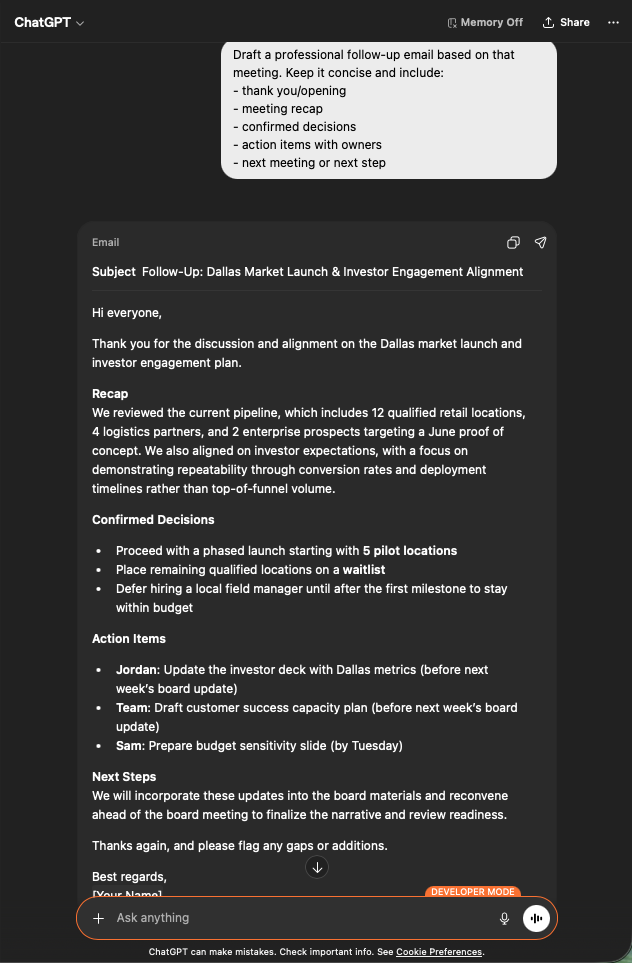
  <Step title="Lấy bối cảnh cuộc họp">
    ```text theme={null}
    Search my VoicePing transcripts for Dallas market investor engagement.
    ```

    Bạn nhận được bản tóm tắt có cấu trúc: tóm tắt chính, kỳ vọng của nhà đầu tư, quyết định chính, thông tin chiến lược và các mục hành động kèm chủ sở hữu. Đúng chất liệu mà email theo dõi cần.

    <div style={{maxWidth: "600px", margin: "0 auto"}}>
      <Frame>
        <img src="https://mintcdn.com/test-cf63e467/z13MfE0CikV5b-4X/en/images/external_access/Follow-up%20email%20creation%201.png?fit=max&auto=format&n=z13MfE0CikV5b-4X&q=85&s=6da6641338869dad182dbb481af32b15" alt="ChatGPT surfacing a Dallas Market Launch transcript with core summary, investor expectations, key decisions, and action items" width="634" height="963" data-path="en/images/external_access/Follow-up email creation 1.png" />
      </Frame>
    </div>
  </Step>

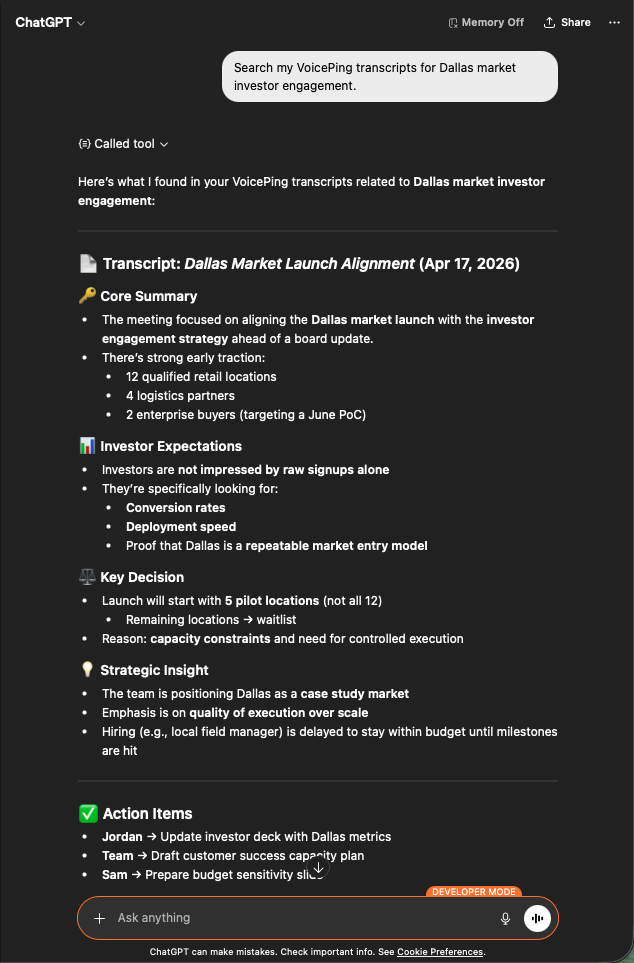
  <Step title="Yêu cầu bản nháp email">
    ```text theme={null}
    Draft a professional follow-up email based on that meeting.
    Keep it concise and include:
    - thank you / opening
    - meeting recap
    - confirmed decisions
    - action items with owners
    - next meeting or next step
    ```

    Bạn nhận được email sẵn sàng gửi: dòng tiêu đề, tóm tắt gọn, các quyết định dạng bullet, các mục hành động được gắn với chủ sở hữu đúng và thời hạn. Dán vào Gmail, xem lại, gửi.

    <div style={{maxWidth: "600px", margin: "0 auto"}}>
      <Frame>
        <img src="https://mintcdn.com/test-cf63e467/z13MfE0CikV5b-4X/en/images/external_access/Follow-up%20email%20creation%202.png?fit=max&auto=format&n=z13MfE0CikV5b-4X&q=85&s=7440cfa879ba68ec0a1ade3cd9c2f0d5" alt="ChatGPT generating a professional follow-up email draft with subject, recap, decisions, and assigned action items" width="632" height="963" data-path="en/images/external_access/Follow-up email creation 2.png" />
      </Frame>
    </div>
  </Step>
</Steps>

**Vì sao điều này quan trọng.** Chất lượng email theo dõi là chỉ báo sớm của tốc độ giao dịch. Biến nó thành tác vụ 30 giây sẽ loại bỏ lý do khiến mọi người bỏ qua.

***

## Bước tiếp theo

<CardGroup cols={2}>
  <Card title="Tổng quan External Access" icon="arrow-left" href="/vi/external-access">
    Quay lại trang trung tâm về phạm vi, kiểm soát vòng đời và nhật ký sự kiện.
  </Card>

  <Card title="Cách bật MCP Access" icon="plug" href="/vi/external-access/mcp">
    Hướng dẫn cài đặt cho Claude, ChatGPT, Codex, Claude Code và Gemini CLI.
  </Card>
</CardGroup>

<FeedbackVi />