> ## Documentation Index
> Fetch the complete documentation index at: https://manual.voiceping.net/llms.txt
> Use this file to discover all available pages before exploring further.

# Quy trình — Soạn bản đề xuất khách hàng từ một cuộc họp

> Biến bản ghi cuộc họp review đề xuất thành bản đề xuất sẵn sàng cho cấp điều hành — tóm tắt điều hành, tình huống khách hàng, giải pháp đề xuất, dòng thời gian, bước tiếp theo. Sử dụng VoicePing MCP Access.

export const FeedbackVi = () => <>
    <Tip>
      Có ý tưởng hoặc yêu cầu về tính năng này? Gửi cho nhóm qua <a href="/vi/product-feedback">Product Feedback</a>.
    </Tip>

    <h2>Liên kết chính thức</h2>

    <CardGroup cols={2}>
      <Card title="Website chính thức" icon="globe" href="https://voiceping.net/en/">
        Truy cập website chính thức
      </Card>
      <Card title="X (Twitter)" icon="x-twitter" href="https://x.com/VoicePingMedia">
        Theo dõi trên X
      </Card>
      <Card title="Facebook" icon="facebook" href="https://www.facebook.com/voiceping.inc">
        Thích trên Facebook
      </Card>
      <Card title="LinkedIn" icon="linkedin" href="https://www.linkedin.com/company/28684130/">
        Kết nối trên LinkedIn
      </Card>
    </CardGroup>
  </>;

## Soạn bản đề xuất khách hàng từ một cuộc họp

**Tình huống.** Một cuộc họp review đề xuất vừa kết thúc. Khách hàng đã trình bày mục tiêu, nêu hai lo ngại về bảo mật và yêu cầu dòng thời gian theo giai đoạn. Bây giờ bạn phải biến cuộc trò chuyện đó thành một đề xuất chính thức. Thách thức không phải là viết — mà là không mất đi tín hiệu nào.

Quy trình này giả sử bạn đã bật [MCP Access](/vi/external-access/mcp) và kết nối ứng dụng AI của bạn.

<Steps>
  <Step title="Tìm cuộc họp cụ thể">
    ```text theme={null}
    Search my VoicePing transcripts for the Northstar Capital proposal review meeting.
    Find the most relevant transcript and show me the title, date, participants
    if available, and why it matches.
    ```

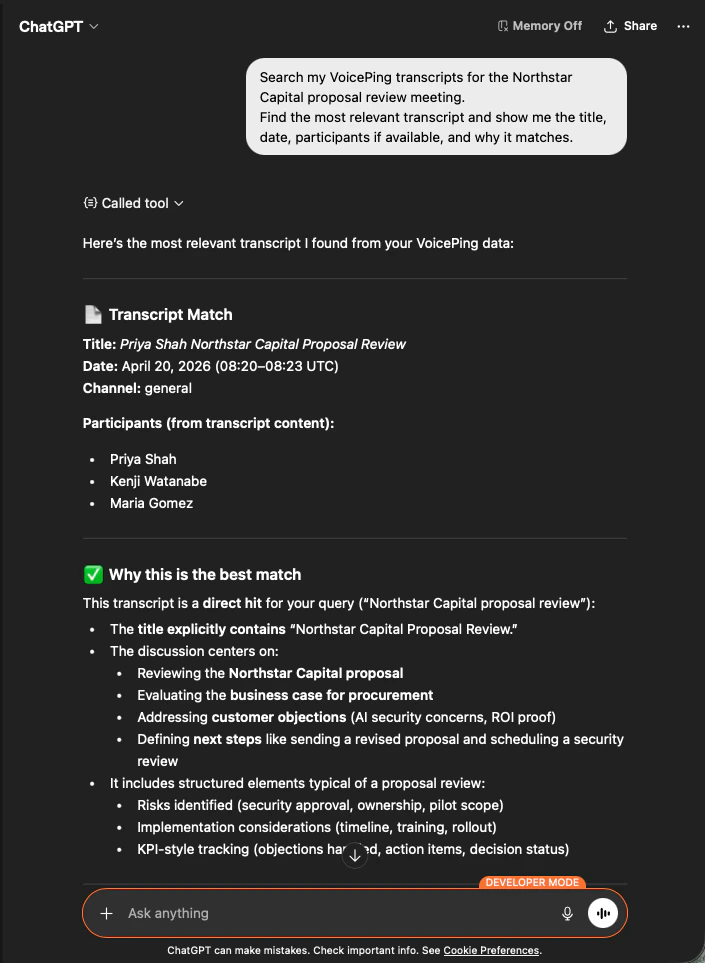
    AI xác định đúng bản ghi, liệt kê người tham dự và giải thích vì sao đây là kết quả phù hợp — để bạn biết đề xuất được xây dựng dựa trên đúng cuộc gọi.

    <div style={{maxWidth: "600px", margin: "0 auto"}}>
      <Frame>
        <img src="https://mintcdn.com/test-cf63e467/z13MfE0CikV5b-4X/en/images/external_access/proposal%20creation%201.png?fit=max&auto=format&n=z13MfE0CikV5b-4X&q=85&s=541234a4b6549b663c1410f3344d4edb" alt="ChatGPT identifying the Northstar Capital proposal review transcript with participants and match reasoning" width="705" height="963" data-path="en/images/external_access/proposal creation 1.png" />
      </Frame>
    </div>
  </Step>

  <Step title="Trích xuất đầu vào đề xuất có cấu trúc">
    ```text theme={null}
    Read that transcript and extract the key proposal inputs:
    - customer goals
    - pain points
    - requested solution
    - success criteria
    - objections or concerns
    - timeline
    - stakeholders
    - next steps
    ```

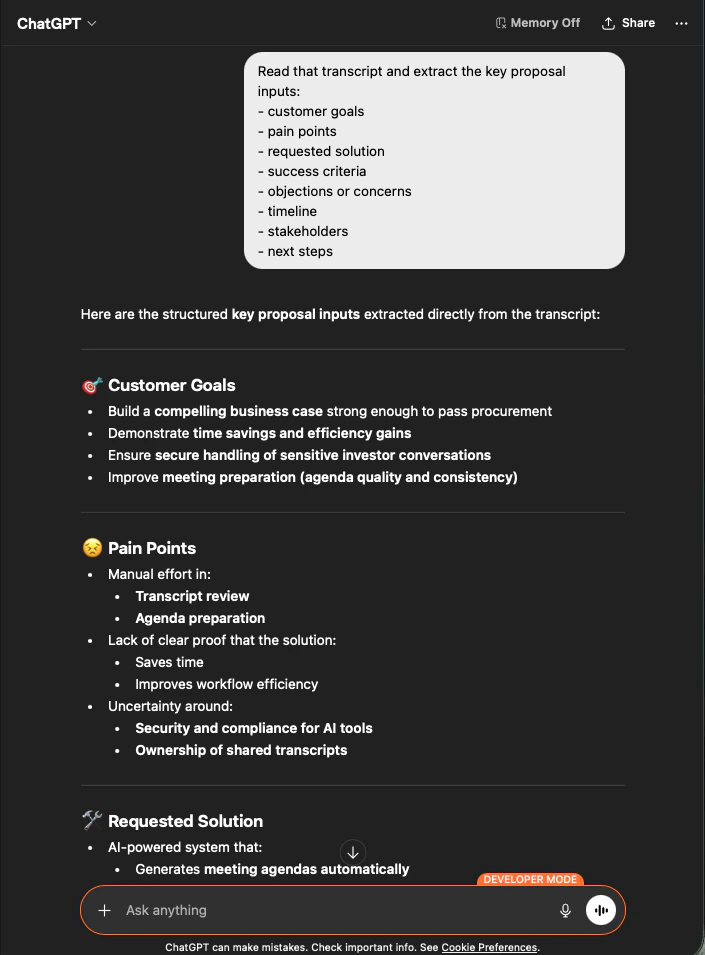
    AI rút ra mọi đầu vào, được nhóm chính xác theo cách bạn yêu cầu. Đây là khung xương đề xuất của bạn — không phát minh gì, mọi thứ đều truy vết được về bản ghi.

    <div style={{maxWidth: "600px", margin: "0 auto"}}>
      <Frame>
        <img src="https://mintcdn.com/test-cf63e467/z13MfE0CikV5b-4X/en/images/external_access/proposal%20creation%202.png?fit=max&auto=format&n=z13MfE0CikV5b-4X&q=85&s=65915e908ac022464f1668c6b920706e" alt="ChatGPT extracting structured proposal inputs — customer goals, pain points, requested solution — from a Northstar Capital transcript" width="705" height="955" data-path="en/images/external_access/proposal creation 2.png" />
      </Frame>
    </div>
  </Step>

  <Step title="Tạo bản đề xuất">
    ```text theme={null}
    Create a customer proposal draft based only on this meeting.
    Structure it with:
    - executive summary
    - customer situation
    - proposed solution
    - implementation scope
    - expected value
    - security or operational considerations
    - timeline
    - next steps
    ```

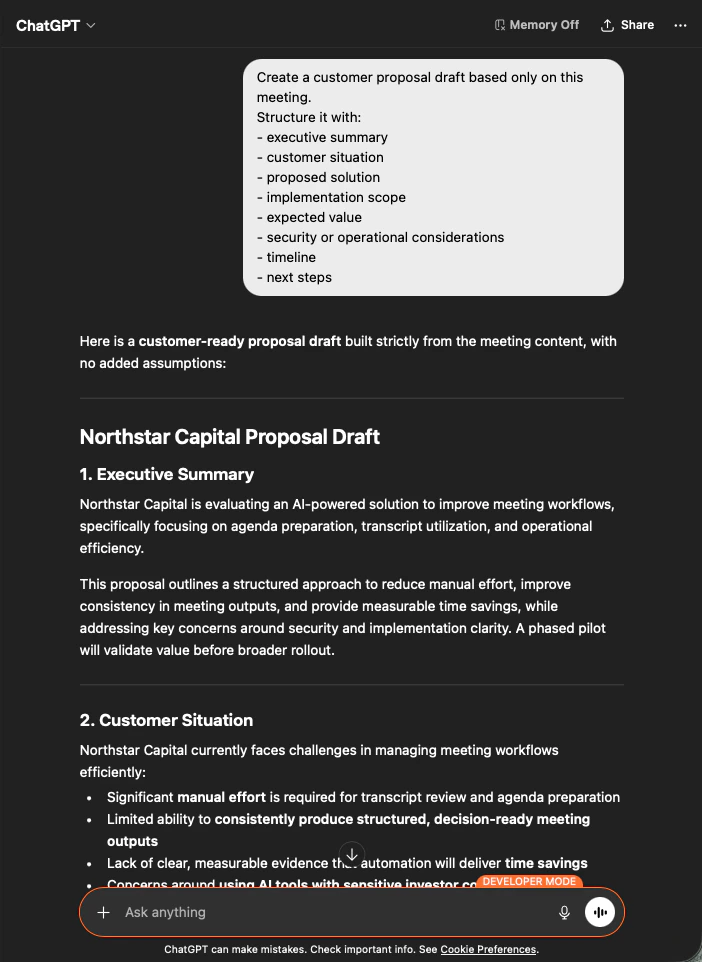
    Kết quả là bản đề xuất đầy đủ — tóm tắt điều hành ở đầu, sau đó từng phần được điền nghiêm ngặt từ nội dung cuộc họp. Bạn chỉnh sửa giọng văn và gửi đi.

    <div style={{maxWidth: "600px", margin: "0 auto"}}>
      <Frame>
        <img src="https://mintcdn.com/test-cf63e467/z13MfE0CikV5b-4X/en/images/external_access/proposal%20creation%203.png?fit=max&auto=format&n=z13MfE0CikV5b-4X&q=85&s=9ef5ea2d403eadf232efd486e8c1a7c8" alt="ChatGPT producing a customer-ready Northstar Capital proposal draft built strictly from meeting content" width="702" height="962" data-path="en/images/external_access/proposal creation 3.png" />
      </Frame>
    </div>
  </Step>
</Steps>

<Note>
  Yêu cầu AI xây dựng **"based only on this meeting"** và **"with no added assumptions"** là khác biệt giữa một đề xuất bạn có thể thực sự gửi đi và một đề xuất bạn phải kiểm tra từng dòng.
</Note>

***

## Bước tiếp theo

<CardGroup cols={2}>
  <Card title="Tổng quan External Access" icon="arrow-left" href="/vi/external-access">
    Quay lại trang trung tâm về phạm vi, kiểm soát vòng đời và nhật ký sự kiện.
  </Card>

  <Card title="Cách bật MCP Access" icon="plug" href="/vi/external-access/mcp">
    Hướng dẫn cài đặt cho Claude, ChatGPT, Codex, Claude Code và Gemini CLI.
  </Card>
</CardGroup>

<FeedbackVi />