> ## Documentation Index
> Fetch the complete documentation index at: https://manual.voiceping.net/llms.txt
> Use this file to discover all available pages before exploring further.
# Hoa don, bien lai va hoat dong thanh toan
> Tai PDF hoa don va bien lai, cap nhat thong tin xuat hoa don va kiem tra su kien dang ky.
export const ContactVi = () => <>
Nếu bạn có bất kỳ câu hỏi nào, vui lòng liên hệ với chúng tôi qua biểu mẫu này.
Liên kết chính thức
Truy cập website chính thức
Theo dõi trên X
Thích trên Facebook
Kết nối trên LinkedIn
;
Mọi thứ bạn cần để kiểm tra đăng ký của mình đều tập trung ở một nơi: phần **Billing** trên PC và trung tâm **Billing** trên thiết bị di động. Tải xuống các tệp PDF hóa đơn, lấy biên lai, chỉnh sửa các trường thanh toán xuất hiện trên các hóa đơn trong tương lai và xem lại nhật ký sự kiện đầy đủ.
## Trên PC (Billing tab)
Mở điều hướng trên cùng → **Billing**. Hai tab bao gồm quản lý hóa đơn:
| Thẻ | Nó dùng để làm gì |
| -------------------------------- | ------------------------------------------------------------------------------------------------------- |
| **Invoice Details** | Tên người nhận hóa đơn, email và số điện thoại xuất hiện trên tệp PDF hóa đơn của bạn |
| **Invoice and Receipt Download** | Monthly danh sách các khoản phí có hóa đơn PDF và biên lai có thể tải xuống |
| **Billing History** | Full subscription, payment-method, trial, cancellation, restore, renewal, and payment-failure event log |
### Invoice Details
Đặt tên, email và số điện thoại Stripe đóng dấu vào tệp PDF hóa đơn của bạn.
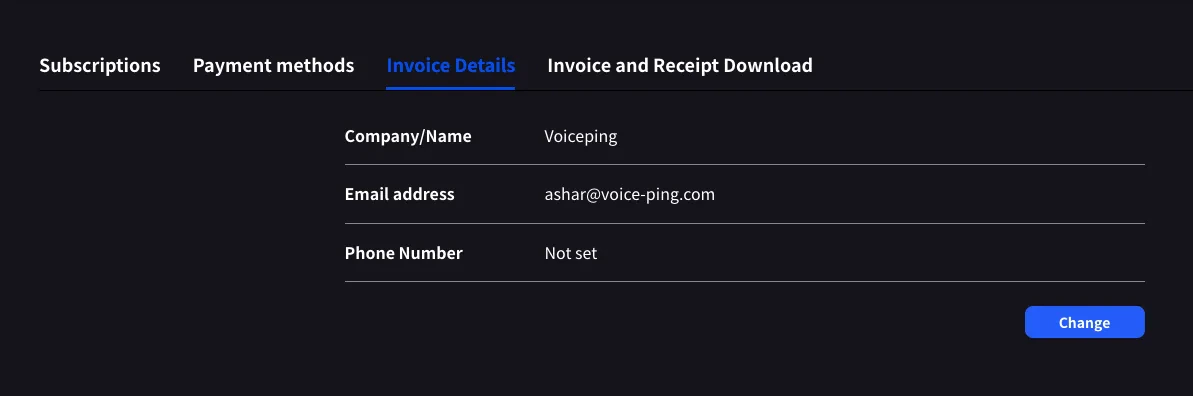 Nhấp vào **Change** để chỉnh sửa bất kỳ trường nào.
Cập nhật **before** ngày thanh toán tiếp theo của bạn. Stripe đọc các trường này tại thời điểm tạo hóa đơn; chỉnh sửa sau không đóng dấu lại các tệp PDF trước đây.
### Invoice and Receipt Download
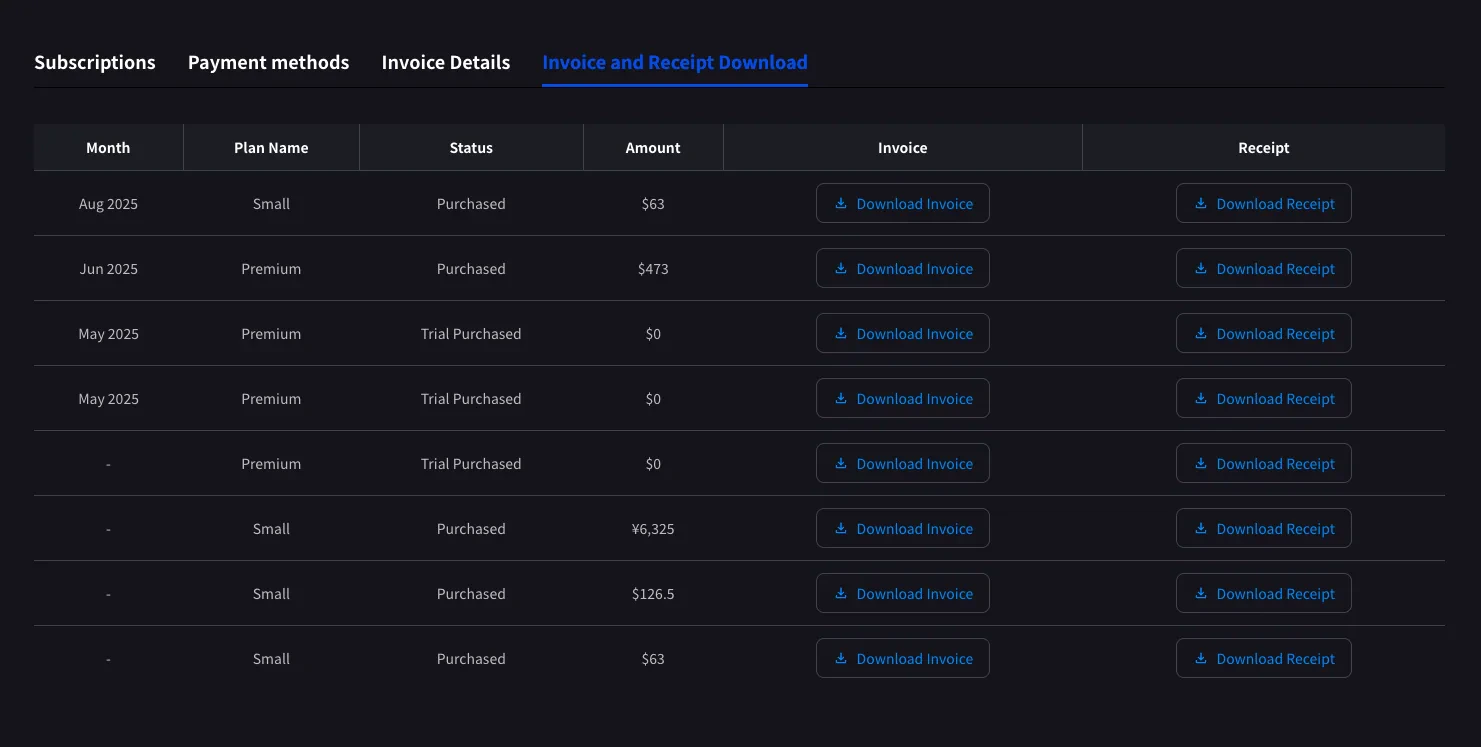
Mọi khoản phí đã hoàn tất sẽ xuất hiện dưới dạng một hàng có tháng, tên gói, trạng thái, số tiền và các nút tải xuống cho cả hóa đơn PDF và biên lai Stripe.
Nhấp vào **Change** để chỉnh sửa bất kỳ trường nào.
Cập nhật **before** ngày thanh toán tiếp theo của bạn. Stripe đọc các trường này tại thời điểm tạo hóa đơn; chỉnh sửa sau không đóng dấu lại các tệp PDF trước đây.
### Invoice and Receipt Download
Mọi khoản phí đã hoàn tất sẽ xuất hiện dưới dạng một hàng có tháng, tên gói, trạng thái, số tiền và các nút tải xuống cho cả hóa đơn PDF và biên lai Stripe.
 | Nút | Mở ra |
| -------------------- | -------------------------------------------------------------------------------------------------- |
| **Download Invoice** | Hóa đơn PDF để chia sẻ, lưu hoặc chuyển tiếp tới bộ phận tài chính |
| **Download Receipt** | Receipt download or stored receipt link; if unavailable, the hosted receipt/invoice fallback opens |
Chỉ những khoản phí đã hoàn thành mới xuất hiện ở đây. Các thay đổi về gói đã lên lịch sẽ hiển thị sau ngày thanh toán tiếp theo, sau khi Stripe tạo hóa đơn. `$0` các hàng có trạng thái **Trial Purchased** cũng được ghi lại, giúp theo dõi thời điểm bắt đầu thử nghiệm.
### Billing History
Use **Billing History** when you need the full audit trail, not only completed invoice rows.
| Column | What it shows |
| ------------------------- | -------------------------------------------------------------------------------------------------------------------------------------------------- |
| **Status** | Event result, such as purchase, upgrade, scheduled change, cancellation, restore, payment-method change, trial update, renewal, or payment failure |
| **Event Date (UTC+9)** | When the billing event was recorded |
| **Plan Name** | The plan involved in the event, including tiered Individual / Small minute labels when available |
| **Start Date / End Date** | The subscription period affected by the event |
| **Price** | The billed amount when the event has a displayable charge |
Use **Billing History** for "what changed and when?" Use **Invoice and Receipt Download** when finance needs the actual invoice PDF or receipt.
## Trên Mobile (trung tâm Billing)
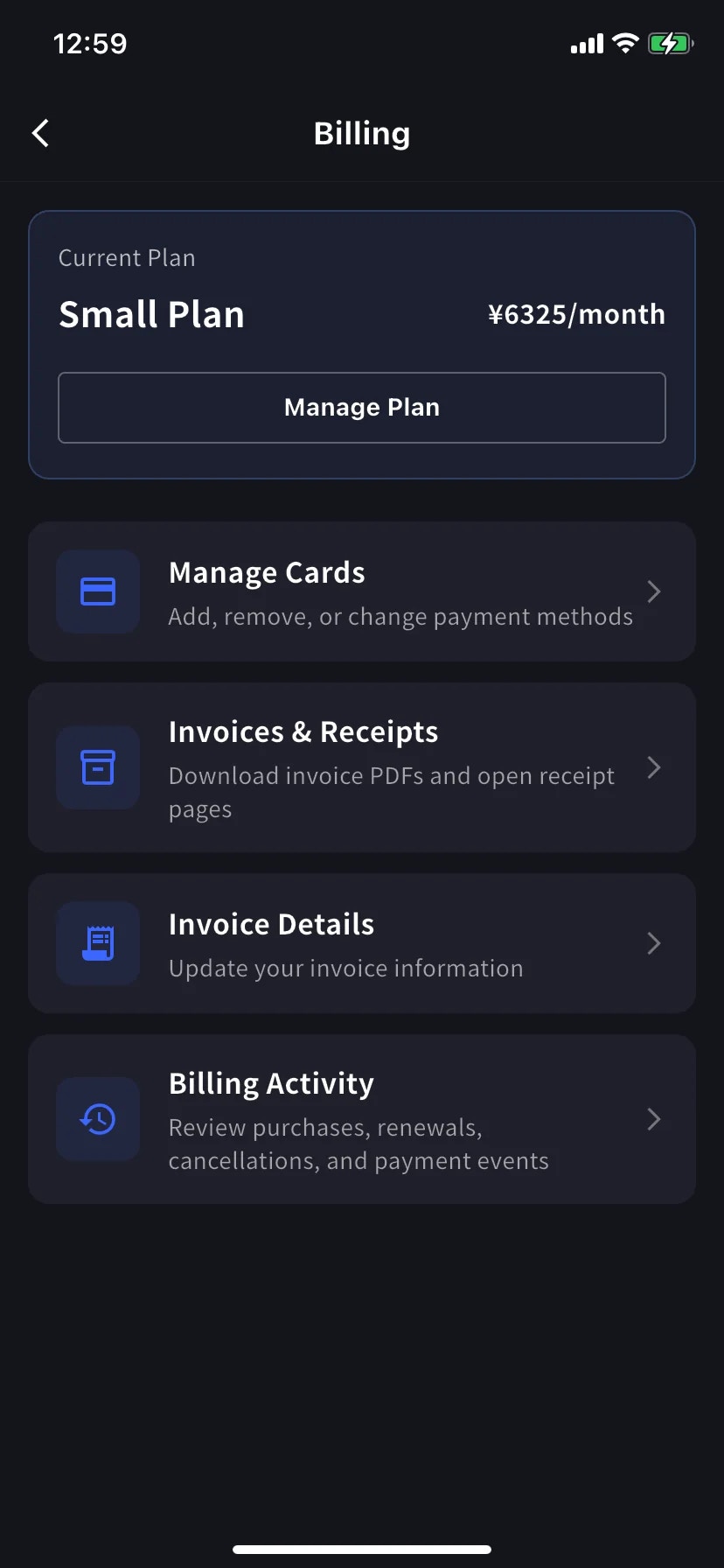
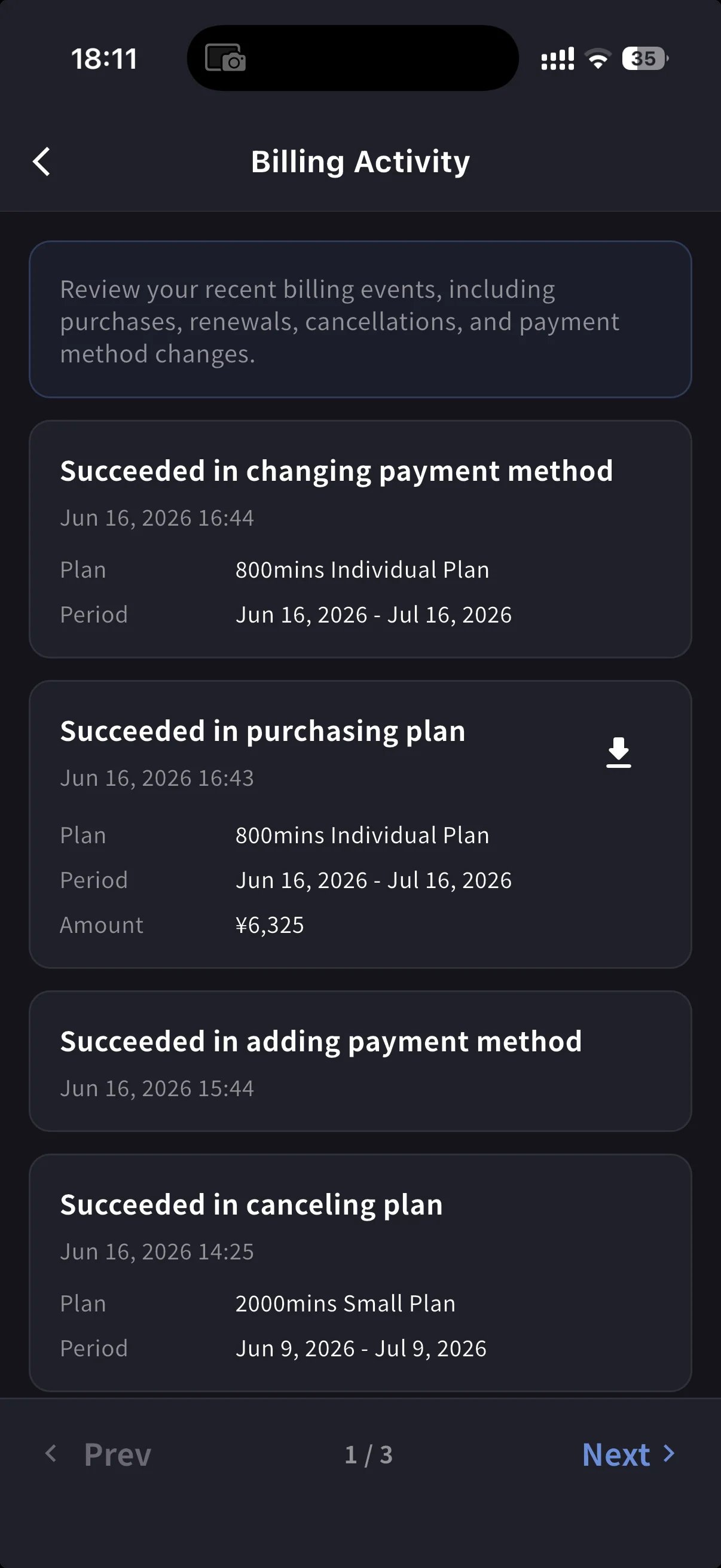
Ứng dụng dành cho thiết bị di động thu gọn các tính năng tương tự vào trung tâm **Billing**, cùng với nhật ký sự kiện (Billing Activity) ghi lại mọi hoạt động đăng ký.
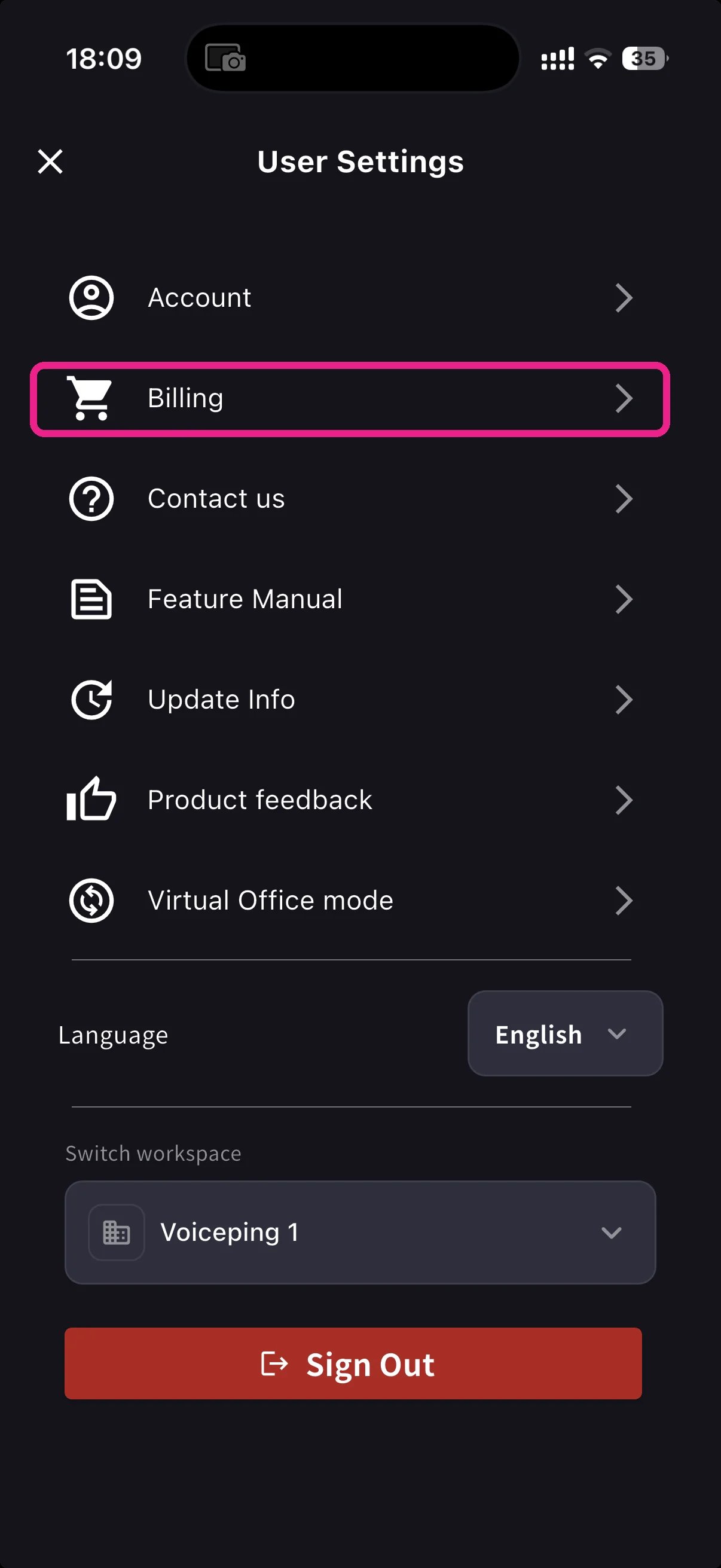
Mở menu bên từ màn hình chính, nhấn **Billing** (biểu tượng giỏ hàng).
Bên dưới thẻ Current Plan, có ba phím tắt bao gồm việc lập hóa đơn:
| Shortcut | Nó dùng để làm gì |
| ----------------------- | --------------------------------------------------------------------- |
| **Invoice Details** | Tên người nhận, email, số điện thoại |
| **Invoices & Receipts** | Invoice PDFs and receipt downloads or stored receipt links |
| **Billing Activity** | Nhật ký sự kiện của mỗi lần di chuyển đăng ký, có dấu thời gian và IP |
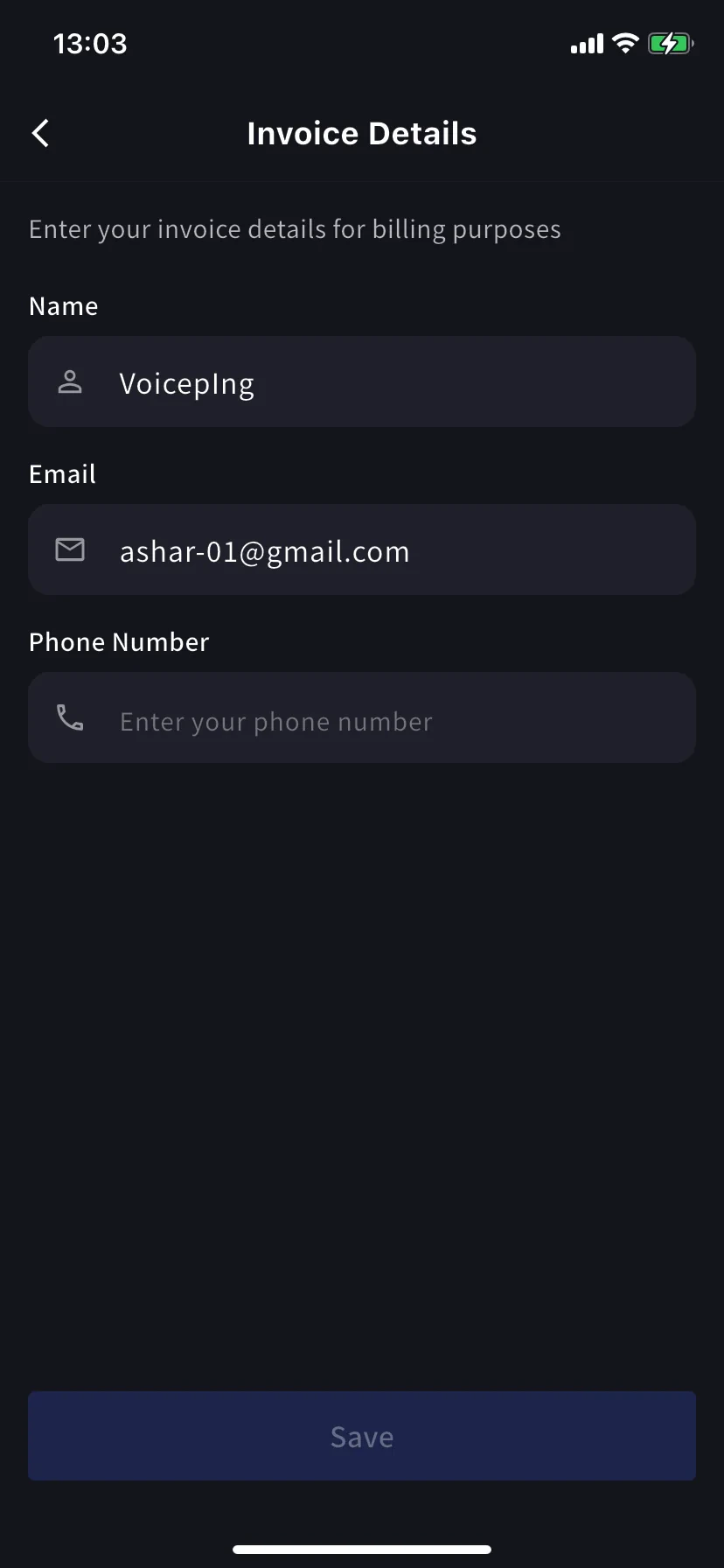
### Invoice Details (mobile)
Các trường tương tự như tab PC: tên, email, số điện thoại cho tệp PDF hóa đơn của bạn.
Cập nhật **before** ngày thanh toán tiếp theo của bạn. Stripe đọc các trường này tại thời điểm tạo hóa đơn; chỉnh sửa sau không đóng dấu lại các tệp PDF trước đây.
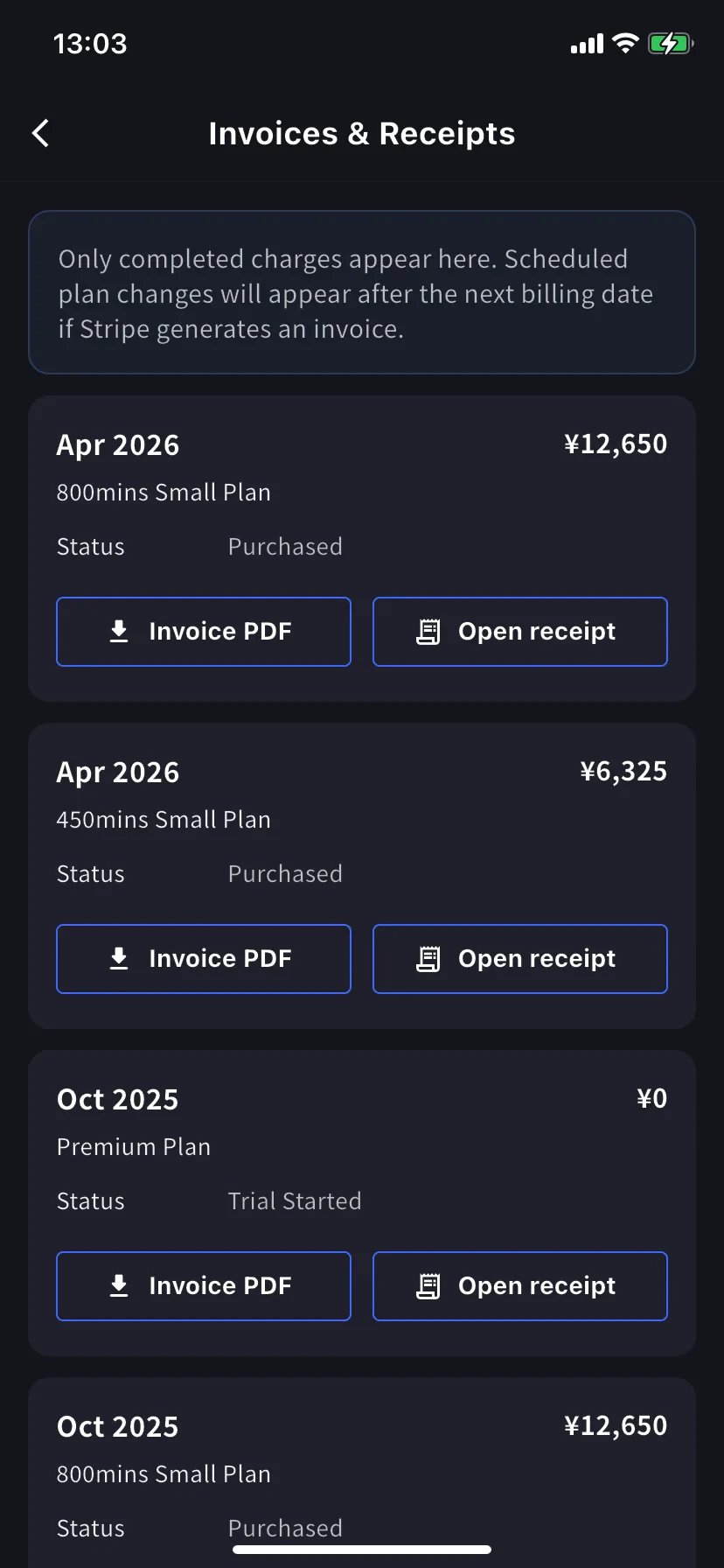
### Invoices & Receipts (mobile)
Các khoản phí trước đây xuất hiện dưới dạng thẻ hàng tháng. Mỗi thẻ có hai hành động.
| Nút | Mở ra |
| ---------------- | -------------------------------------------------------------------------------------------------- |
| **Invoice PDF** | Hóa đơn PDF có thể tải xuống để chia sẻ, lưu hoặc chuyển tiếp |
| **Open receipt** | Receipt download or stored receipt link; if unavailable, the hosted receipt/invoice fallback opens |
### Billing Activity (mobile only)
Nhật ký sự kiện: mọi thứ mà không gian làm việc của bạn đã thực hiện đối với đăng ký của nó, ở cùng một nơi.
Mỗi hàng mang:
* Tên sự kiện, ví dụ *Succeeded in upgrading plan*, *Subscription will be canceled on the next payment date*, *Succeeded in restoring subscription*
* Dấu thời gian (`YYYY/MM/DD HH:MM`)
* Gói, thời hạn thanh toán và số tiền khi áp dụng
* **IP Address** — người đã hành động từ đâu, để kiểm tra và đánh giá an ninh
* Biểu tượng tải xuống cho các khoản phí đã hoàn thành - lấy bản PDF hóa đơn cho sự kiện đó
Sử dụng nó để trả lời khi điều đó xảy ra mà không cần tìm hiểu kỹ email.
On PC, use **Billing History** for the full event log and **Invoice and Receipt Download** for finance documents. On mobile, **Billing Activity** gives a compact activity log with timestamps, IP address, and invoice download actions where available.
## Mẹo
* **Bill-to changes apply to future invoices only.** Cập nhật Invoice Details trước ngày thanh toán tiếp theo để tránh phải cấp lại.
* **Receipts vs invoices.** The invoice is the charge document. The receipt action opens the stored receipt/download when available; otherwise it opens the hosted Stripe fallback.
* **Mobile and PC stay in sync.** Các chỉnh sửa trên một bề mặt sẽ xuất hiện trên bề mặt kia ngay lập tức.
## Related
* [Plan Changes, Cancellation & Trial End](/vi/plan-changes) — nâng cấp, hạ cấp, hủy bỏ
* [Changing Your Payment Credit Card](/vi/credit-card-change) — quản lý thẻ trên PC và di động
* [Pricing](/vi/pricing) — cấp bậc kế hoạch và phụ cấp phút
| Nút | Mở ra |
| -------------------- | -------------------------------------------------------------------------------------------------- |
| **Download Invoice** | Hóa đơn PDF để chia sẻ, lưu hoặc chuyển tiếp tới bộ phận tài chính |
| **Download Receipt** | Receipt download or stored receipt link; if unavailable, the hosted receipt/invoice fallback opens |
Chỉ những khoản phí đã hoàn thành mới xuất hiện ở đây. Các thay đổi về gói đã lên lịch sẽ hiển thị sau ngày thanh toán tiếp theo, sau khi Stripe tạo hóa đơn. `$0` các hàng có trạng thái **Trial Purchased** cũng được ghi lại, giúp theo dõi thời điểm bắt đầu thử nghiệm.
### Billing History
Use **Billing History** when you need the full audit trail, not only completed invoice rows.
| Column | What it shows |
| ------------------------- | -------------------------------------------------------------------------------------------------------------------------------------------------- |
| **Status** | Event result, such as purchase, upgrade, scheduled change, cancellation, restore, payment-method change, trial update, renewal, or payment failure |
| **Event Date (UTC+9)** | When the billing event was recorded |
| **Plan Name** | The plan involved in the event, including tiered Individual / Small minute labels when available |
| **Start Date / End Date** | The subscription period affected by the event |
| **Price** | The billed amount when the event has a displayable charge |
Use **Billing History** for "what changed and when?" Use **Invoice and Receipt Download** when finance needs the actual invoice PDF or receipt.
## Trên Mobile (trung tâm Billing)
Ứng dụng dành cho thiết bị di động thu gọn các tính năng tương tự vào trung tâm **Billing**, cùng với nhật ký sự kiện (Billing Activity) ghi lại mọi hoạt động đăng ký.
Mở menu bên từ màn hình chính, nhấn **Billing** (biểu tượng giỏ hàng).
Bên dưới thẻ Current Plan, có ba phím tắt bao gồm việc lập hóa đơn:
| Shortcut | Nó dùng để làm gì |
| ----------------------- | --------------------------------------------------------------------- |
| **Invoice Details** | Tên người nhận, email, số điện thoại |
| **Invoices & Receipts** | Invoice PDFs and receipt downloads or stored receipt links |
| **Billing Activity** | Nhật ký sự kiện của mỗi lần di chuyển đăng ký, có dấu thời gian và IP |
### Invoice Details (mobile)
Các trường tương tự như tab PC: tên, email, số điện thoại cho tệp PDF hóa đơn của bạn.
Cập nhật **before** ngày thanh toán tiếp theo của bạn. Stripe đọc các trường này tại thời điểm tạo hóa đơn; chỉnh sửa sau không đóng dấu lại các tệp PDF trước đây.
### Invoices & Receipts (mobile)
Các khoản phí trước đây xuất hiện dưới dạng thẻ hàng tháng. Mỗi thẻ có hai hành động.
| Nút | Mở ra |
| ---------------- | -------------------------------------------------------------------------------------------------- |
| **Invoice PDF** | Hóa đơn PDF có thể tải xuống để chia sẻ, lưu hoặc chuyển tiếp |
| **Open receipt** | Receipt download or stored receipt link; if unavailable, the hosted receipt/invoice fallback opens |
### Billing Activity (mobile only)
Nhật ký sự kiện: mọi thứ mà không gian làm việc của bạn đã thực hiện đối với đăng ký của nó, ở cùng một nơi.
Mỗi hàng mang:
* Tên sự kiện, ví dụ *Succeeded in upgrading plan*, *Subscription will be canceled on the next payment date*, *Succeeded in restoring subscription*
* Dấu thời gian (`YYYY/MM/DD HH:MM`)
* Gói, thời hạn thanh toán và số tiền khi áp dụng
* **IP Address** — người đã hành động từ đâu, để kiểm tra và đánh giá an ninh
* Biểu tượng tải xuống cho các khoản phí đã hoàn thành - lấy bản PDF hóa đơn cho sự kiện đó
Sử dụng nó để trả lời khi điều đó xảy ra mà không cần tìm hiểu kỹ email.
On PC, use **Billing History** for the full event log and **Invoice and Receipt Download** for finance documents. On mobile, **Billing Activity** gives a compact activity log with timestamps, IP address, and invoice download actions where available.
## Mẹo
* **Bill-to changes apply to future invoices only.** Cập nhật Invoice Details trước ngày thanh toán tiếp theo để tránh phải cấp lại.
* **Receipts vs invoices.** The invoice is the charge document. The receipt action opens the stored receipt/download when available; otherwise it opens the hosted Stripe fallback.
* **Mobile and PC stay in sync.** Các chỉnh sửa trên một bề mặt sẽ xuất hiện trên bề mặt kia ngay lập tức.
## Related
* [Plan Changes, Cancellation & Trial End](/vi/plan-changes) — nâng cấp, hạ cấp, hủy bỏ
* [Changing Your Payment Credit Card](/vi/credit-card-change) — quản lý thẻ trên PC và di động
* [Pricing](/vi/pricing) — cấp bậc kế hoạch và phụ cấp phút