> ## Documentation Index
> Fetch the complete documentation index at: https://manual.voiceping.net/llms.txt
> Use this file to discover all available pages before exploring further.
# Phiên âm trực tiếp trên di động
> Phiên âm và dịch song ngữ theo thời gian thực trên iOS và Android.
export const FeedbackVi = () => <>
Có ý tưởng hoặc yêu cầu về tính năng này? Gửi cho nhóm qua Product Feedback.
Liên kết chính thức
Truy cập website chính thức
Theo dõi trên X
Thích trên Facebook
Kết nối trên LinkedIn
;
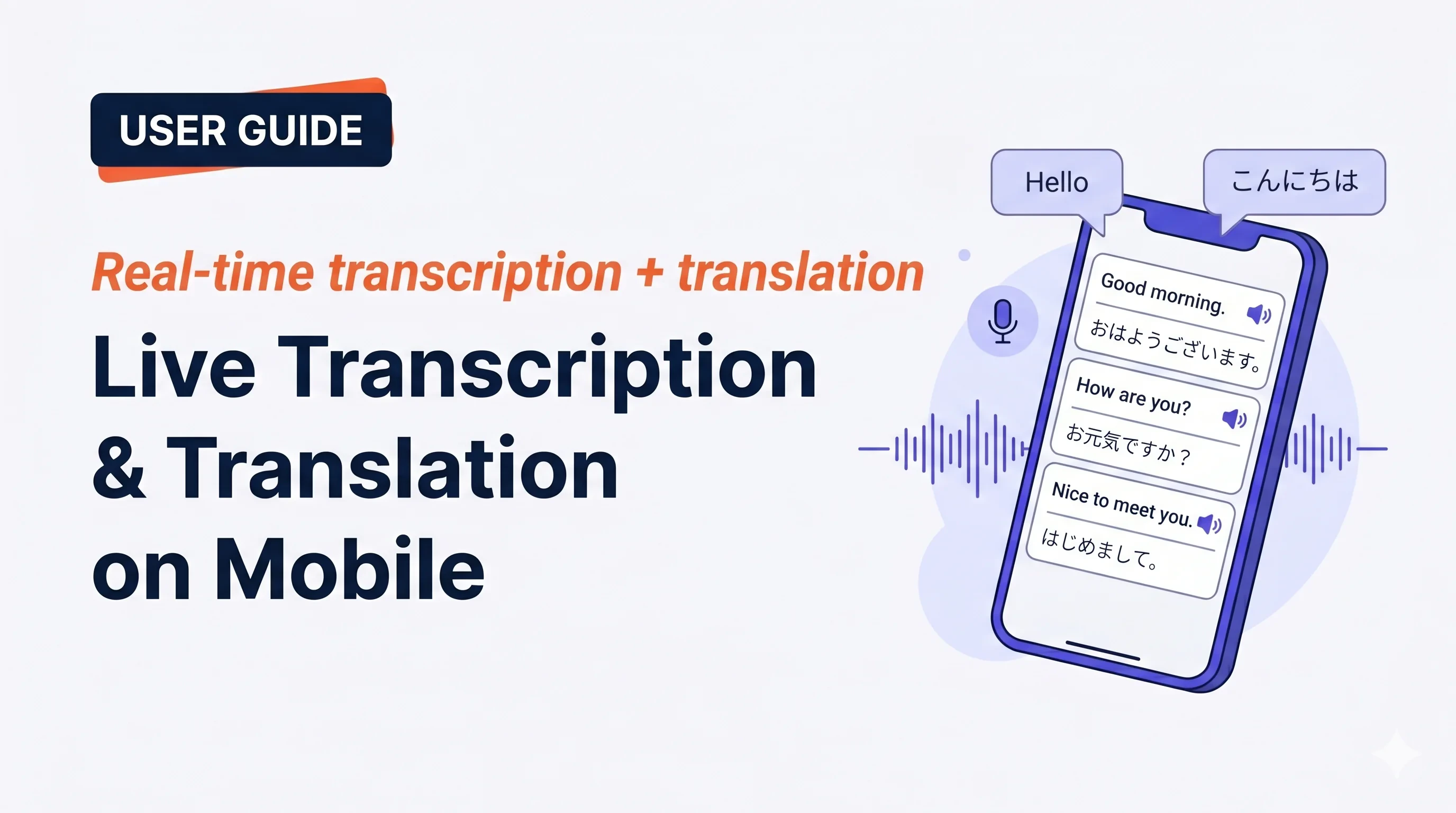 Chạm **Start**, nói, và xem phiên âm cùng bản dịch xuất hiện ngay lập tức. Kết thúc phiên thì nó được lưu vào lịch sử workspace.
## Dùng khi…
Đặt điện thoại giữa bạn và người đối diện ở quán cà phê, taxi hay quầy tính tiền. Bật chế độ Face-to-face để cả hai đọc bằng ngôn ngữ của mình.
Lễ tân khách sạn, nhà hàng, phòng khám, hải quan — hội thoại hai chiều với phụ đề song ngữ.
Trò chuyện với gia sư, đối tác học ngôn ngữ, hoặc người bản ngữ và giữ phụ đề làm lưới an toàn khi bí từ.
Trên đường đi — một chạm Start, nói ý tưởng, End. Lưu thành phiên âm song ngữ có thể tìm kiếm.
## Bắt đầu phiên
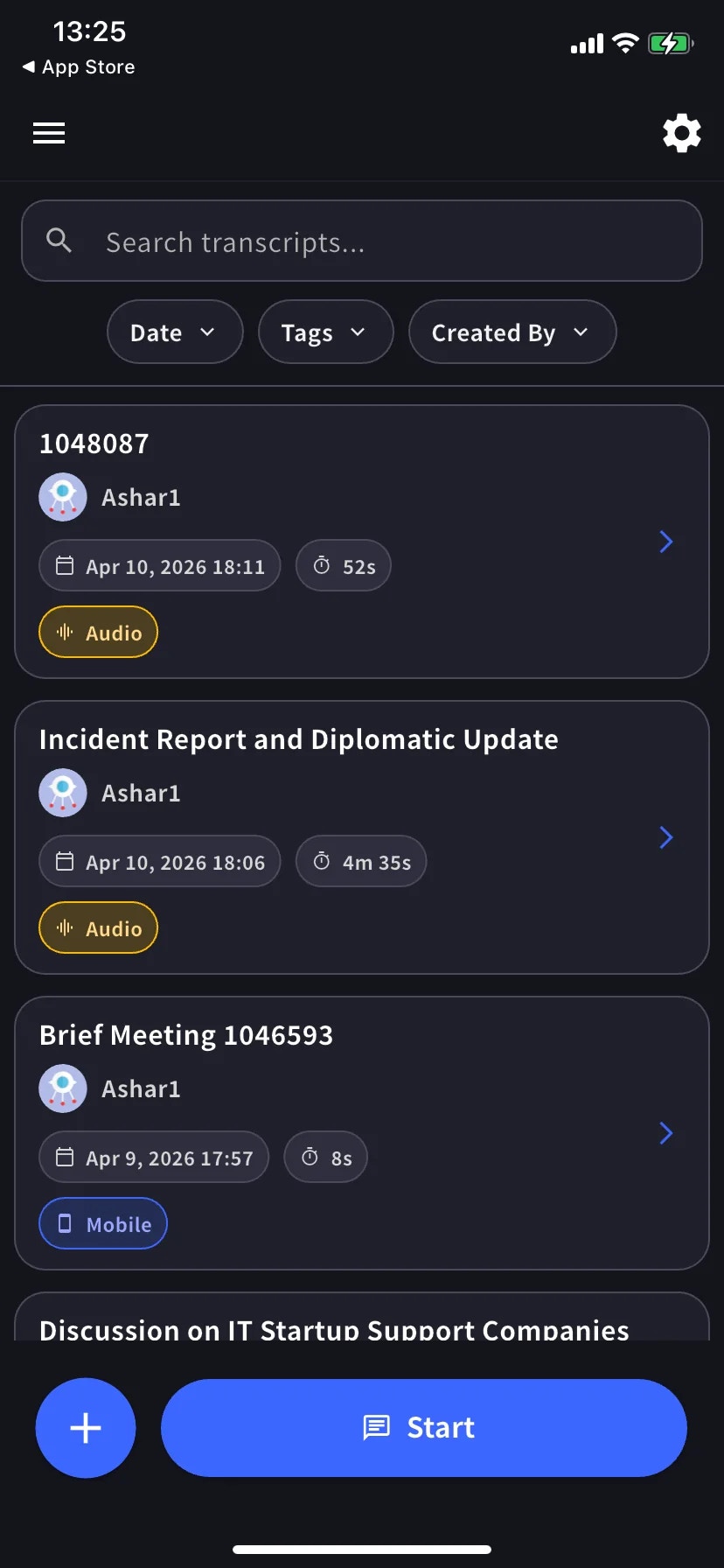
Màn hình chính liệt kê các phiên âm cũ và có nút **Start** ở dưới cùng.
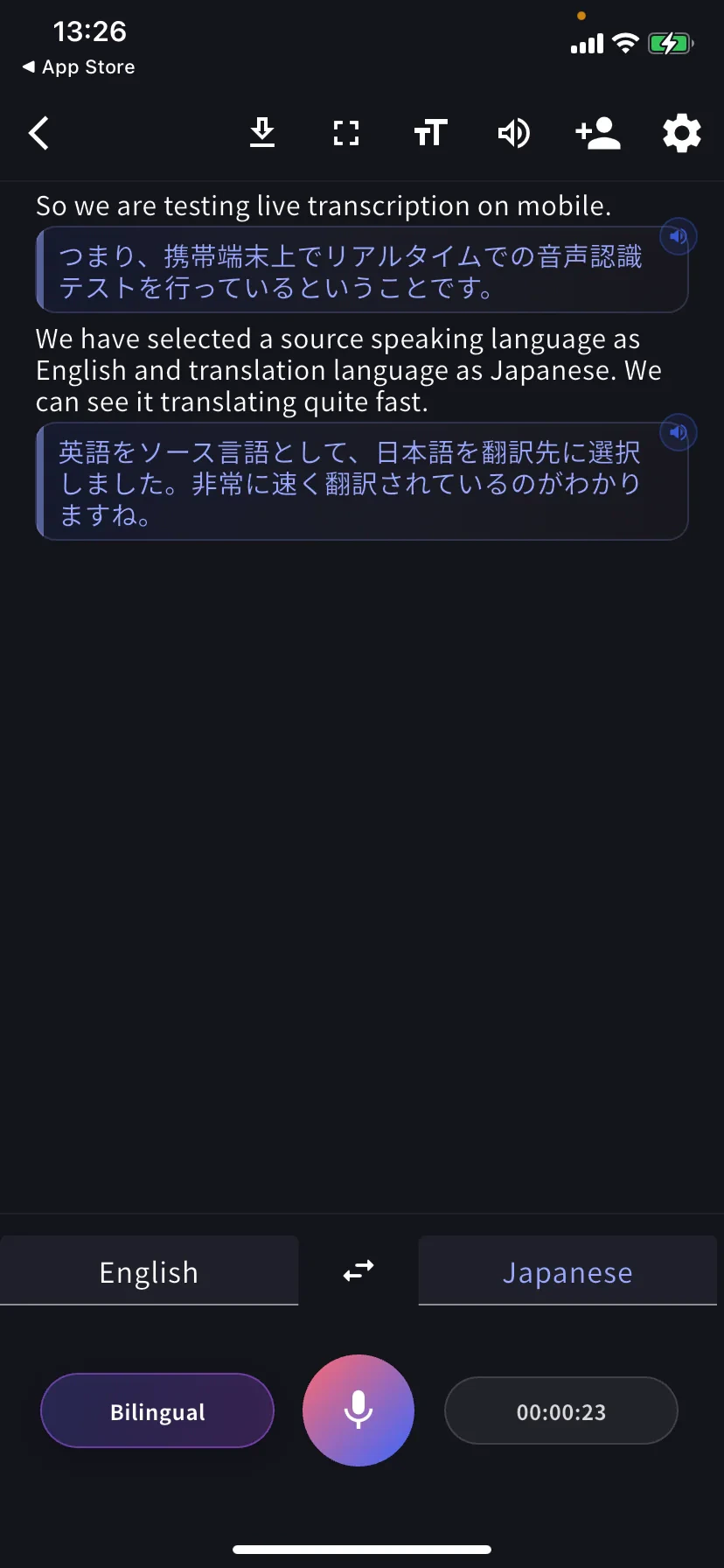
Mỗi câu nói thành một hàng: nguyên bản ở trên, bản dịch ở dưới. Chạm biểu tượng loa trên một hàng để phát lại bản dịch.
## Điều khiển dưới cùng
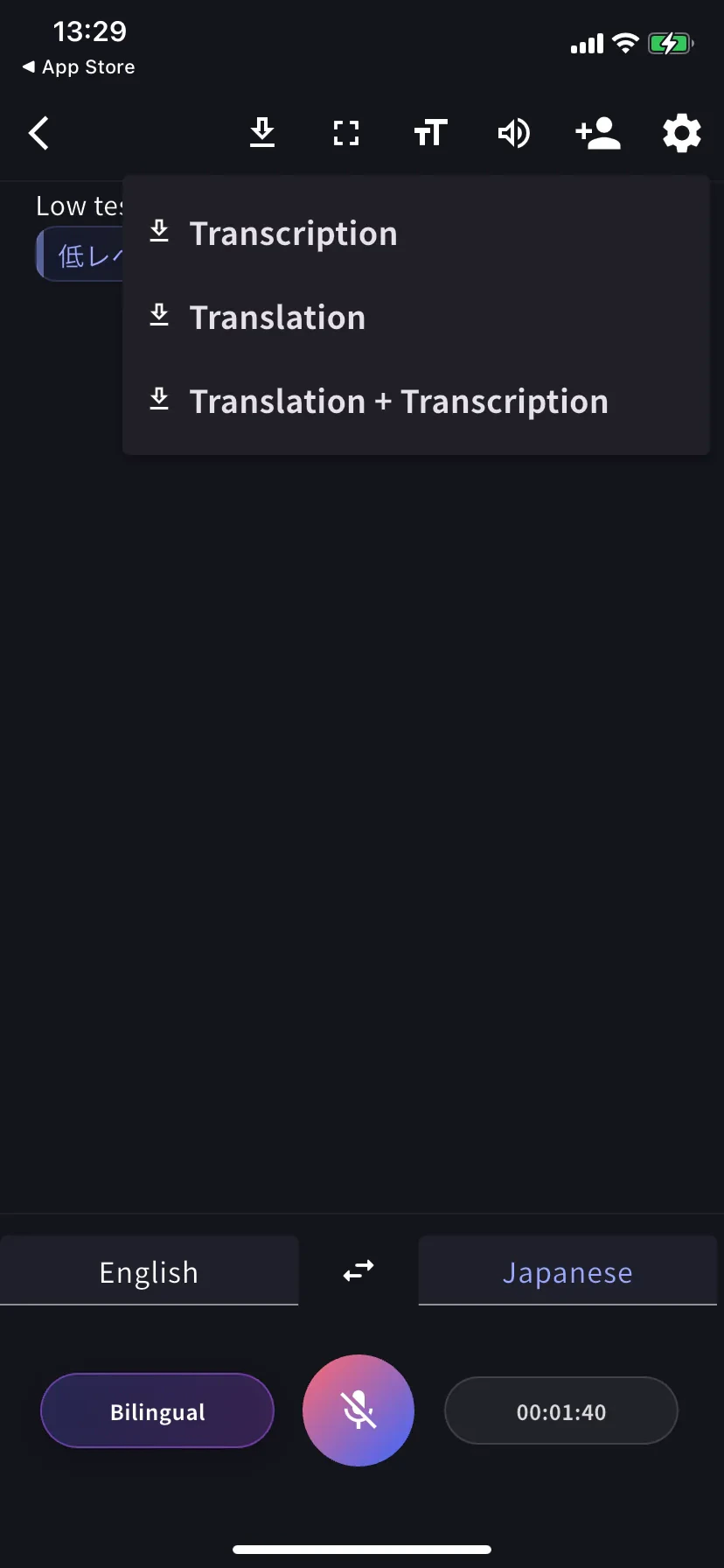
* **Tab trái** — ngôn ngữ bạn nói · **⇄** đổi chỗ · **Tab phải** — ngôn ngữ bạn đọc
* **Bilingual** — chuyển giữa song ngữ và chỉ bản dịch
* **Mic** — chạm để tắt / bật tiếng
* **Đồng hồ** — thời lượng hiện tại; chạm để kết thúc và lưu
## Phát bản dịch bằng giọng nói
Chạm bất kỳ hàng dịch nào để nghe đọc bằng ngôn ngữ đích. Hữu ích khi:
* Bạn muốn người đối diện **nghe** bản dịch thay vì đọc
* Bạn đang **học ngôn ngữ** và muốn nghe phát âm của điều mình vừa nói
* Người đối diện không tiện đọc từ màn hình
Để tự động phát mỗi hàng khi đến, bật **Auto-play speech** trong [Cài đặt âm thanh](/vi/mobile-live-transcription-settings) — và bật **Auto-mute mic** để mic không bắt lại âm thanh phát.
## Chế độ đọc
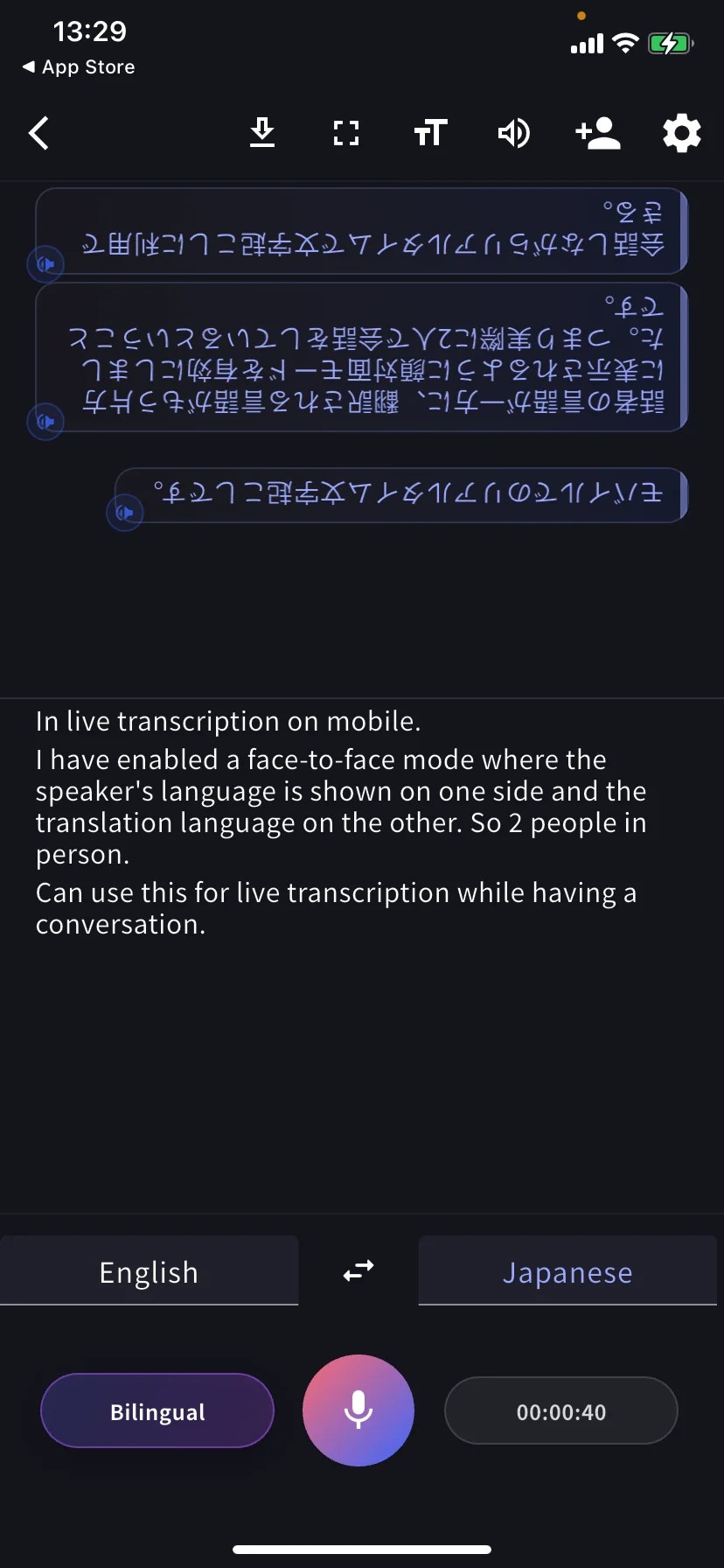
**Face-to-face mode** (TT → Text display) xoay phần dịch 180° để người đối diện đọc đúng hướng từ phía họ. Đặt điện thoại nằm phẳng giữa hai người.
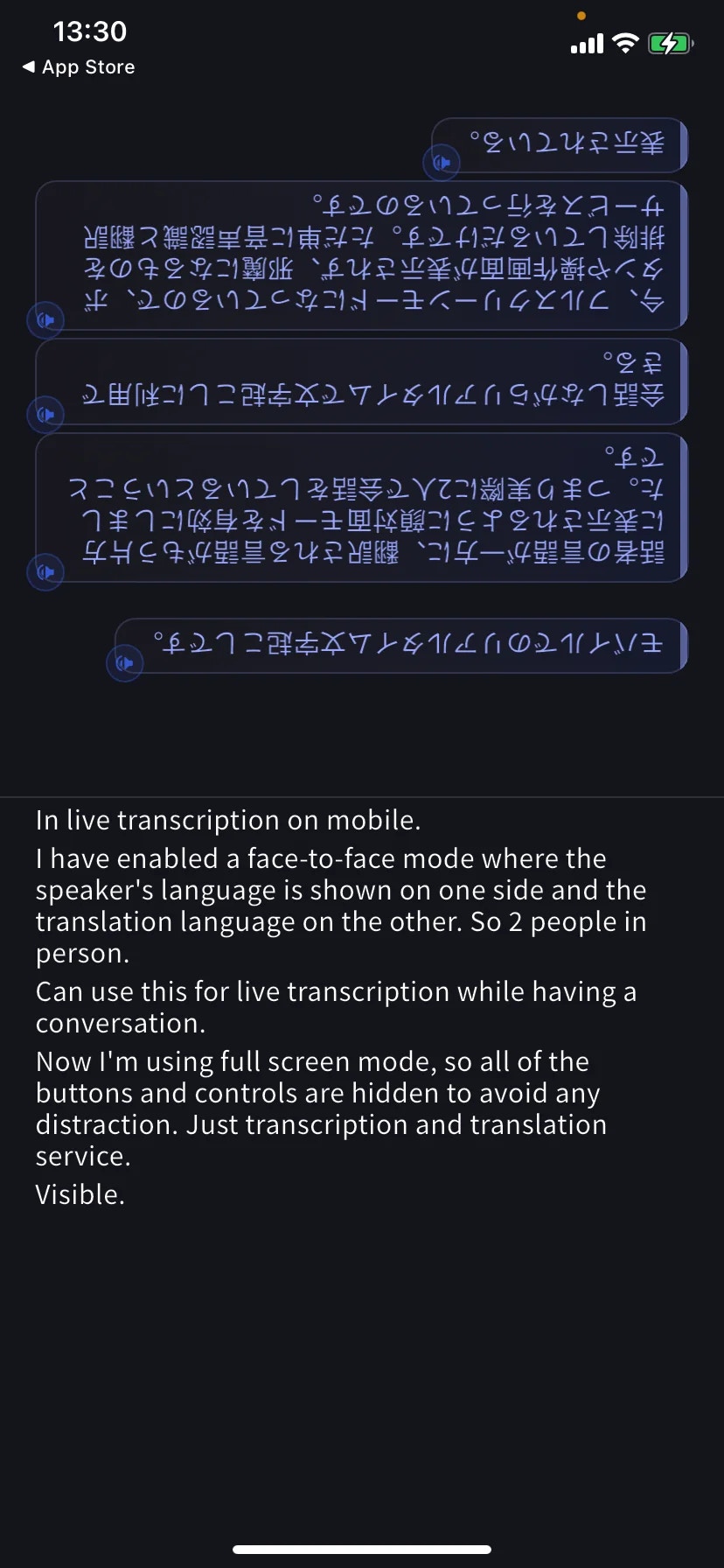
**Fullscreen mode** (⛶ trên thanh công cụ) ẩn thanh công cụ và các nút để không làm gián đoạn cuộc trò chuyện — và tránh chạm nhầm khi điện thoại nằm trên bàn.
## Tải xuống giữa phiên
Chạm **⬇** trên thanh công cụ để xuất mà không kết thúc: Transcription, Translation, hoặc cả hai.
## Kết thúc và lưu
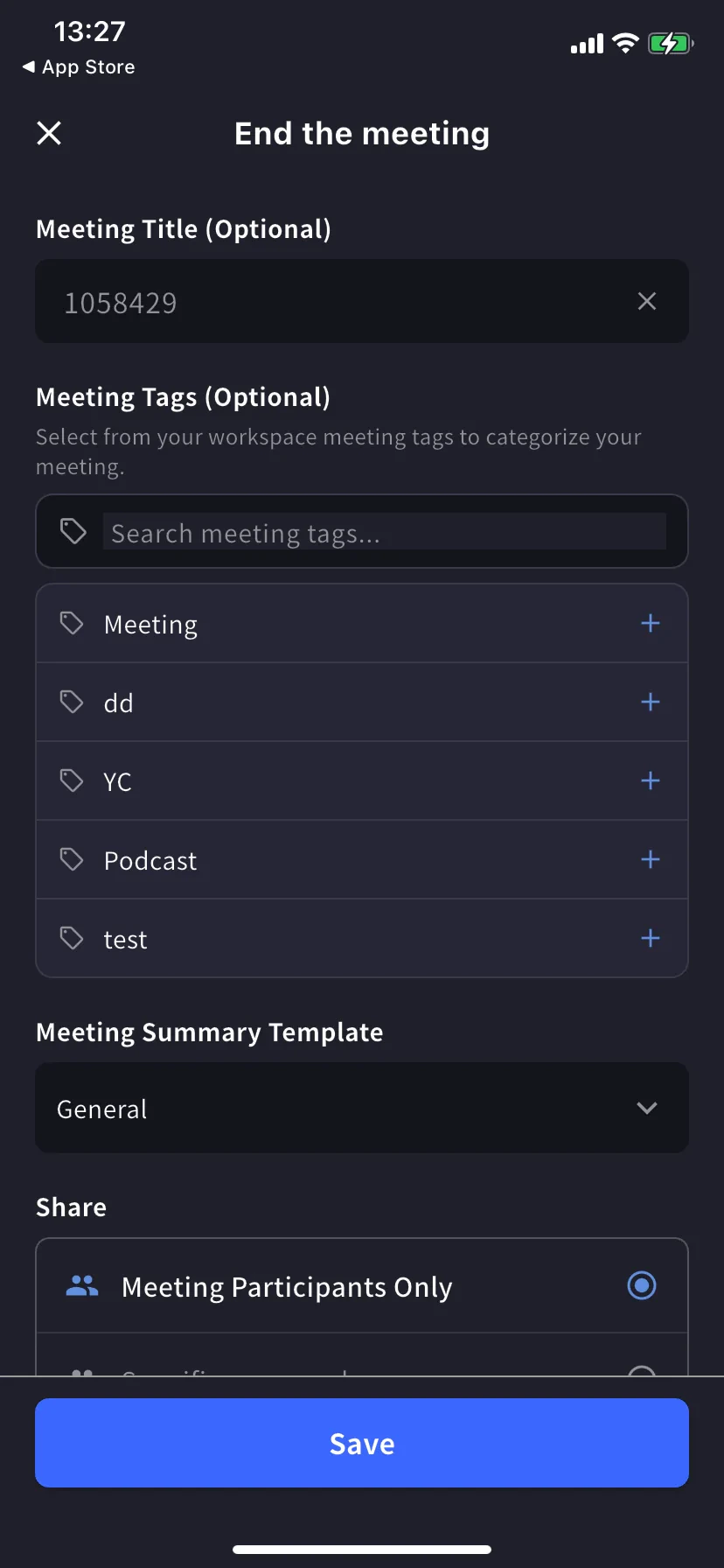
Chạm đồng hồ / dừng để mở biểu mẫu End-meeting.
* **Title** — tự đánh số, đổi nếu cần
* **Tags** — chọn từ tag workspace (dùng để lọc)
* **Summary template** — mẫu cho biên bản tự sinh
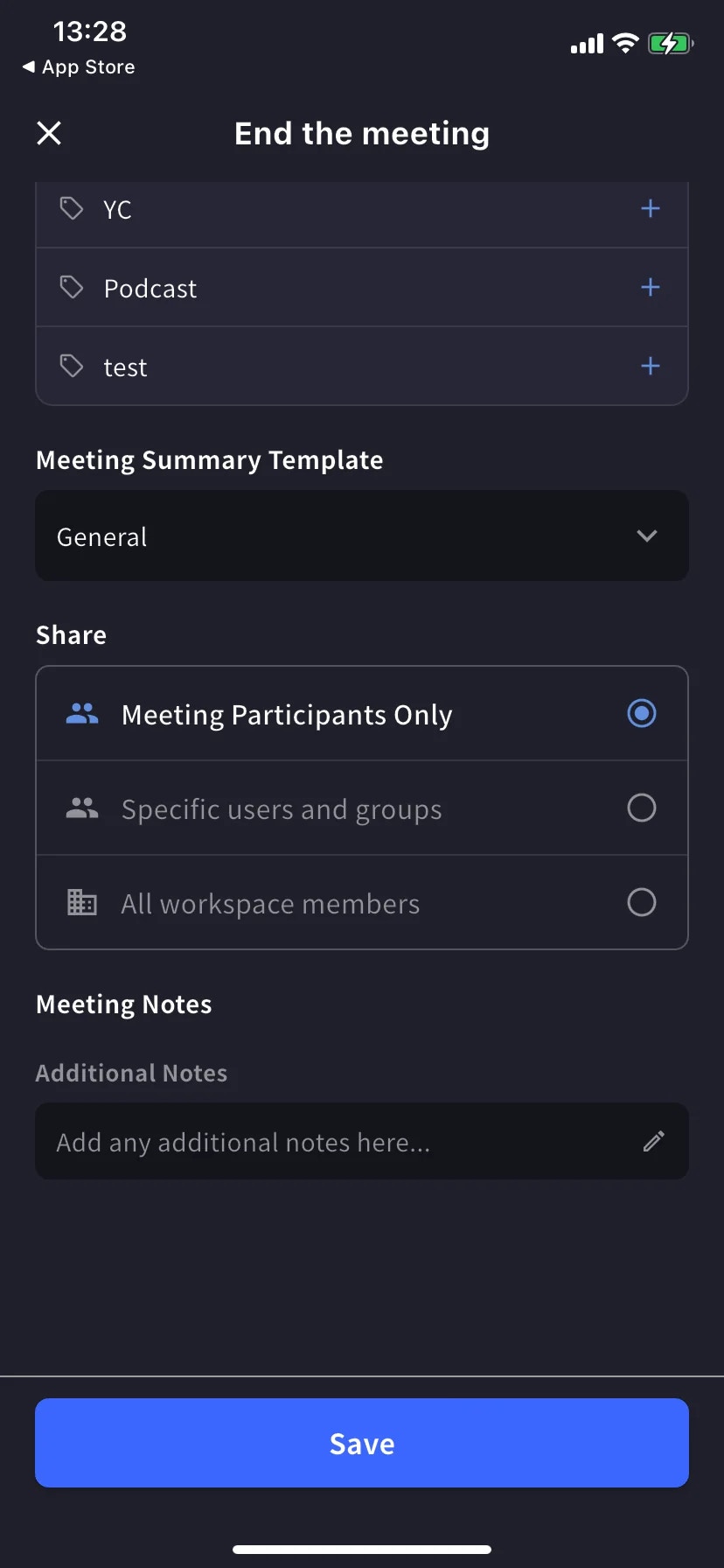
* **Share scope** — Participants only / Specific users / All workspace members
* **Notes** — ghi chú tự do được lưu cùng phiên âm
Chạm **Save**. Phiên xuất hiện trong danh sách lịch sử — tìm theo văn bản, lọc theo Date / Tags / Created By.
## Mẹo
* Đặt điện thoại nằm phẳng giữa bạn và người đối diện — mic tích hợp thu đều hai bên hơn khi cầm.
* Trong quán cà phê ồn hoặc ngoài phố, cắm tai nghe có dây hoặc Bluetooth.
* Giữ app ở foreground — iOS có thể tạm dừng thu khi bạn chuyển app.
* Nạp trước các mục [Từ điển](/vi/dictionary) (cá nhân hoặc workspace, giống desktop) cho các từ sẽ xuất hiện.
## Trang liên quan
* [Cài đặt](/vi/mobile-live-transcription-settings) — âm thanh, hiển thị văn bản, từ điển
* [Chia sẻ cho Listeners (QR)](/vi/mobile-live-transcription-share)
* [Dịch ngoại tuyến](/vi/mobile-offline-translation) · [Thu âm app khác](/vi/mobile-screen-record) · [Tải tệp lên](/vi/mobile-upload-files)
Chạm **Start**, nói, và xem phiên âm cùng bản dịch xuất hiện ngay lập tức. Kết thúc phiên thì nó được lưu vào lịch sử workspace.
## Dùng khi…
Đặt điện thoại giữa bạn và người đối diện ở quán cà phê, taxi hay quầy tính tiền. Bật chế độ Face-to-face để cả hai đọc bằng ngôn ngữ của mình.
Lễ tân khách sạn, nhà hàng, phòng khám, hải quan — hội thoại hai chiều với phụ đề song ngữ.
Trò chuyện với gia sư, đối tác học ngôn ngữ, hoặc người bản ngữ và giữ phụ đề làm lưới an toàn khi bí từ.
Trên đường đi — một chạm Start, nói ý tưởng, End. Lưu thành phiên âm song ngữ có thể tìm kiếm.
## Bắt đầu phiên
Màn hình chính liệt kê các phiên âm cũ và có nút **Start** ở dưới cùng.
Mỗi câu nói thành một hàng: nguyên bản ở trên, bản dịch ở dưới. Chạm biểu tượng loa trên một hàng để phát lại bản dịch.
## Điều khiển dưới cùng
* **Tab trái** — ngôn ngữ bạn nói · **⇄** đổi chỗ · **Tab phải** — ngôn ngữ bạn đọc
* **Bilingual** — chuyển giữa song ngữ và chỉ bản dịch
* **Mic** — chạm để tắt / bật tiếng
* **Đồng hồ** — thời lượng hiện tại; chạm để kết thúc và lưu
## Phát bản dịch bằng giọng nói
Chạm bất kỳ hàng dịch nào để nghe đọc bằng ngôn ngữ đích. Hữu ích khi:
* Bạn muốn người đối diện **nghe** bản dịch thay vì đọc
* Bạn đang **học ngôn ngữ** và muốn nghe phát âm của điều mình vừa nói
* Người đối diện không tiện đọc từ màn hình
Để tự động phát mỗi hàng khi đến, bật **Auto-play speech** trong [Cài đặt âm thanh](/vi/mobile-live-transcription-settings) — và bật **Auto-mute mic** để mic không bắt lại âm thanh phát.
## Chế độ đọc
**Face-to-face mode** (TT → Text display) xoay phần dịch 180° để người đối diện đọc đúng hướng từ phía họ. Đặt điện thoại nằm phẳng giữa hai người.
**Fullscreen mode** (⛶ trên thanh công cụ) ẩn thanh công cụ và các nút để không làm gián đoạn cuộc trò chuyện — và tránh chạm nhầm khi điện thoại nằm trên bàn.
## Tải xuống giữa phiên
Chạm **⬇** trên thanh công cụ để xuất mà không kết thúc: Transcription, Translation, hoặc cả hai.
## Kết thúc và lưu
Chạm đồng hồ / dừng để mở biểu mẫu End-meeting.
* **Title** — tự đánh số, đổi nếu cần
* **Tags** — chọn từ tag workspace (dùng để lọc)
* **Summary template** — mẫu cho biên bản tự sinh
* **Share scope** — Participants only / Specific users / All workspace members
* **Notes** — ghi chú tự do được lưu cùng phiên âm
Chạm **Save**. Phiên xuất hiện trong danh sách lịch sử — tìm theo văn bản, lọc theo Date / Tags / Created By.
## Mẹo
* Đặt điện thoại nằm phẳng giữa bạn và người đối diện — mic tích hợp thu đều hai bên hơn khi cầm.
* Trong quán cà phê ồn hoặc ngoài phố, cắm tai nghe có dây hoặc Bluetooth.
* Giữ app ở foreground — iOS có thể tạm dừng thu khi bạn chuyển app.
* Nạp trước các mục [Từ điển](/vi/dictionary) (cá nhân hoặc workspace, giống desktop) cho các từ sẽ xuất hiện.
## Trang liên quan
* [Cài đặt](/vi/mobile-live-transcription-settings) — âm thanh, hiển thị văn bản, từ điển
* [Chia sẻ cho Listeners (QR)](/vi/mobile-live-transcription-share)
* [Dịch ngoại tuyến](/vi/mobile-offline-translation) · [Thu âm app khác](/vi/mobile-screen-record) · [Tải tệp lên](/vi/mobile-upload-files)