> ## Documentation Index
> Fetch the complete documentation index at: https://manual.voiceping.net/llms.txt
> Use this file to discover all available pages before exploring further.
# Nâng cấp, Hạ cấp & Hủy trên di động
> Đổi gói VoicePing, hủy hoặc khôi phục tự động gia hạn ngay từ ứng dụng di động.
export const ContactVi = () => <>
Nếu bạn có bất kỳ câu hỏi nào, vui lòng liên hệ với chúng tôi qua biểu mẫu này.
Liên kết chính thức
Truy cập website chính thức
Theo dõi trên X
Thích trên Facebook
Kết nối trên LinkedIn
;
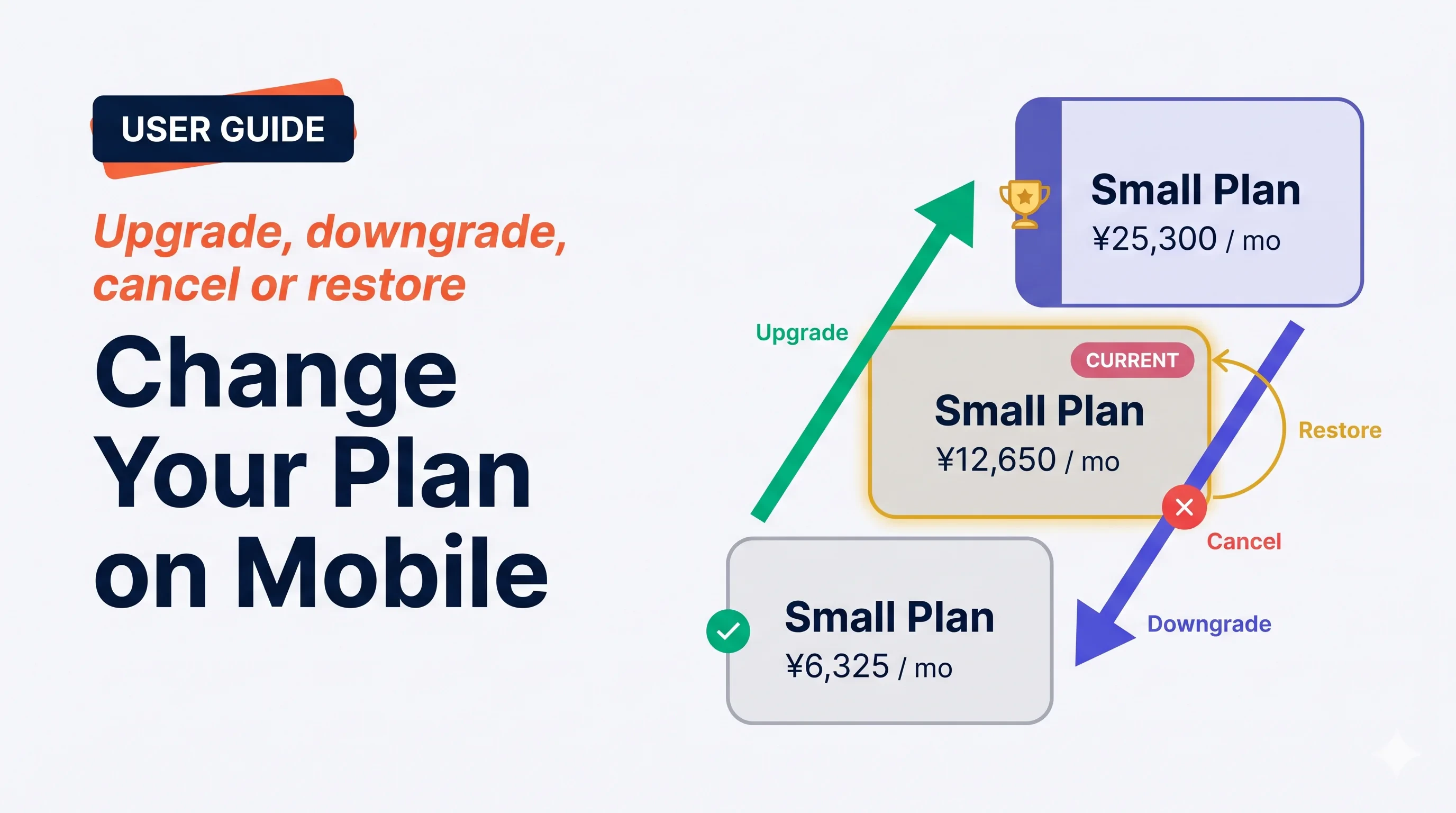 Màn hình **Manage Plan** xử lý mọi thao tác đăng ký — nâng cấp ngay, hạ cấp vào kỳ gia hạn kế, hủy, hoặc khôi phục việc hủy đã lên lịch. VoicePing hiển thị rõ *khi nào*, *giá*, và *mốc đặt lại sử dụng* trước khi bạn xác nhận.
## Bốn thao tác
Màn hình **Manage Plan** xử lý mọi thao tác đăng ký — nâng cấp ngay, hạ cấp vào kỳ gia hạn kế, hủy, hoặc khôi phục việc hủy đã lên lịch. VoicePing hiển thị rõ *khi nào*, *giá*, và *mốc đặt lại sử dụng* trước khi bạn xác nhận.
## Bốn thao tác
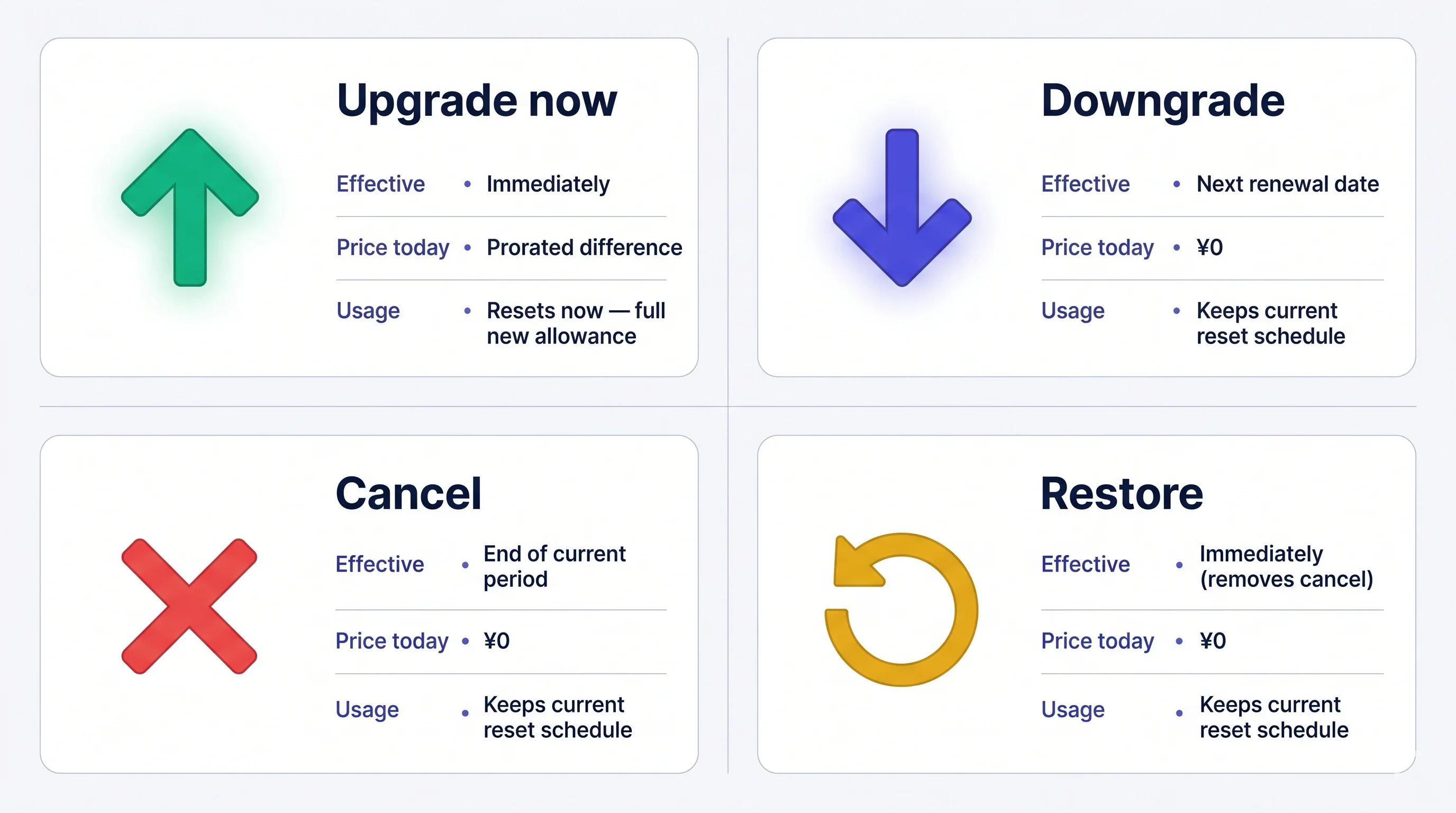 Phí **không hoàn lại** sau khi đã thu. Nếu hủy, gói hiện tại vẫn hoạt động đến hết kỳ — bạn có thể khôi phục miễn phí bất cứ lúc nào trước khi đó.
## Mở Manage Plan
Menu bên → **User Settings** → **Billing** → **Manage Plan**, hoặc chạm **Manage Plan** ngay trên thẻ Current Plan.
Phí **không hoàn lại** sau khi đã thu. Nếu hủy, gói hiện tại vẫn hoạt động đến hết kỳ — bạn có thể khôi phục miễn phí bất cứ lúc nào trước khi đó.
## Mở Manage Plan
Menu bên → **User Settings** → **Billing** → **Manage Plan**, hoặc chạm **Manage Plan** ngay trên thẻ Current Plan.
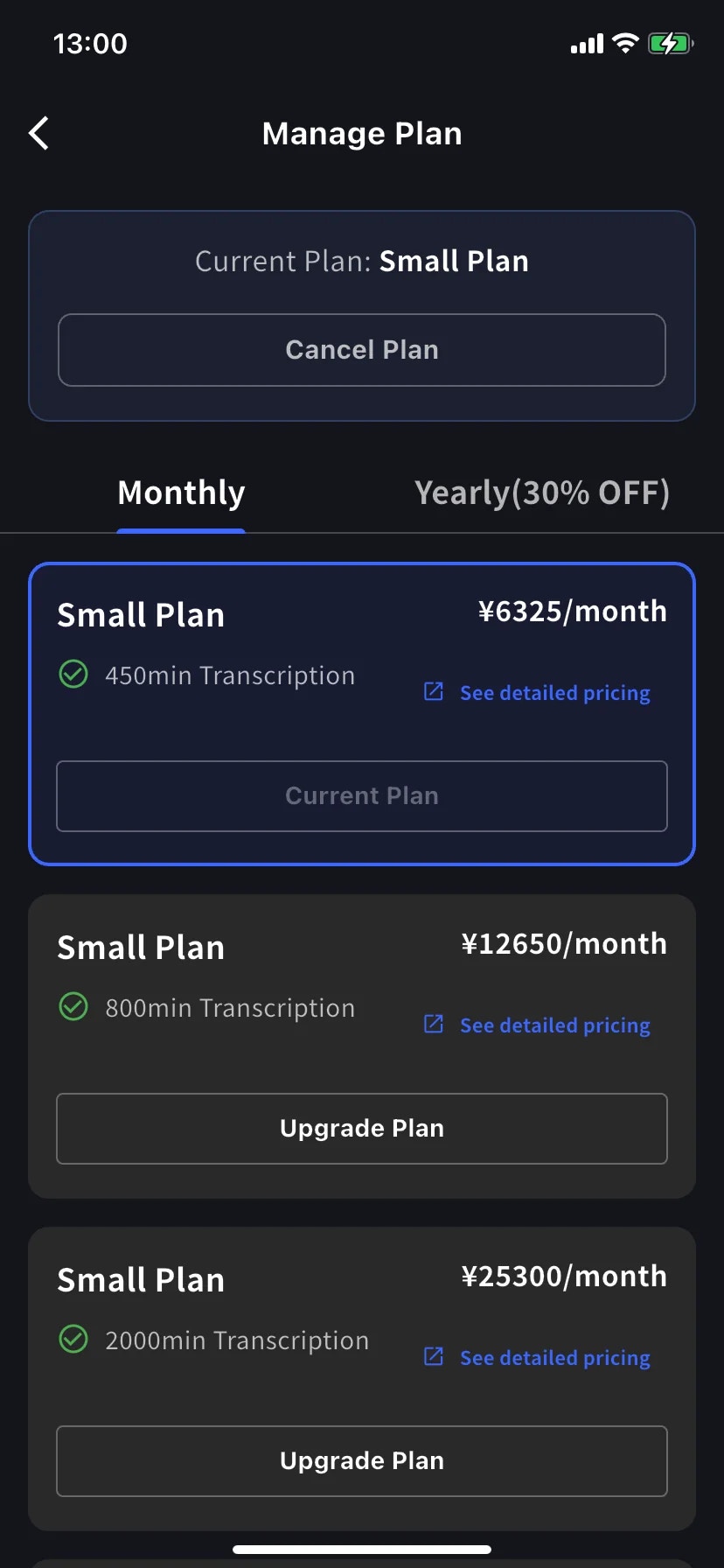
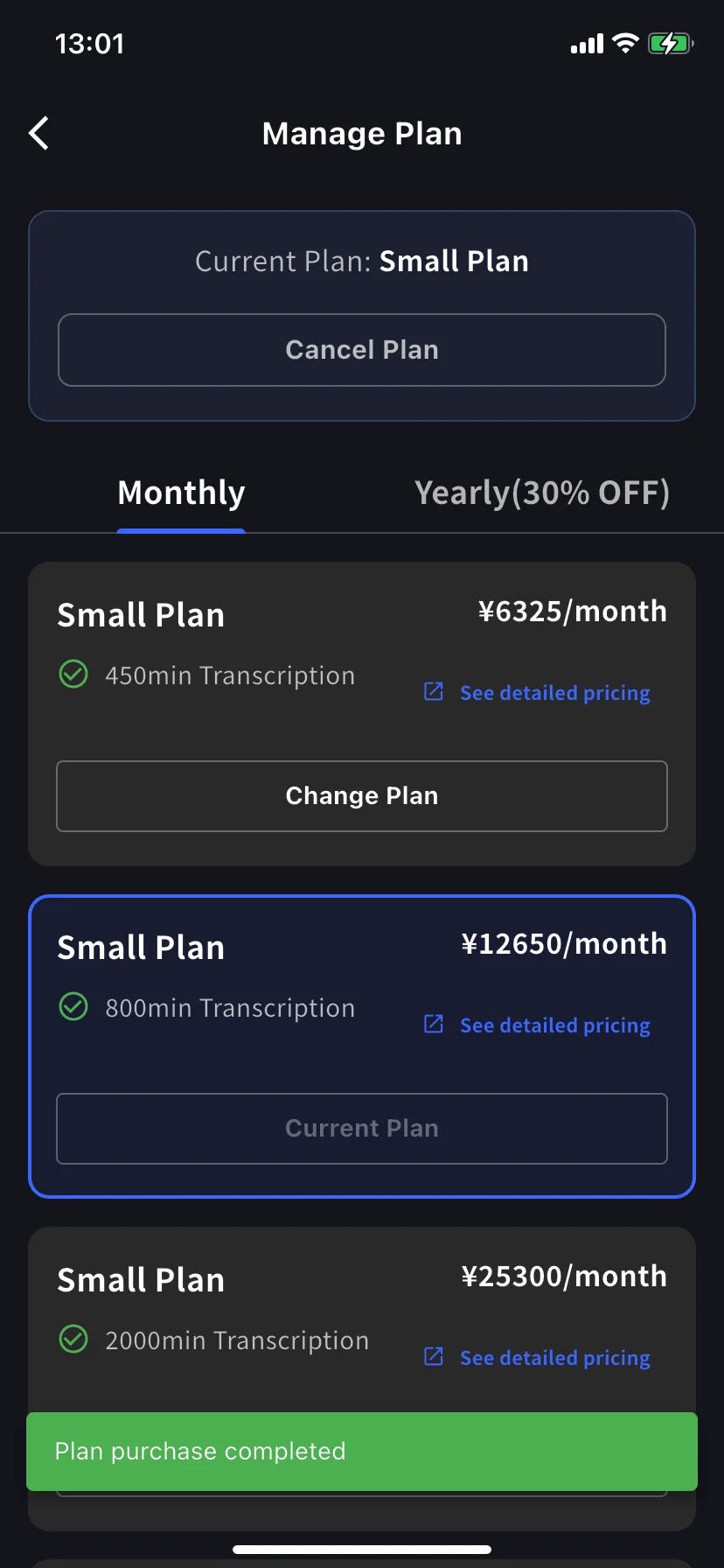
* Tab **Monthly** / **Yearly** chuyển thang giá — giá hiển thị theo tháng ở cả hai, năm thì tính một lần.
* Mức hiện tại có viền xanh và dấu **Current Plan** trên nút.
* Mức cao hơn hiện **Upgrade Plan**; mức thấp hơn hiện **Change Plan**.
* **Cancel Plan** nằm ở đầu màn hình, bên cạnh nhãn gói hiện tại.
## Nâng cấp ngay
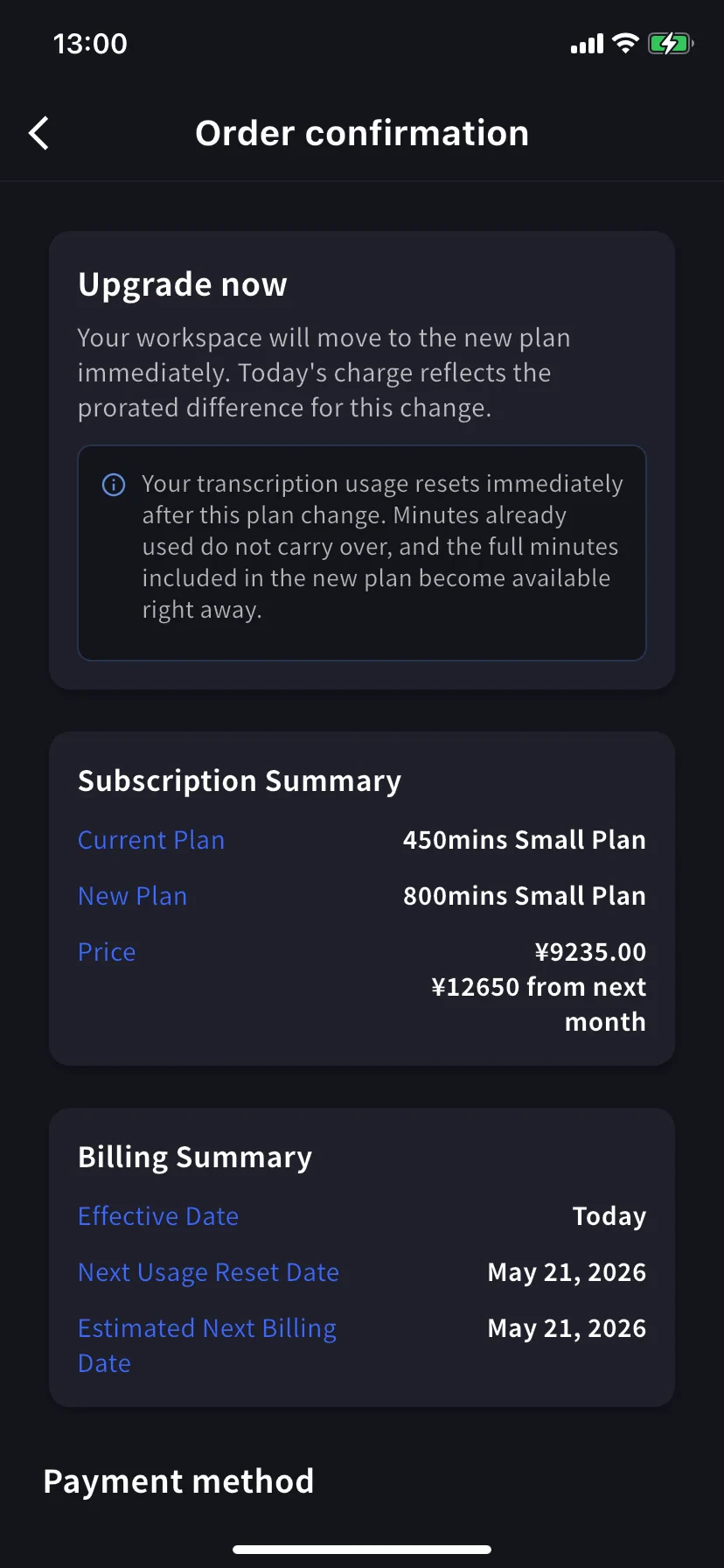
Vào **Order confirmation**. Banner ghi *Upgrade now — your workspace will move to the new plan immediately. Today's charge reflects the prorated difference for this change.*
**Mức dùng phiên âm đặt lại ngay lập tức.** Phút đã dùng không chuyển sang, và toàn bộ phút của gói mới có sẵn ngay.
Subscription Summary hiển thị gói cũ, gói mới và hai mức giá — tiền theo tỷ lệ hôm nay và giá đầy đủ từ tháng sau. Billing Summary xác nhận **Effective Date: Today** và các ngày đặt lại / tính tiền kế.
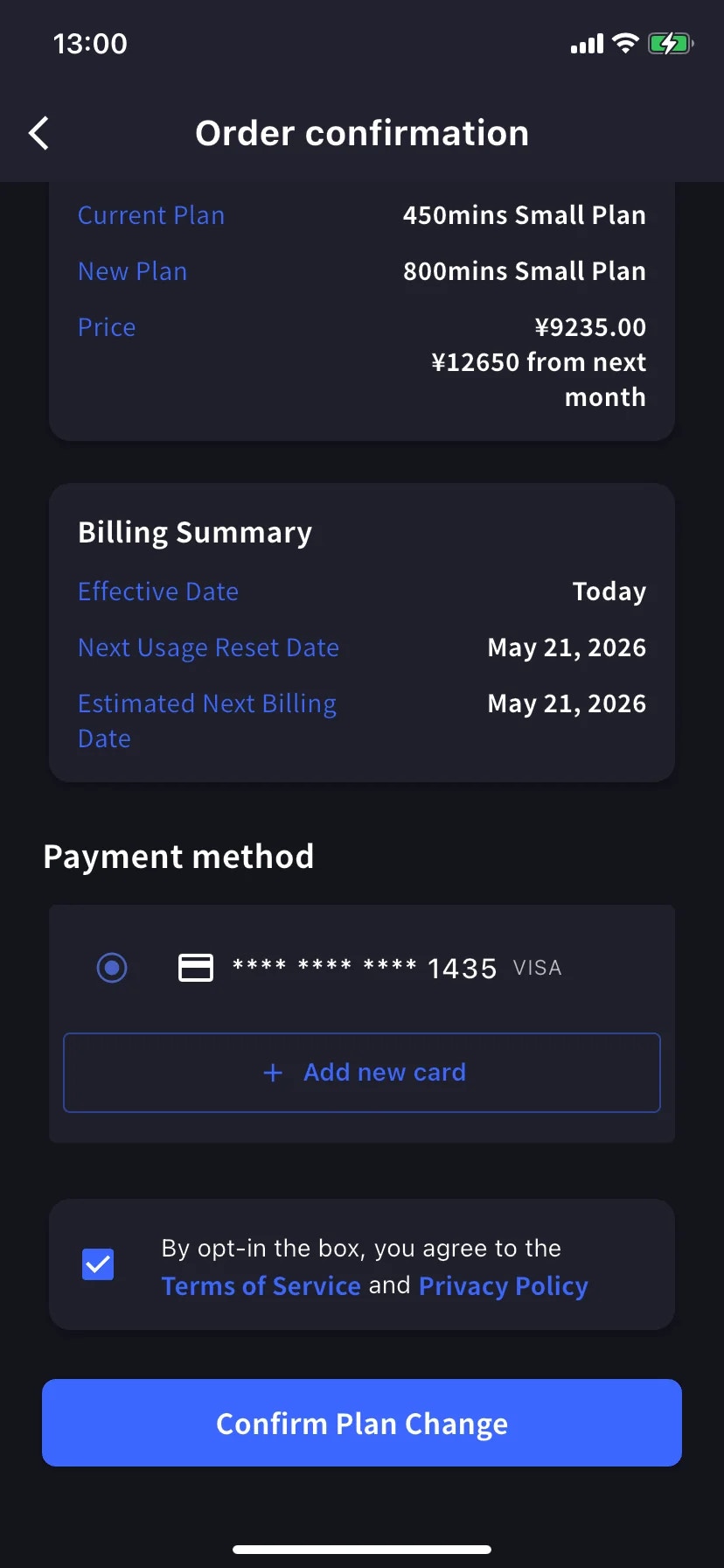
Kéo xuống **Payment method**, chọn thẻ hiện có hoặc chạm **+ Add new card** cho sheet Stripe (Link hoặc nhập tay — xem [Thanh toán trên di động](/vi/mobile-billing#manage-cards)). Tick ô Điều khoản / Riêng tư.
Chạm nút xanh **Confirm Plan Change**. Nút mờ đi trong lúc xử lý.
Thành công thì về Manage Plan với toast xanh **Plan purchase completed** và mức mới được viền là gói hiện tại.
Vì tiền theo tỷ lệ loại trừ thời gian đã dùng ở gói cũ, nâng cấp muộn trong kỳ tính tiền gần với giá đầy đủ gói mới. Nâng cấp rẻ nhất vào gần ngày gia hạn — hoặc cứ kệ và nâng cấp khi cần.
## Hạ cấp — có hiệu lực vào kỳ gia hạn kế
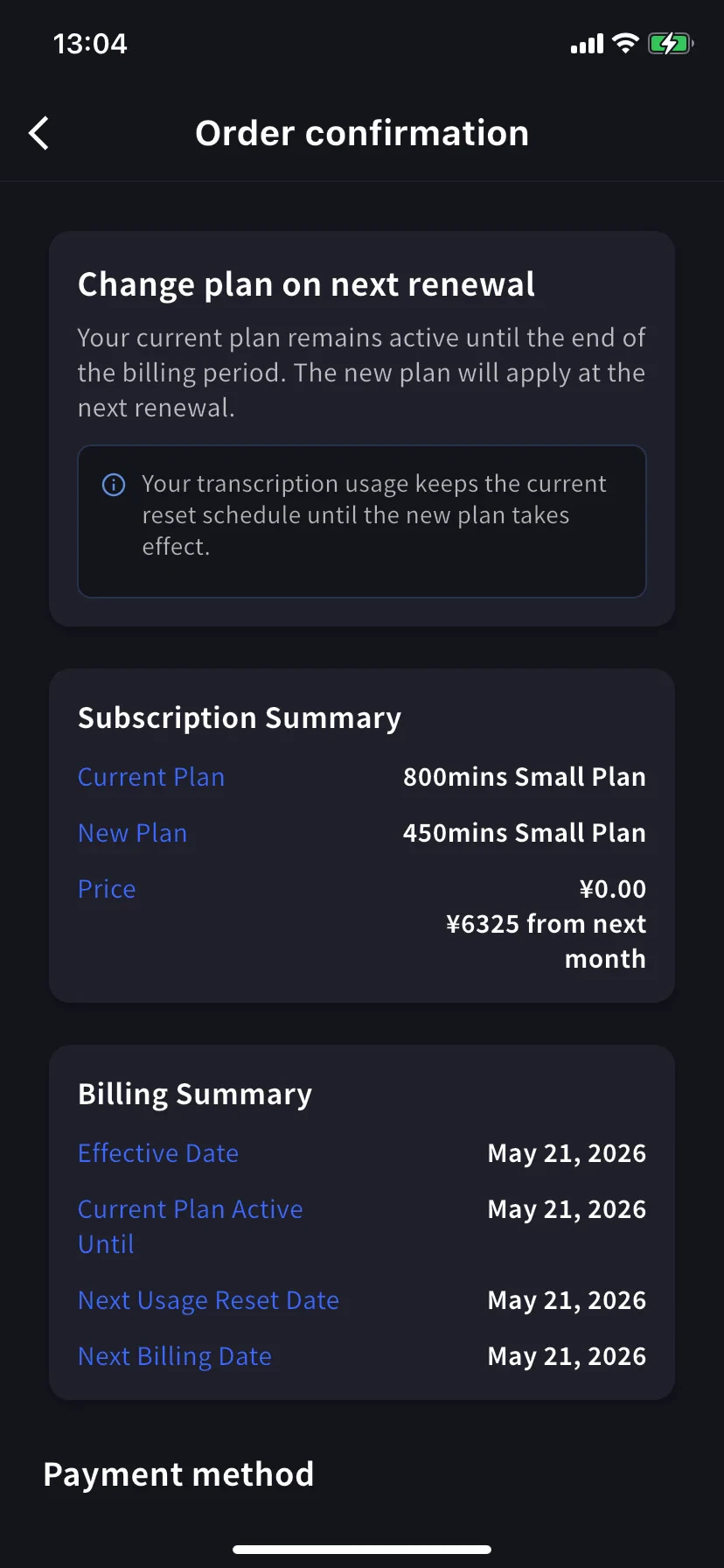
Chạm **Change Plan** ở mức thấp hơn. Banner xác nhận đổi — giờ là *Change plan on next renewal — your current plan remains active until the end of the billing period. The new plan will apply at the next renewal.*
Giá hôm nay là **¥0.00** — bạn sẽ trả giá thấp hơn từ tháng sau. Billing Summary hiển thị **Effective Date** và **Current Plan Active Until** là ngày gia hạn.
**Mức dùng giữ nguyên lịch.** Bạn giữ phút của gói hiện tại đến khi gia hạn; mức thấp hơn áp dụng sau đó.
Xác nhận giống như nâng cấp.
## Hủy đăng ký
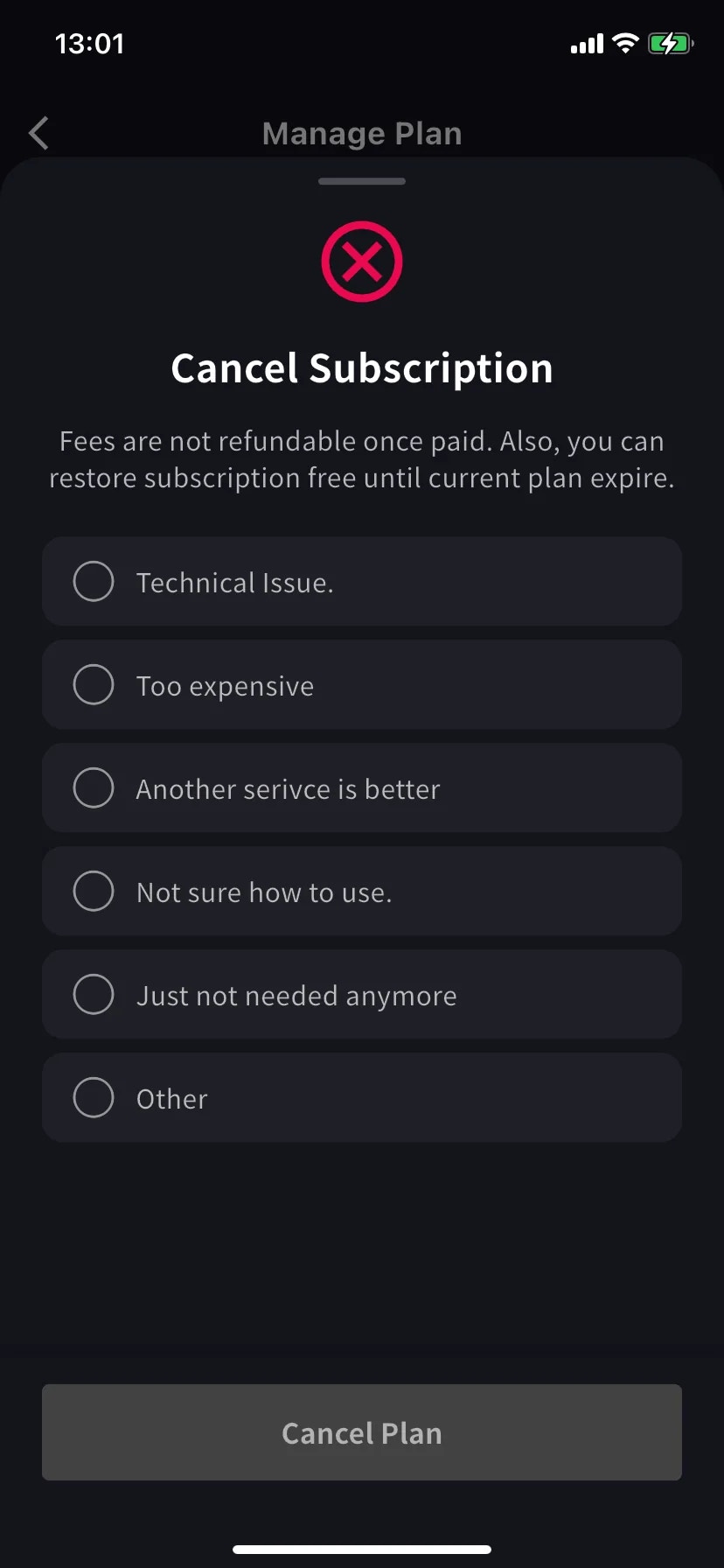
Một sheet trượt lên với biểu tượng ⊗ đỏ và danh sách lý do bắt buộc.
Chọn một lý do — nút Cancel Plan vẫn xám đến khi chọn.
Phí không hoàn lại sau khi đã trả. Gói hiện tại vẫn dùng được đến hết kỳ — có thể khôi phục miễn phí trước khi đó.
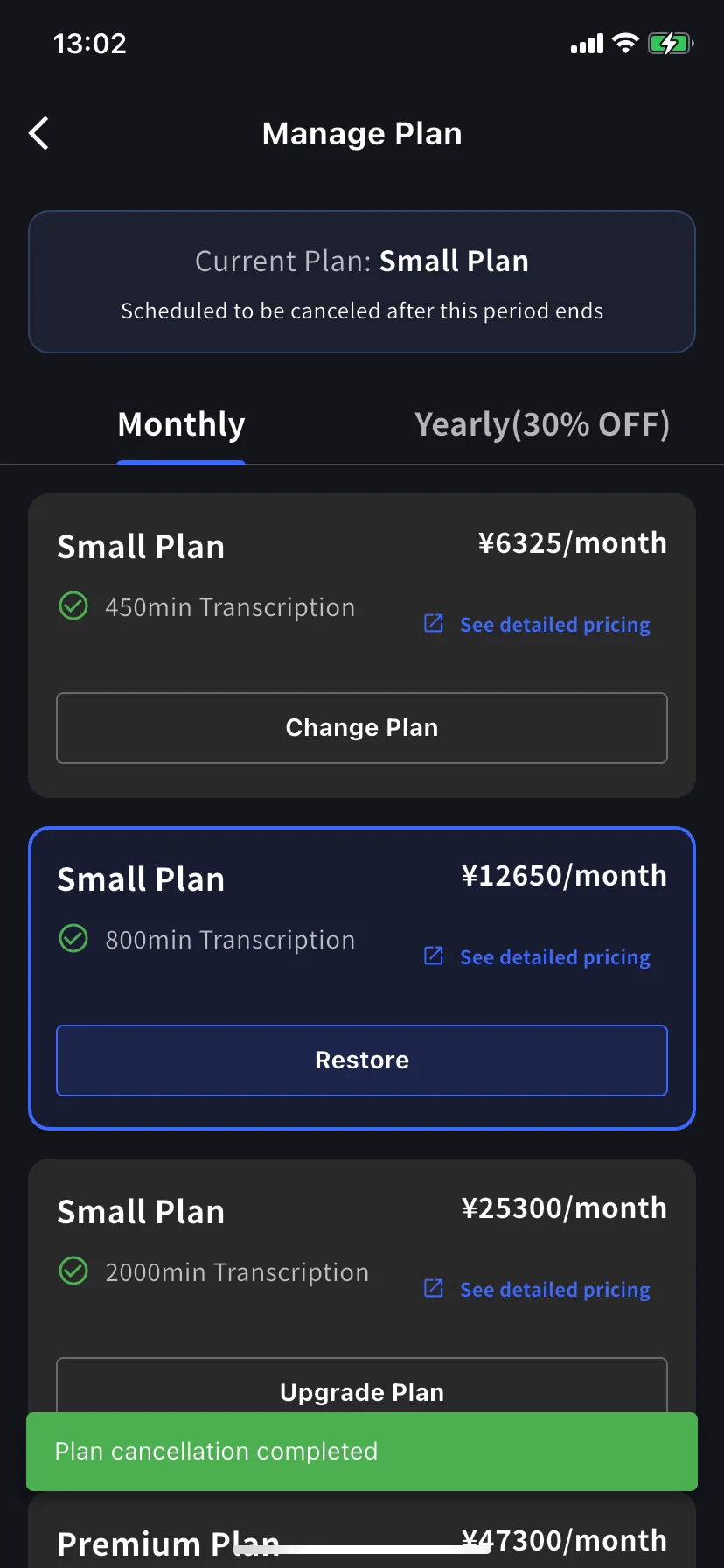
Banner gói hiện tại đổi thành **Scheduled to be canceled after this period ends**, và mức dưới xuất hiện nút **Restore**.
Toast xanh **Plan cancellation completed** xác nhận lịch. Bạn giữ gói và mọi phút đến ngày gia hạn.
## Khôi phục tự động gia hạn
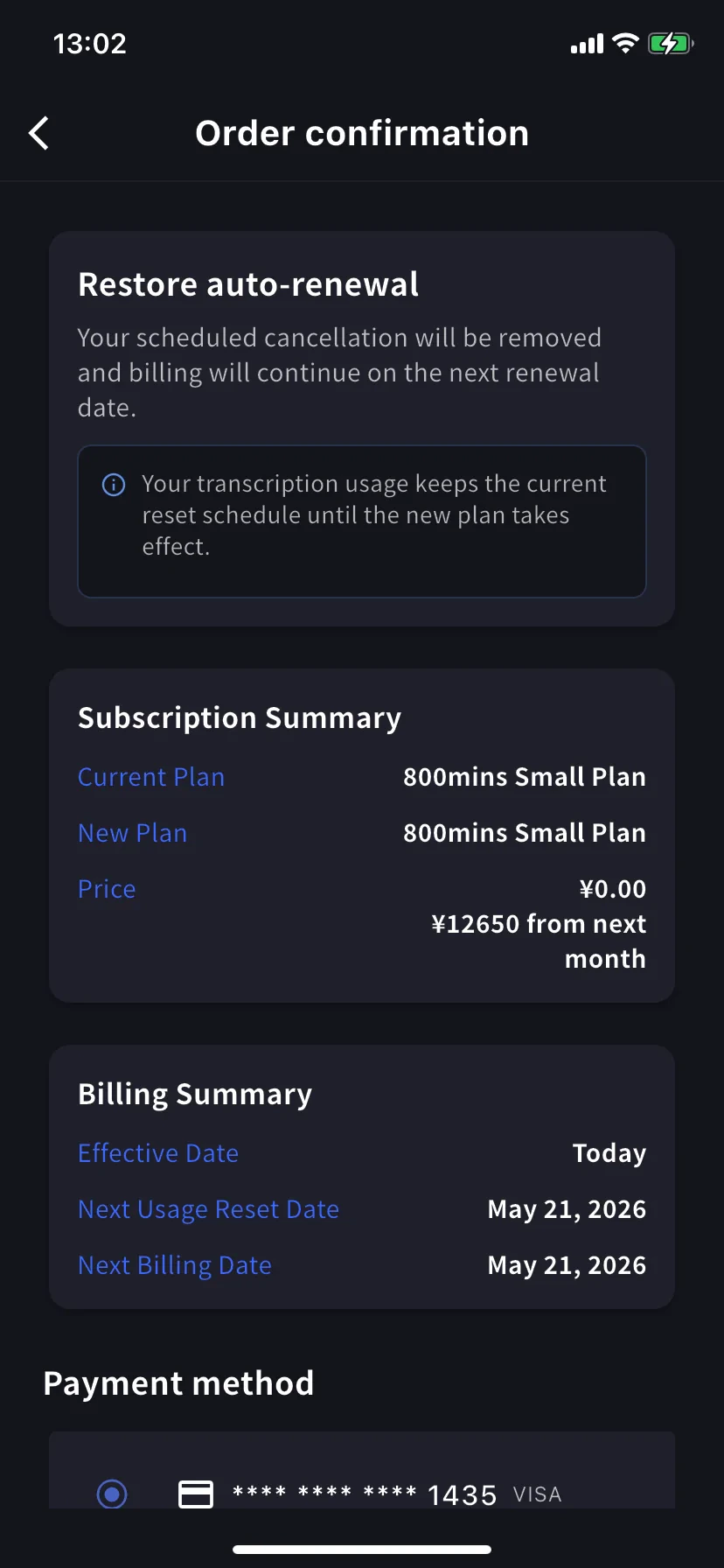
Đổi ý? Chạm **Restore** trên mức hiện tại.
Order confirmation ghi *Restore auto-renewal — your scheduled cancellation will be removed and billing will continue on the next renewal date.* Giá hôm nay ¥0. Chạm **Confirm Plan Change** và bạn quay về đăng ký gia hạn bình thường.
Mức dùng giữ nguyên lịch đặt lại — khôi phục không đặt lại phút.
## Tôi đang xem xác nhận nào?
Cả ba màn hình chung bố cục (Subscription Summary / Billing Summary / Payment method / Confirm). Đọc **tiêu đề banner** để chắc:
| Banner | Hướng | Hiệu lực |
| ------------------------------- | ------------ | ------------- |
| **Upgrade now** | Mức cao hơn | Hôm nay |
| **Change plan on next renewal** | Mức thấp hơn | Kỳ gia hạn kế |
| **Restore auto-renewal** | Hoàn tác hủy | Hôm nay |
## Mẹo
* **Tab hàng năm giảm 30%.** Nếu cam kết lâu dài, chuyển Monthly → Yearly cùng mức là nâng cấp với giảm giá ngay.
* **Sau đó kiểm tra Billing Activity.** Mọi thao tác có dấu thời gian và IP — hữu ích nếu có người khác trong team cũng cài app.
* **Hạ cấp ≠ Hủy.** Hạ cấp giữ bạn ở gói trả phí (nhỏ hơn); hủy đưa bạn về Free sau khi kỳ kết thúc. Chọn cái phù hợp với điều bạn thực sự muốn.
* **Thêm thẻ trước.** Nếu biết sẽ nâng cấp, thêm thẻ trên [Manage Cards](/vi/mobile-billing#manage-cards) trước — quy trình nâng cấp dùng lại.
## Liên quan
* [Thanh toán trên di động](/vi/mobile-billing) — Thẻ, hóa đơn, biên lai, nhật ký hoạt động
* [Đổi gói, Hủy & Kết thúc dùng thử](/vi/plan-changes) — Tương đương trên bảng điều khiển quản trị PC
* [Bảng giá](/vi/pricing) — Các mức gói và số phút
* [Gói miễn phí](/vi/free-plan) / [Dùng thử miễn phí](/vi/free-trial)