> ## Documentation Index
> Fetch the complete documentation index at: https://manual.voiceping.net/llms.txt
> Use this file to discover all available pages before exploring further.
# Chuyển Ngữ & Dịch Tệp Âm Thanh/Video
> Tải lên các tệp âm thanh hoặc video đã ghi vào VoicePing để chuyển ngữ, dịch, tóm tắt và tạo video có phụ đề hoặc lồng tiếng — sau đó mở Meeting Log hoặc tải xuống kết quả.
export const FeedbackVi = () => <>
Có ý tưởng hoặc yêu cầu về tính năng này? Gửi cho nhóm qua Product Feedback.
Liên kết chính thức
Truy cập website chính thức
Theo dõi trên X
Thích trên Facebook
Kết nối trên LinkedIn
;
VoicePing không chỉ dịch thời gian thực — bạn còn có thể tải lên các tệp âm thanh và video hiện có (MP3, MP4 và nhiều định dạng khác) để **chuyển ngữ**, **dịch**, **tóm tắt** và thậm chí tạo phiên bản có **phụ đề** hoặc **lồng tiếng**. Tính năng này được xử lý bởi công cụ **File Transcribe**.
## Gửi Tệp
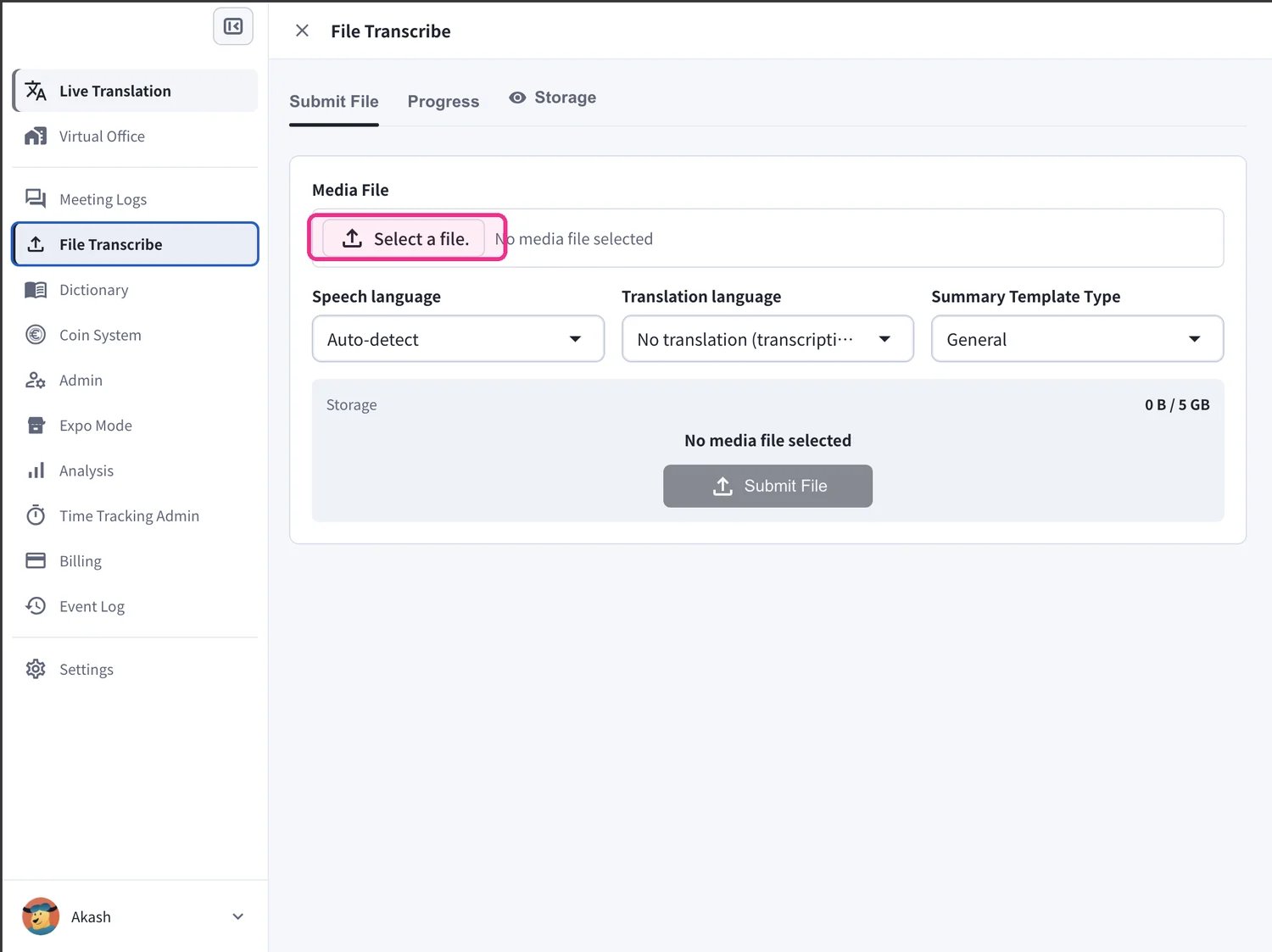
Mở **File Transcribe** từ thanh bên trái và giữ nguyên trên tab **Submit File**.
1. Trong mục **Media File**, nhấp **Select a file.** và chọn tệp âm thanh hoặc video bạn muốn xử lý.
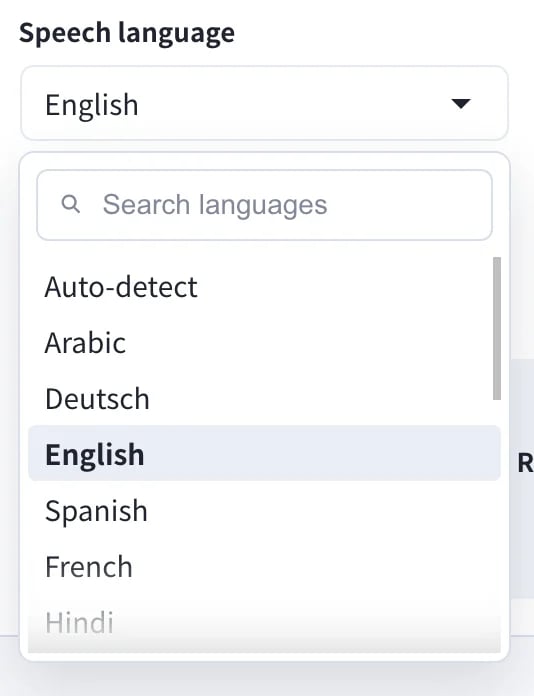
2. Đặt **Speech language** — ngôn ngữ được nói trong tệp của bạn. Giữ ở **Auto-detect** để VoicePing tự nhận diện giúp bạn.
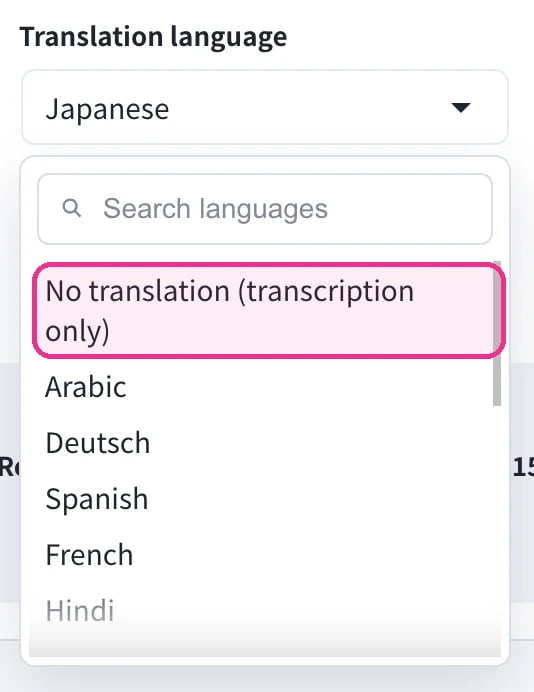
3. Đặt **Translation language**. Chọn ngôn ngữ đích để dịch, hoặc chọn **No translation (transcription only)** nếu bạn chỉ cần bản chuyển ngữ.
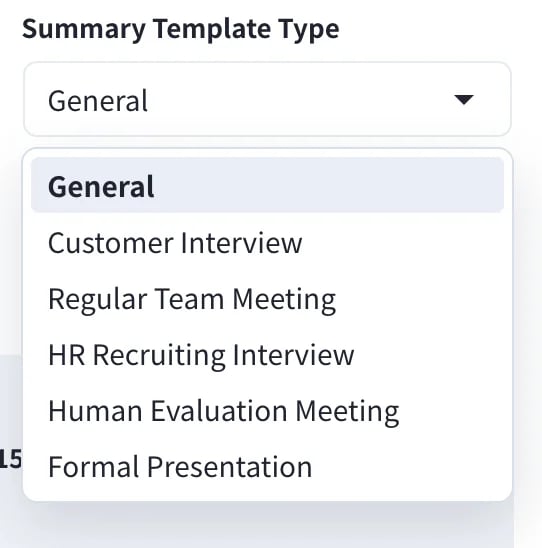
4. Chọn **Summary Template Type** để bản tóm tắt AI phù hợp với nội dung của bạn — ví dụ **General**, **Customer Interview**, **Regular Team Meeting**, **HR Recruiting Interview**, **Human Evaluation Meeting** hoặc **Formal Presentation**.
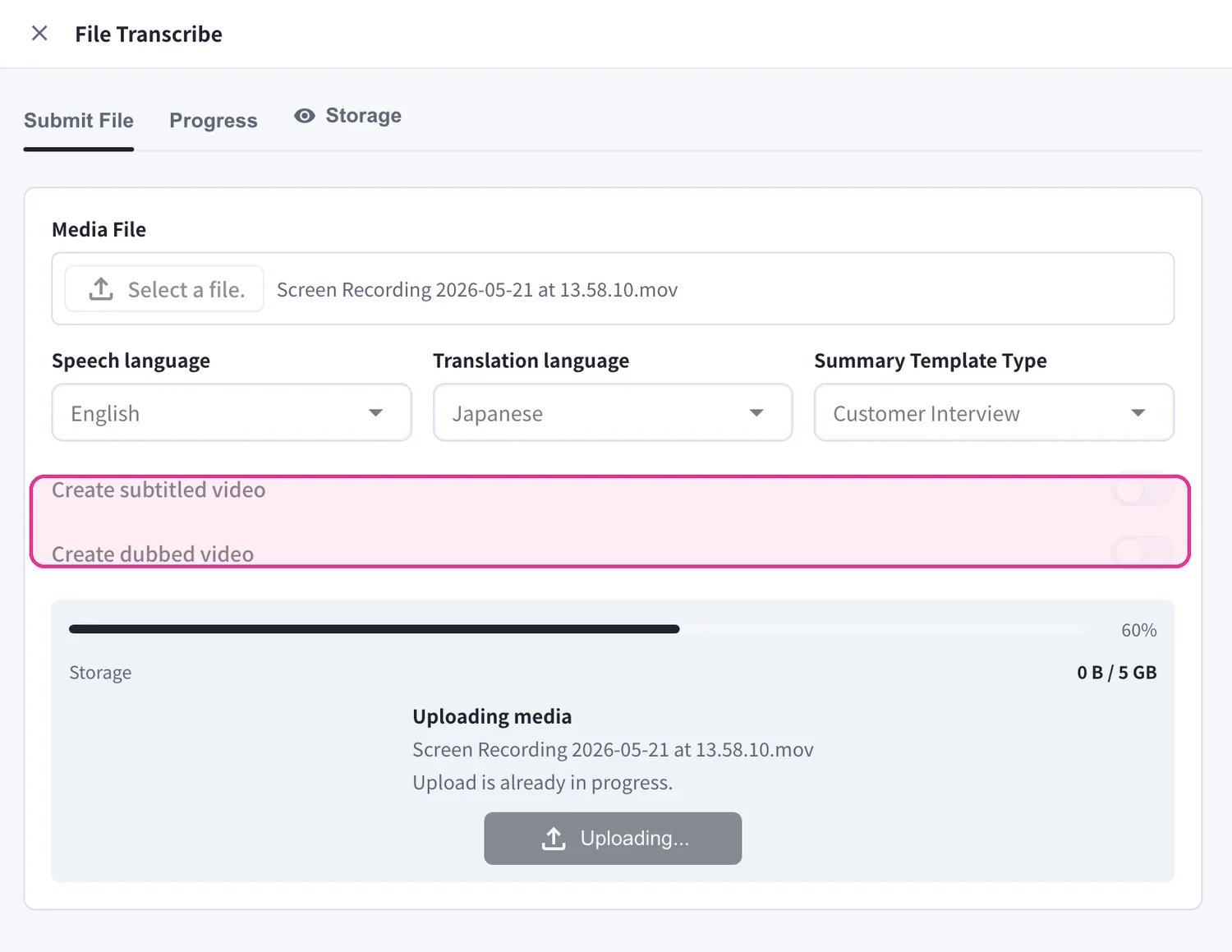
5. Tùy chọn bật **Create subtitled video** và/hoặc **Create dubbed video** để tạo thêm video có phụ đề được nhúng sẵn hoặc lồng tiếng đã dịch. Sau đó nhấp **Submit File** để bắt đầu xử lý.
* Giữ **Translation language** ở **No translation (transcription only)** để chỉ nhận bản chuyển ngữ và tóm tắt.
* **Create subtitled video** và **Create dubbed video** yêu cầu có **Translation language** và cần thêm thời gian xử lý.
* Bạn có thể gửi nhiều tệp liên tiếp nhau — mỗi tệp trở thành một tác vụ riêng.
## Theo Dõi Tiến Trình
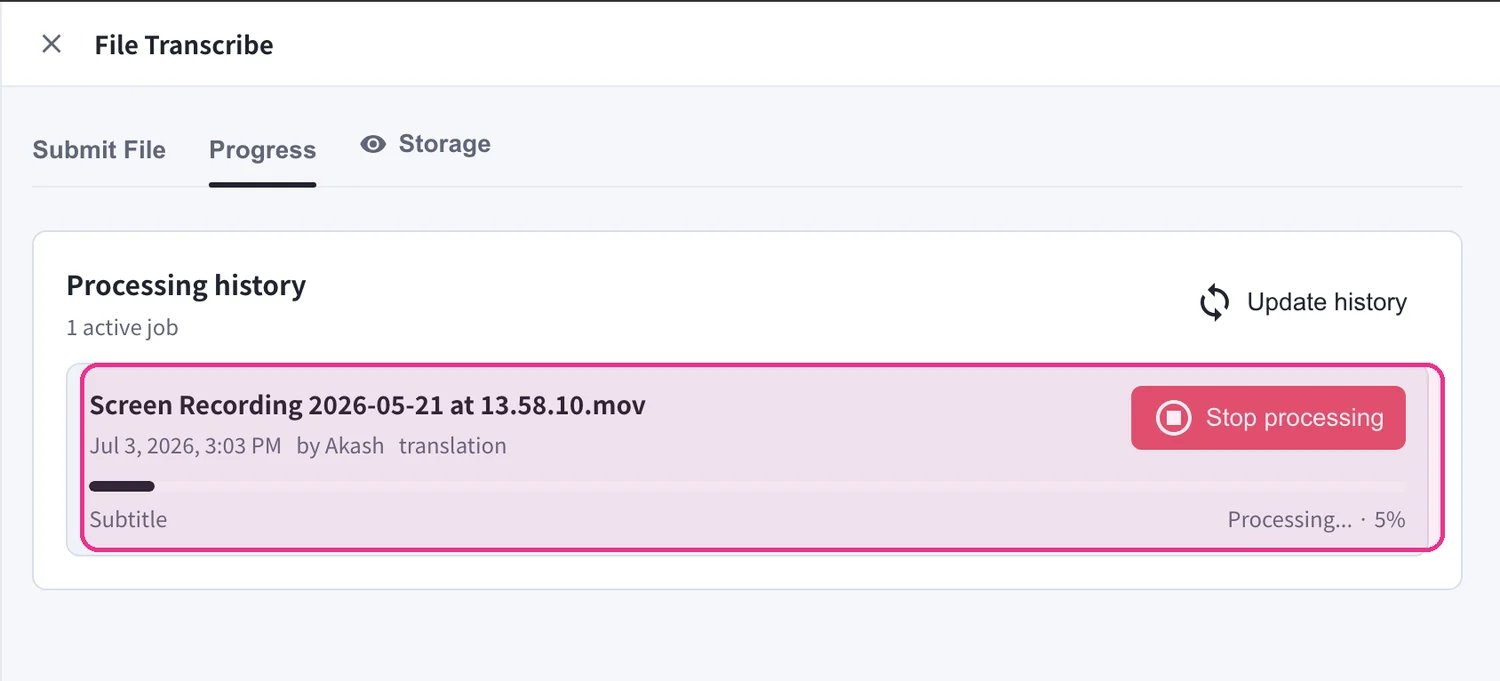
Mở tab **Progress** để theo dõi các tệp của bạn đang được xử lý. Mỗi tác vụ trong **Processing history** hiển thị thanh tiến trình và trạng thái (ví dụ *Processing… 5%*). Dùng **Stop processing** để hủy một tác vụ đang chạy, hoặc **Update history** để làm mới danh sách.
## Nhận Kết Quả
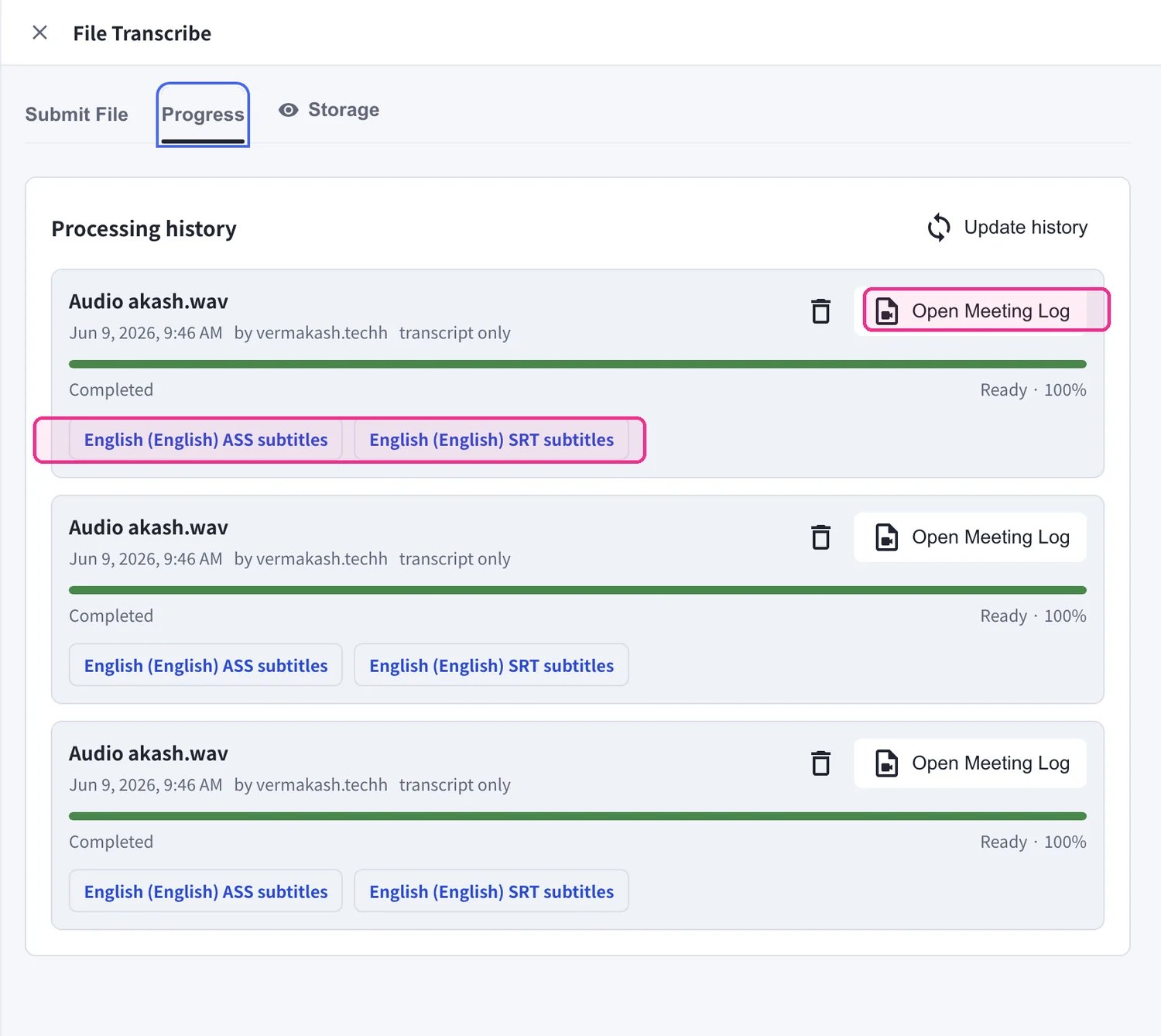
Khi một tác vụ ở trạng thái **Completed**, nó vẫn nằm trong **Processing history** cùng với mọi thứ mà nó đã tạo ra:
* Nhấp **Open Meeting Log** để đọc toàn bộ bản chuyển ngữ, bản dịch và tóm tắt AI.
* Nếu bạn đã tạo phụ đề, hãy tải xuống trực tiếp — các nút **ASS subtitles** và **SRT subtitles** sẽ xuất hiện trên tác vụ đã hoàn tất.
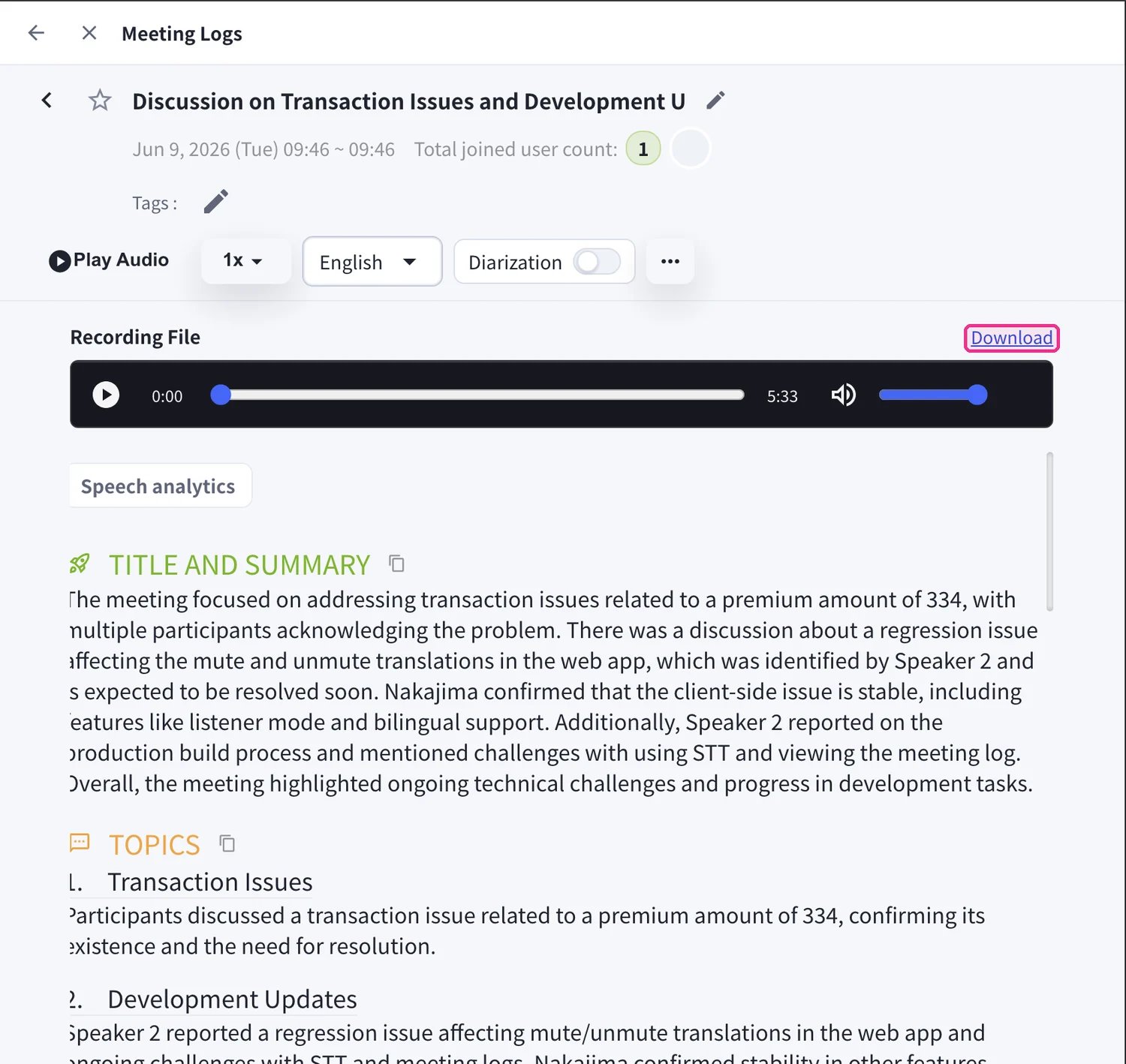
**Meeting Log** mở ra cùng một giao diện như một cuộc họp trực tiếp: phát lại âm thanh, chuyển đổi ngôn ngữ hiển thị, bật/tắt **Diarization** (phân tách người nói) và đọc **Title and Summary** cùng **Topics**. Dùng **Download** bên cạnh **Recording File** để lưu tệp media gốc.
Video có phụ đề và lồng tiếng đến từ các tùy chọn **Create subtitled video** / **Create dubbed video** khi gửi tệp — hãy bật chúng trước khi bạn nhấp **Submit File** nếu cần phụ đề nhúng sẵn hoặc lồng tiếng đã dịch.
## Quản Lý Bộ Nhớ
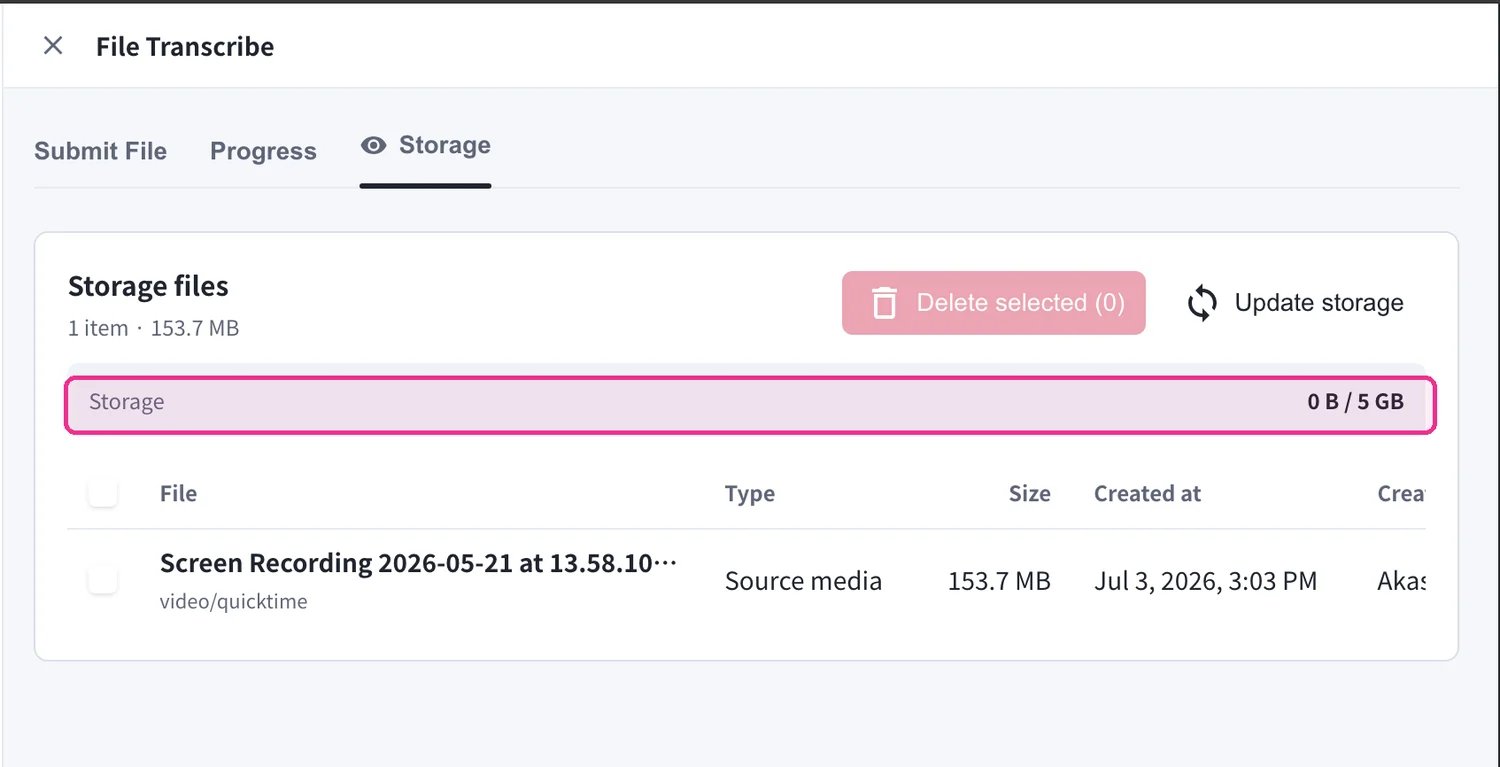
Media đã tải lên sẽ tính vào dung lượng lưu trữ File Transcribe của không gian làm việc. Mở tab **Storage** để xem mọi tệp đã lưu cùng với **Type**, **Size** và ngày **Created at**. Mỗi không gian làm việc bao gồm **5 GB**. Chọn các tệp rồi nhấp **Delete selected** để giải phóng dung lượng, hoặc **Update storage** để làm mới tổng dung lượng.
Khi bộ nhớ đầy, các lượt tải lên mới sẽ bị chặn cho đến khi bạn xóa các tệp hiện có. Hãy tải xuống mọi thứ bạn muốn giữ trước khi xóa — việc xóa là vĩnh viễn.
## Định Dạng Tệp Được Hỗ Trợ
**Tệp Âm Thanh**
* MP3
* WAV
* M4A
* Các định dạng âm thanh phổ biến khác
**Tệp Video**
* MP4
* MOV
* AVI
* Các định dạng video phổ biến khác
## Trường Hợp Sử Dụng
**Hội Thảo & Bài Giảng Đa Ngôn Ngữ**
Thêm phụ đề hoặc âm thanh lồng tiếng vào các hội thảo và bài giảng đã ghi để tạo nội dung đa ngôn ngữ.
**Tạo Biên Bản Cuộc Họp**
Tự động tạo bản chuyển ngữ và tóm tắt AI từ âm thanh cuộc họp đã ghi, giảm đáng kể thời gian tạo biên bản cuộc họp.
**Mở Rộng Video YouTube Đa Ngôn Ngữ**
Thêm phụ đề bằng nhiều ngôn ngữ vào nội dung video hiện có để tiếp cận khán giả toàn cầu.
 2. Đặt **Speech language** — ngôn ngữ được nói trong tệp của bạn. Giữ ở **Auto-detect** để VoicePing tự nhận diện giúp bạn.
 3. Đặt **Translation language**. Chọn ngôn ngữ đích để dịch, hoặc chọn **No translation (transcription only)** nếu bạn chỉ cần bản chuyển ngữ.
 4. Chọn **Summary Template Type** để bản tóm tắt AI phù hợp với nội dung của bạn — ví dụ **General**, **Customer Interview**, **Regular Team Meeting**, **HR Recruiting Interview**, **Human Evaluation Meeting** hoặc **Formal Presentation**.
 5. Tùy chọn bật **Create subtitled video** và/hoặc **Create dubbed video** để tạo thêm video có phụ đề được nhúng sẵn hoặc lồng tiếng đã dịch. Sau đó nhấp **Submit File** để bắt đầu xử lý.
 ## Nhận Kết Quả
Khi một tác vụ ở trạng thái **Completed**, nó vẫn nằm trong **Processing history** cùng với mọi thứ mà nó đã tạo ra:
* Nhấp **Open Meeting Log** để đọc toàn bộ bản chuyển ngữ, bản dịch và tóm tắt AI.
* Nếu bạn đã tạo phụ đề, hãy tải xuống trực tiếp — các nút **ASS subtitles** và **SRT subtitles** sẽ xuất hiện trên tác vụ đã hoàn tất.
## Nhận Kết Quả
Khi một tác vụ ở trạng thái **Completed**, nó vẫn nằm trong **Processing history** cùng với mọi thứ mà nó đã tạo ra:
* Nhấp **Open Meeting Log** để đọc toàn bộ bản chuyển ngữ, bản dịch và tóm tắt AI.
* Nếu bạn đã tạo phụ đề, hãy tải xuống trực tiếp — các nút **ASS subtitles** và **SRT subtitles** sẽ xuất hiện trên tác vụ đã hoàn tất.
 **Meeting Log** mở ra cùng một giao diện như một cuộc họp trực tiếp: phát lại âm thanh, chuyển đổi ngôn ngữ hiển thị, bật/tắt **Diarization** (phân tách người nói) và đọc **Title and Summary** cùng **Topics**. Dùng **Download** bên cạnh **Recording File** để lưu tệp media gốc.