> ## Documentation Index
> Fetch the complete documentation index at: https://manual.voiceping.net/llms.txt
> Use this file to discover all available pages before exploring further.
# API 存取
> 使用具許可權範圍的 API 金鑰,從您自己的後端查詢 VoicePing 會議記錄。提供 TypeScript、Python、Java、Go 的程式碼範例。
export const FeedbackZhTW = () => <>
對此功能有想法或需求?請透過 Product Feedback 傳送給團隊。
官方連結
造訪官方網站
在X上追蹤我們
在Facebook上按讚
在LinkedIn上連結
;
 ## 從後端查詢 VoicePing 會議記錄
API 存取專為伺服器對伺服器的工作流程而設計 — 排程匯出、CRM 同步、儀錶板、法遵歸檔等。您可在工作區建立 API 金鑰、授予一組許可權範圍,然後讓後端以標準 bearer token 呼叫 VoicePing API。
若是**由人員**透過 AI 使用者端詢問問題,請改用 [MCP 存取](/zh-tw/external-access/mcp)。
```text theme={null}
If a person is asking questions, use MCP Access.
If a server is fetching data, use API Access.
```
***
## 何時該使用 API 存取
| 使用情境 | 範例 |
| ----------- | ----------------------------- |
| 排程匯出 | 每週五匯出當週的會議記錄 |
| 內部報表 | 建立每週會議摘要報告 |
| CRM 或專案管理流程 | 將會議記錄摘要推送至 Salesforce 或 Asana |
| 法遵歸檔 | 將會議紀錄存放於符合規範的儲存位置 |
| 儀錶板 | 將會議記錄的 metadata 匯入分析系統 |
***
## 建立 API 金鑰
1. 開啟**工作區設定 → 外部存取 → API 存取**。
2. 若 **API 存取模式**尚未啟用,請先啟用。
3. 點選**建立 API 金鑰**。
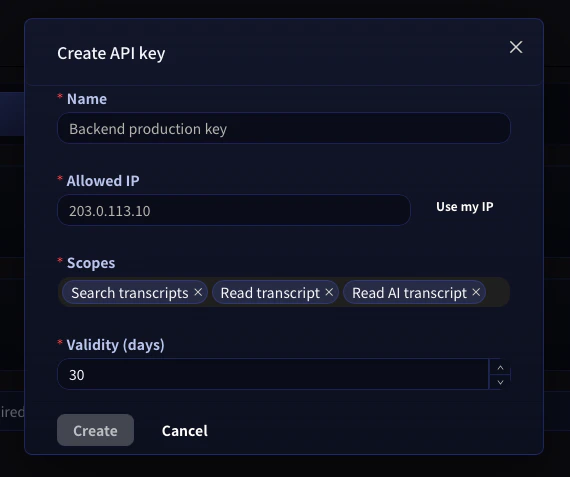
4. 選擇名稱、**允許的 IP 位址**(建議設定)、該金鑰所需的**許可權範圍**,以及有效期間。
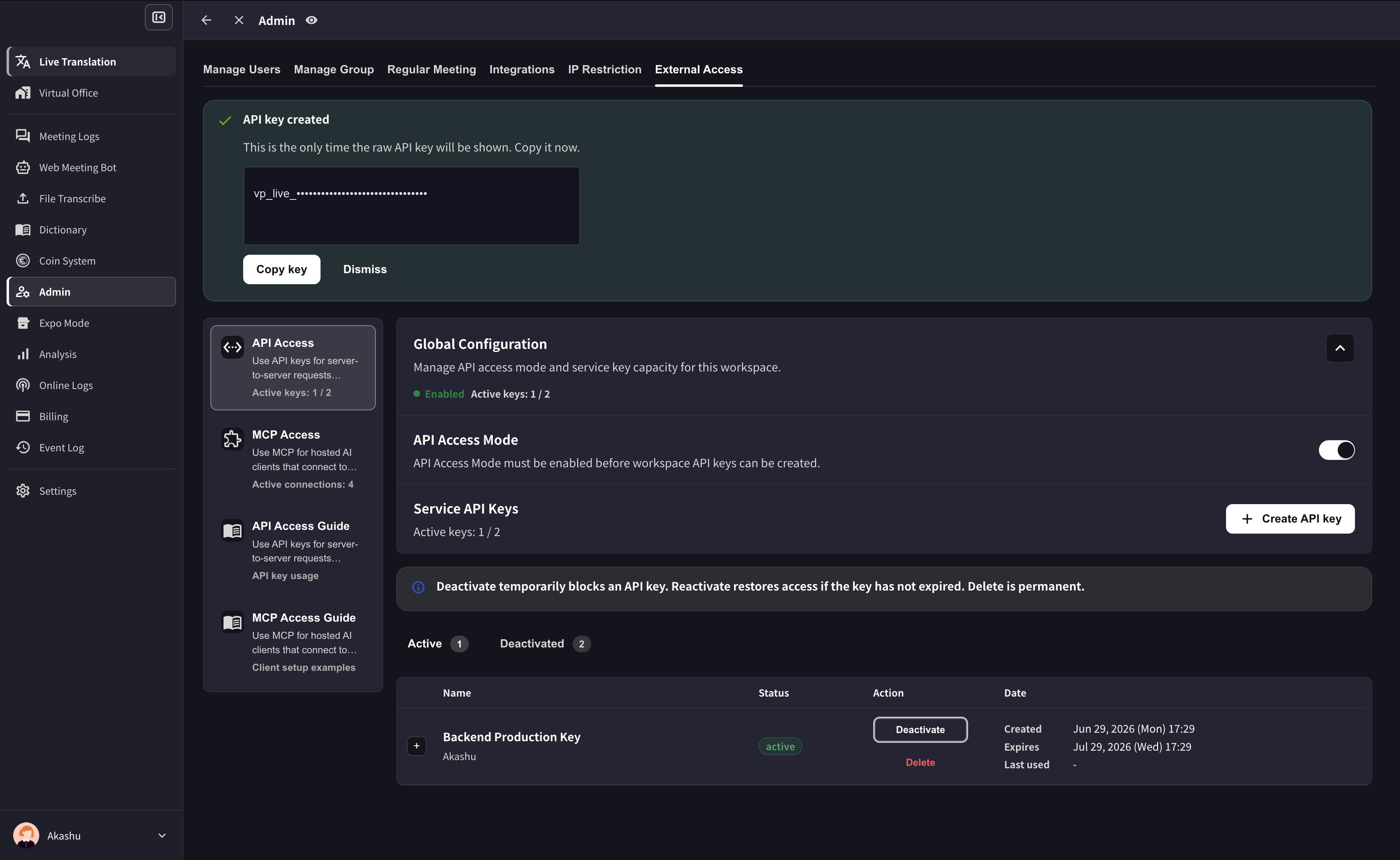
5. 立即複製產生的金鑰並存放於您的金鑰管理工具中。完整金鑰只會顯示一次。
## 從後端查詢 VoicePing 會議記錄
API 存取專為伺服器對伺服器的工作流程而設計 — 排程匯出、CRM 同步、儀錶板、法遵歸檔等。您可在工作區建立 API 金鑰、授予一組許可權範圍,然後讓後端以標準 bearer token 呼叫 VoicePing API。
若是**由人員**透過 AI 使用者端詢問問題,請改用 [MCP 存取](/zh-tw/external-access/mcp)。
```text theme={null}
If a person is asking questions, use MCP Access.
If a server is fetching data, use API Access.
```
***
## 何時該使用 API 存取
| 使用情境 | 範例 |
| ----------- | ----------------------------- |
| 排程匯出 | 每週五匯出當週的會議記錄 |
| 內部報表 | 建立每週會議摘要報告 |
| CRM 或專案管理流程 | 將會議記錄摘要推送至 Salesforce 或 Asana |
| 法遵歸檔 | 將會議紀錄存放於符合規範的儲存位置 |
| 儀錶板 | 將會議記錄的 metadata 匯入分析系統 |
***
## 建立 API 金鑰
1. 開啟**工作區設定 → 外部存取 → API 存取**。
2. 若 **API 存取模式**尚未啟用,請先啟用。
3. 點選**建立 API 金鑰**。
4. 選擇名稱、**允許的 IP 位址**(建議設定)、該金鑰所需的**許可權範圍**,以及有效期間。
5. 立即複製產生的金鑰並存放於您的金鑰管理工具中。完整金鑰只會顯示一次。
 After the key is created, VoicePing shows the raw key only once. Copy it before dismissing the success panel.
 **切勿將 API 金鑰提交至程式碼儲存庫。** 請存放於環境變數或金鑰管理工具。若要更進一步防護,可在建立金鑰視窗中為每個金鑰鎖定特定**允許的 IP 位址** — 即使金鑰外洩,從其他 IP 發出的請求也會被拒絕。
***
## 驗證請求
每個請求都需對 `https://api.voiceping.io` 使用 bearer token 進行驗證:
```http theme={null}
GET /api/v1/transcripts/search?q=pricing&limit=10 HTTP/1.1
Host: api.voiceping.io
Authorization: Bearer
```
只需將金鑰設為 `VOICEPING_API_KEY` 環境變數一次,下方範例就會自動讀取。
***
## 快速上手 — 以您的語言呼叫 API
同樣的兩步驟流程 — **先搜尋會議記錄,再擷取其中一筆** — 以四種語言呈現。預設顯示 TypeScript;可切換分頁選擇您使用的技術棧。
```typescript TypeScript theme={null}
// Requires Node.js 18+ (for built-in fetch)
const apiKey = process.env.VOICEPING_API_KEY!;
const base = "https://api.voiceping.io/api/v1";
const headers = { Authorization: `Bearer ${apiKey}` };
// 1. Search transcripts
const searchRes = await fetch(
`${base}/transcripts/search?q=pricing&limit=10`,
{ headers },
);
const { transcripts } = await searchRes.json();
// 2. Read the first result in full
const detailRes = await fetch(
`${base}/transcripts/${transcripts[0].id}`,
{ headers },
);
const transcript = await detailRes.json();
console.log(transcript.title, transcript.content);
```
```python Python theme={null}
# pip install requests
import os
import requests
api_key = os.environ["VOICEPING_API_KEY"]
base = "https://api.voiceping.io/api/v1"
headers = {"Authorization": f"Bearer {api_key}"}
# 1. Search transcripts
search = requests.get(
f"{base}/transcripts/search",
headers=headers,
params={"q": "pricing", "limit": 10},
).json()
# 2. Read the first result in full
first_id = search["transcripts"][0]["id"]
detail = requests.get(
f"{base}/transcripts/{first_id}",
headers=headers,
).json()
print(detail["title"], detail["content"])
```
```java Java theme={null}
// Java 11+ (uses built-in java.net.http)
import java.net.URI;
import java.net.http.HttpClient;
import java.net.http.HttpRequest;
import java.net.http.HttpResponse;
public class VoicePingQuickstart {
public static void main(String[] args) throws Exception {
String apiKey = System.getenv("VOICEPING_API_KEY");
String base = "https://api.voiceping.io/api/v1";
HttpClient client = HttpClient.newHttpClient();
// 1. Search transcripts
HttpRequest search = HttpRequest.newBuilder()
.uri(URI.create(base + "/transcripts/search?q=pricing&limit=10"))
.header("Authorization", "Bearer " + apiKey)
.GET()
.build();
HttpResponse searchRes =
client.send(search, HttpResponse.BodyHandlers.ofString());
System.out.println(searchRes.body());
// 2. Read a transcript (parse the id from searchRes.body() first;
// shown here with a placeholder)
HttpRequest detail = HttpRequest.newBuilder()
.uri(URI.create(base + "/transcripts/TRANSCRIPT_ID"))
.header("Authorization", "Bearer " + apiKey)
.GET()
.build();
HttpResponse detailRes =
client.send(detail, HttpResponse.BodyHandlers.ofString());
System.out.println(detailRes.body());
}
}
```
```go Go theme={null}
// go run main.go
package main
import (
"fmt"
"io"
"net/http"
"os"
)
func main() {
apiKey := os.Getenv("VOICEPING_API_KEY")
base := "https://api.voiceping.io/api/v1"
// 1. Search transcripts
req, _ := http.NewRequest("GET",
base+"/transcripts/search?q=pricing&limit=10", nil)
req.Header.Set("Authorization", "Bearer "+apiKey)
res, err := http.DefaultClient.Do(req)
if err != nil {
panic(err)
}
defer res.Body.Close()
body, _ := io.ReadAll(res.Body)
fmt.Println(string(body))
// 2. Read a transcript by id (parse id from body first)
detailReq, _ := http.NewRequest("GET",
base+"/transcripts/TRANSCRIPT_ID", nil)
detailReq.Header.Set("Authorization", "Bearer "+apiKey)
detailRes, _ := http.DefaultClient.Do(detailReq)
defer detailRes.Body.Close()
detailBody, _ := io.ReadAll(detailRes.Body)
fmt.Println(string(detailBody))
}
```
***
## 下一步
回到總覽,瞭解同時適用於 MCP 與 API 的許可權範圍、生命週期控制與事件記錄。
若是由人員透過 Claude、ChatGPT、Codex、Claude Code 或 Gemini CLI 詢問問題,請改用 MCP 存取。
**切勿將 API 金鑰提交至程式碼儲存庫。** 請存放於環境變數或金鑰管理工具。若要更進一步防護,可在建立金鑰視窗中為每個金鑰鎖定特定**允許的 IP 位址** — 即使金鑰外洩,從其他 IP 發出的請求也會被拒絕。
***
## 驗證請求
每個請求都需對 `https://api.voiceping.io` 使用 bearer token 進行驗證:
```http theme={null}
GET /api/v1/transcripts/search?q=pricing&limit=10 HTTP/1.1
Host: api.voiceping.io
Authorization: Bearer
```
只需將金鑰設為 `VOICEPING_API_KEY` 環境變數一次,下方範例就會自動讀取。
***
## 快速上手 — 以您的語言呼叫 API
同樣的兩步驟流程 — **先搜尋會議記錄,再擷取其中一筆** — 以四種語言呈現。預設顯示 TypeScript;可切換分頁選擇您使用的技術棧。
```typescript TypeScript theme={null}
// Requires Node.js 18+ (for built-in fetch)
const apiKey = process.env.VOICEPING_API_KEY!;
const base = "https://api.voiceping.io/api/v1";
const headers = { Authorization: `Bearer ${apiKey}` };
// 1. Search transcripts
const searchRes = await fetch(
`${base}/transcripts/search?q=pricing&limit=10`,
{ headers },
);
const { transcripts } = await searchRes.json();
// 2. Read the first result in full
const detailRes = await fetch(
`${base}/transcripts/${transcripts[0].id}`,
{ headers },
);
const transcript = await detailRes.json();
console.log(transcript.title, transcript.content);
```
```python Python theme={null}
# pip install requests
import os
import requests
api_key = os.environ["VOICEPING_API_KEY"]
base = "https://api.voiceping.io/api/v1"
headers = {"Authorization": f"Bearer {api_key}"}
# 1. Search transcripts
search = requests.get(
f"{base}/transcripts/search",
headers=headers,
params={"q": "pricing", "limit": 10},
).json()
# 2. Read the first result in full
first_id = search["transcripts"][0]["id"]
detail = requests.get(
f"{base}/transcripts/{first_id}",
headers=headers,
).json()
print(detail["title"], detail["content"])
```
```java Java theme={null}
// Java 11+ (uses built-in java.net.http)
import java.net.URI;
import java.net.http.HttpClient;
import java.net.http.HttpRequest;
import java.net.http.HttpResponse;
public class VoicePingQuickstart {
public static void main(String[] args) throws Exception {
String apiKey = System.getenv("VOICEPING_API_KEY");
String base = "https://api.voiceping.io/api/v1";
HttpClient client = HttpClient.newHttpClient();
// 1. Search transcripts
HttpRequest search = HttpRequest.newBuilder()
.uri(URI.create(base + "/transcripts/search?q=pricing&limit=10"))
.header("Authorization", "Bearer " + apiKey)
.GET()
.build();
HttpResponse searchRes =
client.send(search, HttpResponse.BodyHandlers.ofString());
System.out.println(searchRes.body());
// 2. Read a transcript (parse the id from searchRes.body() first;
// shown here with a placeholder)
HttpRequest detail = HttpRequest.newBuilder()
.uri(URI.create(base + "/transcripts/TRANSCRIPT_ID"))
.header("Authorization", "Bearer " + apiKey)
.GET()
.build();
HttpResponse detailRes =
client.send(detail, HttpResponse.BodyHandlers.ofString());
System.out.println(detailRes.body());
}
}
```
```go Go theme={null}
// go run main.go
package main
import (
"fmt"
"io"
"net/http"
"os"
)
func main() {
apiKey := os.Getenv("VOICEPING_API_KEY")
base := "https://api.voiceping.io/api/v1"
// 1. Search transcripts
req, _ := http.NewRequest("GET",
base+"/transcripts/search?q=pricing&limit=10", nil)
req.Header.Set("Authorization", "Bearer "+apiKey)
res, err := http.DefaultClient.Do(req)
if err != nil {
panic(err)
}
defer res.Body.Close()
body, _ := io.ReadAll(res.Body)
fmt.Println(string(body))
// 2. Read a transcript by id (parse id from body first)
detailReq, _ := http.NewRequest("GET",
base+"/transcripts/TRANSCRIPT_ID", nil)
detailReq.Header.Set("Authorization", "Bearer "+apiKey)
detailRes, _ := http.DefaultClient.Do(detailReq)
defer detailRes.Body.Close()
detailBody, _ := io.ReadAll(detailRes.Body)
fmt.Println(string(detailBody))
}
```
***
## 下一步
回到總覽,瞭解同時適用於 MCP 與 API 的許可權範圍、生命週期控制與事件記錄。
若是由人員透過 Claude、ChatGPT、Codex、Claude Code 或 Gemini CLI 詢問問題,請改用 MCP 存取。