> ## Documentation Index
> Fetch the complete documentation index at: https://manual.voiceping.net/llms.txt
> Use this file to discover all available pages before exploring further.

# 工作流程 — 找出藏在案件裡的瓶頸

> 浮現業務管線中重複出現的阻礙、負責人不清與資安延遲 — 並將其轉化為優先順序排序的行動計畫。使用 VoicePing MCP 存取。

export const FeedbackZhTW = () => <>
    <Tip>
      對此功能有想法或需求？請透過 <a href="/zh-tw/product-feedback">Product Feedback</a> 傳送給團隊。
    </Tip>

    <h2>官方連結</h2>

    <CardGroup cols={2}>
      <Card title="官方網站" icon="globe" href="https://voiceping.net/en/">
        造訪官方網站
      </Card>
      <Card title="X (Twitter)" icon="x-twitter" href="https://x.com/VoicePingMedia">
        在X上追蹤我們
      </Card>
      <Card title="Facebook" icon="facebook" href="https://www.facebook.com/voiceping.inc">
        在Facebook上按讚
      </Card>
      <Card title="LinkedIn" icon="linkedin" href="https://www.linkedin.com/company/28684130/">
        在LinkedIn上連結
      </Card>
    </CardGroup>
  </>;

## 找出藏在案件裡的瓶頸

**情境。** 案件推進變慢，但原因並不明確 — 從來就不是單一原因。通常是資安疑問、客戶端負責人不清、試行停滯與提案反覆修改的綜合結果。您需要看到整體模式，而不只是單一事件。

此工作流程假設您已啟用 [MCP 存取](/zh-tw/external-access/mcp) 並連線好 AI 使用者端。

<Steps>
  <Step title="浮現所有瓶頸訊號">
    ```text theme={null}
    Search my VoicePing transcripts for bottlenecks, blockers, security delay,
    unclear owner, proposal, pilot, and expansion readiness.
    ```

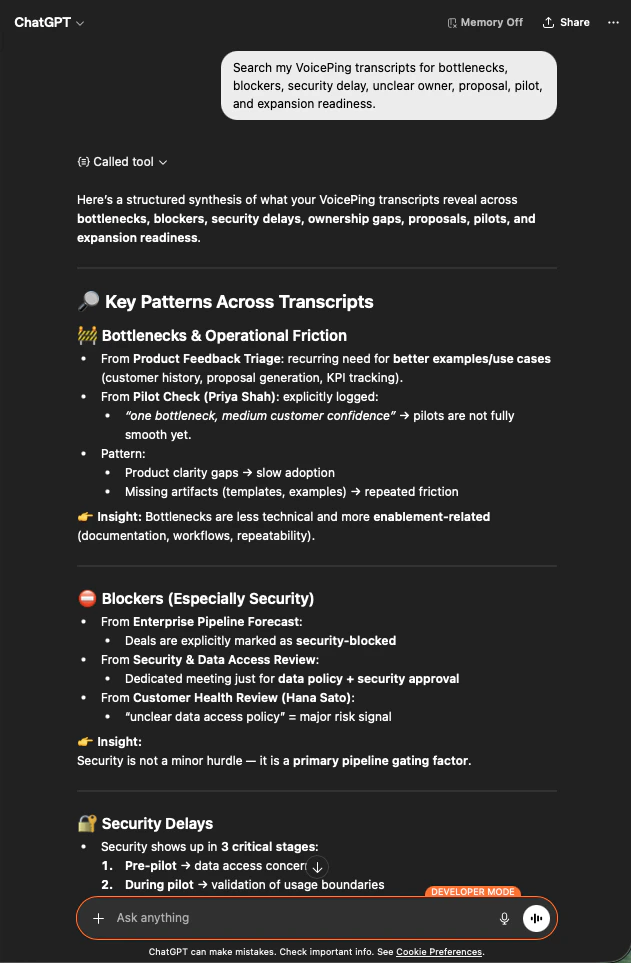
    AI 會跨會議記錄進行綜合分析：列出在營運阻力、資安阻礙、延遲與負責人缺口方面的關鍵模式 — 並為每項指出其來源會議。

    <div style={{maxWidth: "600px", margin: "0 auto"}}>
      <Frame>
        <img src="https://mintcdn.com/test-cf63e467/z13MfE0CikV5b-4X/en/images/external_access/Founding%20bottlenecks%201.png?fit=max&auto=format&n=z13MfE0CikV5b-4X&q=85&s=74fbefec3529689b40ecac2ebf547757" alt="ChatGPT surfacing bottleneck patterns across VoicePing transcripts — operational friction, security blockers, ownership gaps" width="631" height="963" data-path="en/images/external_access/Founding bottlenecks 1.png" />
      </Frame>
    </div>
  </Step>

  <Step title="將瓶頸分組以便採取行動">
    ```text theme={null}
    Analyze the bottlenecks across these meetings. Group them into:
    - customer-side bottlenecks
    - internal team bottlenecks
    - product / onboarding bottlenecks
    - security / compliance bottlenecks
    - proposal or sales-process bottlenecks
    ```

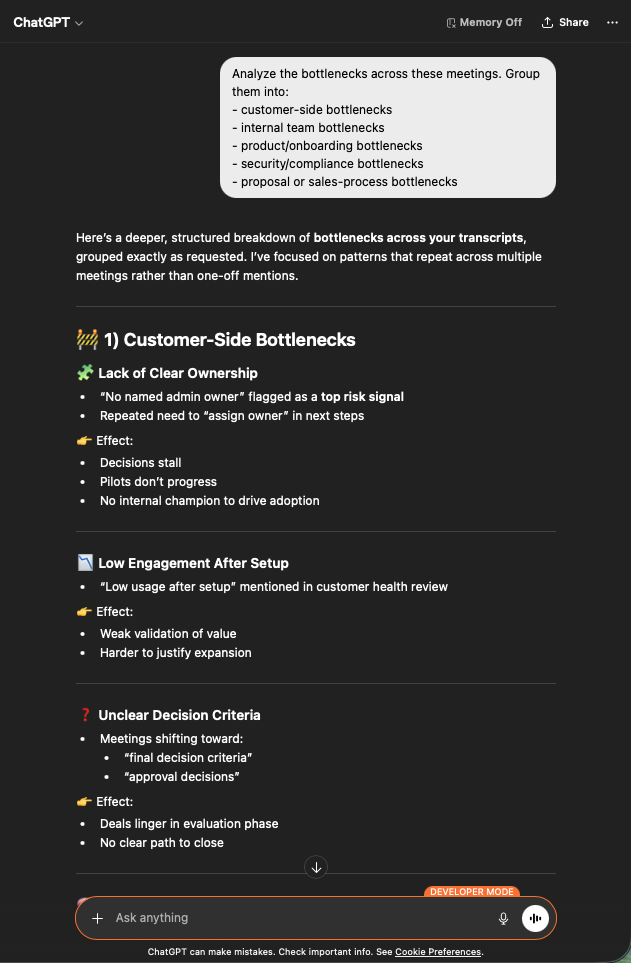
    現在您有了清楚的分類。客戶端議題（負責人不清、互動不足、決策標準不明）、內部、產品、資安、業務流程 — 每類都有跨會議的反覆佐證。

    <div style={{maxWidth: "600px", margin: "0 auto"}}>
      <Frame>
        <img src="https://mintcdn.com/test-cf63e467/z13MfE0CikV5b-4X/en/images/external_access/Founding%20bottlenecks%202.png?fit=max&auto=format&n=z13MfE0CikV5b-4X&q=85&s=bf47786ffd6d4d4d58b9e8238489e5aa" alt="ChatGPT grouping bottlenecks across customer-side, internal, product, security, and sales-process categories" width="631" height="963" data-path="en/images/external_access/Founding bottlenecks 2.png" />
      </Frame>
    </div>
  </Step>

  <Step title="針對每個瓶頸取得行動計畫">
    ```text theme={null}
    Create an action plan to remove the bottlenecks. For each bottleneck, include:
    - evidence from the meetings
    - impact
    - owner
    - recommended fix
    - priority
    ```

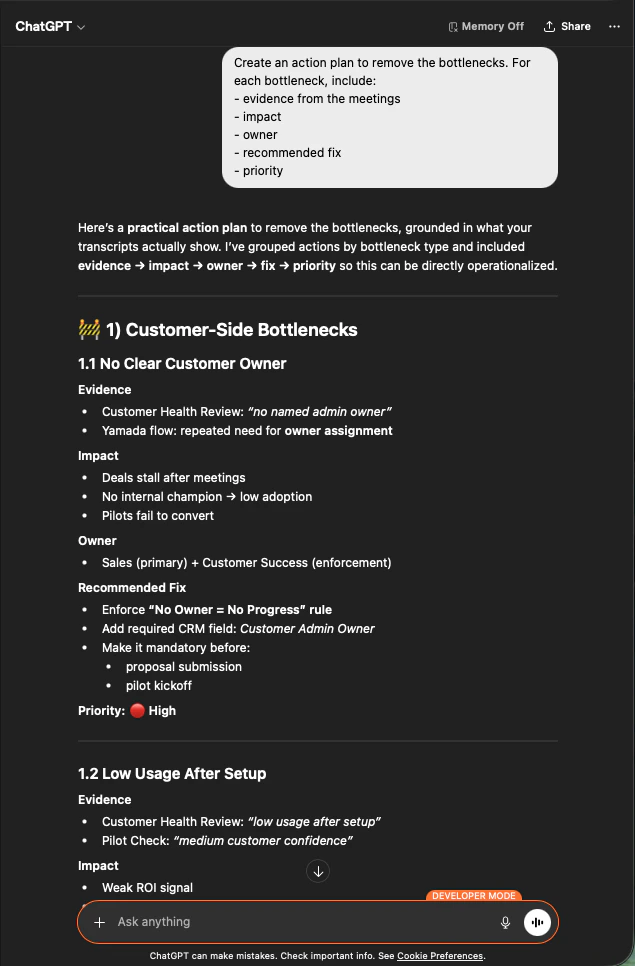
    每一項現在都附有證據、影響、負責人、建議對策與優先順序。這就是您帶進高階主管會議的檔案。

    <div style={{maxWidth: "600px", margin: "0 auto"}}>
      <Frame>
        <img src="https://mintcdn.com/test-cf63e467/z13MfE0CikV5b-4X/en/images/external_access/Founding%20bottlenecks%203.png?fit=max&auto=format&n=z13MfE0CikV5b-4X&q=85&s=0d75e976e991f2c158cd8057aafef71a" alt="ChatGPT producing a prioritized action plan per bottleneck with evidence, impact, owner, recommended fix, and priority" width="635" height="966" data-path="en/images/external_access/Founding bottlenecks 3.png" />
      </Frame>
    </div>
  </Step>
</Steps>

**為何這是創辦人層級的槓桿。** 您不再爭論哪一筆交易卡住，而是著手修正讓*所有*交易停滯的共同模式。

***

## 下一步

<CardGroup cols={2}>
  <Card title="外部存取總覽" icon="arrow-left" href="/zh-tw/external-access">
    回到總覽，瞭解許可權範圍、生命週期控制與事件記錄。
  </Card>

  <Card title="如何啟用 MCP 存取" icon="plug" href="/zh-tw/external-access/mcp">
    Claude、ChatGPT、Codex、Claude Code 與 Gemini CLI 的設定指南。
  </Card>
</CardGroup>

<FeedbackZhTW />