> ## Documentation Index
> Fetch the complete documentation index at: https://manual.voiceping.net/llms.txt
> Use this file to discover all available pages before exploring further.
# 發票、收據與帳單活動
> 在 PC 或手機 App 中下載發票 PDF 和收據、更新帳單抬頭資訊,並稽核所有訂閱事件。
export const ContactZhTW = () => <>
如有任何問題,請透過此表單與我們聯繫。
官方連結
造訪官方網站
在X上追蹤我們
在Facebook上按讚
在LinkedIn上連結
;
稽核訂閱所需的一切都在一個地方: PC 的 **Billing** 區域和手機的 **Billing** hub。你可以下載發票 PDF、取得收據、編輯未來發票上顯示的帳單抬頭欄位,並檢視完整事件記錄。
## PC (Billing 分頁)
開啟頂部導覽 → **Billing**。兩個分頁用於發票管理:
| 分頁 | 用途 |
| -------------------------------- | ------------------------------------------------------------------------------------------------------- |
| **Invoice Details** | 顯示在發票 PDF 上的帳單名稱、Email 和電話號碼 |
| **Invoice and Receipt Download** | 按月列出的扣款記錄,可下載發票 PDF 和 收據 |
| **Billing History** | Full subscription, payment-method, trial, cancellation, restore, renewal, and payment-failure event log |
### Invoice Details
設定 Stripe 寫入發票 PDF 的名稱、Email 和電話號碼。
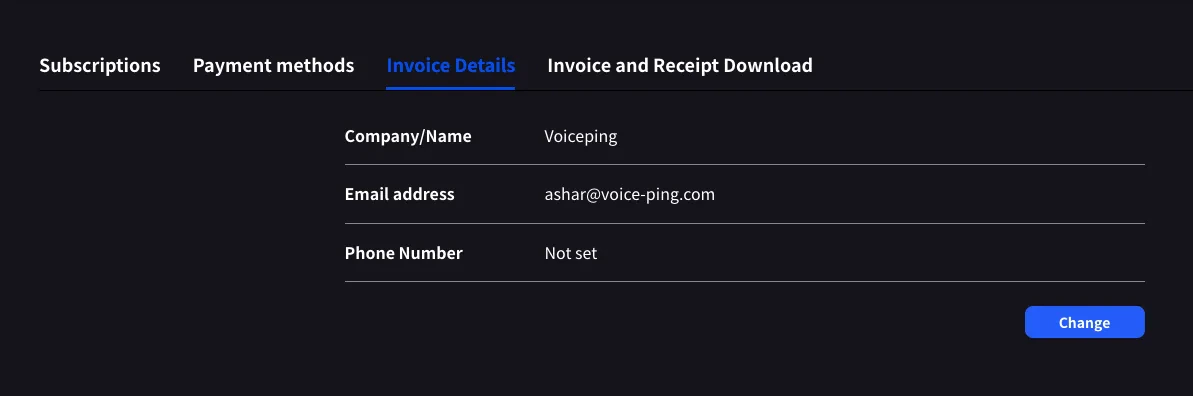 按 **Change** 可編輯任一欄位。
請在下一次帳單日前更新。Stripe 會在產生發票的瞬間讀取這些欄位;之後編輯不會重寫過去的 PDF。
### Invoice and Receipt Download
每筆已完成扣款會顯示為一列,包含月份、方案名稱、狀態、金額,以及發票 PDF 和 收據的下載按鈕。
按 **Change** 可編輯任一欄位。
請在下一次帳單日前更新。Stripe 會在產生發票的瞬間讀取這些欄位;之後編輯不會重寫過去的 PDF。
### Invoice and Receipt Download
每筆已完成扣款會顯示為一列,包含月份、方案名稱、狀態、金額,以及發票 PDF 和 收據的下載按鈕。
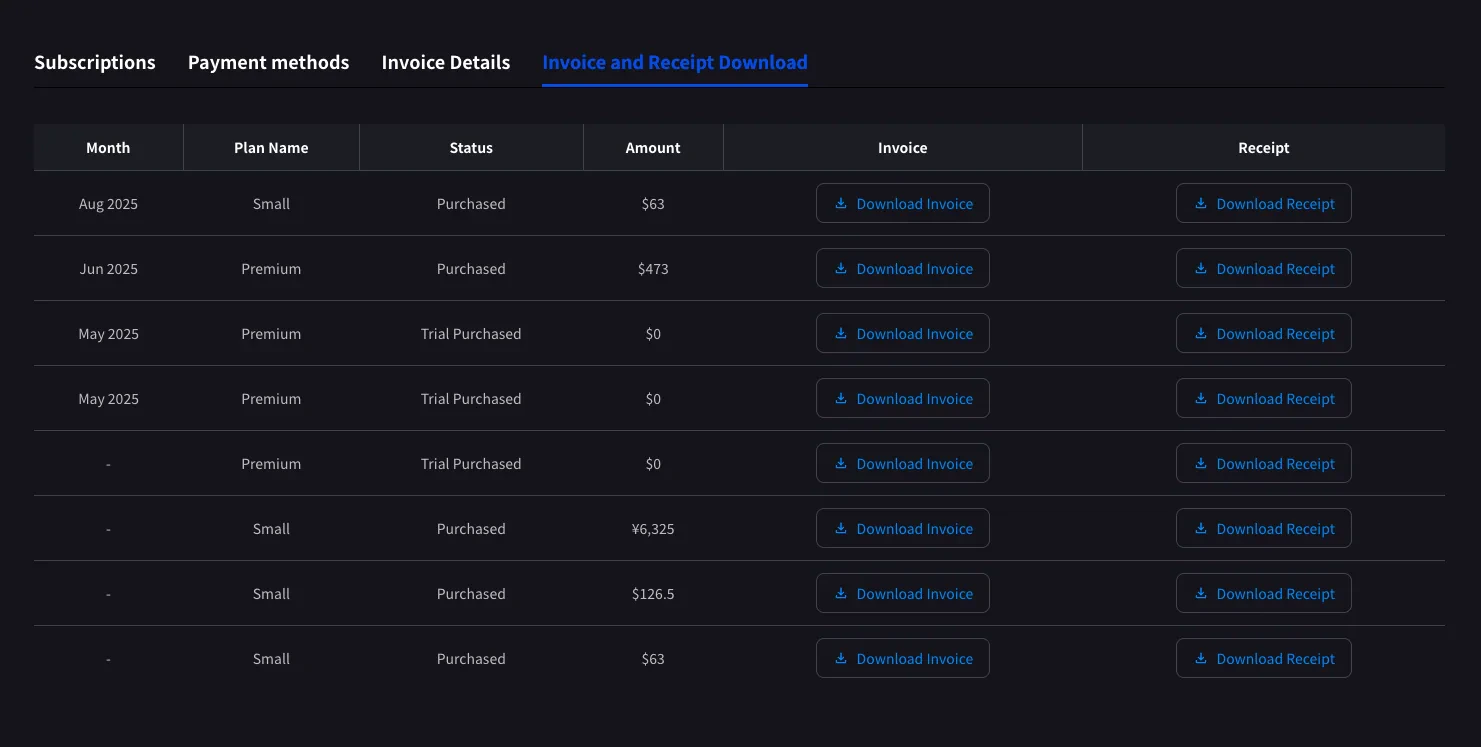 | 按鈕 | 開啟內容 |
| -------------------- | -------------------------------------------------------------------------------------------------- |
| **Download Invoice** | 發票 PDF,可分享、儲存或轉寄給財務 |
| **Download Receipt** | Receipt download or stored receipt link; if unavailable, the hosted receipt/invoice fallback opens |
這裡只顯示已完成扣款。排程中的方案變更會在下一次帳單日 Stripe 產生發票後顯示。狀態為 **Trial Purchased** 的 `$0` 列也會記錄,方便追蹤試用開始時間。
### Billing History
Use **Billing History** when you need the full audit trail, not only completed invoice rows.
| Column | What it shows |
| ------------------------- | -------------------------------------------------------------------------------------------------------------------------------------------------- |
| **Status** | Event result, such as purchase, upgrade, scheduled change, cancellation, restore, payment-method change, trial update, renewal, or payment failure |
| **Event Date (UTC+9)** | When the billing event was recorded |
| **Plan Name** | The plan involved in the event, including tiered Individual / Small minute labels when available |
| **Start Date / End Date** | The subscription period affected by the event |
| **Price** | The billed amount when the event has a displayable charge |
Use **Billing History** for "what changed and when?" Use **Invoice and Receipt Download** when finance needs the actual invoice PDF or receipt.
## Mobile (Billing hub)
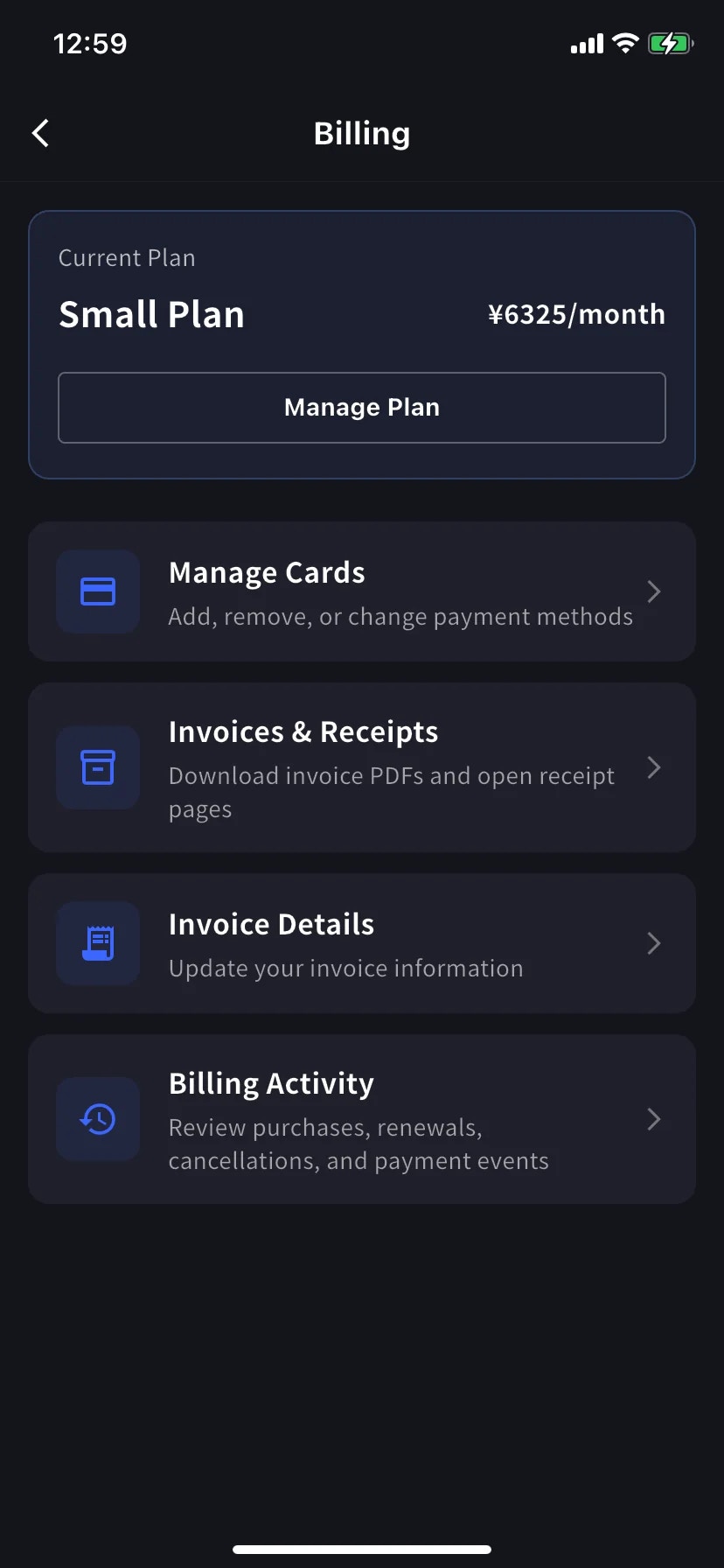
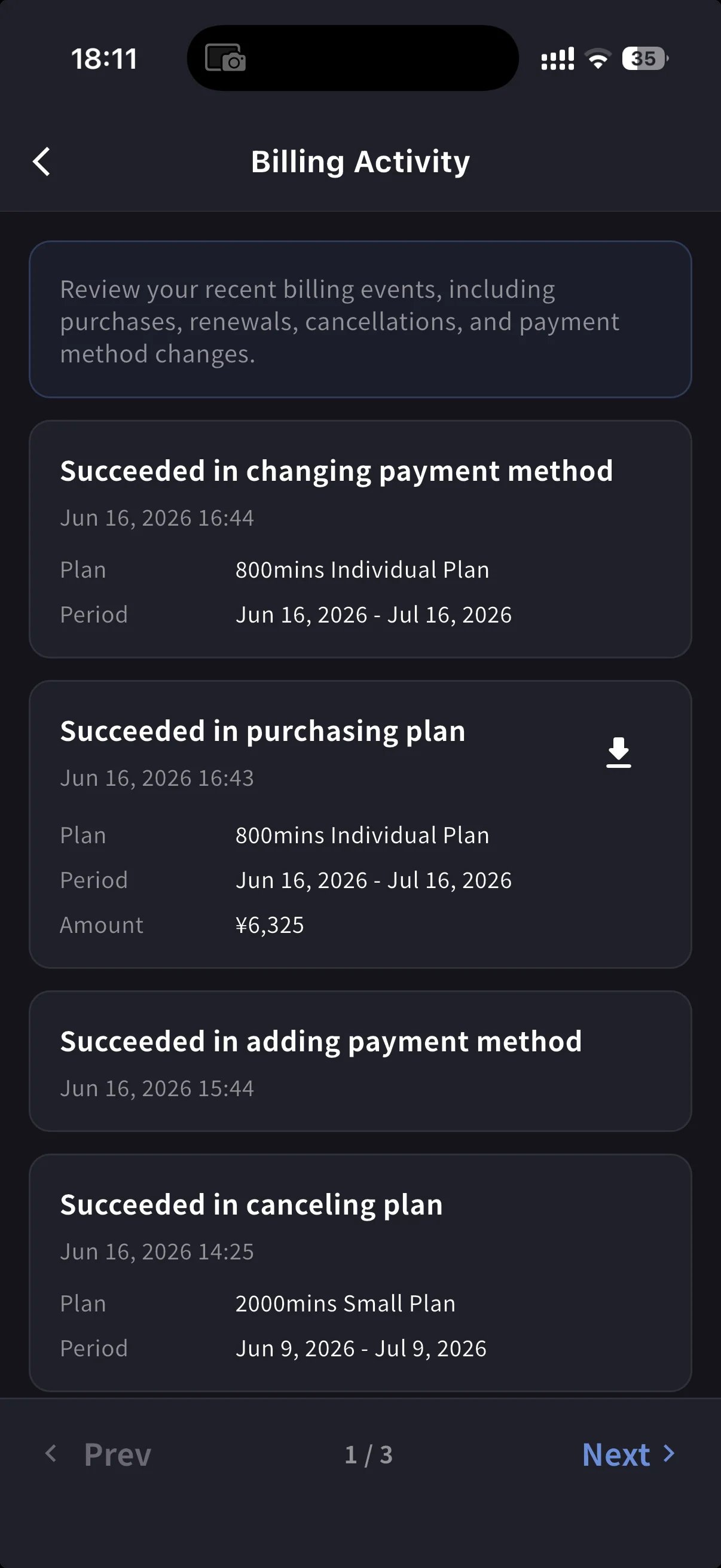
手機 App 將同樣功能集中到 **Billing** hub,並額外提供事件記錄 (Billing Activity),記錄每一次訂閱操作。
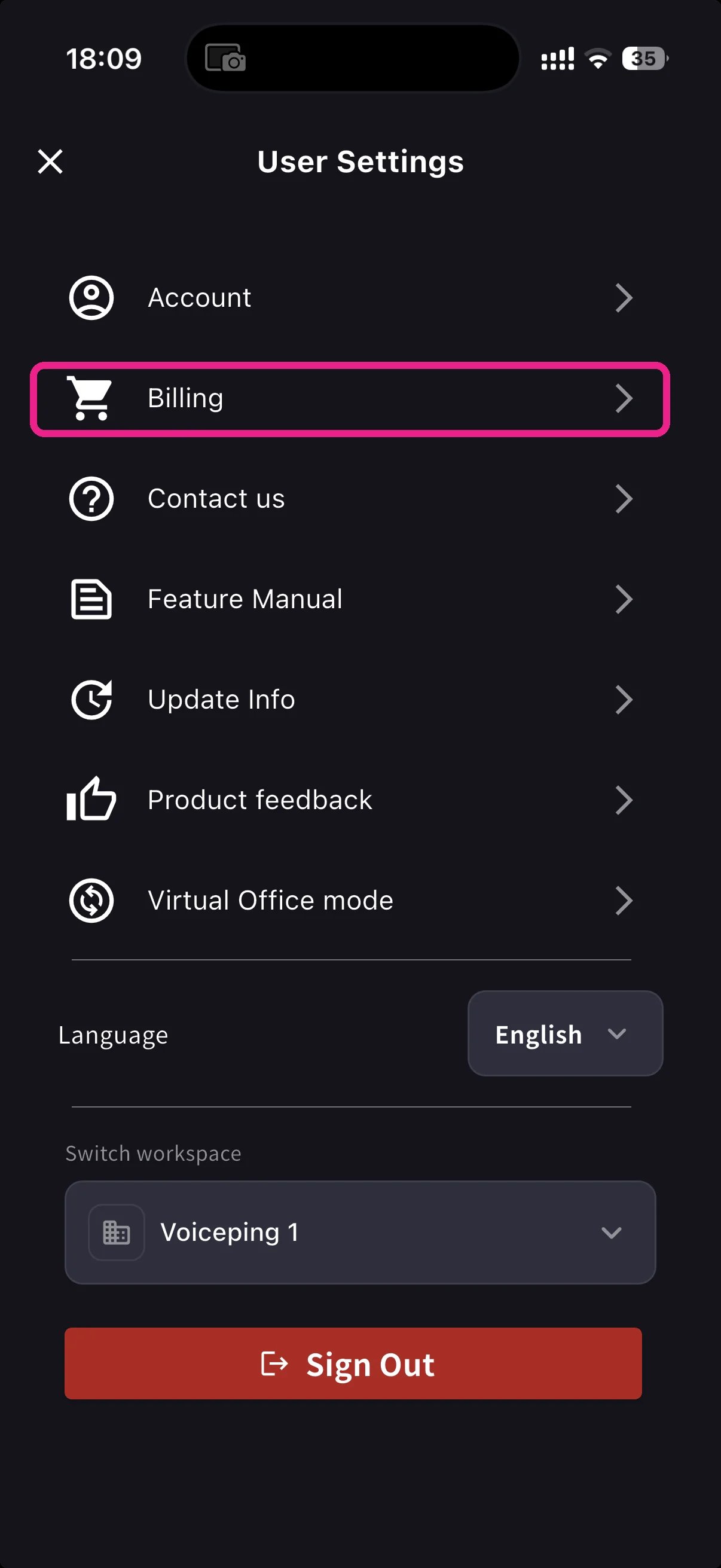
從首頁開啟側邊選單,點 **Billing** (購物車圖示)。
Current Plan 卡片下方有三個與發票相關的捷徑:
| Shortcut | 用途 |
| ----------------------- | ---------------------------------------------------------- |
| **Invoice Details** | 帳單名稱、Email、電話 |
| **Invoices & Receipts** | Invoice PDFs and receipt downloads or stored receipt links |
| **Billing Activity** | 每次訂閱操作的事件記錄,含時間戳和 IP |
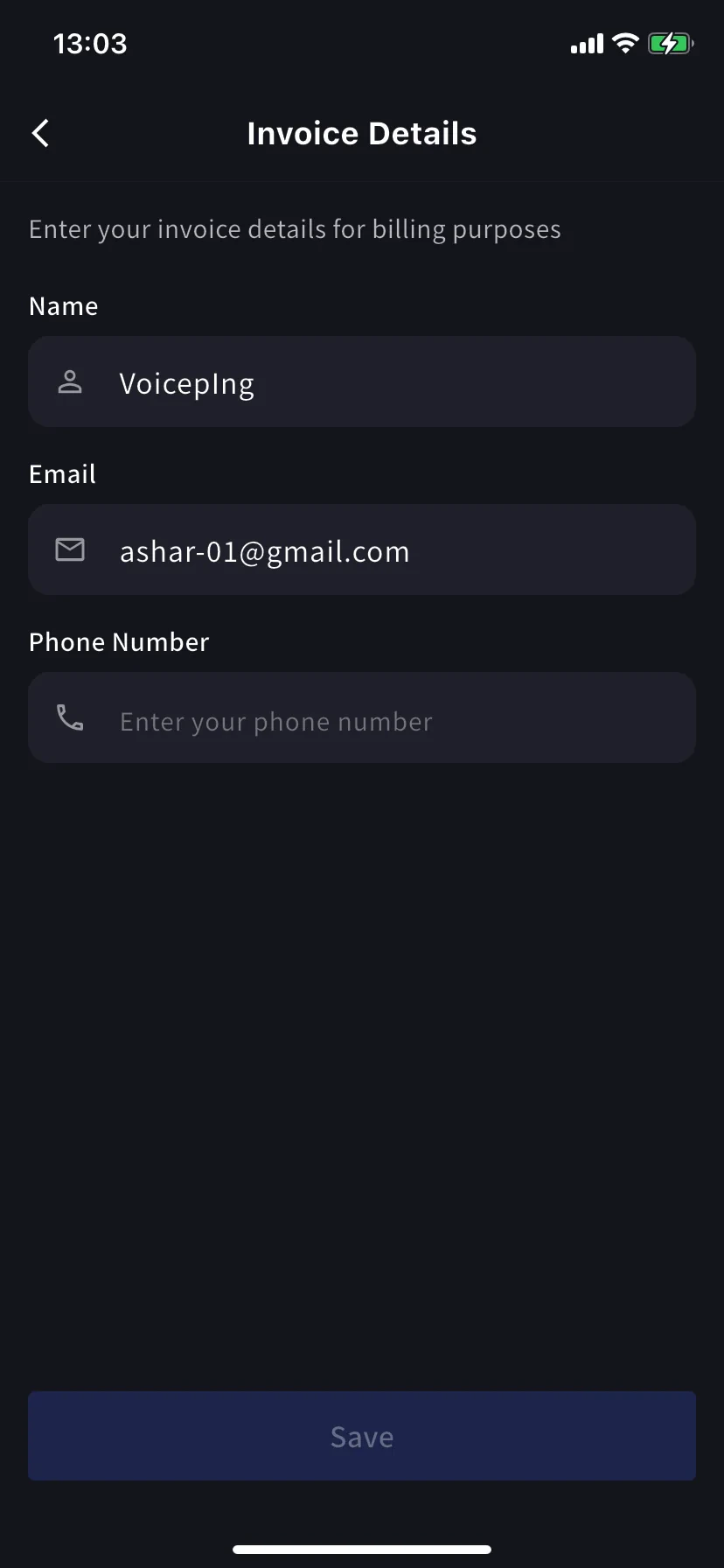
### Invoice Details (mobile)
與 PC 分頁相同的欄位,也就是發票 PDF 用的名稱、Email、電話號碼。
請在下一次帳單日前更新。Stripe 會在產生發票的瞬間讀取這些欄位;之後編輯不會重寫過去的 PDF。
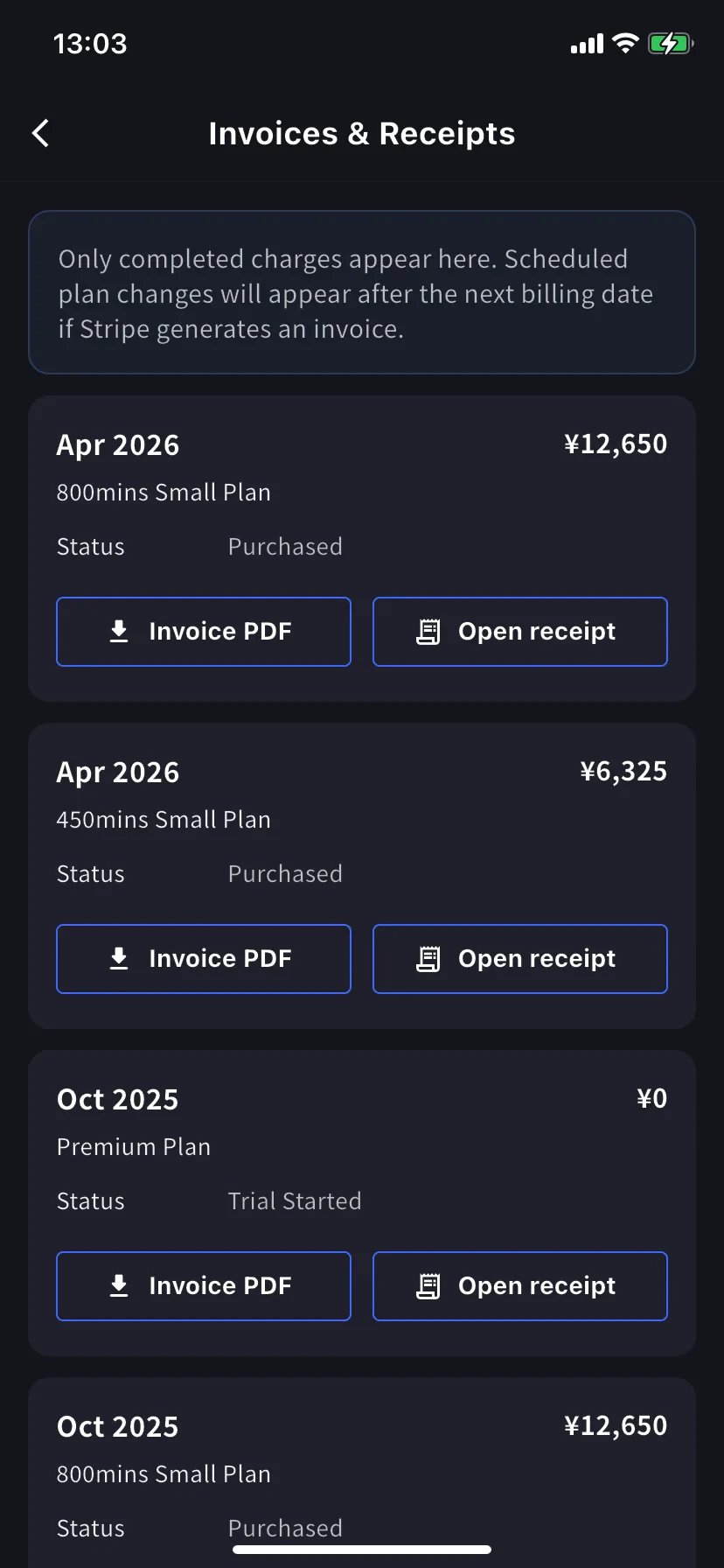
### Invoices & Receipts (mobile)
過去的扣款會以月度卡片顯示。每張卡有兩個操作。
| 按鈕 | 開啟內容 |
| ---------------- | -------------------------------------------------------------------------------------------------- |
| **Invoice PDF** | 可下載的發票 PDF,可分享、儲存或轉寄 |
| **Open receipt** | Receipt download or stored receipt link; if unavailable, the hosted receipt/invoice fallback opens |
### Billing Activity (mobile only)
事件記錄會把工作區對訂閱執行過的所有操作集中顯示。
每一列包含:
* 事件名稱 — 例如 *Succeeded in upgrading plan*、*Subscription will be canceled on the next payment date*、*Succeeded in restoring subscription*
* 時間戳 (`YYYY/MM/DD HH:MM`)
* 方案、帳單週期和金額(如適用)
* **IP Address** — 用於稽核 / 安全檢查誰從哪裡操作
* 已完成扣款上的下載圖示 — 取得該事件的發票 PDF
不用翻 Email,也能回答「這是什麼時候發生的?」
On PC, use **Billing History** for the full event log and **Invoice and Receipt Download** for finance documents. On mobile, **Billing Activity** gives a compact activity log with timestamps, IP address, and invoice download actions where available.
## 提示
* **帳單抬頭變更只適用於未來發票。** 請在下一次帳單日前更新 Invoice Details,避免需要重新開立。
* **收據與發票。** 發票是扣款檔案。收據操作會優先開啟已儲存的收據或下載;如果不可用,則開啟 Stripe 託管的備用頁面。
* **手機與 PC 保持同步。** 一個介面上的編輯會立即顯示在另一個介面上。
## Related
* [Plan Changes, Cancellation & Trial End](/zh-tw/plan-changes) — 升級、降級、取消
* [Changing Your Payment Credit Card](/zh-tw/credit-card-change) — card management (PC and mobile)
* [Pricing](/zh-tw/pricing) — plan tiers and minute allowances
| 按鈕 | 開啟內容 |
| -------------------- | -------------------------------------------------------------------------------------------------- |
| **Download Invoice** | 發票 PDF,可分享、儲存或轉寄給財務 |
| **Download Receipt** | Receipt download or stored receipt link; if unavailable, the hosted receipt/invoice fallback opens |
這裡只顯示已完成扣款。排程中的方案變更會在下一次帳單日 Stripe 產生發票後顯示。狀態為 **Trial Purchased** 的 `$0` 列也會記錄,方便追蹤試用開始時間。
### Billing History
Use **Billing History** when you need the full audit trail, not only completed invoice rows.
| Column | What it shows |
| ------------------------- | -------------------------------------------------------------------------------------------------------------------------------------------------- |
| **Status** | Event result, such as purchase, upgrade, scheduled change, cancellation, restore, payment-method change, trial update, renewal, or payment failure |
| **Event Date (UTC+9)** | When the billing event was recorded |
| **Plan Name** | The plan involved in the event, including tiered Individual / Small minute labels when available |
| **Start Date / End Date** | The subscription period affected by the event |
| **Price** | The billed amount when the event has a displayable charge |
Use **Billing History** for "what changed and when?" Use **Invoice and Receipt Download** when finance needs the actual invoice PDF or receipt.
## Mobile (Billing hub)
手機 App 將同樣功能集中到 **Billing** hub,並額外提供事件記錄 (Billing Activity),記錄每一次訂閱操作。
從首頁開啟側邊選單,點 **Billing** (購物車圖示)。
Current Plan 卡片下方有三個與發票相關的捷徑:
| Shortcut | 用途 |
| ----------------------- | ---------------------------------------------------------- |
| **Invoice Details** | 帳單名稱、Email、電話 |
| **Invoices & Receipts** | Invoice PDFs and receipt downloads or stored receipt links |
| **Billing Activity** | 每次訂閱操作的事件記錄,含時間戳和 IP |
### Invoice Details (mobile)
與 PC 分頁相同的欄位,也就是發票 PDF 用的名稱、Email、電話號碼。
請在下一次帳單日前更新。Stripe 會在產生發票的瞬間讀取這些欄位;之後編輯不會重寫過去的 PDF。
### Invoices & Receipts (mobile)
過去的扣款會以月度卡片顯示。每張卡有兩個操作。
| 按鈕 | 開啟內容 |
| ---------------- | -------------------------------------------------------------------------------------------------- |
| **Invoice PDF** | 可下載的發票 PDF,可分享、儲存或轉寄 |
| **Open receipt** | Receipt download or stored receipt link; if unavailable, the hosted receipt/invoice fallback opens |
### Billing Activity (mobile only)
事件記錄會把工作區對訂閱執行過的所有操作集中顯示。
每一列包含:
* 事件名稱 — 例如 *Succeeded in upgrading plan*、*Subscription will be canceled on the next payment date*、*Succeeded in restoring subscription*
* 時間戳 (`YYYY/MM/DD HH:MM`)
* 方案、帳單週期和金額(如適用)
* **IP Address** — 用於稽核 / 安全檢查誰從哪裡操作
* 已完成扣款上的下載圖示 — 取得該事件的發票 PDF
不用翻 Email,也能回答「這是什麼時候發生的?」
On PC, use **Billing History** for the full event log and **Invoice and Receipt Download** for finance documents. On mobile, **Billing Activity** gives a compact activity log with timestamps, IP address, and invoice download actions where available.
## 提示
* **帳單抬頭變更只適用於未來發票。** 請在下一次帳單日前更新 Invoice Details,避免需要重新開立。
* **收據與發票。** 發票是扣款檔案。收據操作會優先開啟已儲存的收據或下載;如果不可用,則開啟 Stripe 託管的備用頁面。
* **手機與 PC 保持同步。** 一個介面上的編輯會立即顯示在另一個介面上。
## Related
* [Plan Changes, Cancellation & Trial End](/zh-tw/plan-changes) — 升級、降級、取消
* [Changing Your Payment Credit Card](/zh-tw/credit-card-change) — card management (PC and mobile)
* [Pricing](/zh-tw/pricing) — plan tiers and minute allowances