> ## Documentation Index
> Fetch the complete documentation index at: https://manual.voiceping.net/llms.txt
> Use this file to discover all available pages before exploring further.
# 移動端升級、降級 & 取消
> 直接在移動應用中更改 VoicePing 套餐、取消或恢復自動續訂。
export const ContactZhTW = () => <>
如有任何問題,請透過此表單與我們聯繫。
官方連結
造訪官方網站
在X上追蹤我們
在Facebook上按讚
在LinkedIn上連結
;
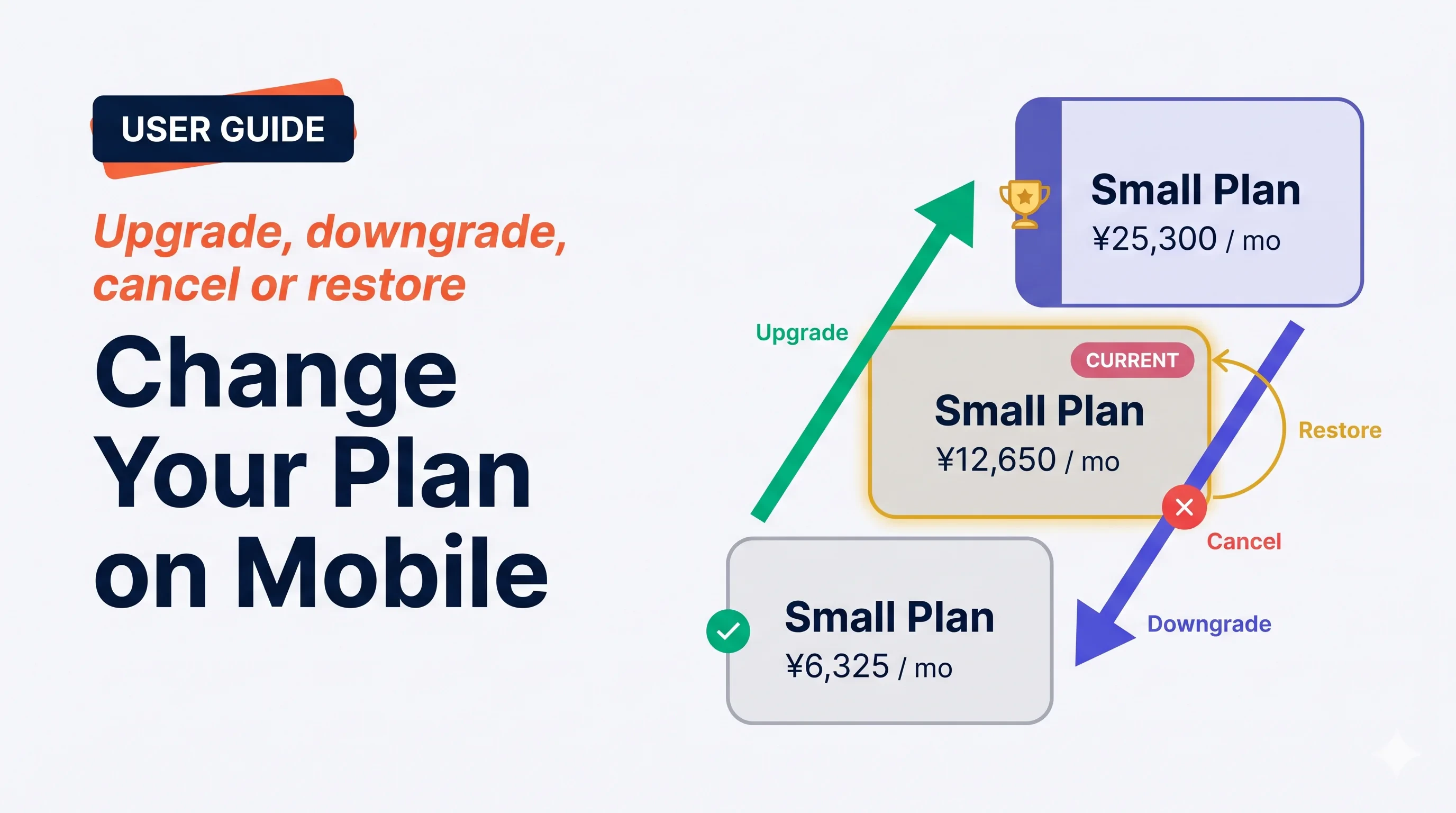 **Manage Plan** 螢幕處理所有訂閱操作 — 立即升級、下次續訂時降級、取消,或恢復已安排的取消。VoicePing 在你確認前明確展示*何時*、*價格*、*用量重置*。
## 四種操作
**Manage Plan** 螢幕處理所有訂閱操作 — 立即升級、下次續訂時降級、取消,或恢復已安排的取消。VoicePing 在你確認前明確展示*何時*、*價格*、*用量重置*。
## 四種操作
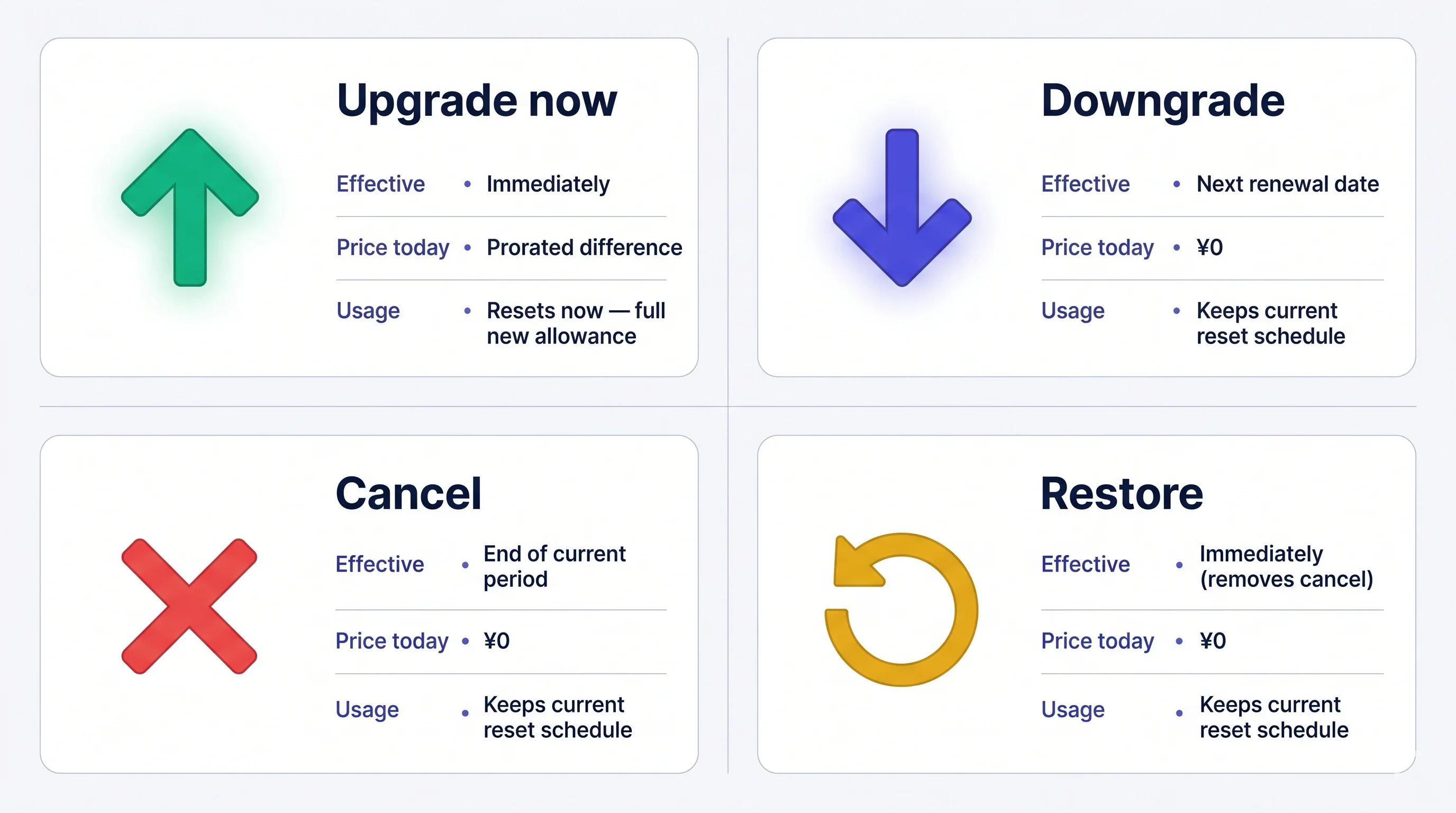 費用一經扣款**不可退款**。如果你取消,當前套餐在本期結束前仍然有效 — 期限前隨時可以免費恢復。
## 開啟 Manage Plan
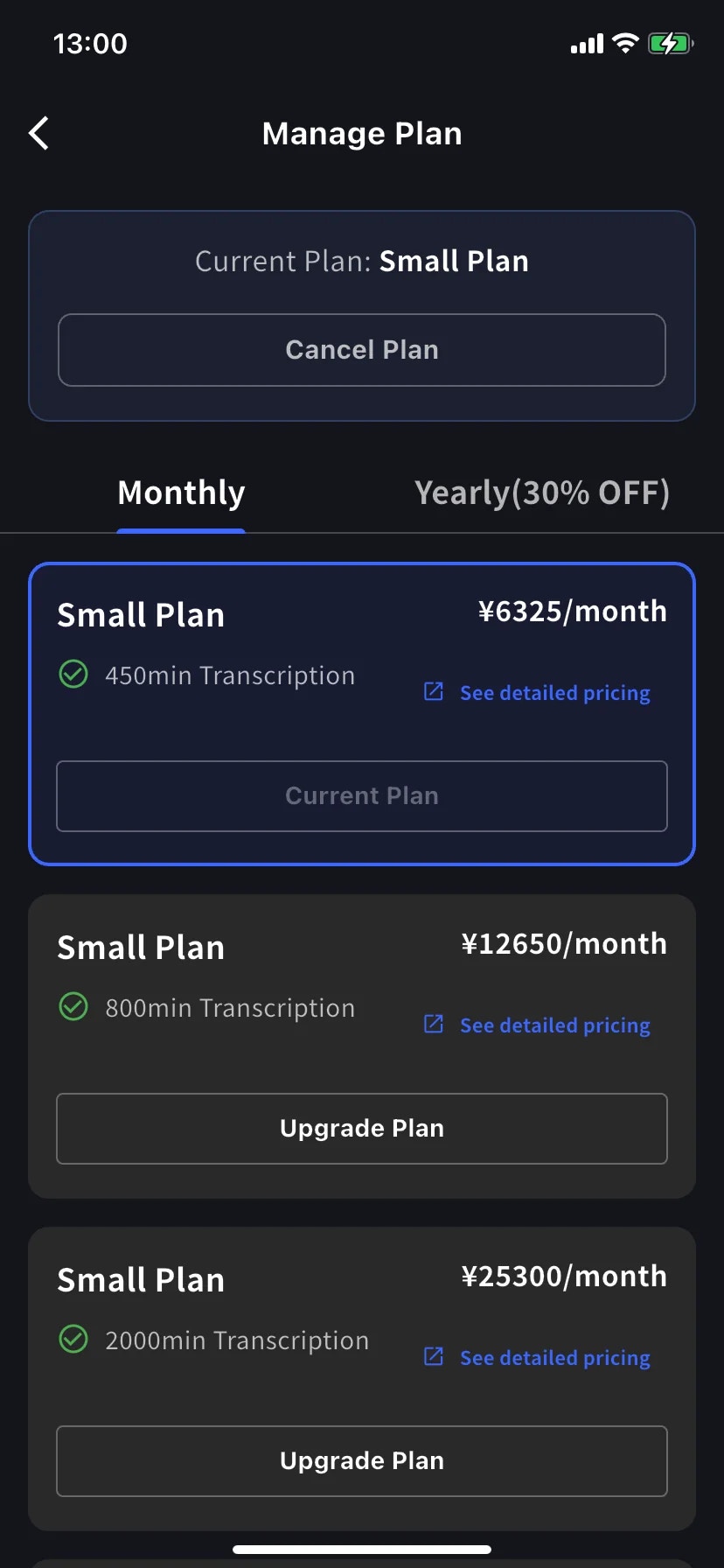
側邊選單 → **User Settings** → **Billing** → **Manage Plan**,或直接在 Current Plan 卡片上點 **Manage Plan**。
* **Monthly** / **Yearly** 標籤切換階梯 — 價格都按月顯示,年付一次性扣款。
* 當前級別用藍色邊框突出,按鈕上蓋 **Current Plan** 章。
* 上位級別顯示 **Upgrade Plan**;下位級別顯示 **Change Plan**。
* **Cancel Plan** 在螢幕頂部,當前套餐徽標旁邊。
## 立即升級
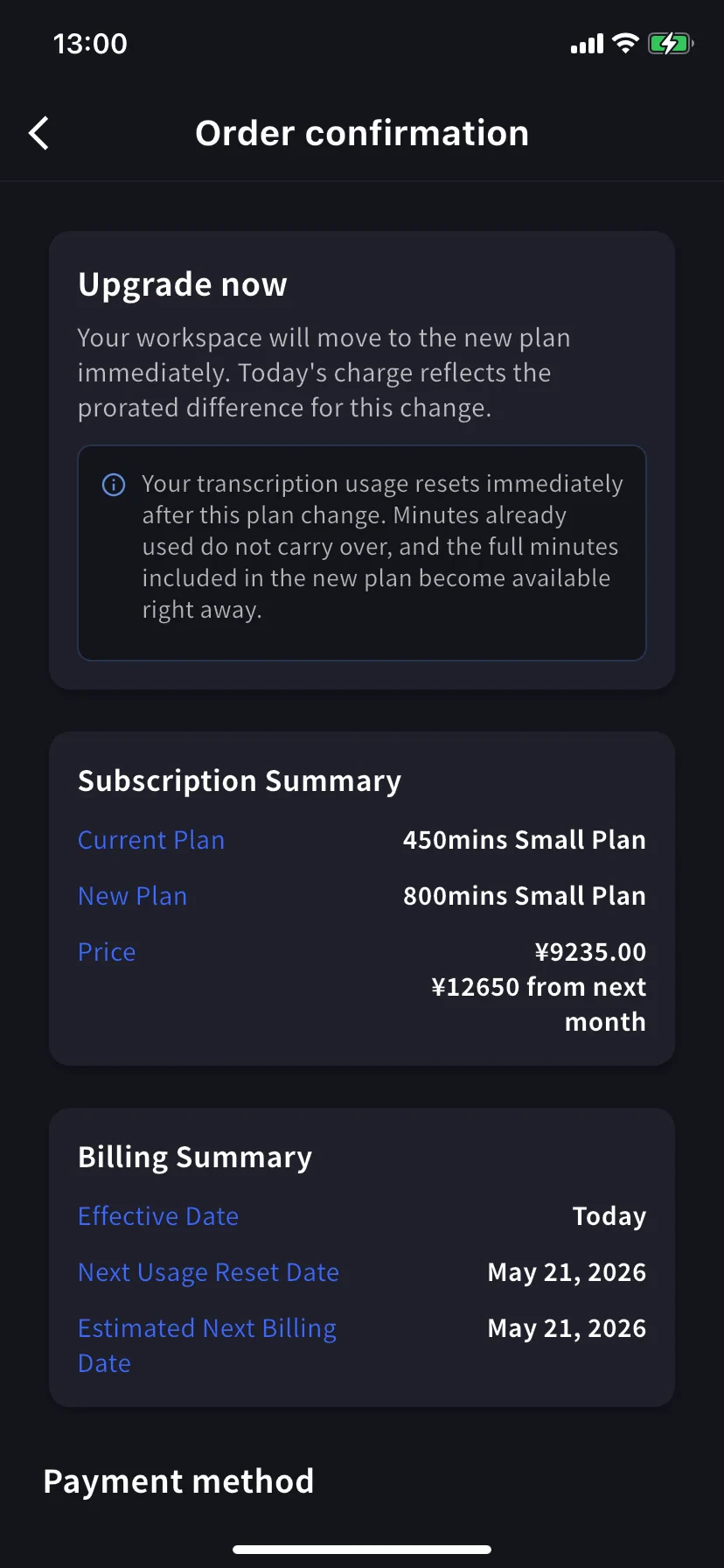
進入 **Order confirmation**。橫幅寫 *Upgrade now — your workspace will move to the new plan immediately. Today's charge reflects the prorated difference for this change.*
**轉錄用量立即重置。** 已用的分鐘不結轉,新套餐的完整分鐘立即可用。
Subscription Summary 顯示當前套餐、新套餐和兩個價格 — 今天的按比例金額和下個月開始的完整價格。Billing Summary 確認 **Effective Date: Today** 以及下一次重置 / 賬單日期。
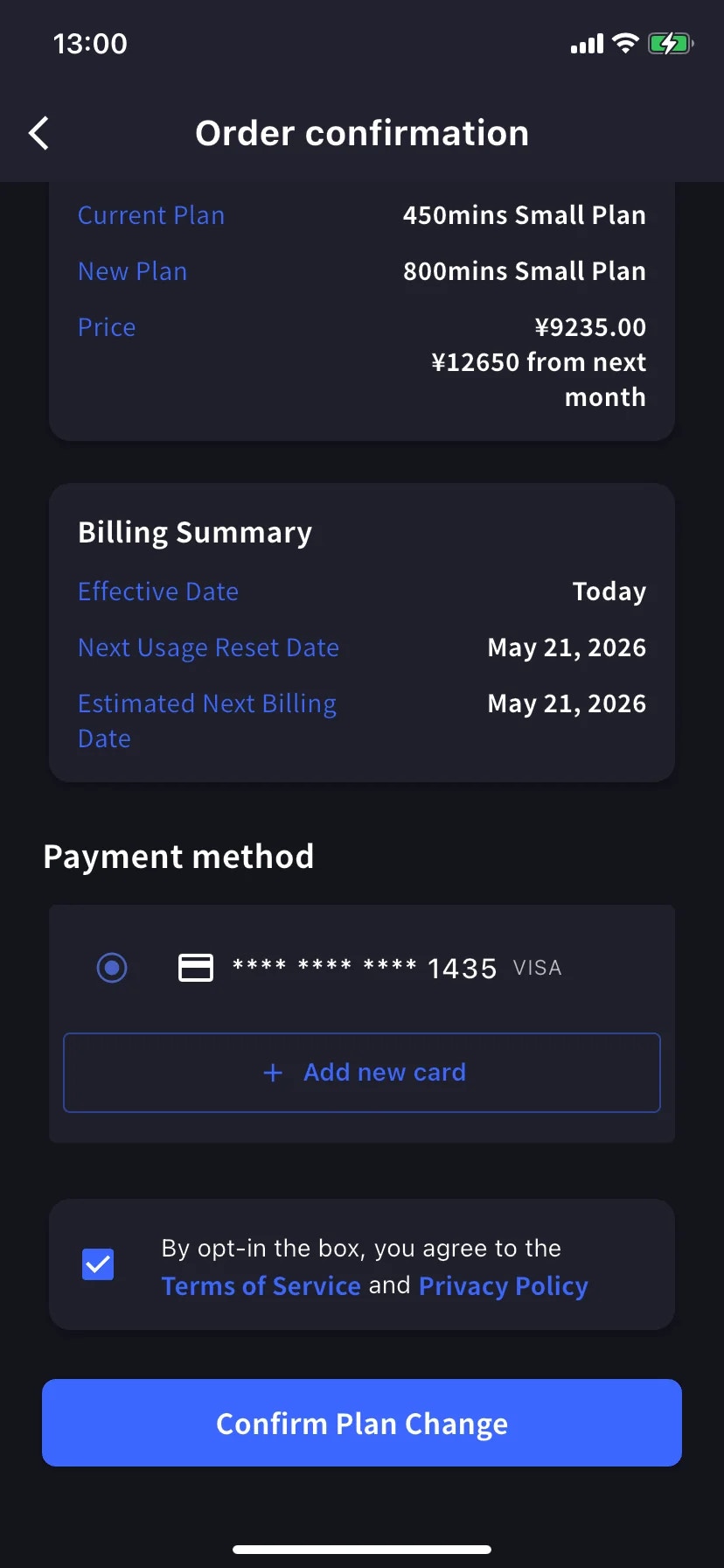
滾到 **Payment method**,選已有卡片或點 **+ Add new card** 開啟 Stripe 表單(Link 或手動輸入 — 見[移動端賬單](/zh-tw/mobile-billing#manage-cards))。勾選條款 / 隱私復選框。
點藍色 **Confirm Plan Change** 按鈕。扣款處理期間按鈕短暫變暗。
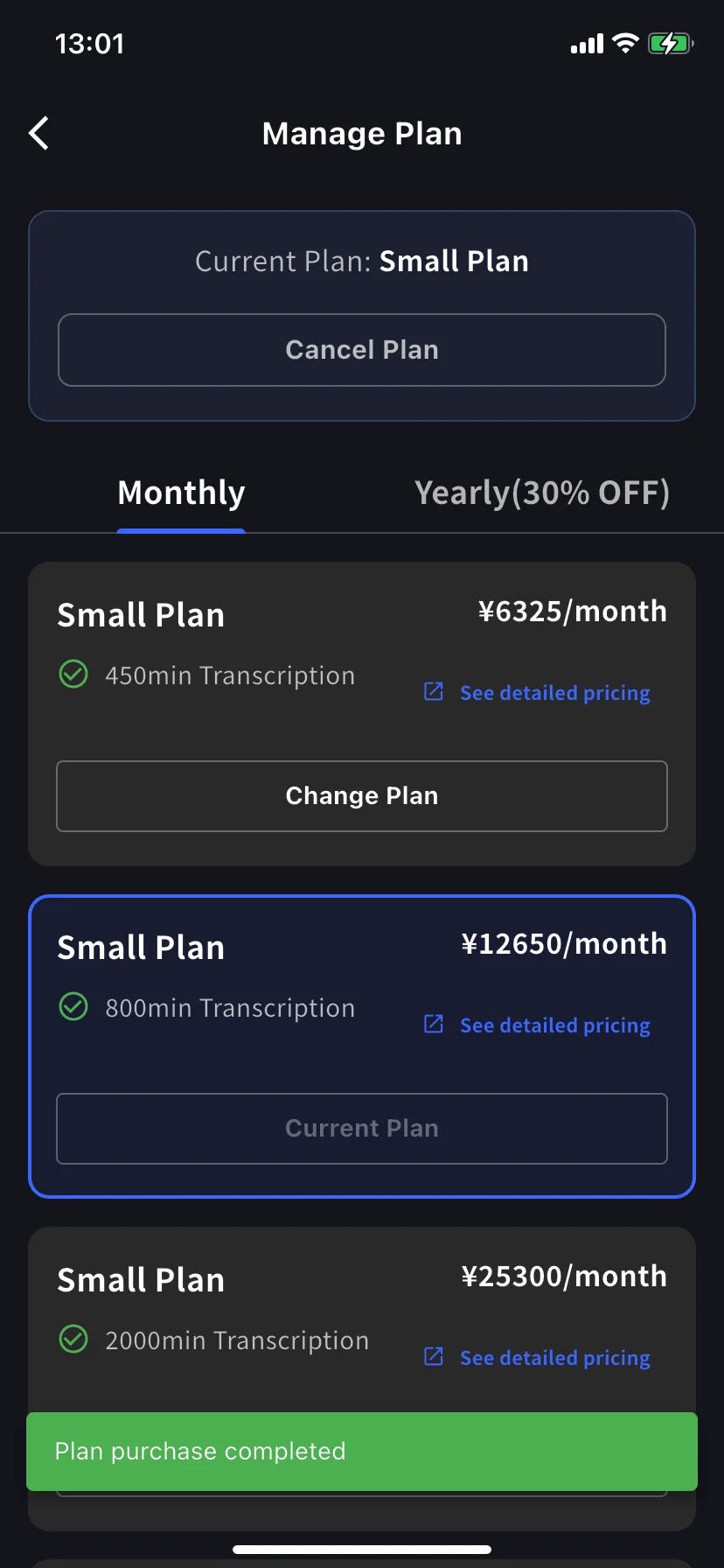
成功後回到 Manage Plan,帶綠色 **Plan purchase completed** toast,新級別被當前套餐框起。
按比例扣款排除舊套餐已用時間,所以賬單週期後期升級接近新套餐原價。最便宜的升級時機在續訂日前後 — 或者不管它,需要時就升級。
## 降級 — 下次續訂生效
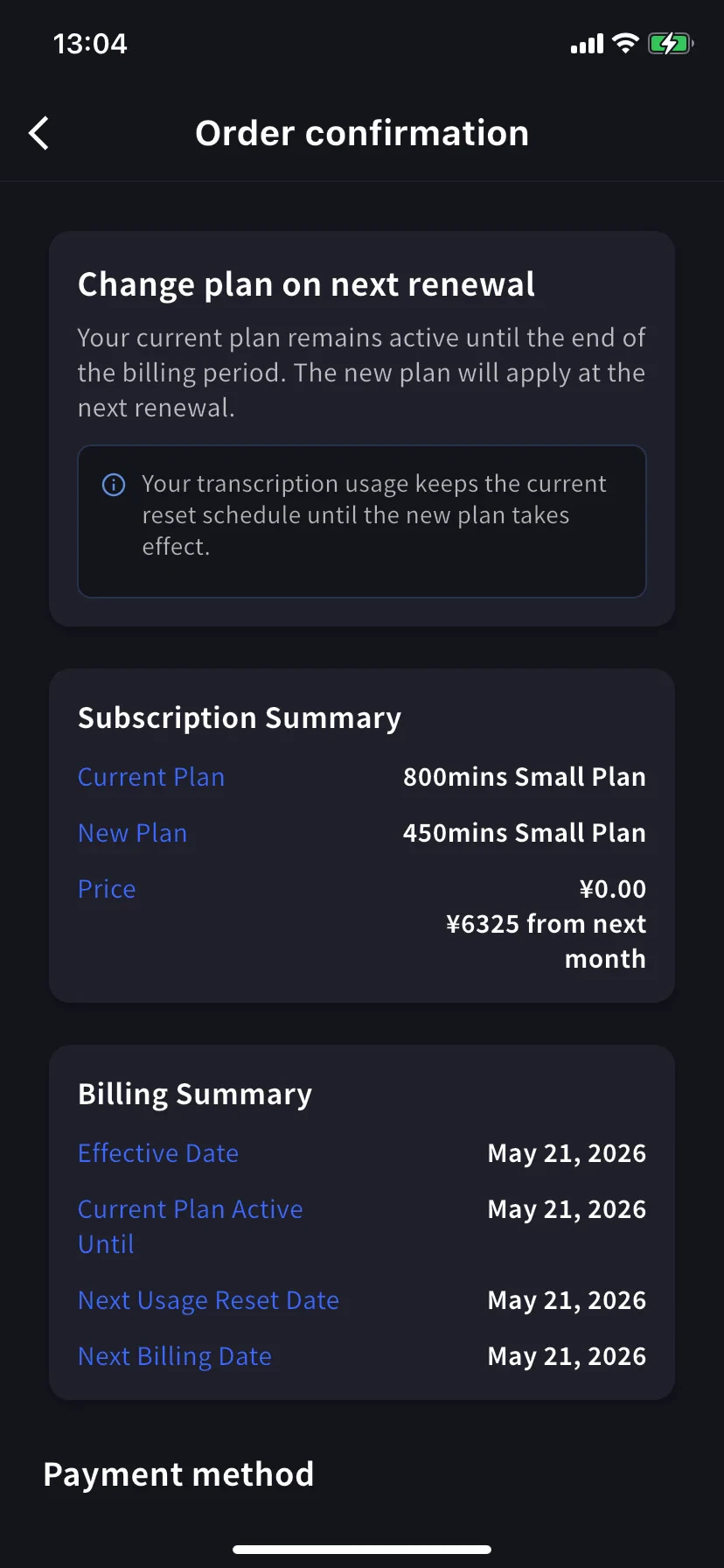
在下位級別點 **Change Plan**。確認橫幅變化 — 現在是 *Change plan on next renewal — your current plan remains active until the end of the billing period. The new plan will apply at the next renewal.*
今天價格是 **¥0.00** — 下個月開始付較低價格。Billing Summary 顯示 **Effective Date** 和 **Current Plan Active Until** 為續訂日期。
**用量保持原定時間表。** 續訂前保留當前套餐的分鐘;新的較低額度在續訂後生效。
確認方式和升級相同。
## 取消訂閱
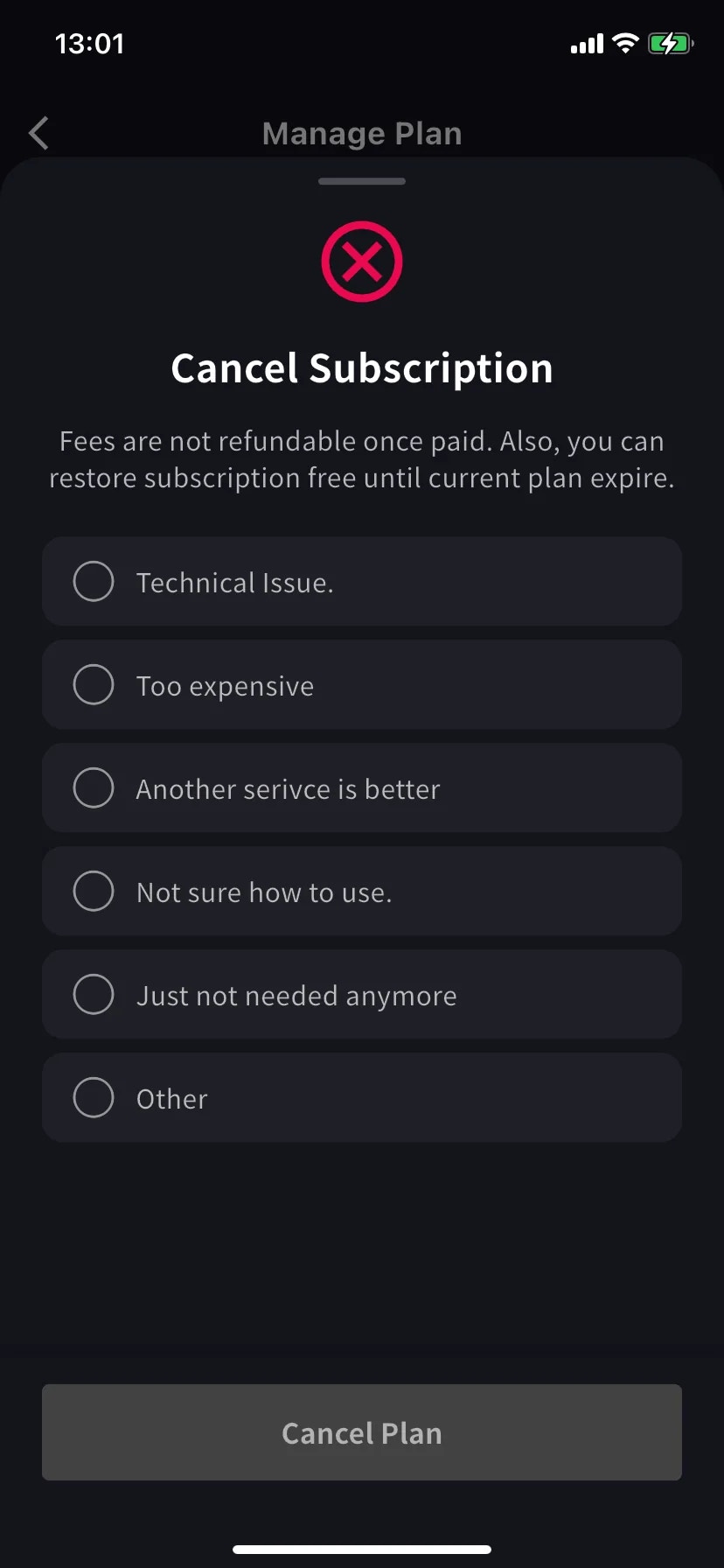
滑出帶紅色 ⊗ 圖示和必選原因列表的表單。
選一個原因 — 選原因前 Cancel Plan 按鈕保持灰色。
費用一經付款不可退款。當前套餐在本期結束前仍可用 — 期限前隨時可以免費恢復。
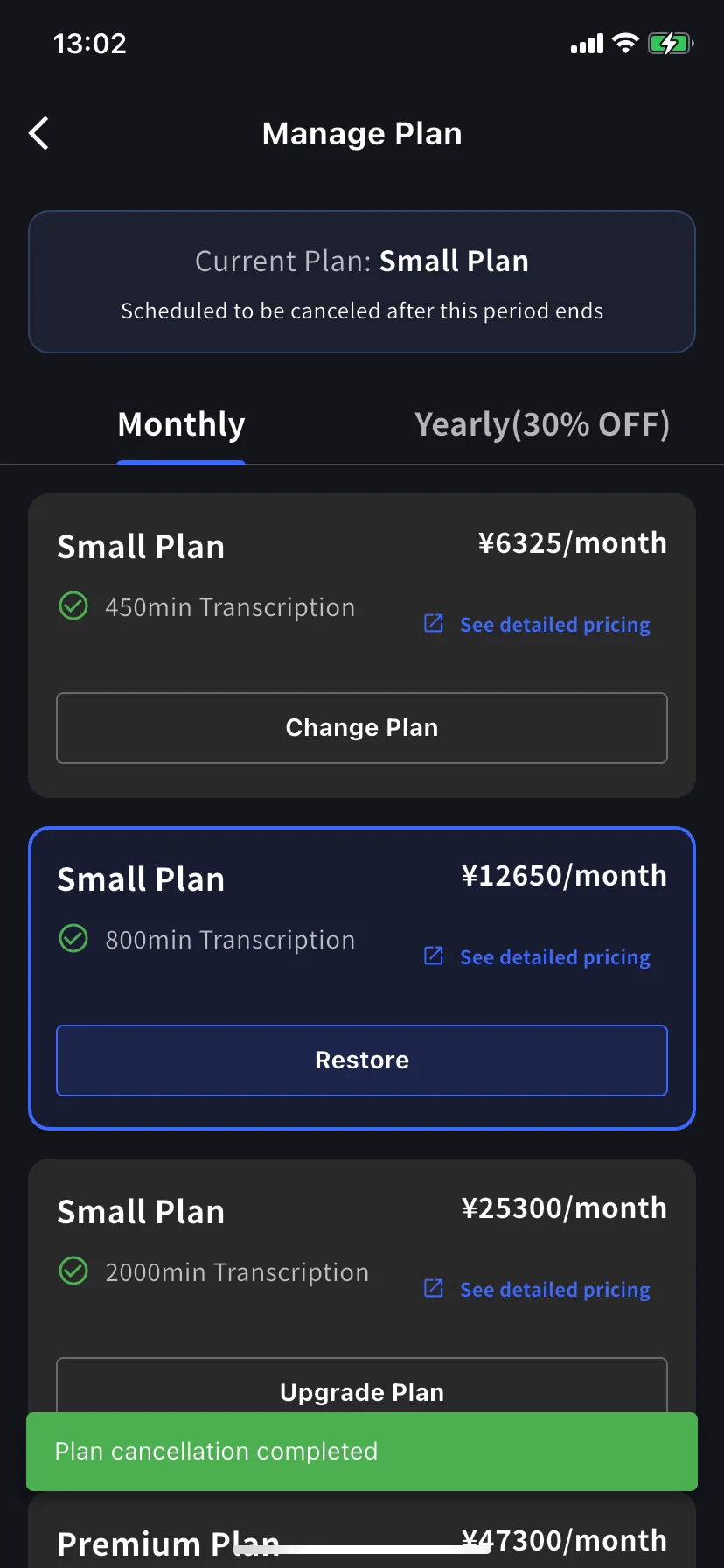
當前套餐橫幅變為 **Scheduled to be canceled after this period ends**,下方級別出現 **Restore** 按鈕。
綠色 **Plan cancellation completed** toast 確認安排。續訂日前保留套餐和全部分鐘。
## 恢復自動續訂
改主意了?在當前級別點 **Restore**。
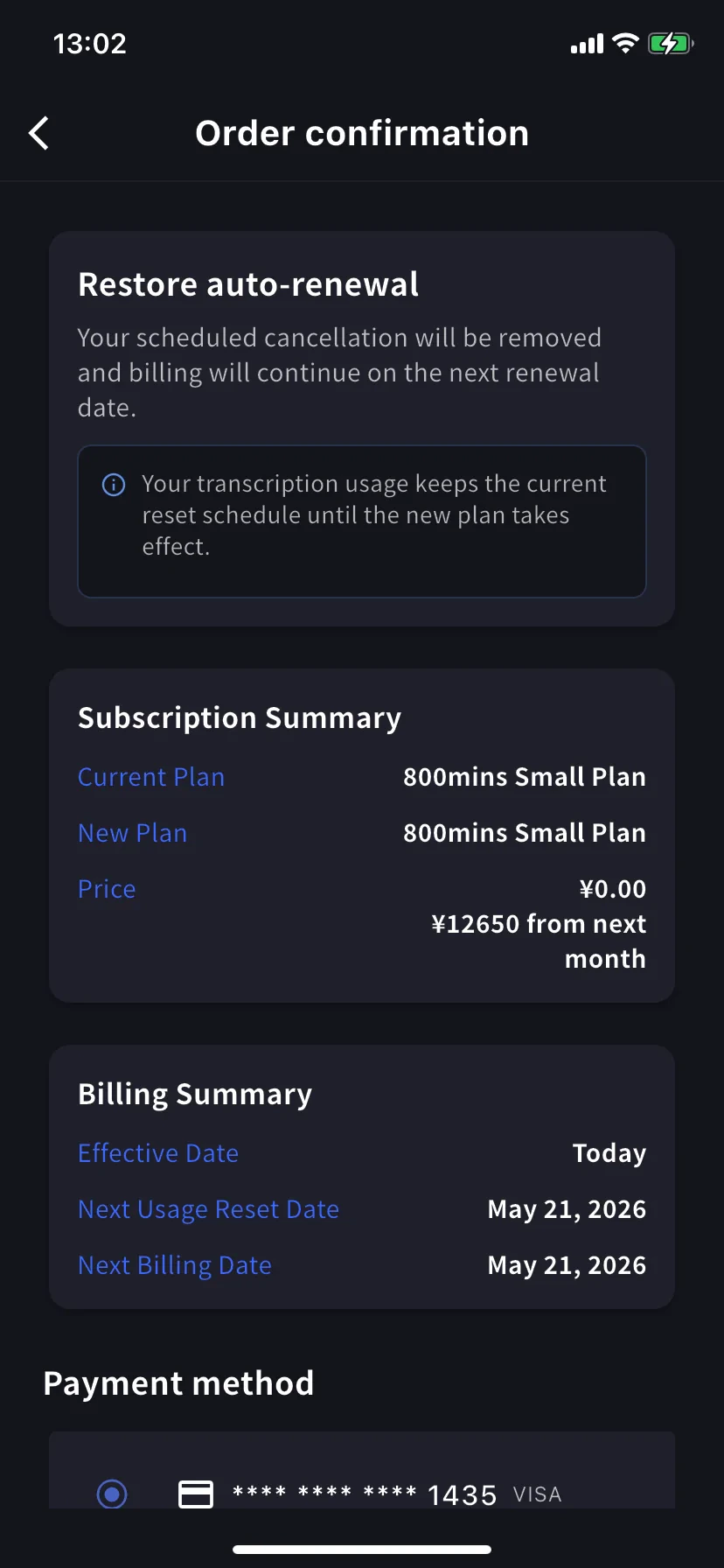
Order confirmation 顯示 *Restore auto-renewal — your scheduled cancellation will be removed and billing will continue on the next renewal date.* 今天價格 ¥0。點 **Confirm Plan Change** 回到正常續訂訂閱。
用量保持當前重置時間表 — 恢復不會重置分鐘。
## 我在看哪個確認畫面?
三個畫面共享同樣佈局(Subscription Summary / Billing Summary / Payment method / Confirm)。讀**橫幅標題**確認:
| 橫幅 | 方向 | 生效 |
| ------------------------------- | ---- | ---- |
| **Upgrade now** | 上位級別 | 今天 |
| **Change plan on next renewal** | 下位級別 | 下次續訂 |
| **Restore auto-renewal** | 撤銷取消 | 今天 |
## 使用提示
* **年付標籤打 7 折。** 長期使用的話,同級別 Monthly → Yearly 切換就是即刻應用折扣的升級。
* **之後檢視 Billing Activity。** 這些操作都帶時間戳和 IP 記錄 — 團隊裡還有其他人裝了 App 時很有用。
* **降級 ≠ 取消。** 降級讓你留在(較小的)付費套餐;取消讓你在本期結束後掉到 Free。選你真正想要的。
* **先加卡。** 如果知道會升級,先在[Manage Cards](/zh-tw/mobile-billing#manage-cards)加卡 — 升級流程會複用它。
## 相關頁面
* [移動端賬單管理](/zh-tw/mobile-billing) — 卡片、發票、收據、活動日誌
* [套餐變更、取消 & 試用結束](/zh-tw/plan-changes) — PC 管理控制臺等價功能
* [定價](/zh-tw/pricing) — 套餐級別和分鐘配額
* [免費套餐](/zh-tw/free-plan) / [免費試用](/zh-tw/free-trial)
費用一經扣款**不可退款**。如果你取消,當前套餐在本期結束前仍然有效 — 期限前隨時可以免費恢復。
## 開啟 Manage Plan
側邊選單 → **User Settings** → **Billing** → **Manage Plan**,或直接在 Current Plan 卡片上點 **Manage Plan**。
* **Monthly** / **Yearly** 標籤切換階梯 — 價格都按月顯示,年付一次性扣款。
* 當前級別用藍色邊框突出,按鈕上蓋 **Current Plan** 章。
* 上位級別顯示 **Upgrade Plan**;下位級別顯示 **Change Plan**。
* **Cancel Plan** 在螢幕頂部,當前套餐徽標旁邊。
## 立即升級
進入 **Order confirmation**。橫幅寫 *Upgrade now — your workspace will move to the new plan immediately. Today's charge reflects the prorated difference for this change.*
**轉錄用量立即重置。** 已用的分鐘不結轉,新套餐的完整分鐘立即可用。
Subscription Summary 顯示當前套餐、新套餐和兩個價格 — 今天的按比例金額和下個月開始的完整價格。Billing Summary 確認 **Effective Date: Today** 以及下一次重置 / 賬單日期。
滾到 **Payment method**,選已有卡片或點 **+ Add new card** 開啟 Stripe 表單(Link 或手動輸入 — 見[移動端賬單](/zh-tw/mobile-billing#manage-cards))。勾選條款 / 隱私復選框。
點藍色 **Confirm Plan Change** 按鈕。扣款處理期間按鈕短暫變暗。
成功後回到 Manage Plan,帶綠色 **Plan purchase completed** toast,新級別被當前套餐框起。
按比例扣款排除舊套餐已用時間,所以賬單週期後期升級接近新套餐原價。最便宜的升級時機在續訂日前後 — 或者不管它,需要時就升級。
## 降級 — 下次續訂生效
在下位級別點 **Change Plan**。確認橫幅變化 — 現在是 *Change plan on next renewal — your current plan remains active until the end of the billing period. The new plan will apply at the next renewal.*
今天價格是 **¥0.00** — 下個月開始付較低價格。Billing Summary 顯示 **Effective Date** 和 **Current Plan Active Until** 為續訂日期。
**用量保持原定時間表。** 續訂前保留當前套餐的分鐘;新的較低額度在續訂後生效。
確認方式和升級相同。
## 取消訂閱
滑出帶紅色 ⊗ 圖示和必選原因列表的表單。
選一個原因 — 選原因前 Cancel Plan 按鈕保持灰色。
費用一經付款不可退款。當前套餐在本期結束前仍可用 — 期限前隨時可以免費恢復。
當前套餐橫幅變為 **Scheduled to be canceled after this period ends**,下方級別出現 **Restore** 按鈕。
綠色 **Plan cancellation completed** toast 確認安排。續訂日前保留套餐和全部分鐘。
## 恢復自動續訂
改主意了?在當前級別點 **Restore**。
Order confirmation 顯示 *Restore auto-renewal — your scheduled cancellation will be removed and billing will continue on the next renewal date.* 今天價格 ¥0。點 **Confirm Plan Change** 回到正常續訂訂閱。
用量保持當前重置時間表 — 恢復不會重置分鐘。
## 我在看哪個確認畫面?
三個畫面共享同樣佈局(Subscription Summary / Billing Summary / Payment method / Confirm)。讀**橫幅標題**確認:
| 橫幅 | 方向 | 生效 |
| ------------------------------- | ---- | ---- |
| **Upgrade now** | 上位級別 | 今天 |
| **Change plan on next renewal** | 下位級別 | 下次續訂 |
| **Restore auto-renewal** | 撤銷取消 | 今天 |
## 使用提示
* **年付標籤打 7 折。** 長期使用的話,同級別 Monthly → Yearly 切換就是即刻應用折扣的升級。
* **之後檢視 Billing Activity。** 這些操作都帶時間戳和 IP 記錄 — 團隊裡還有其他人裝了 App 時很有用。
* **降級 ≠ 取消。** 降級讓你留在(較小的)付費套餐;取消讓你在本期結束後掉到 Free。選你真正想要的。
* **先加卡。** 如果知道會升級,先在[Manage Cards](/zh-tw/mobile-billing#manage-cards)加卡 — 升級流程會複用它。
## 相關頁面
* [移動端賬單管理](/zh-tw/mobile-billing) — 卡片、發票、收據、活動日誌
* [套餐變更、取消 & 試用結束](/zh-tw/plan-changes) — PC 管理控制臺等價功能
* [定價](/zh-tw/pricing) — 套餐級別和分鐘配額
* [免費套餐](/zh-tw/free-plan) / [免費試用](/zh-tw/free-trial)