> ## Documentation Index
> Fetch the complete documentation index at: https://manual.voiceping.net/llms.txt
> Use this file to discover all available pages before exploring further.
# 方案變更、取消與試用結束
> 升級或降級 VoicePing 方案、取消訂閱、結束免費試用或申請合約制帳單。
export const ContactZhTW = () => <>
如有任何問題,請透過此表單與我們聯繫。
## 官方連結
造訪官方網站
在X上追蹤我們
在Facebook上按讚
在LinkedIn上連結
;
在 Billing → Subscriptions 分頁中升級、降級或取消。
在 Billing hub 的 Manage Plan 中升級、降級、取消或復原。
每次方案變更或取消成功後,`account@voice-ping.com` 都會寄出確認信。
## 四種操作
無論在 PC 或手機上,訂閱變更都屬於四種操作之一。生效日期、今日費用和用量重置規則在兩個介面相同。
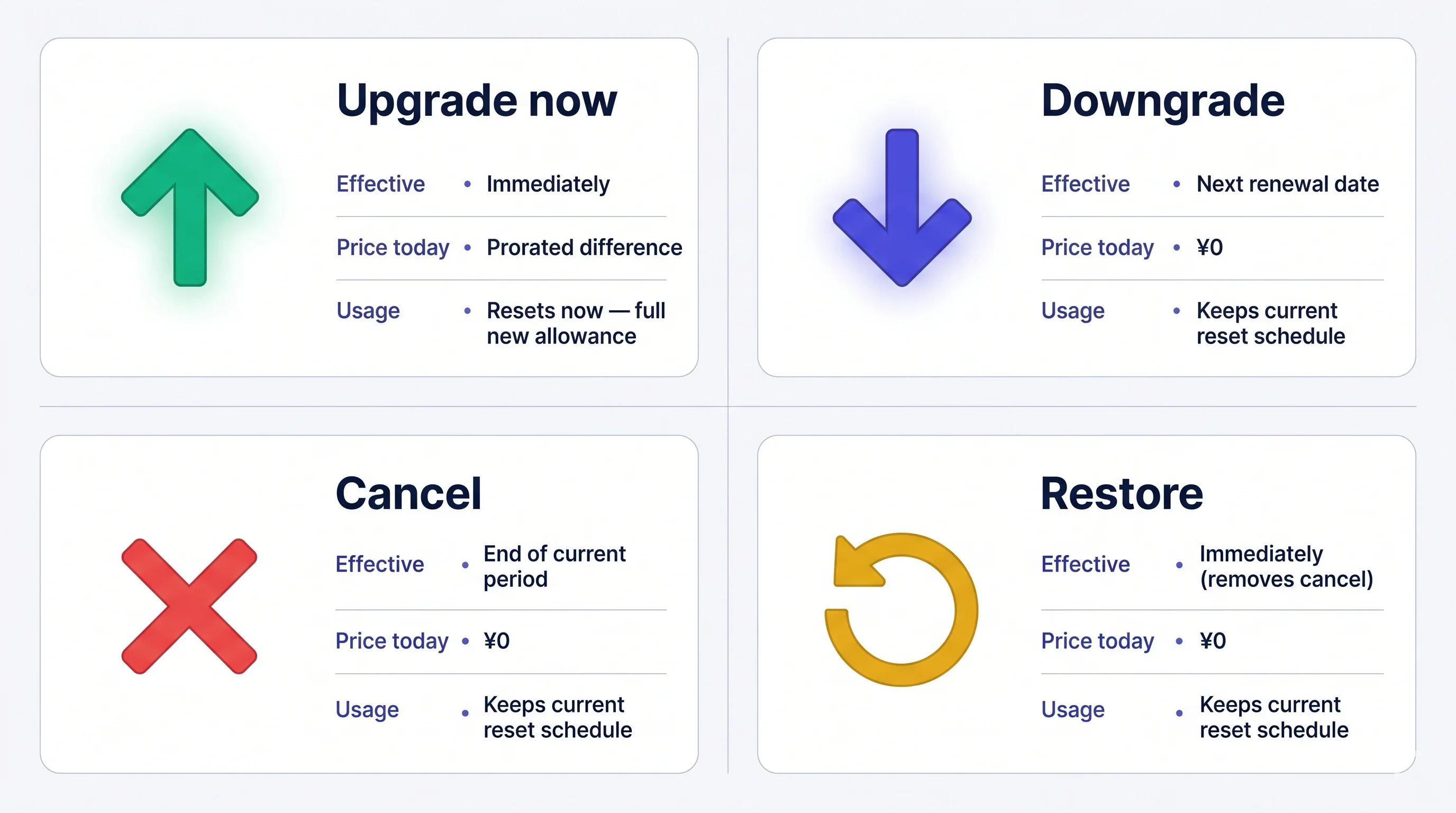 費用一旦扣款即**不可退款**。取消後,現有方案仍會維持到期間結束;結束前可隨時免費復原。
## 如何變更方案
### 1. PC
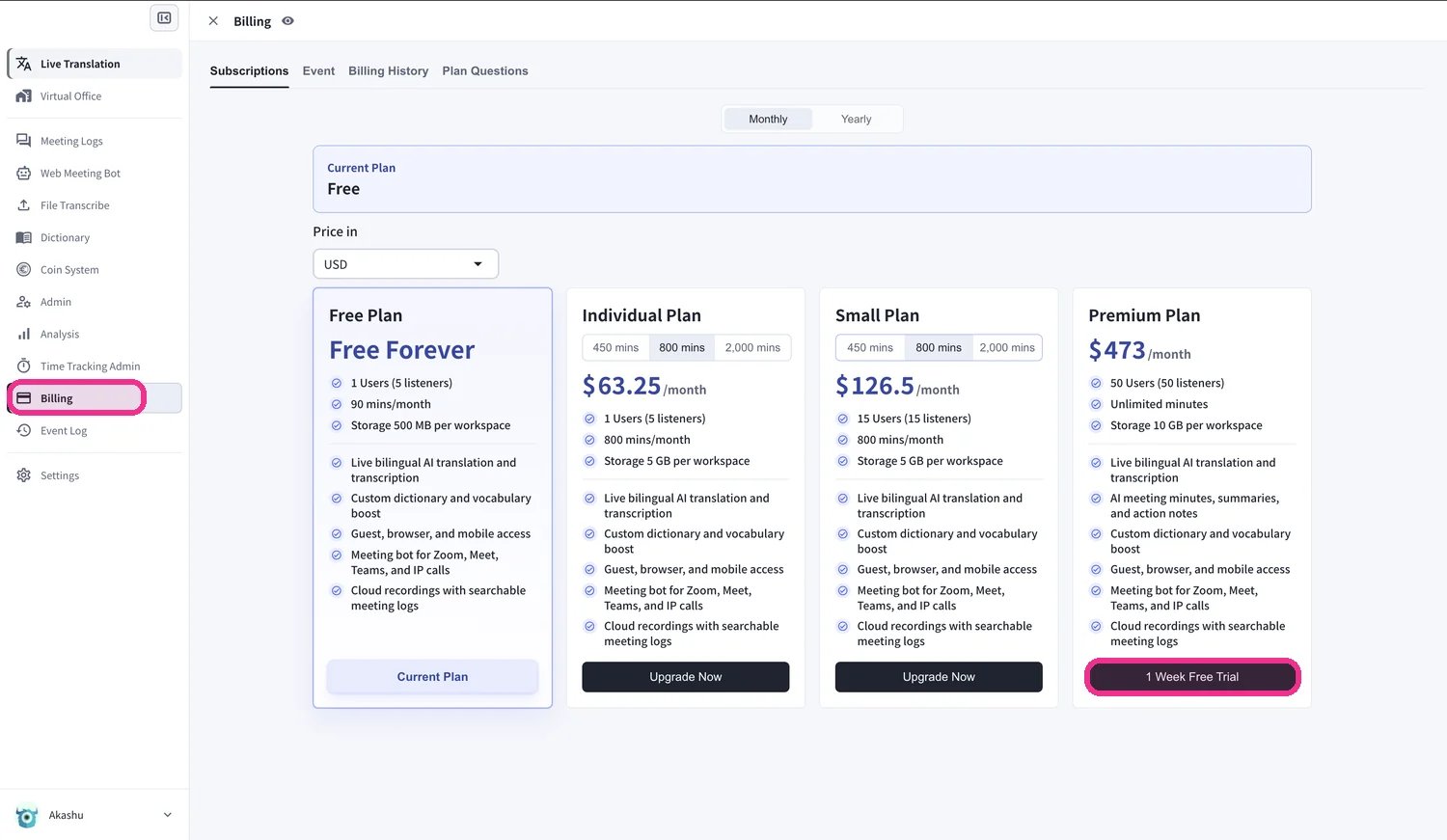
**開啟 Subscriptions 分頁:** 頂部導覽 → **Billing** → **Subscriptions**。
* **從 Free Plan** — 按一下 **Upgrade Free Plan** CTA。
* **從付費方案** — 按一下目前方案旁的 **Change Plan**。
**選擇目標方案:**
* **Small / Premium / Enterprise** — 按 **Upgrade Plan** → **Purchase** → 輸入卡片資料。個人方案為**單人方案,且僅限月付**。
* **Free 升級到 Premium** — 按 **1-Week Free Trial** → **Start Trial** → 輸入卡片資料。試用 1 週後自動扣款。
* **較低階距(降級)** — 選擇級距並確認。現有方案會維持到續約日;新方案從下一個週期開始。
**個人方案是單人方案。** 工作區只有在僅剩**一名有效成員**時才能切換至個人方案。如果成員超過一名,請先移除多餘的成員——VoicePing 會阻擋此變更,並顯示在工作區僅剩一名成員之前還需移除多少名成員。
費用一旦扣款即**不可退款**。取消後,現有方案仍會維持到期間結束;結束前可隨時免費復原。
## 如何變更方案
### 1. PC
**開啟 Subscriptions 分頁:** 頂部導覽 → **Billing** → **Subscriptions**。
* **從 Free Plan** — 按一下 **Upgrade Free Plan** CTA。
* **從付費方案** — 按一下目前方案旁的 **Change Plan**。
**選擇目標方案:**
* **Small / Premium / Enterprise** — 按 **Upgrade Plan** → **Purchase** → 輸入卡片資料。個人方案為**單人方案,且僅限月付**。
* **Free 升級到 Premium** — 按 **1-Week Free Trial** → **Start Trial** → 輸入卡片資料。試用 1 週後自動扣款。
* **較低階距(降級)** — 選擇級距並確認。現有方案會維持到續約日;新方案從下一個週期開始。
**個人方案是單人方案。** 工作區只有在僅剩**一名有效成員**時才能切換至個人方案。如果成員超過一名,請先移除多餘的成員——VoicePing 會阻擋此變更,並顯示在工作區僅剩一名成員之前還需移除多少名成員。
 **升級按比例計費。** 升級當天會開始新的帳單週期;舊方案未使用部分會折抵新價格,用量會重置。越接近期間後段升級,折抵越少;在續約日升級最便宜。**降級** 會在下一次續約時生效,續約日不變。
### 2. Mobile
App Store 政策: 必須用完全部 60 分鐘免費額度後,才會顯示升級和取消按鈕。請使用 60 分鐘,或從 PC 變更方案。
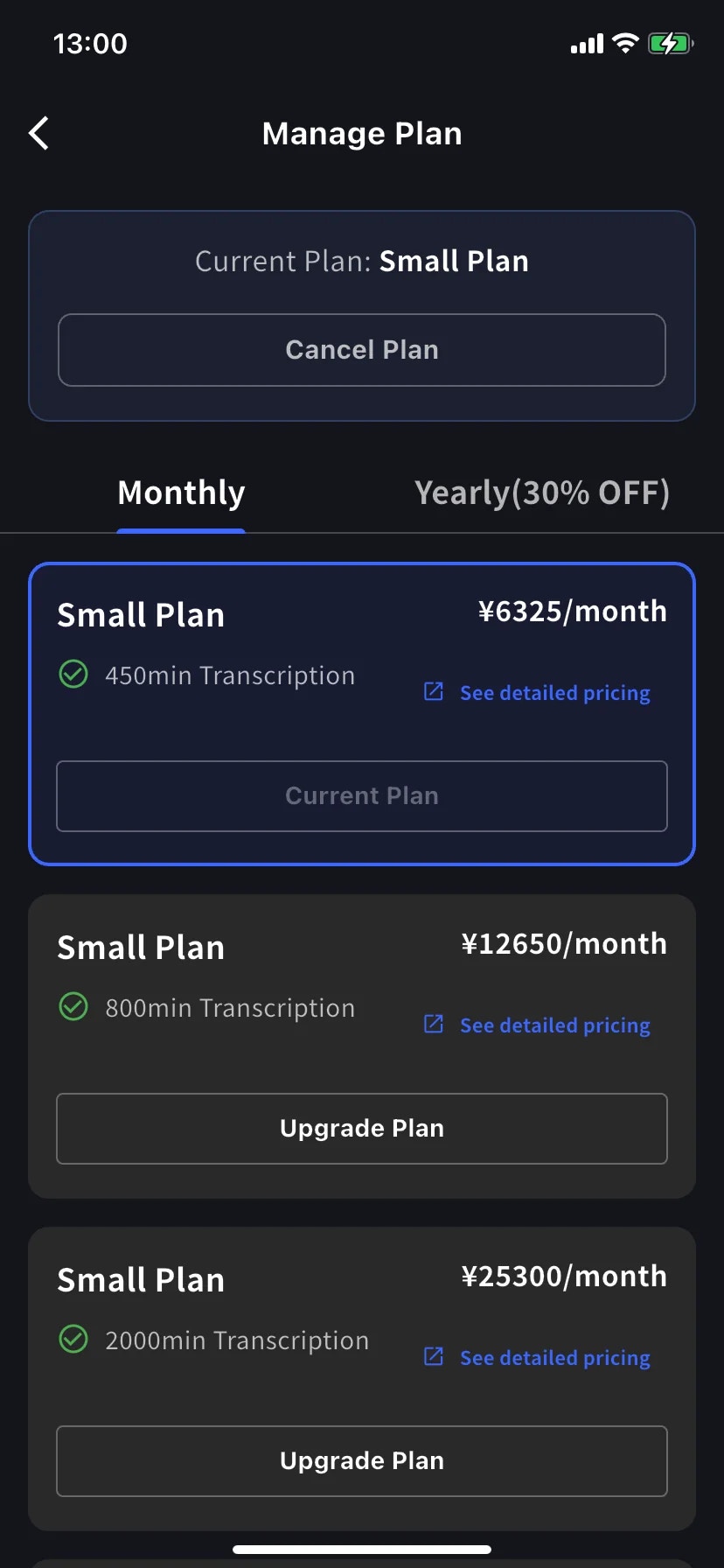
手機上的所有方案變更都透過 Billing hub 的 **Manage Plan** 完成。
側邊選單 → **User Settings** → **Billing** → **Manage Plan**,或點 Current Plan 卡片上的 **Manage Plan**。頂部可切換 **Monthly** / **Yearly**。高於目前的級距顯示 **Upgrade Plan**,低於目前的級距顯示 **Change Plan**。
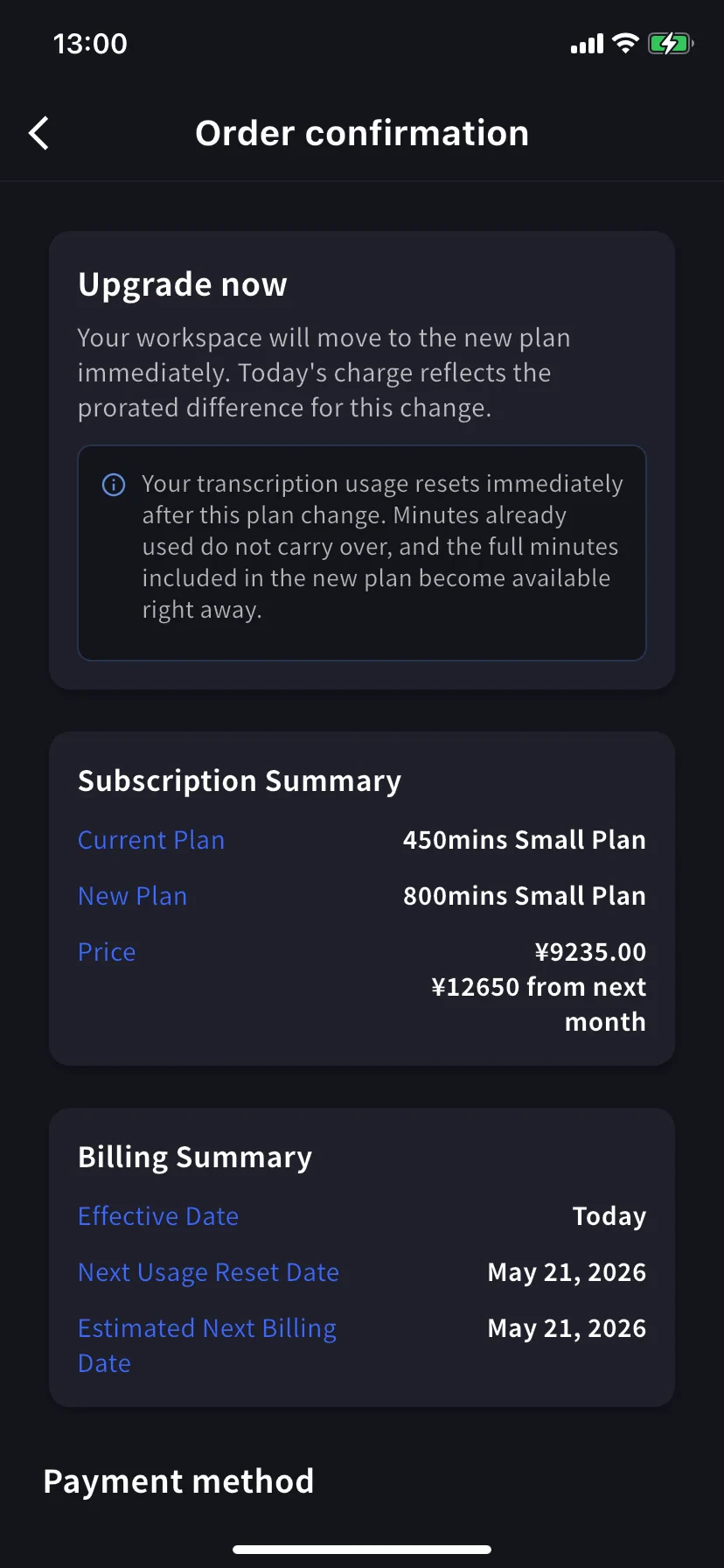
在較高階距上點 **Upgrade Plan**。橫幅會提示工作區會立即切換到新方案,今日扣款為按比例計算的差額。選擇現有卡片或點 **+ Add new card**,勾選 Terms / Privacy,然後點 **Confirm Plan Change**。
**Free Plan 升級到 Premium** 會先開始 1 週試用,試用結束前不扣款。
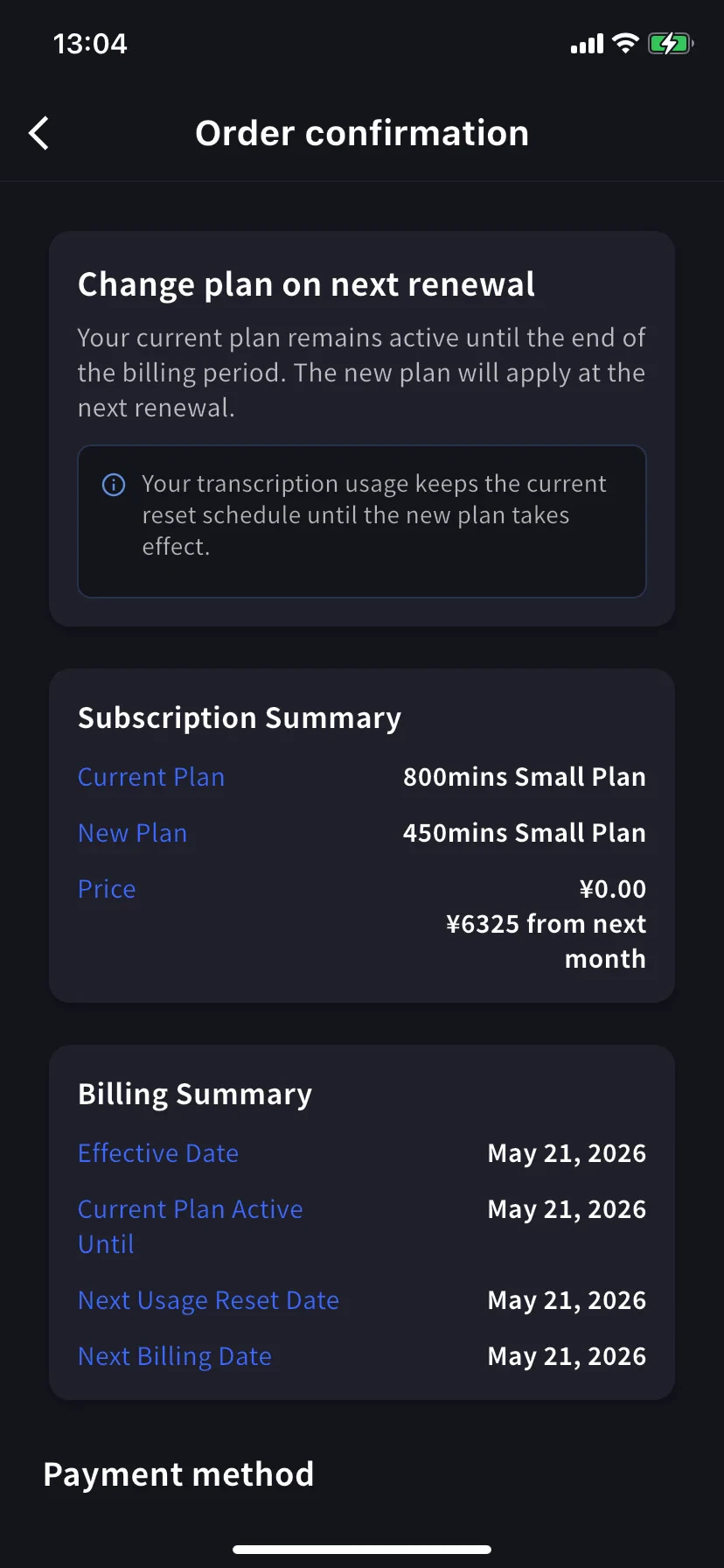
在較低階距上點 **Change Plan**。橫幅會提示目前方案會維持到帳單期間結束。今日費用為 **¥0 / \$0**。確認流程與升級相同。
### 3. Enterprise / 書面 / 電子合約客戶
請檢視 [Contract Procedures](/zh-tw/contract-procedures),並透過[此表單](https://forms.gle/6AUho7oj3zBr79e96)提交以下資訊。
1. 公司名稱 2. 公司地址 3. 公司電話 4. 聯絡人 5. 合約日期 6. 目前方案與希望方案
## 取消 / 試用結束
### 1. PC
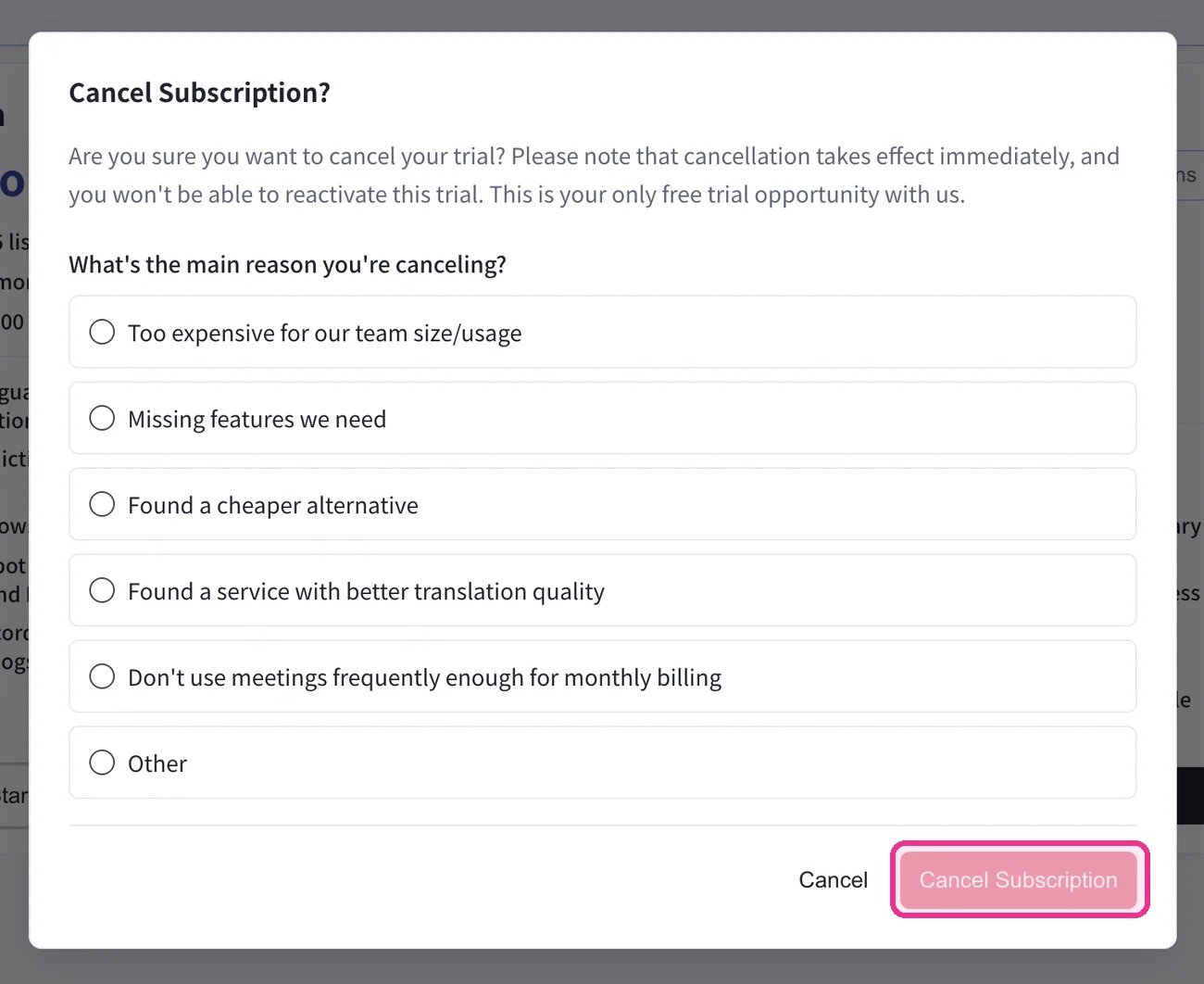
頂部導覽 → **Billing** → **Subscriptions** → 在 **Free Plan** 下按一下 **Start Free Plan**。在 **Cancel Subscription?** 對話方塊中選擇原因,然後按一下 **Cancel Subscription**。
**升級按比例計費。** 升級當天會開始新的帳單週期;舊方案未使用部分會折抵新價格,用量會重置。越接近期間後段升級,折抵越少;在續約日升級最便宜。**降級** 會在下一次續約時生效,續約日不變。
### 2. Mobile
App Store 政策: 必須用完全部 60 分鐘免費額度後,才會顯示升級和取消按鈕。請使用 60 分鐘,或從 PC 變更方案。
手機上的所有方案變更都透過 Billing hub 的 **Manage Plan** 完成。
側邊選單 → **User Settings** → **Billing** → **Manage Plan**,或點 Current Plan 卡片上的 **Manage Plan**。頂部可切換 **Monthly** / **Yearly**。高於目前的級距顯示 **Upgrade Plan**,低於目前的級距顯示 **Change Plan**。
在較高階距上點 **Upgrade Plan**。橫幅會提示工作區會立即切換到新方案,今日扣款為按比例計算的差額。選擇現有卡片或點 **+ Add new card**,勾選 Terms / Privacy,然後點 **Confirm Plan Change**。
**Free Plan 升級到 Premium** 會先開始 1 週試用,試用結束前不扣款。
在較低階距上點 **Change Plan**。橫幅會提示目前方案會維持到帳單期間結束。今日費用為 **¥0 / \$0**。確認流程與升級相同。
### 3. Enterprise / 書面 / 電子合約客戶
請檢視 [Contract Procedures](/zh-tw/contract-procedures),並透過[此表單](https://forms.gle/6AUho7oj3zBr79e96)提交以下資訊。
1. 公司名稱 2. 公司地址 3. 公司電話 4. 聯絡人 5. 合約日期 6. 目前方案與希望方案
## 取消 / 試用結束
### 1. PC
頂部導覽 → **Billing** → **Subscriptions** → 在 **Free Plan** 下按一下 **Start Free Plan**。在 **Cancel Subscription?** 對話方塊中選擇原因,然後按一下 **Cancel Subscription**。
 在 **Billing History** 分頁中確認取消——會出現一筆 **Succeeded to cancel Trial** 記錄(或對應的取消方案記錄)。
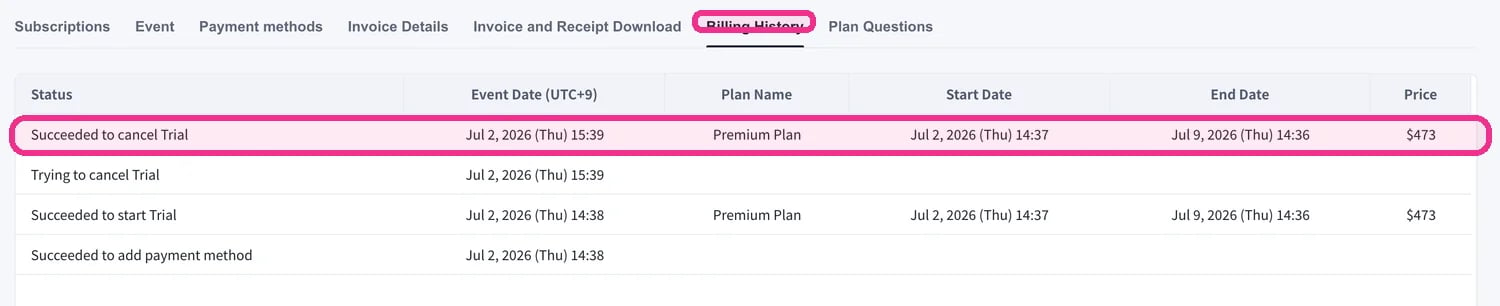 請務必確認 **Billing History** 中出現取消記錄。如果略過此步驟,取消會被視為未完成,且無法退款。
### 2. Mobile
手機上請在 Billing hub 的 **Manage Plan** 中取消。期間結束前可隨時復原。
##### 取消
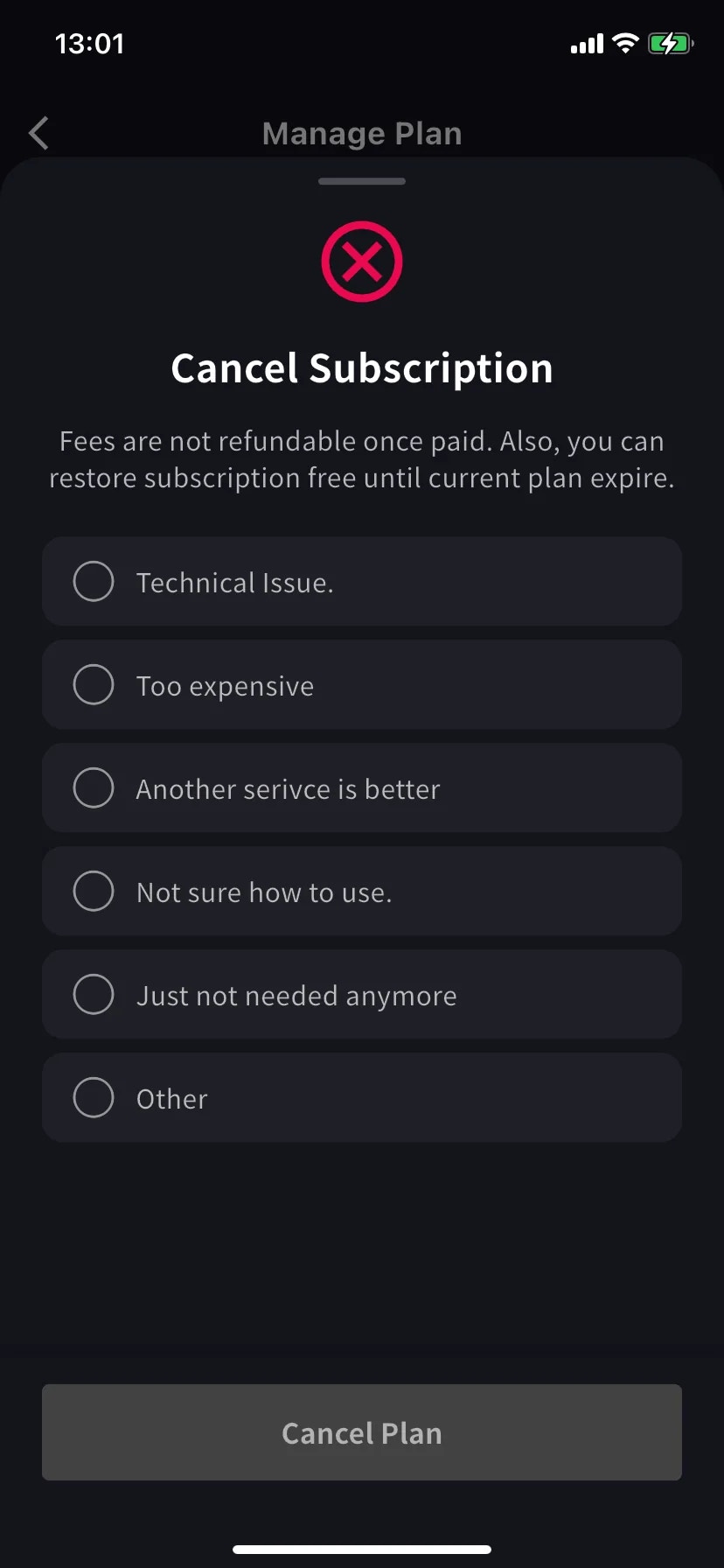
會滑出必填原因清單。選擇原因前,Cancel Plan 按鈕會維持灰色。
選擇 **Other** 時必須輸入至少 15 個字元。
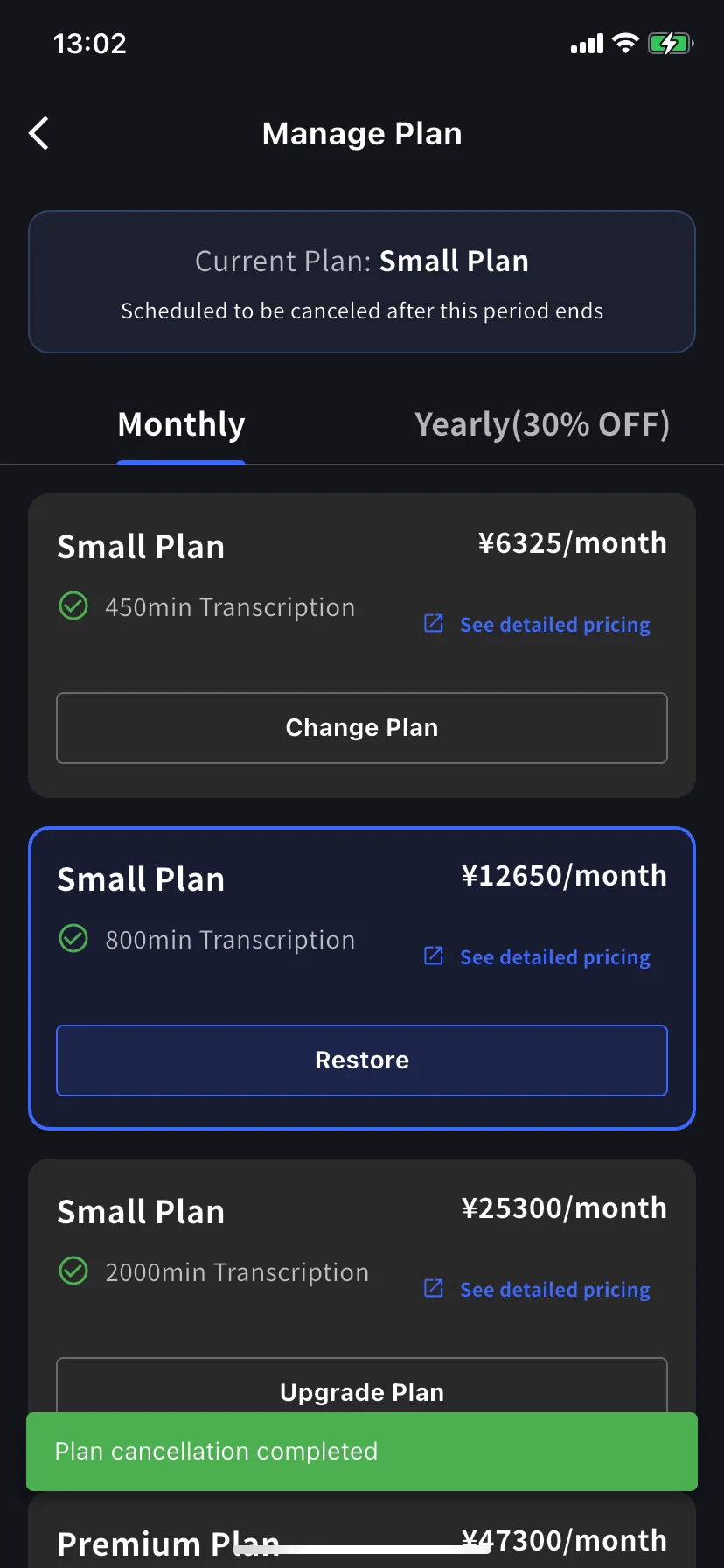
Current plan 橫幅會變為 **Scheduled to be canceled after this period ends**;較低階距會顯示 **Restore** 按鈕。續約日前你仍可使用目前方案和分鐘數。
##### 復原自動續約
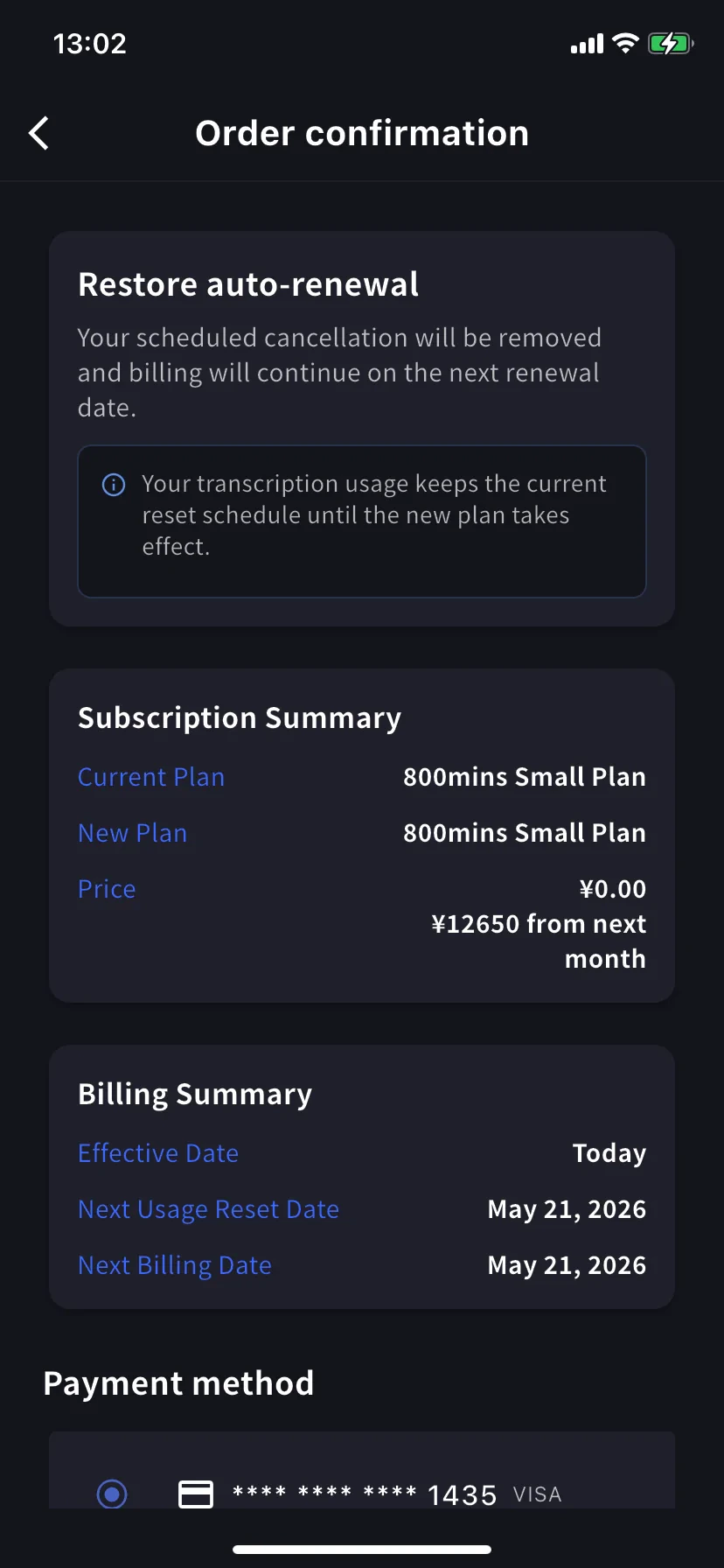
在目前級距上點 **Restore**。訂單確認會顯示預定取消將被移除,並會在下一次續約日繼續扣款。今日費用為 \$0。點 **Confirm Plan Change** 後會回到正常續約訂閱。用量重置時間不變。
### 3. Enterprise / 書面 / 電子合約客戶
合約制帳單客戶不能使用 Subscriptions 分頁。請透過[此表單](https://forms.gle/6AUho7oj3zBr79e96)提交以下資訊。
1. 公司名稱 2. 公司地址 3. 公司電話 4. 聯絡人 5. 合約日期 6. 合約方案型別 7. 取消原因
## 資料保留提醒
Small 和 Premium Plan 使用者超過保留期限的資料會**不另行通知即刪除**。
* **音訊資料** — 最多保留 **3 個月**
* **影片錄製** — **1 個月**後刪除;如需更久保留,請提前下載
* **長期保留** — 付費客戶可申請保留到合約續約日;請聯絡我們討論
請務必確認 **Billing History** 中出現取消記錄。如果略過此步驟,取消會被視為未完成,且無法退款。
### 2. Mobile
手機上請在 Billing hub 的 **Manage Plan** 中取消。期間結束前可隨時復原。
##### 取消
會滑出必填原因清單。選擇原因前,Cancel Plan 按鈕會維持灰色。
選擇 **Other** 時必須輸入至少 15 個字元。
Current plan 橫幅會變為 **Scheduled to be canceled after this period ends**;較低階距會顯示 **Restore** 按鈕。續約日前你仍可使用目前方案和分鐘數。
##### 復原自動續約
在目前級距上點 **Restore**。訂單確認會顯示預定取消將被移除,並會在下一次續約日繼續扣款。今日費用為 \$0。點 **Confirm Plan Change** 後會回到正常續約訂閱。用量重置時間不變。
### 3. Enterprise / 書面 / 電子合約客戶
合約制帳單客戶不能使用 Subscriptions 分頁。請透過[此表單](https://forms.gle/6AUho7oj3zBr79e96)提交以下資訊。
1. 公司名稱 2. 公司地址 3. 公司電話 4. 聯絡人 5. 合約日期 6. 合約方案型別 7. 取消原因
## 資料保留提醒
Small 和 Premium Plan 使用者超過保留期限的資料會**不另行通知即刪除**。
* **音訊資料** — 最多保留 **3 個月**
* **影片錄製** — **1 個月**後刪除;如需更久保留,請提前下載
* **長期保留** — 付費客戶可申請保留到合約續約日;請聯絡我們討論