> ## Documentation Index
> Fetch the complete documentation index at: https://manual.voiceping.net/llms.txt
> Use this file to discover all available pages before exploring further.

# 語音轉文字/翻譯文字的即時編輯

> 即時修正語音識別和翻譯錯誤的方法

export const ContactZhTW = () => <>
    <Tip>
      如有任何問題，請透過<a href="https://forms.gle/6AUho7oj3zBr79e96">此表單</a>與我們聯繫。
    </Tip>

    ## 官方連結

    <CardGroup cols={2}>
      <Card title="官方網站" icon="globe" href="https://voiceping.net/en/">
        造訪官方網站
      </Card>
      <Card title="X (Twitter)" icon="x-twitter" href="https://x.com/VoicePingMedia">
        在X上追蹤我們
      </Card>
      <Card title="Facebook" icon="facebook" href="https://www.facebook.com/voiceping.inc">
        在Facebook上按讚
      </Card>
      <Card title="LinkedIn" icon="linkedin" href="https://www.linkedin.com/company/28684130/">
        在LinkedIn上連結
      </Card>
    </CardGroup>
  </>;

當演講者說錯話，或語音識別/翻譯出現錯誤時，**可以立即編輯翻譯，修正內容將即時反映到所有訪客翻譯頻道。**

## 使用方法

1. **將滑鼠懸停在要編輯的句子上。**
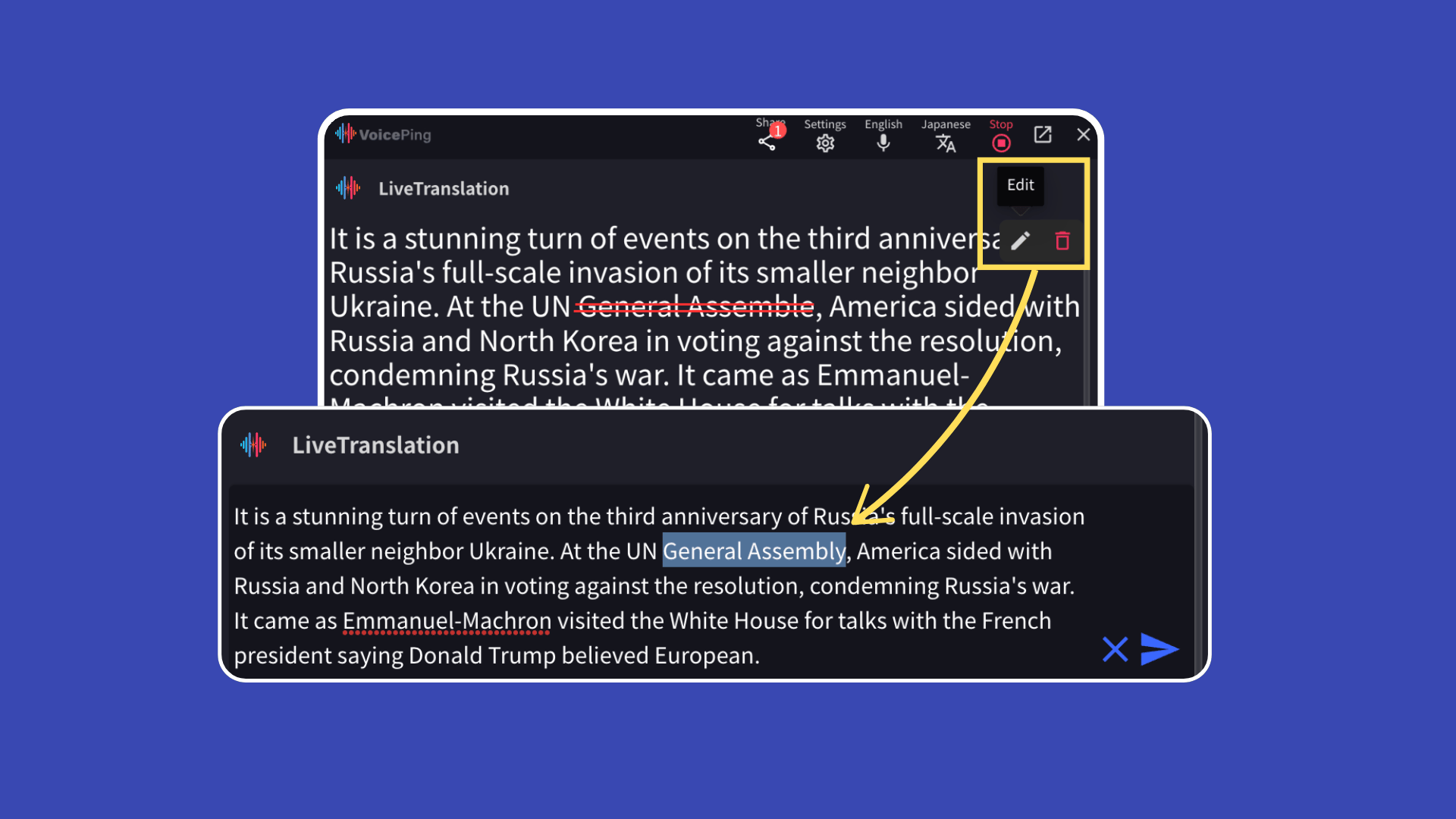
<Frame>
  <img src="https://mintcdn.com/test-cf63e467/rZB_5iopEvtb33Qp/ja/images/realtime-edit/01-edit-hover.png?fit=max&auto=format&n=rZB_5iopEvtb33Qp&q=85&s=953f967d2452391e05227918cfb2b74c" alt="將滑鼠懸停在要編輯的句子上" width="1920" height="1080" data-path="ja/images/realtime-edit/01-edit-hover.png" />
</Frame>

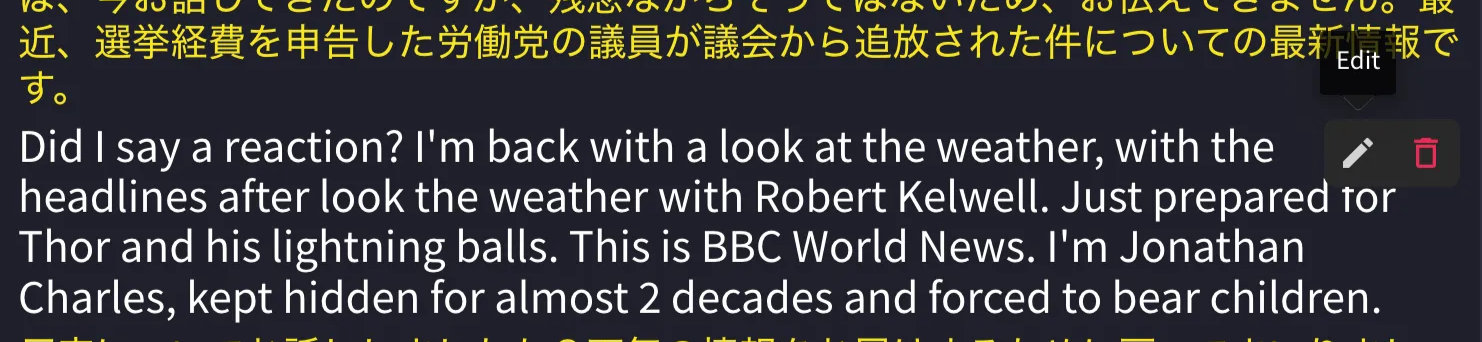
2. **點選「編輯」按鈕。**

<Frame>
  <img src="https://mintcdn.com/test-cf63e467/UDonPy9U4TF-4rTr/ja/images/realtime-edit/02-edit-button.png?fit=max&auto=format&n=UDonPy9U4TF-4rTr&q=85&s=30c1ab1e89bec4e886a921f2bf36ac64" alt="點選編輯按鈕" width="1482" height="342" data-path="ja/images/realtime-edit/02-edit-button.png" />
</Frame>

3. **修正後，點選右側的藍色箭頭按鈕儲存。**

<Frame>
  <img src="https://mintcdn.com/test-cf63e467/UDonPy9U4TF-4rTr/ja/images/realtime-edit/03-save-edit.png?fit=max&auto=format&n=UDonPy9U4TF-4rTr&q=85&s=efb9ae13672b7899789379c5025b8265" alt="儲存修正內容" width="1262" height="168" data-path="ja/images/realtime-edit/03-save-edit.png" />
</Frame>

### 即時反映給訪客

編輯的內容將即時反映給透過**QR碼或 URL** 檢視翻譯頻道的訪客。

<ContactZhTW />