> ## Documentation Index
> Fetch the complete documentation index at: https://manual.voiceping.net/llms.txt
> Use this file to discover all available pages before exploring further.

# 下班/退出应用程序

> VoicePing应用程序的完全退出方法（Windows/Mac）

export const FeedbackZh = () => <>
    <Tip>
      对该功能有想法或需求？请通过 <a href="/zh/product-feedback">Product Feedback</a> 发送给团队。
    </Tip>

    <h2>官方链接</h2>

    <CardGroup cols={2}>
      <Card title="官方网站" icon="globe" href="https://voiceping.net/en/">
        访问官方网站
      </Card>
      <Card title="X (Twitter)" icon="x-twitter" href="https://x.com/VoicePingMedia">
        在X上关注我们
      </Card>
      <Card title="Facebook" icon="facebook" href="https://www.facebook.com/voiceping.inc">
        在Facebook上点赞
      </Card>
      <Card title="LinkedIn" icon="linkedin" href="https://www.linkedin.com/company/28684130/">
        在LinkedIn上连接
      </Card>
    </CardGroup>
  </>;

VoicePing应用程序设计为让成员能够在虚拟空间中"常驻"，因此除非完全退出应用程序，否则会在后台持续运行。

## 退出当前账号

如果要退出当前 VoicePing 账号或切换账号，请使用 “Sign Out”。退出账号不会完全关闭桌面应用程序。

1. 点击左下角的个人资料菜单。
2. 点击 “Sign Out”。
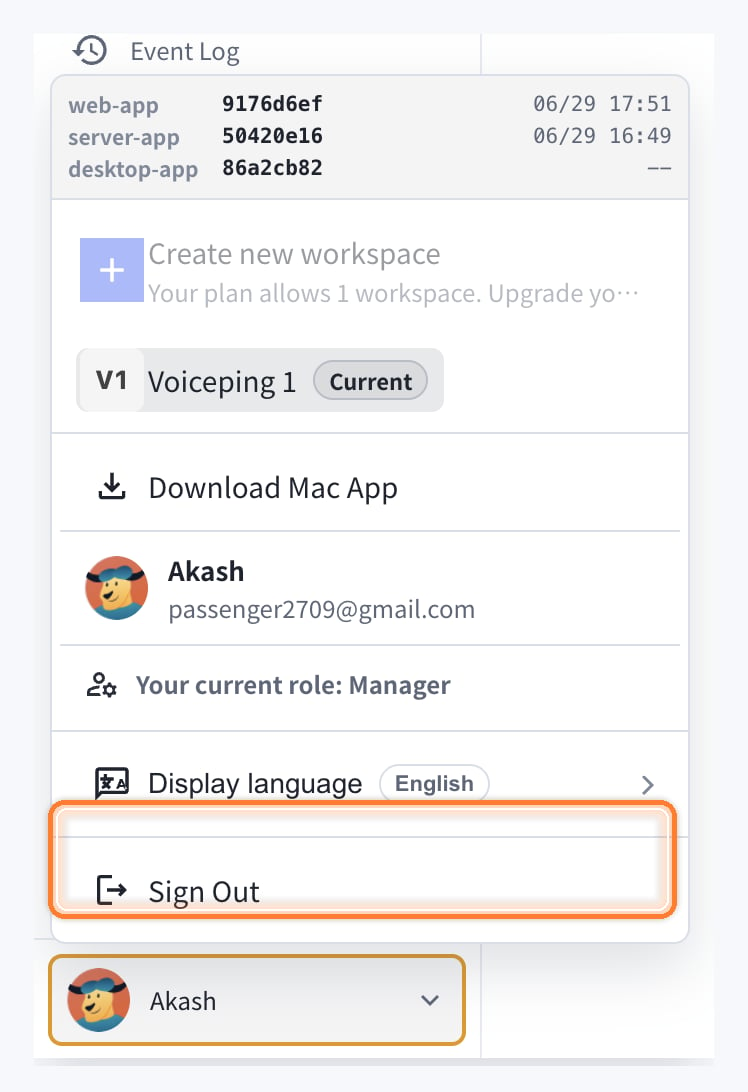
<Frame>
  <img src="https://mintcdn.com/test-cf63e467/1_BQkW2BilGmh1Db/en/images/app-logout/sign-out-menu-highlighted.png?fit=max&auto=format&n=1_BQkW2BilGmh1Db&q=85&s=95748d7f0f7226b0e4778eb43f95ea39" alt="高亮显示的 Sign Out 菜单" width="748" height="1092" data-path="en/images/app-logout/sign-out-menu-highlighted.png" />
</Frame>

## Windows OS的情况

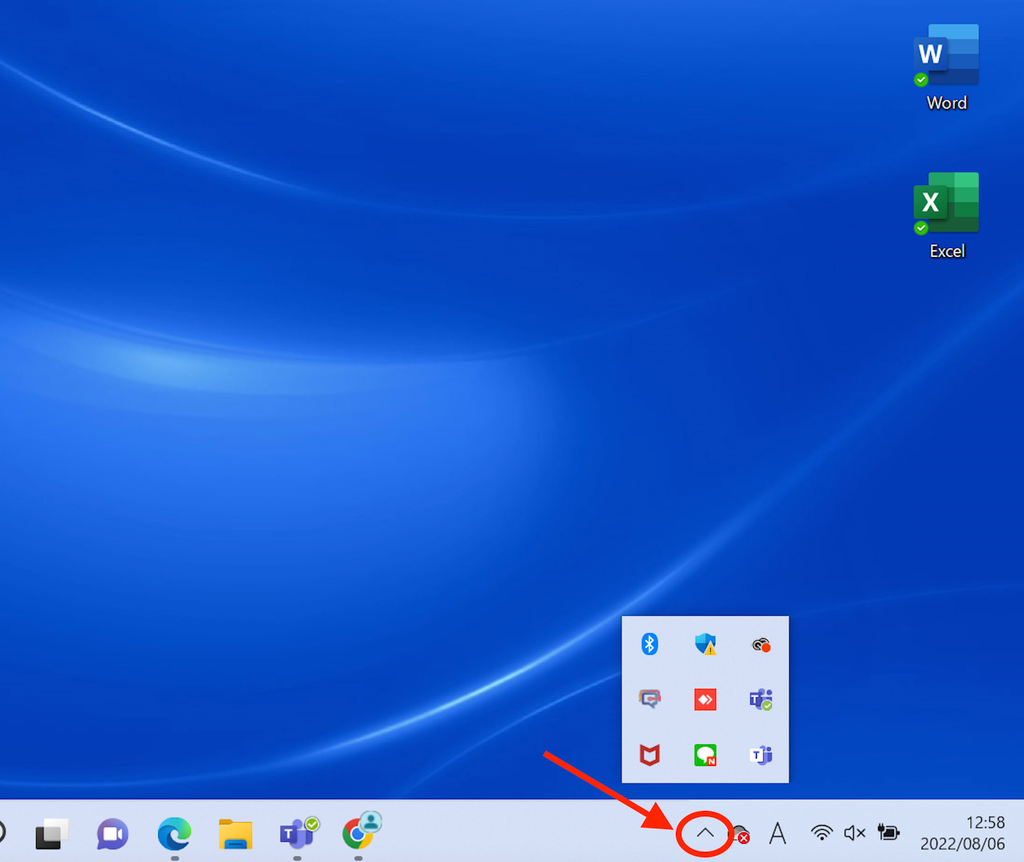
### 步骤1：打开隐藏的指示器

左键点击菜单栏右下角隐藏的指示器

<Frame>
  <img src="https://mintcdn.com/test-cf63e467/4vHpBWNcRcAS0vJ1/ja/images/app-logout/01-windows-indicator.png?fit=max&auto=format&n=4vHpBWNcRcAS0vJ1&q=85&s=45ddbc053e2f5f25bb59ef833bc2519c" alt="Windows指示器" width="1024" height="862" data-path="ja/images/app-logout/01-windows-indicator.png" />
</Frame>

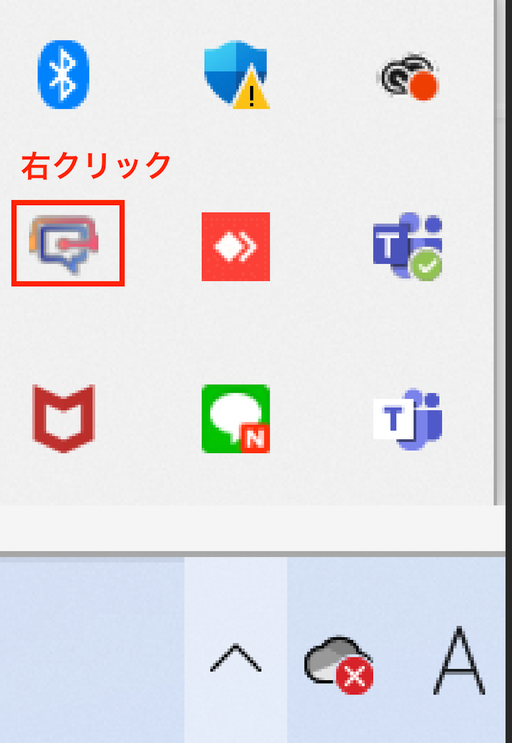
### 步骤2：右键点击VoicePing应用程序

右键点击VoicePing应用程序

<Frame>
  <img src="https://mintcdn.com/test-cf63e467/4vHpBWNcRcAS0vJ1/ja/images/app-logout/02-right-click-menu.png?fit=max&auto=format&n=4vHpBWNcRcAS0vJ1&q=85&s=9a2f7b07483f8efe3e62752d9340e961" alt="VoicePing右键菜单" width="512" height="743" data-path="ja/images/app-logout/02-right-click-menu.png" />
</Frame>

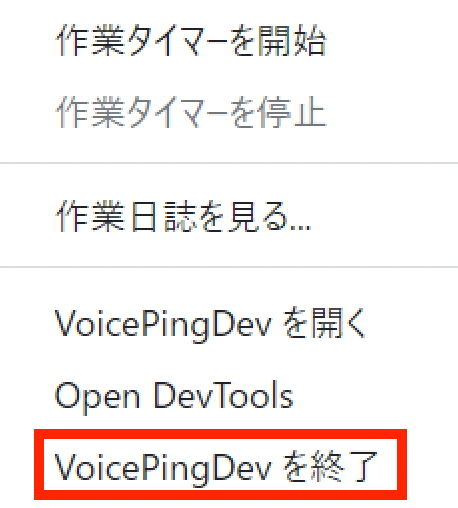
### 步骤3：退出应用程序

点击"退出VoicePing"

<Frame>
  <img src="https://mintcdn.com/test-cf63e467/4vHpBWNcRcAS0vJ1/ja/images/app-logout/03-quit-button.png?fit=max&auto=format&n=4vHpBWNcRcAS0vJ1&q=85&s=6f8f3400c1a53b5adeda6ab475326bf8" alt="退出按钮" width="458" height="508" data-path="ja/images/app-logout/03-quit-button.png" />
</Frame>

## Mac OS的情况

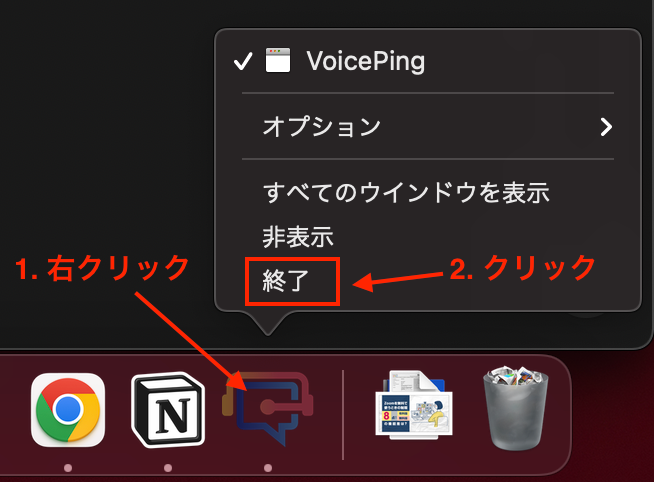
### 步骤1：右键点击应用程序

在右下角显示当前运行应用程序的栏中，右键点击VoicePing应用程序

### 步骤2：点击退出

点击"退出"

<Frame>
  <img src="https://mintcdn.com/test-cf63e467/4vHpBWNcRcAS0vJ1/ja/images/app-logout/04-mac-quit-screen.png?fit=max&auto=format&n=4vHpBWNcRcAS0vJ1&q=85&s=5792e763b707b2bfdfacb685eeced266" alt="Mac退出画面" width="654" height="482" data-path="ja/images/app-logout/04-mac-quit-screen.png" />
</Frame>

<FeedbackZh />