> ## Documentation Index
> Fetch the complete documentation index at: https://manual.voiceping.net/llms.txt
> Use this file to discover all available pages before exploring further.

# 工作流 — 挖出埋藏在商机中的瓶颈

> 在整个销售管线中发现反复出现的阻碍、归属空缺和安全延误 — 并转化为带优先级的行动计划。使用 VoicePing MCP Access。

export const FeedbackZh = () => <>
    <Tip>
      对该功能有想法或需求？请通过 <a href="/zh/product-feedback">Product Feedback</a> 发送给团队。
    </Tip>

    <h2>官方链接</h2>

    <CardGroup cols={2}>
      <Card title="官方网站" icon="globe" href="https://voiceping.net/en/">
        访问官方网站
      </Card>
      <Card title="X (Twitter)" icon="x-twitter" href="https://x.com/VoicePingMedia">
        在X上关注我们
      </Card>
      <Card title="Facebook" icon="facebook" href="https://www.facebook.com/voiceping.inc">
        在Facebook上点赞
      </Card>
      <Card title="LinkedIn" icon="linkedin" href="https://www.linkedin.com/company/28684130/">
        在LinkedIn上连接
      </Card>
    </CardGroup>
  </>;

## 挖出埋藏在商机中的瓶颈

**情境。** 商机在变慢。您并不确切知道为什么 ― 问题从来不是单一的。是安全问题、客户侧归属不清、试点停滞、提案返工交织在一起。您需要看到的是模式，而不是一个个孤立的事件。

本工作流假设您已经启用了 [MCP Access](/zh/external-access/mcp) 并连接了 AI 客户端。

<Steps>
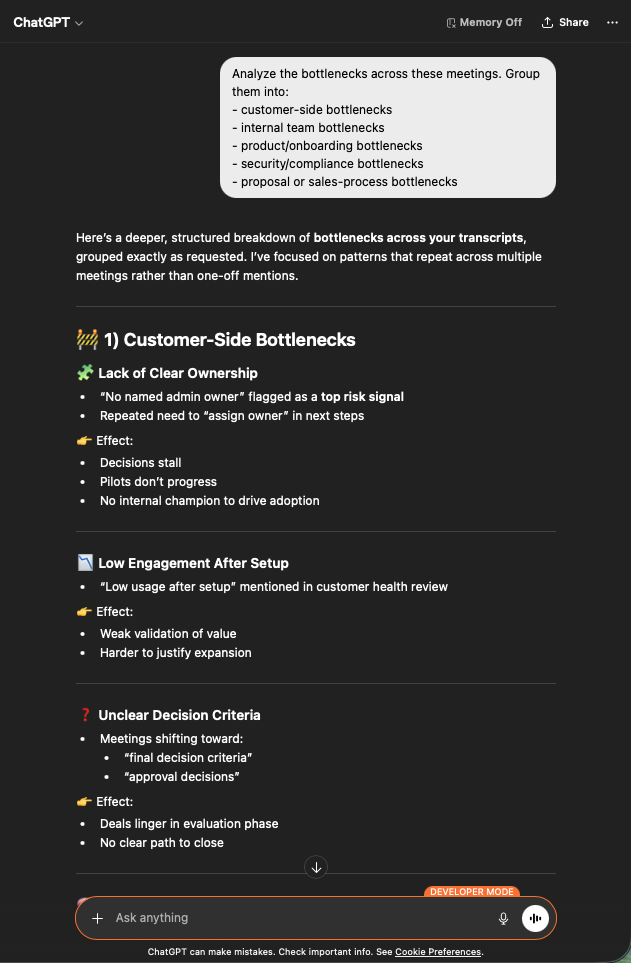
  <Step title="浮现所有瓶颈信号">
    ```text theme={null}
    Search my VoicePing transcripts for bottlenecks, blockers, security delay,
    unclear owner, proposal, pilot, and expansion readiness.
    ```

    AI 会返回跨会议的综合分析：运营摩擦、安全阻碍、延误和归属空缺的关键模式 ― 每一项都标注了来源会议。

    <div style={{maxWidth: "600px", margin: "0 auto"}}>
      <Frame>
        <img src="https://mintcdn.com/test-cf63e467/z13MfE0CikV5b-4X/en/images/external_access/Founding%20bottlenecks%201.png?fit=max&auto=format&n=z13MfE0CikV5b-4X&q=85&s=74fbefec3529689b40ecac2ebf547757" alt="ChatGPT surfacing bottleneck patterns across VoicePing transcripts — operational friction, security blockers, ownership gaps" width="631" height="963" data-path="en/images/external_access/Founding bottlenecks 1.png" />
      </Frame>
    </div>
  </Step>

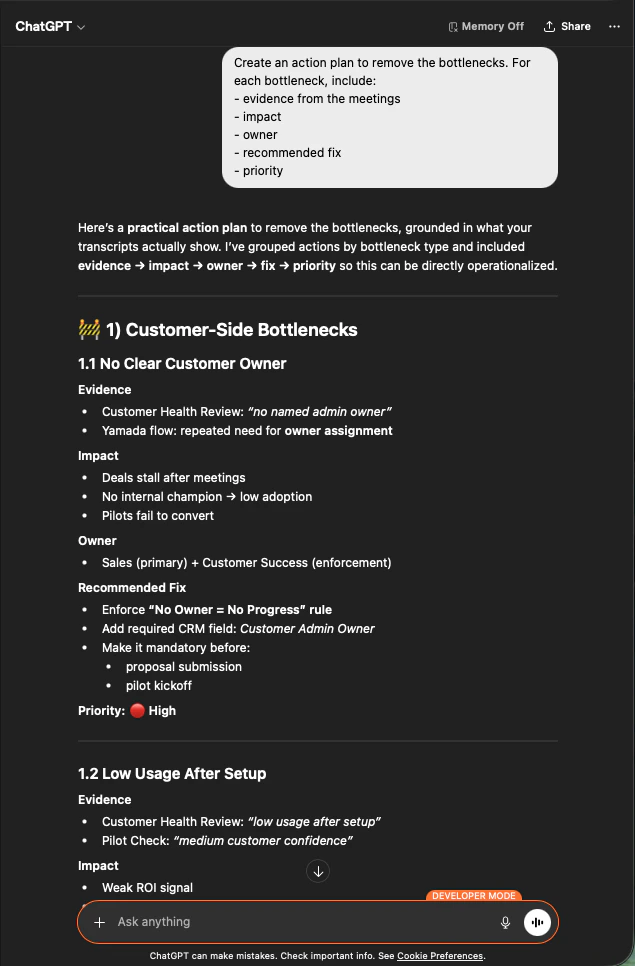
  <Step title="按可执行的维度分组">
    ```text theme={null}
    Analyze the bottlenecks across these meetings. Group them into:
    - customer-side bottlenecks
    - internal team bottlenecks
    - product / onboarding bottlenecks
    - security / compliance bottlenecks
    - proposal or sales-process bottlenecks
    ```

    现在您有了清晰的分类桶。客户侧问题（归属不清、参与度低、决策标准模糊）、内部、产品、安全、销售流程 ― 每一类都有跨会议的重复证据。

    <div style={{maxWidth: "600px", margin: "0 auto"}}>
      <Frame>
        <img src="https://mintcdn.com/test-cf63e467/z13MfE0CikV5b-4X/en/images/external_access/Founding%20bottlenecks%202.png?fit=max&auto=format&n=z13MfE0CikV5b-4X&q=85&s=bf47786ffd6d4d4d58b9e8238489e5aa" alt="ChatGPT grouping bottlenecks across customer-side, internal, product, security, and sales-process categories" width="631" height="963" data-path="en/images/external_access/Founding bottlenecks 2.png" />
      </Frame>
    </div>
  </Step>

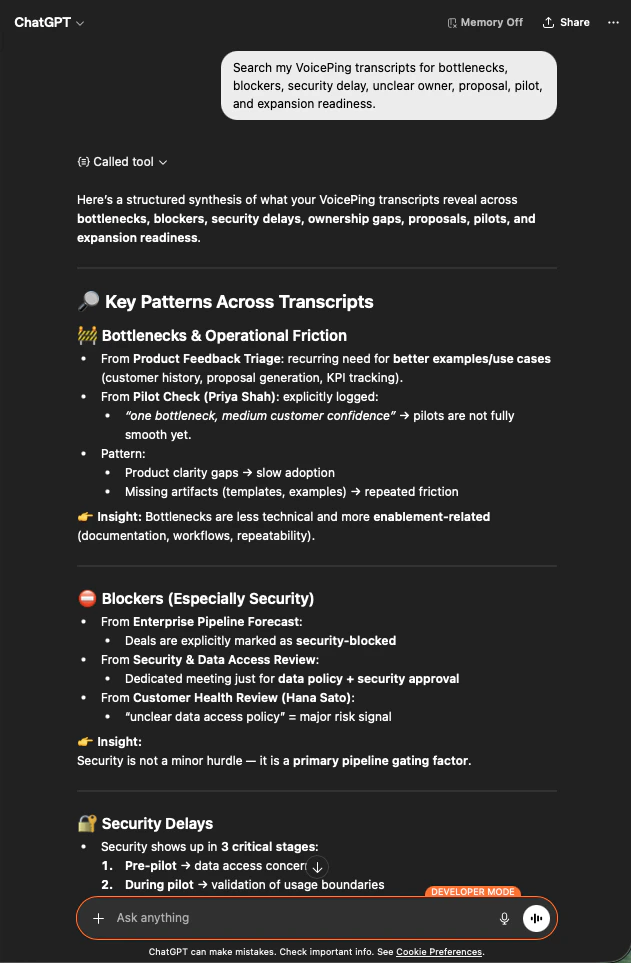
  <Step title="为每个瓶颈制定行动计划">
    ```text theme={null}
    Create an action plan to remove the bottlenecks. For each bottleneck, include:
    - evidence from the meetings
    - impact
    - owner
    - recommended fix
    - priority
    ```

    每一项现在都有证据、影响、负责人、建议修复方案和优先级。这是您可以直接带到管理层会议上的文件。

    <div style={{maxWidth: "600px", margin: "0 auto"}}>
      <Frame>
        <img src="https://mintcdn.com/test-cf63e467/z13MfE0CikV5b-4X/en/images/external_access/Founding%20bottlenecks%203.png?fit=max&auto=format&n=z13MfE0CikV5b-4X&q=85&s=0d75e976e991f2c158cd8057aafef71a" alt="ChatGPT producing a prioritized action plan per bottleneck with evidence, impact, owner, recommended fix, and priority" width="635" height="966" data-path="en/images/external_access/Founding bottlenecks 3.png" />
      </Frame>
    </div>
  </Step>
</Steps>

**为什么是创始人级别的杠杆。** 您不再争论是哪一个商机卡住了，而是开始修复那些拖慢 *所有* 商机的共性模式。

***

## 下一步

<CardGroup cols={2}>
  <Card title="外部访问概览" icon="arrow-left" href="/zh/external-access">
    返回作用域、生命周期控制和事件日志总览。
  </Card>

  <Card title="如何启用 MCP Access" icon="plug" href="/zh/external-access/mcp">
    Claude、ChatGPT、Codex、Claude Code、Gemini CLI 的设置指南。
  </Card>
</CardGroup>

<FeedbackZh />