> ## Documentation Index
> Fetch the complete documentation index at: https://manual.voiceping.net/llms.txt
> Use this file to discover all available pages before exploring further.
# 发票、收据与账单活动
> 在 PC 或手机应用中下载发票 PDF 和收据、更新账单抬头信息,并审计所有订阅事件。
export const ContactZh = () => <>
如有任何问题,请通过此表单与我们联系。
官方链接
访问官方网站
在X上关注我们
在Facebook上点赞
在LinkedIn上连接
;
审计订阅所需的一切都在一个地方: PC 的 **Billing** 区域和手机的 **Billing** 中心。你可以下载发票 PDF、获取收据、编辑未来发票上显示的账单抬头字段,并查看完整事件日志。
## PC (Billing 选项卡)
打开顶部导航 → **Billing**。两个选项卡用于发票管理:
| 选项卡 | 用途 |
| -------------------------------- | ------------------------------------------------------------------------------------------------------- |
| **Invoice Details** | 显示在发票 PDF 上的账单名称、邮箱和电话号码 |
| **Invoice and Receipt Download** | 按月列出的扣款记录,可下载发票 PDF 和 收据 |
| **Billing History** | Full subscription, payment-method, trial, cancellation, restore, renewal, and payment-failure event log |
### Invoice Details
设置 Stripe 写入发票 PDF 的名称、邮箱和电话号码。
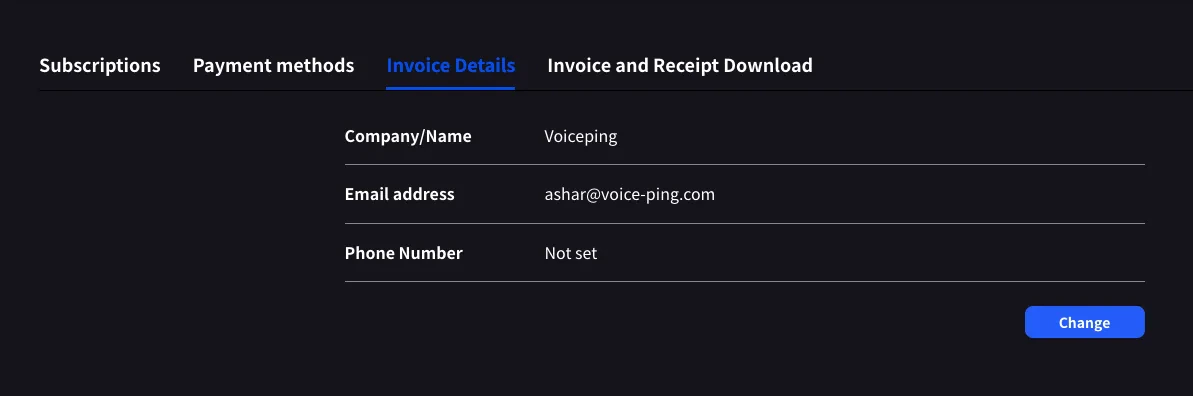 点击 **Change** 可编辑任意字段。
请在下一次账单日前更新。Stripe 会在生成发票的瞬间读取这些字段;之后编辑不会重写过去的 PDF。
### Invoice and Receipt Download
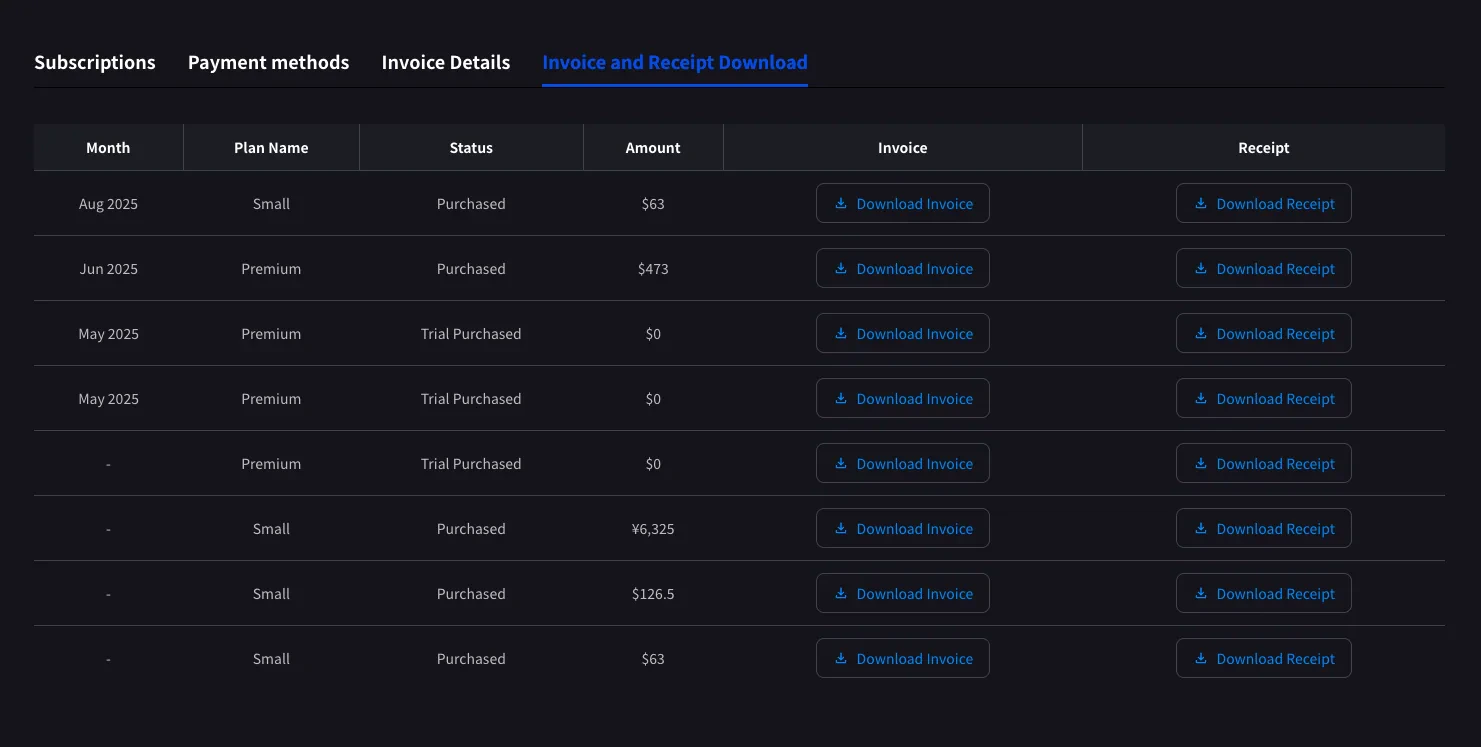
每笔已完成扣款都会显示为一行,包含月份、方案名称、状态、金额,以及发票 PDF 和 收据的下载按钮。
点击 **Change** 可编辑任意字段。
请在下一次账单日前更新。Stripe 会在生成发票的瞬间读取这些字段;之后编辑不会重写过去的 PDF。
### Invoice and Receipt Download
每笔已完成扣款都会显示为一行,包含月份、方案名称、状态、金额,以及发票 PDF 和 收据的下载按钮。
 | 按钮 | 打开内容 |
| -------------------- | -------------------------------------------------------------------------------------------------- |
| **Download Invoice** | 发票 PDF,可分享、保存或转发给财务 |
| **Download Receipt** | Receipt download or stored receipt link; if unavailable, the hosted receipt/invoice fallback opens |
这里仅显示已完成扣款。计划中的方案变更会在下一次账单日 Stripe 生成发票后显示。状态为 **Trial Purchased** 的 `$0` 行也会记录,便于追踪试用开始时间。
### Billing History
Use **Billing History** when you need the full audit trail, not only completed invoice rows.
| Column | What it shows |
| ------------------------- | -------------------------------------------------------------------------------------------------------------------------------------------------- |
| **Status** | Event result, such as purchase, upgrade, scheduled change, cancellation, restore, payment-method change, trial update, renewal, or payment failure |
| **Event Date (UTC+9)** | When the billing event was recorded |
| **Plan Name** | The plan involved in the event, including tiered Individual / Small minute labels when available |
| **Start Date / End Date** | The subscription period affected by the event |
| **Price** | The billed amount when the event has a displayable charge |
Use **Billing History** for "what changed and when?" Use **Invoice and Receipt Download** when finance needs the actual invoice PDF or receipt.
## Mobile (Billing 中心)
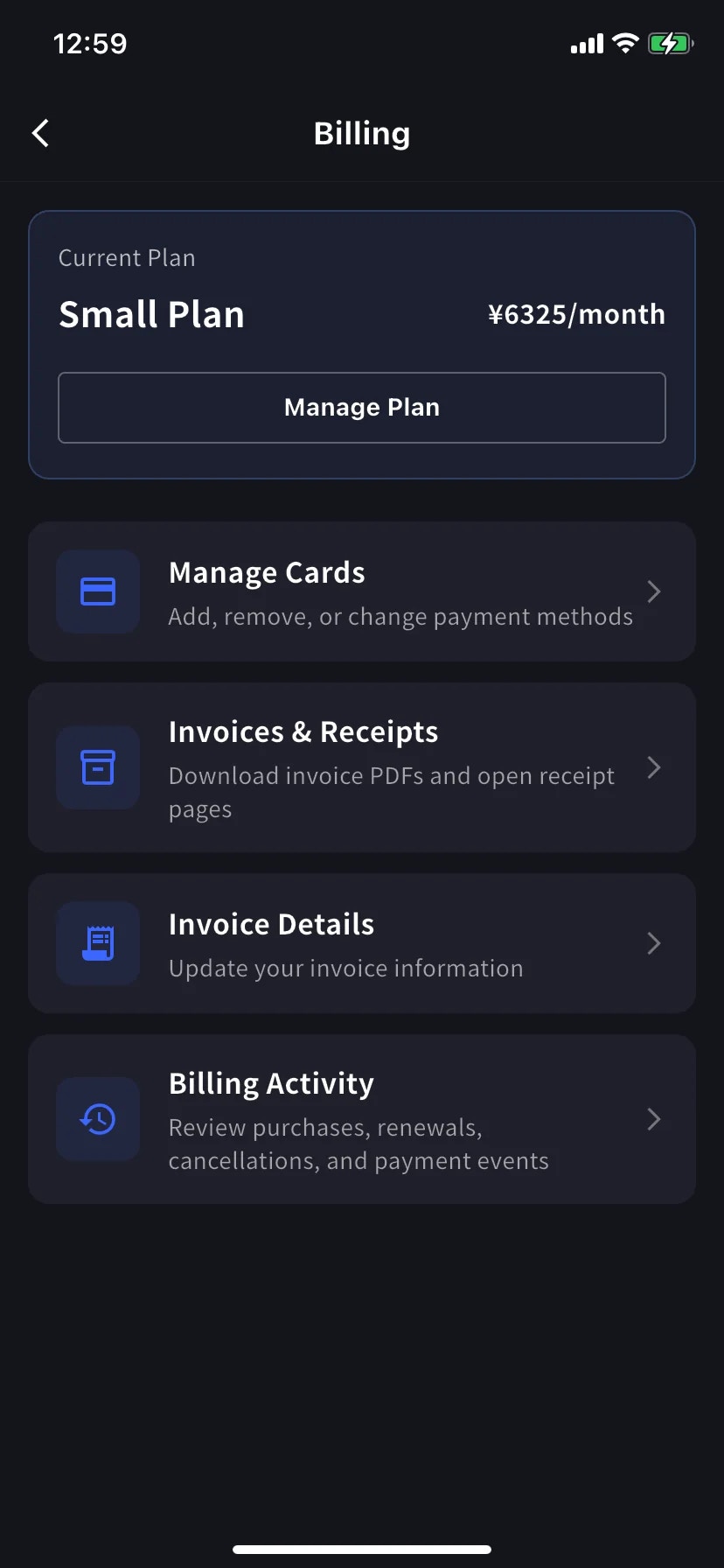
手机应用将同样的功能集中到 **Billing** 中心,并额外提供事件日志 (Billing Activity),记录每一次订阅操作。
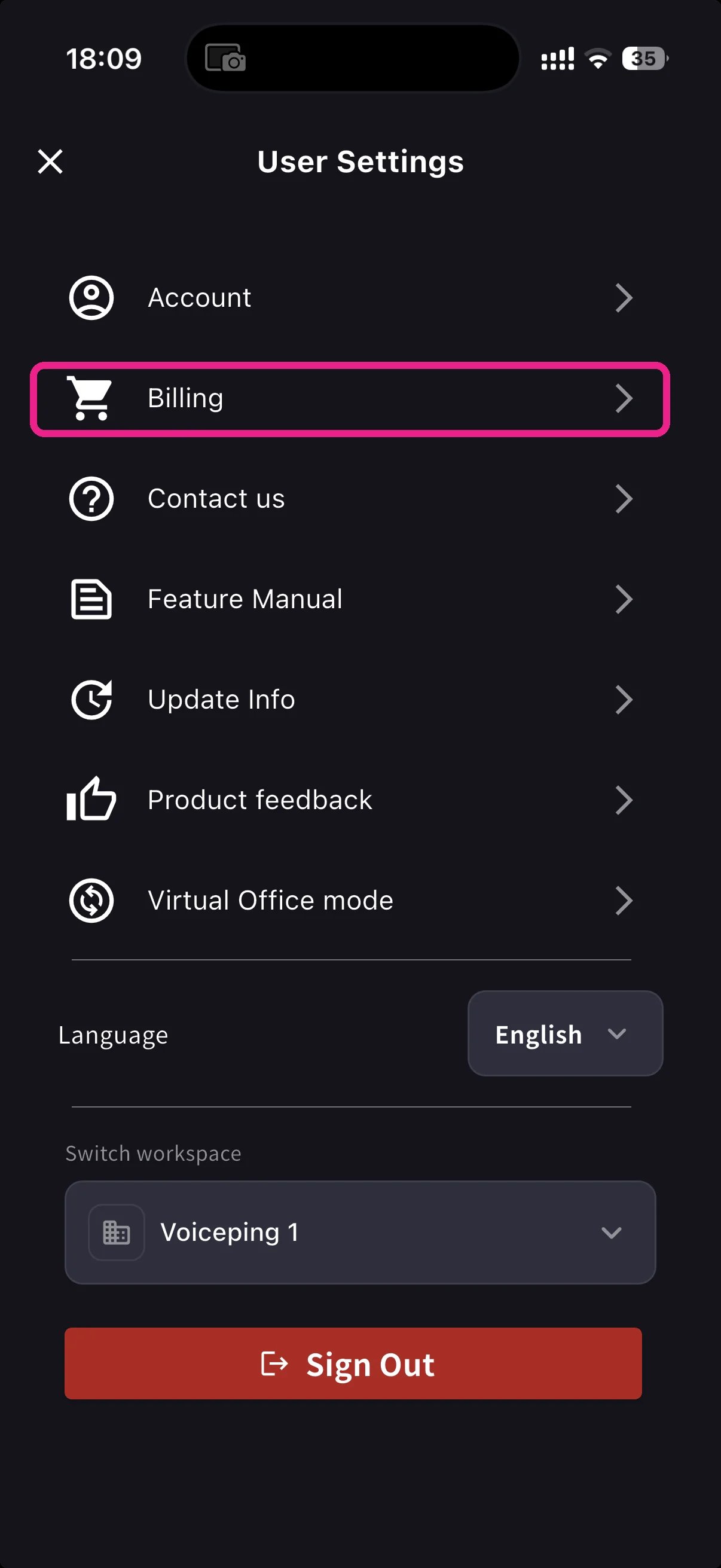
从首页打开侧边菜单,点击 **Billing** (购物车图标)。
Current Plan 卡片下方有三个与发票相关的快捷入口:
| Shortcut | 用途 |
| ----------------------- | ---------------------------------------------------------- |
| **Invoice Details** | 账单名称、邮箱、电话 |
| **Invoices & Receipts** | Invoice PDFs and receipt downloads or stored receipt links |
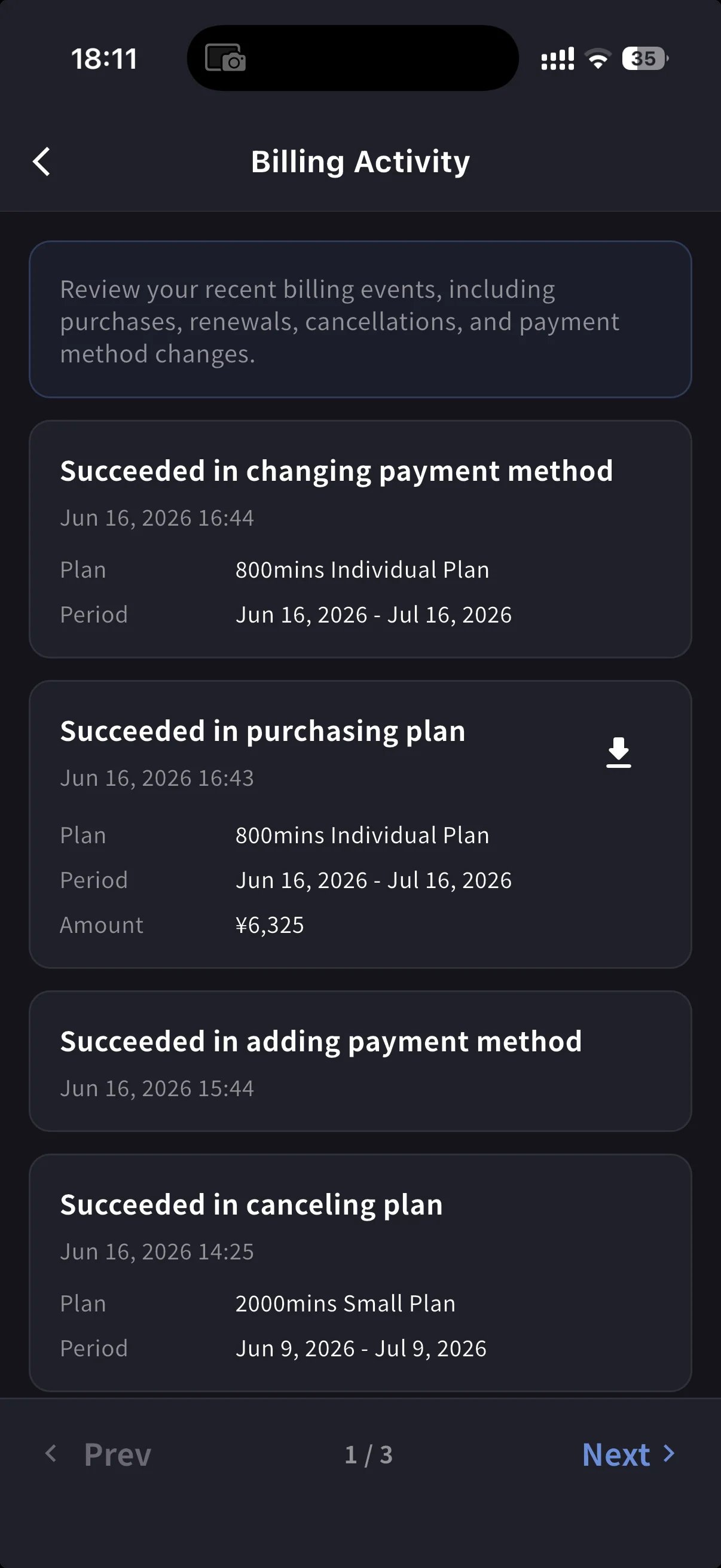
| **Billing Activity** | 每次订阅操作的事件日志,含时间戳和 IP |
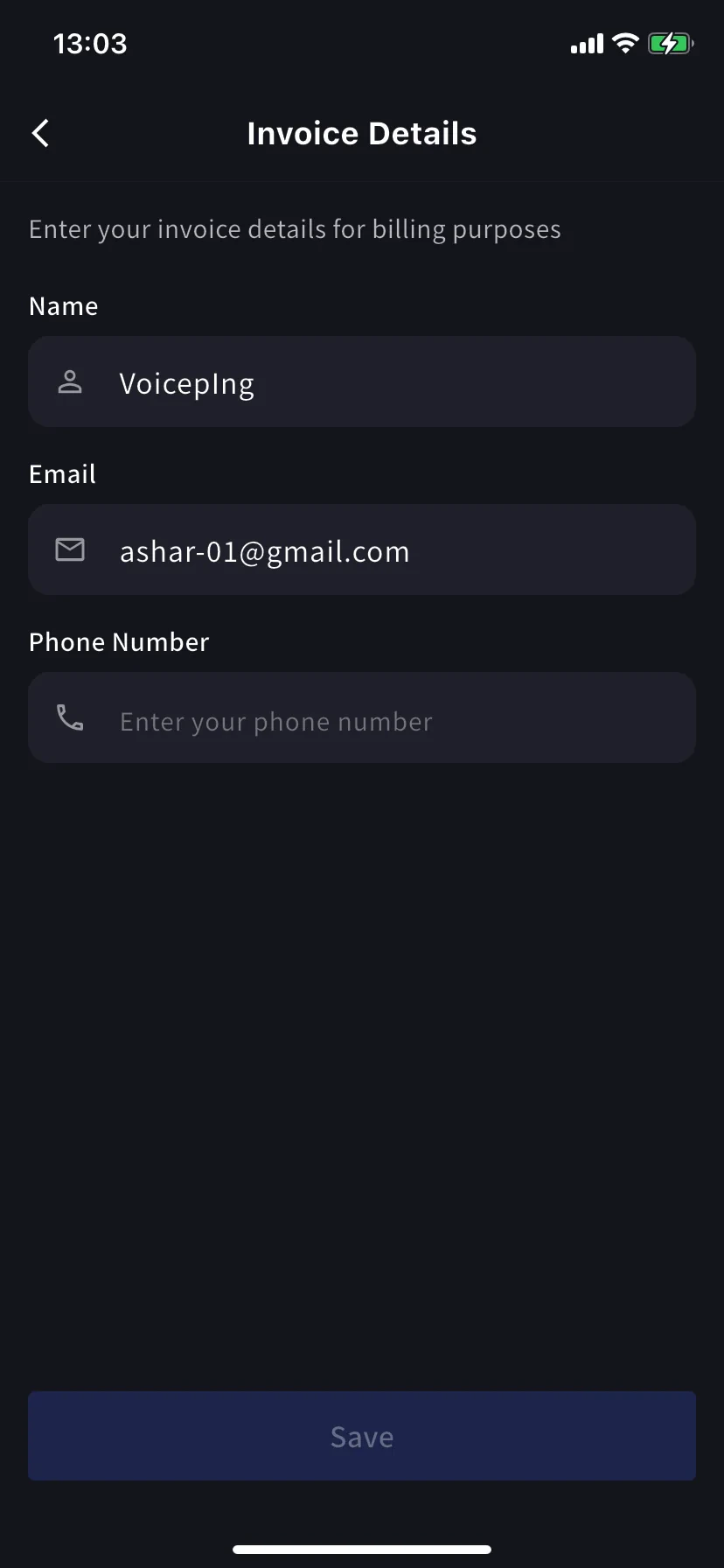
### Invoice Details (mobile)
与 PC 选项卡相同的字段,即发票 PDF 的名称、邮箱、电话号码。
请在下一次账单日前更新。Stripe 会在生成发票的瞬间读取这些字段;之后编辑不会重写过去的 PDF。
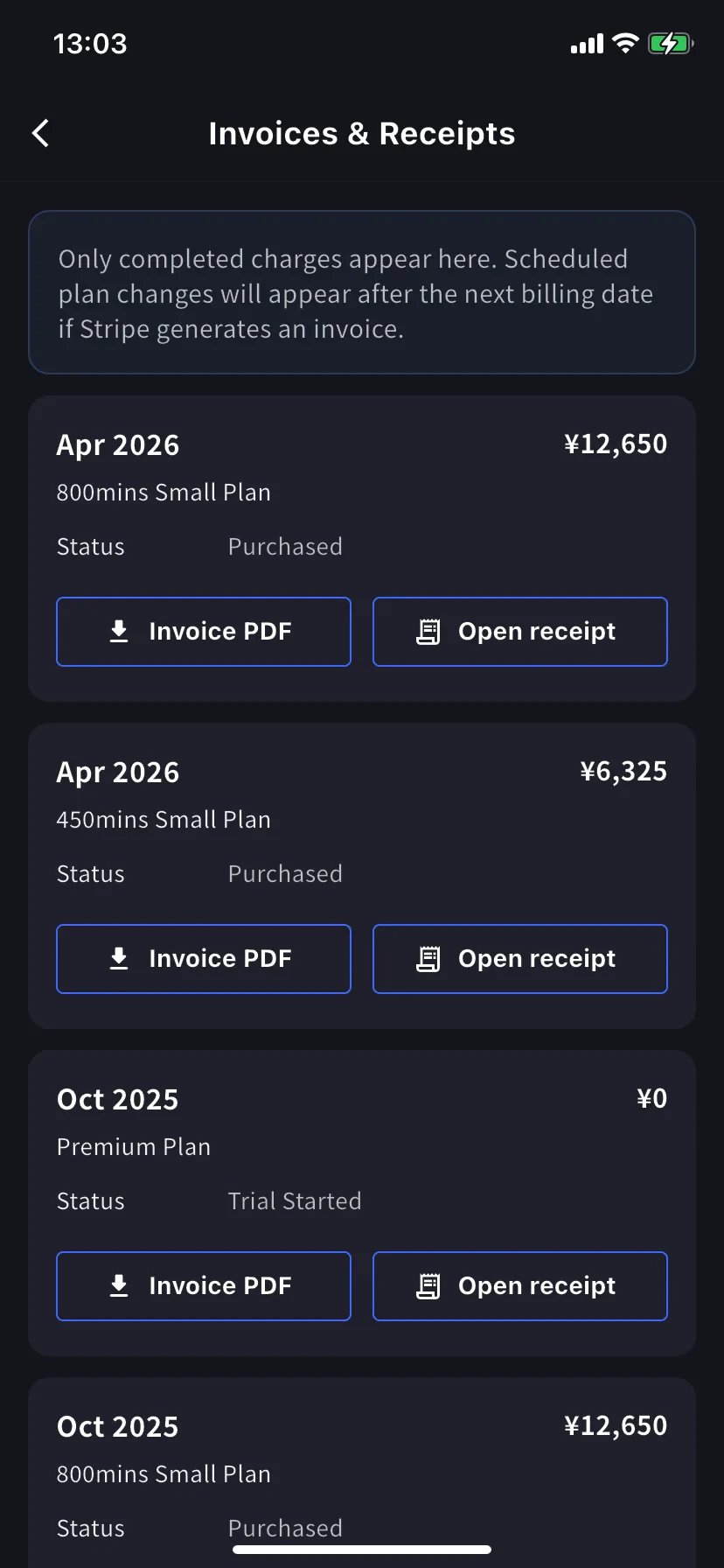
### Invoices & Receipts (mobile)
过去的扣款以月度卡片显示。每张卡有两个操作。
| 按钮 | 打开内容 |
| ---------------- | -------------------------------------------------------------------------------------------------- |
| **Invoice PDF** | 可下载的发票 PDF,可分享、保存或转发 |
| **Open receipt** | Receipt download or stored receipt link; if unavailable, the hosted receipt/invoice fallback opens |
### Billing Activity (mobile only)
事件日志会把工作区对订阅执行过的所有操作集中显示。
每一行包含:
* 事件名称 — 例如 *Succeeded in upgrading plan*、*Subscription will be canceled on the next payment date*、*Succeeded in restoring subscription*
* 时间戳 (`YYYY/MM/DD HH:MM`)
* 方案、账单周期和金额(如适用)
* **IP Address** — 用于审计 / 安全检查是谁从哪里操作
* 已完成扣款上的下载图标 — 获取该事件的发票 PDF
不用翻邮件,也能回答“这是什么时候发生的?”
On PC, use **Billing History** for the full event log and **Invoice and Receipt Download** for finance documents. On mobile, **Billing Activity** gives a compact activity log with timestamps, IP address, and invoice download actions where available.
## 提示
* **账单抬头变更只适用于未来发票。** 请在下一次账单日前更新 Invoice Details,避免需要重新开具。
* **收据与发票。** 发票是扣款文件。收据操作会优先打开已保存的收据或下载;如果不可用,则打开 Stripe 托管的备用页面。
* **手机与 PC 保持同步。** 一个界面上的编辑会立即显示在另一个界面上。
## Related
* [Plan Changes, Cancellation & Trial End](/zh/plan-changes) — 升级、降级、取消
* [Changing Your Payment Credit Card](/zh/credit-card-change) — card management (PC and mobile)
* [Pricing](/zh/pricing) — plan tiers and minute allowances
| 按钮 | 打开内容 |
| -------------------- | -------------------------------------------------------------------------------------------------- |
| **Download Invoice** | 发票 PDF,可分享、保存或转发给财务 |
| **Download Receipt** | Receipt download or stored receipt link; if unavailable, the hosted receipt/invoice fallback opens |
这里仅显示已完成扣款。计划中的方案变更会在下一次账单日 Stripe 生成发票后显示。状态为 **Trial Purchased** 的 `$0` 行也会记录,便于追踪试用开始时间。
### Billing History
Use **Billing History** when you need the full audit trail, not only completed invoice rows.
| Column | What it shows |
| ------------------------- | -------------------------------------------------------------------------------------------------------------------------------------------------- |
| **Status** | Event result, such as purchase, upgrade, scheduled change, cancellation, restore, payment-method change, trial update, renewal, or payment failure |
| **Event Date (UTC+9)** | When the billing event was recorded |
| **Plan Name** | The plan involved in the event, including tiered Individual / Small minute labels when available |
| **Start Date / End Date** | The subscription period affected by the event |
| **Price** | The billed amount when the event has a displayable charge |
Use **Billing History** for "what changed and when?" Use **Invoice and Receipt Download** when finance needs the actual invoice PDF or receipt.
## Mobile (Billing 中心)
手机应用将同样的功能集中到 **Billing** 中心,并额外提供事件日志 (Billing Activity),记录每一次订阅操作。
从首页打开侧边菜单,点击 **Billing** (购物车图标)。
Current Plan 卡片下方有三个与发票相关的快捷入口:
| Shortcut | 用途 |
| ----------------------- | ---------------------------------------------------------- |
| **Invoice Details** | 账单名称、邮箱、电话 |
| **Invoices & Receipts** | Invoice PDFs and receipt downloads or stored receipt links |
| **Billing Activity** | 每次订阅操作的事件日志,含时间戳和 IP |
### Invoice Details (mobile)
与 PC 选项卡相同的字段,即发票 PDF 的名称、邮箱、电话号码。
请在下一次账单日前更新。Stripe 会在生成发票的瞬间读取这些字段;之后编辑不会重写过去的 PDF。
### Invoices & Receipts (mobile)
过去的扣款以月度卡片显示。每张卡有两个操作。
| 按钮 | 打开内容 |
| ---------------- | -------------------------------------------------------------------------------------------------- |
| **Invoice PDF** | 可下载的发票 PDF,可分享、保存或转发 |
| **Open receipt** | Receipt download or stored receipt link; if unavailable, the hosted receipt/invoice fallback opens |
### Billing Activity (mobile only)
事件日志会把工作区对订阅执行过的所有操作集中显示。
每一行包含:
* 事件名称 — 例如 *Succeeded in upgrading plan*、*Subscription will be canceled on the next payment date*、*Succeeded in restoring subscription*
* 时间戳 (`YYYY/MM/DD HH:MM`)
* 方案、账单周期和金额(如适用)
* **IP Address** — 用于审计 / 安全检查是谁从哪里操作
* 已完成扣款上的下载图标 — 获取该事件的发票 PDF
不用翻邮件,也能回答“这是什么时候发生的?”
On PC, use **Billing History** for the full event log and **Invoice and Receipt Download** for finance documents. On mobile, **Billing Activity** gives a compact activity log with timestamps, IP address, and invoice download actions where available.
## 提示
* **账单抬头变更只适用于未来发票。** 请在下一次账单日前更新 Invoice Details,避免需要重新开具。
* **收据与发票。** 发票是扣款文件。收据操作会优先打开已保存的收据或下载;如果不可用,则打开 Stripe 托管的备用页面。
* **手机与 PC 保持同步。** 一个界面上的编辑会立即显示在另一个界面上。
## Related
* [Plan Changes, Cancellation & Trial End](/zh/plan-changes) — 升级、降级、取消
* [Changing Your Payment Credit Card](/zh/credit-card-change) — card management (PC and mobile)
* [Pricing](/zh/pricing) — plan tiers and minute allowances