> ## Documentation Index
> Fetch the complete documentation index at: https://manual.voiceping.net/llms.txt
> Use this file to discover all available pages before exploring further.
# 移动端实时转录设置
> 实时转录的音频、文本显示和词典设置。
export const FeedbackZh = () => <>
对该功能有想法或需求?请通过 Product Feedback 发送给团队。
官方链接
访问官方网站
在X上关注我们
在Facebook上点赞
在LinkedIn上连接
;
 会话中工具栏和应用级设置的参考。基本流程请参见[移动端实时转录](/zh/mobile-live-transcription)。
## 各设置的位置
| 设置组 | 位置 |
| -------------------------- | --------------------- |
| 音频播放、输出、输入 | 会话中 → 🔊 Audio |
| 文字大小、颜色、Face-to-face | 会话中 → TT Text display |
| Custom Phrase、词典、词汇、默认纪要模板 | 应用级 → ⚙ Settings |
## Audio
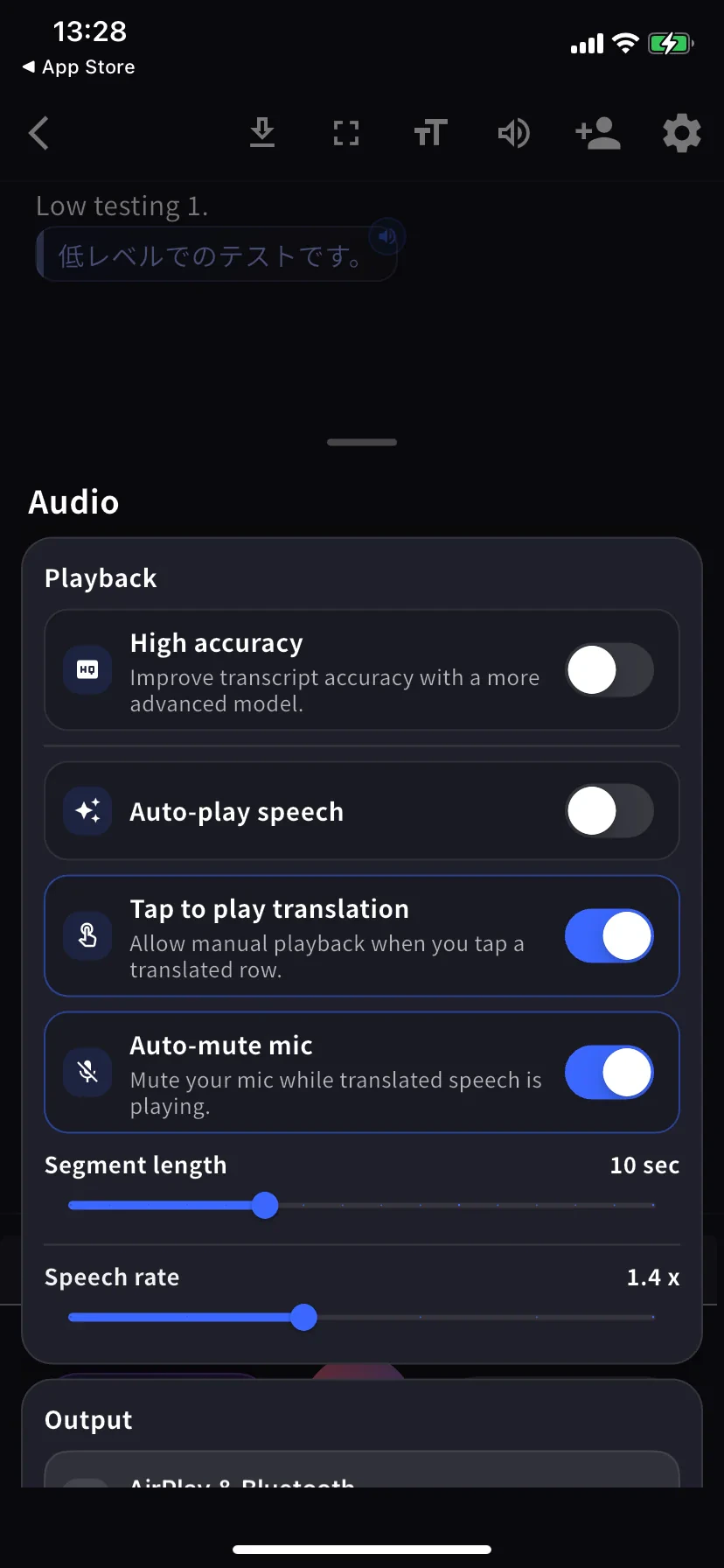
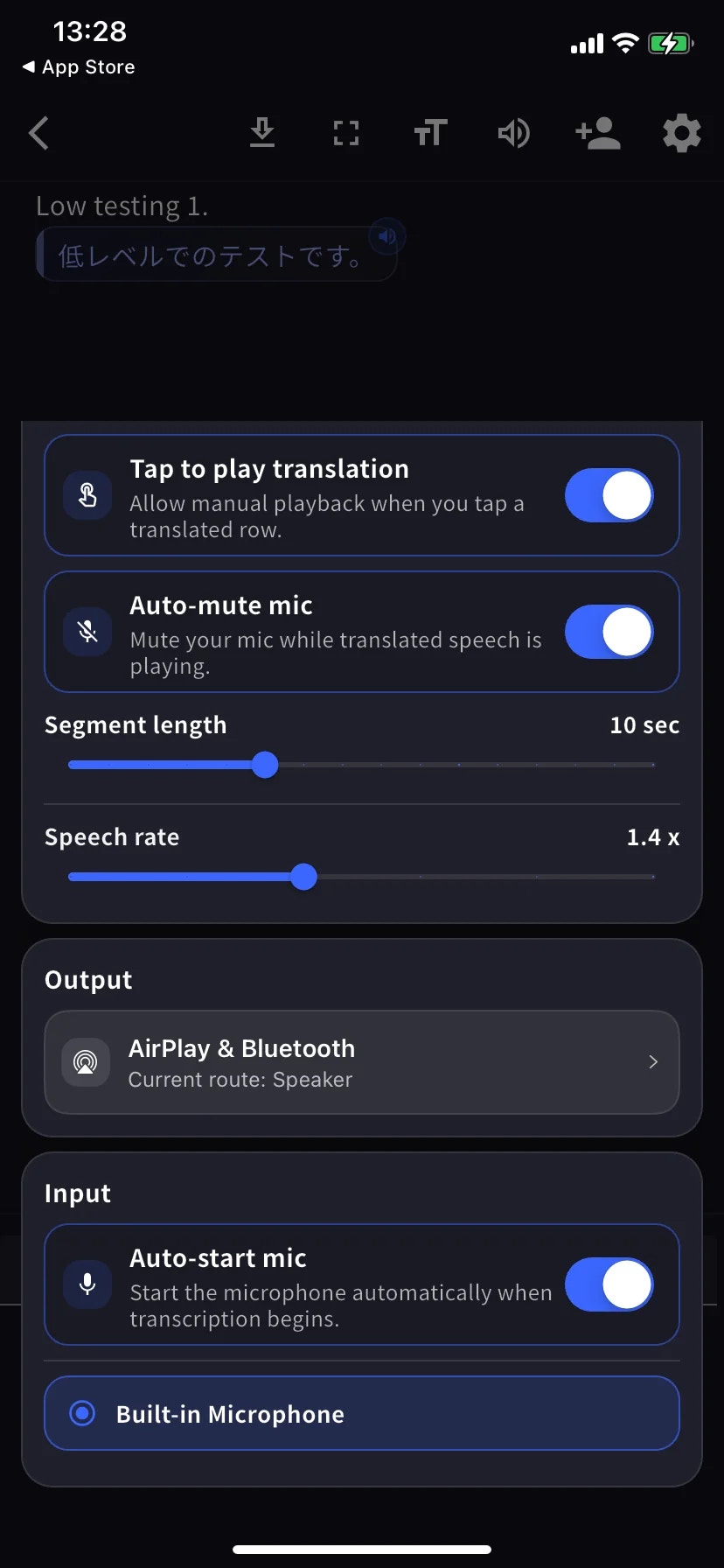
Audio 面板是单一滚动菜单 — 下面两张截图显示同一屏幕的上方(Playback)和下方(Output / Input)。
| 设置 | 说明 |
| --------------------------- | ---------------------------- |
| **High accuracy** | 使用更精确的模型,延迟和电池消耗增加。 |
| **Auto-play speech** | 自动朗读每行翻译。 |
| **Tap to play translation** | 点击某行播放其翻译。 |
| **Auto-mute mic** | 播放时静音麦克风,防止被再次转录。 |
| **Segment length** | 一行确定前的等待时间,默认 10 秒。 |
| **Speech rate** | 播放速度,默认 1.4 倍。 |
| **Output** | 翻译语音输出到 AirPlay、蓝牙、耳机或内置扬声器。 |
| **Auto-start mic** | 转录开始时自动开启麦克风。 |
| **Mic source** | 内置 / 有线 / 蓝牙 — 所选麦克风有蓝色环。 |
## Text display
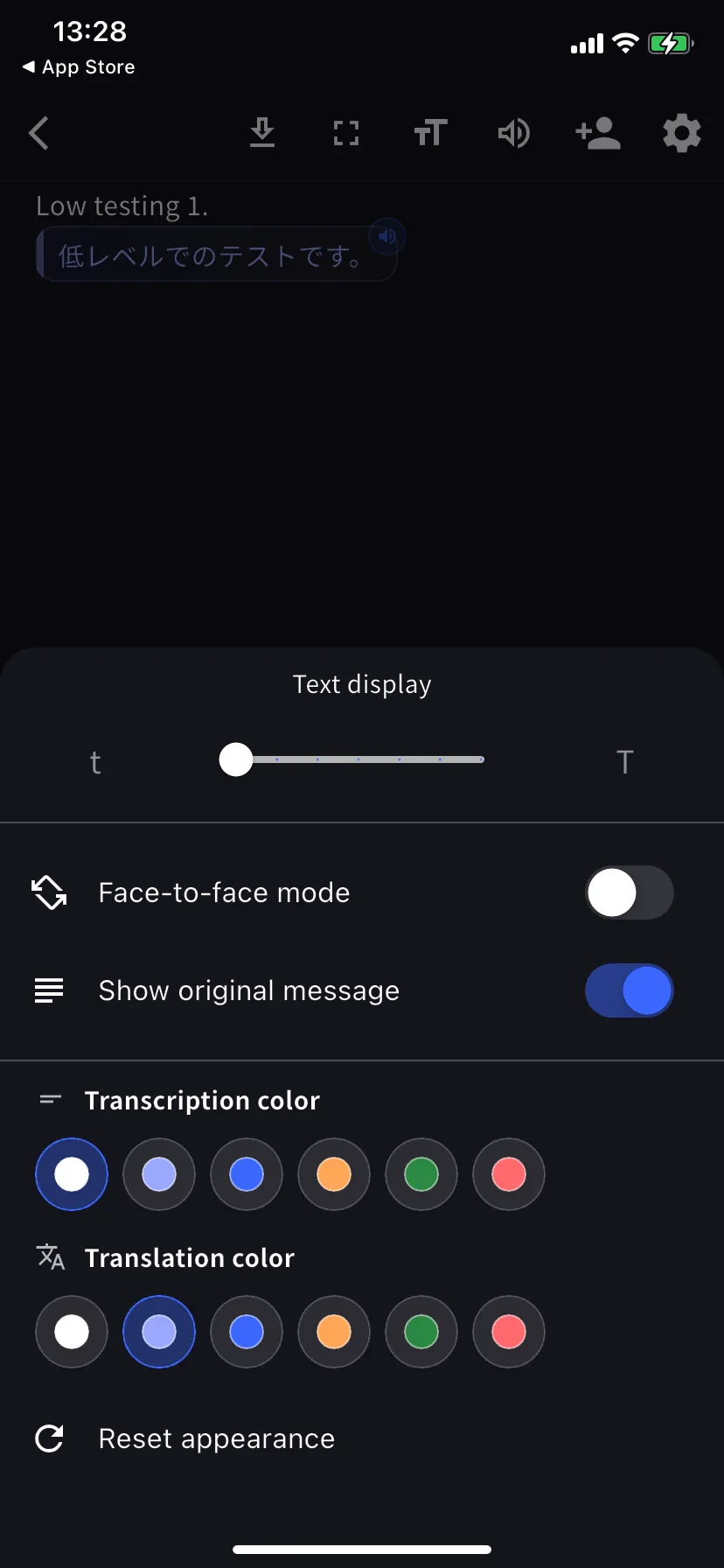
在会话中工具栏点击 **TT**。
| 设置 | 说明 |
| ------------------------------------- | --------------------------- |
| **Text size** | 桌子对面或投影时字体更大。 |
| **Face-to-face mode** | 将翻译部分旋转 180°,让对面的人正向阅读。 |
| **Show original message** | 关闭 = 仅翻译视图。 |
| **Transcription / Translation color** | 各 6 种颜色。Face-to-face 时选对比色。 |
## 应用级设置
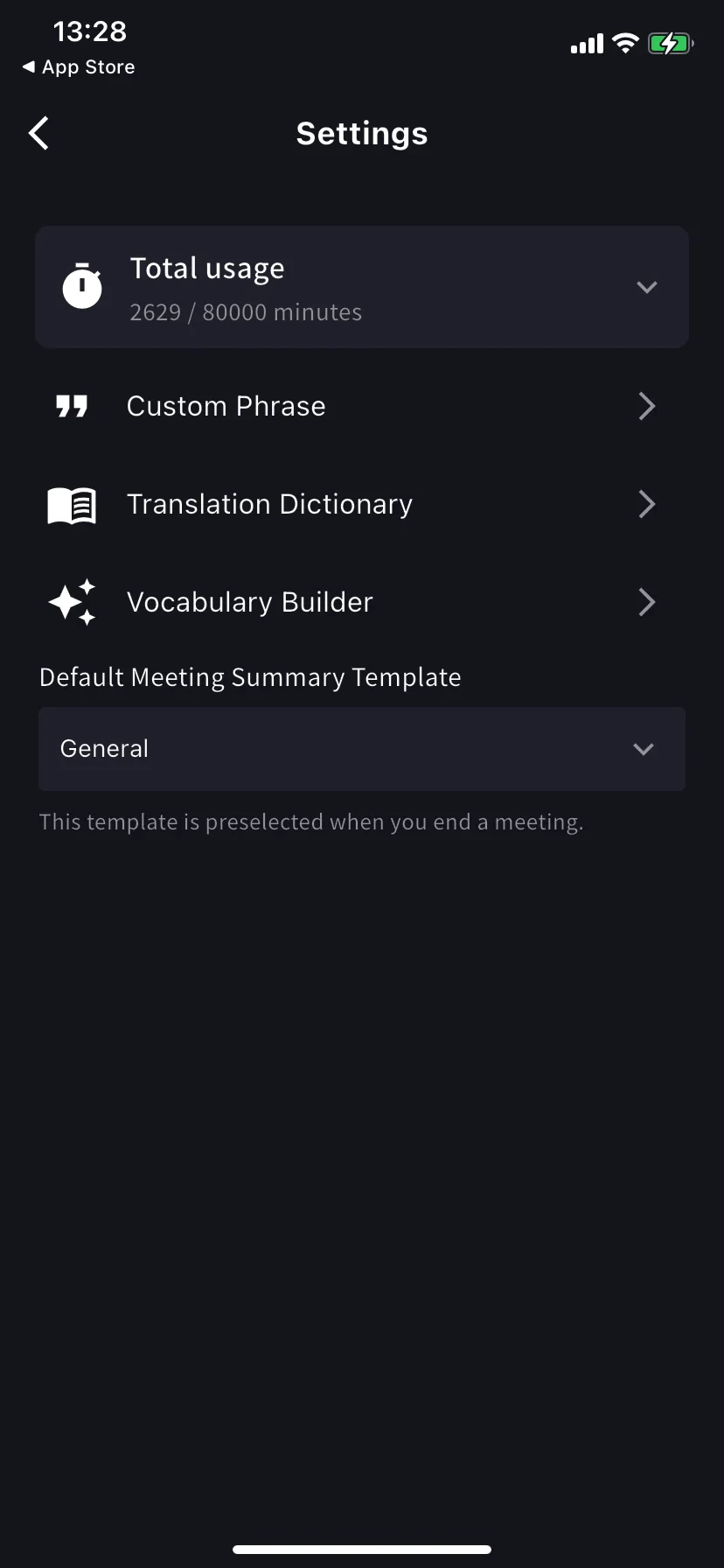
主屏幕 → ⚙ 齿轮图标。
| 设置 | 说明 |
| ---------------------------- | ---------------------------------------------------------------------------------- |
| **Total usage** | 本周期套餐分钟用量 / 上限。 |
| **Custom Phrase** | 专有名词 / 缩写精确转录。支持个人和工作区列表。 |
| **Translation Dictionary** | 词级翻译覆盖。支持个人和工作区列表 — 与桌面端相同。见[词典](/zh/dictionary)。 |
| **Vocabulary Builder** | 构建个人或工作区词汇表 — 见 [Vocabulary Builder](/zh/vocabulary-builder)。 |
| **Speaker diarization** | Separates speakers in supported live transcription sessions before saving the log. |
| **Default summary template** | 结束会议表单中的默认选中模板。 |
## 推荐预设
High accuracy 开 · Auto-play 关 · Tap-to-play 开 · Bilingual 开 · Face-to-face 开 · 字号大一些,让对面的人能从自己这侧阅读。
插入有线或蓝牙耳机 · Segment length 12-15 秒 · 字号大。
Auto-play 开 · Segment length 5 秒 · Speech rate 1.0-1.2 倍 · Output 到蓝牙音箱或耳机。
Fullscreen 开 · 字号最大 · Face-to-face 开 · 只让对方看翻译就关闭 Show original。
## 小贴士
* 在点击 Start 之前插入喜欢的麦克风 — 路由会在会话中保持。
* 设置更改即时生效,无需重启。
## 相关页面
* [移动端实时转录](/zh/mobile-live-transcription) · [分享给听众](/zh/mobile-live-transcription-share)
* [词典](/zh/dictionary) · [Vocabulary Builder](/zh/vocabulary-builder)
会话中工具栏和应用级设置的参考。基本流程请参见[移动端实时转录](/zh/mobile-live-transcription)。
## 各设置的位置
| 设置组 | 位置 |
| -------------------------- | --------------------- |
| 音频播放、输出、输入 | 会话中 → 🔊 Audio |
| 文字大小、颜色、Face-to-face | 会话中 → TT Text display |
| Custom Phrase、词典、词汇、默认纪要模板 | 应用级 → ⚙ Settings |
## Audio
Audio 面板是单一滚动菜单 — 下面两张截图显示同一屏幕的上方(Playback)和下方(Output / Input)。
| 设置 | 说明 |
| --------------------------- | ---------------------------- |
| **High accuracy** | 使用更精确的模型,延迟和电池消耗增加。 |
| **Auto-play speech** | 自动朗读每行翻译。 |
| **Tap to play translation** | 点击某行播放其翻译。 |
| **Auto-mute mic** | 播放时静音麦克风,防止被再次转录。 |
| **Segment length** | 一行确定前的等待时间,默认 10 秒。 |
| **Speech rate** | 播放速度,默认 1.4 倍。 |
| **Output** | 翻译语音输出到 AirPlay、蓝牙、耳机或内置扬声器。 |
| **Auto-start mic** | 转录开始时自动开启麦克风。 |
| **Mic source** | 内置 / 有线 / 蓝牙 — 所选麦克风有蓝色环。 |
## Text display
在会话中工具栏点击 **TT**。
| 设置 | 说明 |
| ------------------------------------- | --------------------------- |
| **Text size** | 桌子对面或投影时字体更大。 |
| **Face-to-face mode** | 将翻译部分旋转 180°,让对面的人正向阅读。 |
| **Show original message** | 关闭 = 仅翻译视图。 |
| **Transcription / Translation color** | 各 6 种颜色。Face-to-face 时选对比色。 |
## 应用级设置
主屏幕 → ⚙ 齿轮图标。
| 设置 | 说明 |
| ---------------------------- | ---------------------------------------------------------------------------------- |
| **Total usage** | 本周期套餐分钟用量 / 上限。 |
| **Custom Phrase** | 专有名词 / 缩写精确转录。支持个人和工作区列表。 |
| **Translation Dictionary** | 词级翻译覆盖。支持个人和工作区列表 — 与桌面端相同。见[词典](/zh/dictionary)。 |
| **Vocabulary Builder** | 构建个人或工作区词汇表 — 见 [Vocabulary Builder](/zh/vocabulary-builder)。 |
| **Speaker diarization** | Separates speakers in supported live transcription sessions before saving the log. |
| **Default summary template** | 结束会议表单中的默认选中模板。 |
## 推荐预设
High accuracy 开 · Auto-play 关 · Tap-to-play 开 · Bilingual 开 · Face-to-face 开 · 字号大一些,让对面的人能从自己这侧阅读。
插入有线或蓝牙耳机 · Segment length 12-15 秒 · 字号大。
Auto-play 开 · Segment length 5 秒 · Speech rate 1.0-1.2 倍 · Output 到蓝牙音箱或耳机。
Fullscreen 开 · 字号最大 · Face-to-face 开 · 只让对方看翻译就关闭 Show original。
## 小贴士
* 在点击 Start 之前插入喜欢的麦克风 — 路由会在会话中保持。
* 设置更改即时生效,无需重启。
## 相关页面
* [移动端实时转录](/zh/mobile-live-transcription) · [分享给听众](/zh/mobile-live-transcription-share)
* [词典](/zh/dictionary) · [Vocabulary Builder](/zh/vocabulary-builder)