> ## Documentation Index
> Fetch the complete documentation index at: https://manual.voiceping.net/llms.txt
> Use this file to discover all available pages before exploring further.

# 移动端实时转录

> iOS 和 Android 上的实时双语转录与翻译。

export const FeedbackZh = () => <>
    <Tip>
      对该功能有想法或需求？请通过 <a href="/zh/product-feedback">Product Feedback</a> 发送给团队。
    </Tip>

    <h2>官方链接</h2>

    <CardGroup cols={2}>
      <Card title="官方网站" icon="globe" href="https://voiceping.net/en/">
        访问官方网站
      </Card>
      <Card title="X (Twitter)" icon="x-twitter" href="https://x.com/VoicePingMedia">
        在X上关注我们
      </Card>
      <Card title="Facebook" icon="facebook" href="https://www.facebook.com/voiceping.inc">
        在Facebook上点赞
      </Card>
      <Card title="LinkedIn" icon="linkedin" href="https://www.linkedin.com/company/28684130/">
        在LinkedIn上连接
      </Card>
    </CardGroup>
  </>;

<Frame>
  <img src="https://mintcdn.com/test-cf63e467/z13MfE0CikV5b-4X/en/images/mobile-live-transcription/hero-live-transcription.webp?fit=max&auto=format&n=z13MfE0CikV5b-4X&q=85&s=4c1bb756bc1a7770eff03be789eace40" alt="Live Transcription & Translation on Mobile" width="2752" height="1536" data-path="en/images/mobile-live-transcription/hero-live-transcription.webp" />
</Frame>

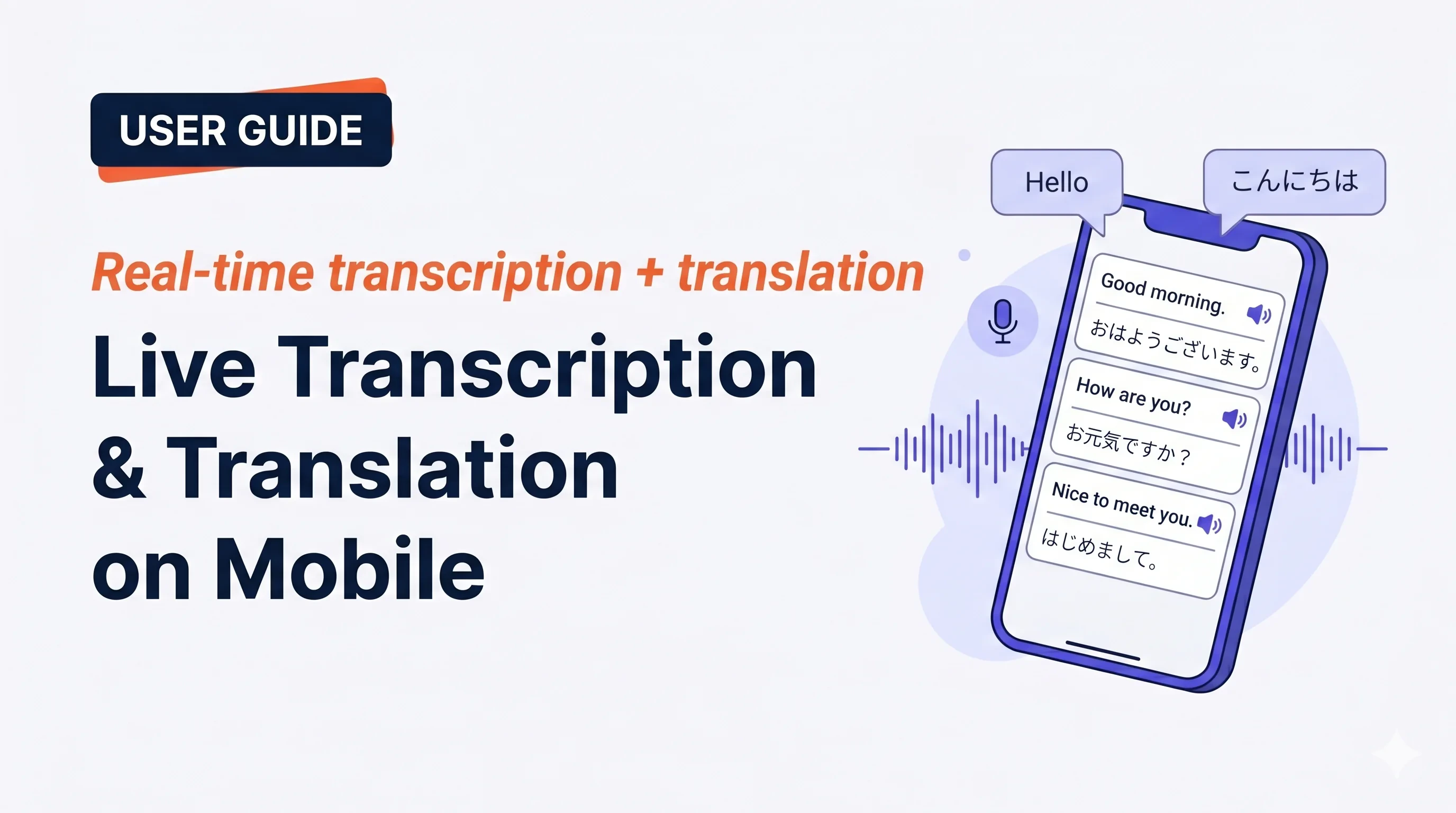
点击 **Start**，开始说话,转录和翻译就会实时显示出来。结束会话后会自动保存到工作区历史记录中。

## 适用场景

<CardGroup cols={2}>
  <Card img="https://mintcdn.com/test-cf63e467/z13MfE0CikV5b-4X/en/images/mobile-live-transcription/usecases/face-to-face.webp?fit=max&auto=format&n=z13MfE0CikV5b-4X&q=85&s=ecfa6b1bbdace121e4a20016d80e503c" width="880" height="880" data-path="en/images/mobile-live-transcription/usecases/face-to-face.webp">
    在咖啡馆、出租车或商店柜台，把手机放在你和对方之间。开启 Face-to-face 模式，双方都能用自己的语言阅读。
  </Card>

  <Card img="https://mintcdn.com/test-cf63e467/z13MfE0CikV5b-4X/en/images/mobile-live-transcription/usecases/travelling-abroad.webp?fit=max&auto=format&n=z13MfE0CikV5b-4X&q=85&s=d7d11828b7e1be8d4a9612c88afaef9d" width="880" height="880" data-path="en/images/mobile-live-transcription/usecases/travelling-abroad.webp">
    酒店前台、餐厅、诊所、海关 — 双向对话带双语字幕。
  </Card>

  <Card img="https://mintcdn.com/test-cf63e467/z13MfE0CikV5b-4X/en/images/mobile-live-transcription/usecases/language-practice.webp?fit=max&auto=format&n=z13MfE0CikV5b-4X&q=85&s=a58dbcf596055135684f509e05a77e9f" width="880" height="880" data-path="en/images/mobile-live-transcription/usecases/language-practice.webp">
    和导师、语言交换伙伴或母语人士交谈,字幕是你想不起某个词时的安全网。
  </Card>

  <Card img="https://mintcdn.com/test-cf63e467/z13MfE0CikV5b-4X/en/images/mobile-live-transcription/usecases/voice-memo.webp?fit=max&auto=format&n=z13MfE0CikV5b-4X&q=85&s=af2e394b163701f1d8071da3d9f0983b" width="880" height="880" data-path="en/images/mobile-live-transcription/usecases/voice-memo.webp">
    路途中捕捉灵感 — 一键 Start,说出想法,End。保存为可搜索的双语转录。
  </Card>
</CardGroup>

## 开始会话

<Steps>
  <Step title="在主屏幕点击 Start">
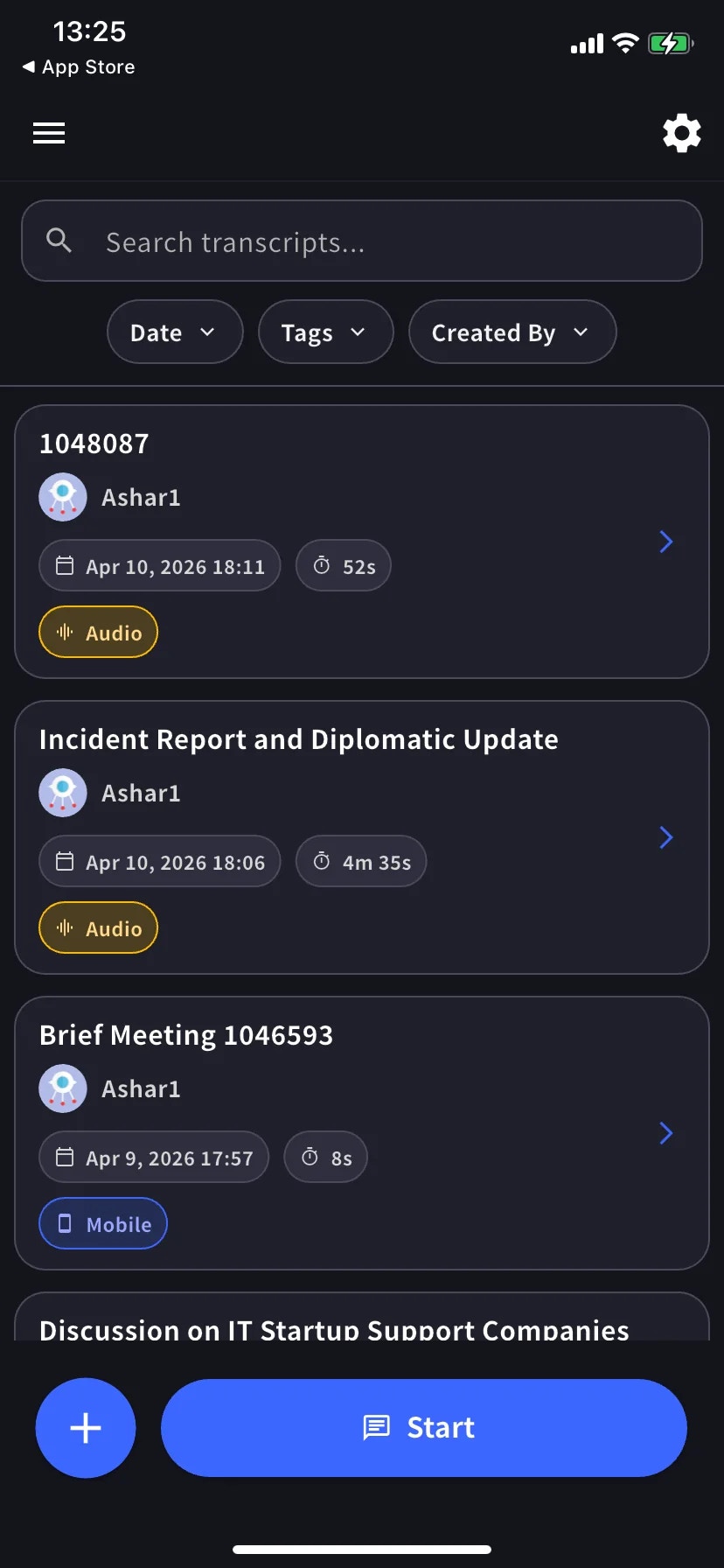
    主屏幕列出过去的转录,底部有 **Start** 按钮。

    <div style={{maxWidth: "270px", margin: "0 auto"}}>
      <Frame>
        <img src="https://mintcdn.com/test-cf63e467/z13MfE0CikV5b-4X/en/images/mobile-live-transcription/01-home-with-history.webp?fit=max&auto=format&n=z13MfE0CikV5b-4X&q=85&s=bb40ea11b0eeaa3fcf329951e82fdc08" alt="带 Start 按钮的主屏幕" width="828" height="1792" data-path="en/images/mobile-live-transcription/01-home-with-history.webp" />
      </Frame>
    </div>
  </Step>

  <Step title="说话">
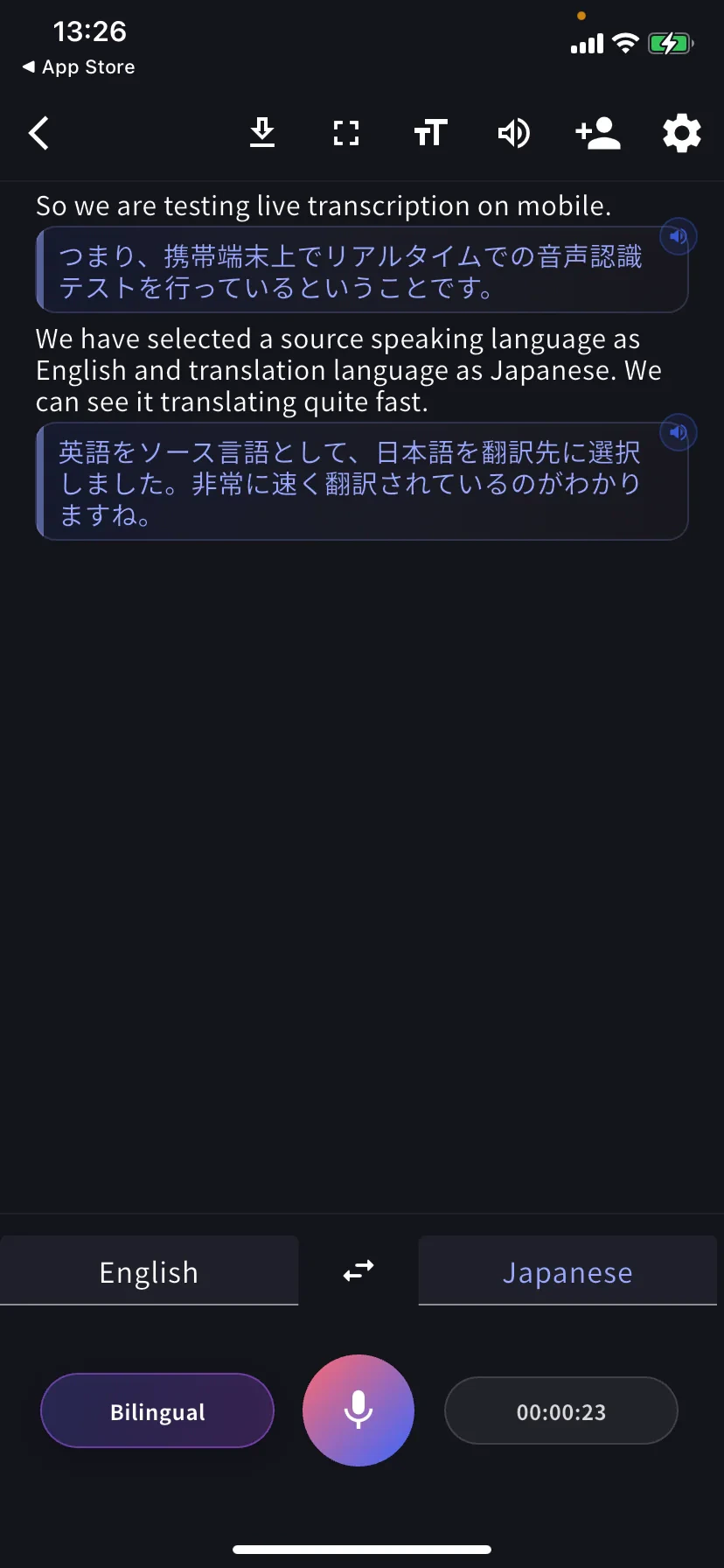
    每段话变成一行:上方为原文,下方为翻译。点击某行上的扬声器图标可播放翻译语音。

    <div style={{maxWidth: "270px", margin: "0 auto"}}>
      <Frame>
        <img src="https://mintcdn.com/test-cf63e467/z13MfE0CikV5b-4X/en/images/mobile-live-transcription/02-live-session.webp?fit=max&auto=format&n=z13MfE0CikV5b-4X&q=85&s=d6fb80b48295a4b5a5e1b974940f110a" alt="带英文原文和日文翻译的实时转录" width="828" height="1792" data-path="en/images/mobile-live-transcription/02-live-session.webp" />
      </Frame>
    </div>
  </Step>
</Steps>

## 底部控件

* **左侧标签** — 你说的语言 · **⇄** 交换 · **右侧标签** — 你读的语言
* **Bilingual** 胶囊 — 切换双语 / 仅翻译视图
* **麦克风** — 点击静音 / 取消静音
* **计时器** — 当前时长;点击结束并保存

## 语音播放翻译

点击任意翻译行,即可用目标语言朗读出来。适用于:

* 想让对方**听**而不是读翻译
* 你在**学习这门语言**,想听刚才那句话的翻译发音
* 对方不方便看屏幕

如需自动朗读每行到达的翻译,请在[音频设置](/zh/mobile-live-transcription-settings)中开启 **Auto-play speech**,同时保持 **Auto-mute mic** 开启,防止回放被自己麦克风拾取。

## 阅读模式

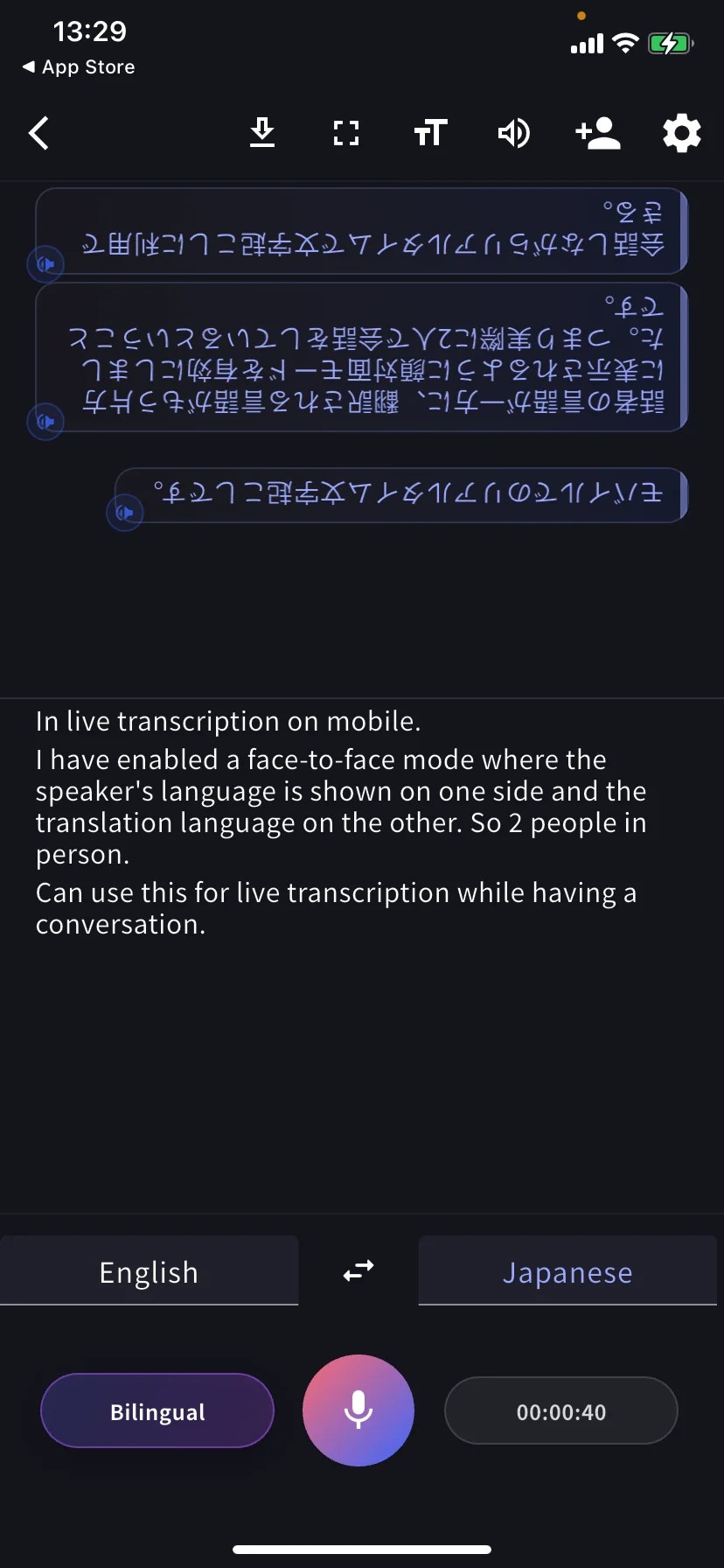
**Face-to-face 模式**(TT → Text display)将翻译部分旋转 180°,让桌子对面的人从他们那边正向阅读。把手机平放在你们之间。

<div style={{maxWidth: "270px", margin: "0 auto"}}>
  <Frame>
    <img src="https://mintcdn.com/test-cf63e467/z13MfE0CikV5b-4X/en/images/mobile-live-transcription/04-face-to-face-mode.webp?fit=max&auto=format&n=z13MfE0CikV5b-4X&q=85&s=7ebc4ede4e28842cad2c75019a5f7b23" alt="Face-to-face 模式" width="828" height="1792" data-path="en/images/mobile-live-transcription/04-face-to-face-mode.webp" />
  </Frame>
</div>

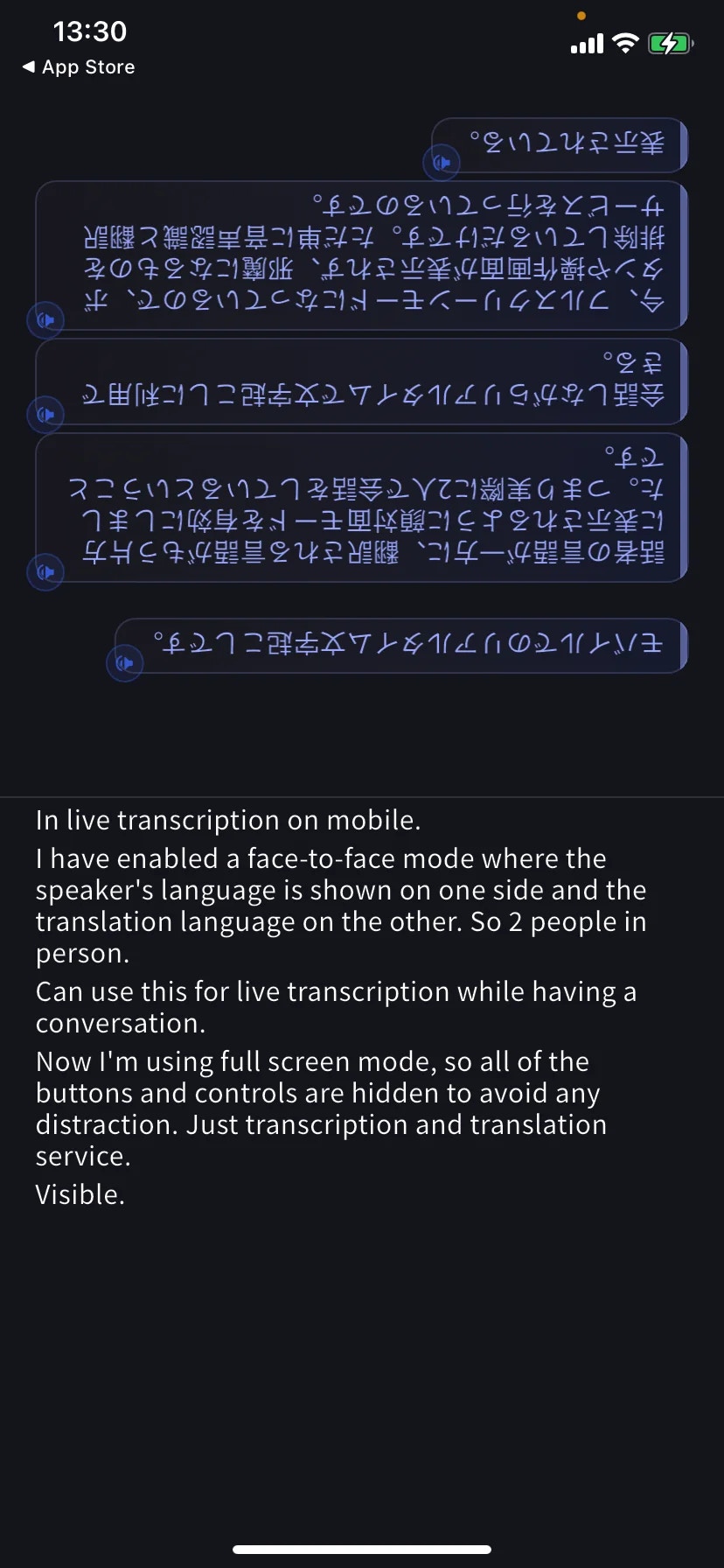
**Fullscreen 模式**(工具栏的 ⛶)隐藏工具栏和按钮,让对话不被打扰 — 手机平放时也不会误触控件。

<div style={{maxWidth: "270px", margin: "0 auto"}}>
  <Frame>
    <img src="https://mintcdn.com/test-cf63e467/z13MfE0CikV5b-4X/en/images/mobile-live-transcription/05-fullscreen-mode.webp?fit=max&auto=format&n=z13MfE0CikV5b-4X&q=85&s=70ca52a05418823d39a5817b4918824a" alt="全屏模式" width="828" height="1792" data-path="en/images/mobile-live-transcription/05-fullscreen-mode.webp" />
  </Frame>
</div>

## 会话中下载

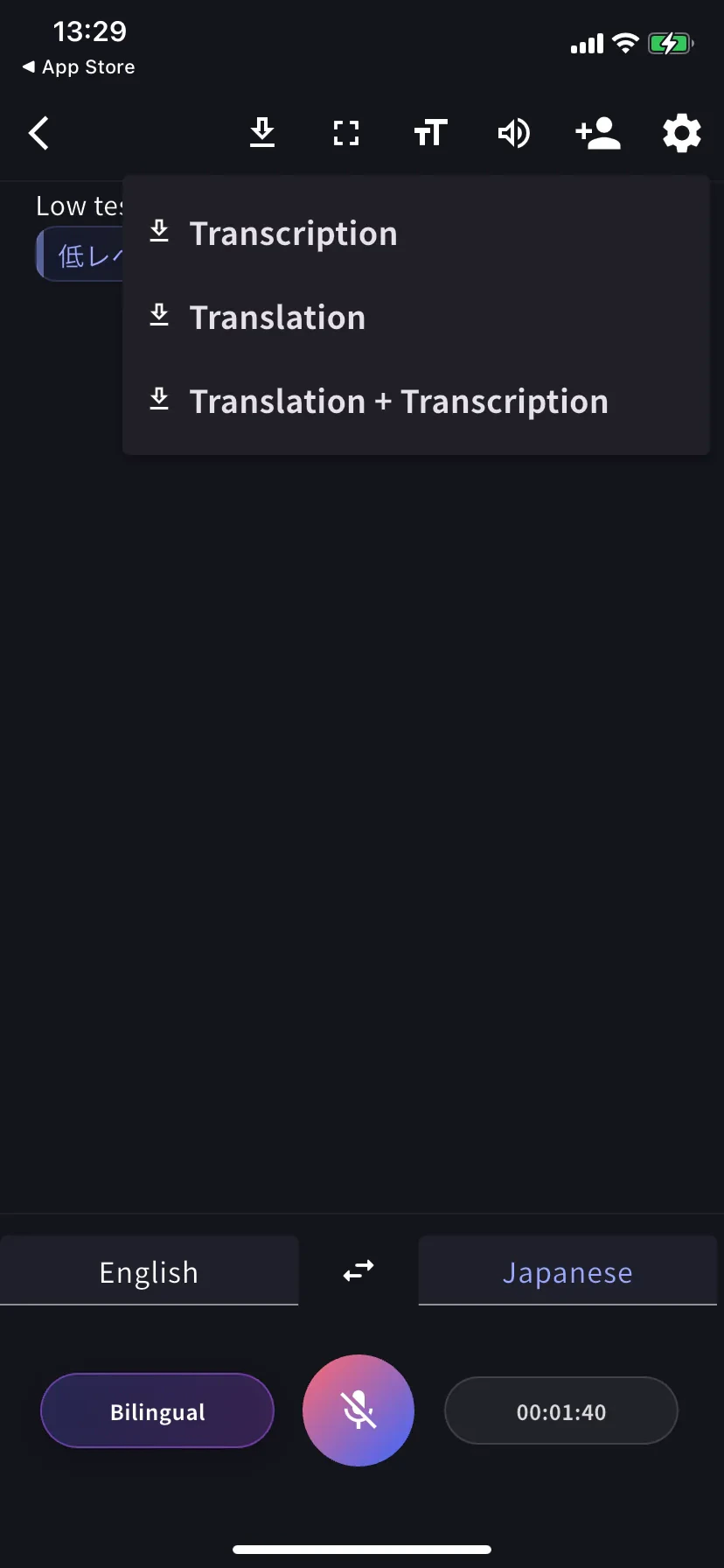
点击工具栏中的 **⬇**,不结束会话即可导出:Transcription、Translation 或两者皆选。

<div style={{maxWidth: "270px", margin: "0 auto"}}>
  <Frame>
    <img src="https://mintcdn.com/test-cf63e467/z13MfE0CikV5b-4X/en/images/mobile-live-transcription/03-download-menu.webp?fit=max&auto=format&n=z13MfE0CikV5b-4X&q=85&s=ec14e41ddcb20b3da58fbe8d730b620a" alt="下载菜单" width="828" height="1792" data-path="en/images/mobile-live-transcription/03-download-menu.webp" />
  </Frame>
</div>

## 结束并保存

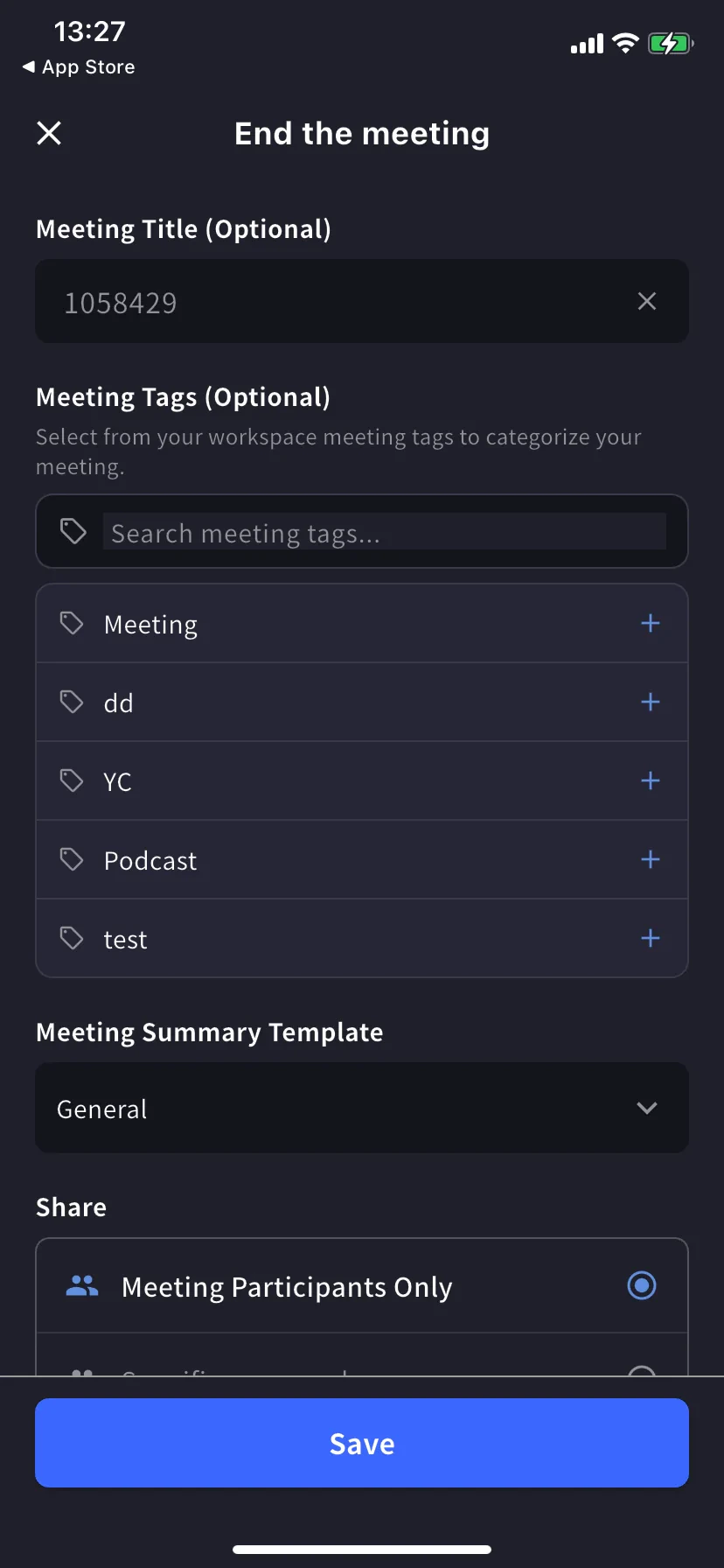
点击底部的计时器 / 停止,打开结束会议表单。

* **Title** — 自动数字命名,可修改
* **Tags** — 从工作区标签中选择(用于筛选)
* **Summary template** — 自动生成会议纪要的模板
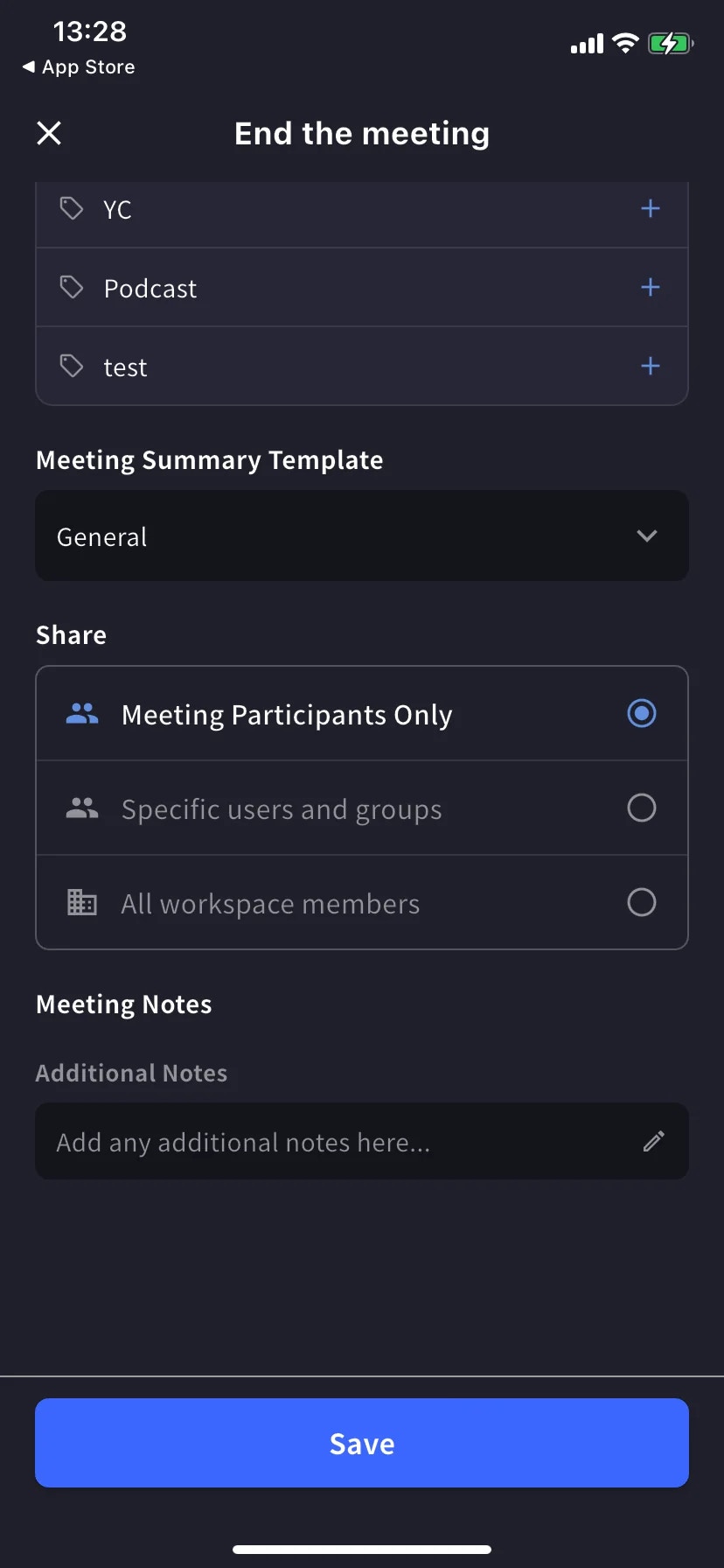
* **Share scope** — Participants only / Specific users / All workspace members
* **Notes** — 与转录一起保存的自由备注

<div style={{display: "flex", gap: "12px", justifyContent: "center", flexWrap: "wrap"}}>
  <div style={{flex: "1 1 220px", maxWidth: "240px"}}>
    <Frame>
      <img src="https://mintcdn.com/test-cf63e467/z13MfE0CikV5b-4X/en/images/mobile-live-transcription/10-end-meeting-form.webp?fit=max&auto=format&n=z13MfE0CikV5b-4X&q=85&s=5b614ea9e8df8ced3d5ac35d120ccda8" alt="结束会议表单 — 标题、标签、模板" width="828" height="1792" data-path="en/images/mobile-live-transcription/10-end-meeting-form.webp" />
    </Frame>
  </div>

  <div style={{flex: "1 1 220px", maxWidth: "240px"}}>
    <Frame>
      <img src="https://mintcdn.com/test-cf63e467/z13MfE0CikV5b-4X/en/images/mobile-live-transcription/11-end-meeting-share.webp?fit=max&auto=format&n=z13MfE0CikV5b-4X&q=85&s=bf605f10c523975d1af0640c0dda8f3b" alt="共享范围和备注" width="828" height="1792" data-path="en/images/mobile-live-transcription/11-end-meeting-share.webp" />
    </Frame>
  </div>
</div>

点击 **Save**。会话出现在主屏幕历史列表中 — 支持文本搜索,按 Date / Tags / Created By 筛选。

## 小贴士

* 把手机平放在你和对方之间 — 内置麦克风比手持更能均匀捕捉双方声音。
* 在嘈杂的咖啡馆或街道上,插入有线或蓝牙耳机。
* 保持应用在前台 — iOS 在切换应用时可能暂停录音。
* 提前在[词典](/zh/dictionary)中预加载会出现的词(个人或工作区,与桌面端相同)。

## 相关页面

* [设置](/zh/mobile-live-transcription-settings) — 音频、文本显示、词典
* [分享给听众(QR)](/zh/mobile-live-transcription-share)
* [离线翻译](/zh/mobile-offline-translation) · [捕获其他应用音频](/zh/mobile-screen-record) · [上传文件](/zh/mobile-upload-files)
<FeedbackZh />