> ## Documentation Index
> Fetch the complete documentation index at: https://manual.voiceping.net/llms.txt
> Use this file to discover all available pages before exploring further.
# 移动端升级、降级 & 取消
> 直接在移动应用中更改 VoicePing 套餐、取消或恢复自动续订。
export const ContactZh = () => <>
如有任何问题,请通过此表单与我们联系。
官方链接
访问官方网站
在X上关注我们
在Facebook上点赞
在LinkedIn上连接
;
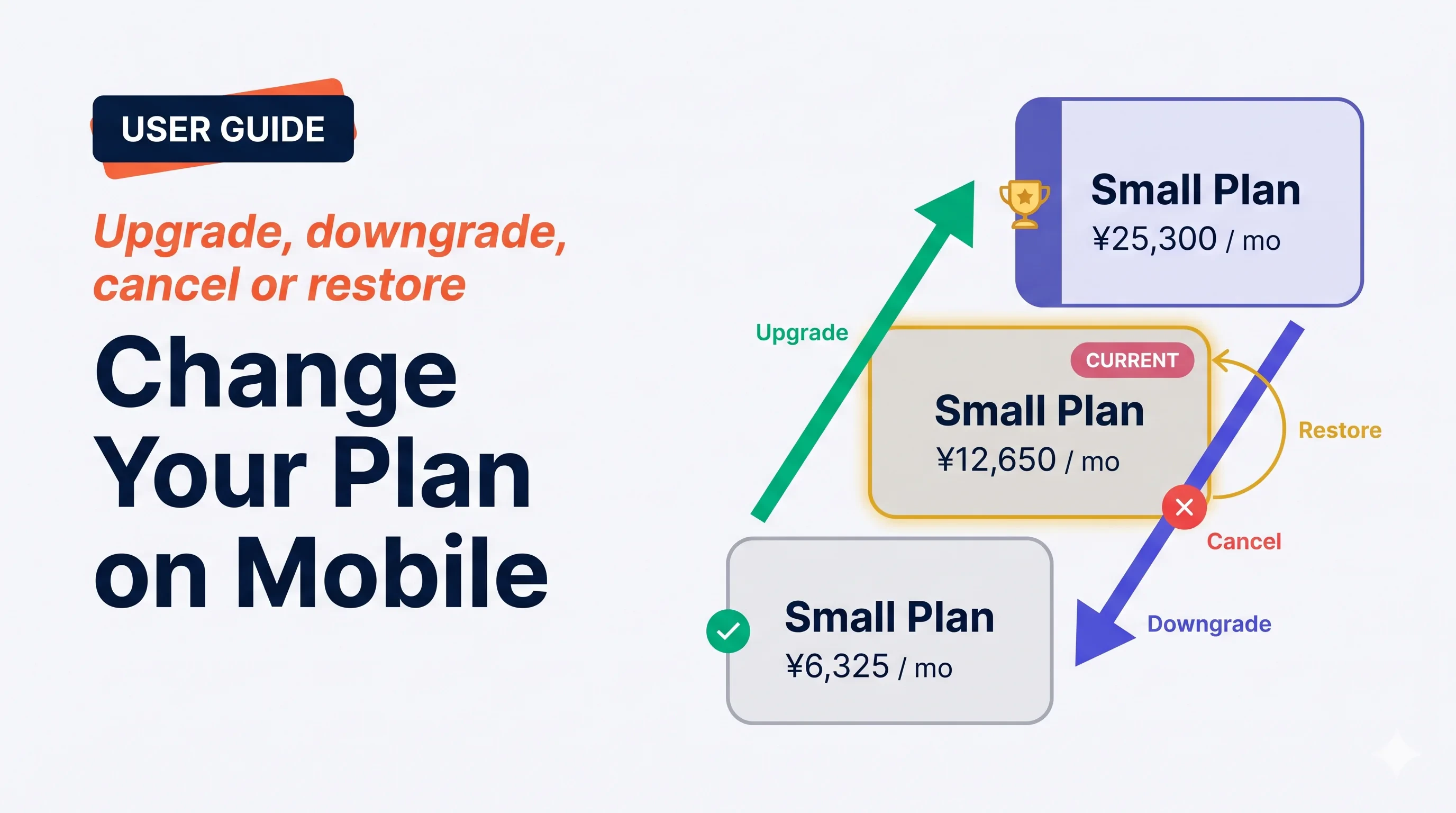 **Manage Plan** 屏幕处理所有订阅操作 — 立即升级、下次续订时降级、取消,或恢复已安排的取消。VoicePing 在你确认前明确展示*何时*、*价格*、*用量重置*。
## 四种操作
**Manage Plan** 屏幕处理所有订阅操作 — 立即升级、下次续订时降级、取消,或恢复已安排的取消。VoicePing 在你确认前明确展示*何时*、*价格*、*用量重置*。
## 四种操作
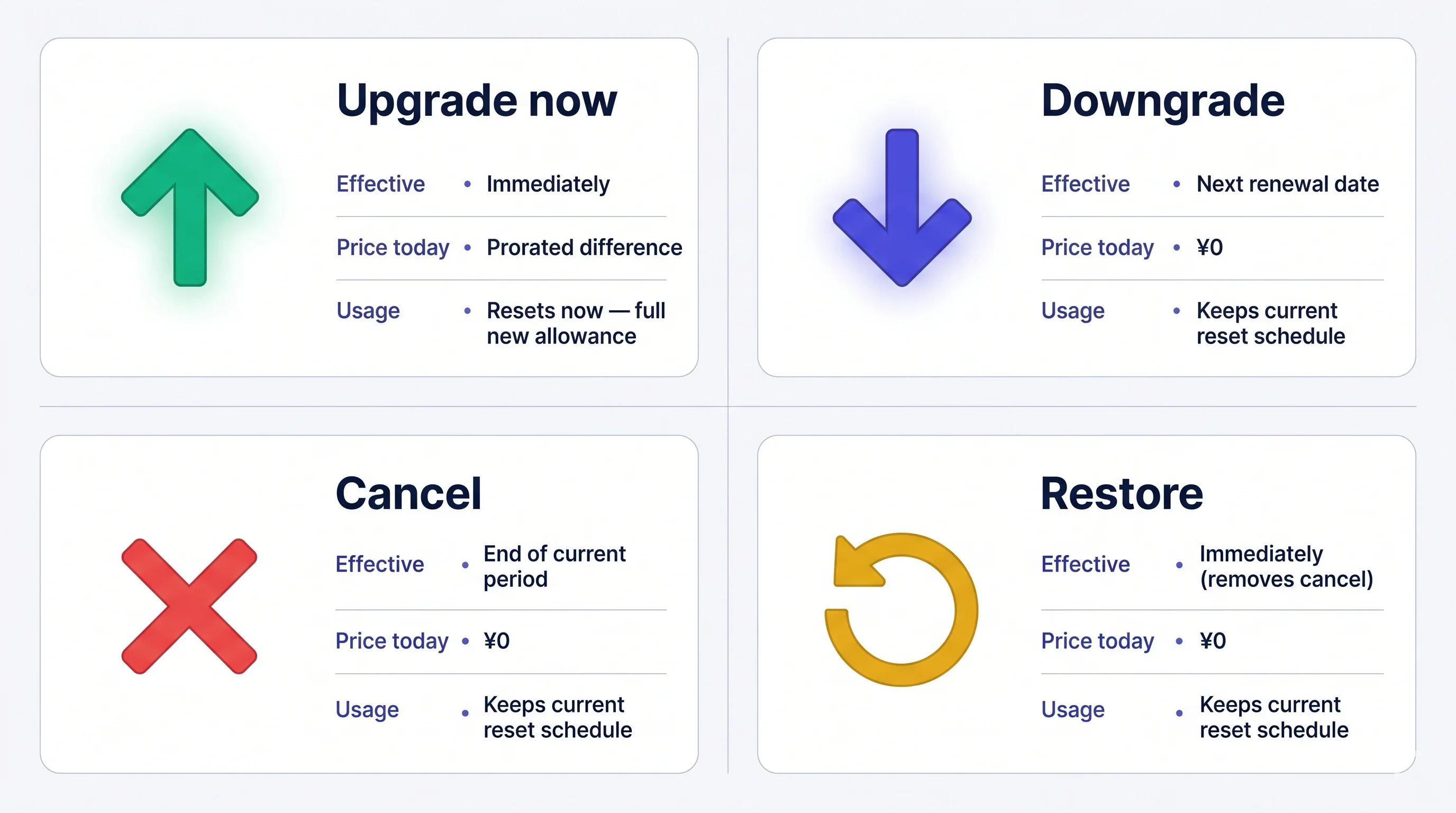 费用一经扣款**不可退款**。如果你取消,当前套餐在本期结束前仍然有效 — 期限前随时可以免费恢复。
## 打开 Manage Plan
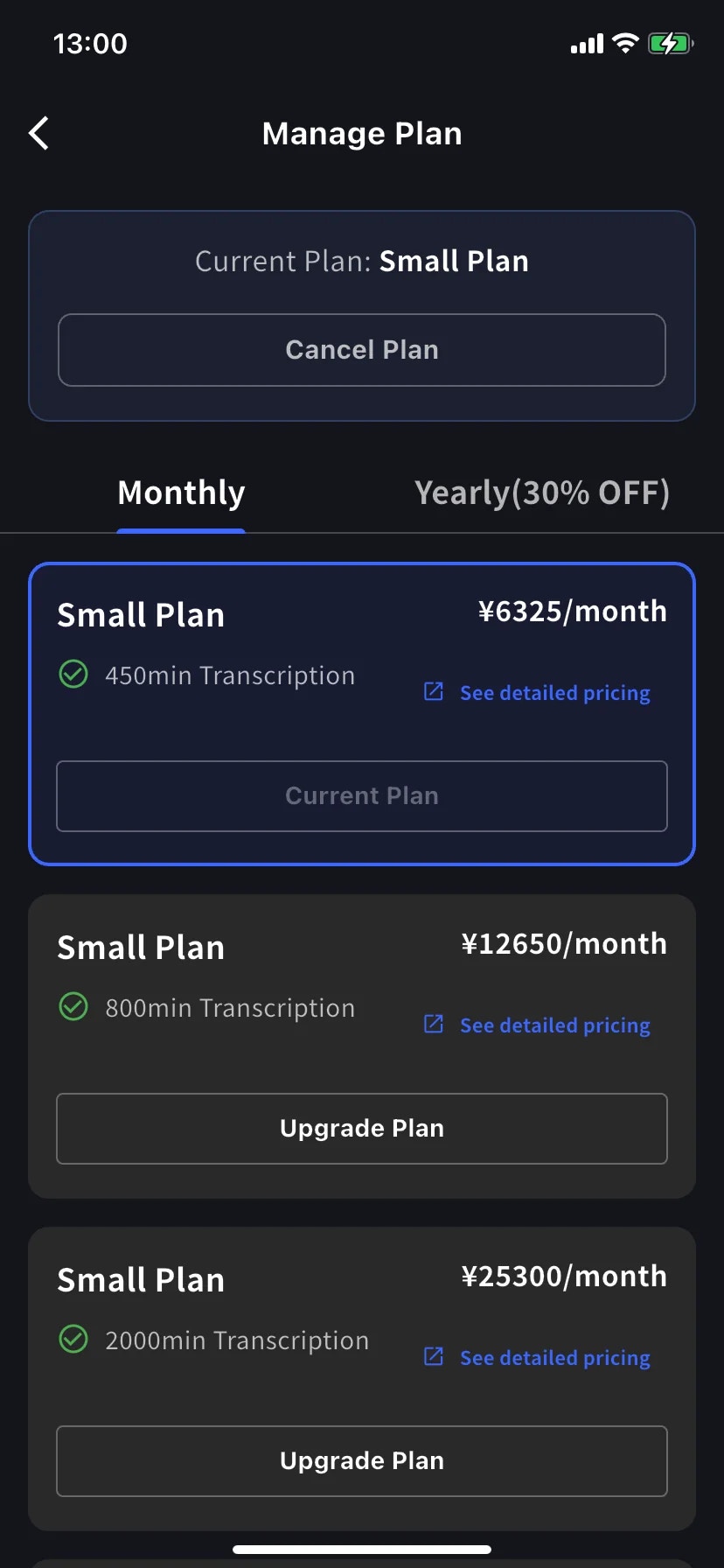
侧边菜单 → **User Settings** → **Billing** → **Manage Plan**,或直接在 Current Plan 卡片上点 **Manage Plan**。
* **Monthly** / **Yearly** 标签切换阶梯 — 价格都按月显示,年付一次性扣款。
* 当前级别用蓝色边框突出,按钮上盖 **Current Plan** 章。
* 上位级别显示 **Upgrade Plan**;下位级别显示 **Change Plan**。
* **Cancel Plan** 在屏幕顶部,当前套餐徽标旁边。
## 立即升级
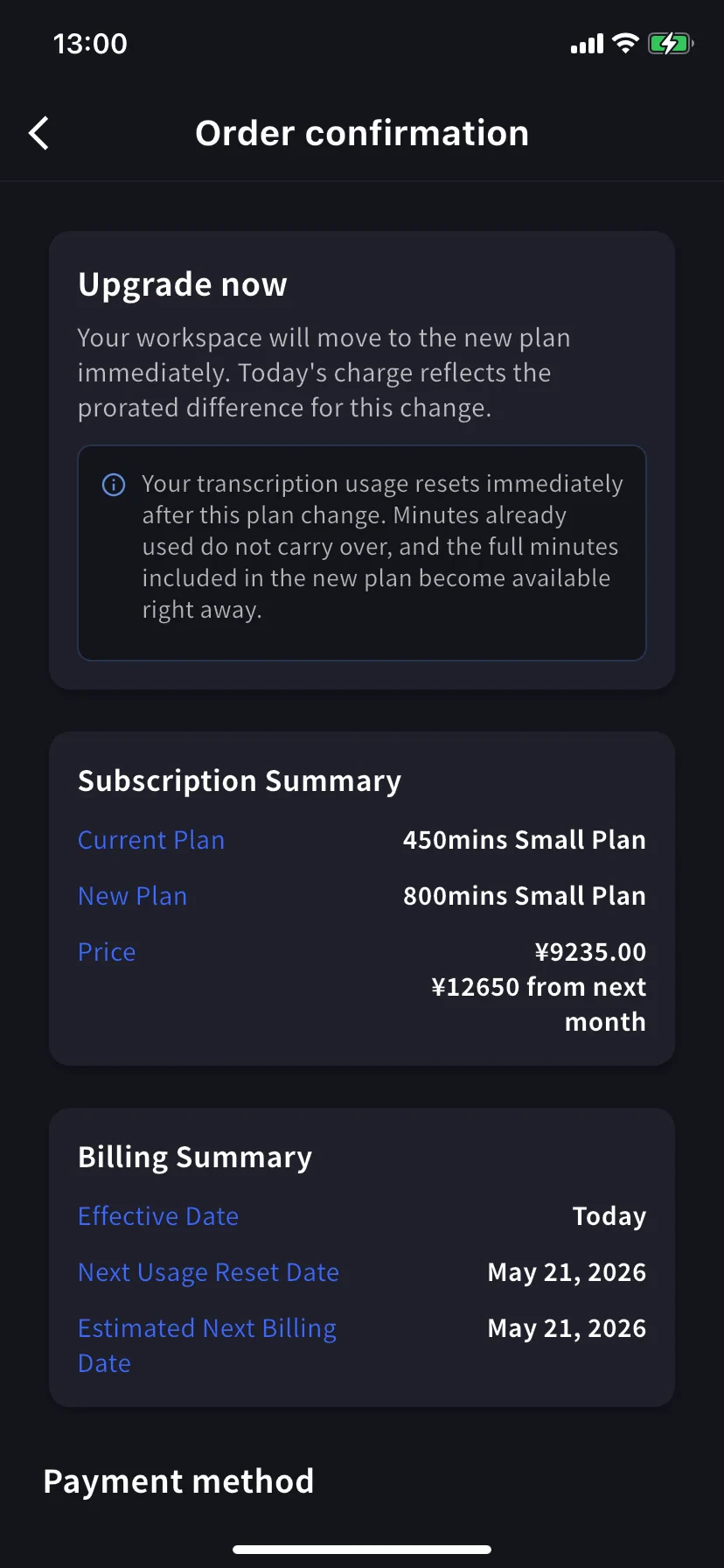
进入 **Order confirmation**。横幅写 *Upgrade now — your workspace will move to the new plan immediately. Today's charge reflects the prorated difference for this change.*
**转录用量立即重置。** 已用的分钟不结转,新套餐的完整分钟立即可用。
Subscription Summary 显示当前套餐、新套餐和两个价格 — 今天的按比例金额和下个月开始的完整价格。Billing Summary 确认 **Effective Date: Today** 以及下一次重置 / 账单日期。
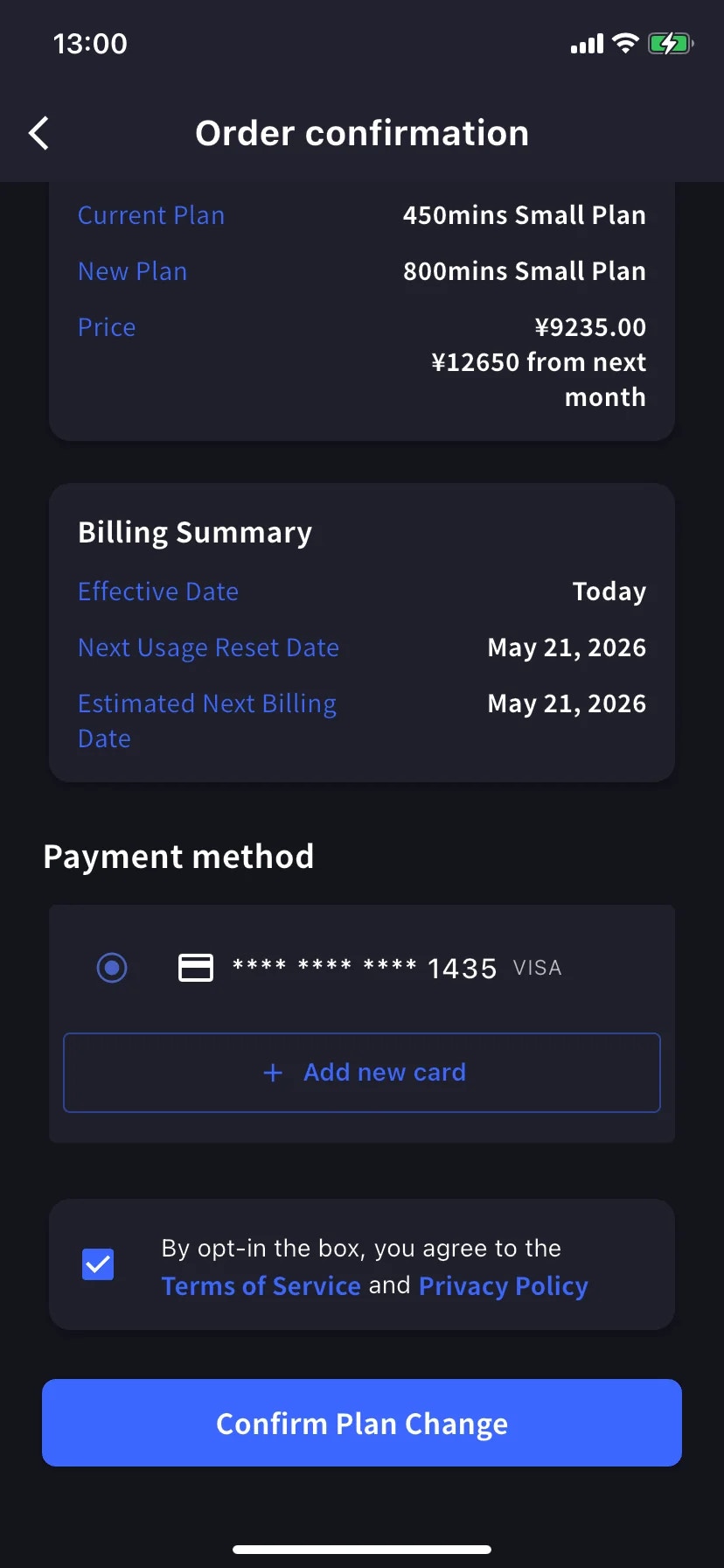
滚到 **Payment method**,选已有卡片或点 **+ Add new card** 打开 Stripe 表单(Link 或手动输入 — 见[移动端账单](/zh/mobile-billing#manage-cards))。勾选条款 / 隐私复选框。
点蓝色 **Confirm Plan Change** 按钮。扣款处理期间按钮短暂变暗。
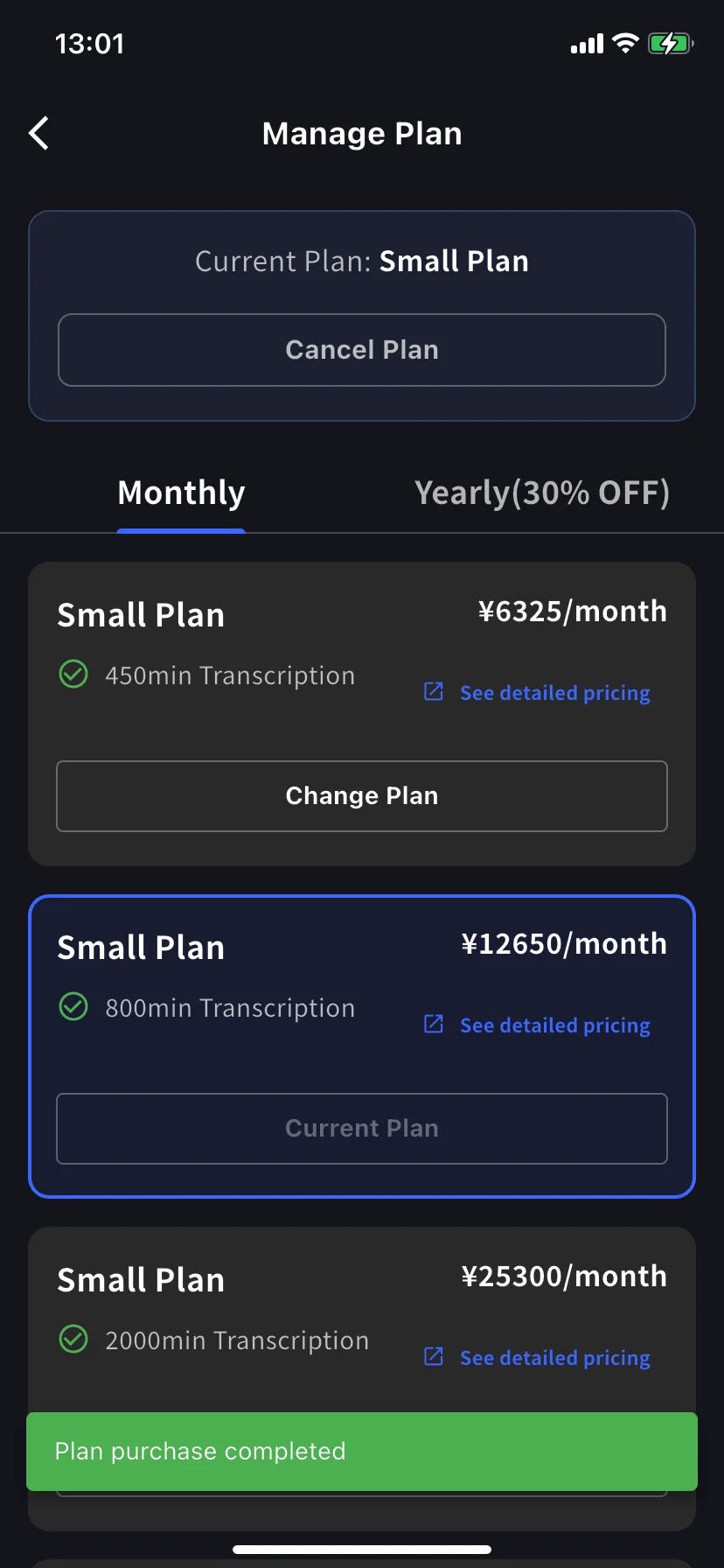
成功后回到 Manage Plan,带绿色 **Plan purchase completed** toast,新级别被当前套餐框起。
按比例扣款排除旧套餐已用时间,所以账单周期后期升级接近新套餐原价。最便宜的升级时机在续订日前后 — 或者不管它,需要时就升级。
## 降级 — 下次续订生效
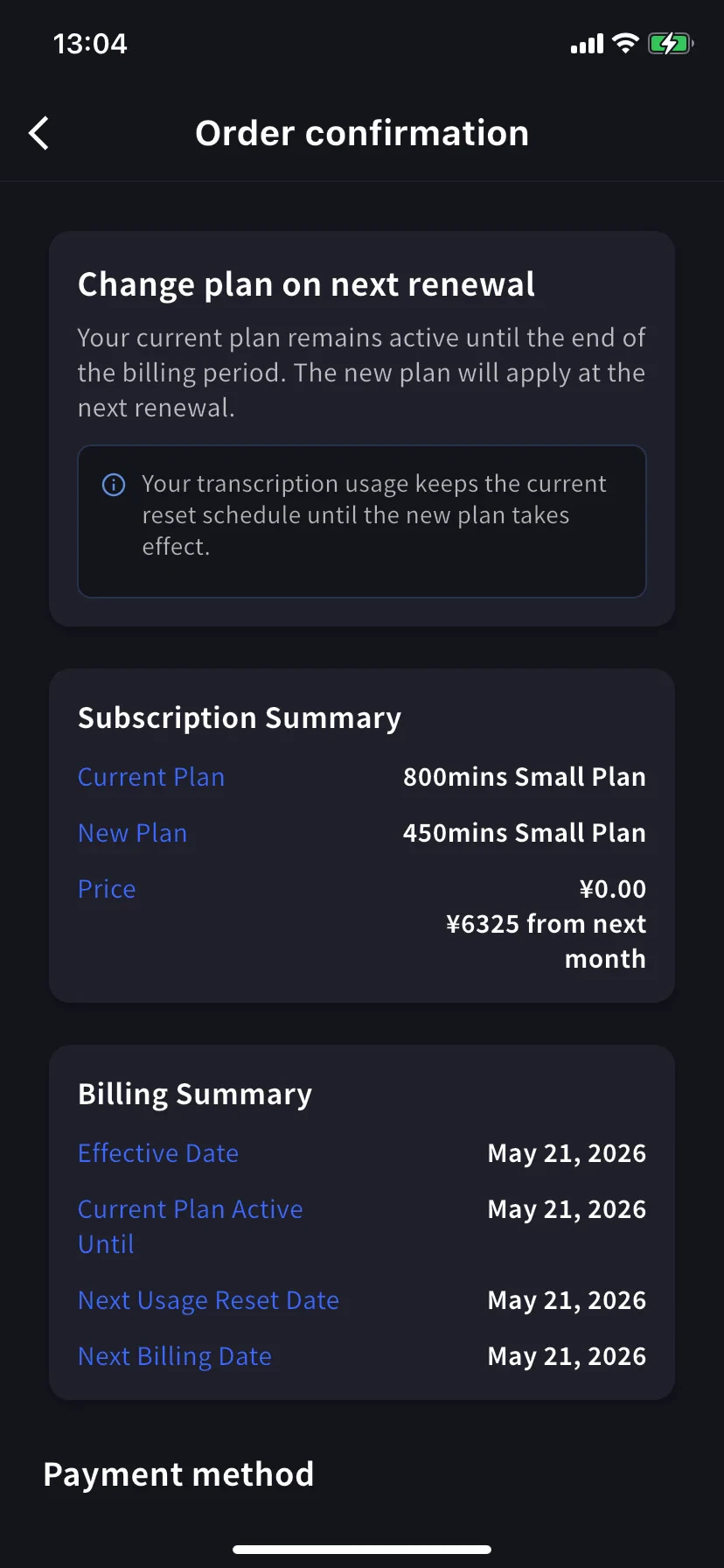
在下位级别点 **Change Plan**。确认横幅变化 — 现在是 *Change plan on next renewal — your current plan remains active until the end of the billing period. The new plan will apply at the next renewal.*
今天价格是 **¥0.00** — 下个月开始付较低价格。Billing Summary 显示 **Effective Date** 和 **Current Plan Active Until** 为续订日期。
**用量保持原定时间表。** 续订前保留当前套餐的分钟;新的较低额度在续订后生效。
确认方式和升级相同。
## 取消订阅
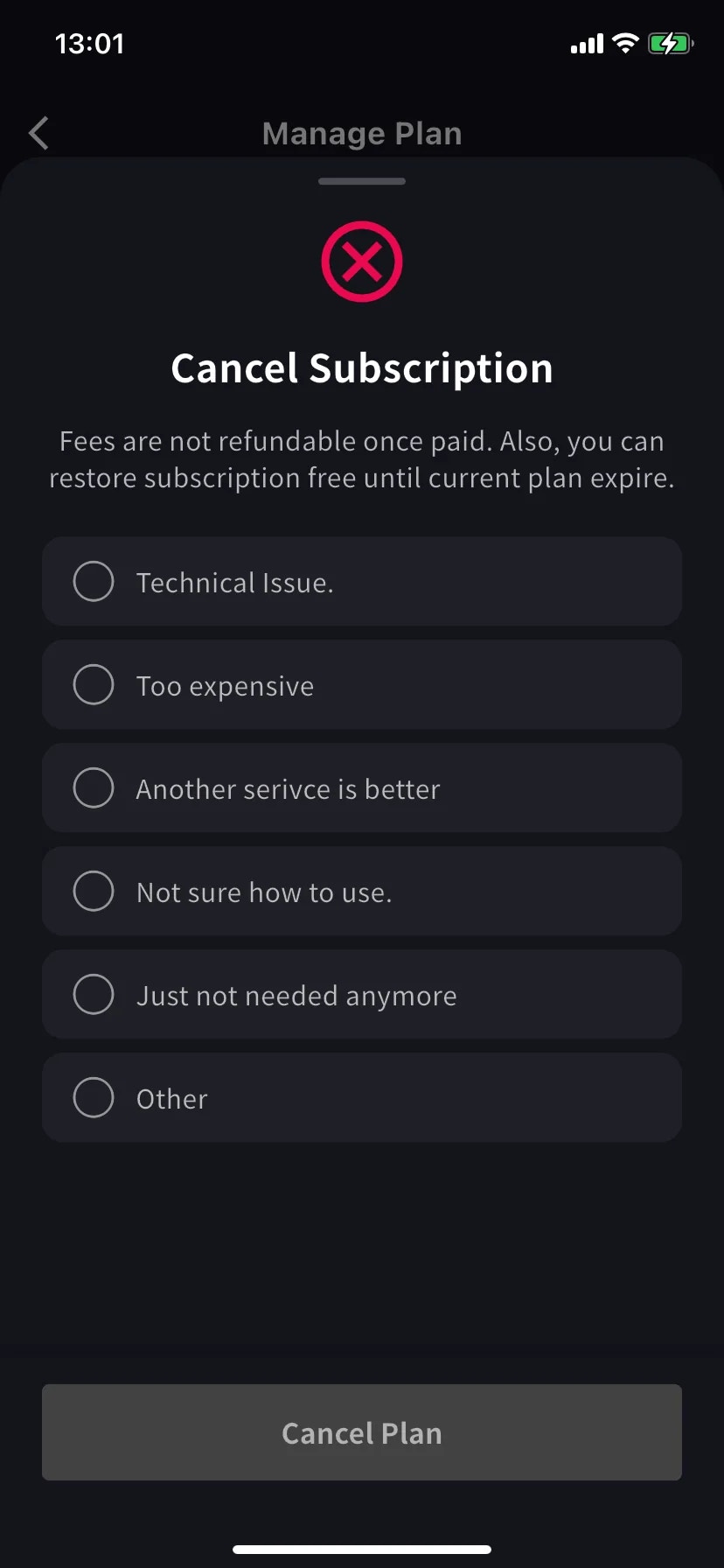
滑出带红色 ⊗ 图标和必选原因列表的表单。
选一个原因 — 选原因前 Cancel Plan 按钮保持灰色。
费用一经付款不可退款。当前套餐在本期结束前仍可用 — 期限前随时可以免费恢复。
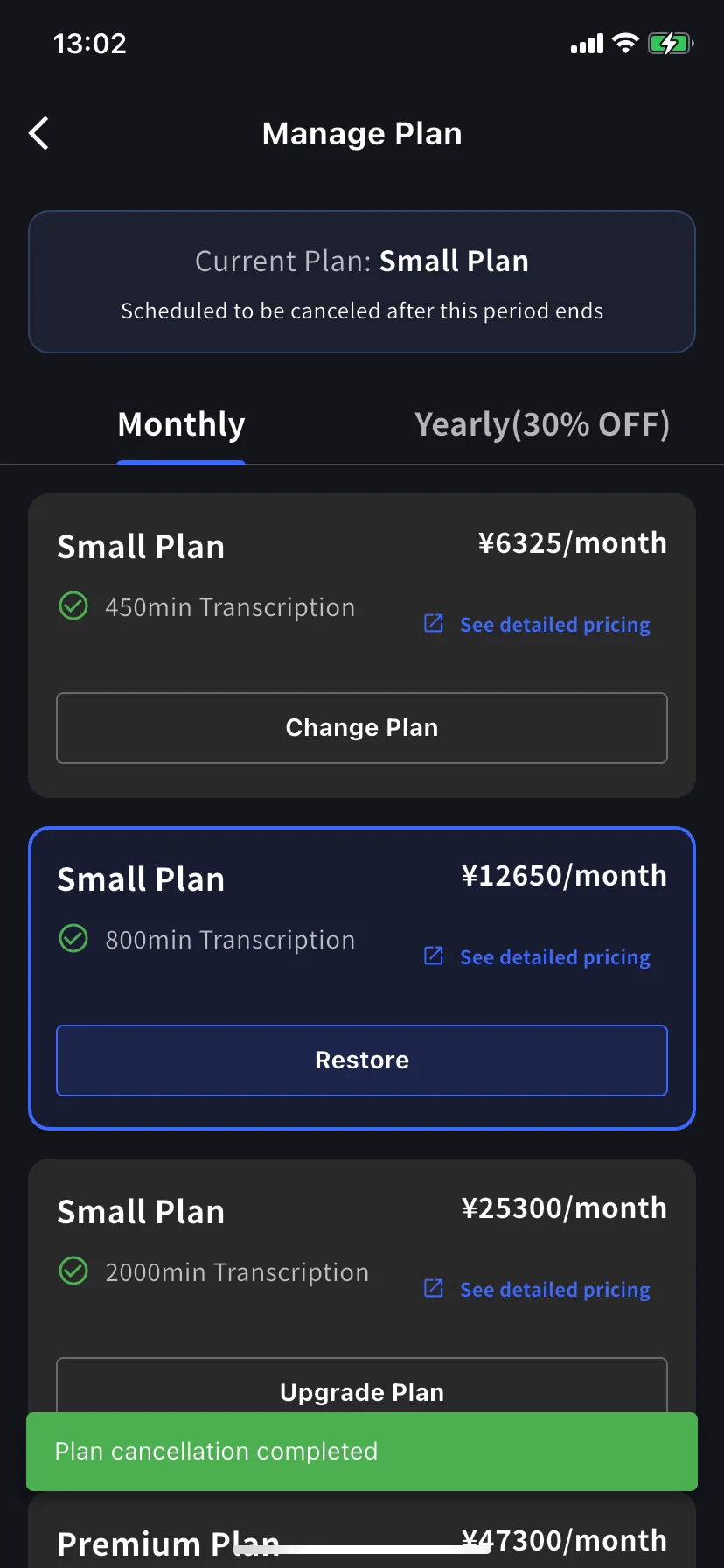
当前套餐横幅变为 **Scheduled to be canceled after this period ends**,下方级别出现 **Restore** 按钮。
绿色 **Plan cancellation completed** toast 确认安排。续订日前保留套餐和全部分钟。
## 恢复自动续订
改主意了?在当前级别点 **Restore**。
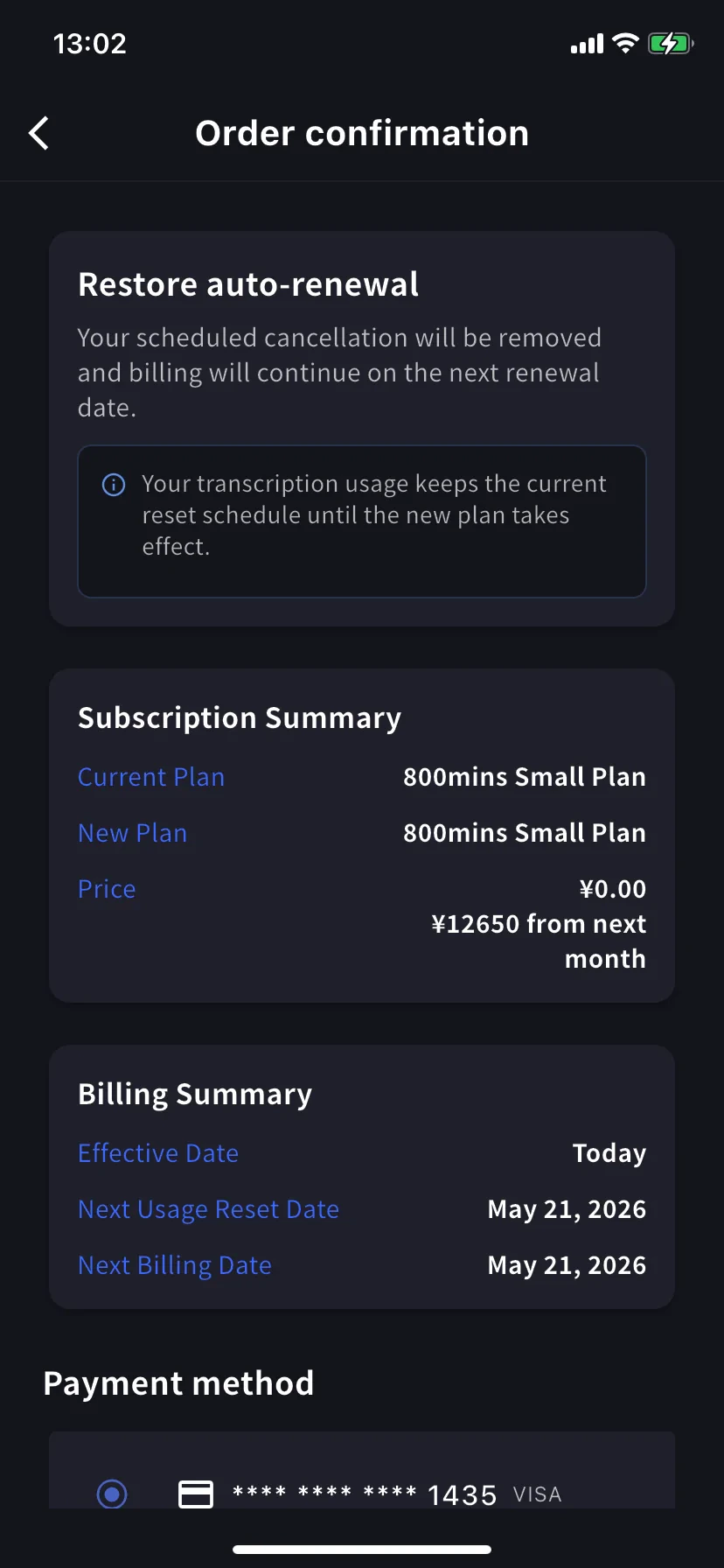
Order confirmation 显示 *Restore auto-renewal — your scheduled cancellation will be removed and billing will continue on the next renewal date.* 今天价格 ¥0。点 **Confirm Plan Change** 回到正常续订订阅。
用量保持当前重置时间表 — 恢复不会重置分钟。
## 我在看哪个确认画面?
三个画面共享同样布局(Subscription Summary / Billing Summary / Payment method / Confirm)。读**横幅标题**确认:
| 横幅 | 方向 | 生效 |
| ------------------------------- | ---- | ---- |
| **Upgrade now** | 上位级别 | 今天 |
| **Change plan on next renewal** | 下位级别 | 下次续订 |
| **Restore auto-renewal** | 撤销取消 | 今天 |
## 使用提示
* **年付标签打 7 折。** 长期使用的话,同级别 Monthly → Yearly 切换就是即刻应用折扣的升级。
* **之后查看 Billing Activity。** 这些操作都带时间戳和 IP 记录 — 团队里还有其他人装了 App 时很有用。
* **降级 ≠ 取消。** 降级让你留在(较小的)付费套餐;取消让你在本期结束后掉到 Free。选你真正想要的。
* **先加卡。** 如果知道会升级,先在[Manage Cards](/zh/mobile-billing#manage-cards)加卡 — 升级流程会复用它。
## 相关页面
* [移动端账单管理](/zh/mobile-billing) — 卡片、发票、收据、活动日志
* [套餐变更、取消 & 试用结束](/zh/plan-changes) — PC 管理控制台等价功能
* [定价](/zh/pricing) — 套餐级别和分钟配额
* [免费套餐](/zh/free-plan) / [免费试用](/zh/free-trial)
费用一经扣款**不可退款**。如果你取消,当前套餐在本期结束前仍然有效 — 期限前随时可以免费恢复。
## 打开 Manage Plan
侧边菜单 → **User Settings** → **Billing** → **Manage Plan**,或直接在 Current Plan 卡片上点 **Manage Plan**。
* **Monthly** / **Yearly** 标签切换阶梯 — 价格都按月显示,年付一次性扣款。
* 当前级别用蓝色边框突出,按钮上盖 **Current Plan** 章。
* 上位级别显示 **Upgrade Plan**;下位级别显示 **Change Plan**。
* **Cancel Plan** 在屏幕顶部,当前套餐徽标旁边。
## 立即升级
进入 **Order confirmation**。横幅写 *Upgrade now — your workspace will move to the new plan immediately. Today's charge reflects the prorated difference for this change.*
**转录用量立即重置。** 已用的分钟不结转,新套餐的完整分钟立即可用。
Subscription Summary 显示当前套餐、新套餐和两个价格 — 今天的按比例金额和下个月开始的完整价格。Billing Summary 确认 **Effective Date: Today** 以及下一次重置 / 账单日期。
滚到 **Payment method**,选已有卡片或点 **+ Add new card** 打开 Stripe 表单(Link 或手动输入 — 见[移动端账单](/zh/mobile-billing#manage-cards))。勾选条款 / 隐私复选框。
点蓝色 **Confirm Plan Change** 按钮。扣款处理期间按钮短暂变暗。
成功后回到 Manage Plan,带绿色 **Plan purchase completed** toast,新级别被当前套餐框起。
按比例扣款排除旧套餐已用时间,所以账单周期后期升级接近新套餐原价。最便宜的升级时机在续订日前后 — 或者不管它,需要时就升级。
## 降级 — 下次续订生效
在下位级别点 **Change Plan**。确认横幅变化 — 现在是 *Change plan on next renewal — your current plan remains active until the end of the billing period. The new plan will apply at the next renewal.*
今天价格是 **¥0.00** — 下个月开始付较低价格。Billing Summary 显示 **Effective Date** 和 **Current Plan Active Until** 为续订日期。
**用量保持原定时间表。** 续订前保留当前套餐的分钟;新的较低额度在续订后生效。
确认方式和升级相同。
## 取消订阅
滑出带红色 ⊗ 图标和必选原因列表的表单。
选一个原因 — 选原因前 Cancel Plan 按钮保持灰色。
费用一经付款不可退款。当前套餐在本期结束前仍可用 — 期限前随时可以免费恢复。
当前套餐横幅变为 **Scheduled to be canceled after this period ends**,下方级别出现 **Restore** 按钮。
绿色 **Plan cancellation completed** toast 确认安排。续订日前保留套餐和全部分钟。
## 恢复自动续订
改主意了?在当前级别点 **Restore**。
Order confirmation 显示 *Restore auto-renewal — your scheduled cancellation will be removed and billing will continue on the next renewal date.* 今天价格 ¥0。点 **Confirm Plan Change** 回到正常续订订阅。
用量保持当前重置时间表 — 恢复不会重置分钟。
## 我在看哪个确认画面?
三个画面共享同样布局(Subscription Summary / Billing Summary / Payment method / Confirm)。读**横幅标题**确认:
| 横幅 | 方向 | 生效 |
| ------------------------------- | ---- | ---- |
| **Upgrade now** | 上位级别 | 今天 |
| **Change plan on next renewal** | 下位级别 | 下次续订 |
| **Restore auto-renewal** | 撤销取消 | 今天 |
## 使用提示
* **年付标签打 7 折。** 长期使用的话,同级别 Monthly → Yearly 切换就是即刻应用折扣的升级。
* **之后查看 Billing Activity。** 这些操作都带时间戳和 IP 记录 — 团队里还有其他人装了 App 时很有用。
* **降级 ≠ 取消。** 降级让你留在(较小的)付费套餐;取消让你在本期结束后掉到 Free。选你真正想要的。
* **先加卡。** 如果知道会升级,先在[Manage Cards](/zh/mobile-billing#manage-cards)加卡 — 升级流程会复用它。
## 相关页面
* [移动端账单管理](/zh/mobile-billing) — 卡片、发票、收据、活动日志
* [套餐变更、取消 & 试用结束](/zh/plan-changes) — PC 管理控制台等价功能
* [定价](/zh/pricing) — 套餐级别和分钟配额
* [免费套餐](/zh/free-plan) / [免费试用](/zh/free-trial)