> ## Documentation Index
> Fetch the complete documentation index at: https://manual.voiceping.net/llms.txt
> Use this file to discover all available pages before exploring further.
# 方案变更、取消与试用结束
> 升级或降级 VoicePing 方案、取消订阅、结束免费试用或申请合同制账单。
export const ContactZh = () => <>
如有任何问题,请通过此表单与我们联系。
官方链接
访问官方网站
在X上关注我们
在Facebook上点赞
在LinkedIn上连接
;
在 Billing → Subscriptions 选项卡中升级、降级或取消。
在 Billing 中心的 Manage Plan 中升级、降级、取消或恢复。
每次方案变更或取消成功后,`account@voice-ping.com` 都会发送确认邮件。
## 四种操作
无论在 PC 还是手机上,订阅变更都属于四种操作之一。生效日期、今天的费用和用量重置规则在两个界面上相同。
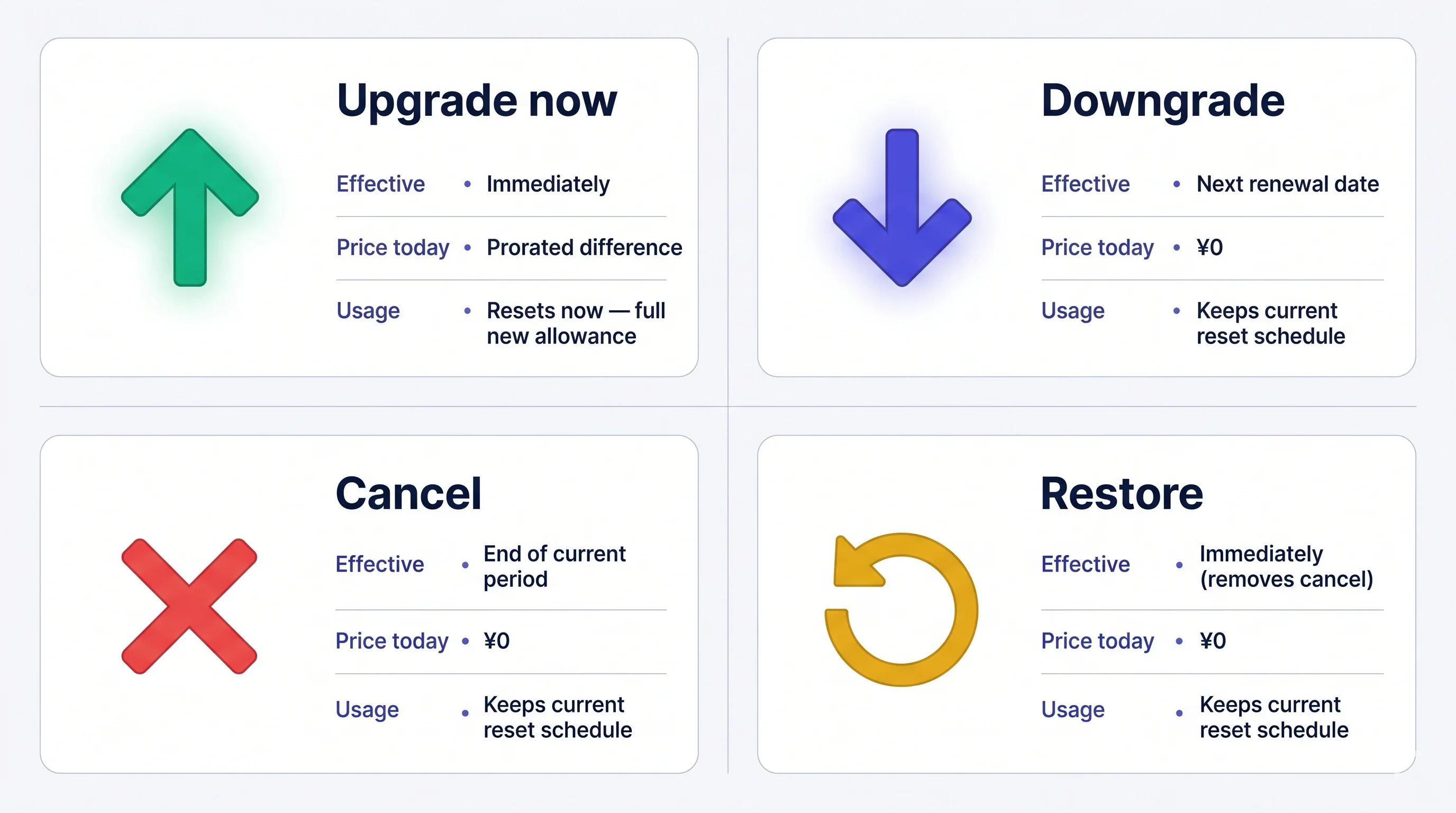 费用一旦扣款即**不可退款**。如果取消,当前方案会一直有效到周期结束;在结束前可随时免费恢复。
## 如何变更方案
### 1. PC
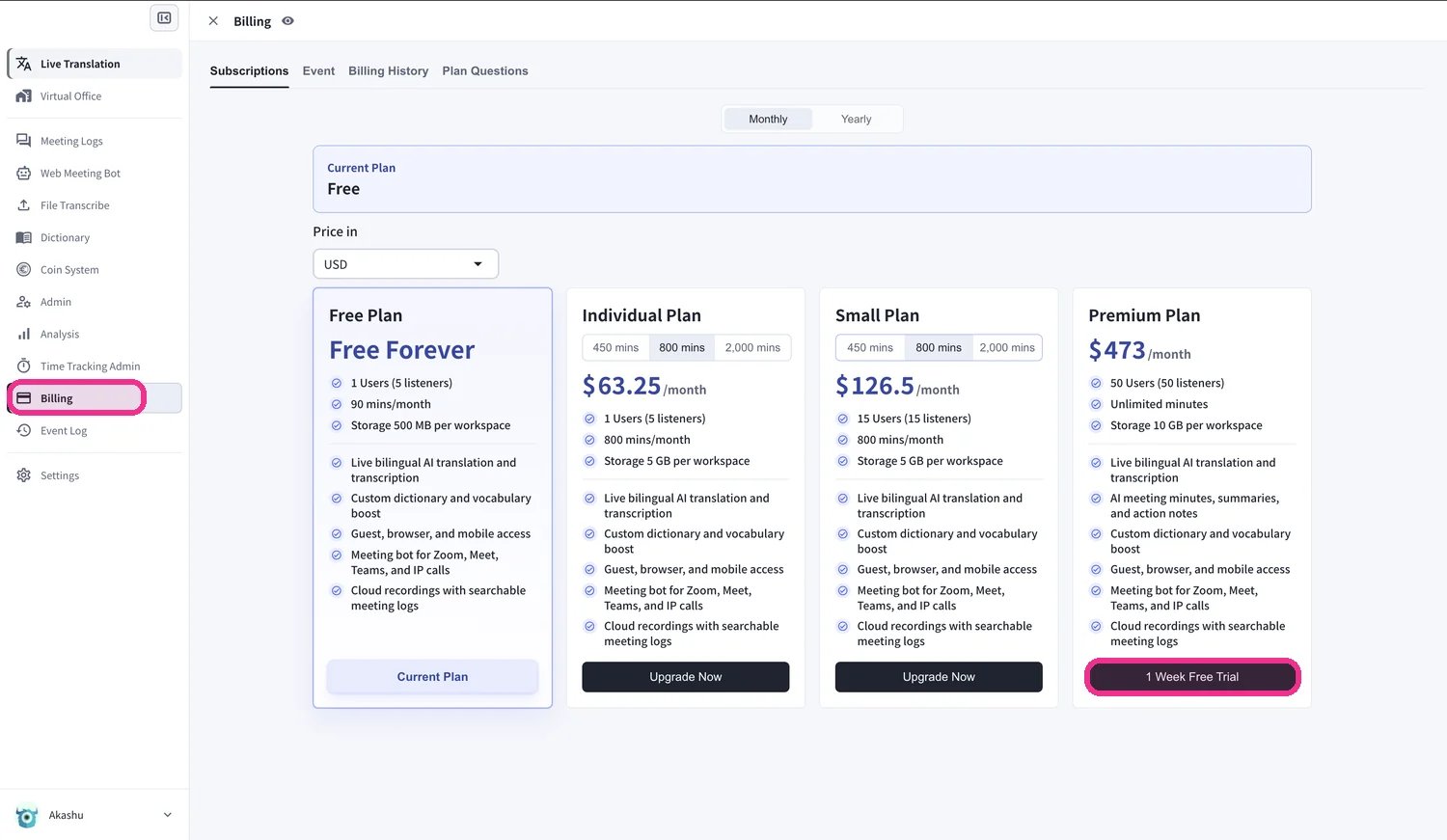
**打开 Subscriptions 选项卡:** 顶部导航 → **Billing** → **Subscriptions**。
* **从 Free Plan** — 点击 **Upgrade Free Plan** CTA。
* **从付费方案** — 点击当前方案旁边的 **Change Plan**。
**选择目标方案:**
* **Small / Premium / Enterprise** — 点击 **Upgrade Plan** → **Purchase** → 输入卡信息。个人套餐为**单用户且仅限月付**。
* **Free 升级到 Premium** — 点击 **1-Week Free Trial** → **Start Trial** → 输入卡信息。试用 1 周后自动扣款。
* **较低档位(降级)** — 选择档位并确认。当前方案会保持到续费日;新方案从下一个周期开始。
**个人套餐是单用户套餐。** 只有当工作区仅有**一名活跃成员**时,才能切换至个人套餐。如果成员超过一人,请先移除多余的成员——VoicePing 会阻止此变更,并提示需移除多少名成员,直到工作区成员减少到一人为止。
费用一旦扣款即**不可退款**。如果取消,当前方案会一直有效到周期结束;在结束前可随时免费恢复。
## 如何变更方案
### 1. PC
**打开 Subscriptions 选项卡:** 顶部导航 → **Billing** → **Subscriptions**。
* **从 Free Plan** — 点击 **Upgrade Free Plan** CTA。
* **从付费方案** — 点击当前方案旁边的 **Change Plan**。
**选择目标方案:**
* **Small / Premium / Enterprise** — 点击 **Upgrade Plan** → **Purchase** → 输入卡信息。个人套餐为**单用户且仅限月付**。
* **Free 升级到 Premium** — 点击 **1-Week Free Trial** → **Start Trial** → 输入卡信息。试用 1 周后自动扣款。
* **较低档位(降级)** — 选择档位并确认。当前方案会保持到续费日;新方案从下一个周期开始。
**个人套餐是单用户套餐。** 只有当工作区仅有**一名活跃成员**时,才能切换至个人套餐。如果成员超过一人,请先移除多余的成员——VoicePing 会阻止此变更,并提示需移除多少名成员,直到工作区成员减少到一人为止。
 **升级按比例计费。** 升级当天会开始新的账单周期;旧方案未使用部分会抵扣新价格,用量会重置。越接近周期末升级,抵扣越少;在续费日升级最便宜。**降级** 会在下一次续费时生效,续费日不变。
### 2. Mobile
App Store 政策: 只有用完全部 60 分钟免费额度后,才会显示升级和取消按钮。请先使用 60 分钟,或从 PC 变更方案。
手机上的所有方案变更都通过 Billing 中心的 **Manage Plan** 完成。
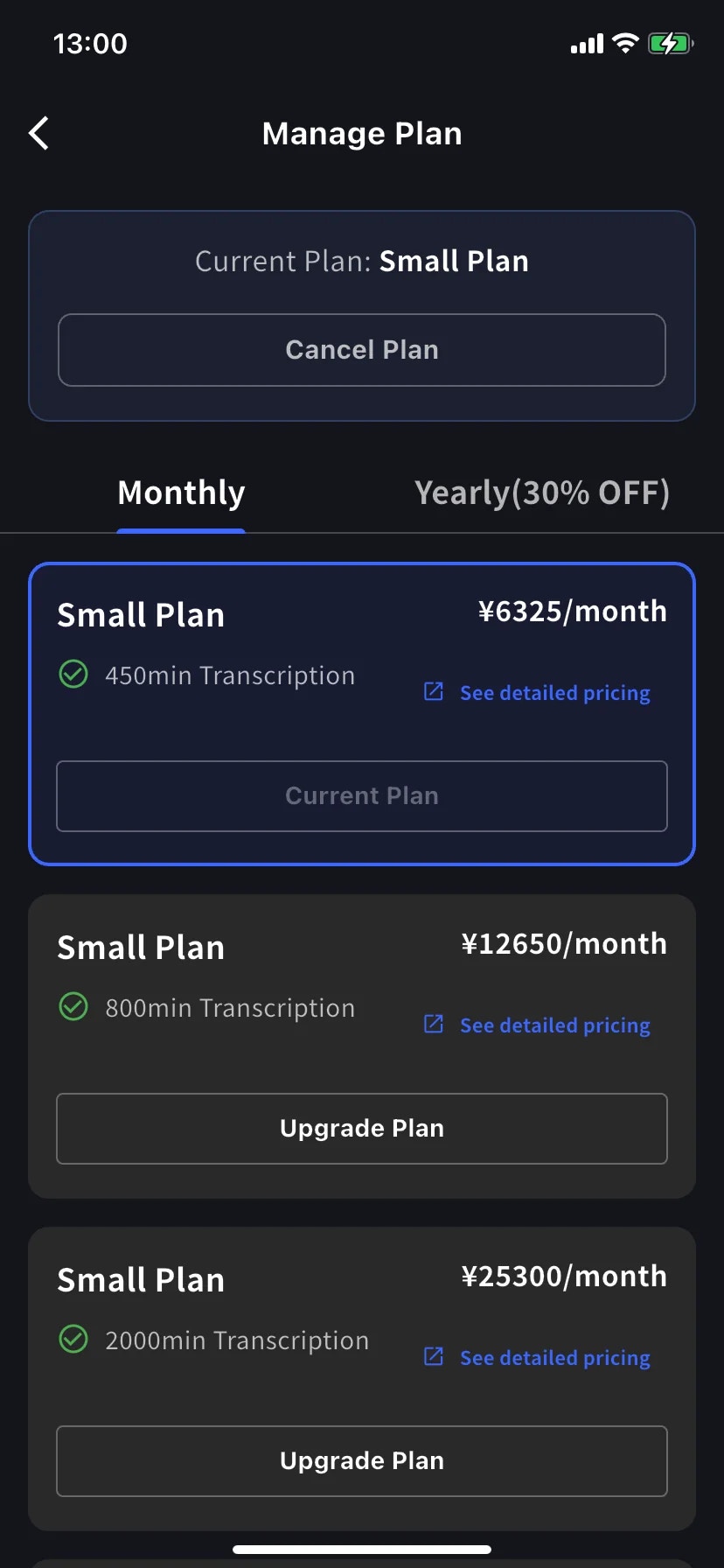
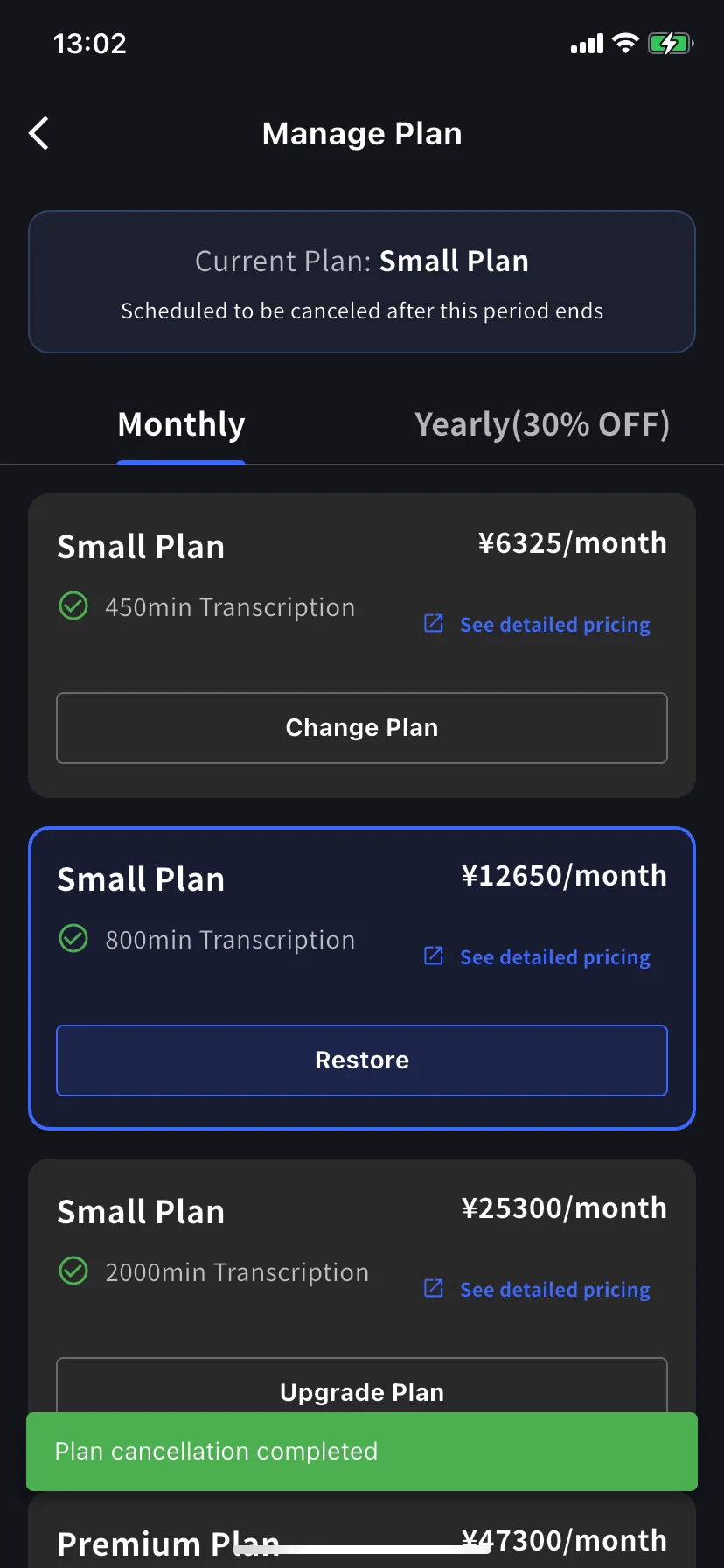
侧边菜单 → **User Settings** → **Billing** → **Manage Plan**,或点 Current Plan 卡片上的 **Manage Plan**。顶部可切换 **Monthly** / **Yearly**。高于当前的档位显示 **Upgrade Plan**,低于当前的档位显示 **Change Plan**。
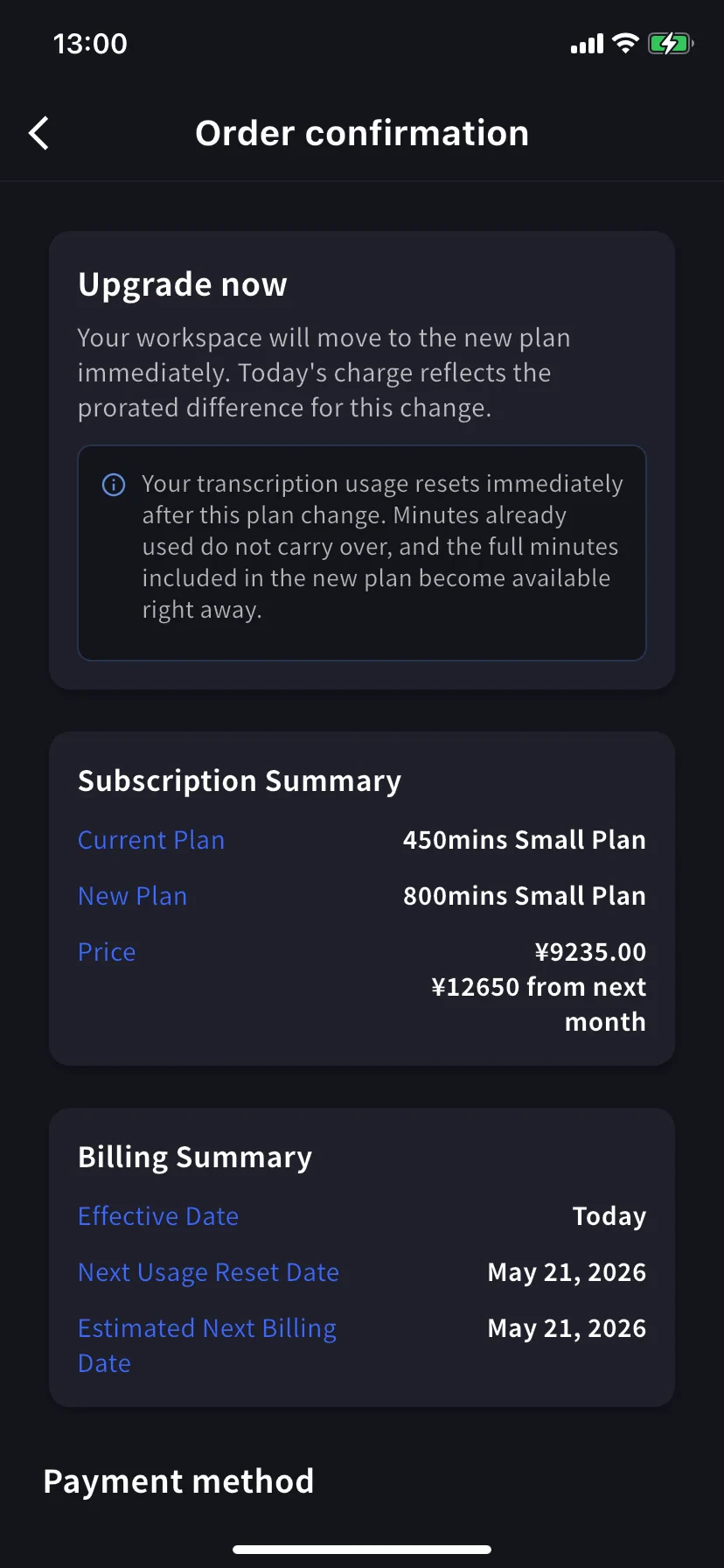
在更高档位上点 **Upgrade Plan**。横幅会提示工作区会立即切换到新方案,今天的费用为按比例计算的差额。选择现有卡或点 **+ Add new card**,勾选 Terms / Privacy,然后点 **Confirm Plan Change**。
**Free Plan 升级到 Premium** 会先开始 1 周试用,试用结束前不扣款。
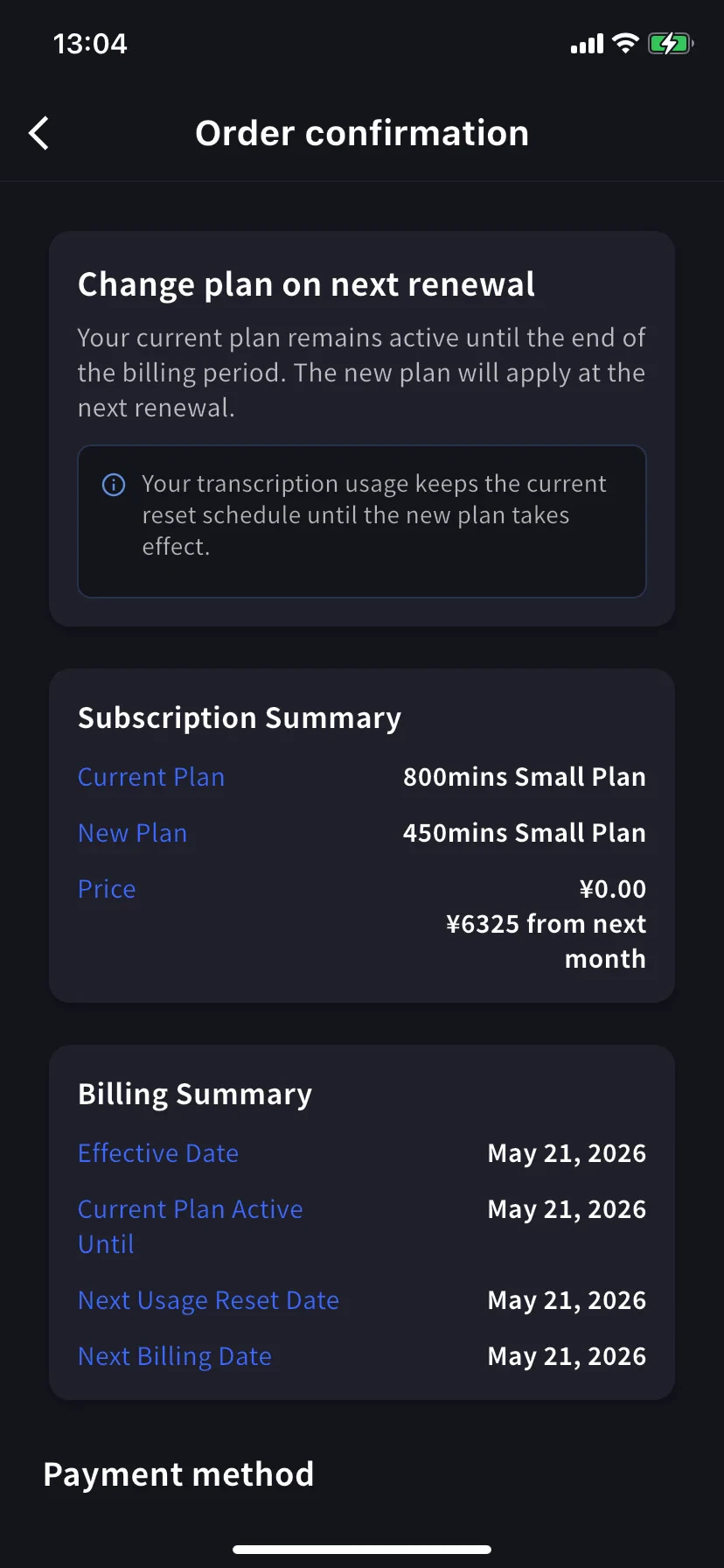
在较低档位上点 **Change Plan**。横幅会提示当前方案会保持到当前账单周期结束。今天费用为 **¥0 / \$0**。确认流程与升级相同。
### 3. Enterprise / 书面 / 电子合同客户
请查看 [Contract Procedures](/zh/contract-procedures),并通过[此表单](https://forms.gle/6AUho7oj3zBr79e96)提交以下信息。
1. 公司名称 2. 公司地址 3. 公司电话 4. 联系人 5. 合同日期 6. 当前方案和希望方案
## 取消 / 试用结束
### 1. PC
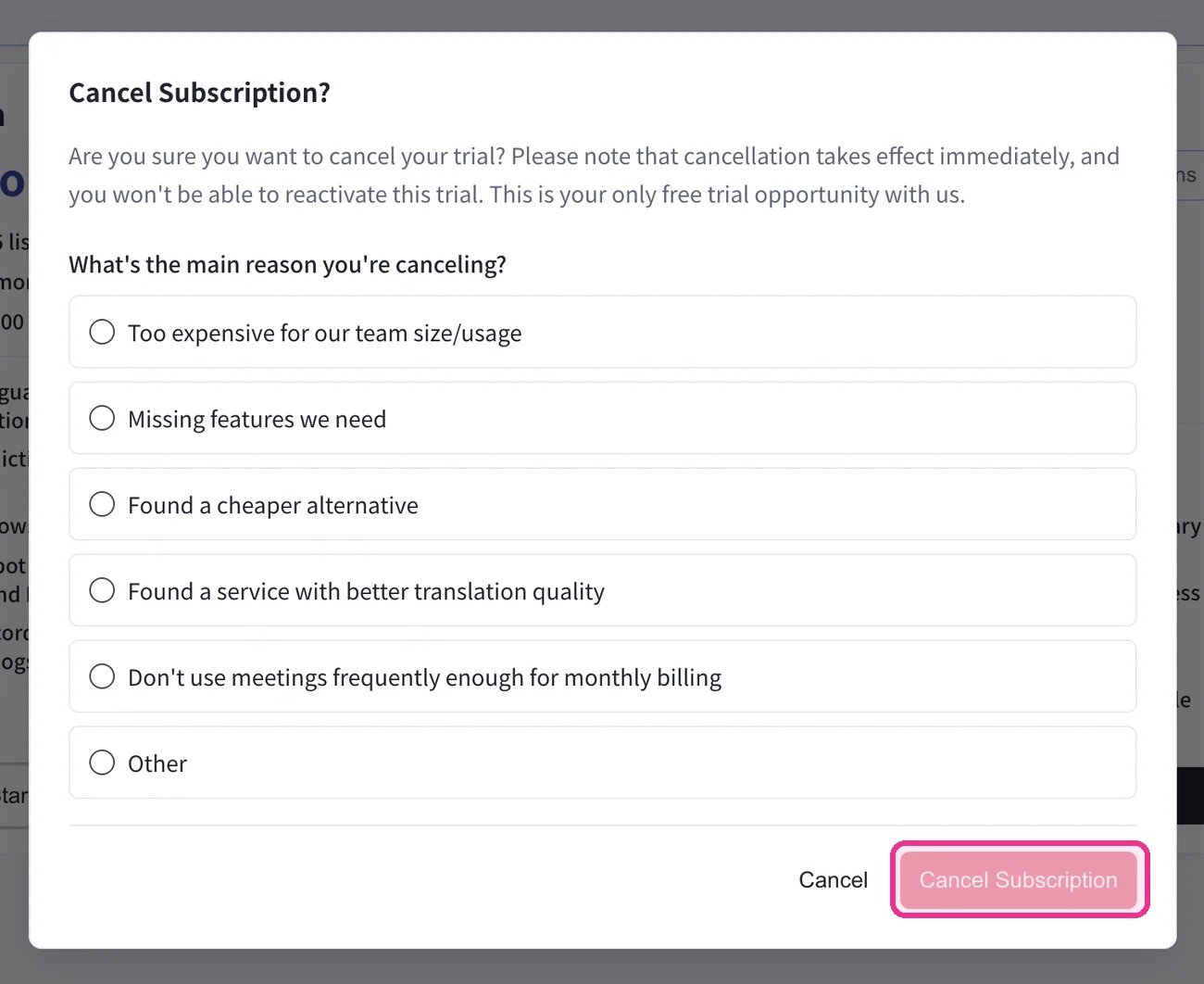
顶部导航 → **Billing** → **Subscriptions** → 在 **Free Plan** 下点击 **Start Free Plan**。在 **Cancel Subscription?** 对话框中选择一个原因,然后点击 **Cancel Subscription**。
**升级按比例计费。** 升级当天会开始新的账单周期;旧方案未使用部分会抵扣新价格,用量会重置。越接近周期末升级,抵扣越少;在续费日升级最便宜。**降级** 会在下一次续费时生效,续费日不变。
### 2. Mobile
App Store 政策: 只有用完全部 60 分钟免费额度后,才会显示升级和取消按钮。请先使用 60 分钟,或从 PC 变更方案。
手机上的所有方案变更都通过 Billing 中心的 **Manage Plan** 完成。
侧边菜单 → **User Settings** → **Billing** → **Manage Plan**,或点 Current Plan 卡片上的 **Manage Plan**。顶部可切换 **Monthly** / **Yearly**。高于当前的档位显示 **Upgrade Plan**,低于当前的档位显示 **Change Plan**。
在更高档位上点 **Upgrade Plan**。横幅会提示工作区会立即切换到新方案,今天的费用为按比例计算的差额。选择现有卡或点 **+ Add new card**,勾选 Terms / Privacy,然后点 **Confirm Plan Change**。
**Free Plan 升级到 Premium** 会先开始 1 周试用,试用结束前不扣款。
在较低档位上点 **Change Plan**。横幅会提示当前方案会保持到当前账单周期结束。今天费用为 **¥0 / \$0**。确认流程与升级相同。
### 3. Enterprise / 书面 / 电子合同客户
请查看 [Contract Procedures](/zh/contract-procedures),并通过[此表单](https://forms.gle/6AUho7oj3zBr79e96)提交以下信息。
1. 公司名称 2. 公司地址 3. 公司电话 4. 联系人 5. 合同日期 6. 当前方案和希望方案
## 取消 / 试用结束
### 1. PC
顶部导航 → **Billing** → **Subscriptions** → 在 **Free Plan** 下点击 **Start Free Plan**。在 **Cancel Subscription?** 对话框中选择一个原因,然后点击 **Cancel Subscription**。
 在 **Billing History** 选项卡中确认此次取消——会出现一条 **Succeeded to cancel Trial** 记录(或对应的取消方案记录)。
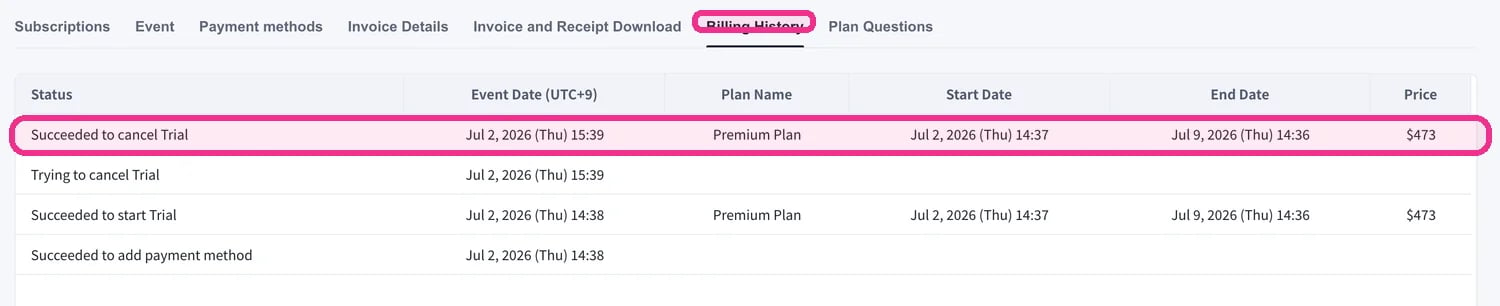 请务必确认取消操作已出现在 **Billing History** 中。如果跳过此步骤,取消会被视为未完成,且无法退款。
### 2. Mobile
手机上请在 Billing 中心的 **Manage Plan** 中取消。周期结束前可随时恢复。
##### 取消
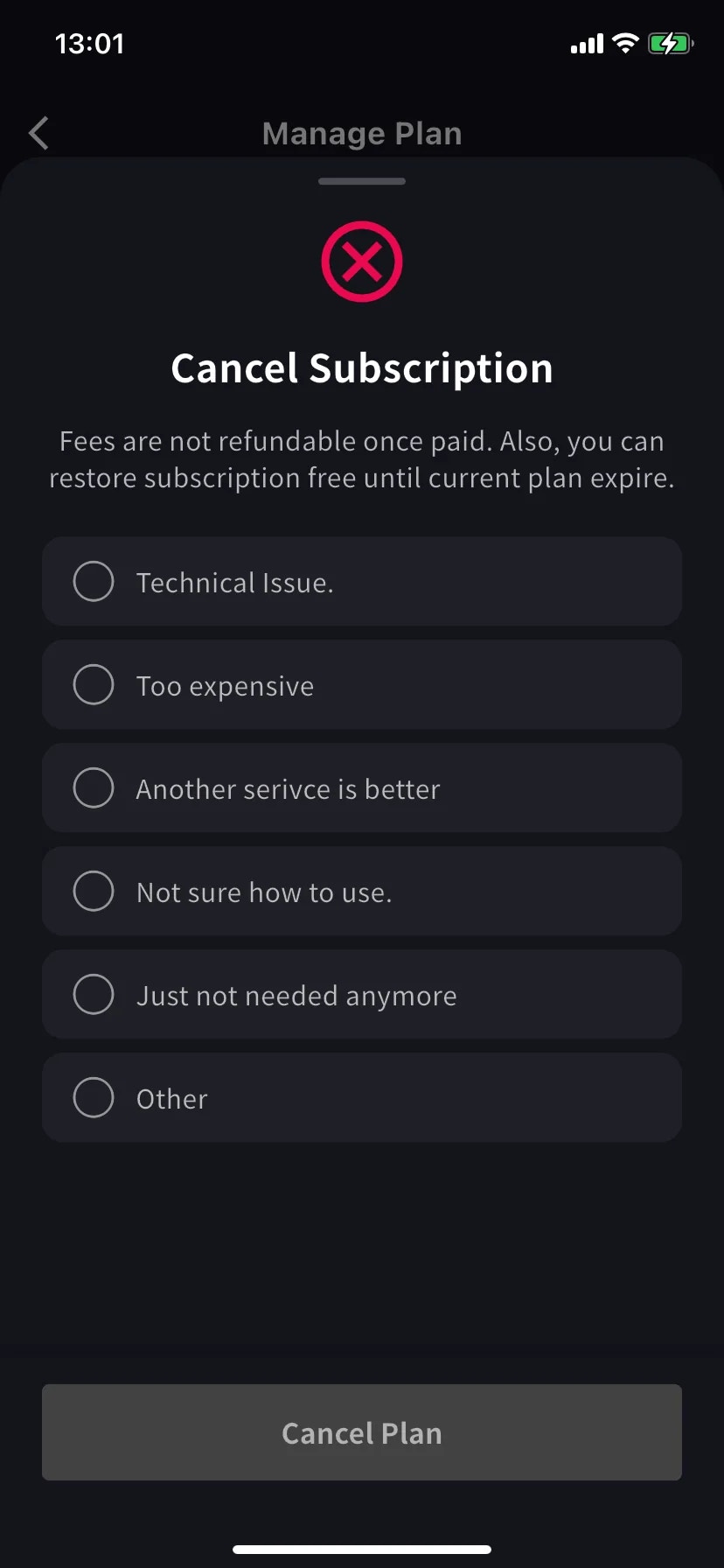
会弹出必须选择原因的表单。选择原因前,Cancel Plan 按钮会保持灰色。
选择 **Other** 时必须输入至少 15 个字符。
Current plan 横幅会变为 **Scheduled to be canceled after this period ends**;较低档位会显示 **Restore** 按钮。续费日前你仍可使用当前方案和分钟数。
##### 恢复自动续费
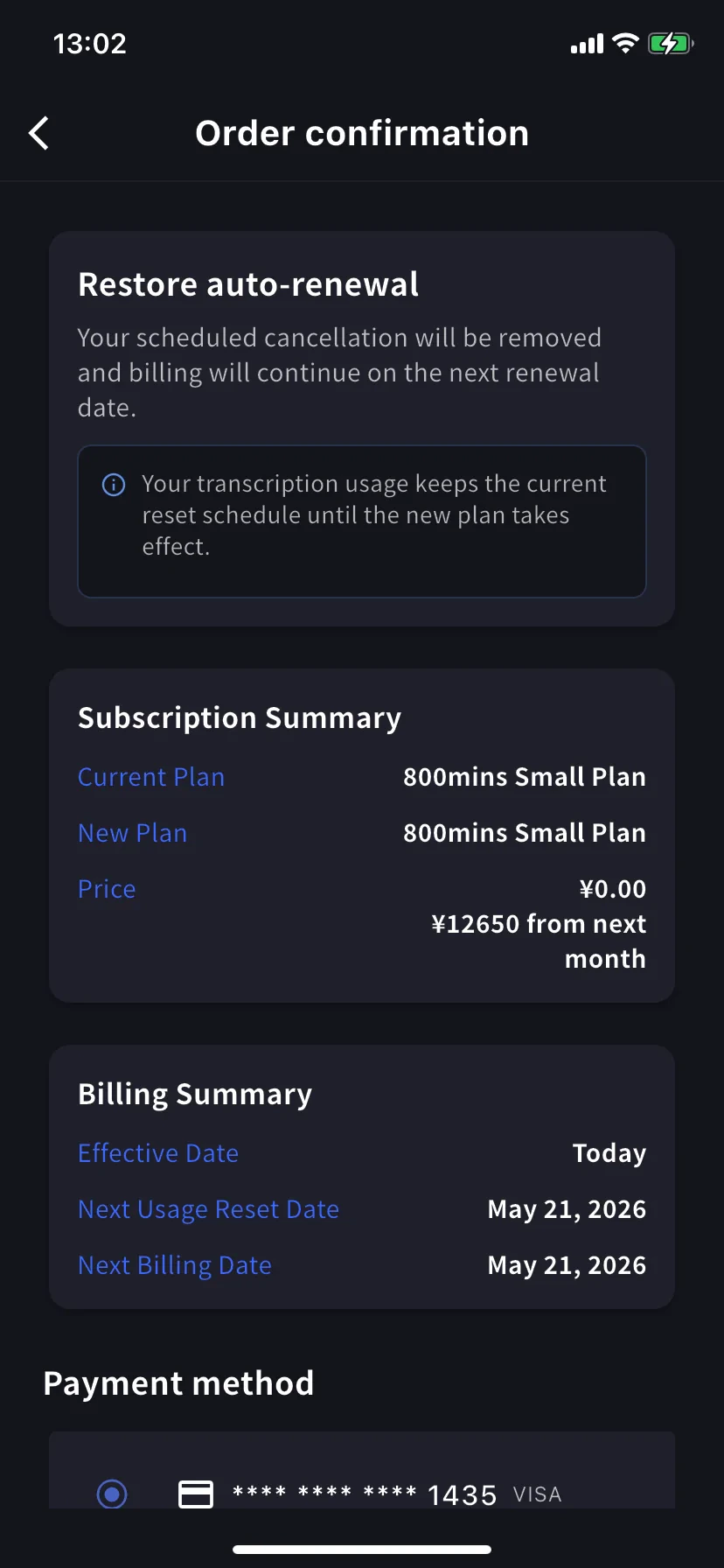
在当前档位上点 **Restore**。订单确认会显示预约取消将被移除,并会在下一次续费日继续扣款。今天费用为 \$0。点 **Confirm Plan Change** 后会回到正常续费订阅。用量重置时间保持不变。
### 3. Enterprise / 书面 / 电子合同客户
合同计费客户不能使用 Subscriptions 选项卡。请通过[此表单](https://forms.gle/6AUho7oj3zBr79e96)提交以下信息。
1. 公司名称 2. 公司地址 3. 公司电话 4. 联系人 5. 合同日期 6. 合同方案类型 7. 取消原因
请务必确认取消操作已出现在 **Billing History** 中。如果跳过此步骤,取消会被视为未完成,且无法退款。
### 2. Mobile
手机上请在 Billing 中心的 **Manage Plan** 中取消。周期结束前可随时恢复。
##### 取消
会弹出必须选择原因的表单。选择原因前,Cancel Plan 按钮会保持灰色。
选择 **Other** 时必须输入至少 15 个字符。
Current plan 横幅会变为 **Scheduled to be canceled after this period ends**;较低档位会显示 **Restore** 按钮。续费日前你仍可使用当前方案和分钟数。
##### 恢复自动续费
在当前档位上点 **Restore**。订单确认会显示预约取消将被移除,并会在下一次续费日继续扣款。今天费用为 \$0。点 **Confirm Plan Change** 后会回到正常续费订阅。用量重置时间保持不变。
### 3. Enterprise / 书面 / 电子合同客户
合同计费客户不能使用 Subscriptions 选项卡。请通过[此表单](https://forms.gle/6AUho7oj3zBr79e96)提交以下信息。
1. 公司名称 2. 公司地址 3. 公司电话 4. 联系人 5. 合同日期 6. 合同方案类型 7. 取消原因