> ## Documentation Index
> Fetch the complete documentation index at: https://manual.voiceping.net/llms.txt
> Use this file to discover all available pages before exploring further.
# API Access
> Query VoicePing meeting transcripts from your own backend with scoped API keys. Code samples in TypeScript, Python, Java, and Go.
export const FeedbackEn = () => <>
Have an idea or request about this feature? Send it to the team via Product Feedback.
Official Links
Visit our official website
Follow us on X
Like us on Facebook
Connect on LinkedIn
;
 ## Query VoicePing Transcripts From Your Backend
API Access is for server-to-server workflows — scheduled exports, CRM sync, dashboards, compliance archives. You create an API key in your workspace, grant it a set of scopes, and your backend calls the VoicePing API with a standard bearer token.
If a **person** is asking questions through an AI client, use [MCP Access](/en/external-access/mcp) instead.
```text theme={null}
If a person is asking questions, use MCP Access.
If a server is fetching data, use API Access.
```
***
## When to use API Access
| Use case | Example |
| ------------------- | -------------------------------------------------- |
| Scheduled exports | Export this week's transcripts every Friday |
| Internal reporting | Build a weekly meeting summary report |
| CRM or PM workflows | Push transcript summaries into Salesforce or Asana |
| Compliance archives | Store meeting records in approved storage |
| Dashboards | Feed transcript metadata into analytics systems |
***
## Create an API key
1. Open **workspace settings → External Access → API Access**.
2. Enable **API Access Mode** if it's not already on.
3. Click **Create API key**.
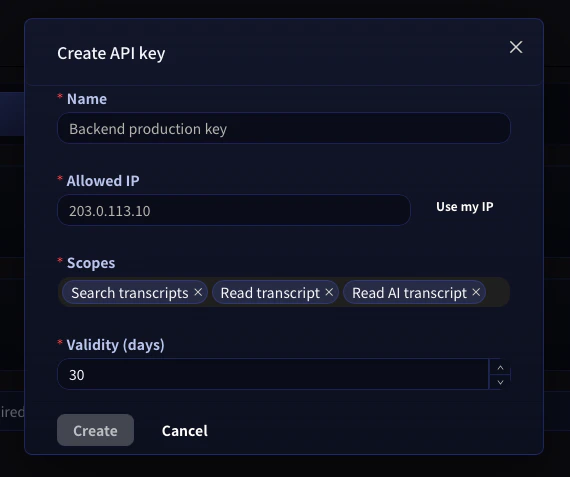
4. Choose a name, the **allowed IP address** (recommended), the **scopes** the key needs, and a validity period.
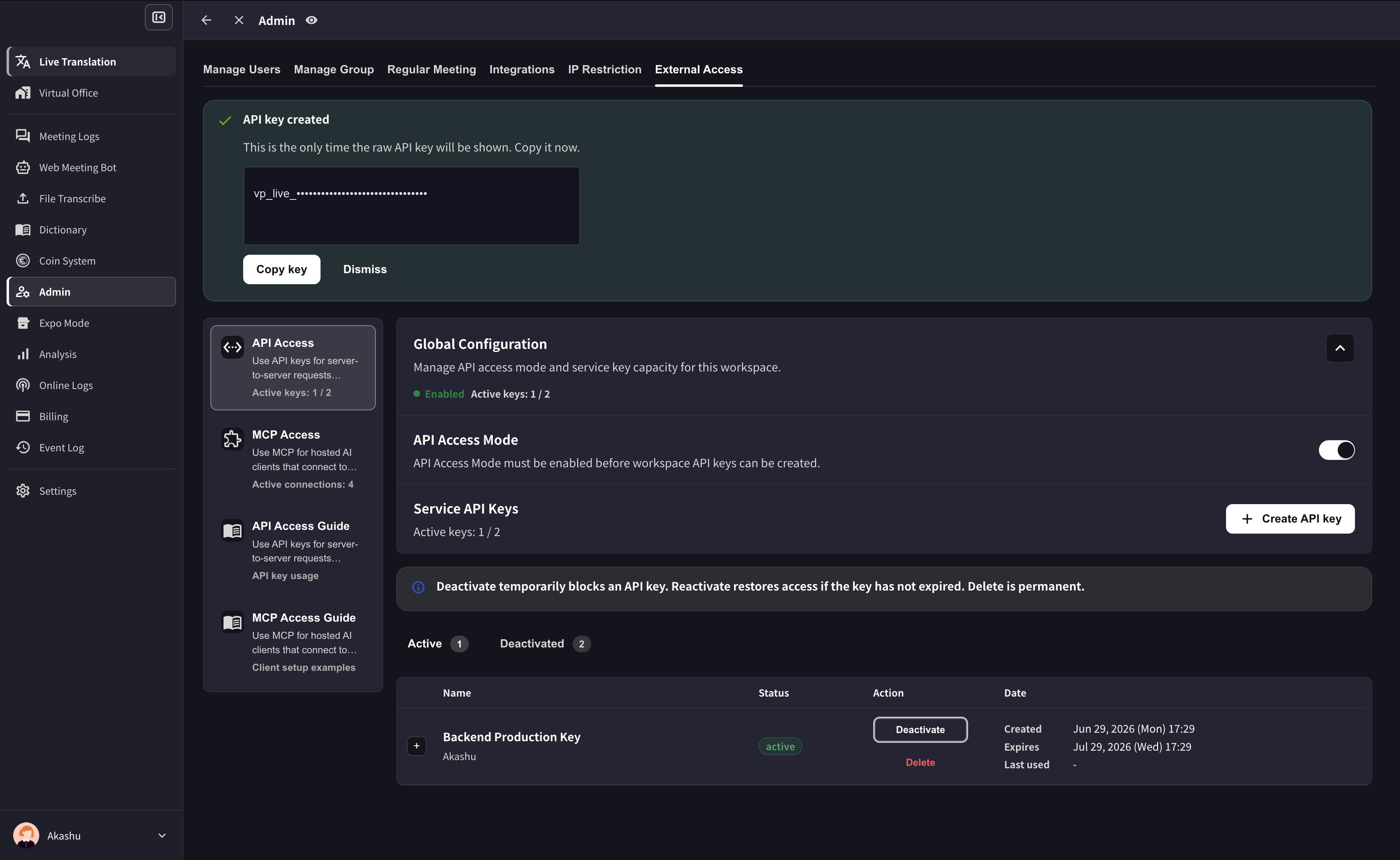
5. Copy the generated key immediately and store it in your secret manager. The full key is shown only once.
## Query VoicePing Transcripts From Your Backend
API Access is for server-to-server workflows — scheduled exports, CRM sync, dashboards, compliance archives. You create an API key in your workspace, grant it a set of scopes, and your backend calls the VoicePing API with a standard bearer token.
If a **person** is asking questions through an AI client, use [MCP Access](/en/external-access/mcp) instead.
```text theme={null}
If a person is asking questions, use MCP Access.
If a server is fetching data, use API Access.
```
***
## When to use API Access
| Use case | Example |
| ------------------- | -------------------------------------------------- |
| Scheduled exports | Export this week's transcripts every Friday |
| Internal reporting | Build a weekly meeting summary report |
| CRM or PM workflows | Push transcript summaries into Salesforce or Asana |
| Compliance archives | Store meeting records in approved storage |
| Dashboards | Feed transcript metadata into analytics systems |
***
## Create an API key
1. Open **workspace settings → External Access → API Access**.
2. Enable **API Access Mode** if it's not already on.
3. Click **Create API key**.
4. Choose a name, the **allowed IP address** (recommended), the **scopes** the key needs, and a validity period.
5. Copy the generated key immediately and store it in your secret manager. The full key is shown only once.
 After the key is created, VoicePing shows the raw key only once. Copy it before dismissing the success panel.
 **Never commit API keys.** Keep them in environment variables or your secret manager. For extra safety, lock each key to a specific **allowed IP address** in the create-key modal — any request from another IP will be rejected even if the key is leaked.
***
## Authenticate requests
Every request authenticates with a bearer token against `https://api.voiceping.io`:
```http theme={null}
GET /api/v1/transcripts/search?q=pricing&limit=10 HTTP/1.1
Host: api.voiceping.io
Authorization: Bearer
```
Set the key once as the `VOICEPING_API_KEY` environment variable, and the samples below will pick it up automatically.
***
## Quickstart — call the API in your language
The same two-step flow — **search transcripts, then fetch one** — in four languages. TypeScript is shown first; switch tabs for your stack.
```typescript TypeScript theme={null}
// Requires Node.js 18+ (for built-in fetch)
const apiKey = process.env.VOICEPING_API_KEY!;
const base = "https://api.voiceping.io/api/v1";
const headers = { Authorization: `Bearer ${apiKey}` };
// 1. Search transcripts
const searchRes = await fetch(
`${base}/transcripts/search?q=pricing&limit=10`,
{ headers },
);
const { transcripts } = await searchRes.json();
// 2. Read the first result in full
const detailRes = await fetch(
`${base}/transcripts/${transcripts[0].id}`,
{ headers },
);
const transcript = await detailRes.json();
console.log(transcript.title, transcript.content);
```
```python Python theme={null}
# pip install requests
import os
import requests
api_key = os.environ["VOICEPING_API_KEY"]
base = "https://api.voiceping.io/api/v1"
headers = {"Authorization": f"Bearer {api_key}"}
# 1. Search transcripts
search = requests.get(
f"{base}/transcripts/search",
headers=headers,
params={"q": "pricing", "limit": 10},
).json()
# 2. Read the first result in full
first_id = search["transcripts"][0]["id"]
detail = requests.get(
f"{base}/transcripts/{first_id}",
headers=headers,
).json()
print(detail["title"], detail["content"])
```
```java Java theme={null}
// Java 11+ (uses built-in java.net.http)
import java.net.URI;
import java.net.http.HttpClient;
import java.net.http.HttpRequest;
import java.net.http.HttpResponse;
public class VoicePingQuickstart {
public static void main(String[] args) throws Exception {
String apiKey = System.getenv("VOICEPING_API_KEY");
String base = "https://api.voiceping.io/api/v1";
HttpClient client = HttpClient.newHttpClient();
// 1. Search transcripts
HttpRequest search = HttpRequest.newBuilder()
.uri(URI.create(base + "/transcripts/search?q=pricing&limit=10"))
.header("Authorization", "Bearer " + apiKey)
.GET()
.build();
HttpResponse searchRes =
client.send(search, HttpResponse.BodyHandlers.ofString());
System.out.println(searchRes.body());
// 2. Read a transcript (parse the id from searchRes.body() first;
// shown here with a placeholder)
HttpRequest detail = HttpRequest.newBuilder()
.uri(URI.create(base + "/transcripts/TRANSCRIPT_ID"))
.header("Authorization", "Bearer " + apiKey)
.GET()
.build();
HttpResponse detailRes =
client.send(detail, HttpResponse.BodyHandlers.ofString());
System.out.println(detailRes.body());
}
}
```
```go Go theme={null}
// go run main.go
package main
import (
"fmt"
"io"
"net/http"
"os"
)
func main() {
apiKey := os.Getenv("VOICEPING_API_KEY")
base := "https://api.voiceping.io/api/v1"
// 1. Search transcripts
req, _ := http.NewRequest("GET",
base+"/transcripts/search?q=pricing&limit=10", nil)
req.Header.Set("Authorization", "Bearer "+apiKey)
res, err := http.DefaultClient.Do(req)
if err != nil {
panic(err)
}
defer res.Body.Close()
body, _ := io.ReadAll(res.Body)
fmt.Println(string(body))
// 2. Read a transcript by id (parse id from body first)
detailReq, _ := http.NewRequest("GET",
base+"/transcripts/TRANSCRIPT_ID", nil)
detailReq.Header.Set("Authorization", "Bearer "+apiKey)
detailRes, _ := http.DefaultClient.Do(detailReq)
defer detailRes.Body.Close()
detailBody, _ := io.ReadAll(detailRes.Body)
fmt.Println(string(detailBody))
}
```
***
## Next steps
Back to scopes, lifecycle controls, and event logs that apply to both MCP and API.
If a person is asking questions through Claude, ChatGPT, Codex, Claude Code, or Gemini CLI, use MCP Access instead.
**Never commit API keys.** Keep them in environment variables or your secret manager. For extra safety, lock each key to a specific **allowed IP address** in the create-key modal — any request from another IP will be rejected even if the key is leaked.
***
## Authenticate requests
Every request authenticates with a bearer token against `https://api.voiceping.io`:
```http theme={null}
GET /api/v1/transcripts/search?q=pricing&limit=10 HTTP/1.1
Host: api.voiceping.io
Authorization: Bearer
```
Set the key once as the `VOICEPING_API_KEY` environment variable, and the samples below will pick it up automatically.
***
## Quickstart — call the API in your language
The same two-step flow — **search transcripts, then fetch one** — in four languages. TypeScript is shown first; switch tabs for your stack.
```typescript TypeScript theme={null}
// Requires Node.js 18+ (for built-in fetch)
const apiKey = process.env.VOICEPING_API_KEY!;
const base = "https://api.voiceping.io/api/v1";
const headers = { Authorization: `Bearer ${apiKey}` };
// 1. Search transcripts
const searchRes = await fetch(
`${base}/transcripts/search?q=pricing&limit=10`,
{ headers },
);
const { transcripts } = await searchRes.json();
// 2. Read the first result in full
const detailRes = await fetch(
`${base}/transcripts/${transcripts[0].id}`,
{ headers },
);
const transcript = await detailRes.json();
console.log(transcript.title, transcript.content);
```
```python Python theme={null}
# pip install requests
import os
import requests
api_key = os.environ["VOICEPING_API_KEY"]
base = "https://api.voiceping.io/api/v1"
headers = {"Authorization": f"Bearer {api_key}"}
# 1. Search transcripts
search = requests.get(
f"{base}/transcripts/search",
headers=headers,
params={"q": "pricing", "limit": 10},
).json()
# 2. Read the first result in full
first_id = search["transcripts"][0]["id"]
detail = requests.get(
f"{base}/transcripts/{first_id}",
headers=headers,
).json()
print(detail["title"], detail["content"])
```
```java Java theme={null}
// Java 11+ (uses built-in java.net.http)
import java.net.URI;
import java.net.http.HttpClient;
import java.net.http.HttpRequest;
import java.net.http.HttpResponse;
public class VoicePingQuickstart {
public static void main(String[] args) throws Exception {
String apiKey = System.getenv("VOICEPING_API_KEY");
String base = "https://api.voiceping.io/api/v1";
HttpClient client = HttpClient.newHttpClient();
// 1. Search transcripts
HttpRequest search = HttpRequest.newBuilder()
.uri(URI.create(base + "/transcripts/search?q=pricing&limit=10"))
.header("Authorization", "Bearer " + apiKey)
.GET()
.build();
HttpResponse searchRes =
client.send(search, HttpResponse.BodyHandlers.ofString());
System.out.println(searchRes.body());
// 2. Read a transcript (parse the id from searchRes.body() first;
// shown here with a placeholder)
HttpRequest detail = HttpRequest.newBuilder()
.uri(URI.create(base + "/transcripts/TRANSCRIPT_ID"))
.header("Authorization", "Bearer " + apiKey)
.GET()
.build();
HttpResponse detailRes =
client.send(detail, HttpResponse.BodyHandlers.ofString());
System.out.println(detailRes.body());
}
}
```
```go Go theme={null}
// go run main.go
package main
import (
"fmt"
"io"
"net/http"
"os"
)
func main() {
apiKey := os.Getenv("VOICEPING_API_KEY")
base := "https://api.voiceping.io/api/v1"
// 1. Search transcripts
req, _ := http.NewRequest("GET",
base+"/transcripts/search?q=pricing&limit=10", nil)
req.Header.Set("Authorization", "Bearer "+apiKey)
res, err := http.DefaultClient.Do(req)
if err != nil {
panic(err)
}
defer res.Body.Close()
body, _ := io.ReadAll(res.Body)
fmt.Println(string(body))
// 2. Read a transcript by id (parse id from body first)
detailReq, _ := http.NewRequest("GET",
base+"/transcripts/TRANSCRIPT_ID", nil)
detailReq.Header.Set("Authorization", "Bearer "+apiKey)
detailRes, _ := http.DefaultClient.Do(detailReq)
defer detailRes.Body.Close()
detailBody, _ := io.ReadAll(detailRes.Body)
fmt.Println(string(detailBody))
}
```
***
## Next steps
Back to scopes, lifecycle controls, and event logs that apply to both MCP and API.
If a person is asking questions through Claude, ChatGPT, Codex, Claude Code, or Gemini CLI, use MCP Access instead.