> ## Documentation Index
> Fetch the complete documentation index at: https://manual.voiceping.net/llms.txt
> Use this file to discover all available pages before exploring further.

# Workflow — Send a Follow-Up Email in 30 Seconds

> Turn a just-finished meeting transcript into a professional follow-up email — recap, confirmed decisions, action items with owners, next step. Uses VoicePing MCP Access.

export const FeedbackEn = () => <>
    <Tip>
      Have an idea or request about this feature? Send it to the team via <a href="/en/product-feedback">Product Feedback</a>.
    </Tip>

    <h2>Official Links</h2>

    <CardGroup cols={2}>
      <Card title="Official Website" icon="globe" href="https://voiceping.net/en/">
        Visit our official website
      </Card>
      <Card title="X (Twitter)" icon="x-twitter" href="https://x.com/VoicePingMedia">
        Follow us on X
      </Card>
      <Card title="Facebook" icon="facebook" href="https://www.facebook.com/voiceping.inc">
        Like us on Facebook
      </Card>
      <Card title="LinkedIn" icon="linkedin" href="https://www.linkedin.com/company/28684130/">
        Connect on LinkedIn
      </Card>
    </CardGroup>
  </>;

## Send a Follow-Up Email in 30 Seconds

**The situation.** Meeting just ended. Everyone remembers about 40% of what was decided. Whoever sends the first recap sets the record — and locks in the action items. This is the single highest-leverage habit in any sales or project team.

This workflow assumes you've already enabled [MCP Access](/en/external-access/mcp) and connected your AI client.

<Steps>
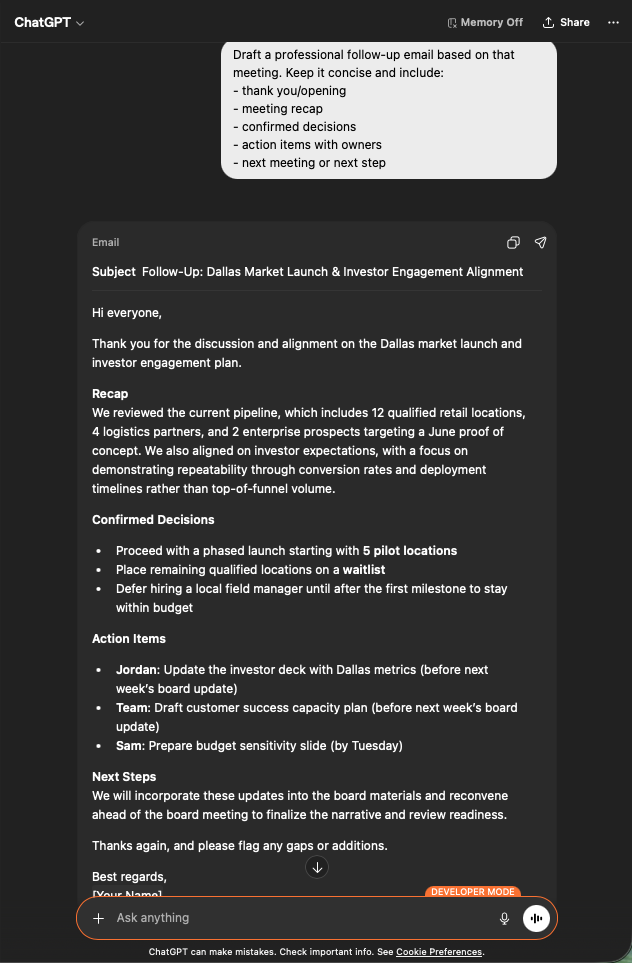
  <Step title="Pull the meeting context">
    ```text theme={null}
    Search my VoicePing transcripts for Dallas market investor engagement.
    ```

    You get a structured recap: the core summary, investor expectations, key decisions, strategic insights, and action items with owners. Exactly the material a follow-up email needs.

    <div style={{maxWidth: "600px", margin: "0 auto"}}>
      <Frame>
        <img src="https://mintcdn.com/test-cf63e467/z13MfE0CikV5b-4X/en/images/external_access/Follow-up%20email%20creation%201.png?fit=max&auto=format&n=z13MfE0CikV5b-4X&q=85&s=6da6641338869dad182dbb481af32b15" alt="ChatGPT surfacing a Dallas Market Launch transcript with core summary, investor expectations, key decisions, and action items" width="634" height="963" data-path="en/images/external_access/Follow-up email creation 1.png" />
      </Frame>
    </div>
  </Step>

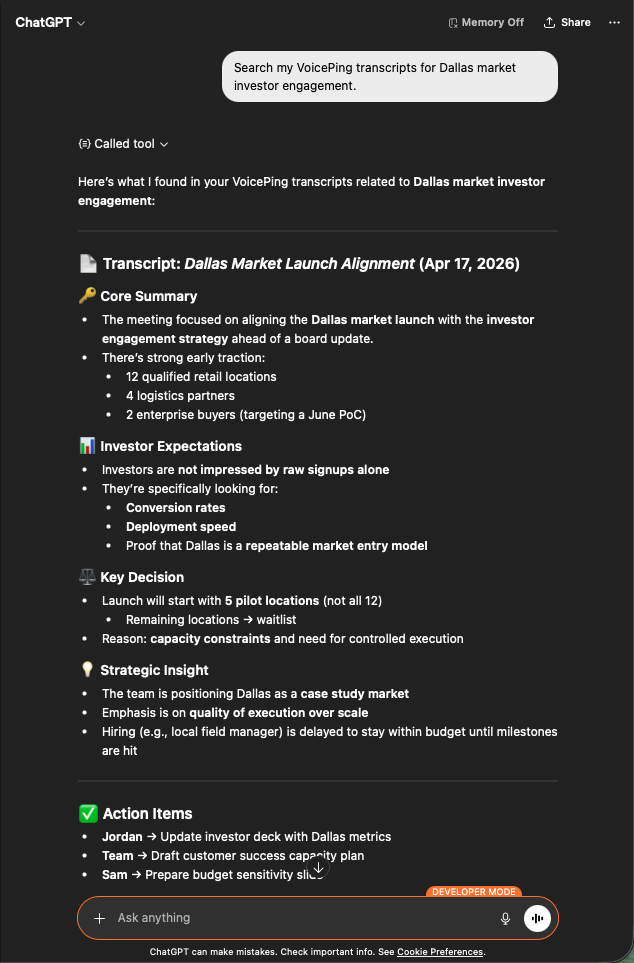
  <Step title="Ask for the email draft">
    ```text theme={null}
    Draft a professional follow-up email based on that meeting.
    Keep it concise and include:
    - thank you / opening
    - meeting recap
    - confirmed decisions
    - action items with owners
    - next meeting or next step
    ```

    You get a ready-to-send email: subject line, tight recap, bulleted decisions, action items tagged with the right owner and a deadline. Paste into Gmail, review, send.

    <div style={{maxWidth: "600px", margin: "0 auto"}}>
      <Frame>
        <img src="https://mintcdn.com/test-cf63e467/z13MfE0CikV5b-4X/en/images/external_access/Follow-up%20email%20creation%202.png?fit=max&auto=format&n=z13MfE0CikV5b-4X&q=85&s=7440cfa879ba68ec0a1ade3cd9c2f0d5" alt="ChatGPT generating a professional follow-up email draft with subject, recap, decisions, and assigned action items" width="632" height="963" data-path="en/images/external_access/Follow-up email creation 2.png" />
      </Frame>
    </div>
  </Step>
</Steps>

**Why this matters.** Follow-up quality is a leading indicator of deal velocity. Making it a 30-second task removes the reason people skip it.

***

## Next steps

<CardGroup cols={2}>
  <Card title="External Access overview" icon="arrow-left" href="/en/external-access">
    Back to the hub for scopes, lifecycle controls, and event logs.
  </Card>

  <Card title="How to enable MCP Access" icon="plug" href="/en/external-access/mcp">
    Setup guides for Claude, ChatGPT, Codex, Claude Code, and Gemini CLI.
  </Card>
</CardGroup>

<FeedbackEn />