> ## Documentation Index
> Fetch the complete documentation index at: https://manual.voiceping.net/llms.txt
> Use this file to discover all available pages before exploring further.
# Live Transcription Settings on Mobile
> Audio, text display, and dictionary settings for live transcription.
export const FeedbackEn = () => <>
Have an idea or request about this feature? Send it to the team via Product Feedback.
Official Links
Visit our official website
Follow us on X
Like us on Facebook
Connect on LinkedIn
;
 Reference for the in-session toolbar and app-level settings. For the basic flow see [Live Transcription on Mobile](/en/mobile-live-transcription).
## Where each setting lives
| Setting group | Location |
| --------------------------------------------------------------- | ---------------------------- |
| Audio playback, output, input | In-session → 🔊 Audio |
| Text size, colors, Face-to-face | In-session → TT Text display |
| Custom Phrase, Dictionary, Vocabulary, Default summary template | App-level → ⚙ Settings |
## Audio
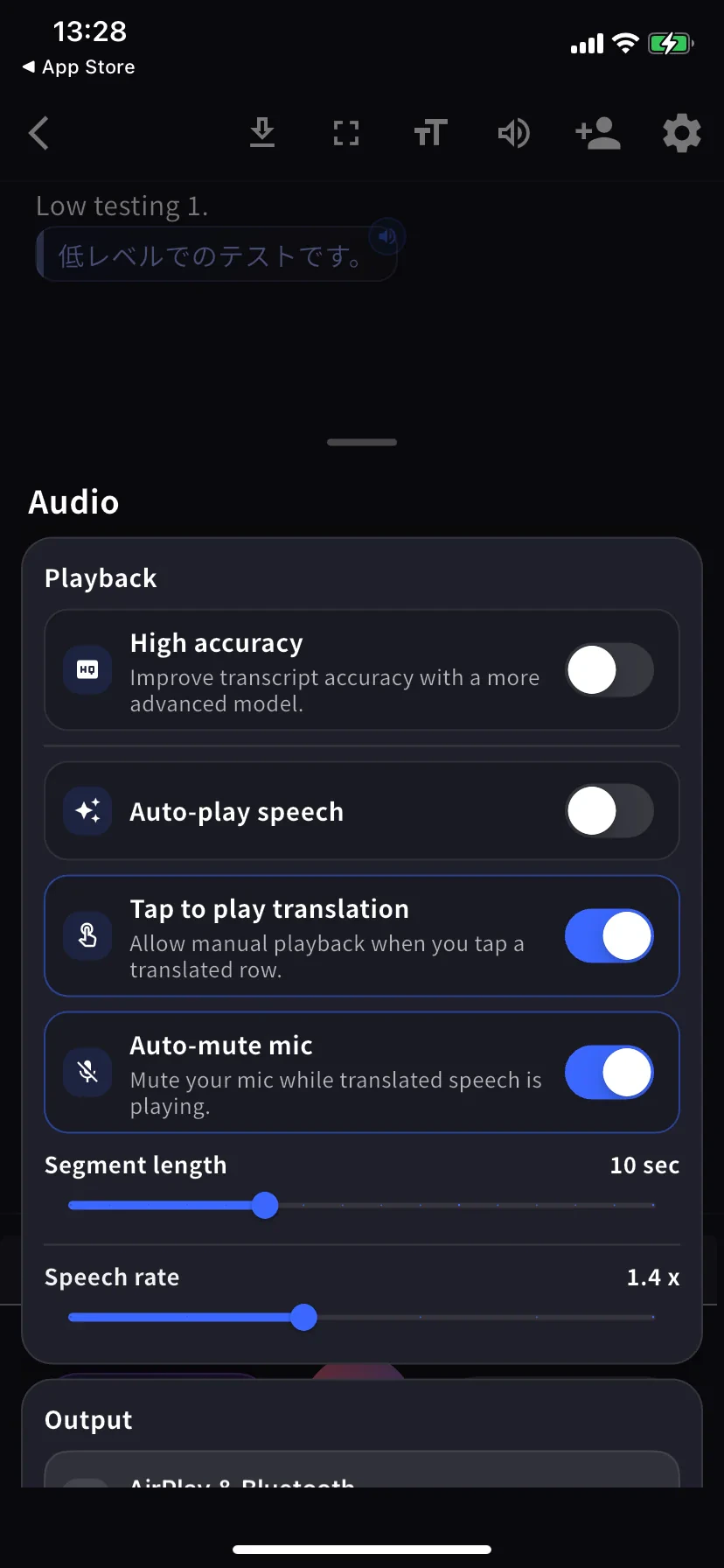
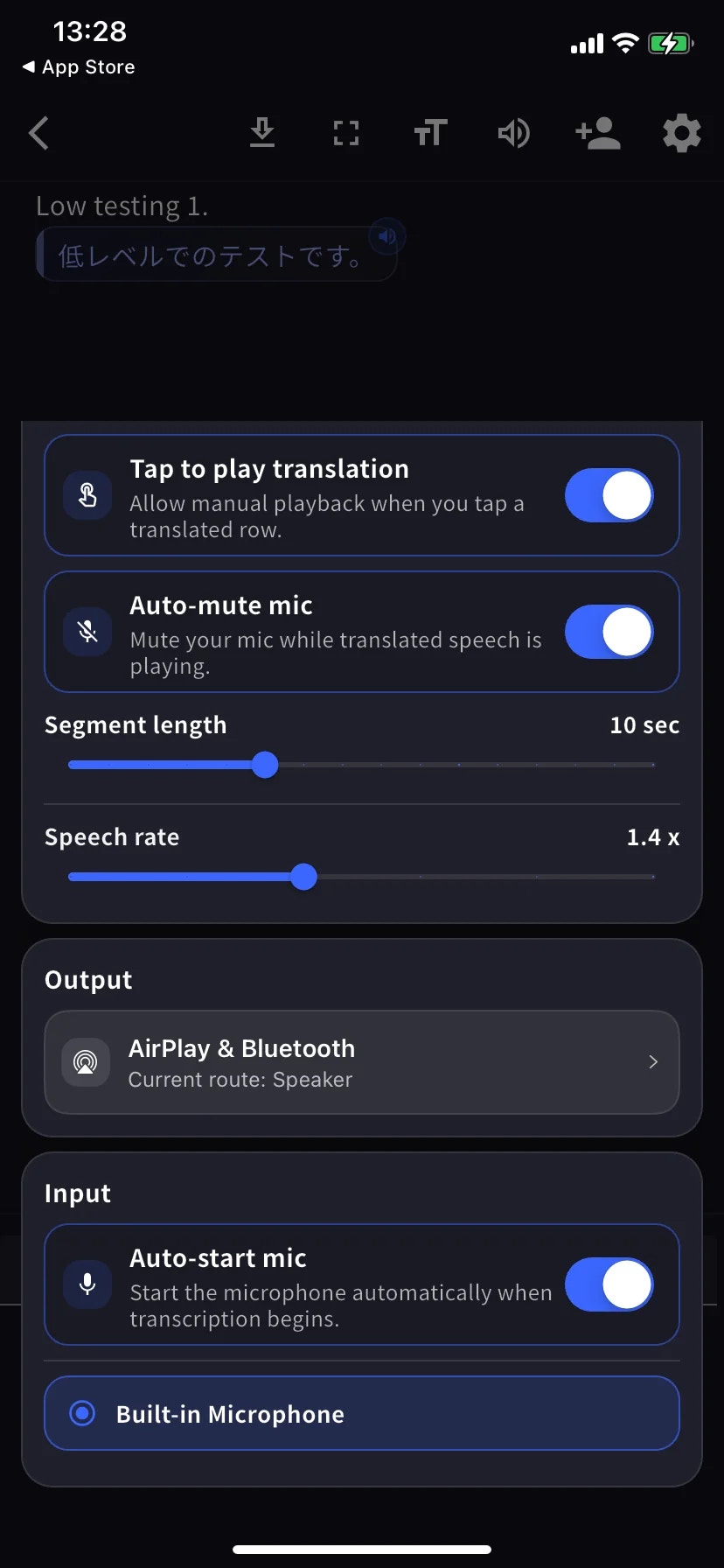
The Audio sheet is a single scrolling menu — the two screenshots below show the top (Playback) and bottom (Output / Input) of the same screen.
| Setting | What it does |
| --------------------------- | ------------------------------------------------------------------------------- |
| **High accuracy** | More accurate model, higher latency / battery cost. |
| **Auto-play speech** | Plays each translated row aloud automatically. |
| **Tap to play translation** | Tap a row to play its translation. |
| **Auto-mute mic** | Mutes mic during playback so it isn't re-transcribed. |
| **Segment length** | How long before a row is finalised. Default 10 sec. |
| **Speech rate** | Playback speed. Default 1.4×. |
| **Output** | Route translated speech to AirPlay, Bluetooth, headphones, or built-in speaker. |
| **Auto-start mic** | Start mic automatically when transcription begins. |
| **Mic source** | Built-in / wired / Bluetooth — selected mic has a blue ring. |
## Text display
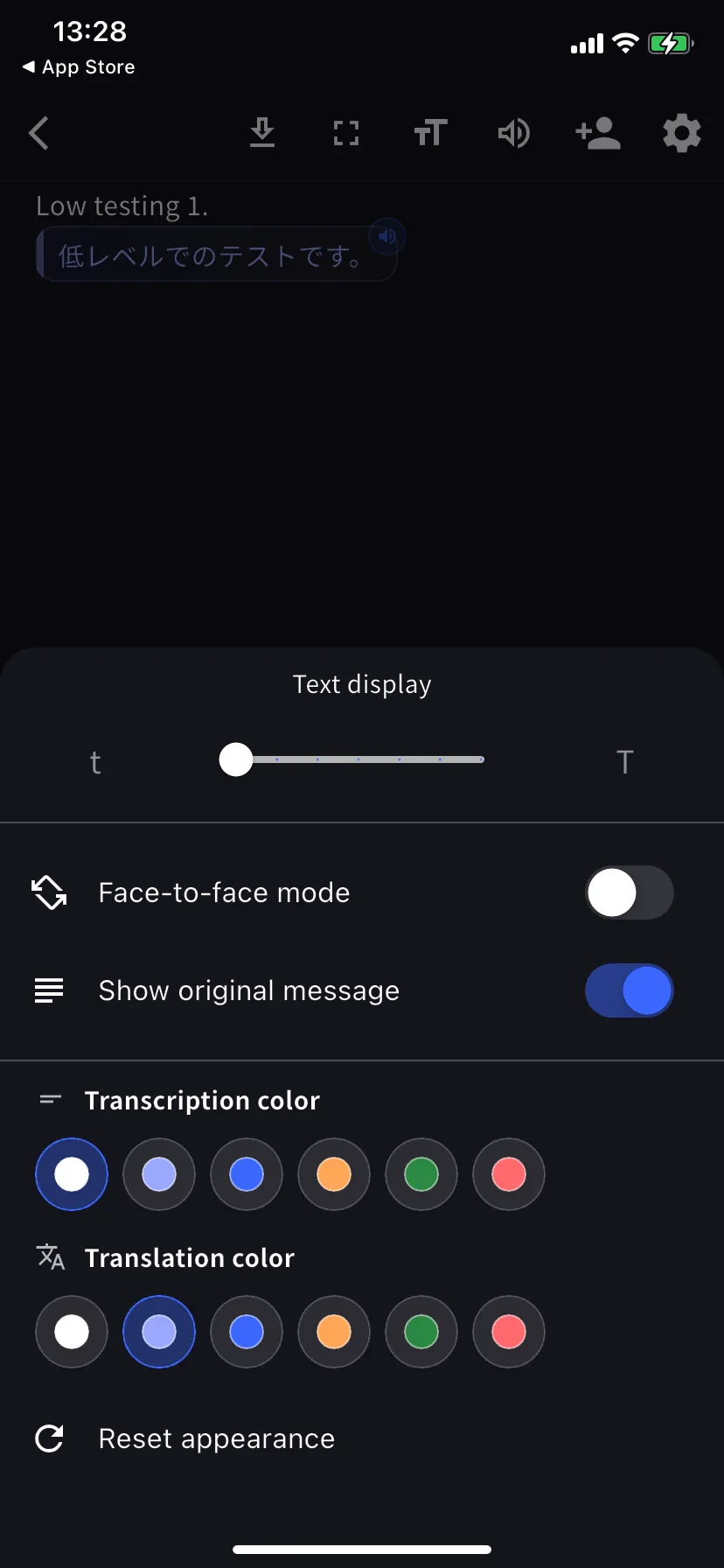
Tap **TT** in the in-session toolbar.
| Setting | What it does |
| ------------------------------------- | ----------------------------------------------------------- |
| **Text size** | Larger for hand-off across a table or projection. |
| **Face-to-face mode** | Rotates translation half 180° for the person opposite. |
| **Show original message** | Off = translation-only view. |
| **Transcription / Translation color** | Six choices each. Pick contrasting colors for face-to-face. |
## App-level settings
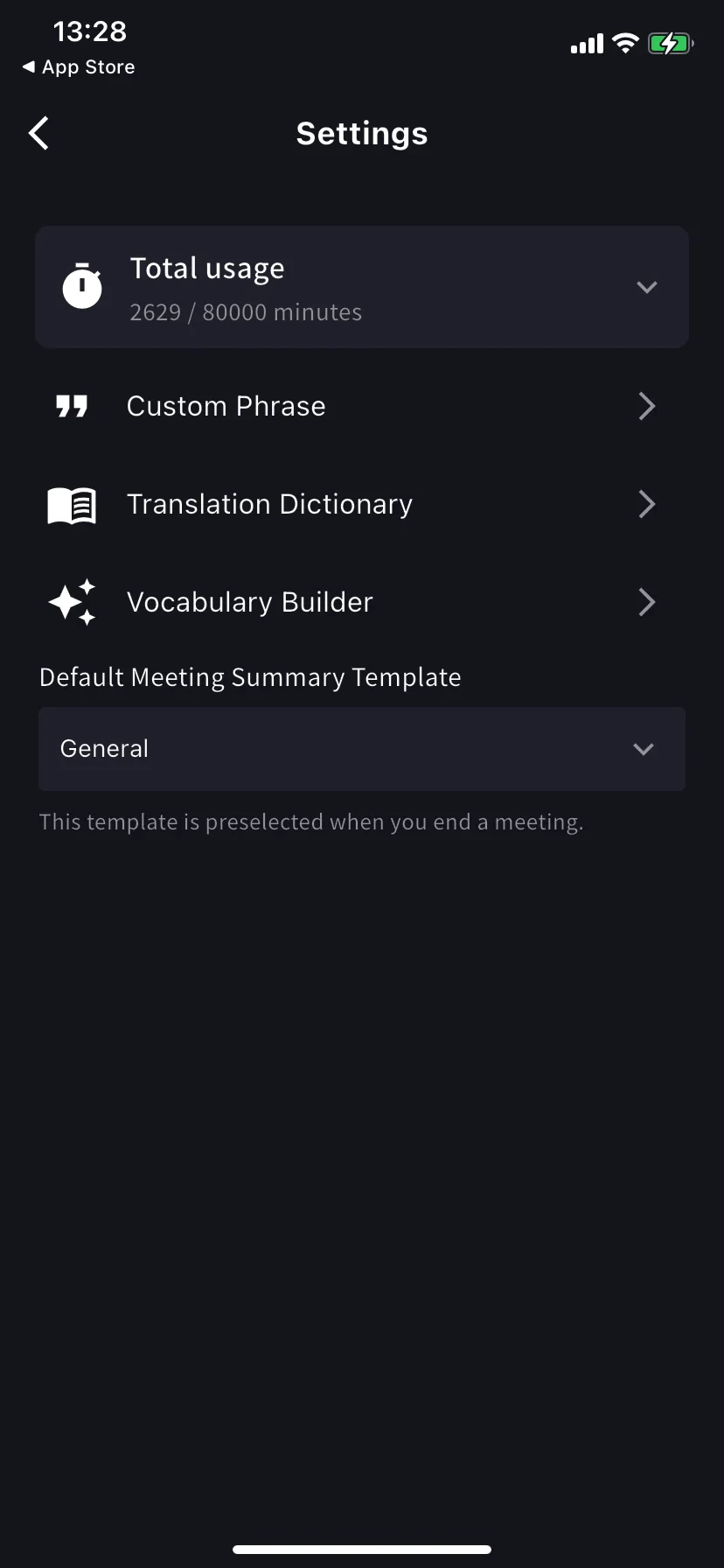
Home screen → ⚙ gear.
| Setting | What it does |
| ---------------------------- | ----------------------------------------------------------------------------------------------------------------------------- |
| **Total usage** | Plan minutes used / available this cycle. |
| **Custom Phrase** | Proper nouns / acronyms transcribed exactly. Personal and workspace lists supported. |
| **Translation Dictionary** | Term-level translation overrides. Personal and workspace lists supported — same as desktop. See [Dictionary](/en/dictionary). |
| **Vocabulary Builder** | Build personal or workspace vocabulary lists — see [Vocabulary Builder](/en/vocabulary-builder). |
| **Speaker diarization** | Separates speakers in supported live transcription sessions before saving the log. |
| **Default summary template** | Preselected on the End-meeting form. |
## Recommended presets
High accuracy on · Auto-play off · Tap-to-play on · Bilingual on · Face-to-face on · Text size large so the other person can read from their side.
Plug in a wired or Bluetooth headset · Segment length 12-15 sec · Text size large.
Auto-play on · Segment length 5 sec · Speech rate 1.0-1.2× · Output to Bluetooth speaker or headphones.
Fullscreen on · Text size max · Face-to-face on · Show original off if they only need the translation.
## Tips
* Plug in your preferred mic *before* tapping Start — the route is sticky.
* Settings changes apply immediately, no restart needed.
## Related
* [Live Transcription on Mobile](/en/mobile-live-transcription) · [Share to Listeners](/en/mobile-live-transcription-share)
* [Dictionary](/en/dictionary) · [Vocabulary Builder](/en/vocabulary-builder)
Reference for the in-session toolbar and app-level settings. For the basic flow see [Live Transcription on Mobile](/en/mobile-live-transcription).
## Where each setting lives
| Setting group | Location |
| --------------------------------------------------------------- | ---------------------------- |
| Audio playback, output, input | In-session → 🔊 Audio |
| Text size, colors, Face-to-face | In-session → TT Text display |
| Custom Phrase, Dictionary, Vocabulary, Default summary template | App-level → ⚙ Settings |
## Audio
The Audio sheet is a single scrolling menu — the two screenshots below show the top (Playback) and bottom (Output / Input) of the same screen.
| Setting | What it does |
| --------------------------- | ------------------------------------------------------------------------------- |
| **High accuracy** | More accurate model, higher latency / battery cost. |
| **Auto-play speech** | Plays each translated row aloud automatically. |
| **Tap to play translation** | Tap a row to play its translation. |
| **Auto-mute mic** | Mutes mic during playback so it isn't re-transcribed. |
| **Segment length** | How long before a row is finalised. Default 10 sec. |
| **Speech rate** | Playback speed. Default 1.4×. |
| **Output** | Route translated speech to AirPlay, Bluetooth, headphones, or built-in speaker. |
| **Auto-start mic** | Start mic automatically when transcription begins. |
| **Mic source** | Built-in / wired / Bluetooth — selected mic has a blue ring. |
## Text display
Tap **TT** in the in-session toolbar.
| Setting | What it does |
| ------------------------------------- | ----------------------------------------------------------- |
| **Text size** | Larger for hand-off across a table or projection. |
| **Face-to-face mode** | Rotates translation half 180° for the person opposite. |
| **Show original message** | Off = translation-only view. |
| **Transcription / Translation color** | Six choices each. Pick contrasting colors for face-to-face. |
## App-level settings
Home screen → ⚙ gear.
| Setting | What it does |
| ---------------------------- | ----------------------------------------------------------------------------------------------------------------------------- |
| **Total usage** | Plan minutes used / available this cycle. |
| **Custom Phrase** | Proper nouns / acronyms transcribed exactly. Personal and workspace lists supported. |
| **Translation Dictionary** | Term-level translation overrides. Personal and workspace lists supported — same as desktop. See [Dictionary](/en/dictionary). |
| **Vocabulary Builder** | Build personal or workspace vocabulary lists — see [Vocabulary Builder](/en/vocabulary-builder). |
| **Speaker diarization** | Separates speakers in supported live transcription sessions before saving the log. |
| **Default summary template** | Preselected on the End-meeting form. |
## Recommended presets
High accuracy on · Auto-play off · Tap-to-play on · Bilingual on · Face-to-face on · Text size large so the other person can read from their side.
Plug in a wired or Bluetooth headset · Segment length 12-15 sec · Text size large.
Auto-play on · Segment length 5 sec · Speech rate 1.0-1.2× · Output to Bluetooth speaker or headphones.
Fullscreen on · Text size max · Face-to-face on · Show original off if they only need the translation.
## Tips
* Plug in your preferred mic *before* tapping Start — the route is sticky.
* Settings changes apply immediately, no restart needed.
## Related
* [Live Transcription on Mobile](/en/mobile-live-transcription) · [Share to Listeners](/en/mobile-live-transcription-share)
* [Dictionary](/en/dictionary) · [Vocabulary Builder](/en/vocabulary-builder)