Documentation Index

Fetch the complete documentation index at: https://manual.voiceping.net/llms.txt

Use this file to discover all available pages before exploring further.

30 စက္ကန့်အတွင်း Follow-Up Email ပို့ပါ

အခြေအနေ။ အစည်းအဝေး ပြီးခါစဖြစ်သည်။ လူတိုင်း ဆုံးဖြတ်ထားသည့်အရာ၏ ၄၀% ခန့်သာ မှတ်မိကြသည်။ ပထမဆုံး recap ကို ပို့သူသည် မှတ်တမ်းကို သတ်မှတ်သည် — အရေးယူ အချက်များကိုလည်း ပိတ်ဆို့သည်။ ဤသည်မှာ မည်သည့် sales သို့မဟုတ် project team တွင်မဆို အကျိုးအရှိဆုံး အလေ့အထ တစ်ခုတည်းဖြစ်သည်။ ဤ workflow သည် သင်သည် MCP Access ကို ဖွင့်ပြီး AI client ကို ချိတ်ဆက်ထားပြီးဖြစ်သည်ဟု ယူဆသည်။
1

အစည်းအဝေး context ကို ဆွဲယူပါ

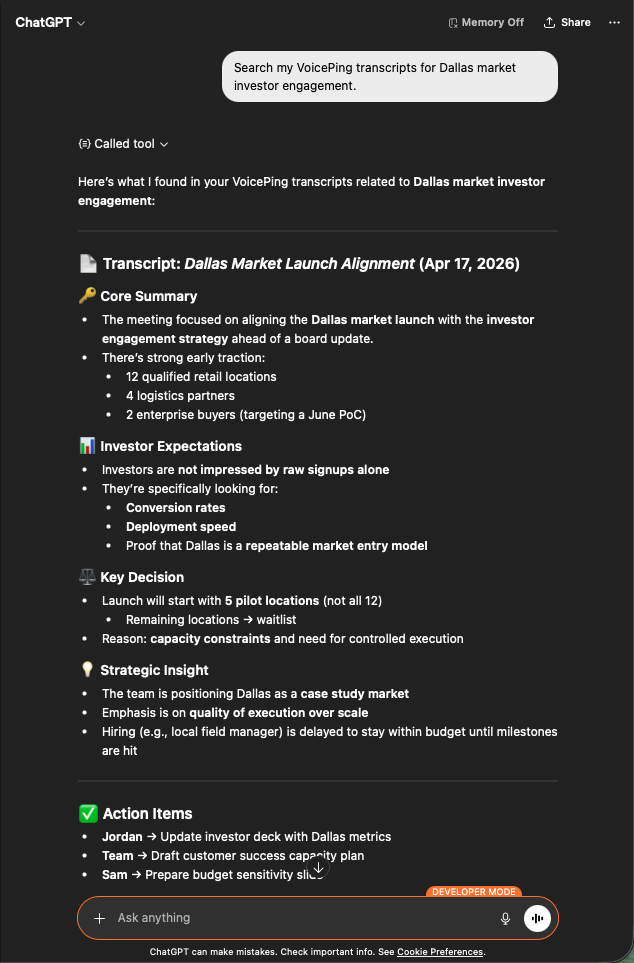
Search my VoicePing transcripts for Dallas market investor engagement.
ဖွဲ့စည်းထားသော recap တစ်ခု ရရှိမည်- အဓိက အကျဉ်းချုပ်၊ investor မျှော်လင့်ချက်များ၊ အဓိက ဆုံးဖြတ်ချက်များ၊ မဟာဗျူဟာ အမြင်များနှင့် ပိုင်ရှင်များပါဝင်သော action item များ။ follow-up email တစ်ခု လိုအပ်သည့် ပစ္စည်းအတိအကျပင် ဖြစ်သည်။
ChatGPT surfacing a Dallas Market Launch transcript with core summary, investor expectations, key decisions, and action items
2

email မူကြမ်းကို တောင်းပါ

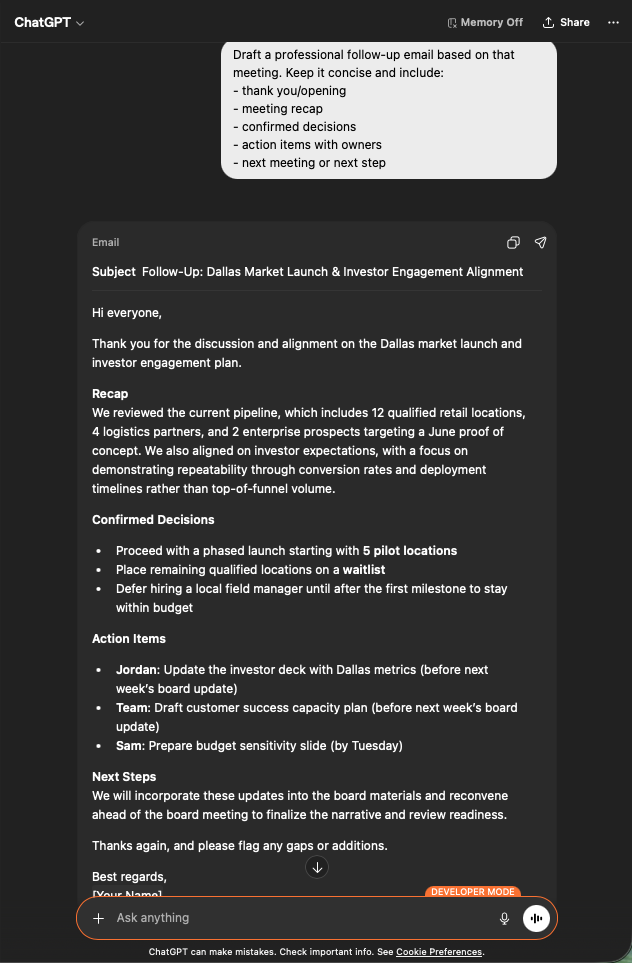
Draft a professional follow-up email based on that meeting.
Keep it concise and include:
- thank you / opening
- meeting recap
- confirmed decisions
- action items with owners
- next meeting or next step
ပို့ရန် အသင့်ဖြစ်သော email တစ်ခုကို ရရှိမည်- subject line, တိုတောင်းသော recap, bulleted decisions, မှန်ကန်သော ပိုင်ရှင်နှင့် deadline တွဲထားသော action item များ။ Gmail သို့ paste လုပ်ပါ၊ ပြန်ကြည့်ပြီး ပို့ပါ။
ChatGPT generating a professional follow-up email draft with subject, recap, decisions, and assigned action items
ဘာကြောင့် အရေးကြီးသနည်း။ Follow-up အရည်အသွေးသည် deal velocity ၏ ဦးဆောင်ညွှန်ပြချက်ဖြစ်သည်။ ၎င်းကို ၃၀ စက္ကန့် အလုပ်တစ်ခုဖြစ်အောင် ပြုလုပ်ခြင်းသည် လူများ ဤအလုပ်ကို ကျော်ဖြတ်ရသော အကြောင်းအရင်းကို ဖယ်ရှားပေးသည်။

နောက်ထပ် အဆင့်များ

External Access ခြုံငုံမှု

scope များ၊ lifecycle ထိန်းချုပ်မှုများနှင့် event log များအတွက် hub သို့ ပြန်သွားပါ။

MCP Access ကို မည်ကဲ့သို့ ဖွင့်မည်နည်း

Claude, ChatGPT, Codex, Claude Code နှင့် Gemini CLI အတွက် setup လမ်းညွှန်များ။