
လွန်ခဲ့သော အစည်းအဝေးများမှ Client-Ready Agenda တစ်ခု ရေးဆွဲပါ
အခြေအနေ။ သင်သည် customer တစ်ဦး — ဆိုကြပါစို့ Northstar Capital — နှင့် တနင်္လာနေ့တွင် follow-up အစည်းအဝေး ရှိသည်။ လွန်ခဲ့သော သီတင်းနှစ်ပတ်အတွင်း သူတို့နှင့် ခေါ်ဆိုမှု သုံးကြိမ် ပြုလုပ်ခဲ့ပြီးဖြစ်သည်- discovery, security review, နှင့် ROI ဆွေးနွေးမှု။ transcript တိုင်းကို ပြန်ဖတ်ပြီး agenda ကို ကိုယ်တိုင် ပေါင်းစပ်နိုင်သည်။ သို့မဟုတ် မေးလိုက်နိုင်သည်။ ဤ workflow သည် သင်သည် MCP Access ကို ဖွင့်ပြီး AI client ကို ချိတ်ဆက်ထားပြီးဖြစ်သည်ဟု ယူဆသည်။ဆက်စပ်မှုရှိသော အစည်းအဝေးများကို AI ကို ရှာခိုင်းပါ
customer အမည်ကို ညွှန်ပြပြီး အရေးပါသော စကားဝိုင်းများကို ၎င်းက ဖော်ထုတ်ပေးပါစေ။AI သည် လွန်ခဲ့သော ခေါ်ဆိုမှု သုံးခုကို ရက်စွဲများနှင့်အတူ တစ်ခုစီအတွက် “ဘာကြောင့် အရေးကြီးသည်” တစ်ကြောင်းစာဖြင့် ပြန်ပေးမည် — သင်သည် ဆက်ဆံရေး၏ အစီအစဉ်ကို ချက်ချင်း မြင်သိရမည်။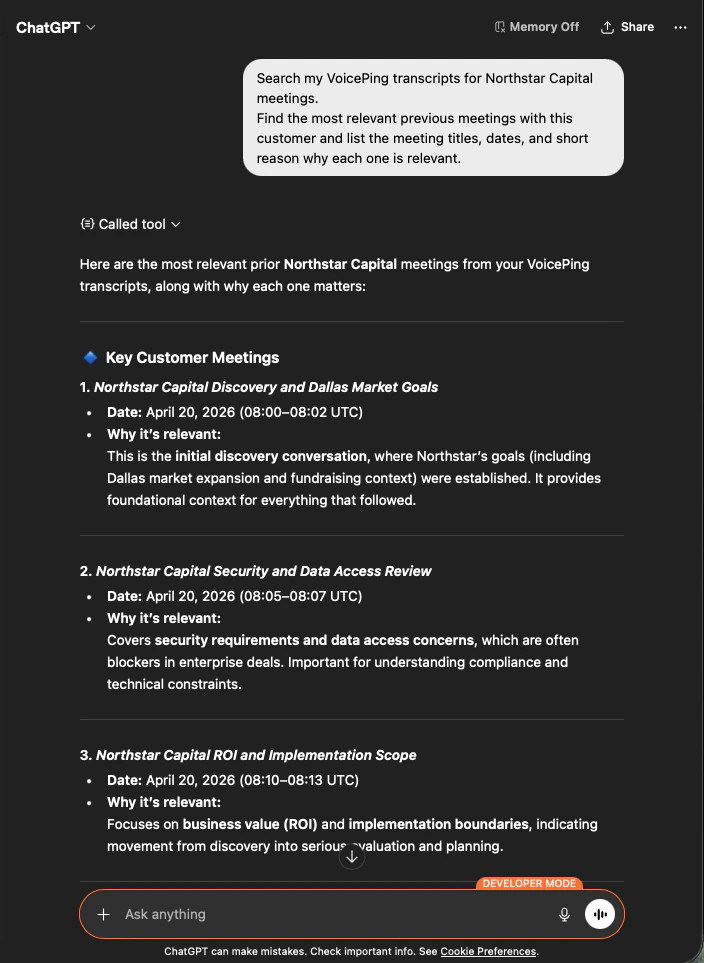
Client-ready agenda တောင်းပါ
ယခု ထိုအစည်းအဝေးများကို သင် အမှန်တကယ် ပို့နိုင်သော အရာတစ်ခုအဖြစ် ပြောင်းပေးရန် တောင်းပါ။သင်သည် အချိန်ကန့်သတ်ထားသော ခြောက်ပိုင်း agenda တစ်ခုကို ရရှိမည် — Success Criteria, Pilot Scope, Security & Data Policy, Proposal Plan, Open Risks, နှင့် Final Decisions — အမှန်တကယ် ဆွေးနွေးခဲ့သည့်အရာများမှ ထုတ်ယူပြီး တည်ဆောက်ထားသည်။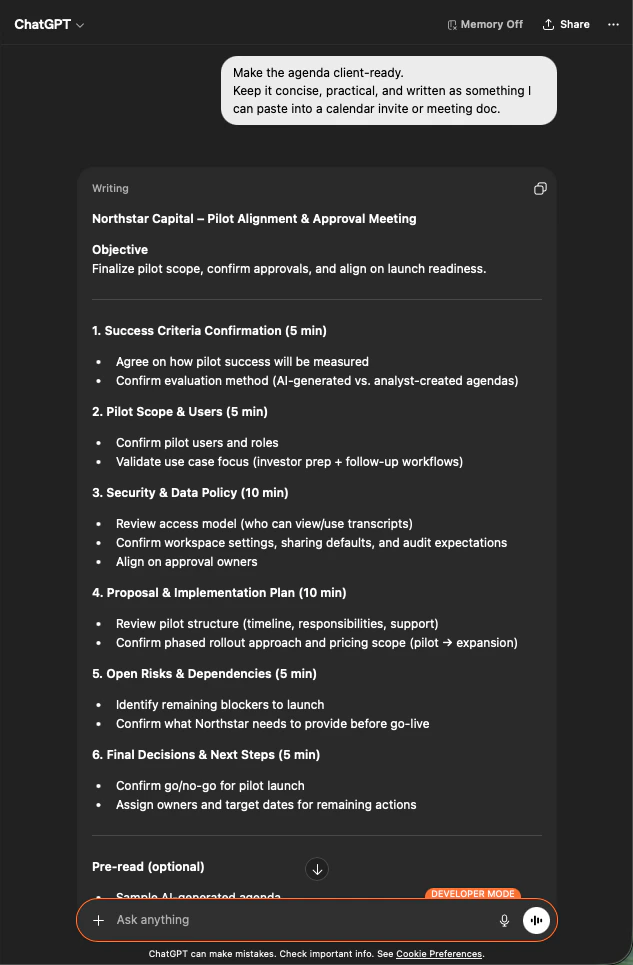
နောက်ထပ် အဆင့်များ
External Access ခြုံငုံမှု
scope များ၊ lifecycle ထိန်းချုပ်မှုများနှင့် event log များအတွက် hub သို့ ပြန်သွားပါ။
MCP Access ကို မည်ကဲ့သို့ ဖွင့်မည်နည်း
Claude, ChatGPT, Codex, Claude Code နှင့် Gemini CLI အတွက် setup လမ်းညွှန်များ။