သင်၏စာရင်းသွင်းမှုကို စစ်ဆေးရန် လိုအပ်သမျှအားလုံးကို တစ်နေရာတည်းတွင် တည်ရှိသည်- Billing အပိုင်း PC နှင့် မိုဘိုင်းရှိ Billing အချက်အချာကျသည်။ ပြေစာ PDF များကို ဒေါင်းလုဒ်လုပ်ပါ၊ ပြေစာများကို ဖမ်းယူပါ၊ နောင်လာမည့် ပြေစာများတွင် ပေါ်လာသော ဘီလ်-အကွက်များကို တည်းဖြတ်ပါ၊ ဖြစ်ရပ်မှတ်တမ်း အပြည့်အစုံကို ပြန်လည်သုံးသပ်ပါ။
PC (Billing တက်ဘ်များ) တွင်
ထိပ်တန်း nav → Billing ကိုဖွင့်ပါ။ ပြေစာစီမံခန့်ခွဲမှုကို ဖုံးအုပ်ထားသော တဘ်နှစ်ခု
| တက်ဘ် | ဘာအတွက်လဲ။ |
|---|
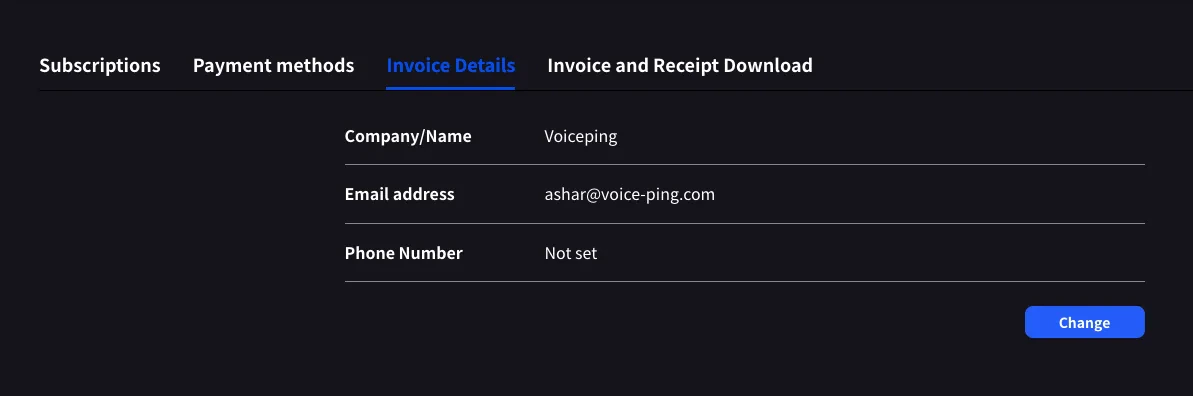
| Invoice Details | သင့်ငွေတောင်းခံလွှာ PDF များတွင် ပေါ်လာသော ဘီလ်ပို့ရန် အမည်၊ အီးမေးလ်နှင့် ဖုန်း |
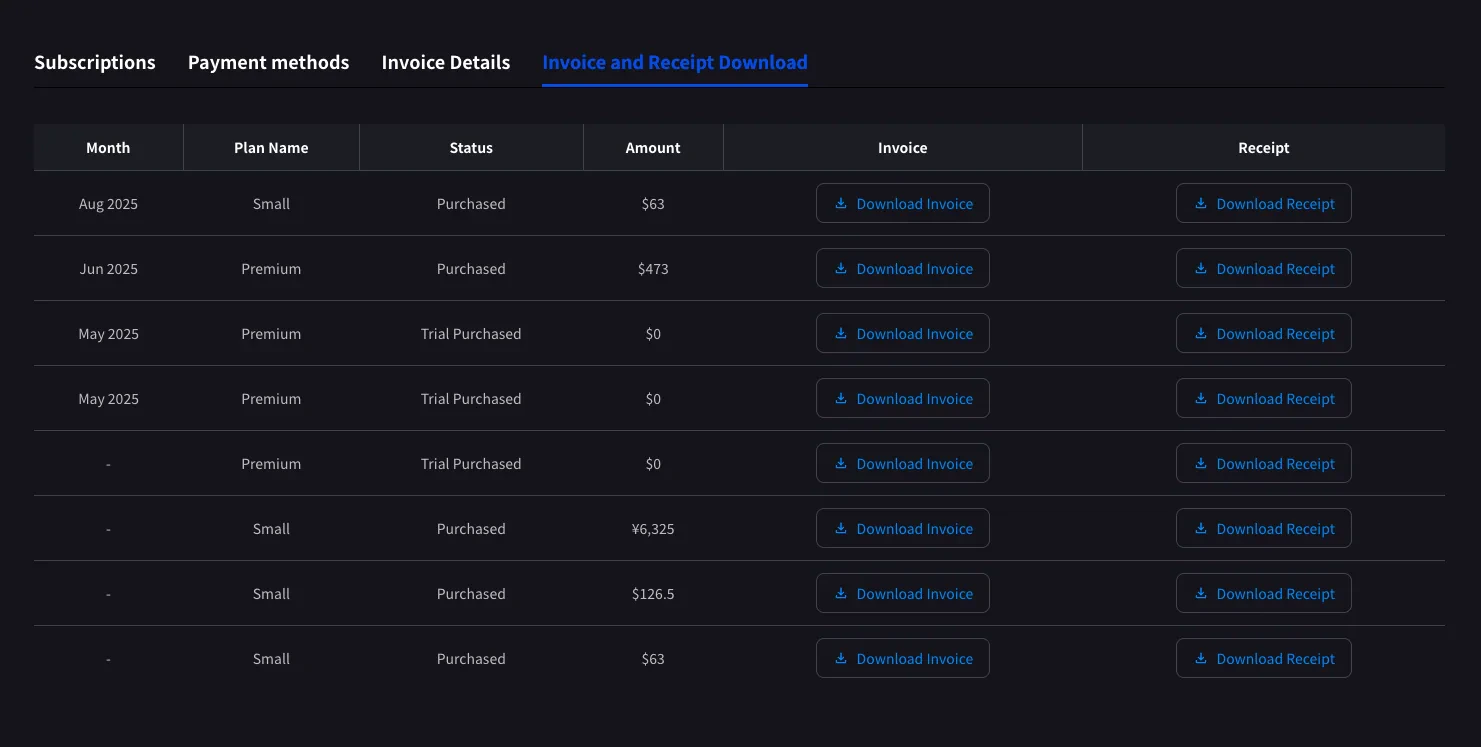
| Invoice and Receipt Download | Monthly ဒေါင်းလုဒ်လုပ်နိုင်သော ပြေစာ PDF များနှင့် ပြေစာများပါရှိသော ကျသင့်ငွေစာရင်း |
| Billing History | Full subscription, payment-method, trial, cancellation, restore, renewal, and payment-failure event log |
Invoice Details
သင့်ငွေတောင်းခံလွှာ PDF များပေါ်တွင် Stripe တံဆိပ်တုံးထုထားသည့် အမည်၊ အီးမေးလ်နှင့် ဖုန်းတို့ကို သတ်မှတ်ပါ။
မည်သည့်အကွက်ကိုမဆို တည်းဖြတ်ရန် Change ကိုနှိပ်ပါ။
ဤ before သင်၏နောက်ထပ်ငွေပေးချေမည့်ရက်စွဲကို အပ်ဒိတ်လုပ်ပါ။ Stripe ပြေစာထုတ်ပေးသည့်အချိန်တွင် ဤအကွက်များကို ဖတ်သည်။ နောက်ပိုင်းတွင် တည်းဖြတ်ခြင်းသည် ယခင် PDF များကို ပြန်လည်ပုံမဖော်ပါ။
Invoice and Receipt Download
ပြီးသွားသော အခကြေးငွေတိုင်းသည် ငွေတောင်းခံလွှာ PDF နှင့် Stripe ပြေစာအတွက် လ၊ အစီအစဉ်အမည်၊ အခြေအနေ၊ ပမာဏနှင့် ဒေါင်းလုဒ်ခလုတ်များပါရှိသော အတန်းတစ်ခုအဖြစ် ပေါ်လာပါသည်။
| ခလုတ် | ဖွင့်လှစ်သည်။ |
|---|
| Download Invoice | မျှဝေရန်၊ သိမ်းဆည်းရန် သို့မဟုတ် ဘဏ္ဍာရေးသို့ ထပ်ဆင့်ပေးပို့ခြင်းအတွက် ပြေစာ PDF |
| Download Receipt | Receipt download or stored receipt link; if unavailable, the hosted receipt/invoice fallback opens |
ပြီးမြောက်သော အခကြေးငွေများသာ ဤနေရာတွင် ပေါ်လာပါသည်။ Stripe ပြေစာထုတ်ပေးသည်နှင့် နောက်တစ်ကြိမ် ငွေပေးချေသည့်ရက်စွဲပြီးနောက် အစီအစဉ်ဆွဲထားသော အစီအစဉ်ပြောင်းလဲမှုများ ပေါ်လာပါသည်။ အစမ်းစတင်သည့်အခါ ခြေရာခံရန် ကူညီပေးသည့် $0 အတန်း Trial Purchased အတန်းများကိုလည်း မှတ်တမ်းတင်ထားသည်။
Billing History
Use Billing History when you need the full audit trail, not only completed invoice rows.
| Column | What it shows |
|---|
| Status | Event result, such as purchase, upgrade, scheduled change, cancellation, restore, payment-method change, trial update, renewal, or payment failure |
| Event Date (UTC+9) | When the billing event was recorded |
| Plan Name | The plan involved in the event, including tiered Individual / Small minute labels when available |
| Start Date / End Date | The subscription period affected by the event |
| Price | The billed amount when the event has a displayable charge |
Use Billing History for “what changed and when?” Use Invoice and Receipt Download when finance needs the actual invoice PDF or receipt.
Mobile (Billing အချက်အချာ) တွင်၊
မိုဘိုင်းအက်ပ်သည် တူညီသောအင်္ဂါရပ်များကို Billing hub နှင့် စာရင်းသွင်းမှုရွှေ့ခြင်းတိုင်းကို မှတ်တမ်းတင်သည့် ဖြစ်ရပ်မှတ်တမ်း (Billing Activity) သို့ ပြိုကျသွားသည်။
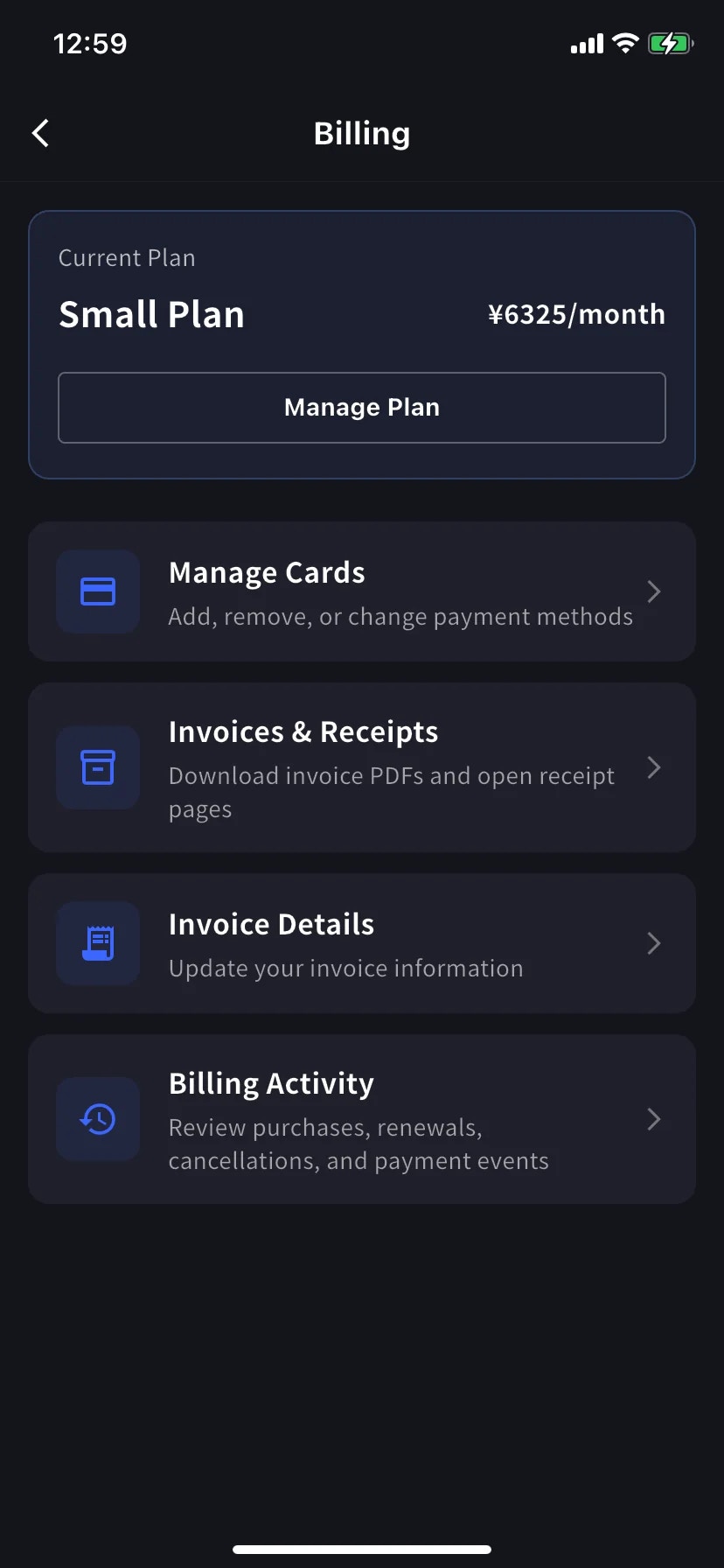
Billing hub ကိုဖွင့်ပါ။
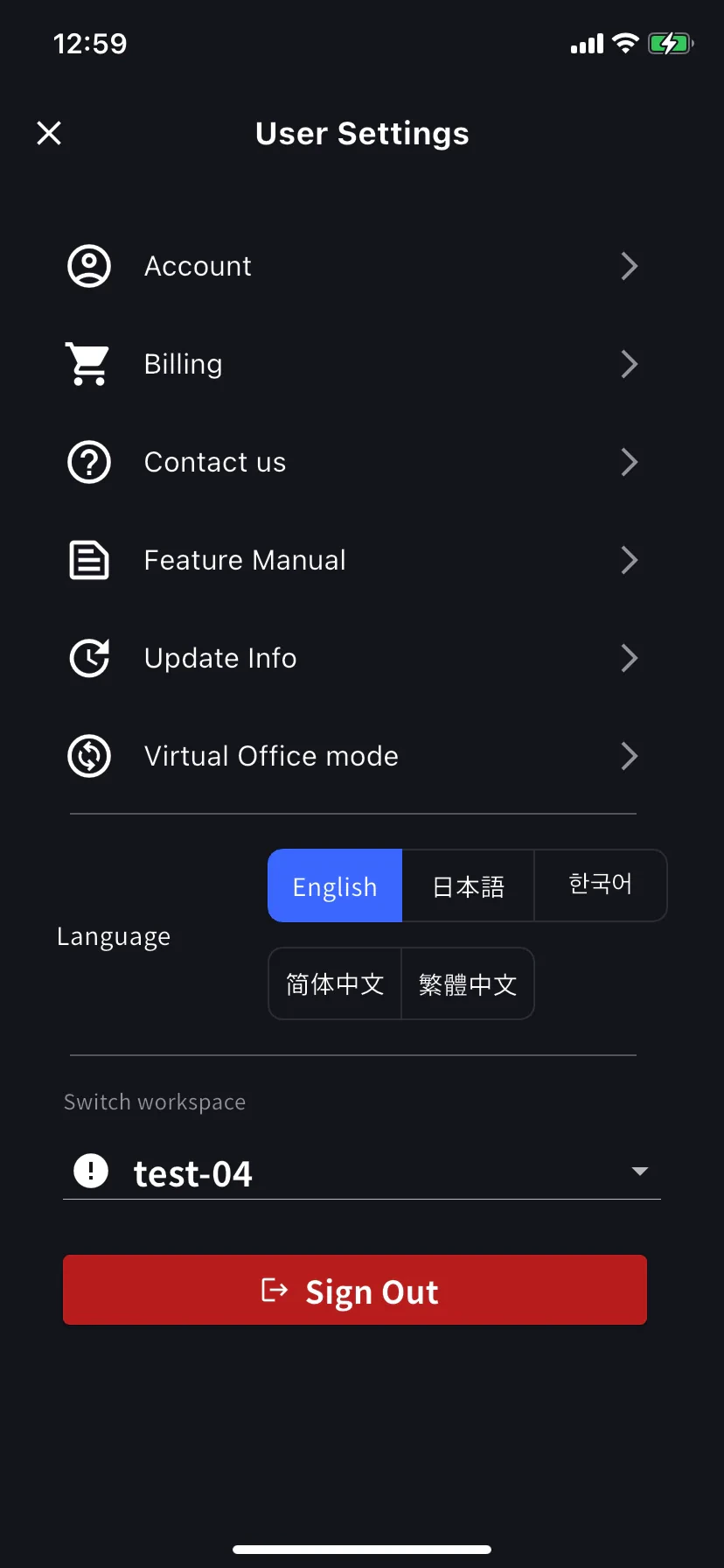
ပင်မစခရင်မှ ဘေးဘက်မီနူးကိုဖွင့်ပါ၊ Billing (လှည်းအိုင်ကွန်) ကိုနှိပ်ပါ။ ဖြတ်လမ်းတစ်ခု ရွေးပါ။
Current Plan ကတ်အောက်တွင်၊ ငွေတောင်းခံလွှာအတွက် ဖြတ်လမ်းလင့်ခ်သုံးခု ဖုံးလွှမ်းသည်-| Shortcut | ဘာအတွက်လဲ။ |
|---|
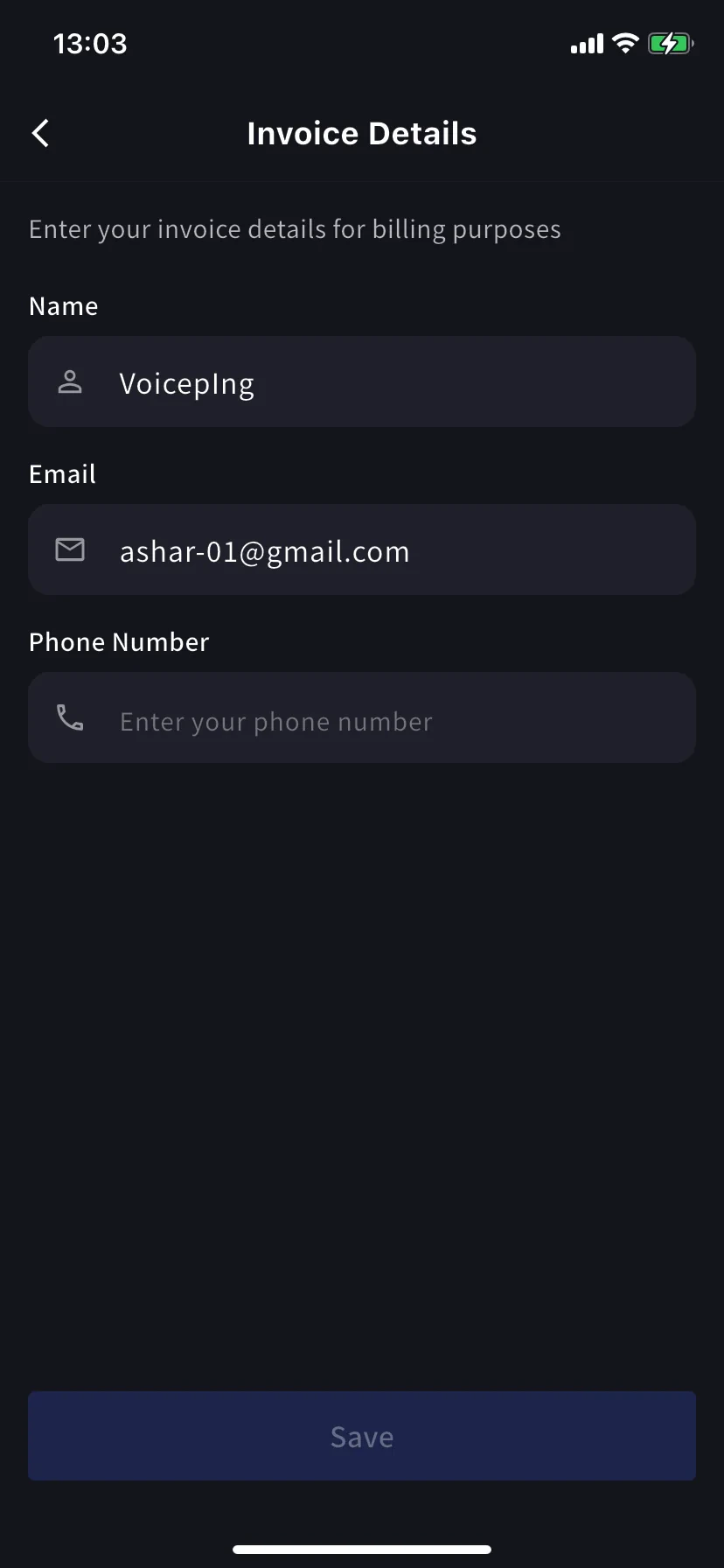
| Invoice Details | အမည်၊ အီးမေးလ်၊ ဖုန်း |
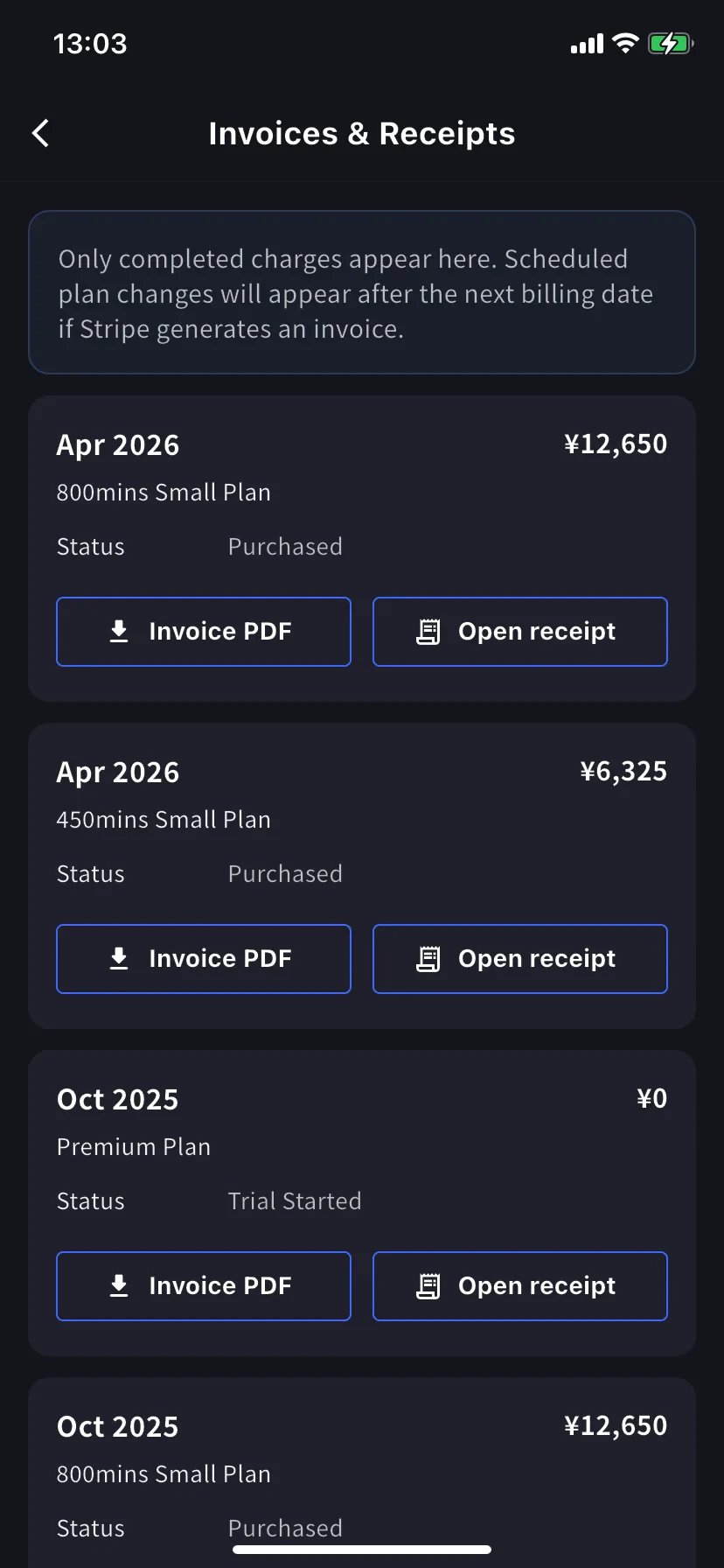
| Invoices & Receipts | Invoice PDFs and receipt downloads or stored receipt links |
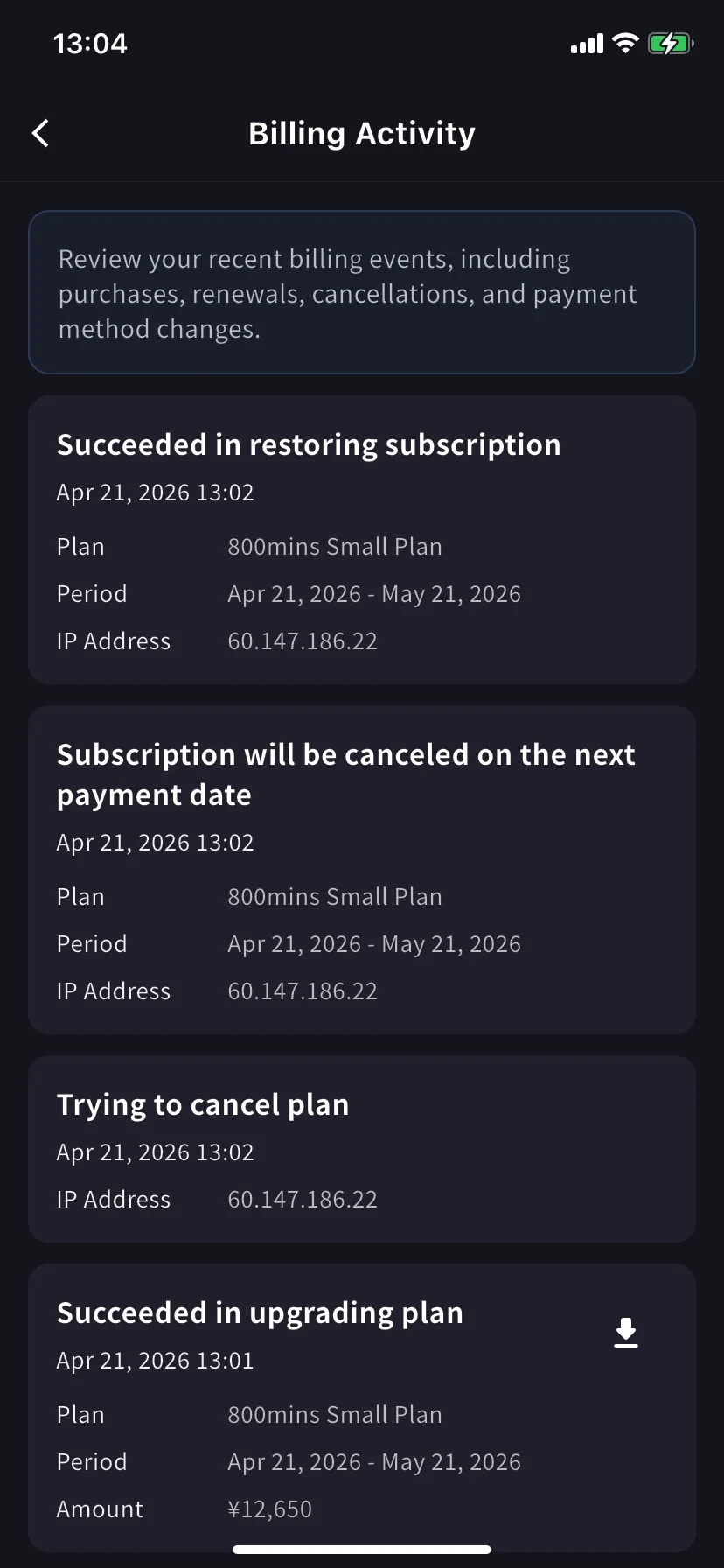
| Billing Activity | အချိန်တံဆိပ်နှင့် IP ဖြင့် စာရင်းသွင်းမှု ရွှေ့ခြင်းတိုင်း၏ ဖြစ်ရပ်မှတ်တမ်း |
Invoice Details (mobile)
PC တက်ဘ်နှင့် တူညီသောအကွက်များ- သင့်ငွေတောင်းခံလွှာ PDF များအတွက် အမည်၊ အီးမေးလ်၊ ဖုန်း။
ဤ before သင်၏နောက်ထပ်ငွေပေးချေမည့်ရက်စွဲကို အပ်ဒိတ်လုပ်ပါ။ Stripe ပြေစာထုတ်ပေးသည့်အချိန်တွင် ဤအကွက်များကို ဖတ်သည်။ နောက်ပိုင်းတွင် တည်းဖြတ်ခြင်းသည် ယခင် PDF များကို ပြန်လည်ပုံမဖော်ပါ။
Invoices & Receipts (mobile)
ယခင်ကောက်ခံမှုများသည် လစဉ်ကတ်များအဖြစ် ပေါ်လာပါသည်။ ကတ်တစ်ခုစီတွင် လုပ်ဆောင်မှုနှစ်ခုရှိသည်။
| ခလုတ် | ဖွင့်လှစ်သည်။ |
|---|
| Invoice PDF | မျှဝေခြင်း၊ သိမ်းဆည်းခြင်း သို့မဟုတ် ထပ်ဆင့်ပို့ခြင်းအတွက် ဒေါင်းလုဒ်လုပ်နိုင်သော ငွေတောင်းခံလွှာ PDF |
| Open receipt | Receipt download or stored receipt link; if unavailable, the hosted receipt/invoice fallback opens |
Billing Activity (mobile only)
အစီအစဉ်မှတ်တမ်း- သင့်လုပ်ငန်းခွင်သည် ၎င်း၏စာရင်းသွင်းမှုကို တစ်နေရာတည်းတွင် လုပ်ဆောင်ခဲ့သမျှ။
အတန်းတစ်ခုစီသည်-
- ပွဲအမည်၊ ဥပမာ Succeeded in upgrading plan၊ Subscription will be canceled on the next payment date၊ Succeeded in restoring subscription
- အချိန်တံဆိပ် (
YYYY/MM/DD HH:MM)
- ဖြစ်နိုင်လျှင် အစီအစဉ်၊ ငွေပေးချေသည့်ကာလနှင့် ပမာဏ
- IP Address — စာရင်းစစ်နှင့် လုံခြုံရေးပြန်လည်သုံးသပ်ရန်အတွက် မည်သည့်နေရာမှ လုပ်ဆောင်ခဲ့သူ
- ပြီးသွားသော အခကြေးငွေများအတွက် အိုင်ကွန်ကို ဒေါင်းလုဒ်လုပ်ပါ — ထိုဖြစ်ရပ်အတွက် ပြေစာ PDF ကို ဆွဲထုတ်ပါ။
အီးမေးလ်များကို မတူးဘဲ ဖြစ်ပျက်လာသည့်အခါ ဖြေကြားရန် ၎င်းကို အသုံးပြုပါ။
On PC, use Billing History for the full event log and Invoice and Receipt Download for finance documents. On mobile, Billing Activity gives a compact activity log with timestamps, IP address, and invoice download actions where available.
အကြံပြုချက်များ
- Bill-to changes apply to future invoices only. ထပ်မံထုတ်ပေးရန်မလိုစေရန် Invoice Details အပ်ဒိတ်လုပ်ပါ။
- Receipts vs invoices. The invoice is the charge document. The receipt action opens the stored receipt/download when available; otherwise it opens the hosted Stripe fallback.
- Mobile and PC stay in sync. မျက်နှာပြင်တစ်ခုရှိ တည်းဖြတ်မှုများသည် အခြားတစ်ခုပေါ်တွင် ချက်ချင်းပေါ်လာသည်။