အစည်းအဝေးတစ်ခုမှ Customer Proposal မူကြမ်း ရေးပါ

အခြေအနေ။ proposal-review အစည်းအဝေးတစ်ခု ပြီးဆုံးသွားပြီ။ customer က ၎င်းတို့၏ ရည်မှန်းချက်များကို ချပြခဲ့သည်၊ security အကြောင်း စိုးရိမ်ချက် နှစ်ခုကို ထောက်ပြခဲ့သည်၊ phased timeline ကို တောင်းခဲ့သည်။ ယခု ထိုစကားဝိုင်းကို formal proposal တစ်ခုအဖြစ် ပြောင်းရမည်။ အခက်အခဲက ရေးခြင်းမဟုတ် — signal တစ်စိတ်တစ်ပိုင်းမျှ မပျောက်စေရန်ဖြစ်သည်။ ဤ workflow သည် သင်သည် MCP Access ကို ဖွင့်ပြီး AI client ကို ချိတ်ဆက်ထားပြီးဖြစ်သည်ဟု ယူဆသည်။
1

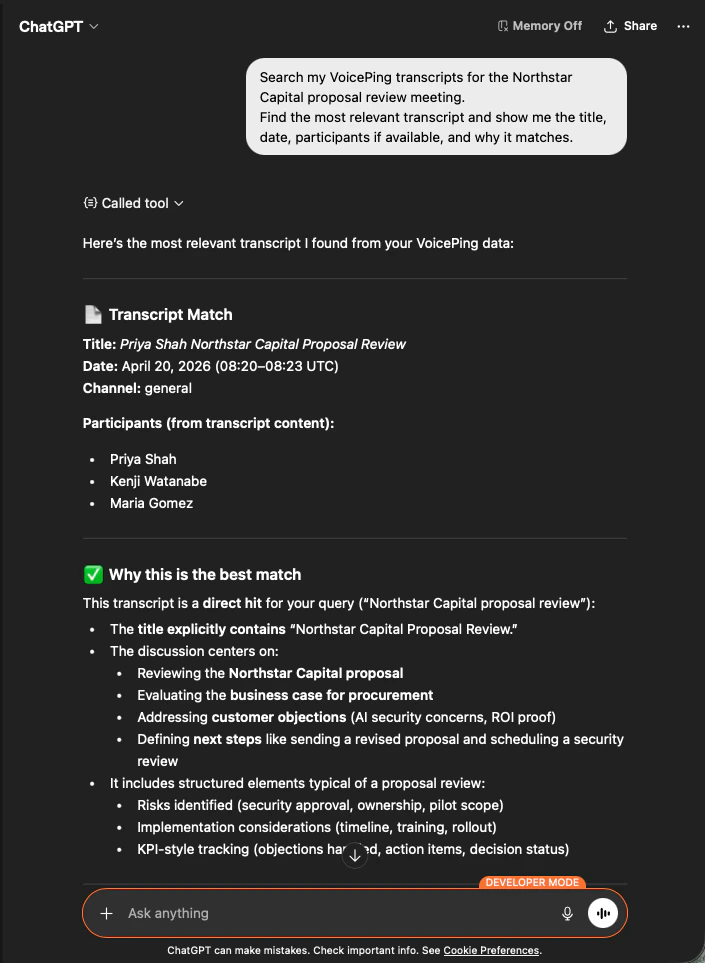
သီးခြား အစည်းအဝေးကို ရှာပါ

AI သည် transcript ကို အတိအကျ ဖော်ထုတ်ပေးမည်၊ ပါဝင်သူများကို စာရင်းပြုမည်၊ ဘာကြောင့် မှန်ကန်သော ကိုက်ညီမှုဖြစ်ကြောင်း ရှင်းပြမည် — သင့် proposal သည် မှန်ကန်သော ခေါ်ဆိုမှုပေါ်တွင် အခြေခံကြောင်း သိသာမည်။
ChatGPT identifying the Northstar Capital proposal review transcript with participants and match reasoning
2

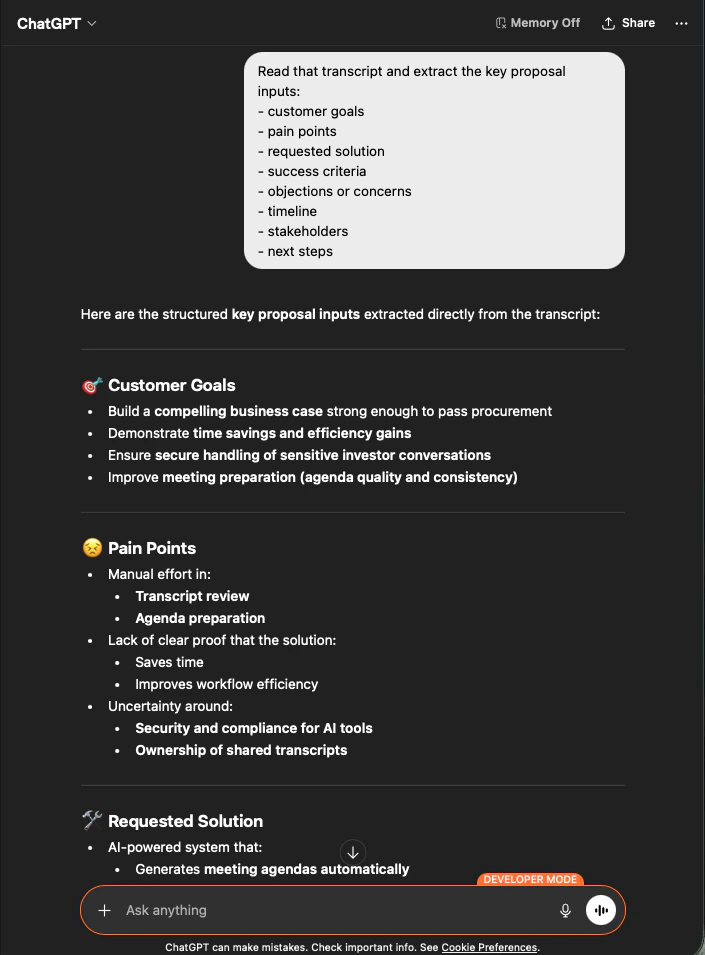
ဖွဲ့စည်းထားသော proposal input များကို ထုတ်ယူပါ

AI သည် input တိုင်းကို သင်တောင်းခဲ့သည့်အတိုင်း အုပ်စုဖွဲ့ပြီး ထုတ်ပေးမည်။ ဤသည်မှာ သင်၏ proposal အကြမ်းဖြစ်သည် — မည်သည့်အရာမျှ တီထွင်ထားခြင်းမရှိ၊ အားလုံး transcript သို့ ပြန်ခြေရာခံနိုင်သည်။
ChatGPT extracting structured proposal inputs — customer goals, pain points, requested solution — from a Northstar Capital transcript
3

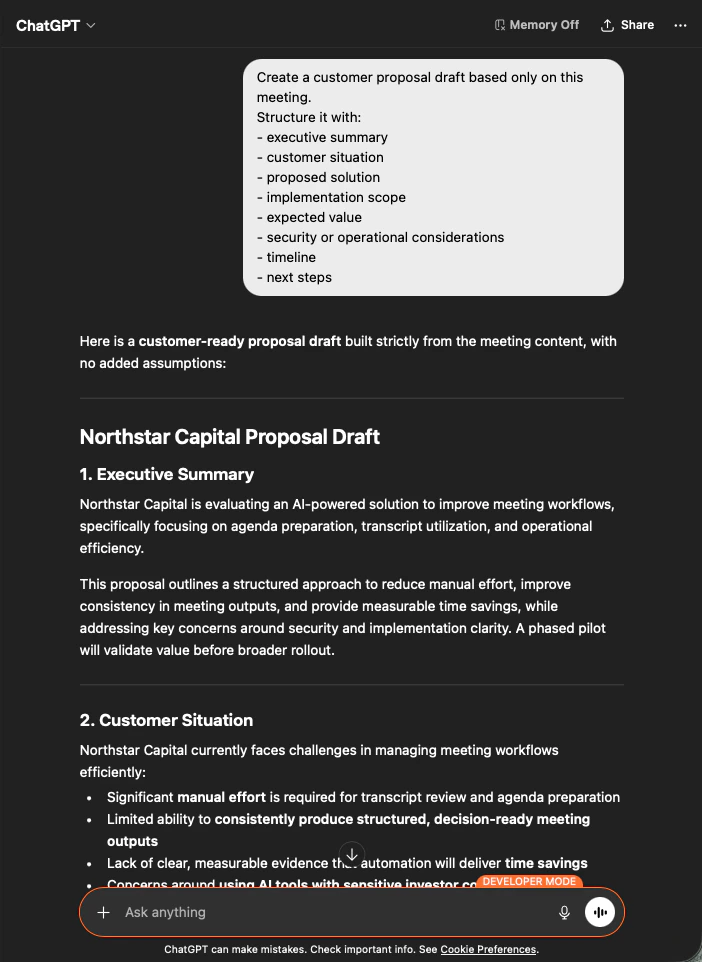
proposal မူကြမ်းကို ထုတ်လုပ်ပါ

output သည် proposal မူကြမ်း အပြည့်အစုံဖြစ်သည် — executive summary ကို ဦးစွာ၊ ထို့နောက် အပိုင်းတစ်ခုစီကို အစည်းအဝေး အကြောင်းအရာမှသာ ဖြည့်ထားသည်။ သင်သည် အသံနေအသံထားအတွက် ပြင်ဆင်ပြီး ပို့လိုက်ပါ။
ChatGPT producing a customer-ready Northstar Capital proposal draft built strictly from meeting content
AI ကို “based only on this meeting” နှင့် “with no added assumptions” ဖြင့် တည်ဆောက်ရန် ပြောခြင်းသည် သင် အမှန်တကယ် ပို့နိုင်သော proposal တစ်ခုနှင့် လိုင်းတစ်လိုင်းစီ အချက်အလက် ပြန်စစ်ရမည့် proposal တစ်ခုကြား ခြားနားချက်ဖြစ်သည်။

နောက်ထပ် အဆင့်များ

External Access ခြုံငုံမှု

scope များ၊ lifecycle ထိန်းချုပ်မှုများနှင့် event log များအတွက် hub သို့ ပြန်သွားပါ။

MCP Access ကို မည်ကဲ့သို့ ဖွင့်မည်နည်း

Claude, ChatGPT, Codex, Claude Code နှင့် Gemini CLI အတွက် setup လမ်းညွှန်များ။