
ဆက်တင်တစ်ခုစီ၏ တည်နေရာ
| ဆက်တင်အုပ်စု | တည်နေရာ |
|---|---|
| အသံ playback၊ output၊ input | session အတွင်း → 🔊 Audio |
| စာသားအရွယ်၊ အရောင်၊ Face-to-face | session အတွင်း → TT Text display |
| Custom Phrase၊ Dictionary၊ Vocabulary၊ ပုံသေ အနှစ်ချုပ် template | app-level → ⚙ Settings |
Audio
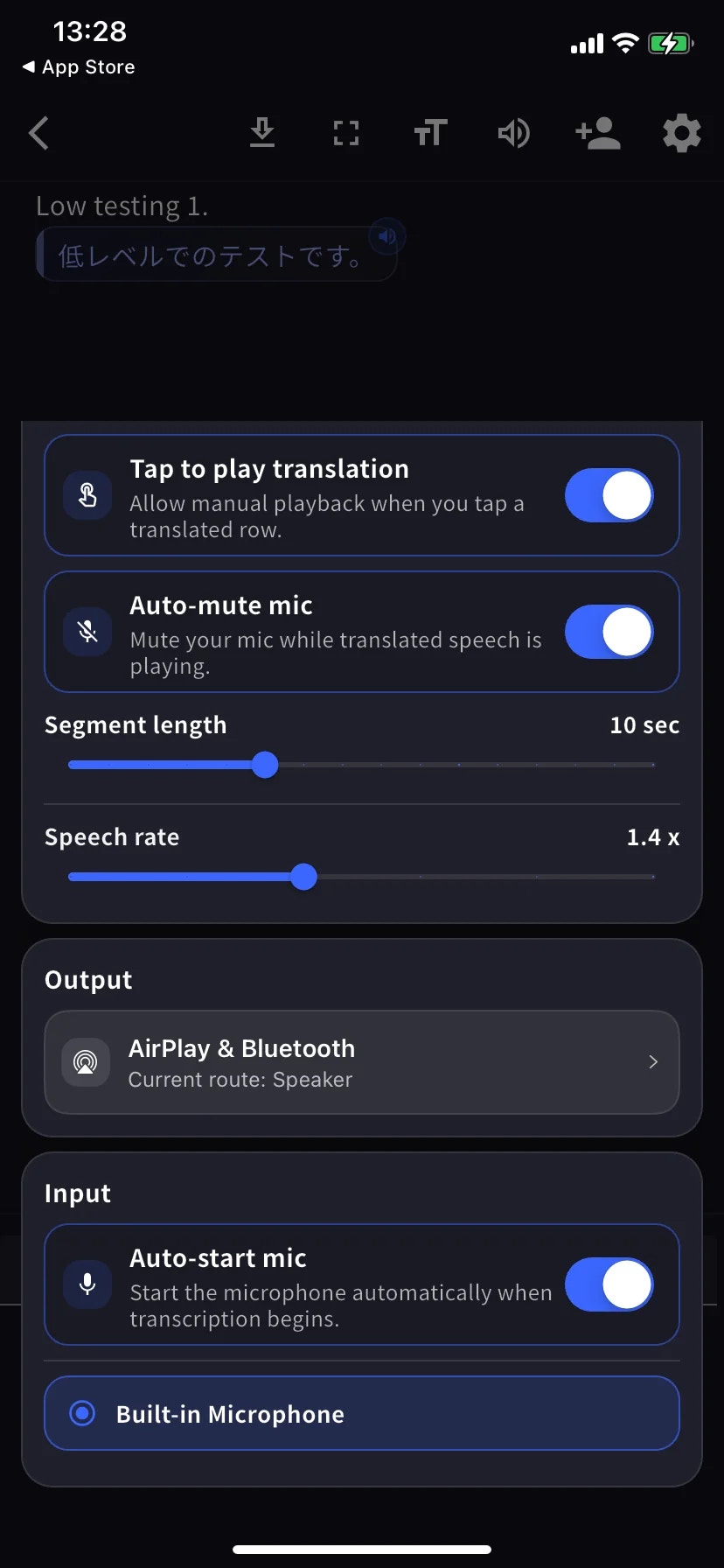
Audio sheet သည် scroll menu တစ်ခုတည်း — အောက်က screenshot နှစ်ခုသည် အတူတူသော screen ၏ အပေါ်ပိုင်း (Playback) နှင့် အောက်ပိုင်း (Output / Input) ကို ပြသသည်။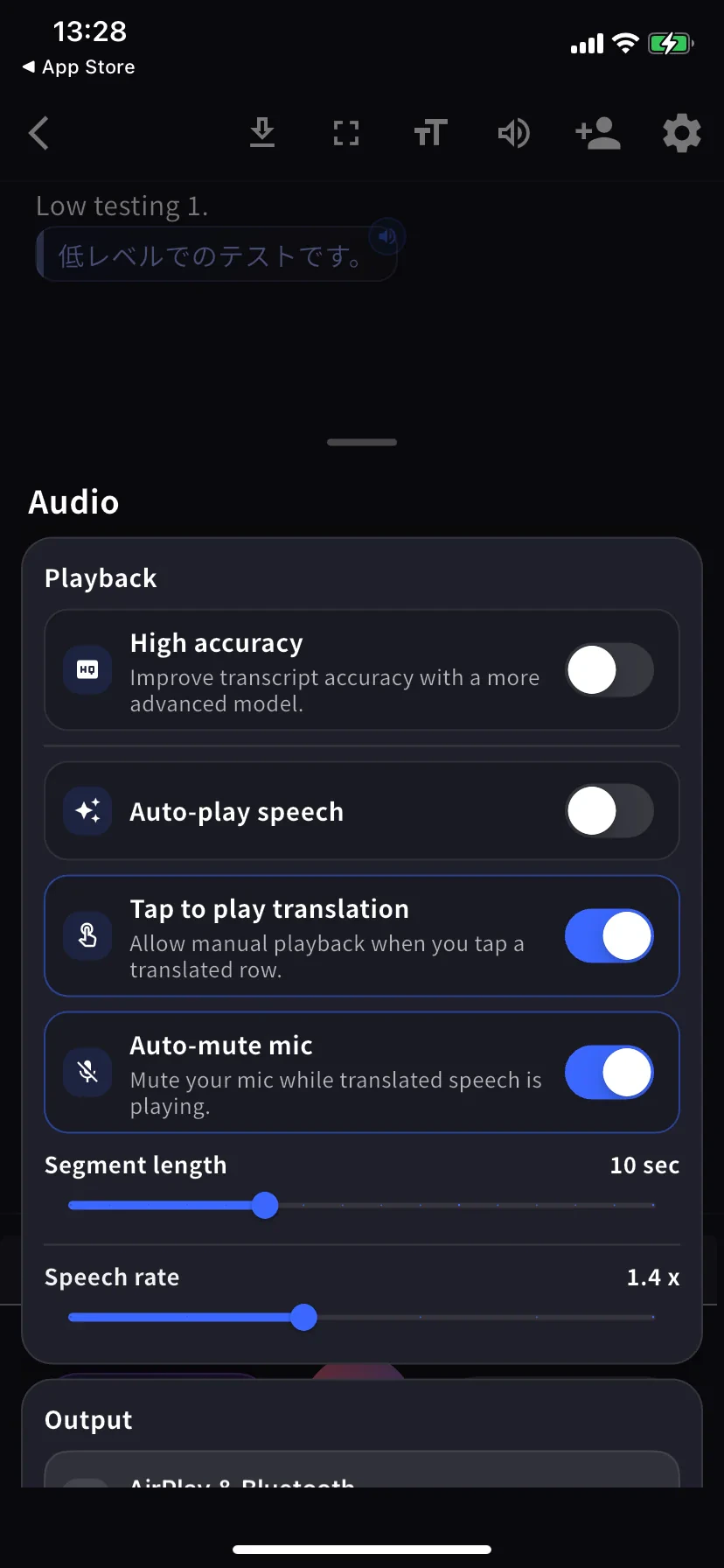
| ဆက်တင် | လုပ်ဆောင်မှု |
|---|---|
| High accuracy | ပိုမိုတိကျသော model၊ ပိုမြင့်သော latency / ဘက်ထရီ ကုန်ကျစရိတ်။ |
| Auto-play speech | ဘာသာပြန်လိုင်းတိုင်းကို အလိုအလျောက် ဖွင့်သည်။ |
| Tap to play translation | လိုင်းကိုနှိပ်၍ ၎င်း၏ ဘာသာပြန်ကို ဖွင့်သည်။ |
| Auto-mute mic | playback အတွင်း မိုက်ကို အသံတိတ်သည် — ပြန်လည် ထုတ်နုတ်မခံရစေရန်။ |
| Segment length | လိုင်းတစ်ခု အပြီးသတ်မှုမပြုမီ စောင့်ချိန်။ ပုံသေ 10 စက္ကန့်။ |
| Speech rate | ဖွင့်သည့်အရှိန်။ ပုံသေ 1.4×။ |
| Output | ဘာသာပြန်အသံကို AirPlay၊ Bluetooth၊ နားကြပ်၊ သို့မဟုတ် built-in စပီကာသို့ ရွှေ့သည်။ |
| Auto-start mic | ထုတ်နုတ်မှုစတင်သည်နှင့် မိုက်ကို အလိုအလျောက် စတင်သည်။ |
| Mic source | Built-in / ကြိုးတပ် / Bluetooth — ရွေးချယ်ထားသော မိုက်တွင် အပြာရောင် ကွင်းရှိသည်။ |
Text display
in-session toolbar တွင် TT ကိုနှိပ်ပါ။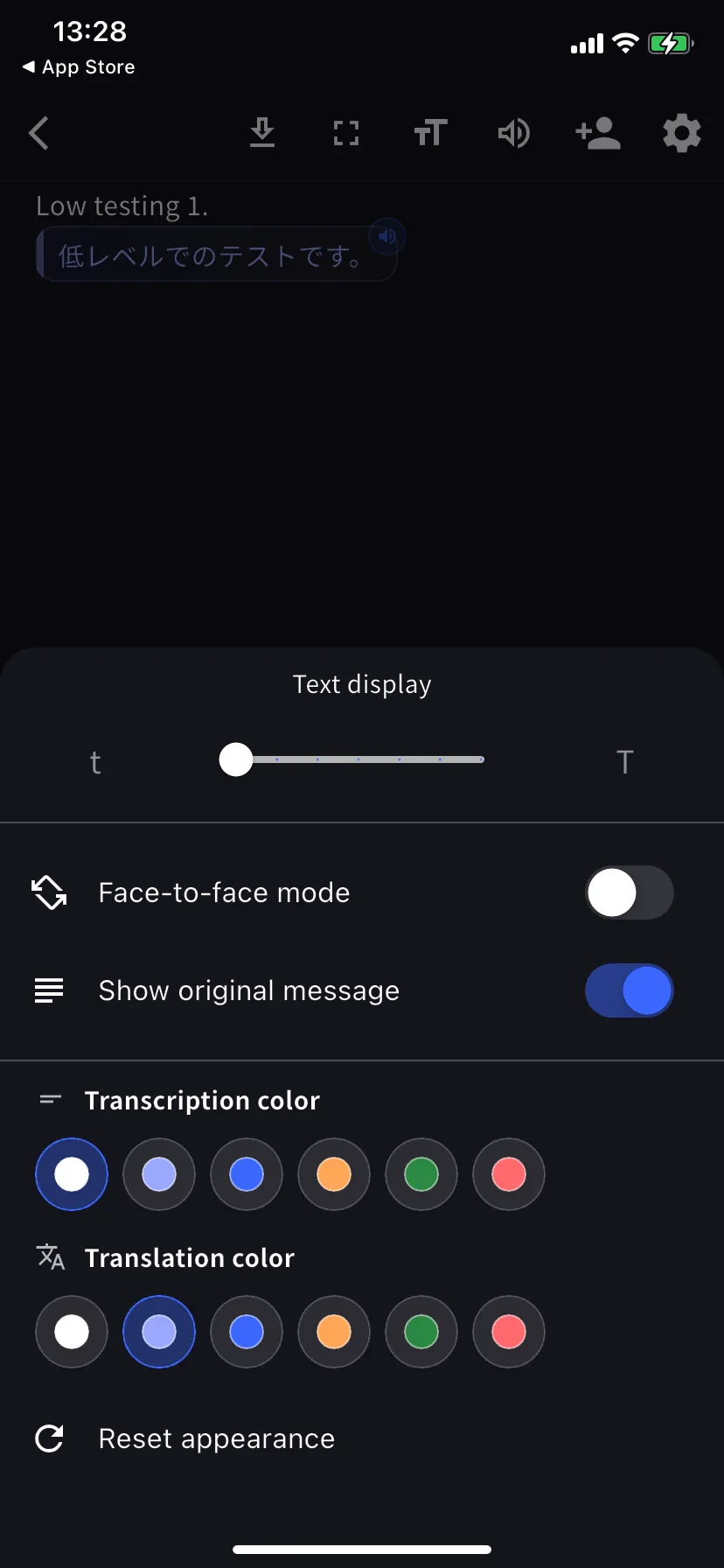
| ဆက်တင် | လုပ်ဆောင်မှု |
|---|---|
| Text size | စားပွဲဖြတ်ကျော်ပေးရန် သို့မဟုတ် ပရိုဂျက်တာ အသုံးပြုရန် ကြီးသော အရွယ်။ |
| Face-to-face mode | မျက်နှာခြင်းဆိုင်သူအတွက် ဘာသာပြန်တစ်ဝက်ကို 180° လှည့်သည်။ |
| Show original message | ပိတ်ထား = ဘာသာပြန်သာ မြင်ကွင်း။ |
| Transcription / Translation color | တစ်ခုစီတွင် ရောင် 6 မျိုး။ Face-to-face အတွက် ခြားနားသော အရောင်များကို ရွေးပါ။ |
App-level ဆက်တင်များ
ပင်မစာမျက်နှာ → ⚙ ဂိယာ။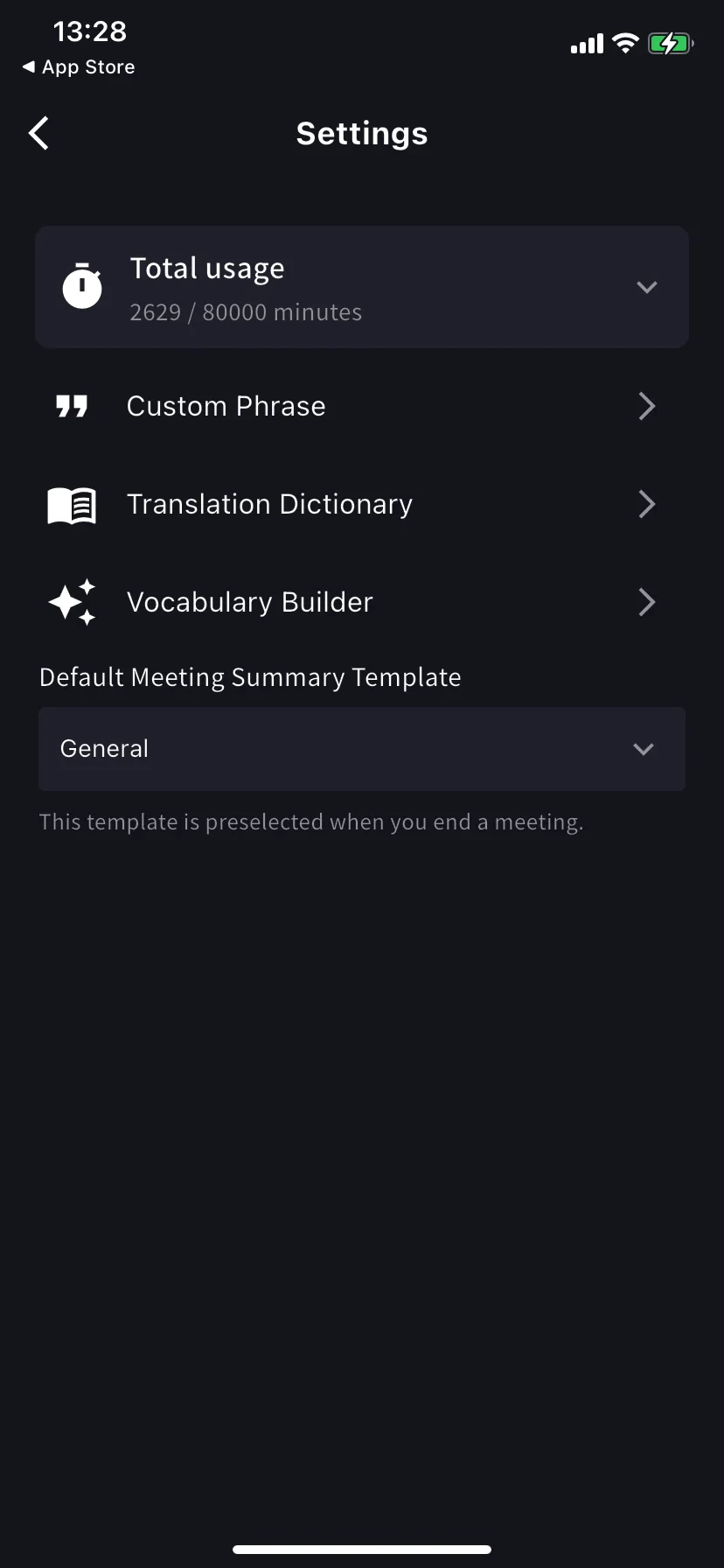
| ဆက်တင် | လုပ်ဆောင်မှု |
|---|---|
| Total usage | ဤ cycle တွင် အသုံးပြုပြီး / ရရှိနိုင်သော အစီအစဉ်မိနစ်။ |
| Custom Phrase | သီးခြားနာမ / အတိုကောက်များကို တိကျစွာ ထုတ်နုတ်။ ကိုယ်ရေးနှင့် workspace စာရင်းများ ထောက်ပံ့။ |
| Translation Dictionary | ဝေါဟာရ အဆင့် ဘာသာပြန် ကျော်သောလွှမ်းမိုးမှု။ ကိုယ်ရေးနှင့် workspace စာရင်းများ ထောက်ပံ့ — desktop နှင့်အတူတူ။ Dictionary ကို ကြည့်ပါ။ |
| Vocabulary Builder | ကိုယ်ရေး သို့မဟုတ် workspace ဝေါဟာရ စာရင်းများ တည်ဆောက် — Vocabulary Builder ကို ကြည့်ပါ။ |
| Default summary template | End-meeting ဖောင်တွင် ကြိုတင်ရွေးချယ်ထား။ |
အကြံပြု ကြိုတင်ဖွဲ့စည်းမှုများ
စားပွဲဖြတ် 1-လျှင်-1 တိတ်ဆိတ်
စားပွဲဖြတ် 1-လျှင်-1 တိတ်ဆိတ်
High accuracy ဖွင့် · Auto-play ပိတ် · Tap-to-play ဖွင့် · Bilingual ဖွင့် · Face-to-face ဖွင့် · အခြားသူသည် မိမိဘက်မှ ဖတ်နိုင်ရန် စာသားအရွယ် ကြီး။
ဆူညံသော ကော်ဖီဆိုင် / လမ်း / ဖောက်သည် နေရာ
ဆူညံသော ကော်ဖီဆိုင် / လမ်း / ဖောက်သည် နေရာ
ကြိုးတပ် သို့မဟုတ် Bluetooth hedset တပ် · Segment length 12-15 စက္ကန့် · စာသားအရွယ် ကြီး။
အခြားသူအား ဘာသာပြန်ကို အသံထွက်ဖတ်ပြခြင်း
အခြားသူအား ဘာသာပြန်ကို အသံထွက်ဖတ်ပြခြင်း
Auto-play ဖွင့် · Segment length 5 စက္ကန့် · Speech rate 1.0-1.2× · output Bluetooth စပီကာ သို့မဟုတ် နားကြပ်။
အခြားသူထံသို့ ဖုန်းပေးအပ်ခြင်း
အခြားသူထံသို့ ဖုန်းပေးအပ်ခြင်း
Fullscreen ဖွင့် · စာသားအရွယ် အမြင့်ဆုံး · Face-to-face ဖွင့် · အခြားသူသည် ဘာသာပြန်သာ လိုအပ်ပါက Show original ပိတ်။
အကြံပြုချက်များ
- Start မနှိပ်မီ အကြို မိမိနှစ်သက်သော မိုက်ကို တပ်ပါ — routing သည် session အတွင်း တည်မြဲသည်။
- ဆက်တင်ပြောင်းလဲမှုများ ချက်ချင်း အသက်ဝင်သည်၊ ပြန်စရန် မလိုပါ။